
campusM 2024 March Release Notes
Developments
Attendance - Configurable Icon of "Unable to Validate" Check-In Status
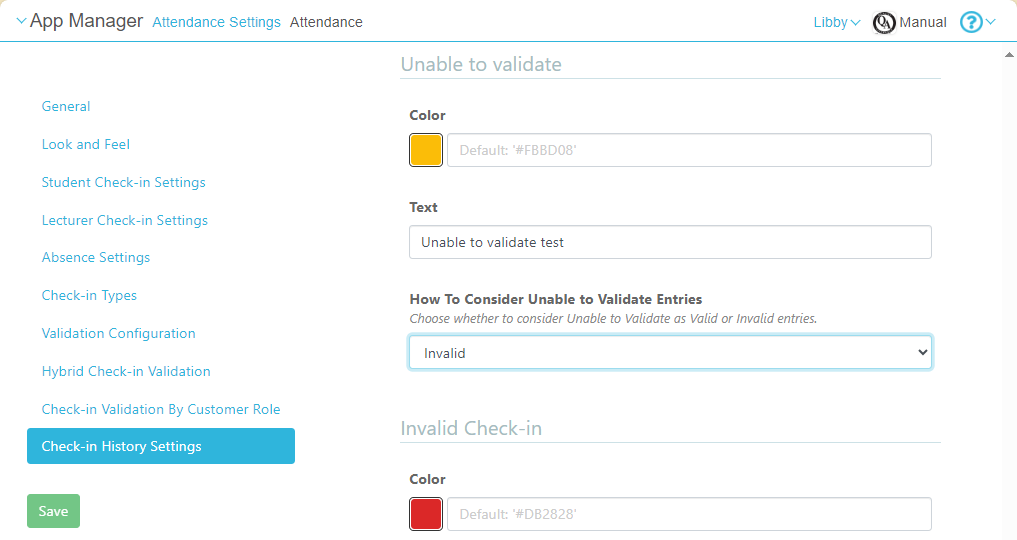
It is now possible to configure how campusM marks check-ins that it identifies as "unable to validate" in the student check-in screen. You can choose whether these check-ins should be marked with the icon used for valid check-ins ( ) or the icon for invalid check-ins (
 ). To configure this setting, in the App Manager, go to Attendance Settings > Attendance > Check-in History Settings, and, under How to Consider Unable to Validate Entries, select Invalid or Valid.
For more information, see Configuring Attendance.
Notifications - Undo for Deletions
End users now have the option to undo the deletion of a notification. After the user selects Delete in the Delete Alert, the Undo option appears for several seconds in the Alert deleted message at the bottom of the screen.
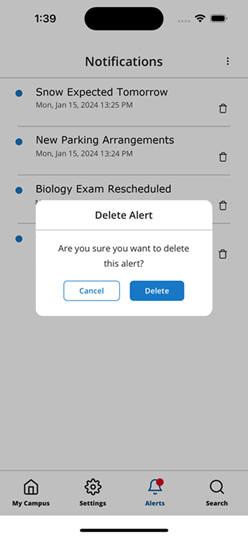
Delete Alert
|
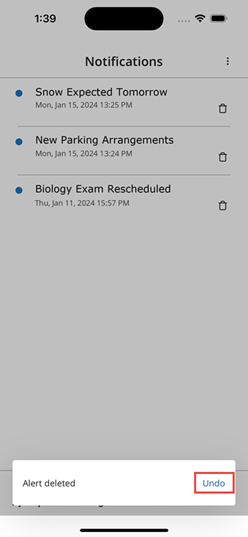
Undo Option
|
For more information about managing notifications, see Sending Notifications to End-Users.
Product Integration - New SAML Certificate
The SAML certificate has been renewed for 2024. For more information, see Configuring Integration Profiles.
| SF number | Platform | Description |
|---|---|---|
| 06890169 | Web | Previously, a maximum of 500 users could be imported to an App Role from a CSV file. This was fixed, and there is no longer any limit on the number of users that can be included in the CSV file. |
| 06865832 | All | Previously, the Assignments widget did not pull in all the assignment information that it should have. This was fixed. |
