
campusM 2024 July Release Notes
Developments
Calendar - New Agenda View
React Native
A new view has been added to the calendar on the React Native platform:Agenda view. As compared with the default view,Day view, this view enables end users to see the activities of the selected day as a list, presented as equal-sized rectangles, each of which represents a single activity, regardless of its duration. Times for which no activities are scheduled do not appear in this view. To switch between calendar views, end-users select (Day to Agenda view) or
 (Agenda to Day view).
|
|
|
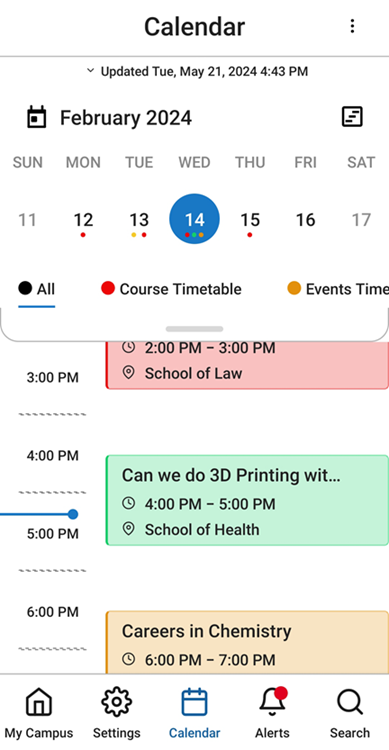
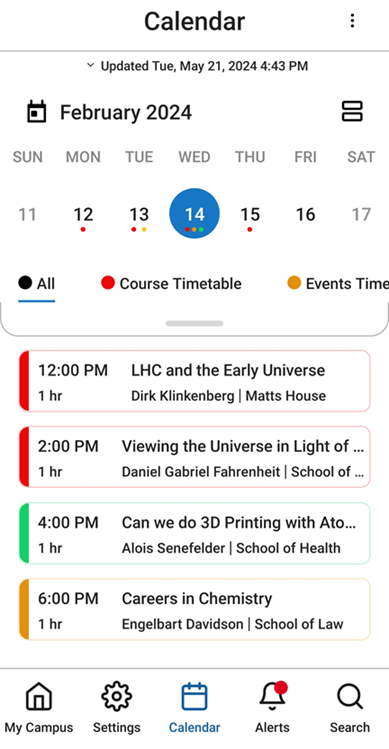
For more information, see Feature Focus – My Calendar.
Day View Tile - Customizable Backgrounds
React Native
The Day View tile, which shows end-users their next scheduled activity, now includes backgrounds as follows:
- Upcoming activities – When the end-user has at least one remaining activity scheduled for the day, information about the next upcoming activity appears in the tile with a solid-color background. The color of the background can be configured in the tile's settings, so it can match your institution's standard color-scheme.
- No upcoming activities – When the end-user has no remaining activities scheduled for the day, the tile appears with a standard background image and message. Several versions of the background image, employing different color-schemes to better match the institution's standard color-scheme, are available for selection in the tile's configuration.
|
|
|
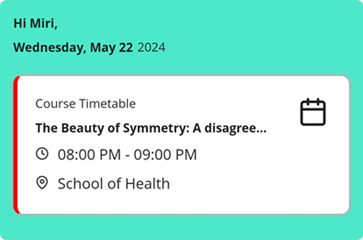
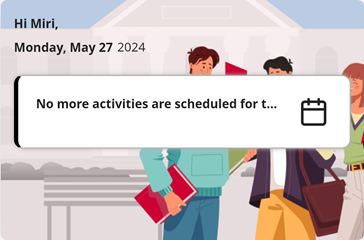
For more information, see Feature Focus – My Calendar.
The No Activities Message is now used both when no activities were scheduled for the day and when activities were scheduled, but they are all in the past. The Activities Done Message is no longer in use.
Calendar - Refresh Mechanisms
React Native
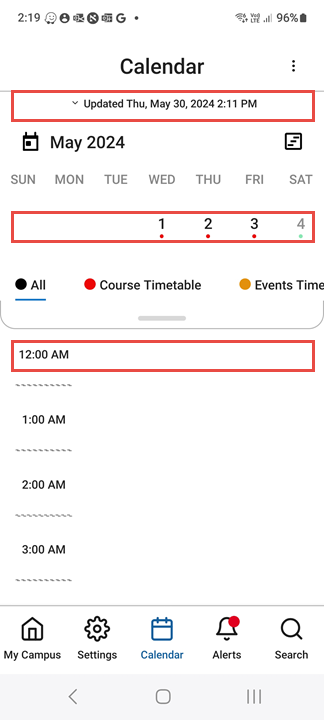
Three methods end-users can employ in order to update their calendars are now supported:
- Tap the Updated... line at the top of the calendar
- When the first week of the month is visible in the calendar area (above the schedule of the selected day; in Week or Month view) drag down from the row of that week in the calendar area.
- Drag in the schedule area:
- In Day view – When 12:00 AM is visible at the top of the timeline, drag down from the 12:00 AM row.
- In Agenda view – When the first activity of the day is visible, drag down from it.
For additional information about working with the calendar in React Native, see Feature Focus – My Calendar.
Feeds Tile - Icon Position Configuration
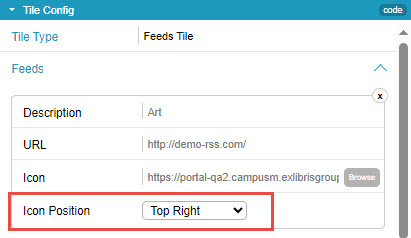
A new field has been added to the configuration of a feed in a Feeds tile,Icon Position. The new field allows you to choose from six possible positions of an icon when one is superimposed on the tile (e.g., the logo of the provider of the RSS feed): top left, top center, top right, bottom left, bottom center, and bottom right.

For additional information about adding and configuring tiles in the App Builder, see Configuring Services.
Accessibility - Improved Page Headings
As part of our continuing efforts to optimize the accessibility of our applications, page headings have been added to a number of pages in which they were not previously displayed.
Bug Fixes
| SF number | Platform | Description |
|---|---|---|
| 07114491 | React Native | Certain AEK tiles were not functional, and displayed an error message. This was fixed. |
| N/A | Web | When the API returned a string in the locPostCode field, it was not displayed in the calendar. This was fixed. |
| 06300247 | All | When a language pack was applied, certain labels were still displayed in English. This was fixed. |
| 07141827 | React Native Mobile | In the the preview and sandbox versions of the mobile apps, an error message appeared when the Guest profile was selected. This was fixed. |
