
campusM 2024 June Release Notes
Developments
Calendar - Week-Month Display
In React Native mobile apps, the calendar views have been streamlined. Expanding from week view to month view is done by dragging down to open a "drawer"; expanding from month view to week view is done by dragging up to close the drawer. The Day view is always displayed whether or not the week/month view are expanded.
The Timetable type Color indicator has been enlarged for accessibility purposes.
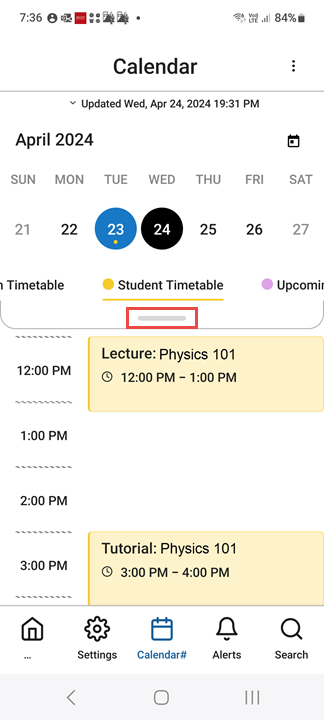
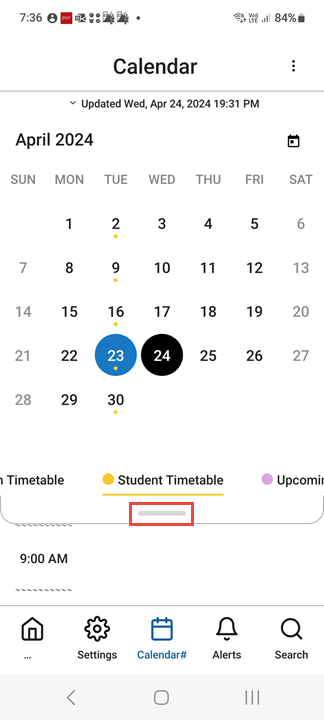
For more information, see Feature Focus – My Calendar.
Notifications - Specify Recipients Based on Their Roles
You can now configure notifications to be sent to users based on their roles. This powerful enhancement even enables you to define groups of recipients based on two roles, using logical operators to define the relationship between them. For example, you can define a list of recipients that includes all users who are both first-year students and physics majors.
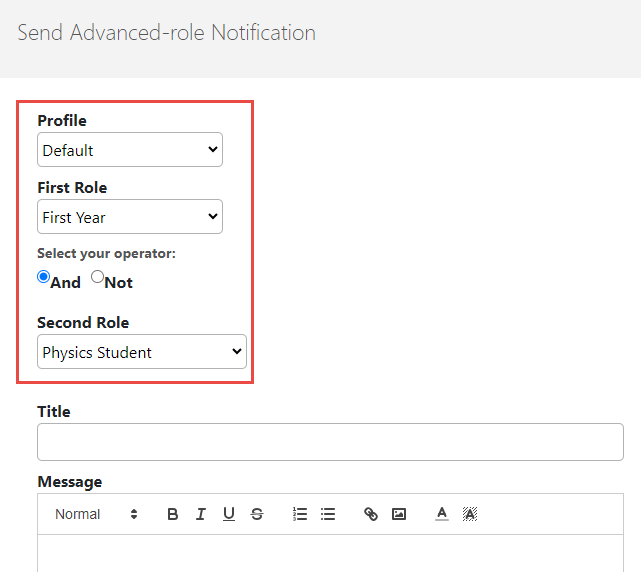
For more information, see Sending Notifications to End-Users from Notification Center.
API - REST API for Account Information
A REST API is now available for retrieving user-account information from the database.
API - REST API for User Holds
A REST API is now available for retrieving user-holds information from the database.
Bug Fixes
| SF number | Platform | Description |
|---|---|---|
| 06470401 | React Native - iOS | The corners of the Top Banner Tile were not rounded |
