
campusM 2024 May Release Notes
Developments
Calendar - Combined Display of Activities
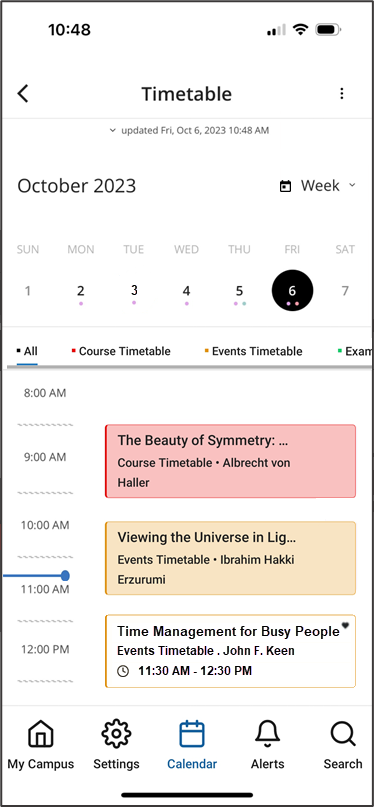
In React Native mobile apps, the calendar now incorporates more scheduled activities in a single display – timetable items such as courses and exams, as well as scheduled events from other event product integrations (PIs). Items are color-coded to indicate their type. Tapping on an item opens its details.
Only events that the end-user has registered for or tagged as favorites are included in the calendar. Favorites for which the end-user has not registered appear in the calendar with the same color-coding as other events from the same feed, but in a much paler shade. All favorites are marked with a Heart icon ( ).
For more information, see Feature Focus – My Calendar.
Calendar - New Day View Tile
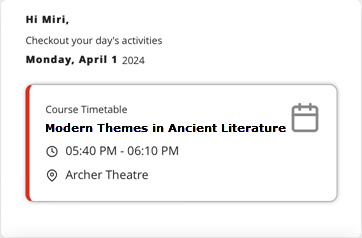
In React Native mobile apps, a new tile, Day View, is now available. This tile gives end-users information about their next upcoming activity of the day, taking the information from the new calendar, which includes information from timetables and other event PI feeds (see above). Selecting the tile opens the calendar with the activity displayed.
- If you add a Day View tile to your app, and the app already has a Timetable tile, it is recommended to remove the Timetable tile, because it essentially serves the same purpose as the Day View tile.
- Although the Day View tile can be added to the Web app, it is not recommended to do so at this time, because the Web-app does not yet support the React Native calendar, so activities may appear in the Day View tile that do not appear in the calendar.
For more information, see Feature Focus – My Calendar.
Calendar - New Calendar Button in Menu Bar
In React Native mobile apps, a new Calendar button ( ) has been added to the menu bar of React Native mobile apps, enabling end-users to open the calendar quickly from any screen in the app (see illustration above). The button is added to the app automatically if the system has any scheduling feeds – timetables such as courses or exams, and/or other event PIs.
Customers who do not have any active timetables, but do have event PIs, or who do not have any event PIs nor any CAL endpoints, can have the Calendar button removed if they wish.
For more information, see Feature Focus – My Calendar.
Attendance - Export of Data to CSV
Attendance data can now be retrieved for review and further processing by exporting it to a CSV file. The export process can be scheduled to take place daily or weekly, and/or performed ad hoc, as required. CSV files can be opened by spreadsheet applications like Excel.
For more information, see Exporting Attendance Data.
Product Integration - Support for New Leganto UI
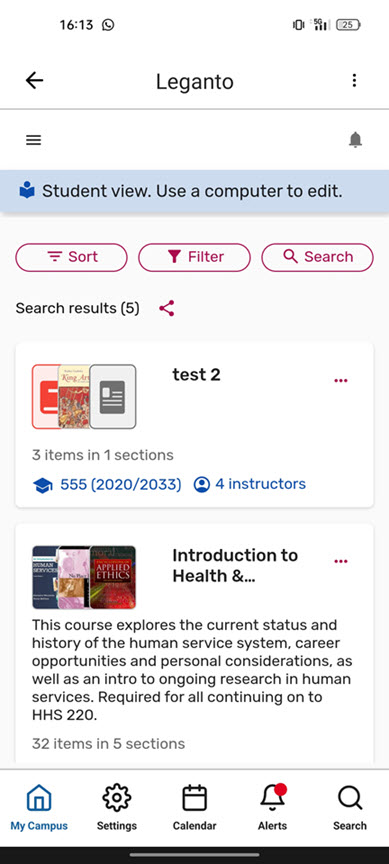
The new Leganto UI is now supported by campusM. In organizations in which Leganto is deployed with its new UI, the Leganto product integration opens in campusM in the new UI.
Bug Fixes
| SF number | Platform | Description |
|---|---|---|
| 07041838 | iOS | When students tried to check into a class by scanning a QR code, the application unexpectedly closed. This was fixed. |
| N/A | Web |
|
| N/A | Mobile | CSS was not correctly implemented in content pages. This was fixed. |
