
campusM 2024 September Release Notes
Developments
Calendar - Activity Reminders
When an end-user selects an activity reminder pop-up, the app opens and displays the homepage.
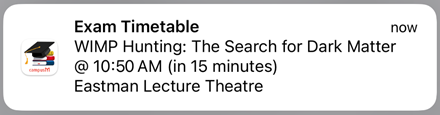
For more information, see Feature Focus – My Calendar.
Server-Side Event Notifications No Longer Supported
Now that end-users can configure their own activity reminders as they see fit, the option for admins to configure server-side notifications in the settings of the Events PI is no longer supported. (The settings will be removed from the App Manager in the October 2024 release.) This ensures that end-users will not receive reminders for the same event from both the activity-reminder system that they configure themselves and the event-notification system that could have been configured by admins.
For more information about user-configured activity reminders, see Feature Focus – My Calendar. For information about the Events PI, see Events.
Attendance - Notification Option
When the app is configured to allow students to turn attendance notifications on or off (see Configuring Attendance), they can now do so in the app Settings of the React Native platform. (This option was already available in the legacy apps.)
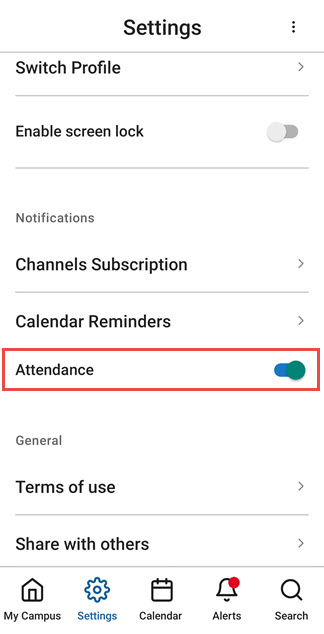
For more information, see campusM Attendance Student Experience.
Attendance - Permission Requests for Validation
To better inform students about permission requests for Geolocation and/or Bluetooth (depending on the selected validation mechanism), we have introduced new prompts in React Native. These prompts appear before the operating system requests access, clearly indicating the need for these permissions for check-in purposes.
For more information, see Configuring Attendance.
Attendance - Improved Crowdsource Validation
A delay has been introduced to the attendance process to improve the capture of iBeacons when the Crowdsource validation type is enabled.
For more information about Crowdsource check-in validation, see Configuring Attendance.
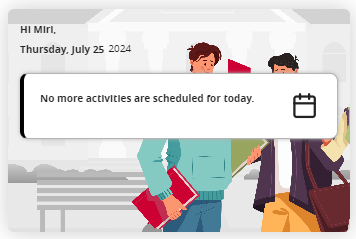
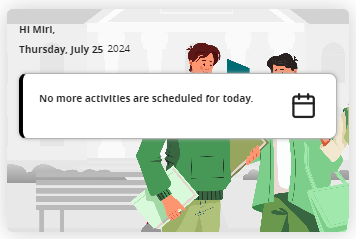
Product Integration - Day-View Smart-Tile Background Images
The color themes of the background images used in the Day View Smart Tiles have been reworked to make the differences more consistent and distinctive. These images are used in the tiles when the end-user has no remaining activities scheduled for the day. For more information, see Feature Focus – My Calendar.
|
Day View Tile with No Activities and the Background Image in Its Default Colors
|
Day View Tile with No Activities and the Green Version of the Background Image
|
Notification Center - Pop-up Actions
You can now configure what happens when a recipient of a notification taps the pop-up notification that they receive when the notification is sent. By default, when the user taps the notification, the app opens and displays the home page. You can now specify a different target location. For this purpose, a new field,Notification Click Action, has been added to the notification settings (App Manager > Notification Center > Send [Individual / Group / Advanced Role]).
At present, only Map links are supported. Additional link options will be supported in the future.
For additional information, see Working with the Notification Center.
Bug Fixes
| SF number | Platform | Description |
|---|---|---|
| N/A | Web on MAC (Safari) | When certain pages loaded, the focus was on the bottom of the page. This was fixed. When these pages load, the focus is at the top of the page, as it should be. |
| 07187257 | React Native | Linking to an AEK screen from within another AEK screen produced an error. This was fixed. |
| 07171626 | React Native iOS | The Terms and Conditions and the ID Card pages were not displayed properly. This was fixed. |
| 07171374 | App Manager | The expiry date shown in notifications in the App Manager was always 90 days from their creation date, even if the expiry date had been changed by an admin. (This was just a display issue, the actual expiry date in the database was the one selected by the admin.) This was fixed. |
| React Native | "Start" and "End" labels were not translated in an Event Timetable when they should have been. This was fixed. | |
| 07187257 | React Native | When a location name was selected in the app (e.g., from Search results), the map showed the location very briefly, and then switched the view to show the default map of the campus. This was fixed. |
| 07175678 | App Manager | Under certain circumstances, it was not possible to upload a file to a notification from the Asset Manager. This was fixed. |
| N/A | React Native | Attendance data showed users as having checked in from Android devices even when they had actually checked in from an iOS device. This was fixed. |
| N/A | All | The Events PI was not working properly with the JSON API vendor. This was fixed. |
| N/A | React Native | A Role-Sync process was initiated every time the app was opened, causing performance issues. This was fixed. |
| N/A | React Native | Certain problems related to check-in validation when required permissions were not given or location data was not received quickly enough were corrected. |
| 07236359 | React Native | The button to enable or disable attendance alerts was not included in the app's Notification Settings. The button was added. |
