
campusM 2024 Release Notes
Developments
No developments match your criteria.
App Settings - Complexity Requirements for End-User Passwords
November2024CAM-23404
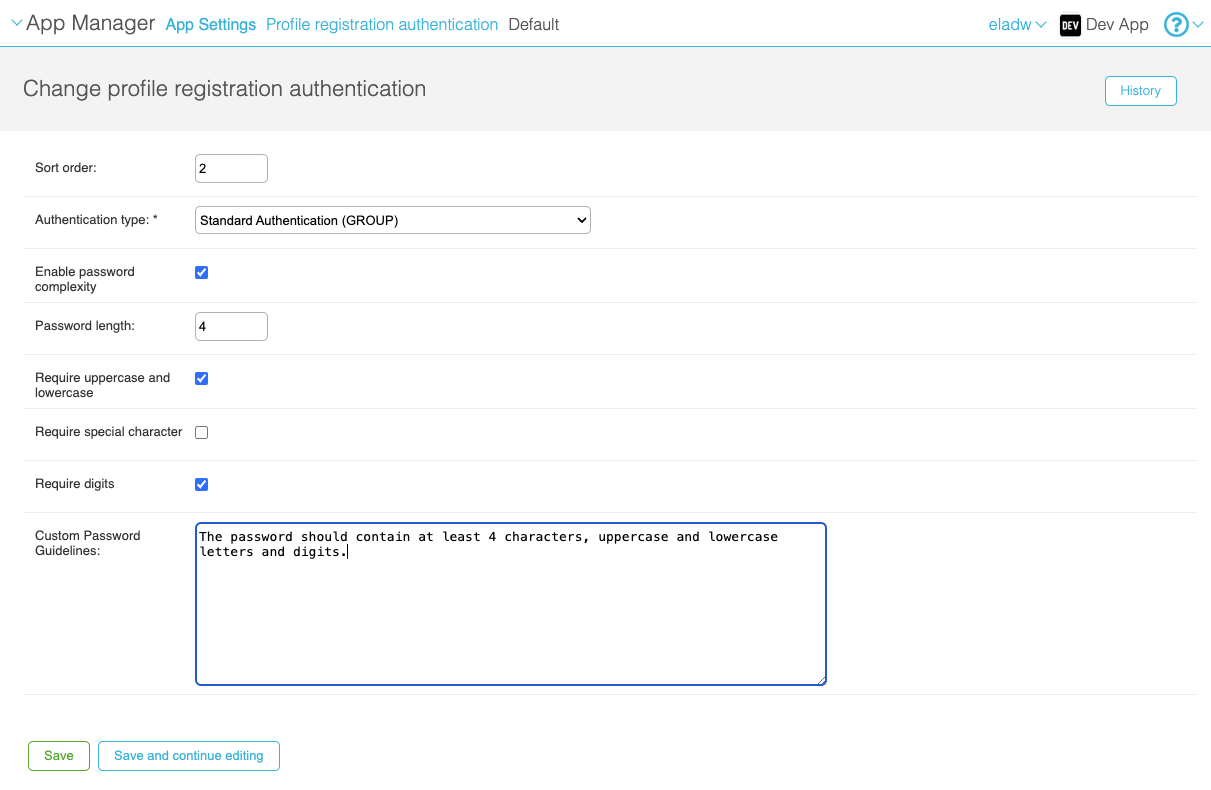
Standard authentication can now be configured to require that passwords meet certain requirements, such as a minimum number of characters and/or the inclusion of uppercase and lowercase letters. These requirements are configured per profile group, and must be met by end-users when they create a login password for the app.
For more information, see Managing Users.
Authentication - Support for CAS
November2024CAM-21979
Token-based authentication via CAS is now supported. To configure this option, create an integration profile for it in the App Manager at App Settings > Integration Profiles > Add integration profile. For additional information, see Configuring Integration Profiles.
Accessibility - Addition of Accessible Mechanism for Arranging Tiles
November2024CAM-25825
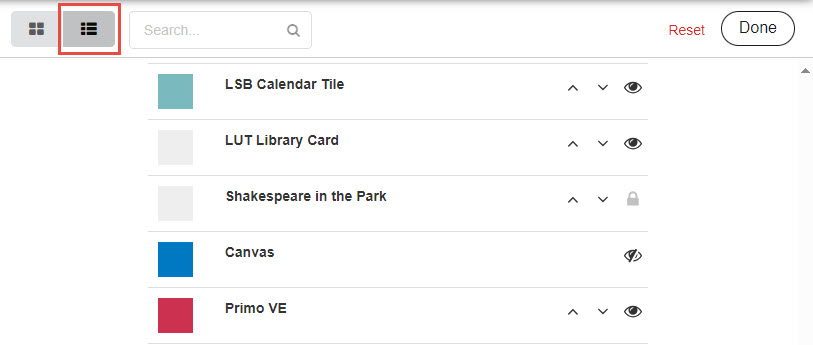
In the end-user app, the List view of the Arrange feature has been revamped to provide a more accessible mechanism for changing the order in which tiles appear on the desktop. Previously, the only way to rearrange the tiles was to drag and drop them, in Grid view. Now, up and down arrows are included in List view, in the rows of each of the tiles. Selecting one of these arrows moves its tile up or down by one row at a time.
As a further enhancement of the List view, the other icons have been replaced. Users can now choose to hide tiles, or to display tiles that were previously hidden, by selecting or
or , respectively. Tiles that cannot be hidden are identified with a Lock icon (
 ).
).
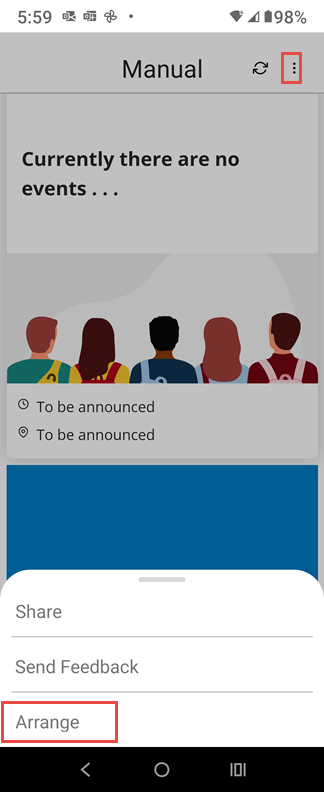
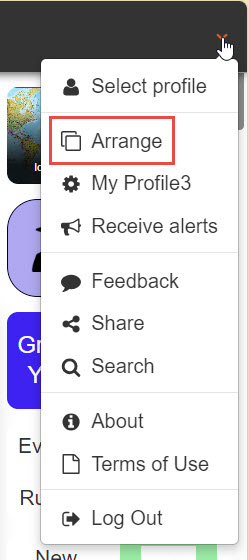
The Arrange option can be opened in mobile devices by selecting to open the bottom menu, and then selecting Arrange. In the Web app, it can be opened from the main menu.
Accessibility - Improved Icons
November2024CAM-24906
Updated October 15, 2024
As part of our efforts to improve the accessibility of the campusM app, the appearance of the icons in the menu bar at the bottom of the screen has been modified. The icon in the menu bar of the currently selected tab is now in a brighter blue and the image is filled in rather than outlined (e.g., instead of
 ), making it easier for the visually impaired to distinguish it from the icons of the tabs that are not selected (which are in black and outlined - e.g.,
 ).
).
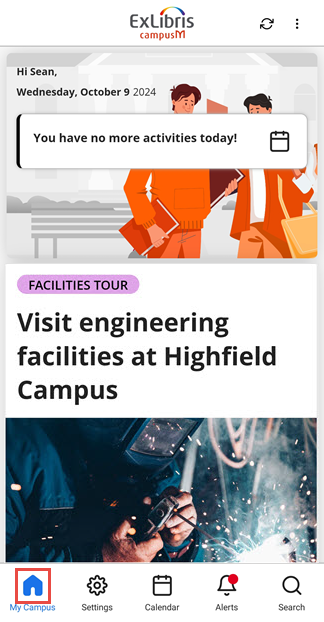
The entire set of icons now looks like this:
| Icon - Tab Not Selected | Icon - Tab Selected |
|---|---|

|

|

|

|

|

|
 (with new-
notification indicator) (with new-
notification indicator) |
 (with new-
notification indicator) (with new-
notification indicator) |

|

|
Attendance - Prompts to Enable Required Services
November2024CAM-25364
For systems configured to require check-in validation by geolocation and/or beacon, a prompt has been added to handle cases in which students who attempt to check in have given permissions for the app to use the services required to perform the validation (location services for geolocation or Bluetooth service for beacon), but have not turned those services on on their devices. For example, if beacon validation is required, and a student has given the app Bluetooth permission, but Bluetooth is turned off on their mobile device, when they attempt to check in to a class, they are prompted to turn Bluetooth on.
Calendar - Improved Display of Short Activities
November2024CAM-25179
In Calendar view, the display of relatively short activities has been improved. Text that would be cut off in the activity ’s rectangle in the calendar is no longer displayed. As before, long-pressing the activity opens its full label in the Details Drawer at the bottom of the screen.
Analytics - Monthly Hits Table
November2024URM-225256
Previously, the Monthly Hits table in the Pages subject area only included data about pages that were accessed at least ten times during the month. This behavior has been changed. There is no longer a minimum number of hits required in order for a page to be included in the results. Any page that was accessed at least once during the month is included.
Add ID Card to Apple Wallet
October2024CAM-24955
Users can now add their ID card from campusM to Apple Wallet. This is disabled by default, i.e., administrators need to enable this functionality in the ID Card configuration (see Digital Wallet Support). Google Wallet will be supported in a future release.
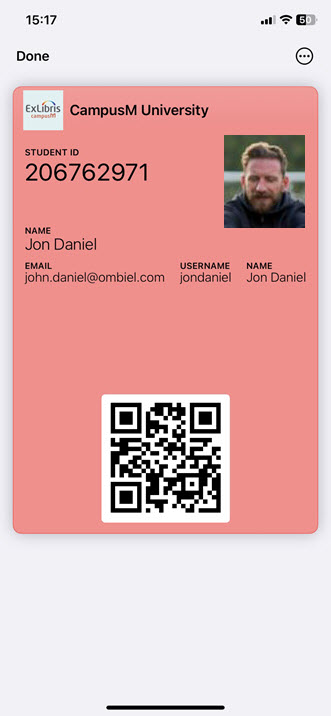
For more information see ID Card - Digital Wallet Support.
Timetable Product Integration - App Role-based Visibility
October2024CAM-9928
Customers are now able to configure a Timetable Product Integration Calendar type (endpoint) visibility based on a user's App Role. Administrators can configure one or more App Roles if enabled.
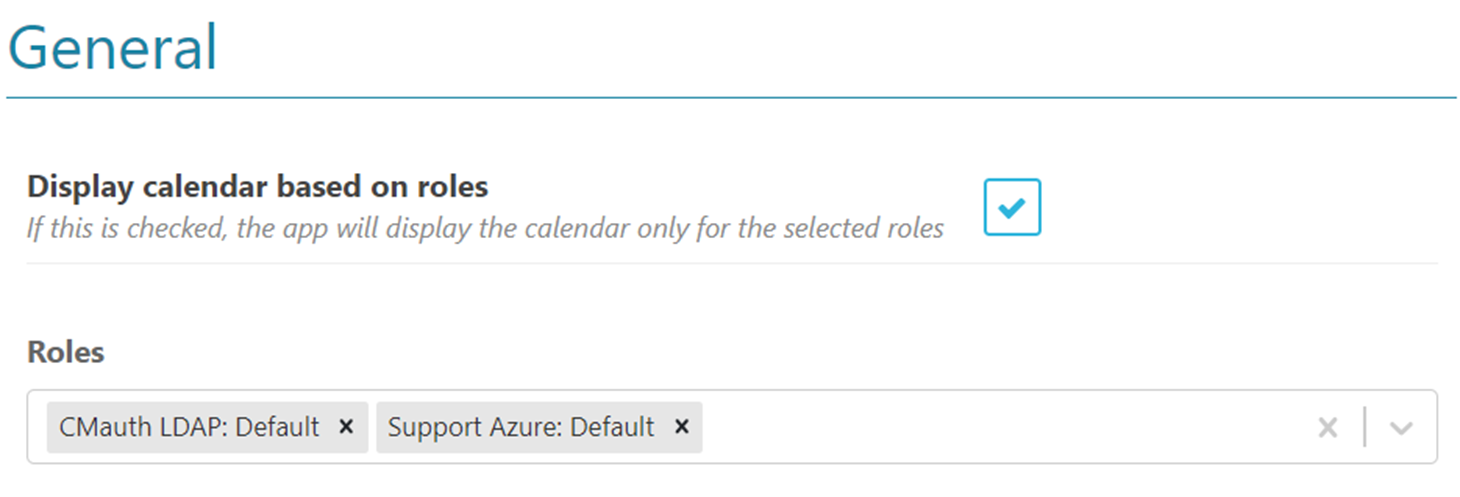
For more information see the Timetable Product Integration configuration.
Grades Product Integration - Support for Oracle PeopleSoft
October2024CAM-17974
Support for the Oracle PeopleSoft Grades Product Integration has been expanded and improved. For more information, see Grades.
New Refresh Button
October2024CAM-24548
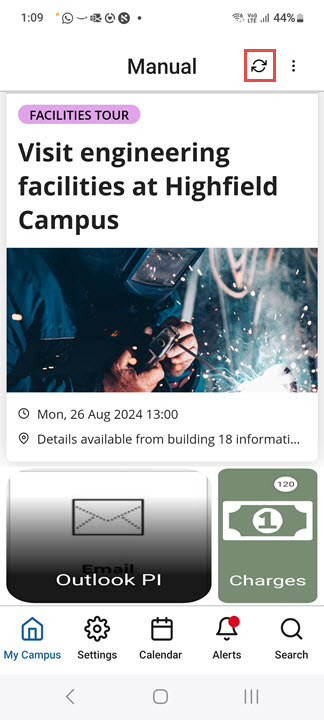
A Refresh button ( ) has been added to the Homepage and to AEK and PI pages. Selecting this button refreshes the data and, depending on the type of page, implements changes that were made to the tiles in the Homepage or to the functionality of the AEK or PI.
Calendar - Activity Reminders
September2024
 IdeaExchangeCAM-25374
React Native
Updated August 13, 2024
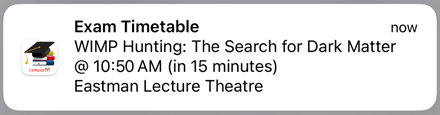
When an end-user selects an activity reminder pop-up, the app opens and displays the homepage.
For more information, see Feature Focus – My Calendar.
Server-Side Event Notifications No Longer Supported
September2024CAM-25436
Now that end-users can configure their own activity reminders as they see fit, the option for admins to configure server-side notifications in the settings of the Events PI is no longer supported. (The settings will be removed from the App Manager in the October 2024 release.) This ensures that end-users will not receive reminders for the same event from both the activity-reminder system that they configure themselves and the event-notification system that could have been configured by admins.
For more information about user-configured activity reminders, see Feature Focus – My Calendar. For information about the Events PI, see Events.
Attendance - Notification Option
September2024CAM-25006
React Native
Updated August 13, 2024
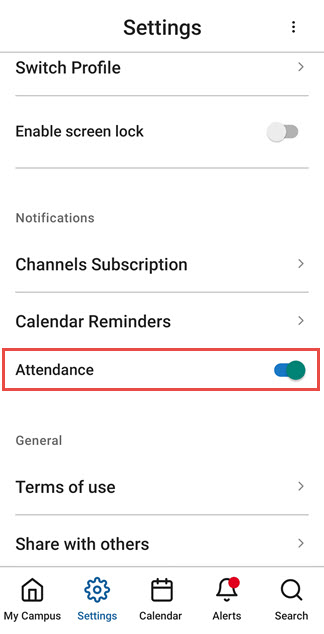
When the app is configured to allow students to turn attendance notifications on or off (see Configuring Attendance), they can now do so in the app Settings of the React Native platform. (This option was already available in the legacy apps.)
For more information, see campusM Attendance Student Experience.
Attendance - Permission Requests for Validation
September2024CAM
React Native
To better inform students about permission requests for Geolocation and/or Bluetooth (depending on the selected validation mechanism), we have introduced new prompts in React Native. These prompts appear before the operating system requests access, clearly indicating the need for these permissions for check-in purposes.
For more information, see Configuring Attendance.
Attendance - Improved Crowdsource Validation
September2024
A delay has been introduced to the attendance process to improve the capture of iBeacons when the Crowdsource validation type is enabled.
For more information about Crowdsource check-in validation, see Configuring Attendance.
Product Integration - Day-View Smart-Tile Background Images
September2024CAM-25005
React Native
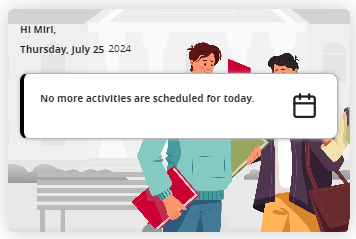
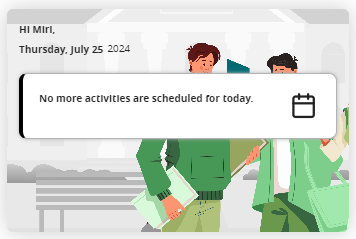
The color themes of the background images used in the Day View Smart Tiles have been reworked to make the differences more consistent and distinctive. These images are used in the tiles when the end-user has no remaining activities scheduled for the day. For more information, see Feature Focus – My Calendar.
|
Day View Tile with No Activities and the Background Image in Its Default Colors
|
Day View Tile with No Activities and the Green Version of the Background Image
|
Notification Center - Pop-up Actions
September2024
Updated August 25, 2024
CAM-25660
You can now configure what happens when a recipient of a notification taps the pop-up notification that they receive when the notification is sent. By default, when the user taps the notification, the app opens and displays the home page. You can now specify a different target location. For this purpose, a new field,Notification Click Action, has been added to the notification settings (App Manager > Notification Center > Send [Individual / Group / Advanced Role]).
At present, only Map links are supported. Additional link options will be supported in the future.
For additional information, see Working with the Notification Center.
Calendar - Activity Reminders
August2024
Idea Exchange
React Native
CAM-24136
End-users can now set up reminders for all calendar activities (classes, events, etc.). They can determine whether or not to receive reminders for each type of activity, and can set the timing for the reminders they choose to receive. For customers using the Attendance module, the existing reminder functionality remains unchanged for Attendance activities (see Configuring Attendance;campusM Attendance Student Experience), but users now have the additional ability to set up reminders for non-Attendance activities.
Activity reminders pop-up on end-users' devices at specified intervals before the activities are scheduled to take place. (They are not included in the Alerts list.)
Configuration for this feature is part of the app settings, so end-users can configure their reminder settings themselves. Reminders for each timetable endpoint can be configured individually, and end-users can choose whether to have reminders at all, and if so, whether to have multiple reminders for each activity, at specified times before they are scheduled to take place. For example, they could choose to have reminders for events 1 hour before they are scheduled to begin, and reminders for exams 5 minutes and 15 minutes before they are scheduled to occur.
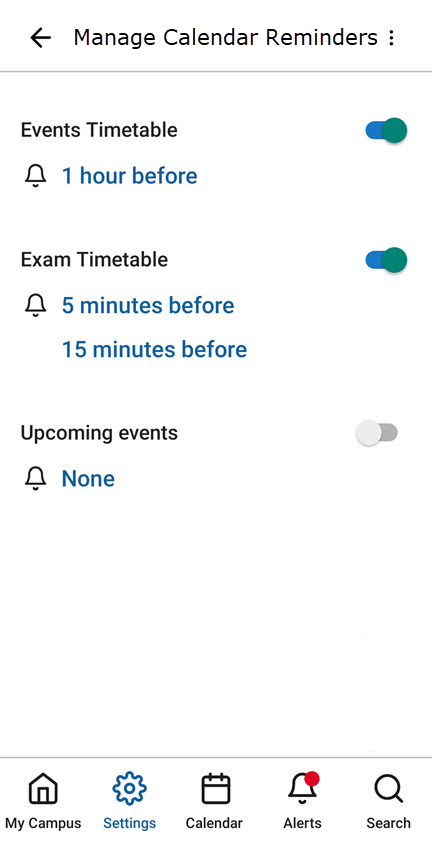
As part of this development, the name of the Settings > Notifications > Alerts option was changed to Settings > Notifications > Channels Subscription. The functionality of this option, which enables end-users to sign up for specific notification groups, has not changed. For additional information about notification groups, see Sending Notifications to End-Users from Notification Center.
For more information, see Feature Focus – My Calendar.
Attendance - Invalidation of Mock Locations
August2024CAM-24884
When the attendance system is set to use geolocation to validate students' locations when they check into a class, it now automatically checks whether the GPS location coordinates were manually set on the student's device, indicating that the data from the location sensor was overridden in order to spoof the geolocation system. Location data that is found to have been tampered with on a device now invalidates the student's check-in.
For additional information about using geolocation in the check-in validation process, see Configuring Attendance.
Information about mocked locations that were detected can be retrieved by admins via the API, using the Check In Report API, in the isLocationMocked parameter. For additional information about the Check In Report, see Check In Report in the Developer Network.
Product Integration - Syncing of User Role Data with Alma
August2024CAM-23518
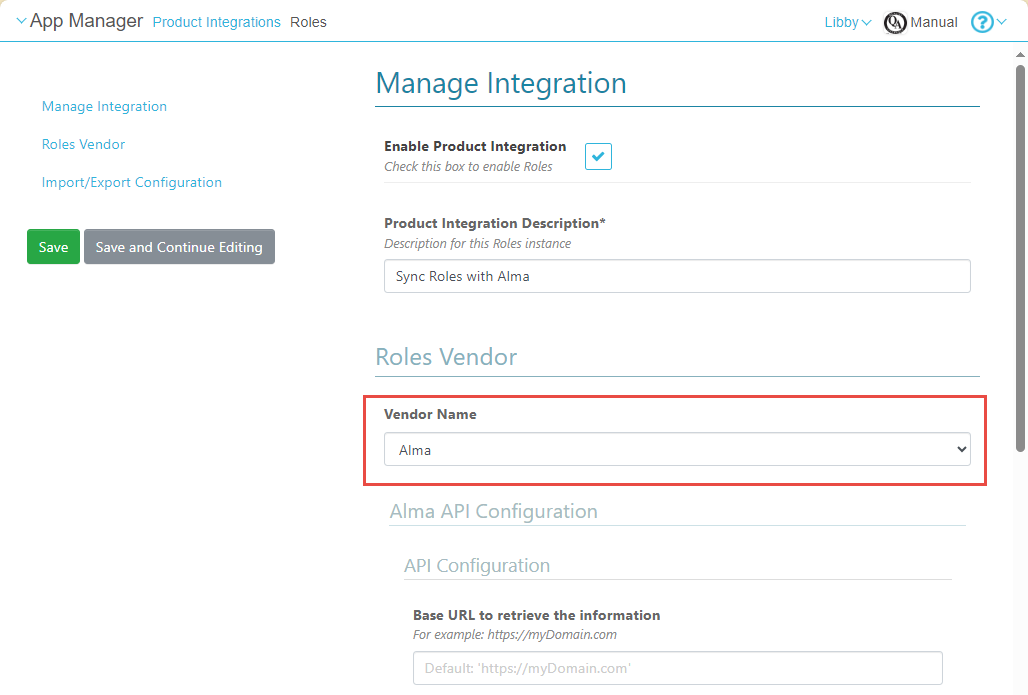
A new vendor,Alma, is now supported by the Roles Product Integration. This vendor enables syncing user-role information with Alma's student information system (SIS) in order to import the latest information about students' user groups.
For more information, see Roles.
Notifications - Search All History
August2024CAM-24555
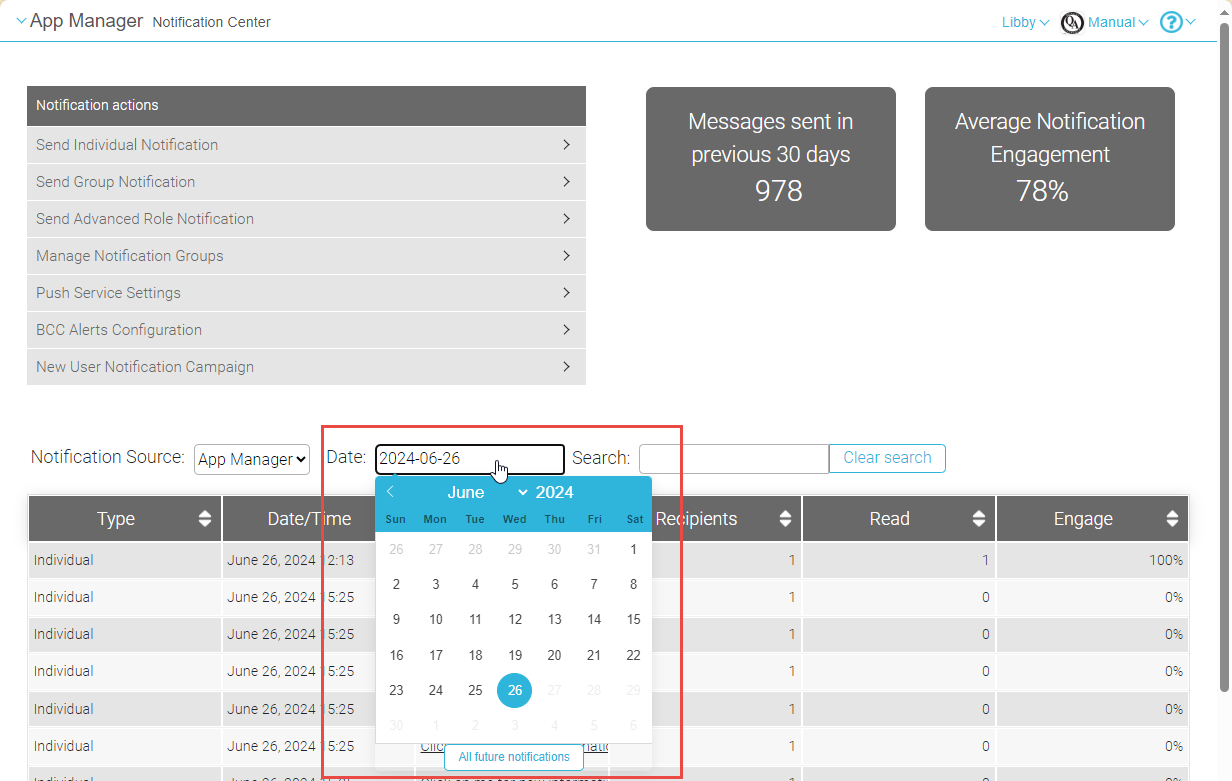
You can now search for notifications that were sent more than 30 days ago. The Date field in the Notification Center now allows you to select any date in the past in order to find notifications that were sent on that day.
For more information, see Sending Notifications to End-Users from Notification Center.
App Settings - Default Language for Landing Page
August2024CAM-24469
You can now set the default language for the landing page that end-users see the first time they open the app. The language can be set in a new field,Language pack, which is located in the App Manager at App Settings > App Settings > General Settings.
For additional information, see Configuring App Basics.
App Builder - Alerts and Maps Tiles
August2024CAM-17870
Two new types of tiles can now be added by admins to the end-user apps:
- Alerts
- Maps
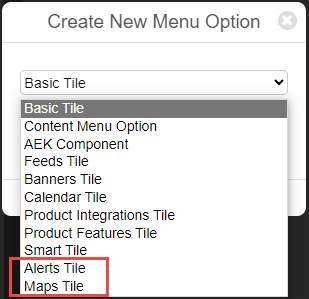
Previously, these types of tiles could only be added by Ex Libris customer support.
For information about creating new tiles for the end-user app, see Creating Services.
Calendar - New Agenda View
July2024 (Added to the June 2024 release)
React Native
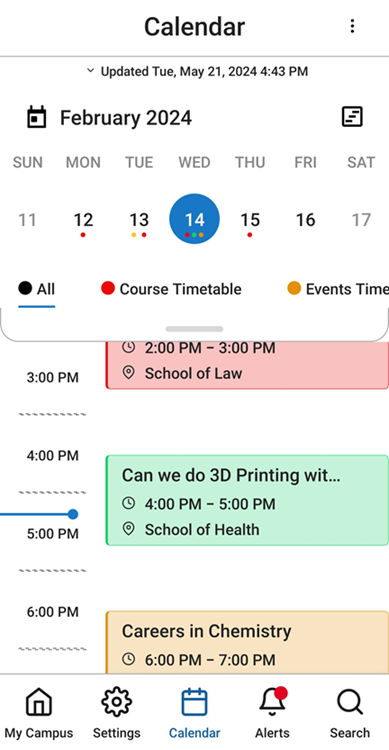
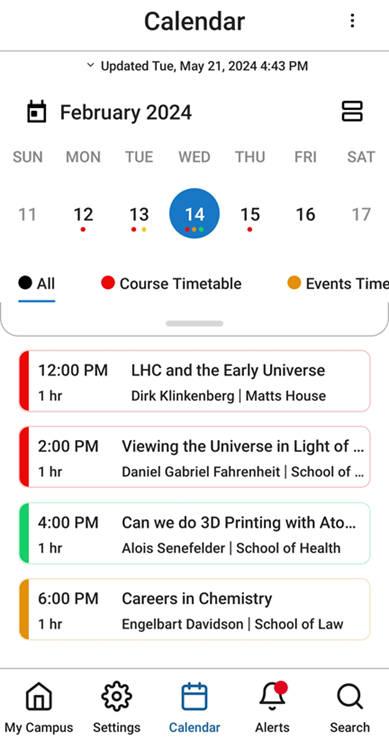
A new view has been added to the calendar on the React Native platform:Agenda view. As compared with the default view,Day view, this view enables end users to see the activities of the selected day as a list, presented as equal-sized rectangles, each of which represents a single activity, regardless of its duration. Times for which no activities are scheduled do not appear in this view. To switch between calendar views, end-users select (Day to Agenda view) or
 (Agenda to Day view).
|
Calendar in Day View
|
Calendar in Agenda View
|
For more information, see Feature Focus – My Calendar.
Day View Tile - Customizable Backgrounds
July 2024 (Added to the June 2024 release)
React Native
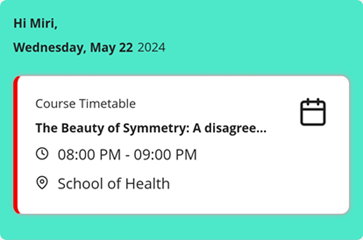
The Day View tile, which shows end-users their next scheduled activity, now includes backgrounds as follows:
- Upcoming activities – When the end-user has at least one remaining activity scheduled for the day, information about the next upcoming activity appears in the tile with a solid-color background. The color of the background can be configured in the tile's settings, so it can match your institution's standard color-scheme.
- No upcoming activities – When the end-user has no remaining activities scheduled for the day, the tile appears with a standard background image and message. Several versions of the background image, employing different color-schemes to better match the institution's standard color-scheme, are available for selection in the tile's configuration.
|
Day View Tile When There Is an Upcoming Activity
|
Day View Tile When There Are No Upcoming Activities (Default Color-Scheme)
|
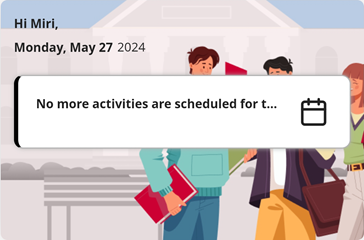
For more information, see Feature Focus – My Calendar.
The No Activities Message is now used both when no activities were scheduled for the day and when activities were scheduled, but they are all in the past. The Activities Done Message is no longer in use.
Calendar - Refresh Mechanisms
July 2024 (Added to the June 2024 release)
React Native
Three methods end-users can employ in order to update their calendars are now supported:
- Tap the Updated... line at the top of the calendar
- When the first week of the month is visible in the calendar area (above the schedule of the selected day; in Week or Month view) drag down from the row of that week in the calendar area.
- Drag in the schedule area:
- In Day view – When 12:00 AM is visible at the top of the timeline, drag down from the 12:00 AM row.
- In Agenda view – When the first activity of the day is visible, drag down from it.
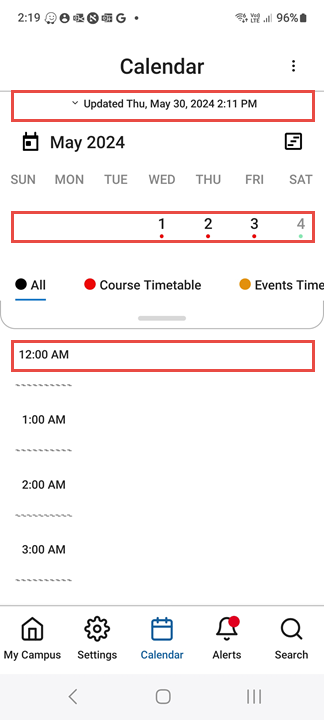
For additional information about working with the calendar in React Native, see Feature Focus – My Calendar.
Feeds Tile - Icon Position Configuration
July2024CAM-20437
A new field has been added to the configuration of a feed in a Feeds tile,Icon Position. The new field allows you to choose from six possible positions of an icon when one is superimposed on the tile (e.g., the logo of the provider of the RSS feed): top left, top center, top right, bottom left, bottom center, and bottom right.
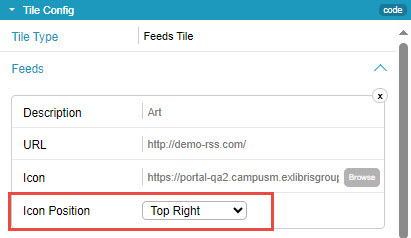

For additional information about adding and configuring tiles in the App Builder, see Configuring Services.
Accessibility - Improved Page Headings
July2024CAM-24779
As part of our continuing efforts to optimize the accessibility of our applications, page headings have been added to a number of pages in which they were not previously displayed.
Calendar - Week-Month Display
June 2024
React NativeCAM-24367
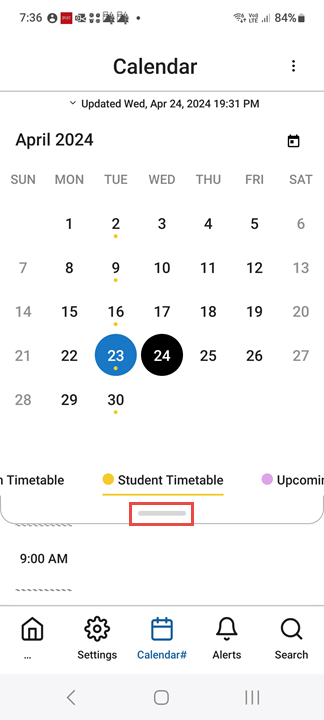
In React Native mobile apps, the calendar views have been streamlined. Expanding from week view to month view is done by dragging down to open a "drawer"; expanding from month view to week view is done by dragging up to close the drawer. The Day view is always displayed whether or not the week/month view are expanded.
The Timetable type Color indicator has been enlarged for accessibility purposes.
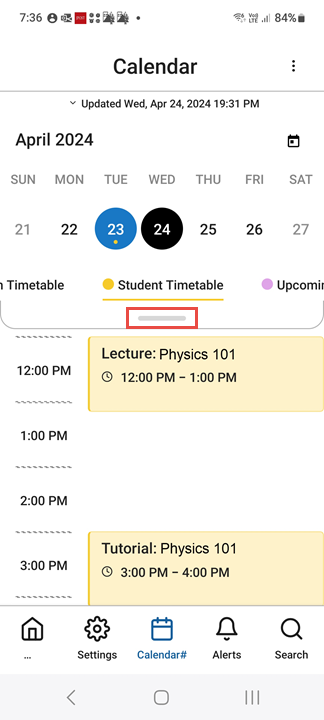
For more information, see Feature Focus – My Calendar.
Notifications - Specify Recipients Based on Their Roles
June 2024CAM-24442
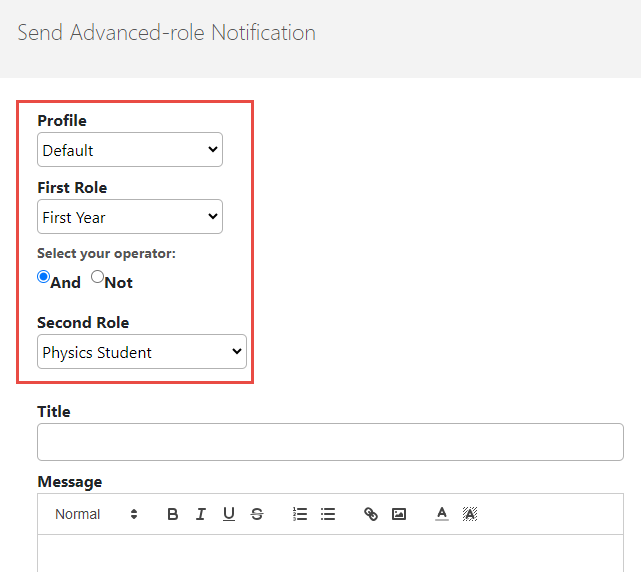
You can now configure notifications to be sent to users based on their roles. This powerful enhancement even enables you to define groups of recipients based on two roles, using logical operators to define the relationship between them. For example, you can define a list of recipients that includes all users who are both first-year students and physics majors.
For more information, see Sending Notifications to End-Users from Notification Center.
API - REST API for Account Information
June2024CAM-24563
A REST API is now available for retrieving user-account information from the database.
API - REST API for User Holds
June2024 (Updated May 27, 2024)CAM-24562
A REST API is now available for retrieving user-holds information from the database.
Calendar - Combined Display of Activities
May2024
React Native
CAM-24054
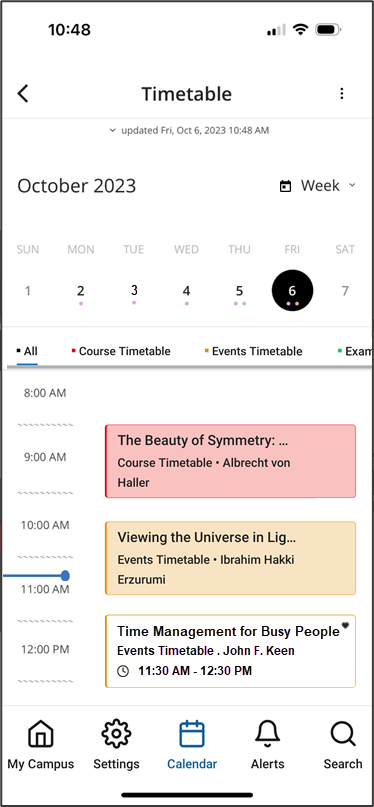
In React Native mobile apps, the calendar now incorporates more scheduled activities in a single display – timetable items such as courses and exams, as well as scheduled events from other event product integrations (PIs). Items are color-coded to indicate their type. Tapping on an item opens its details.
Only events that the end-user has registered for or tagged as favorites are included in the calendar. Favorites for which the end-user has not registered appear in the calendar with the same color-coding as other events from the same feed, but in a much paler shade. All favorites are marked with a Heart icon ( ).
).
For more information, see Feature Focus – My Calendar.
Calendar - New Day View Tile
May2024
React Native
CAM-24318
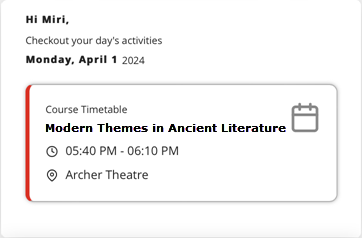
In React Native mobile apps, a new tile, Day View, is now available. This tile gives end-users information about their next upcoming activity of the day, taking the information from the new calendar, which includes information from timetables and other event PI feeds (see above). Selecting the tile opens the calendar with the activity displayed.
- If you add a Day View tile to your app, and the app already has a Timetable tile, it is recommended to remove the Timetable tile, because it essentially serves the same purpose as the Day View tile.
- Although the Day View tile can be added to the Web app, it is not recommended to do so at this time, because the Web-app does not yet support the React Native calendar, so activities may appear in the Day View tile that do not appear in the calendar.
For more information, see Feature Focus – My Calendar.
Calendar - New Calendar Button in Menu Bar
May2024
React Native
In React Native mobile apps, a new Calendar button ( ) has been added to the menu bar of React Native mobile apps, enabling end-users to open the calendar quickly from any screen in the app (see illustration above). The button is added to the app automatically if the system has any scheduling feeds – timetables such as courses or exams, and/or other event PIs.
Customers who do not have any active timetables, but do have event PIs, or who do not have any event PIs nor any CAL endpoints, can have the Calendar button removed if they wish.
For more information, see Feature Focus – My Calendar.
Attendance - Export of Data to CSV
May2024CAM-XXXXX
Attendance data can now be retrieved for review and further processing by exporting it to a CSV file. The export process can be scheduled to take place daily or weekly, and/or performed ad hoc, as required. CSV files can be opened by spreadsheet applications like Excel.
For more information, see Exporting Attendance Data.
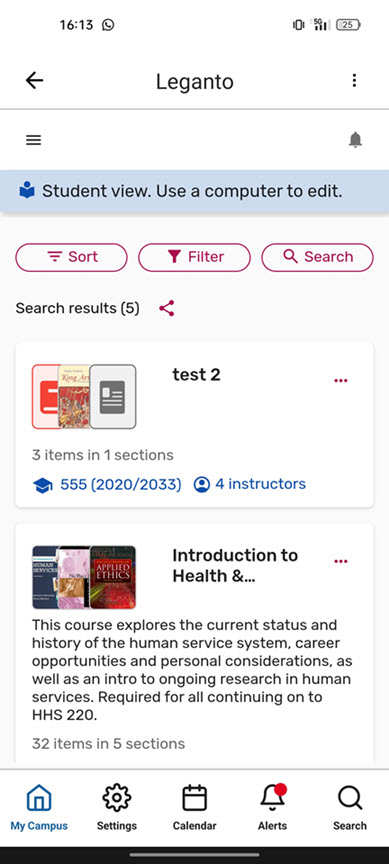
Product Integration - Support for New Leganto UI
May2024
The new Leganto UI is now supported by campusM. In organizations in which Leganto is deployed with its new UI, the Leganto product integration opens in campusM in the new UI.
Directory Search Results - Contact Information Display
April2024CAM-23802
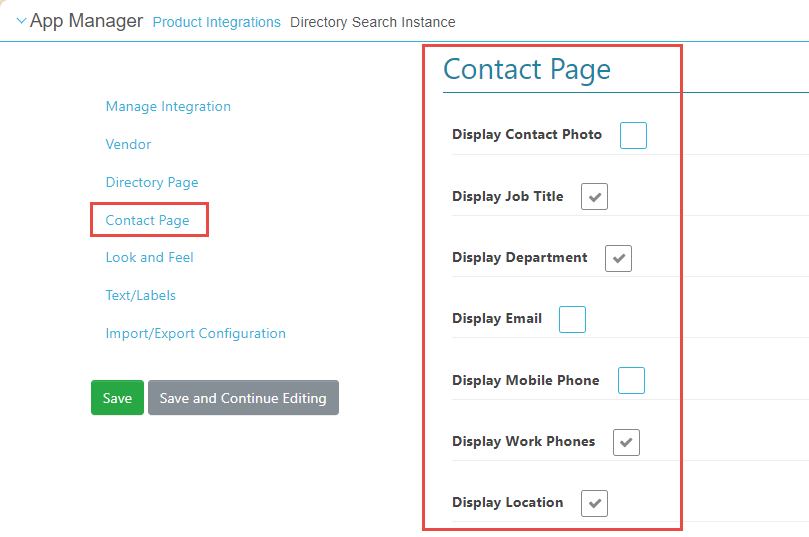
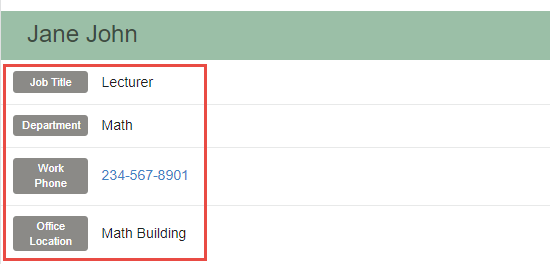
You can now control which contact information is displayed in the Contact page, which is the page that opens when a user selects a contact from the list of contacts retrieved by a directory search. To configure this, in the App Manager, in the Product Integrations module, in the settings of the Directory Search Instance, under Contact Page, select the items that should be displayed in Contact pages for this type of directory search.
For more information, see Directory Search.
Event Product Integrations - Support for JSON Imports
April2024CAM-23003
Events can now be imported via REST API in JSON format. This can be configured in the App Manager, in the Product Integrations module, in the settings of the Events Instance, under JSON Events.
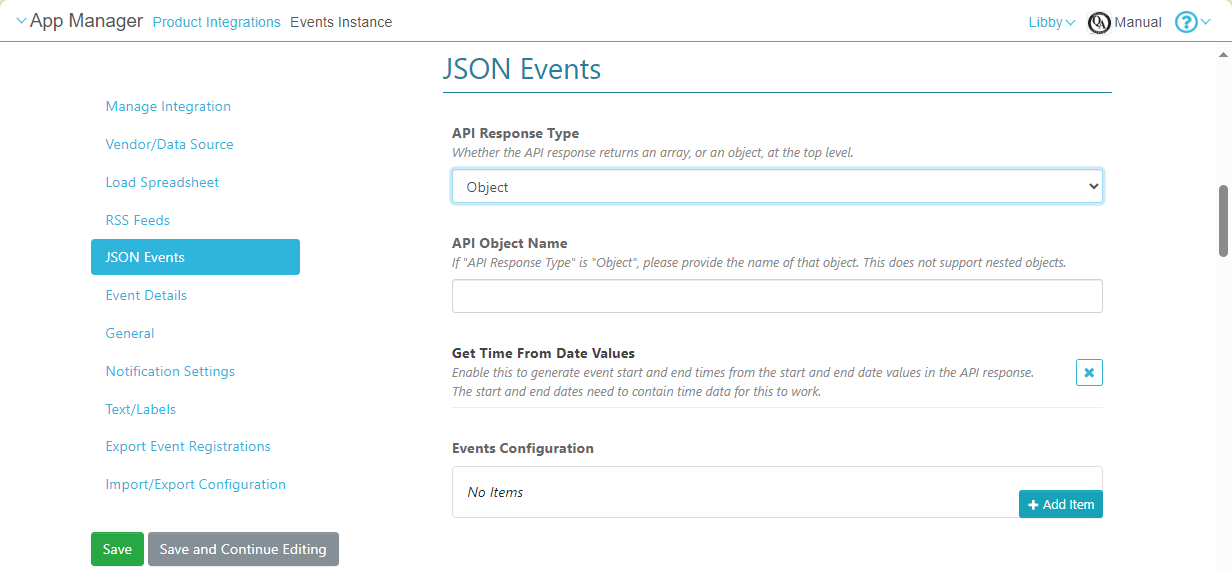
Although JSON supports nested objects, only top-level attributes can currently be imported.
For more information, see Events.
Map Display Enhancements in Position Pages
April2024CAM-24061, CAM-24015
React Native Platform
In React Native versions of the app, the following enhancements have been implemented in the map displays in Position pages:
- An About tab has been added to the page, and is the default tab that opens when the end-user selects a position in the app. When this tab is open, only the location of that position is marked on the map, in order to reduce clutter. By default, the name of the position is displayed in the About tab. However, if the Note field of the position contains text, this text is displayed in the About tab, rather than the name of the position. All marked locations continue to appear in the map when the Around Here tab is selected.
- Actions that appear in Actions tabs can have icons identifying their types.
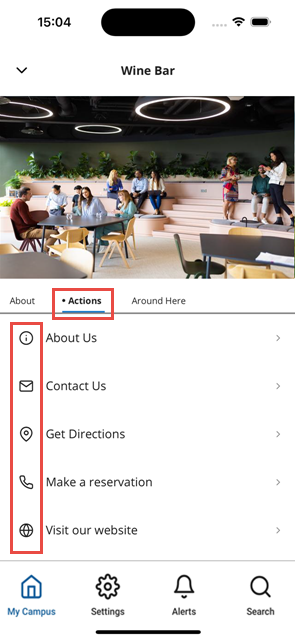 Icons Identifying Actions in the Actions Tab of a Position Page
For more information, see Adding Maps and Locations to Services and Feature Focus – Maps.
Enhancements in Class Details Pages
April2024CAM-24099, CAM-23826
React Native Platform
In React Native versions of the app, the following enhancements have been implemented in the Class Details pages:
- Timezone display: The times displayed are for the time zone currently selected in the device, and the name of the time zone is indicated above the times.
- Location Info: Selecting this opens the campusM Position page for the location.
- Navigate to Location: Selecting this takes the user out of campusM and opens the location in the device's map app.
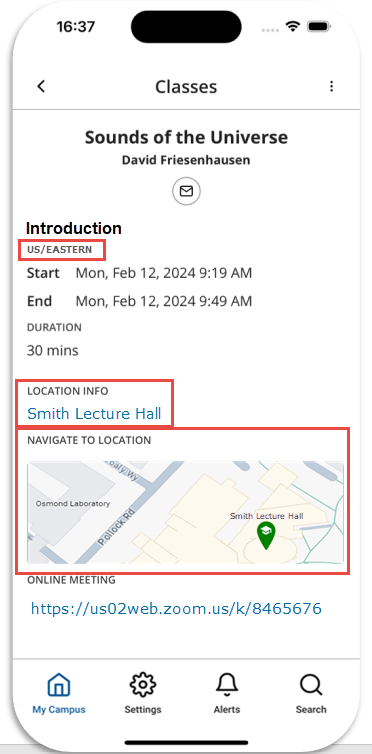 Icons Identifying Actions in the Actions Tab of a Position Page
For more information, see Feature Focus – My Calendar.
New "Go to Today" Button in Calendar
April2024CAM-24159
React Native Platform
In React Native versions of the app, a Go to Today button ( ) has been added to the Calendar page.
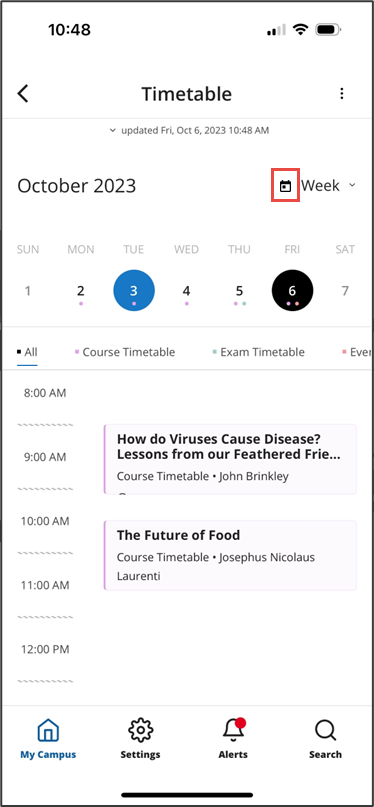
For more information, see Feature Focus – My Calendar.
Attendance - Configurable Icon of "Unable to Validate" Check-In Status
March2024CAM-23000
It is now possible to configure how campusM marks check-ins that it identifies as "unable to validate" in the student check-in screen. You can choose whether these check-ins should be marked with the icon used for valid check-ins ( ) or the icon for invalid check-ins (
 ). To configure this setting, in the App Manager, go to Attendance Settings > Attendance > Check-in History Settings, and, under How to Consider Unable to Validate Entries, select Invalid or Valid.
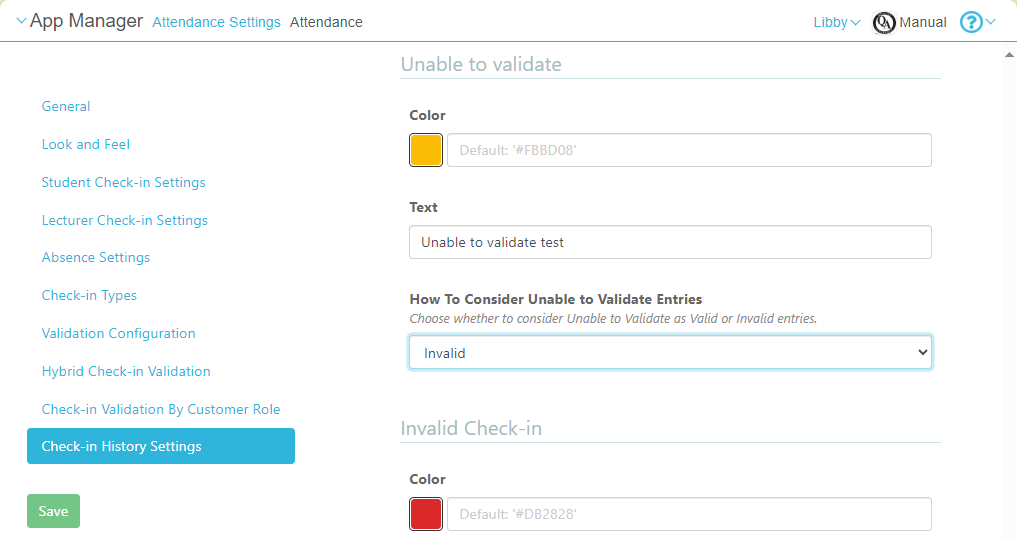
For more information, see Configuring Attendance.
Notifications - Undo for Deletions
March2024
ReactNativePlatformCAM-22216
End users now have the option to undo the deletion of a notification. After the user selects Delete in the Delete Alert, the Undo option appears for several seconds in the Alert deleted message at the bottom of the screen.
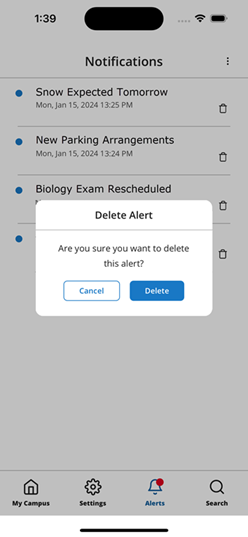
Delete Alert
|
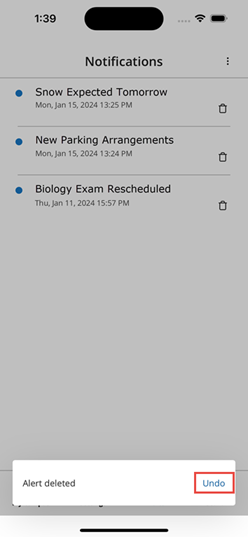
Undo Option
|
For more information about managing notifications, see Sending Notifications to End-Users.
Product Integration - New SAML Certificate
March2024CAM-23810
The SAML certificate has been renewed for 2024. For more information, see Configuring Integration Profiles.
React Native: Improved Navigation from Timetable
February2024CAM-23616
In the React Native UI, a new Navigation button ( ) has been added to the Event screen. Selecting this button takes the user directly to the screen of their device's map app in which they can get directions to the location.
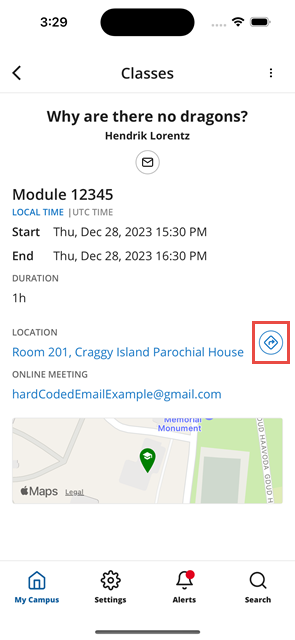
|
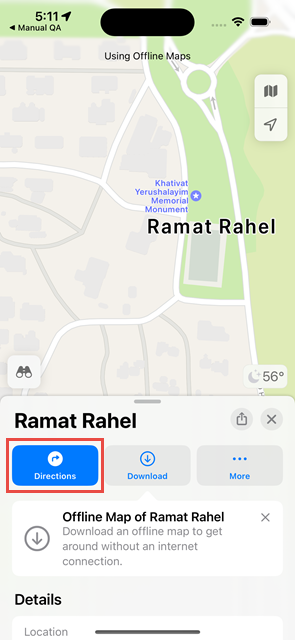
|
| Navigation Button in Event Screen | Map Screen with Directions Option |
For more information, see Feature Focus – My Calendar.
Attendance - Enhanced Bulk Management
January2024CAM-23186
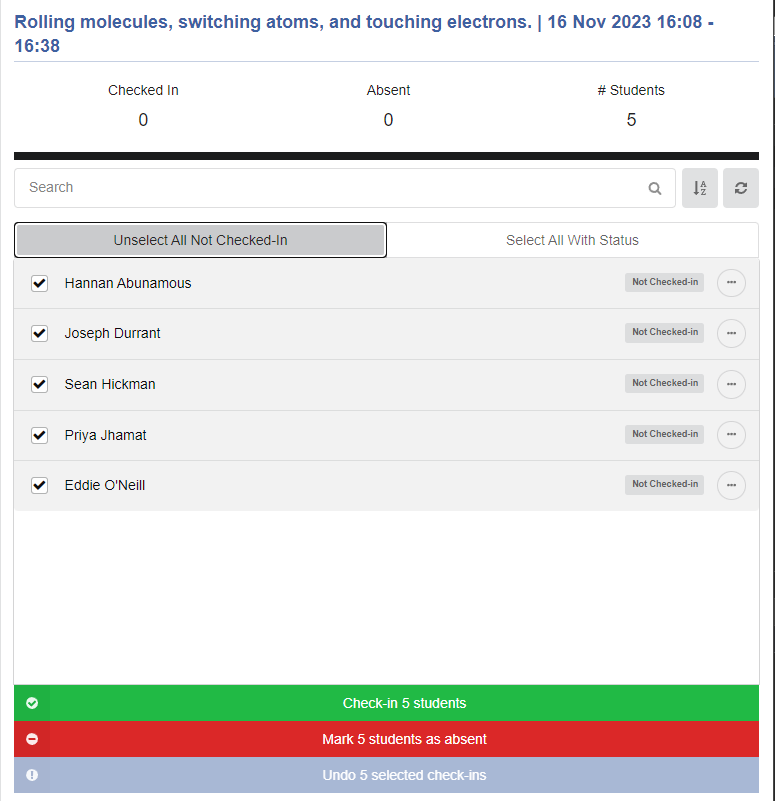
Lecturers can now select multiple students to check-in or mark absent using Select All Unsubmitted Students and Select All With Status buttons. In addition, when one or more students are selected, lecturers can set their status in one action, by selecting an option from below the list of students. For additional information, see campusM Attendance Lecturer Experience
Notifications - Editing of Future Notifications
January 2024CAM-22241
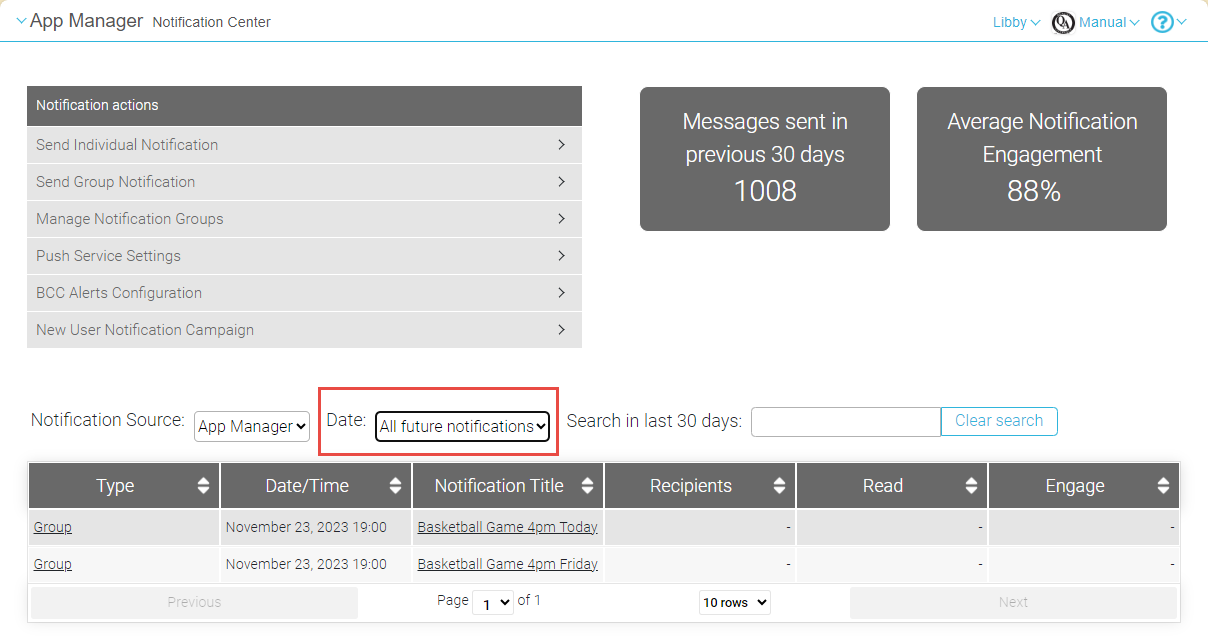
You can now edit scheduled notifications that have not yet been sent. To do so, in the Notifications Dashboard (Notifications), under Date, select All future notifications to open a list of scheduled notifications, and then select the notification you want to edit. For more information, see Sending Notifications to End-Users from Notification Center.
App Builder - Configurable Location for Banner Controls
January 2024CAM-23084
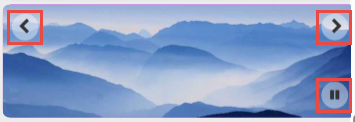
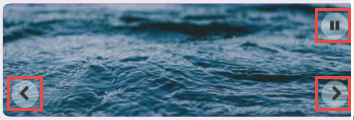
It is now possible to configure where the User Controls of banner tiles are placed - at the top or the bottom of the image. When a Play/Pause control is also included in the banner, it is placed in the alternate location. For additional information, see Configuring Services.
Resolved Issues
No resolved issues match your criteria.
- December 2024 Platform:React NativeCAM-25555 When a nested tile had a link to a content sub-menu, the sub-menu title was not displayed correctly. This was fixed.
- December 2024 Platform:React NativeCAM-25871 Certain translation keys were missing from the code, making it impossible for translations of some labels to be displayed in alternative languages in the app. This was fixed.
- December 2024SF: 07495359CAM-25958 Under certain settings, students could not check into optional classes. This was fixed.
- December 2024 Platform:React Native AndroidSF: 07256787CAM-25788 Under certain circumstances, when a student attempted to check into a class by selecting the push notification, a blank page was displayed. This was fixed by modifying the order in which the check-in process is implemented. In addition, in the future, if a similar problem arises, the app homepage will be opened rather than a blank page.
- December 2024 Platform:Mobile PlatformsSF: 07173184CAM-25011 External links from the introductory pages of the app (the Privacy or Feedback pages) did not work as expected. When the links were created using a simple URL, it was not possible to go back to the page from which the link was selected. When OpenURL was used to create the links, error messages were displayed when the links were selected. These issues were fixed. The Back option and OpenURL external links are now supported as expected.
- December 2024 Platform:AndroidCAM-25527 When users of screen readers navigated through the Settings page, the current selection for the Distance unit and Map type fields were not read to them. This was problematic for blind and visually impaired users, who would not have known which settings were selected in their apps. The problem was fixed.
- December 2024SF: 07728013CAM-26137 Under certain circumstances, when the Export Attendance option was used to fetch an attendance report, the resulting report contained no data. This was fixed.
- November 2024SF: 07769092(Updated 27 November 2024)CAM-26328 In some cases, lecturers were unable to undo or override a student's check-in. This was fixed.
- November 2024SF: 07237755CAM-25561 The term filter for the Blackboard integration did not work correctly. This was fixed.
- November 2024 A number of accessibility issues potentially impacting on blind and visually impaired users were corrected in this release:
- November 2024CAM-25441 CAM-25613 When users of screen readers navigated through the tiles, they were not always notified of the number of alerts that were present. This was problematic for blind and visually impaired users, who would not have known that they had unread content within the app. This was fixed by adding ARIA attributes to the relevant types of tiles.
- November 2024CAM-25614 Accessibility labels were added to the Add Image button of My Profile and the Filter by Dates button of Events.
- November 2024CAM-25618 CAM-25531 In the My Profiles page, multiple Edit buttons may be present, for the various categories of notification groups as well as the user photo. The descriptions of the Edit buttons were improved in order to enable blind and visually impaired users to identify what each button related to.
- November 2024CAM-25610 In the Notifications page, multiple Delete buttons may be present, for each of the notifications. The descriptions of the Delete buttons were improved in order to enable blind and visually impaired users to identify which notification each button related to.
- November 2024iOSCAM-25542 In the Notifications page, certain components did not have accessibility labels as they should have. The missing labels were added.
- November 2024CAM-25440 In the Calendar page, multiple dates may be highlighted at the same time, indicating the current and selected dates. The descriptions of highlighted dates were improved in order to enable blind and visually impaired users to identify why they are highlighted.
- November 2024 Platform:React NativeCAM-25526 The current state of the toggle indicating whether an activity in the calendar is marked as a favorite is now included in the accessibility label.
- November 2024CAM-25925 In the Manage Alerts page, the contrast in toggle switches was improved by switching to a darker gray.
- November 2024CAM-25540 In order to improve accessibility, in the Maps page, two buttons were converted into tabs, and accessibility labels were added to them.
- November 2024 Platform:React NativeSF: 07136440 07185537 07245801 07267258CAM-25123 In certain cases, end-users were unable to subscribe to notification groups. This was fixed.
- November 2024SF: 07272037CAM-25627 In multilingual environments, in some cases labels were not translated when they should have been. This was fixed.
- November 2024 Platform:React NativeCAM-25387 When a calendar activity had an online meeting, the link to the meeting appeared in the activity's Details page as the URL of the meeting, rather than the description of the meeting. This was fixed.
- November 2024 Platform:iOSSF: 07499732CAM-25904 The end-user app froze when a large number of local notifications were received. This was fixed.
- November 2024 Platform:React NativeSF: 07222840CAM-25475 Previously, when a user selected a push notification, they were taken to the app homepage. This was fixed; now, when a user selects a push notification, they are taken to the Alerts page.
- November 2024 Platform:React NativeCAM-25582 The search function did not work correctly for Nested tiles. When a Nested tile was found, selecting it in the search results did not take the user to the tile. In addition, the components of Nested tiles were not found at all. This was fixed.
- November 2024SF: 07270591CAM-25569 At times, when the Outlook PI had trouble loading a folder, the app stalled with a spinning icon. Now, when Outlook encounters this type of problem, an error message appears, and the app is no longer stalled.
- October 2024 Platform:iOS 18SF: 07695586 07699141 07699521 07699660 07699886 07700460 07700834 07700848 07708718(Updated 27 November 2024)CAM-26014 End-users using iPhones running iOS 18 could not open the campusM app. This problem was in iOS and was fixed by Apple in the iOS 18.0.1 update.
- October 2024 Platform:React Native - AndroidSF: 07257344 07233542CAM-25529 Under certain circumstances, when the end-user app was closed on an Android device, it could not be reopened without reinstalling. This was fixed.
- October 2024 Platform: React Native iOS AndroidSF: 07204106CAM-25273 In some cases, selecting the Alerts option in the menu bar caused the app to hang. This was fixed.
- October 2024 Platform:React Native AndroidSF: 07213975CAM-25391 In the Calendar, in Week view, swiping right or left on the dates moved the calendar by a month rather than a week. This was fixed.
- October 2024 Platform:React Native iOS AndroidSF: 07187286CAM-25376 In some cases, http links were causing errors. This was fixed; campusM now converts these links to https.
- October 2024 Platform:React Native iOSSF: 07173293CAM-25097 The location in the calendar was not fully displayed. This was fixed.
- October 2024 Platform:React NativeiOSCAM-25530 Accessibility - There were issues on the ID Card that impacted screen reading of the labels. This was fixed.
- October 2024 Platform:React Native iOSSF: 07254759CAM-25760 For Attendance, when the user did not have the relevant permissions they were unable to check-in, even though permissions should not have impacted check-in. This was fixed.
- October 2024 Platform:React Native iOSCAM-25238 Sending Advanced-role notifications when the customer had only one role for each profile does not work. The workaround is to create an alert group tied to this role. The documentation for Notifications was updated to reflect this.
- September 2024 Platform:Web on MAC (Safari)CAM-24776 When certain pages loaded, the focus was on the bottom of the page. This was fixed. When these pages load, the focus is at the top of the page, as it should be.
- September 2024 Platform:React NativeSF: 07154084CAM-24898 Linking to an AEK screen from within another AEK screen produced an error. This was fixed.
- September 2024 Platform:React Native iOSSF: 07171626CAM-24999 The Terms and Conditions and the ID Card pages were not displayed properly. This was fixed.
- September 2024 Platform:App ManagerSF: 07171374CAM-25092 The expiry date shown in notifications in the App Manager was always 90 days from their creation date, even if the expiry date had been changed by an admin. (This was just a display issue, the actual expiry date in the database was the one selected by the admin.) This was fixed.
- September 2024 Platform:React NativeCAM-25098"Start" and "End" labels were not translated in an Event Timetable when they should have been. This was fixed.
- September 2024 Platform:React NativeSF: 07187257CAM-25117 When a location name was selected in the app (e.g., from Search results), the map showed the location very briefly, and then switched the view to show the default map of the campus. This was fixed.
- September 2024 Platform:App ManagerSF: 07175678CAM-25120 Under certain circumstances, it was not possible to upload a file to a notification from the Asset Manager. This was fixed.
- September 2024 Platform:React NativeCAM-25362 Attendance data showed users as having checked in from Android devices even when they had actually checked in from an iOS device. This was fixed.
- September 2024 CAM-25375 The Events PI was not working properly with the JSON API vendor. This was fixed.
- September 2024 Platform:React NativeCAM-25377 A Role-Sync process was initiated every time the app was opened, causing performance issues. This was fixed.
- September 2024 Platform:React Native - AndroidCAM-25447 Certain problems related to check-in validation when required permissions were not given or location data was not received quickly enough were corrected.
- September 2024 Platform:React NativeSF: 07236359CAM-25562 The button to enable or disable attendance alerts was not included in the app's Notification Settings. The button was added.
- August 2024 Platform:Android React NativeSF: 07156864 07172224CAM-25102 On certain Android devices, scrolling from month to month in the calendar did not work properly. When the entire month was displayed, scrolling right or left in order to switch to the previous or next month would freeze after one month scrolled. This was fixed.
- August 2024 Platform:App ManagerSF: 07047992 07050225 07056145CAM-24586 In Nested tiles, when the Action (URL) field was selected, the search did not open as it should have, making it difficult to select campusM content pages and menu options. This was fixed.
- August 2024 Platform:App ManagerSF: 07166259CAM-24949 In the Product Integration settings for Events, the Browse button of the Events Home Page Image field did not work. This was fixed.
- August 2024 Platform:App ManagerSF: 07166851CAM-24954 It was not possible to replace the icon of Twitter with the icon of X in a template in Creative Studio. This was fixed.
- August 2024 Platform:iOS React NativeSF: 07199324CAM-25107 The calendar loaded very slowly and events were not displayed properly. This was fixed.
- August 2024 Platform:Mobile Platforms React NativeSF: 07132354 07173963 07187339CAM-25239 When a lecturer checked a student in on a mobile device, the student's check-in status was not updated in the lecturer's app immediately, as it should have been. This was fixed.
- August 2024 Platform:Mobile Platforms React NativeCAM-24699 When the interface language of the end-user app was not English, the names of the days of the week appeared in the calendar in English. This was fixed.
- July 2024 Platform: React NativeSF: 07114491CAM-24597 Certain AEK tiles were not functional, and displayed an error message. This was fixed.
- July 2024 Platform: WebCAM-24516 When the API returned a string in the locPostCode field, it was not displayed in the calendar. This was fixed.
- July 2024 Platform: AllSF: 06300247CAM-24494 When a language pack was applied, certain labels were still displayed in English. This was fixed.
- July 2024 Platform: React Native Android and iOSSF: 07141827CAM-24800 In the the preview and sandbox versions of the mobile apps, an error message appeared when the Guest profile was selected. This was fixed.
- June 2024 Platform:React Native - iOSSF:06470401CAM-20346 The corners of the Top Banner Tile were not rounded on iOS. This was fixed in the React Native platform. Note that it was not fixed in the legacy platform.
- May 2024 Platform:React Native - iOSSF:07041838CAM-24196 When students tried to check into a class by scanning a QR code, the application unexpectedly closed. This was fixed.
- May 2024 Platform:WebCAM-24132 The timetable for Celcat month-view was failing to show events. This was fixed.
- May 2024 Platform:React Native - MobileAppsCAM-24399 CSS was not correctly implemented in content pages. This was fixed.
- April 2024CAM-22486 In the Timetable PI, the default response content-type (JSON) was not being applied. This was fixed.
- April 2024 Platform:iOSCAM-20569 The biometric lock was not activated when the app was open in the background. This was fixed.
- April 2024 Platform:React NativeCAM-23760 The customer logo was not displayed at the top of the app. This was fixed.
- April 2024 Platform:React NativeCAM-23991 When a large number of notifications were received, it was not possible to scroll all the way down to the bottom of the list. This was fixed.
- April 2024 Platform:React NativeCAM-23905 When the Arrange option was selected from the Actions(three dots) menu, the app did not respond. This was fixed.
- March 2024SF: 06890169CAM-23069 Previously, a maximum of 500 users could be imported to an App Role from a CSV file. This was fixed, and there is no longer any limit on the number of users that can be included in the CSV file.
- March 2024SF: 06865832CAM-23023 Previously, the Assignments widget did not pull in all the assignment information that it should have. This was fixed.
- February 2024 Platform:ReactNativeCAM-23617 (HOTFIX FOR MONTH) Previously, in the class details screen, the course title was displayed below the lecturer's name, and was in a smaller typeface. This was reversed: the course title is displayed above the lecturer's name, and in a larger typeface.
- February 2024SF: 06893082CAM-23336 Previously, in the Attendance Transaction Viewer, the Bluetooth field was blank in even when a value existed for it in the database. This was fixed.
- January 2024 Previously, there was an issue with the pagination in the Notification Center, in the Change notification group subscriptions page, when the "Only Subscribed Users" filter was applied. This was fixed.
Page tags: article:topiccontent:Documentationlang:englishproduct:alma_specto
