
Configuring the Multi-Object Menu
There are two configuration options for configuring the Multi-Object Menu, version 2 and the legacy version 1 that has fewer configuration options in the interface and instead requires configuration using tmpl files.
Access the Multi-Object Menu configuration page from Configuration > Menu Configuration > Menu Design > Multi-Object Menu configuration.
The Multi-Object Menu configuration page for version 2 appears as follows:
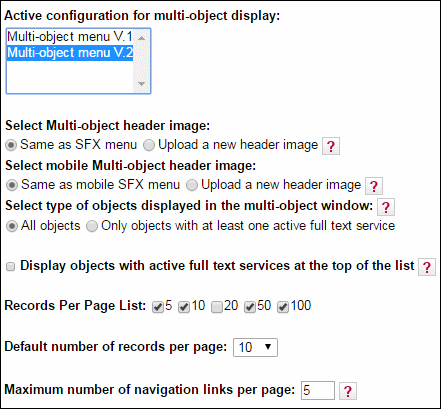
The options to select a multi-object header image and to select a mobile multi-object header image are only available for version 2. The following files determine the layout of the Multi‐Object Menu:
- head.tmpl
- main.tmpl
- new_openurl.tmpl
- search_description.tmpl
- tail.tmpl
For template V1, these files are located in exlibris/sfx_ver/sfx4_1/
For template V2, these files arelocated in exlibris/sfx_ver/sfx4_1/
For version 2 template wording changes are done using the SFX Admin Center (Configuration > Translation and Display > MultiObjects Menu). For version 1, wording changes should be done in the tmpl files listed above. For example, text can be changed in the following section of the exlibris/sfx_ver/sfx4_1/instance/templates/multiobject/main.tmpl file:
|
<TMPL_LOOP service_loop> <TMPL_IF getAbstract>Abstract</TMPL_IF> <TMPL_IF getAlikeRecord>A like record</TMPL_IF> <TMPL_IF getAuthor>Author</TMPL_IF> <TMPL_IF getAuthorEmail>Author e-mail</TMPL_IF> <TMPL_IF getBookReview>Book review</TMPL_IF> <TMPL_IF getCitedJournal>Cited journal</TMPL_IF> <TMPL_IF getCitedRecord>Cited record</TMPL_IF> <TMPL_IF getCitedReference>Cited reference</TMPL_IF> <TMPL_IF getDocumentDelivery>Document delivery</TMPL_IF> <TMPL_IF getDOI>DOI</TMPL_IF> <TMPL_IF getFullTxt>Full text</TMPL_IF> <TMPL_IF getHolding>Holding</TMPL_IF> <TMPL_IF getMessageNoFullTxt>No full text</TMPL_IF> <TMPL_IF getReference>Reference</TMPL_IF> <TMPL_IF getSubject>Subject</TMPL_IF> <TMPL_IF getTOC>TOC</TMPL_IF> <TMPL_IF getWebSearch>Web search</TMPL_IF> <TMPL_IF getWebService>Web service</TMPL_IF> <TMPL_UNLESS __last__>,</TMPL_UNLESS> </TMPL_LOOP> |
You can view the SFX multi-object menu by sending an OpenURL to the server with a title that belongs to two or more different objects.
For example:
|
http://demo.exlibrisgroup.com:3210/demo?ctx_tim=2004-10-14T16%3A45%3A1EDT&rft.jtitle=BIOCHEMISTRY&rft.genre=journal&rft_val_fmt=info%3Aofi%2Ffmt%3Akev%3Amtx%3Ajournal&ctx_id=10_1&ctx_enc=info%3Aofi%2Fenc%3AUTF-8&ctx_ver=Z39.88-2004&url_ver=Z39.88-2004&svc_val_fmt=info%3Aofi%2Ffmt%3Akev%3Amtx%3Asch_svc&res_id=http%3A%2F%2F10.1.2.233%3A3210%2Fsfxtst3&url_ctx_fmt=10_1 |
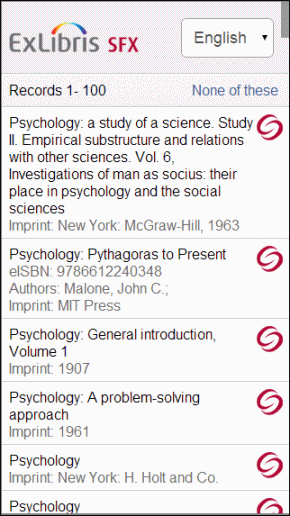
The multi-object window has been optimized for display on mobile devices. You access the multi-object window the same way as you would the standard interface – the mobile device is automatically detected.
ServiceType Feature
It is possible to restrict the type of services that are displayed in the SFX menu by sending a specially structured OpenURL to the SFX menu. However, this feature can be used only if:
- The library is the information provider (for example, in cases of local collections) and therefore responsible for generating OpenURLs.
- The vendor agrees to provide a serviceType parameter in the OpenURL.
- In OpenURL 0.1 this needs to be done in the pid section of the OpenURL.
- In OpenURL 1.0 this can be done using the standard OpenURL element.
When restricting the type of services that are displayed in the SFX menu to full text only (using the OpenURL 1.0 format svc.fulltext=yes), the following SFX serviceTypes are included:
- For HTML menu included services are:
- getFulltxt
- getSelectedFullTxt
- getMessageNoFullTxt
- For all other outputs (including simplexml, other xml formats, serivce_exist, etc.), the included services are:
- getFulltxt
- getSelectedFullTxt
- In the pid section of the OpenURL, specify the types of services that you want displayed:
|
pid=serviceType=<name of Service>-<name of Service> |
- Make sure that the OpenURL contains an sid (sourceID), and that the corresponding source parser includes a section that can interpret the serviceType part of the pid.
For example:
|
http://demo.exlibrisgroup.com:8888/demo?sid=ALEPH&issn=0002-8894&volume=059&issue=1&pid=serviceType=getFullTxt http://demo.exlibrisgroup.com:8888/demo?sid=ALEPH&issn=0002-8894&volume=059&issue=1&pid=serviceType=getHolding http://demo.exlibrisgroup.com:8888/demo?sid=ALEPH&issn=0002-8894&volume=059&issue=1&pid=serviceType=getWebService-getFullTxt http://demo.exlibrisgroup.com:8888/demo?sid=ALEPH&issn=0002-8894&volume=059&issue=1&pid=serviceType=getWebService-getFullTxt-getHolding |
Currently, the following SFX sources can interpret the serviceType part of the pid:
- Aleph
- EJOURNAL_LIST.
In XML, the serviceType indication should be:
|
pid=serviceType=<name of Service>-<name of Service> |
In KEV OpenURL use the following:
|
svc_val_fmt=info:ofi/fmt:kev:mtx:sch_svc&svc.fulltext=yes |
In XML OpenURL, the serviceType indication looks like the following:
|
<ctx:service-type> <ctx:metadata-by-val> <ctx:format>info:ofi/fmt:xml:xsd:sch_svc</ctx:format> <ctx:metadata> <sv:fulltext xmlns:sv="info:ofi/fmt:xml:xsd:sch_svc">yes</sv:fulltext> </ctx:metadata> </ctx:metadata-by-val> </ctx:service-type> |
Country and Language Settings
The configuration file located at /exlibris/sfx_ver/sfx4_1/
|
Section "locale" country "China" diacritics_handler "diacriticsUSA" use_kanji_variant "1" EndSection |
The following are the permitted values:
- Country – The full name of the country, as listed in the ISO 3166-1 standard.
- For Taiwan, use Taiwan, not Taiwan, Province of China.
- If Mainland China is defined as the country, for Chinese objects, the Simplified Chinese version of the title is displayed in the SFX menu banner and stored in the ContextObject.
- If Taiwan is defined as the country for Chinese objects, the Traditional Chinese version of the title is displayed in the SFX menu banner and stored in the ContextObject.
- Diacritics Handling – Determines how diacritics are handled for searching and sorting of title information. Diacritic settings are not applicable for the SFX menu. They are used for sorting in KBManager. Possible values for the diacritics_handler parameter are:
- diacriticsUSA
- diacriticsGerman
- diacriticsSwedish
- diacriticsDanish
- Use Kanji Variants – Determines if Kanji variants are used for title searches. Values can be 1 or 0. Japanese customers are recommended to activate this feature. If this parameter is not displayed, add it to the locale section of the config/ctx_object.config file.
|
use_kanji_variant "1" |
Report Broken Link
The Report Broken Link option in the SFX menu can be used by the end user to report broken target links to Ex Libris and to any e-mail address you configure. This option is displayed in the SFX menu for full text, abstract, and Table of Contents services, if the Go button or a link to the target has been clicked.
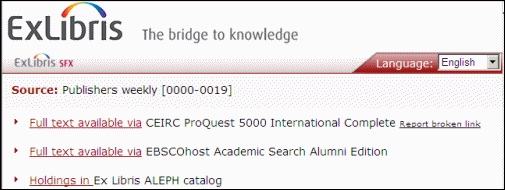
When you click Report a Broken Link, the information about the target and target URL is sent to the Ex Libris Beacon server and used to analyze and improve target linking. Additionally, you can configure SFX to send a copy of the report to a pre-defined e-mail address.
By default, the new option is active in the SFX menu after applying the 4.3.1 Service Pack (for Simplified template set only). It is possible to disable the Report Broken Link option and define additional configuration settings. For information on configuring the Report Broken Link functionality, see Target Design.
The text for the Broken link option can be changed and translated via the SFX Menu Main tab of the Translations & Display section of the SFXAdmin Center.
By default, the display of the option is enabled (in simplified menu only).
When clicking Report broken link, the following is displayed if you have configured end users to be able to specify an email address and configured an email address for the library:
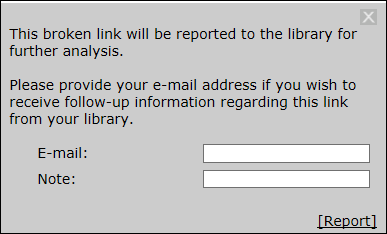
Enter an email address to receive follow-up information regarding this link from your library and click Report.
The following is an example of an email sent to the library:
|
From: sst1_2@il-sfx08.corp.exlibrisgroup.com [mailto:sst1_2@il-sfx08.corp.exlibrisgroup.com] Sent: 01 September 2015 08:54 To: Lieve Rottiers Subject: Broken link report from sst1_2 instance
The following broken link report was sent to Ex Libris from the SFX menu by one of your users:
OpenURL: http://www.sfxserver-example.org:3410/sfxlcl41?url_ver=Z39.88- 2004&url_ctx_fmt=info%3Aofi%2Ffmt%3Akev%3Amtx%3Actx&ctx_ver=Z 39.88-2004&ctx_enc=info%3Aofi%2Fenc%3AUTF- 8&rfr_id=info%3Asid%2Fsfxit.com%3Akbmanager&sfx.ignore_date_t hreshold=1&rft.object_id=1000000000017905
Target name: ACLS_HUMANITIES_EBOOK
Target URL: http://hdl.handle.net/2027/heb.04414 This user would like to receive follow-up information regarding this broken link at the following e-mail address: lieverottiers@exlibrisgroup.com End user note: Broken link NOTE: The 'Report Broken Link' option allows end-users to send Ex Libris immediate feedback about issues they may encounter. This information allows Ex Libris to resolve broken links much more quickly, using analysis of multiple reports that reach us centrally from SFX sites worldwide. |
