
Display Logic
It is possible to define which services or service types should not appear in the SFX menu, depending on whether other types of services are presented to the user.
To configure the display logic rules of the SFX menu, click the Display Logic tab. The following window opens:
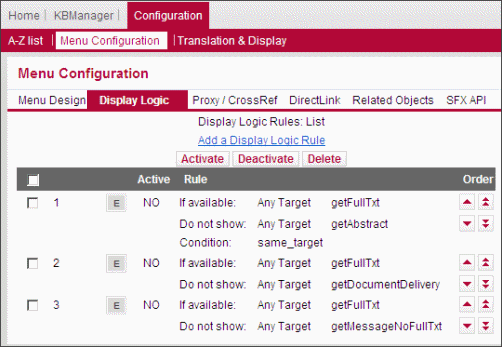
It is possible to define a range of display rules. For example:
- For different services defined for one particular target. For example, if a getFulltext service is displayed for a particular target, do not display a getTOC service for the same target.
- For services defined for all targets. For example, if any getFullTxt service is displayed, do not display any getDocumentDelivery services.
- For a particular target service. For example, if the EBSCO_ACADEMIC_SEARCH_PREMIER getFullTxt service is displayed, do not display any other full-text targets.
- Select the
 check box to the left of the display logic rule.
 - Click the Activate or Deactivate buttons to activate or deactivate a rule.
- Click Add a Display Logic Rule. The following dialog box opens:

- Define the target and target service for which you want to set a condition. You can select Any Target or specify a particular target.
- Define the target and target service that you want to suppress. You can select Any Target or specify a particular target.
- You can optionally select one of the following conditions from the drop-down list:
- same_target – select if the target in the if the following is available statement is identical to the target in the Do not show statement.
- threshold – select if a threshold statement in perl syntax can be used as a condition, either typed in directly or via the Threshold Composer. For more information on thresholds, see Thresholds.
- no_timediff_warning – select if at least one target exists in the if the following is available statement without am embargo or moving wall warning. For more information, see Menu Design – General Configuration.
- same_threshold – select if you want to exclude services from the SFX menu if they have an identical active threshold.
The following is an example of a rule using this condition:
|
Do not show EBSCOHOST* getFullTxt If available EBSCOHOST* getFullTxt Condition: same_threshold |
This rule determines that only one EbscoHost target appears if a journal article is available from two Ebsco packages with the same coverage.
To edit a display logic rule, click the Edit button  to the left of the rule.
- Select the check box to the left of the display logic rule.
- Click the Delete button.
Use the arrow buttons to the right of each rule to change the order in which the rules appear.

The single arrows move the rule one step up or down.
The double arrows move the rule to the top or bottom of the list.
Examples of Display Logic Rules
- Example 1 – If EBSCO_ACADEMIC_SEARCH_PREMIER getFullTxt exists, do not show any other full-text targets.
This rule looks like the following:

- Example 2 – If EBSCO_ACADEMIC_SEARCH_PREMIER getFullTxt exists, suppress EBSCO_ACADEMIC_SEARCH_PREMIER getTOC.
This rule looks like the following:

- Example 3 – If EBSCO_ACADEMIC_SEARCH_PREMIER getFullTxt exists, suppress PROQUEST_5000 getFullTxt only if the user is a student.
This rule looks like the following:

Example 4 – The following special display logic rule is used for the DirectLink banner:

For more information on this rule, see DirectLink Sidebar/DirectLink Banner.
Troubleshooting Display Logic Rules
In the HTML source of the SFX menu, you can see which target services were suppressed as a result of these rules. For example:
|
SFXMenu::Services::DisplayLogic::evaluate_display_logic_rules: Evaluating Display Logic Rules:HASH(0x1386684). SFXMenu::Services::DisplayLogic::evaluate_display_logic_rules: * Started processing rule '4'. SFXMenu::Services::DisplayLogic::evaluate_single_display_rule: Evaluating rule for services of context object '0'. |
Display Logic When Services for Related Objects are Included in the SFX Menu
If services for related objects are included in the SFX menu, display logic rules are calculated separately on the following objects:
- the main object and its closely related objects
- the remotely related objects
This prevents the scenario where display logic rules prevent services for the main object from being displayed, because a remotely related object service appears in the SFX menu.
For an overview of related objects, see Related Objects.
