
Proxy/Crossref
This section explains how SFX works with both rewrite proxies and Web proxies. The following proxy types are supported by SFX:
This is an authentication method to allow off-campus users access to licensed databases. The proxy operates as an intermediary server between end users and the library’s licensed databases.
SFX currently supports the following rewrite proxies:
- EZProxy
- EZProxy Encode
- Innovative WAM proxy
- LIBPROXY
- OpenAthens
When creating target URLs, SFX can direct end users (either for all targets or selective targets) to the institution’s proxy server.
For example, instead of creating the following URL:
http://www.bmj.com
SFX can create the following URL:
http://proxy.library.edu/login?url=http://www.bmj.com
The proxy server determines the IP address of the end user and detects whether this user is accessing the target on campus or off campus.
- If a user is on campus, the user is allowed to go to the target
- If a user is off campus, the user is prompted for the proxy user name/password information. The proxy then connects to licensed databases to obtain Web pages and send them back to the user. Since the proxy runs on a machine on the library’s network, the database vendors see the requests as coming from an IP address on the network and therefore permit access.
Web Proxy
A small number of SFX sources and targets use HTTP fetch. If you are associated with an institution that uses a Web proxy and want the HTTP requests sent by the SFX server to go through this proxy, follow the instructions detailed in Configuring Proxy Information.
The following sources use HTTP fetch:
- PubMed
- CrossRef
The following targets use HTTP fetch:
- EBSCOHost and EBSCO EJS
Configuring Proxy Information
To configure proxy information, click the Proxy/CrossRef tab. The following window opens:
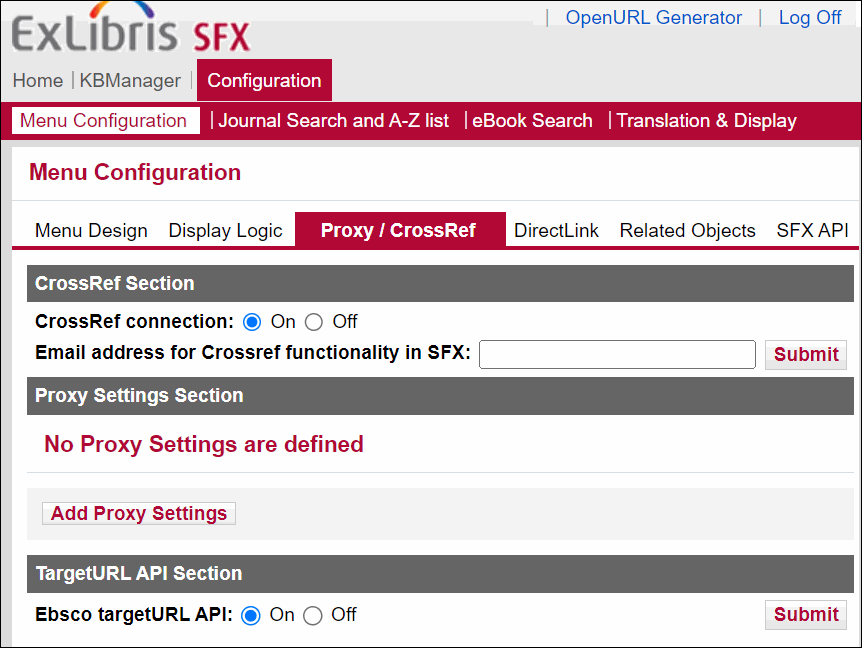
The Crossref section allows you to enable or disable the connection to Crossref. By default, the connection is enabled (On). It is possible to disable the connection, for example, in case of technical issues on the Crossref server.
You can specify the email address that is included when connecting to Crossref. This email address is used by Crossref to contact the library in case of problems, and replaces the username and password Crossref required previously.
For information on how the CrossRef connection is used in SFX, refer to the DOI/CrossRef Setup section in the SFX Advanced User’s Guide.
- Click Add Proxy Settings. The following dialog box opens:
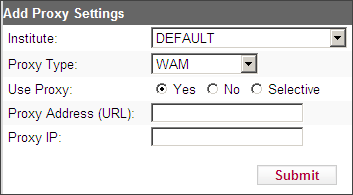
- From the Institute drop-down list, select the institute for which you want to specify a proxy if institutes have been defined in the instance, or DEFAULT if no institutes have been set up.
- From the Proxy Type drop-down list, select one of the following proxy modules:
- EZPROXY
- EZPROXY_encode
- LIBPROXY
- OpenAthens
- WAM
- WEB_PROXY
- Under Use Proxy, select one of the following options:
- Yes – to have proxy support for all target services. Every target service is directed through the proxy server.
- No – to have the browser redirect to the original target URL, as usual. If you select this option, there is no attempt to access the proxy server.
- Selective – to have proxy support only for selected target URLs. If you select this option, only those targets whose target service Proxy option is selected are directed through the proxy server. For more information, see Target Services.
- In the Proxy Address (URL) text box, enter the URL of the proxy server.
SFX supports the HTTPS protocol for the following proxy types:
- EZPROXY
- WAM
- OpenAthens
For HTTPS, specify the URL by using http://
- In the Proxy IP text box, enter the IP address of the proxy server.
For EzProxy, it is possible to include a list of IP addresses/IP ranges that will be excluded from the proxy mechanism.
To configure this list, access the following configuration file on the SFX server:
/exlibris/sfx_ver/<instance>/config/proxy_ezproxy.config
The IP information can be specified as a single address or a range of addresses. It is possible to use an asterisk and a hyphen to define IP ranges. See the following example configuration file:
|
Section "exclude_ip" #add here ip ranges that you wish to exclude from being proxied. #a separate line for each range 10.1.1.1 10.1.2.11-13 10.1.4.* 10.8.0-79.-10.8.81-255. 11.1.. EndSection |
Testing Proxy Configuration
After you configure a proxy, it is recommended to test the proxy configuration by sending an OpenURL to the SFX instance and verifying whether the correct proxy information has been added to the target URL.
- Rewrite proxies (WAM, EZProxy, EZPROXY_encode, LIBPROXY, OpenAthens)
-
WAM: if a regular target URL looks like this:
http://www.publishersweekly.com
a correctly proxied target URL looks like this:
http://0-www.publishersweekly.com.proxy.lib.university.edu/
-
EZProxy: if a regular target URL looks like this:
http://www.publishersweekly.com
a correctly proxied target URL looks like this:
http://proxy.yourlib.org:2048/login?url=http://www.publishersweekly.com
-
EZProxy Encode: if a regular target URL looks like this:
http://www.akademiai.com/openurl.asp?issn=0001-5210&genre=journal
a correctly proxied target URL looks like this:
http://proxy.yourlib.org:2048/login?url=http%3A%2F%2Fwww.akademiai.com%2Fopenurl.asp%3Fissn%3D0001-5210%26genre%3Djournal
-
LIBPROXY: if a regular target URL looks like this:
http://www.publishersweekly.com
a correctly proxied target URL looks like this:
http://proxy.yourlib.org:2048/login?url=http://www.publishersweekly.com
-
OpenAthens: if a regular target URL looks like this:
http://www.publishersweekly.com/2012/33/1/56
a correctly proxied target URL looks like this:
http://www.publishersweekly.com.proxy.yourlib.org:2048/2012/33/1/56
-
-
Testing Web proxies
Test to make sure the HTTP fetch is working by using the following OpenURL:
<base_url>?id=pmid:14972762
If the fetch is successful, the banner of the SFX menu will contain text similar to the following:
Title Pragmatic principles--methodological pragmatism in the principle-based …
Source The Journal of medicine and philosophy [0360-5310] Schmidt Felzmann yr: 2003 vol: 28 iss: 5-6 pg: 581
