
Menu Configuration Overview
When you click the SFX button in a search engine or database, the SFX menu is displayed, showing a short summary of the object and a list of basic and extended available services. It contains names of targets, groupings, and descriptions of the different services. All of these items and the order in which they appear can be customized according to your institution’s preferences.
For each SFX instance, the look and feel and layout can be completely customized. As a result, different SFX instances on the same SFX server can have SFX menus that look very different. Within each instance, it is possible to determine the look and feel of the menu by selecting an SFX menu template set.
The available templates are:
- The advanced menu template – the default SFX menu template. This SFX menu template has all possible configuration options available by default. Configurations and translations of this template set need to be performed via the HTML templates and UNIX configuration files. For more information on the advanced menu template, refer to the SFX Advanced User’s Guide.
- The simplified SFX menu template – displays fewer details than the advanced menu, although they can be added, as desired. All configuration and language changes for the simplified menu template set can be done via the SFX Menu main tab of the Translations & Display section of the SFX Admin Center interface.
SFX Menu for Multiple Hits in the SFX Database
A special SFX menu format is displayed if more than one object is found in the SFX database when building the SFX ContextObject. Possible matches are listed in a special SFX menu format called the multi-object menu. The user selects one of the objects to complete the SFX request.
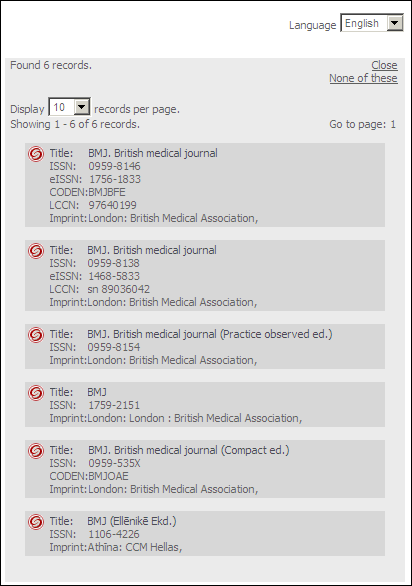
The multi-object menu is displayed in the following scenarios:
- The OpenURL contains the ISSN, ISBN, LCCN, or other unique identifier. SFX tries to find a match for this unique identifier in the SFX database.
- If SFX finds one object in the SFX database, the object metadata found in the database is added to the ContextObject (a process called augmentation) and the SFX menu is displayed.
- If no match is found, the SFX menu is displayed without any metadata from the SFX database.
- If SFX finds multiple hits in the SFX database, the multi-object menu is displayed.
- The OpenURL does not contain an ISSN, ISBN, or other unique identifier. SFX tries to find a match for the title of the context object in the SFX database. This scenario occurs more often when using the CitationLinker, as described in the CitationLinker section of the SFX Advanced User’s Guide.
- For books:
- If one or multiple results are found in the SFX database, the multi-object menu is displayed.
- If no match is found, the standard SFX menu is displayed.
- For journals:
- If multiple results are found in the SFX database, the multi-object menu is displayed.
- If one match or no match is found, the standard SFX menu is displayed.
- For books:
If the multi-object menu does not list the journal or book for which you are searching, click None of these. An SFX menu is created with the metadata from the original OpenURL without any additional metadata enhancements from the SFX database.
