Displaying Resources Based on Records
Data tests determine whether links to target resources are displayed or suppressed based on data in one of the following:
This table shows common reasons that resource links are suppressed and how to suppress them:
| Suppress the resource link because: | Use a data test of type: | Enter the following in the field selectors: |
|---|---|---|
| the displayed record belongs to an identified range (call number, etc.) | bool | record field (in the Library catalog definition) |
| the displayed record has or lacks data in a field | regular expression | record field (in the Library catalog definition) |
| the coverage data indicates that the resource is not accessible | match | record field (in the Library catalog definition) and coverage database fields |
| it is not possible to construct a link from the available data | regular expression | record field (in the Library catalog definition) and coverage database fields |
Using data tests, target resources can be suppressed from displaying in the:
- full record display of WebPAC
- full record display of Sierra
- record browse of the brief citation display
Because data tests require data from a specific record, they cannot be used to suppress links in standard WebPAC and Sierra browse displays.
The use of data tests is optional.
Existing data tests can be edited or deleted.
To use a data test:
- Determine the reason to suppress links.
- Create the appropriate type of data test.
- Assign the data test to the resource definitions for the resources to be displayed or suppressed as a result of the data test.
Data tests have names and types. The name is a unique identifier. The type refers to whether the data test is a regular expression, bool query, or match test.
Innovative provides a wiki for data tests that have been successfully tested with Pathfinder Pro.
About Field Selectors
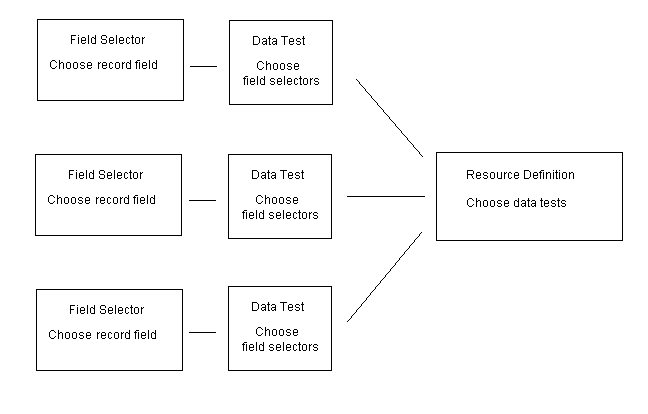
Match and regular expression data tests use field selectors. Field selectors allow you to choose fields to be incorporated into data tests from records.
The display and suppression of resource links is highly customizable. Field selectors can use multiple record fields. Data tests can use multiple field selectors. Multiple data tests can be assigned to a single resource definition.
This flow chart shows how data in a displayed record can be taken into field selectors, which are used in data tests, which are assigned to resource definitions (click on a box to link to the related procedure):