
Alma February 2026 Release Notes
Features
New Partners Fields in Resource Sharing Partner Record
February 2026 Fulfillment and Resource SharingURM-317894
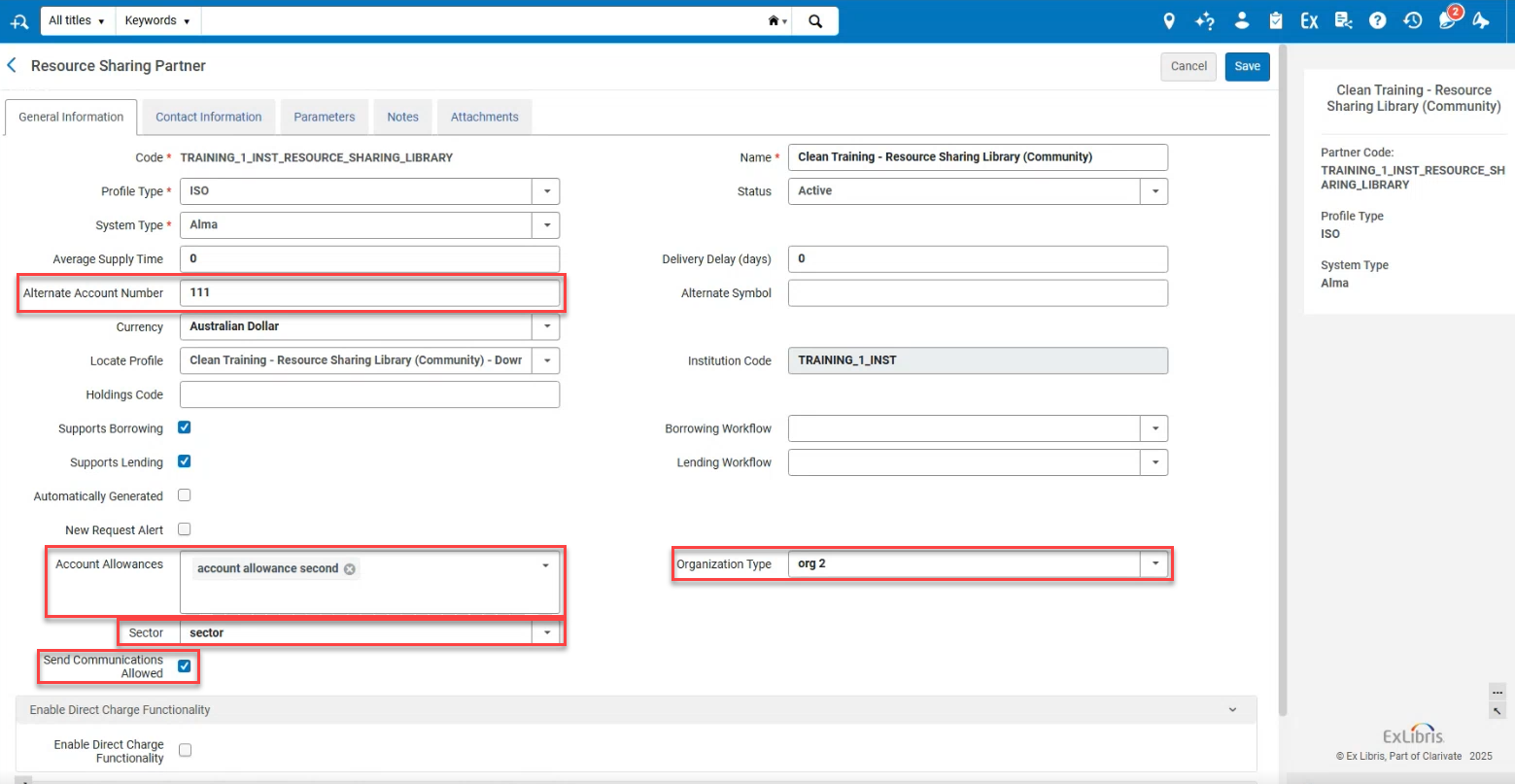
Additional fields were added to the Resource Sharing Partner record (Fulfillment > Resource Sharing > Partners) to enable further customization. The following fields were added:
- Alternate Account Number— Free text field that, in addition to an alternate symbol, enables additional information to be stored on the partner record.
- Account Allowances— Populated by customizable drop down options. Multiple selections can be made to designate additional partner information.
- Sector— Populated by customizable drop down options to enable additional information to be stored on the partner record.
- Send Communications Allowed— The value is checked/unchecked. Some libraries may want to note if marketing materials can be delivered to partners or not.
- Organization Type— Populated by customizable drop down options to enable additional information to be stored on the partner record.
For more information, see Resource Sharing Partners.
Temporarily Deactivate Lending for Different Formats
February 2026 Fulfillment and Resource SharingURM-320775
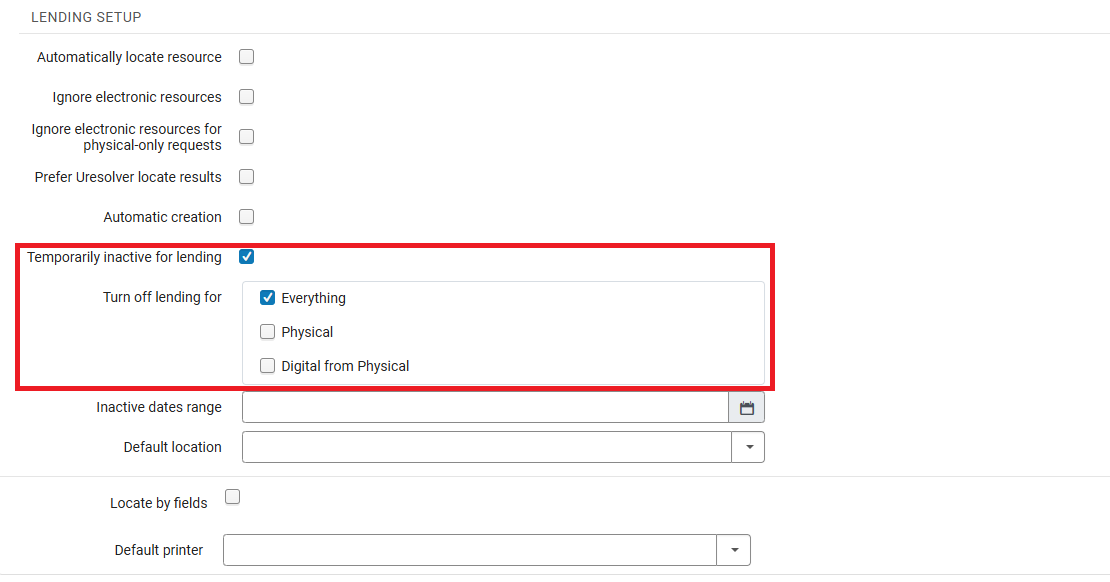
Lenders now have the ability to selectively deactivate specific lending services rather than deactivate all services. Previously, lenders could only deactivate all lending operations at once. Now they can decide whether to deactivate Everything, temporarily deactivate Physical lending while keeping digital services active, or temporarily deactivate Digital from Physical lending while continuing physical shipping or electronic lending.
This provides lenders with more flexibility to handle temporary disruptions without having to fully stop their lending services.
For more information, see Configuring Parameters of a Resource Sharing Library.
Details in Alma Metadata History
February 2026 Fulfillment and Resource Sharing
 Idea ExchangeURM-317895
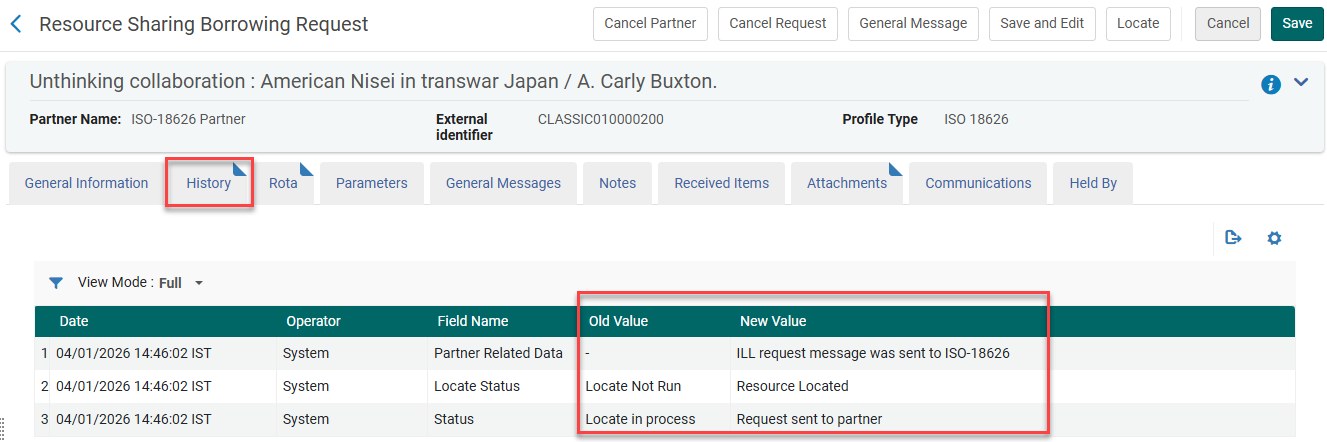
Alma now tracks the metadata changes made in the Resource Information section. They are recorded and viewable in the History tab of the request.
For more information, see Managing Borrowing Requests.
Location Level Best Copy for Fulfilling a Request
February 2026 Fulfillment and Resource SharingURM-319753URM-254568URM-319351
Currently, transit time rules are used to define both the transit time for items and to determine which is the closest (preferred) item for fulfilling the request. Until now, the transit time was defined at the library level. It is now possible to use the Transit Time rules to also determine the best copy for a request based on its location within the library.
For more information, see Pickup at Shelf and Configuring Libraries.
Add Notes in Deliver Digital Documents Page
February 2026 Fulfillment and Resource Sharing
Idea ExchangeURM-167540
It is now possible to add notes to partner and internal notes when using Deliver Digital Documents to fulfill a document delivery request. This enhances communication with borrowers and facilitates the recording of internal information when providing a document delivery service.
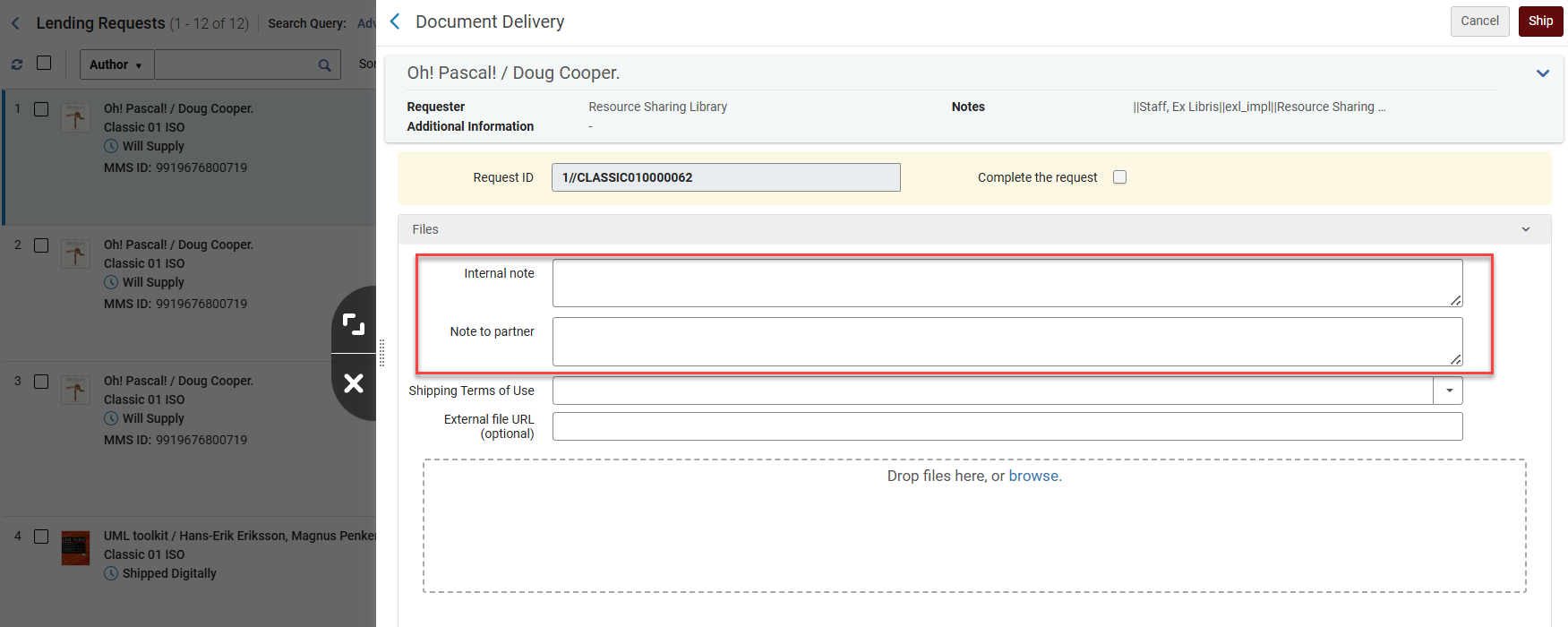
The two note fields were also added to the Download Electronic Resource page.
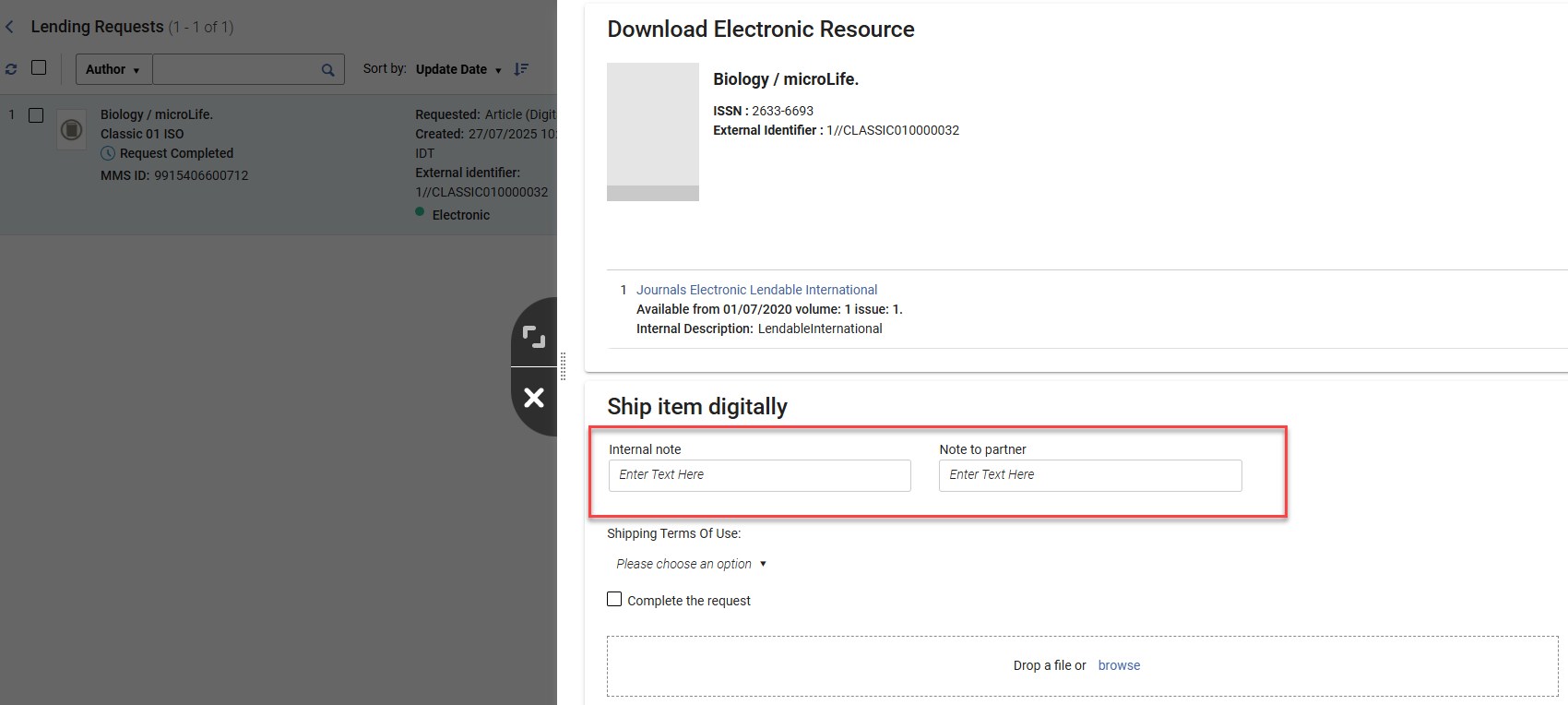
For more information, see Managing Lending Requests.
Ship Lending Requests Without Barcode
February 2026 Fulfillment and Resource SharingURM-254566URM-317625
It is now possible to ship items when fulfilling resource sharing lending requests, even when they do not have a barcode. In this case, the ship and check-in actions are used by selecting the items from pickup lists. This impacts the Ship Items page and the Scan-In Items page.
The Item ID of shipped items can be added to the displayed information about a lending request's items. When shipping an item without a barcode, this will be the only unique identifier that can be displayed.
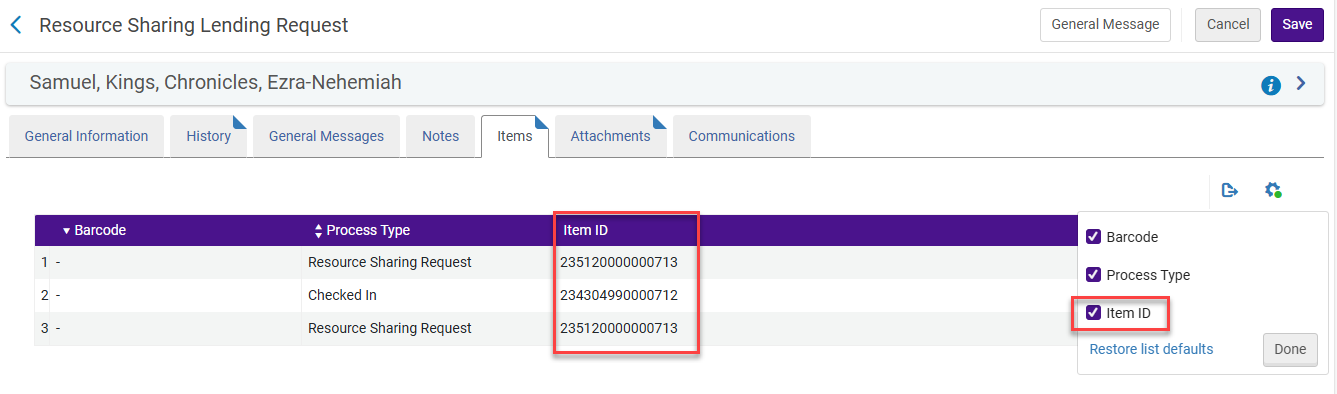
For more information, see Peer to Peer Resource Sharing and Scanning Items.
Override Hold Policies
February 2026 Fulfillment and Resource Sharing
Idea ExchangeURM-317447
When placing a hold, booking, or digitization request in Alma, the operator is shown any blocks that may affect the request. Operators with the new Override Patron Hold Blocks privilege can override these blocks. If you would like this functionality enabled, please contact the Alma Support team and request that the relevant privilege be activated for your institution.
This provides transparency around blocked requests and enables authorized overrides.

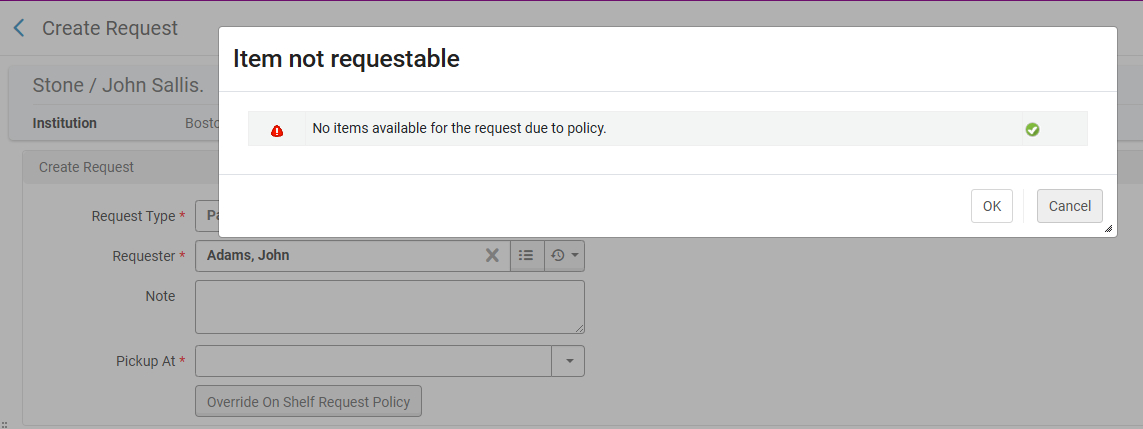
The privilege will appear for all roles that have the Override Block Request privilege. For existing customers, the privilege will be disabled. For new customers, the privilege will be enabled by default for the Circulation Desk Manager and Fulfillment Services Manager roles.
For more information, see Managing Patron Services at a Circulation Desk and Privileges for Roles in Alma.
View Mode for Courses in Course Reserves
February 2026 Fulfillment and Resource SharingURM-243453
A new privilege was added to the Course Reserves Viewer role, enabling users to view the list of courses in view mode (and not only reading lists and citations). This impacts Alma users who should not be able to edit courses, reading lists and citations, but should be able to view all of them.
If you would like this functionality enabled, please contact the Alma Support team and request that the relevant privilege be activated for your institution.
For more information, see Managing User Roles,Privileges for Roles in Alma and Roles and Registration Configuration.
Automatic Waiver of Overdue Fines for Re-loaned Items
February 2026 Fulfillment and Resource Sharing
Idea ExchangeURM-90892
When an item currently on loan is checked out to a new patron, Alma may automatically check in the previous loan, depending on the configuration (Configuration > Fulfillment > Physical Fulfillment > Block Preferences) for the Item is currently on loan by another patron action. This automatic check-in can result in overdue fines for the prior borrower. Institutions can now configure Alma to automatically waive these fines or allow circulation staff performing the check-out to decide whether the fines should be waived.

For more information, see Configuring Loans and Patron Charges Configuration.
Automatic Selection of Library Digitization Department
February 2026 Fulfillment and Resource SharingURM-253673
Alma now intelligently selects the most suitable library-level digitization department for newly created Patron Digitization Requests and Ship Digitally requests. This enhancement applies in scenarios where the system automatically assigns a digitization department, including:
- Requests submitted via Primo
- Requests automatically generated from incoming resource sharing transactions
In both cases, Alma prioritizes digitization departments that are also configured as circulation desks and are responsible for reshelving the requested items.
For more information, see Configuring Fulfillment Jobs and Creating a Request from the Institution.
Differentiated User Groups in Fulfillment Networks Based on Source Institution
February 2026 Fulfillment and Resource Sharing
Idea ExchangeURM-93337
Alma users in a fulfillment network can now classify patrons from other institutions in the fulfillment network (linked accounts), according to their original User Group from their source institution. This enhancement enables institutions to assign appropriate User Groups to guest patrons based on their original classification, allowing for more accurate fulfillment rules and service levels.
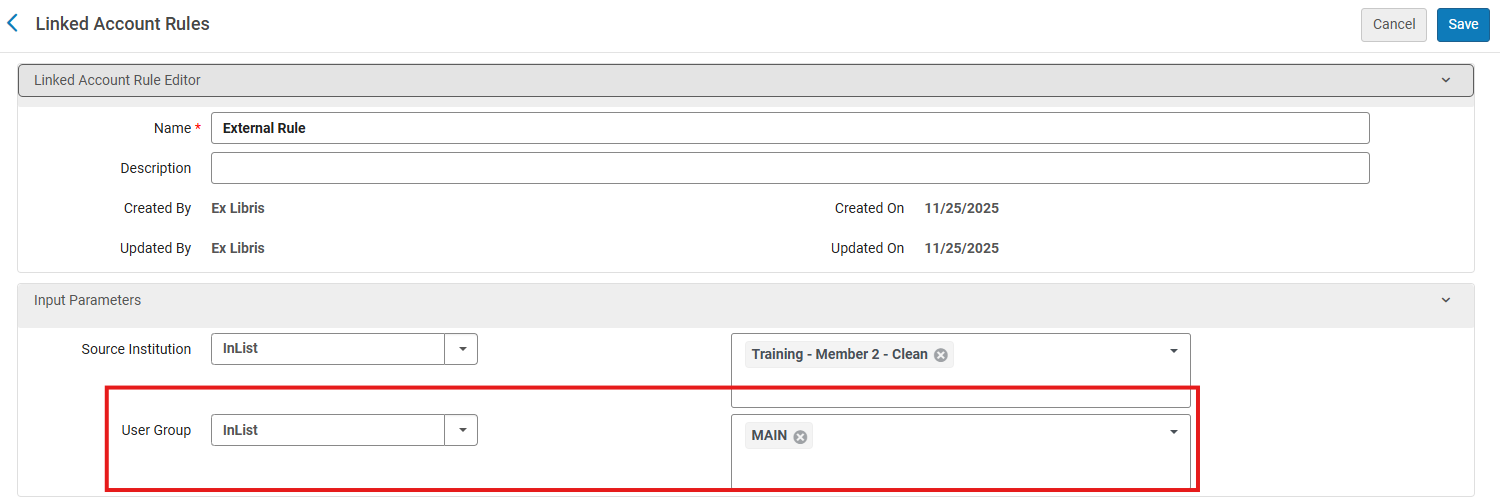
The external user groups are configured in Alma from Configuration > User Management > External User Group.
For more information, see Linking Users in Collaborative Networks and Configuring External User Groups.
Pop-Up Notification for Hold Shelf Items
February 2026 Fulfillment and Resource Sharing
CERV Enhancement (ID#247150)URM-247150
Libraries can now enable a pop-up alert at the circulation desk, upon logging into the Manage Patron Services page, to notify operators when a patron has an associated system note, such as a note about items waiting on a hold shelf. The notification contains the same information as that in the System notes.
This feature helps ensure that staff are promptly informed and reduces the risk of missing important hold messages during interactions with patrons. The pop-up can be enabled using the popup_message_system_notes parameter in Configuration > Fulfillment > Other Settings.
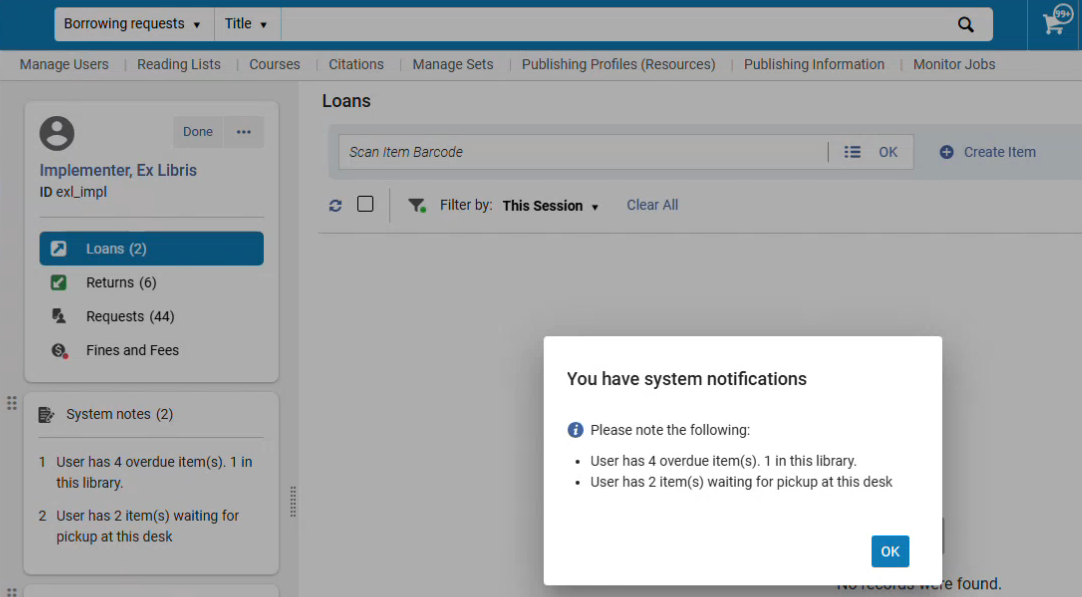
Selecting OK in the pop-up dismisses the message and leaves the user in the Manage Patron Services page.
For more information, see Configuring Fulfillment Jobs and Managing Patron Services.
Prioritizing Locations for Fulfilling Digitization Requests
February 2026 Fulfillment and Resource SharingURM-151357
It is now possible to assign a digitization priority level to a location. This way, Alma can be set up to prefer some locations over others when a new digitization request may be fulfilled by different copies from different locations. This adds efficiency and accuracy to the digitization process.
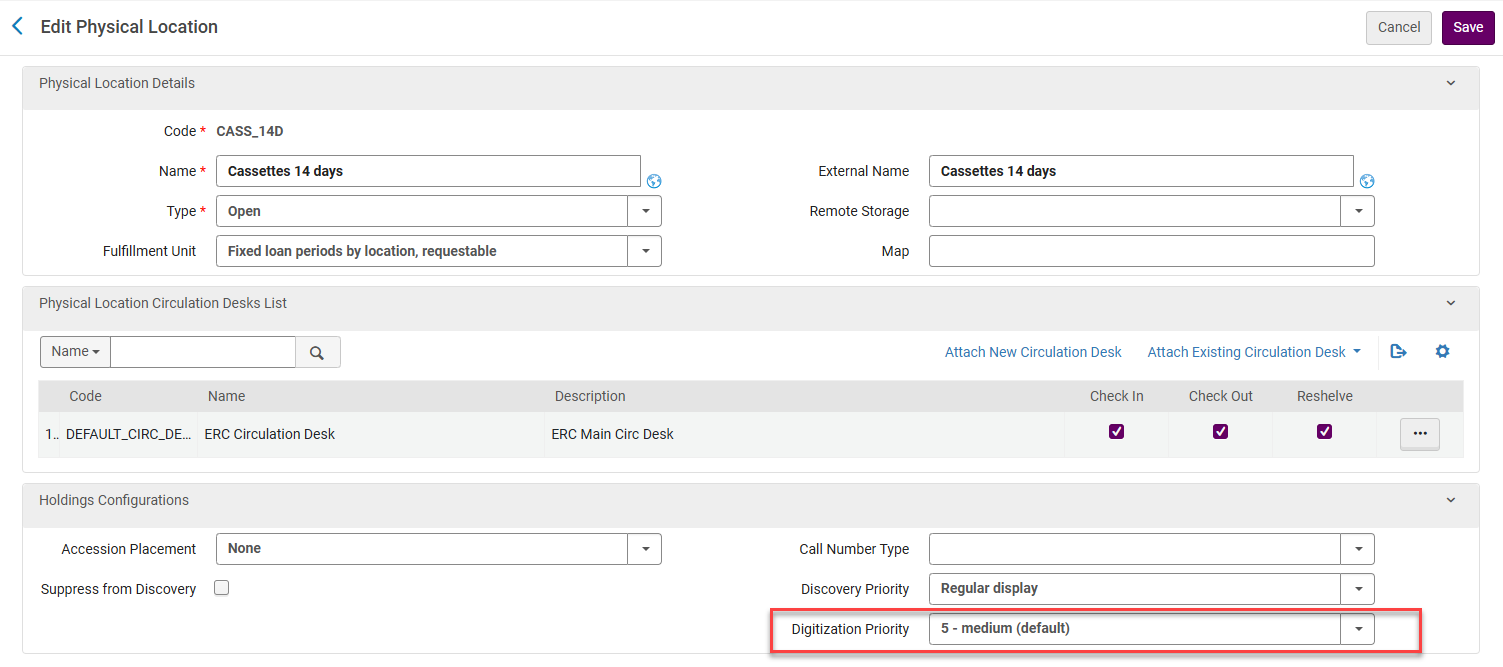
For more information, see Configuring Physical Locations,Creating a Request from the Institution and Managing Lending Requests.
New Linked Open Data (LOD) Editor for BIBFRAME Records, Now Available in Alma
February 2026 Metadata & Linked Open DataURM-249613
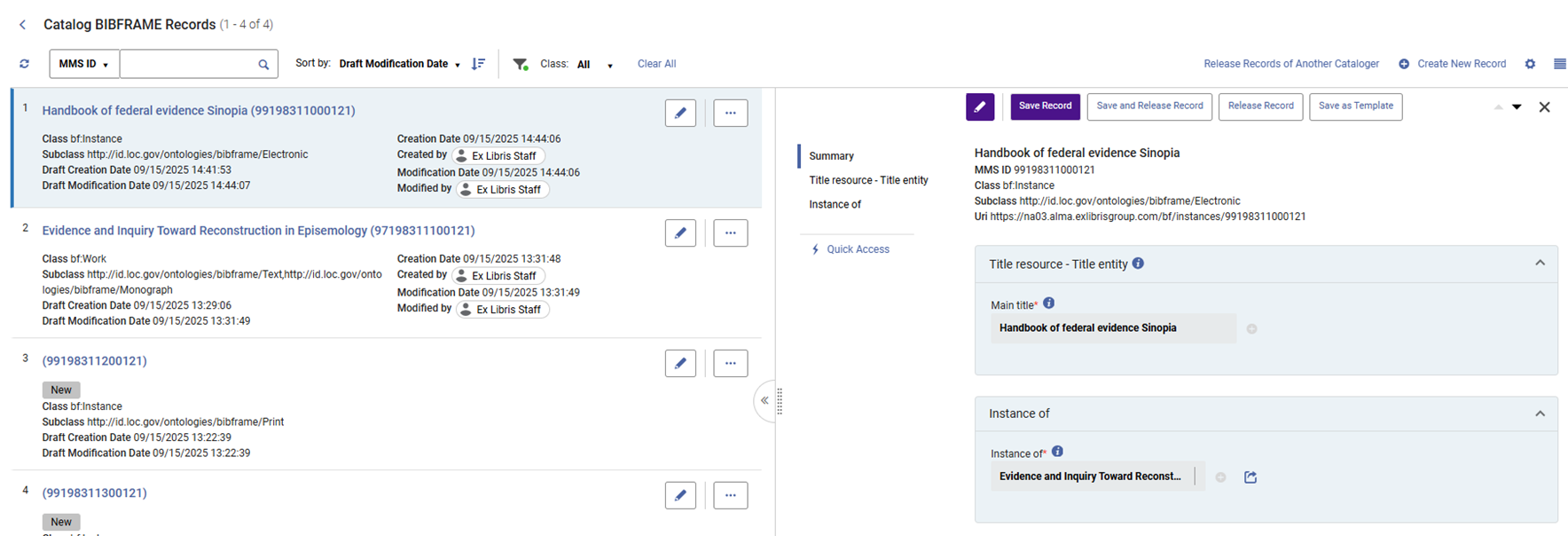
This is a new world of Linked Open Data cataloging, streamlined and embedded into Alma and Alma workflows, enabling institutions to embrace BIBFRAME within their familiar workflows while maintaining MARC records alongside them within the same environment.
The new LOD editor is now available to all institutions that want to catalog and edit BIBFRAME records directly within Alma. With the new editor, catalogers can create and edit BIBFRAME works and instances in a seamless, navigation-friendly experience, including quick editing from within the search results and a draft management page for those who wish to work in a separate workflow.
The new editor is guided by the BIBFRAME and BFLC ontologies, enabling users to create entities based on the structure and relationships between properties and classes as defined by the Library of Congress. With the new lookup service, catalogers can query directly external authoritative sources such as the Library of Congress's linked data service (id.loc.gov) and Wikidata. The new editor also provides out-of-the-box templates for works and instances, based on the structures defined by the BIBFRAME interoperability group (BIG) and enables users to create and manage their own templates, with additional functionalities of private and public templates.
Configuration for Enabling BIBFRAME
February 2026 Metadata & Linked Open DataURM-253835
For users with Cataloging Configuration or Catalog Admin roles, it is now possible to enable (default disabled) support for BIBFRAME works and instances with Alma by using a configuration page rather than needing to open a ticket with the support team.
This setup enables the Works search, the BIBFRAME editor link, and templates links within the Resources menu and the metadata configuration for these formats.
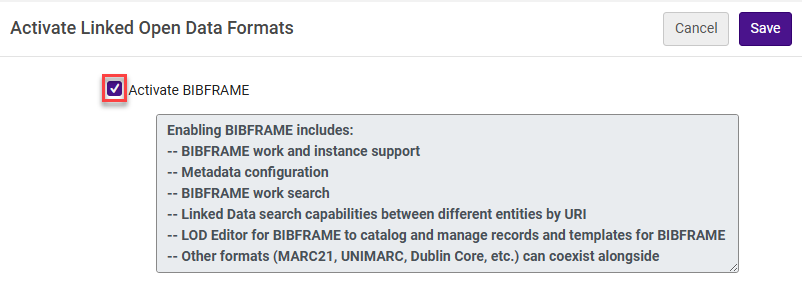
For more information, see Enabling BIBFRAME in Your Institution.
New Merge Option for SBN Authority Contribution and Alignment
February 2026 Metadata & Linked Open DataURM-317795
Previously, merge rules were not available for SBN authority alignment or as part of SBN contributions. It is now possible to apply merge logic during both SBN authority alignment and Bibliographic/Authority contributions. Customers can select and apply merge rules in these processes to improve data consistency, reduce duplication, and enhance automation within SBN workflows.
For more information, see Integrating the SBN Italian Union Catalogue.
New Search Indexes for Physical Items
February 2026 Metadata & Linked Open DataURM-241914
New search indexes were added to physical items:
- Physical item: Has Order =yes/no: allows searching for items with/without orders. The index accounts for both orders at the item and the holdings level, similar to the Order link in the items search results.
- Physical item: Received =yes/no: allows searching for items that were received or not received, similar to the receiving filter in the items list. Items are considered received if they have a receiving date of today or earlier.
These new search options make it easier to find items; for example, items with orders that have not yet been received.
For more information, see Physical Items Search Indexes.
Enhanced MARC Bibliographic Index Infrastructure
February 2026 Metadata & Linked Open Data
Idea ExchangeURM-253352
To enable a seamless setup for institution-specific bibliographic search indexes, customers now have the ability to define custom indexes for their institution based on Bibliographic data. This new infrastructure provides the flexibility for each customer to create their own search indexes tailored to their Bibliographic data.
This feature can only be tested in your sandbox environment after the data is cloned on February 8th.
For more information, see Configuring Search.
Sorting Option for Alma SRU External Search Resources
February 2026 Metadata & Linked Open DataURM-319072
We have introduced a new sorting capability for Alma SRU-based external search resources only. Users can sort results in the Metadata Editor by Rank,Title(default),Creator, and Publication Date.
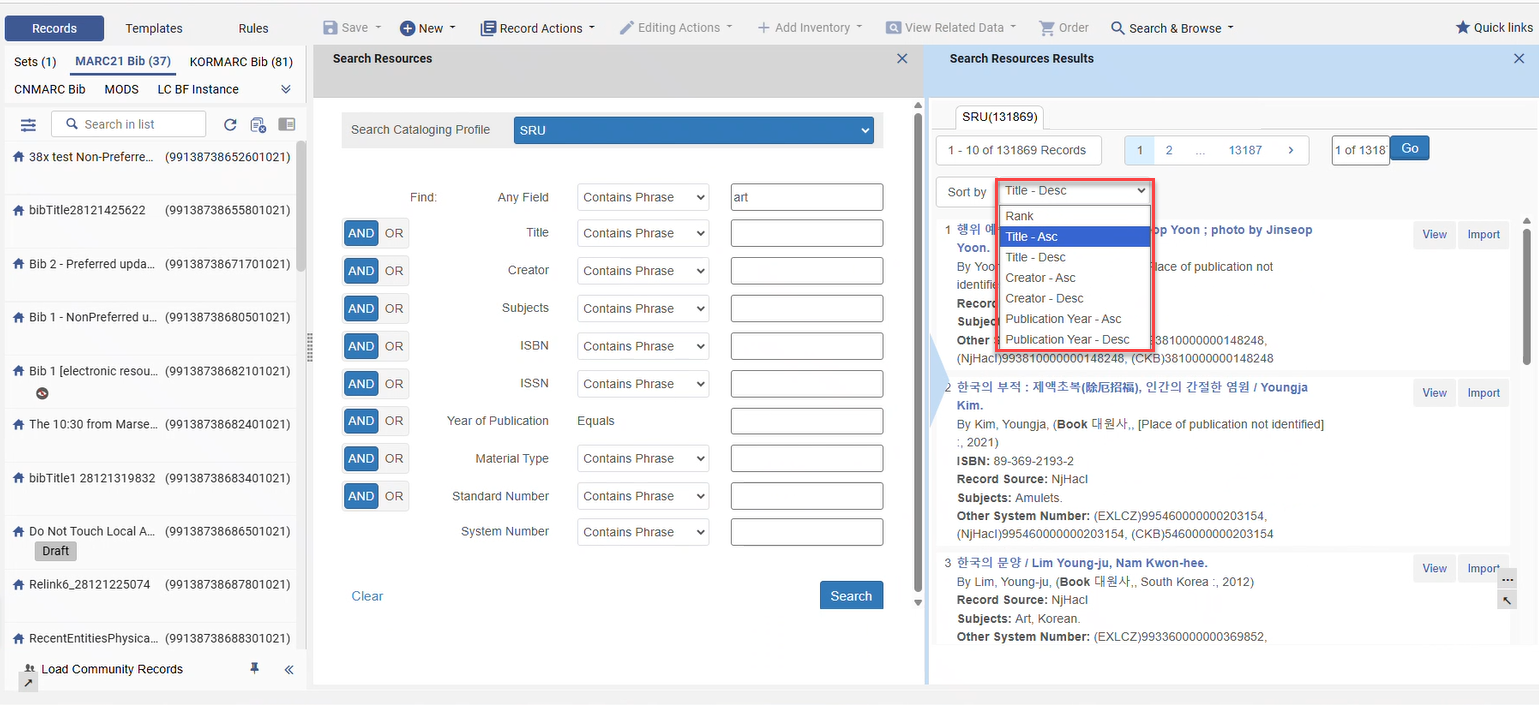
For more information, see Configuring External Search Resources.
New Controlled Vocabulary List for Language Codes
February 2026 Metadata & Linked Open DataURM-183897
A new, merged controlled vocabulary list has been created by combining language codes from the MARC21 standard and the ISO 639-3 list. This enhanced list includes an expanded range of languages, addressing gaps that previously existed when cataloging the MARC 041 $a field.
The list is available only in English. When searching by the language list in subfield 041 $a, using the Language facet, or using the pop‑up assistant in the Metadata Editor for subfield 041 $a, all values are displayed in English.
For more information, see Combined Language List.
Introducing the Alma AI Assistant for Acquisitions Funds and Ledgers – Preview Mode (Beta)
February 2026 Artificial Intelligence
To improve day-to-day efficiency, the Alma AI Assistant enhances the user experience when interacting with Alma through a chat-based interface. Instead of navigating multiple screens and workflows, staff users can ask questions naturally and receive clear, relevant responses directly within Alma.
The first focus area for the Alma AI Assistant is Acquisitions - Funds and Ledgers. Staff users with the Fund/Ledger Manager role (from the institution level) can ask questions about their institution's funds and ledgers and receive immediate, natural-language responses.
Since the Alma AI Assistant was first announced on the Alma roadmap, it has generated significant interest across the community. As part of the November 2025 release, we conducted an Early Access Program with 15 participating institutions. Their hands-on usage and feedback have been invaluable in shaping the next steps of this initiative.
Given the exploratory and evolving nature of this feature, we want to broaden the feedback loop even further. Therefore, as part of the February 2026 release, we are introducing Alma AI Assistant in Preview Mode (beta) across all Alma environments. Administrators can choose to activate the feature at their discretion.
Preview Mode (beta) - What to Expect
The Preview Mode (beta) is an early iteration designed to give libraries the opportunity to explore the feature, understand its potential, and actively contribute feedback that will guide future development. Additional enhancements, including the ability to perform actions as part of the Alma AI Assistant flow are planned for upcoming releases.
Libraries are encouraged to try the Alma AI Assistant in their Sandbox or Production environments to gain an initial sense of its capabilities and limitations.
Feedback is critical for this phase. You can share your input directly within the Alma AI Assistant using the thumbs up /thumbs down
 options on each response, or by contacting us directly at tamar.fuches@clarivate.com.
For more information on enabling the feature, how it works, and our planned enhancements, refer to the Alma AI Assistant – Acquisitions Funds and Ledgers documentation. Also see Artificial Intelligence in Alma.
New Collection Development Manager Role
February 2026 Resource ManagementURM-318430
Rialto now has a dedicated Collection Development Manager role. This role centralizes collection development workflows, replacing the previous model in which multiple roles could use these workflows.
Users assigned the Collection Development Manager role are now the only ones who can:
- Access the Workflows menu under Collection Development
- Create, edit, and delete collection development projects
- Generate and manage recommendations for retention and deselection projects
Repository Administrator and Rialto Administrator roles continue to have access to collection development configuration settings, but they no longer have direct access to the workflows themselves.Collection Development Managers do not have access to configuration settings.
This change clarifies responsibilities and reduces confusion about which users can view, configure, and run collection development workflows.
On Production (not Sandbox), users who created collection development workflow projects prior to the February release will be automatically assigned the Collection Development Manager role to maintain access to existing workflows.
Export Comparison Reports for Collection Development Projects
February 2026 Resource ManagementURM-319704
Rialto now enables Collection Development Managers to export comprehensive comparison reports for retention and deselection projects. Reports can be generated using the Export Extended Report option in the three-dot menu next to a project name.
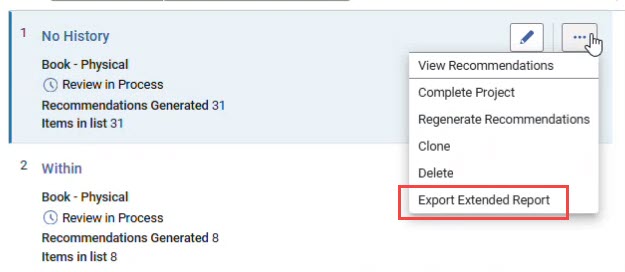
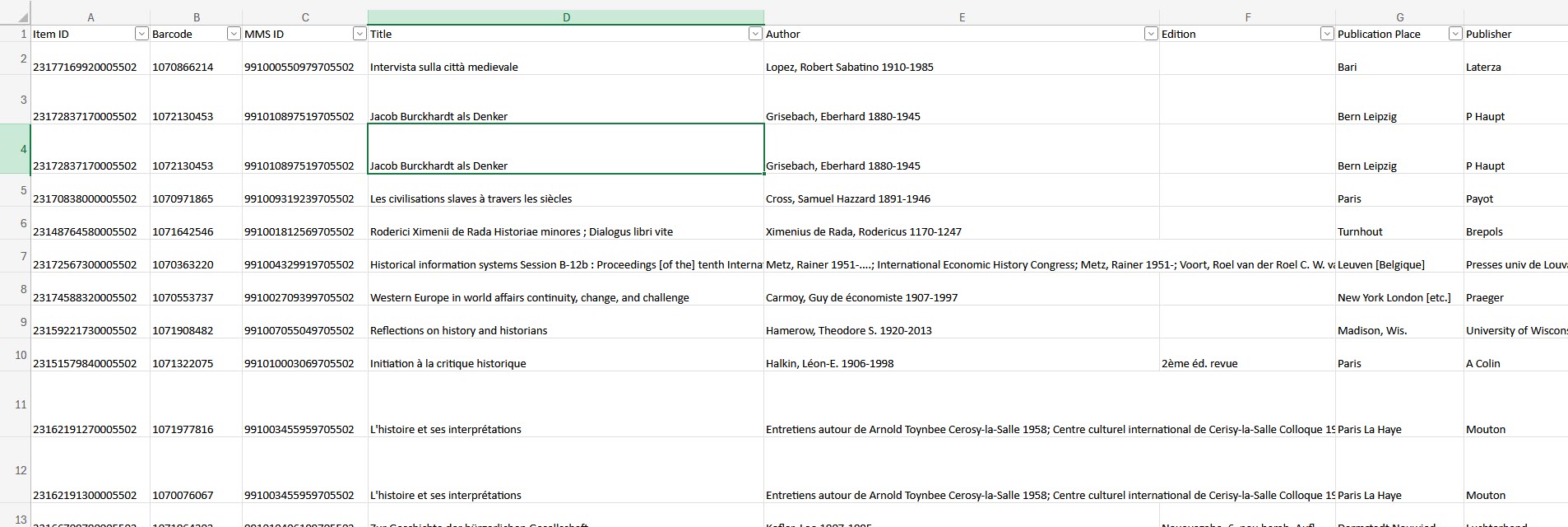
The export produces an Excel file containing detailed information on all active recommendations from the project, along with comparable data for all matching titles from the selected comparison institutions.
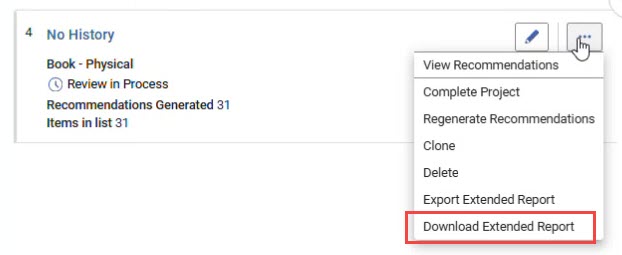
Once a report is generated, a notification appears in the top-right corner of the interface to let the user know it is ready. The report can then be downloaded using the Download Extended Report option in the same three-dot menu. This action is only visible after an extended report has been created. All generated reports can also be viewed or downloaded from the History tab in Admin > Manage Jobs and Sets > Monitor Jobs.
This feature delivers a rich, consolidated view of project recommendations, bringing all relevant data together to support confident retention and deselection decisions. For details, see Creating and Downloading an Extended Report.
Link Resolver Improvement for Video Records in Network Environments
February 2026 Resource Management
Collaborative NetworksURM-248355
We have enhanced the link resolver's search mechanism for video records in network environments. It now accurately identifies video records and distinguishes them from book records, reducing false matches and preventing book links from appearing when patrons search for videos.
For more information, see Alma Link Resolver Workflow.
Complete Record of All Changes in History for Electronic Resources
February 2026 Resource Management
Idea Exchange
CERV Enhancement (ID#36487)URM-319130
The e-resources History tab now records changes made by the CZ synchronization, as well as local changes made by system jobs or operators. This applies to electronic collections, electronic services and electronic portfolios. Updates from the Community Zone will appear with "operator" = "system", as do other system job changes. This development also includes the recording of changes to the general notes and the additional PO lines, which were not previously saved in the history.
For more information, see Managing Electronic Resources.
Autoholdings for Oxford University Press
February 2026 Resource Management
Idea ExchangeURM-252900
Libraries can now automate the management of licensed OUP content by using autoholdings.
Once the integration is set up, Alma automatically retrieves a standardized KBART file containing monographs and serial holdings information from the provider's platform and updates the corresponding collections. This integration removes the need for manual updates, reducing staff workload, saving significant time and enhancing accuracy.
For more information, see Upload Electronic Holdings from Oxford University Press.
Holdings Retention by MARC Fields
February 2026 Resource ManagementURM-319641
Institutions can now define holdings with specific metadata as "committed to retain", thus protecting them from deletion, even if the holdings do not have items. Retention blocks manual and batch deletion.
Definition rules are defined on the Holdings Records Retention definition page at Configuration > Resources > Collection Retention > Holdings Records Retention Definition.


The retention indication on the holdings level is also available in analytics in the following fields:
- Holdings Committed to Retain (Physical Items SA)
- Has Holdings Committed to Retain (Titles SA)
- Has P-Inventory Committed to Retain (Titles SA — indicates whether the title has any items/holdings that are committed to retain)
Retention from holdings is not passed on to the items, i.e., items do not inherit the holdings' retention status. To protect items from deletion, you must define the item itself as committed to be retained in the item editor.
Retention indication is applied during indexing. The new logic applies only to newly created or updated holding records. To ensure the logic is also applied to existing records, contact support to request indexing.
For more information, see Working with Holdings Records,Physical Items and Titles.
Support for German XRechnung Standard when Creating Invoice from XML
February 2026 AcquisitionsURM-212199URM-315492
Users can now create invoices in Alma from XML file, of the German e-invoice standard XRechnung.
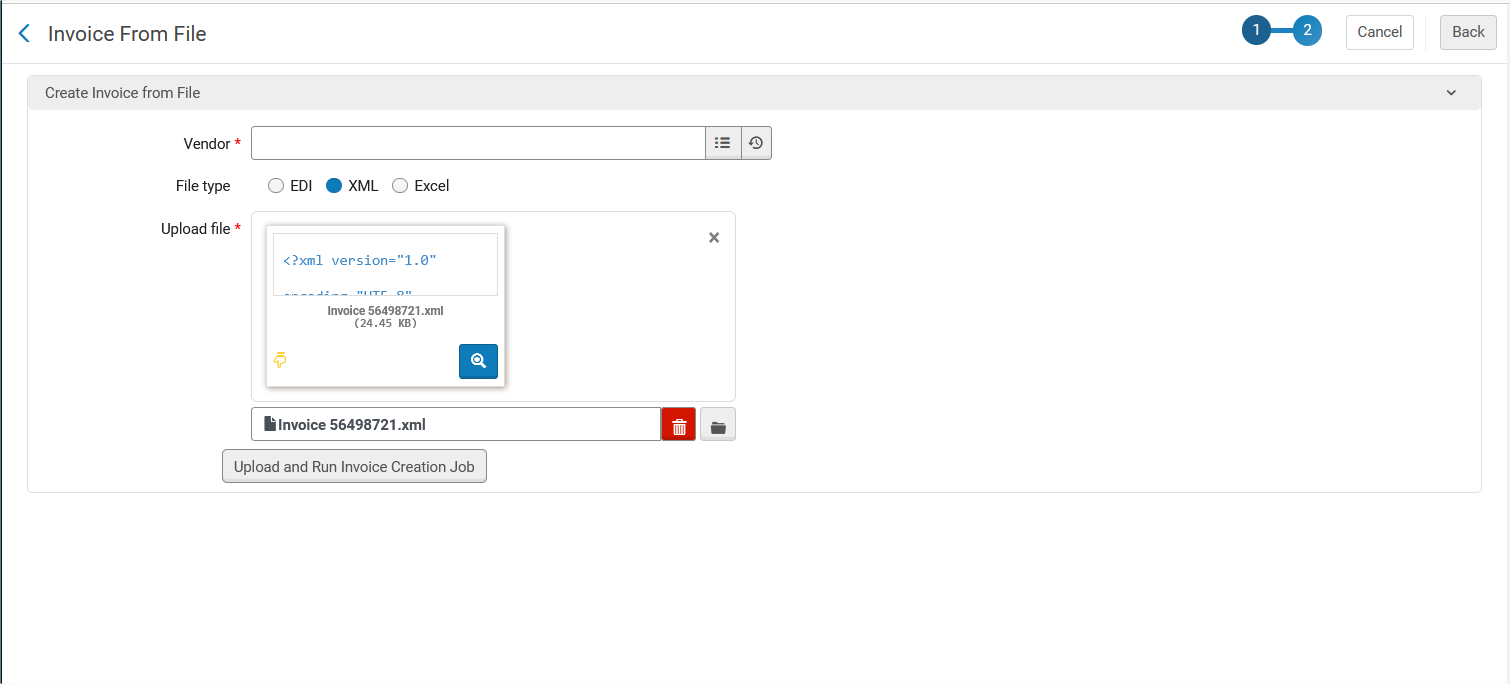
For more information, see Creating Invoices.
Additional Options for EDI Configuration
February 2026 AcquisitionsURM-212199URM-315492
Two additional fields were added to the input job parameters at Vendor > EDI Information > Input Job Parameters.
- Default VAT— Appears when Use VAT Code is set to true. The VAT default will be used (and set for the invoice) when there is no value in the input file for VAT code, or when there is a value which does not match the VAT Codes table. Note that Default VAT only applies to the invoice level. Even if the VAT In Invoice Line Level field is set to true, the default VAT is ignored.
- Internal copy— When true, the created invoice for this vendor will have the Internal copy field checked (meaning it will not be sent to ERP).The new fields will not impact the current setup and will have null/false values by default.
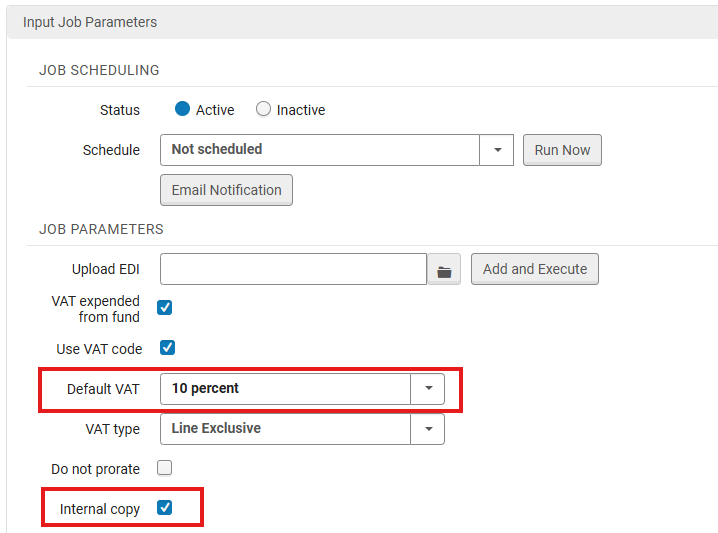
Both these fields apply to invoice creation from EDI, XML and Excel.
For more information, see Electronic Data Interchange (EDI).
More "Interested In" Letter Fields can be Customized
February 2026 Acquisitions
Idea ExchangeURM-208307
The Interested In letter is sent in different scenarios (upon receipt of the item, upon activation of the resource and upon cancellation of the PO line). Previously, the subject and other message labels were the same in all these cases. Now, the labels can be customized for each of the following use cases, enabling users to write a different subject line and message body depending on the trigger event.
The three main use cases that now have unique customization fields are:
- Receiving
- subject_received
- letter_name_received
- details_received
- details_item_arrival_time
- Activation
- subject_activated
- letter_name_activated
- details_activated
- Cancellation
- subject_cancelled
- letter_name_cancelled
- details_cancelled
These fields can be customized from the Labels table when editing the letter (Configuration > General > Letters Configuration > Interested In Letter > Labels).
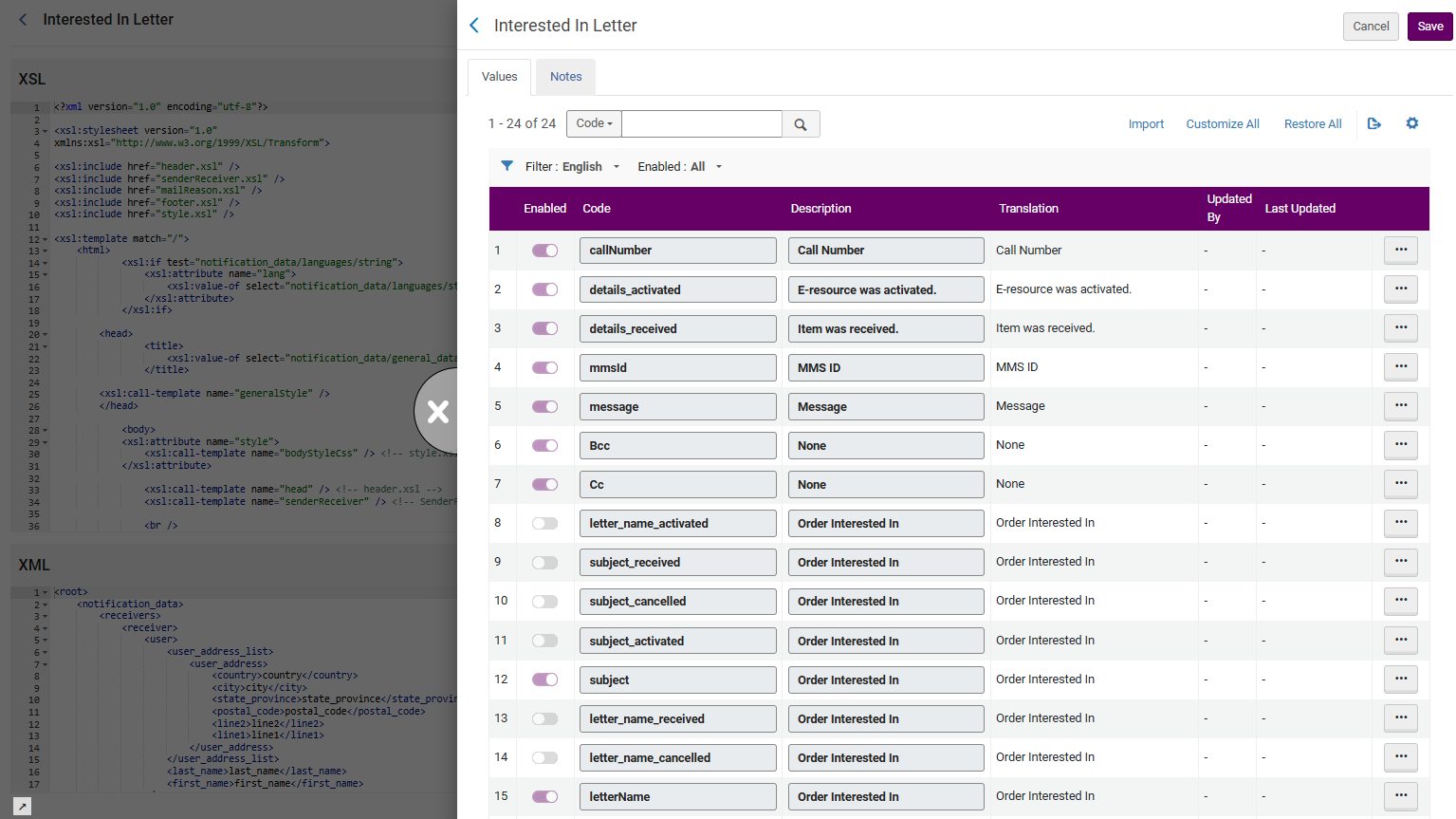
For more information, see Configuring Alma Letters.
PO Line Cancellation: Enable Deletion of Related Inventory Even if Linked to CZ
February 2026 Acquisitions
Idea ExchangeURM-319332
Until now, when cancelling PO line, the portfolio would only be deleted if it was a standalone local portfolio and inactive. A new customer parameter (delete_linked_portfolio_upon_pol_cancellation) was added. When set to true, inactive portfolios that are linked to Community Zone or that are part of an electronic collection will now also be deleted, in addition to the local portfolio.
The parameter is set to false by default. It can be accessed from Configuration > Acquisitions > Other settings.
For more information, see Closing, Cancelling, Reopening and Relinking PO Lines.
Rialto Status in PO Line General Information
February 2026 AcquisitionsURM-199550
When a PO line was created as part of the Rialto workflow, the Rialto status is now shown in the PO line General Information section.
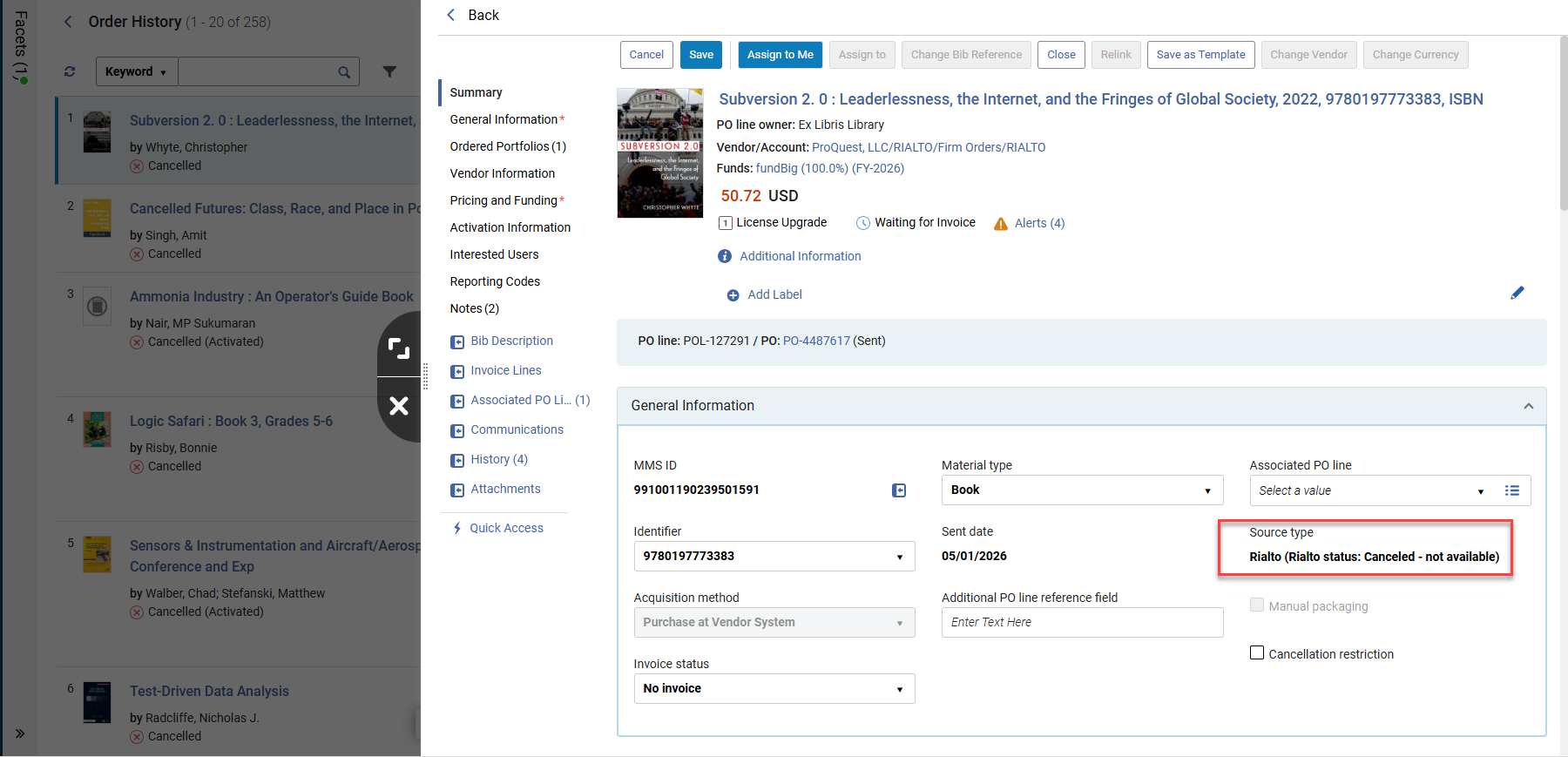
For more information, see Manually Creating a PO Line.
Option to Place Requests on Title and Item Level from PO Line
February 2026 Acquisitions
Idea ExchangeURM-207490
Users can now place requests from the PO line on the title and item level:
Title level— Using the Request Title action.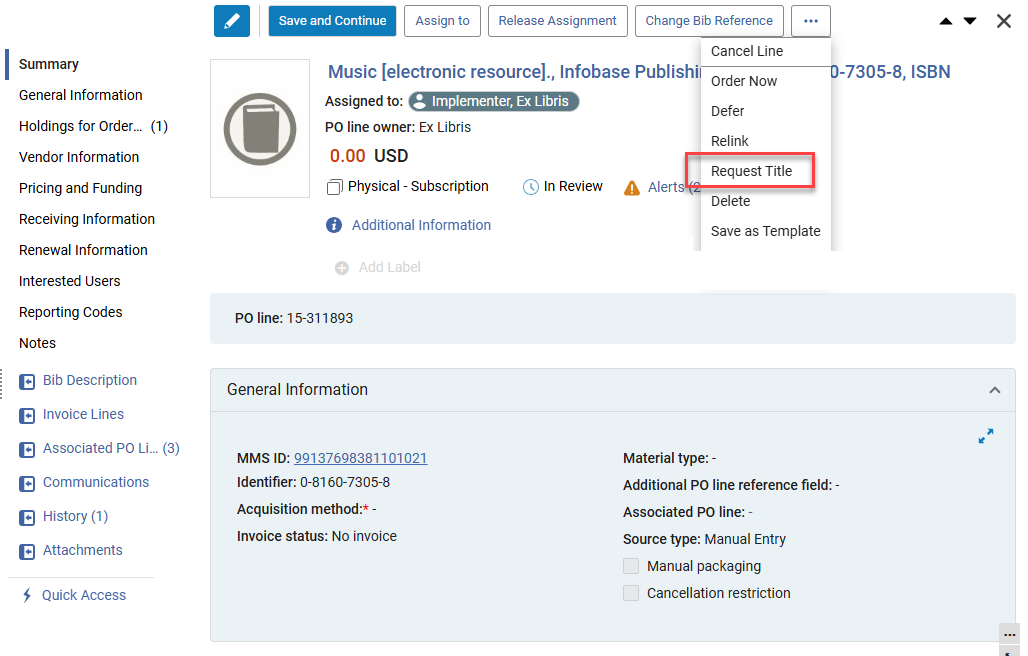
Item level— In the Ordered Items and in the Items in Claim sections, using the Request Item action.
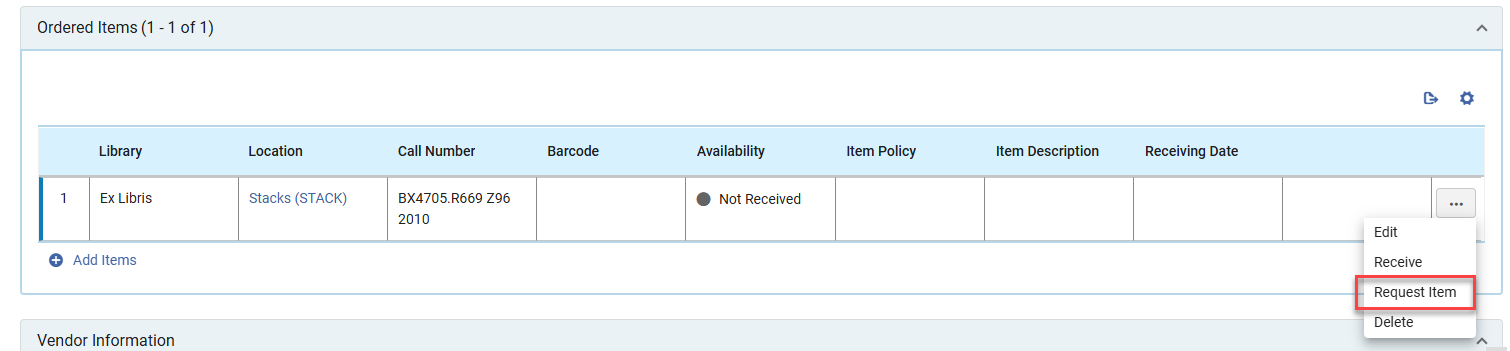
The actions are displayed for physical PO lines. Users will see the available request types according to their user privilege, just as if the request were placed from a list of items or a repository search.
For more information, see Manually Creating a PO Line.
Link to Holdings Record from PO Line Right Pane
February 2026 AcquisitionsURM-313474
The PO line title in the right pane now links to the institution record in a sliding panel.
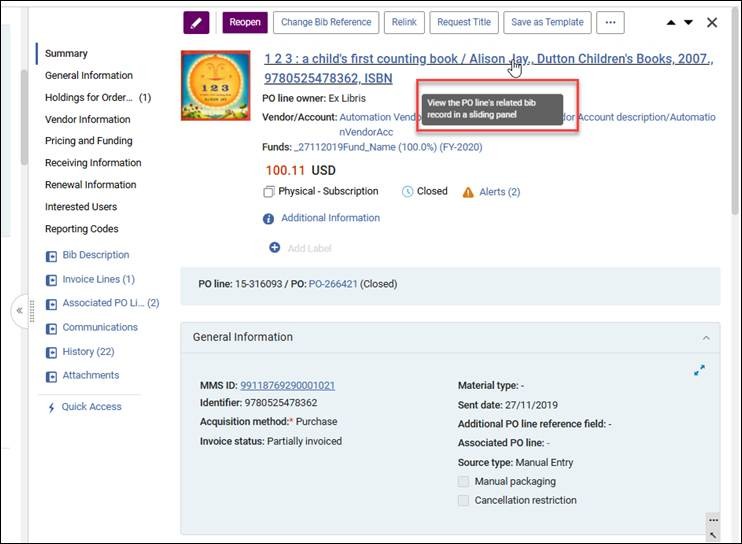 Link to sliding panel
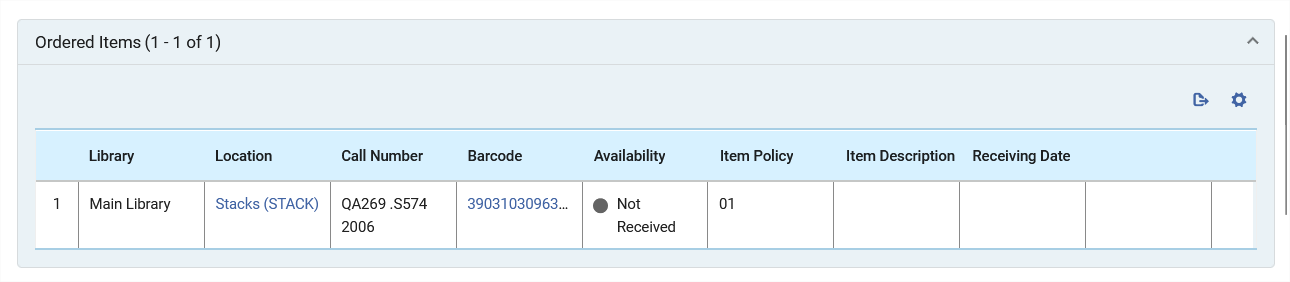
Additionally, the Location column in the following tables will now link to the Holdings record:
- Ordered Items
- Holdings for Ordered Items
- Items in Claim
For more information, see Manually Creating a PO Line.
New API for Creation of Allocation and Transfer Fund Transactions
February 2026 AcquisitionsURM-249499
Users can now use POST in the fund transactions API as follows:
POST /almaws/v1/acq/funds/{fund_id}/transactions
The supported transactions that can be created are:
- Allocation
- Transfer
For more information, see t he Developer Network.
Additional COUNTER Report Attributes for SUSHI R5/R5.1. Harvesting
February 2026 Acquisitions
Idea ExchangeURM-253611
Users can now select additional attributes for SUSHI harvesting COUNTER R5/R5.1 reports: DR, IR, PR and TR. This enables the Access type and other attributes to be included in the harvested reports, enhancing the functionality for title (and other) reports.
For the institution-level defaults, the attributes can be selected from Configuration > Acquisitions > COUNTER R5 Additional Attributes for SUSHI Harvesting.
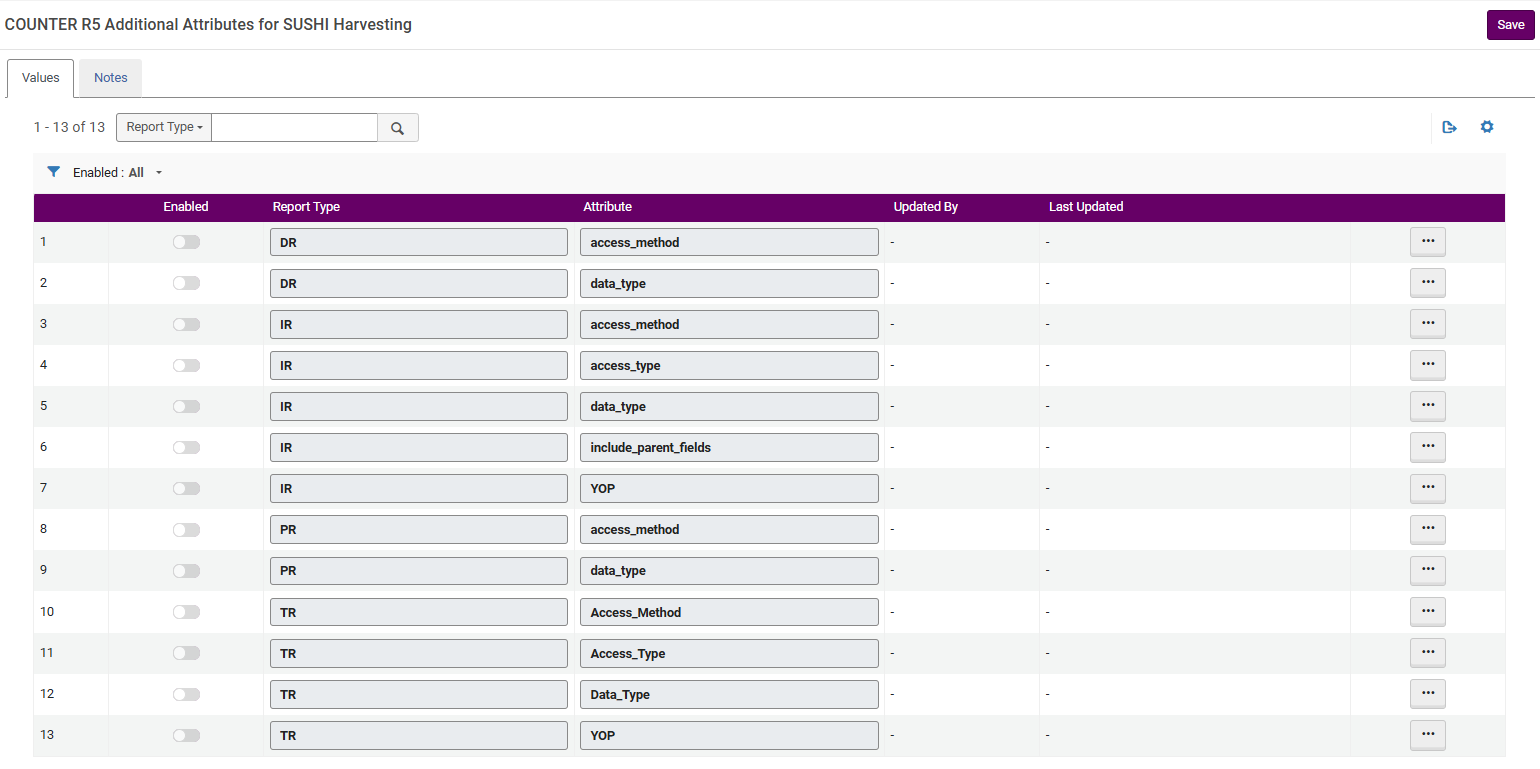
Attributes can also be selected for the SUSHI account level.
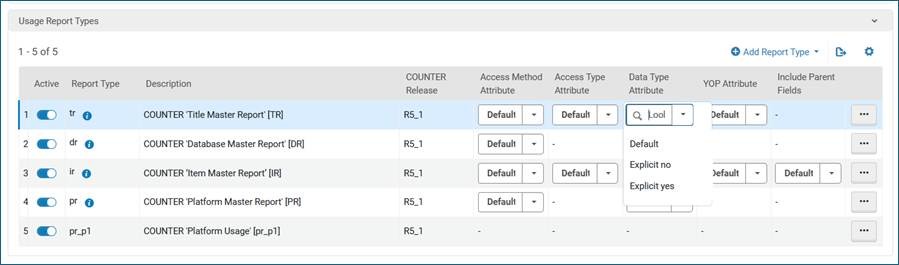
The report level options are:
- Default— Take the values set in COUNTER R5 Additional Attributes for SUSHI Harvesting
- Explicit yes— Send this attribute, no matter what settings are in COUNTER R5 Additional Attributes for SUSHI Harvesting
- Explicit no— Don't send this attribute, no matter what settings are in COUNTER R5 Additional Attributes for SUSHI Harvesting
For more information, see Managing COUNTER - Compliant Usage Data.
Relative Date Search Operators for Order Lines Search
February 2026 AcquisitionsURM-241620
When searching order lines, users can search by relative dates. This is available for:
- Creation date
- Is Within the Last (days)
- Is Older Than (days)
- Sent date
- Is Within the Last (days)
- Is Older Than (days)
- Renewal date
- Is Within the Last (days)
- Is Older Than (days)
- Is Within the Next (days)
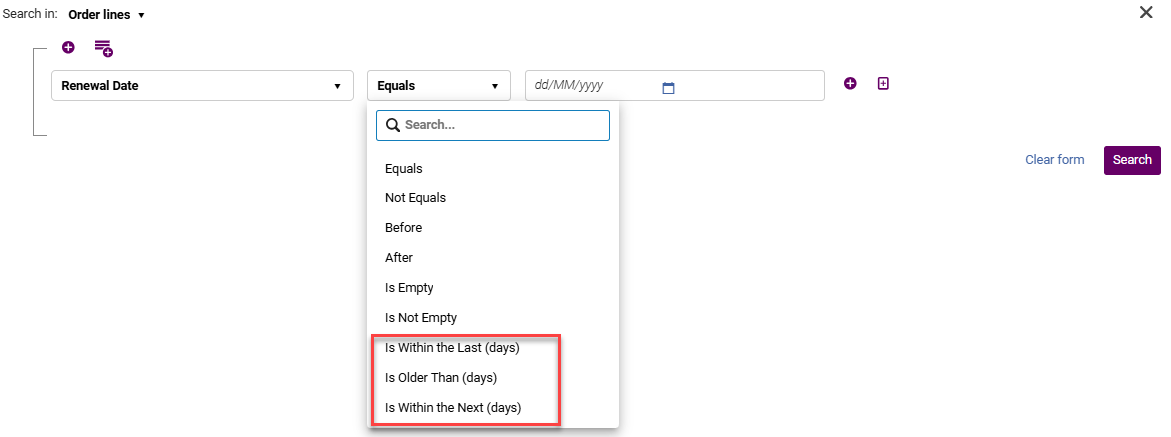
For more information, see Searching for PO Lines and Using Facets to Refine Results.
New Order Import Profile: Option to Use Call Number for Holdings Matching
February 2026 AcquisitionsURM-306026
The New Order Import profile looks for the holding on which the item should be created. This match is based on the library and location.
Institutions can now configure this match to also consider the call number. This can be achieved by setting the eod_match_holdings_by_call_number customer parameter (Configuration > Acquisitions > Other Settings) to True. When the call number is different from that of an existing holding for the matched bibliographic record, a new holding is created.
If more than one matched holding is found, a new holding is created, as the system cannot determine which one to use. This is the existing behavior when multiple matches are found based on library and location.
- This new feature assumes a mapping to 852h.
- When the parameter is set to true, and the call number has an empty value, the behavior is as follows:
- When there is one existing holding in the matched bib, the item is created for this holding.
- When there is more than one existing holding in the matched bib, a new holding is created.
For more information, see Managing Import Profiles and Other Settings.
Support Services for Consortia Central Office
February 2026 Collaborative Networks
URM-215332URM-226822URM-317340
It is now possible for the Network Zone operator, from the Central Configuration Dashboard, to perform a defined set of maintenance and troubleshooting tasks on behalf of its member institutions. These include support services and utilities that were previously handled only by Ex Libris support, enabling faster problem resolution and proactive system management at the consortial level.
This enhancement empowers the Central Office to support its members more effectively by performing direct maintenance and troubleshooting actions. It strengthens the Central Office's role as a service provider, improves response times for member institutions, and reduces reliance on external support for common issues.
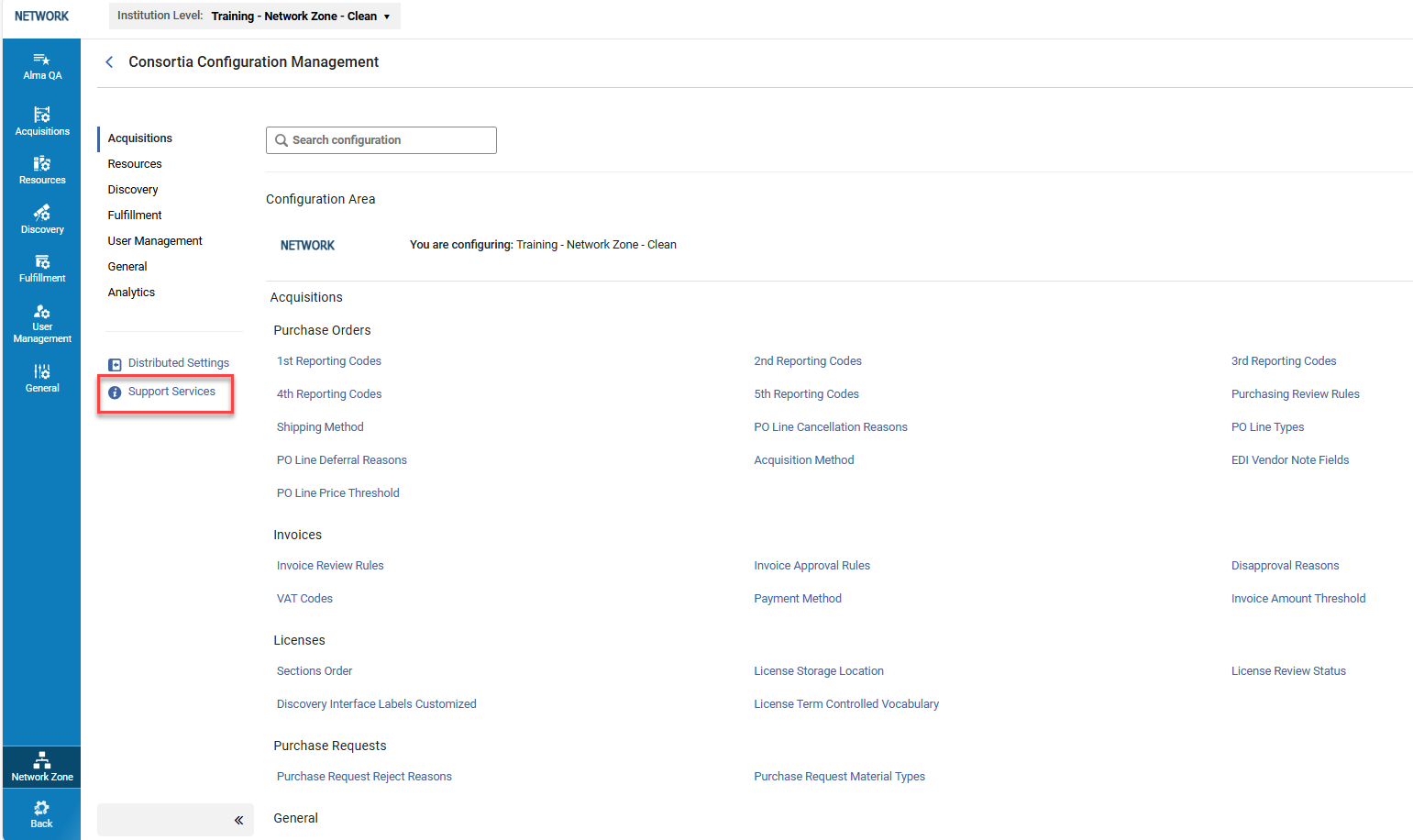
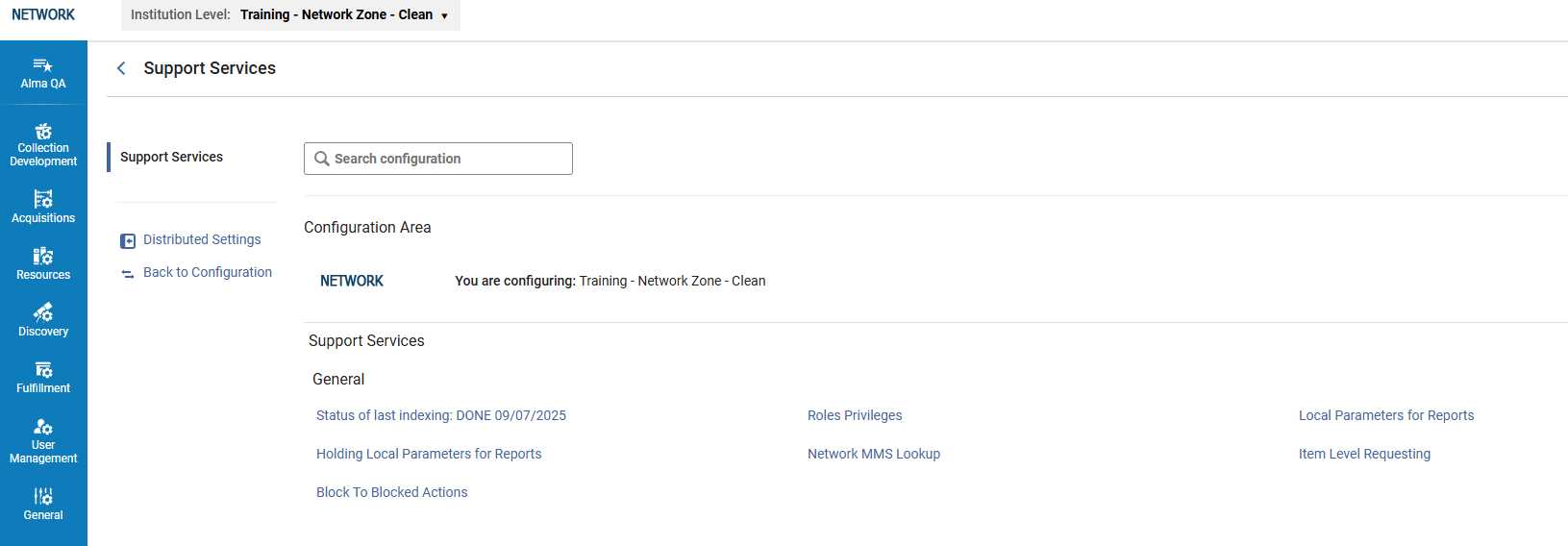
This new feature is only relevant to Consortia with a Network Zone setup. The Network Zone operator must have the Support Services role in order to access and use these tools.
For more information, see Support Services.
New Additions to the Central Configuration Dashboard
February 2026 Collaborative Networks
URM-319235URM-319507URM-319423
The following information was added to the new Central Configuration Dashboard:
- Activate Linked Open Data Formats page to expand the exposure of Linked Open Data across the network.
- Homepage Notifications for management and distribution.
- Usage Calculation mapping table in a brand new Collection Development section to offer a central management and distribution across members without the need to opt-in locally in the Data Sharing profile.
- Partner Sectors, Partner Organization Type and Partner Account Allowances code tables for central management of Resource Sharing and Rapido.
These additions enable the central office to work more efficiently, reducing time spent applying central policies.
These features are relevant only for consortia operating with a Network Zone setup.
Shared Blocks Across the Fulfillment Network for Network Zone Managed Users
February 2026 Collaborative Networks
Idea ExchangeURM-314620
Previously, in a Network where users are managed at the Network Zone level, patron blocks could only be shared from the Network Zone to the institutions where the patron had local accounts. It is now possible to share blocks from any institution with any other institution where the patron has an active account.
This enables patron blocking more easily and efficiently across the entire network where users are managed in the Network Zone.
For more information, see Configuring User Blocks and Managing Users.
Combination of Electronic Resources Activated at Network Zone and Institution Zone for Online Services Order
February 2026 Collaborative Networks
Idea ExchangeURM-248932
It is now possible for the Member Administrator to select from a combined list of electronic resources activated at Network Zone and Institution Zone levels in the Online Services Order configuration. At the Network Zone level, the operator (from the dashboard) can still update the order for these services for the Network (only local resources from the network) and for the Members (combined list of local and network resources).
This enhancement improves efficiency by allowing the combination of Network and Institution Zone electronic resources for improved services.
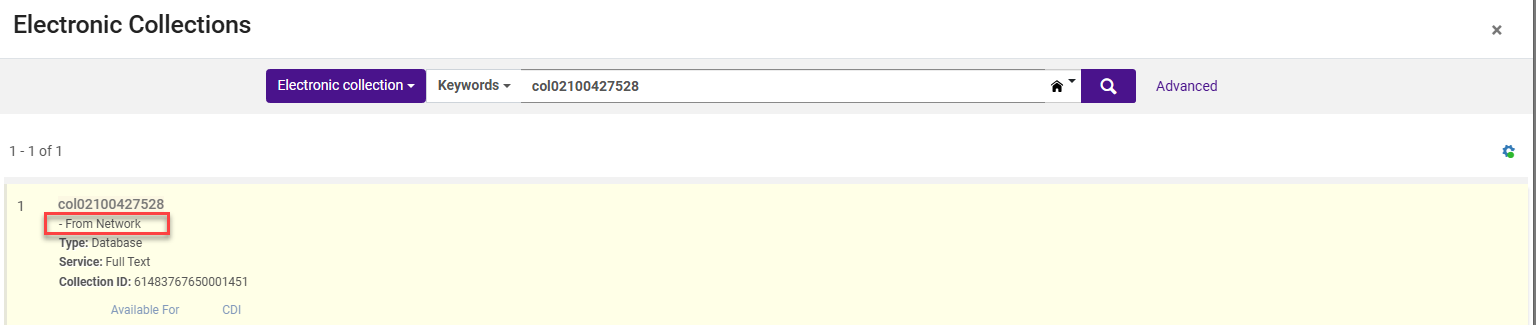
This new feature is only relevant to Consortia with a Network Zone setup.
For more information, see ViewIt.
Support for Italian in Online Help
February 2026 User Experience, Accessibility & InfrastructureURM-320535
Support for Italian was added to the online help.
When working in the Italian user interface and accessing the online help, it now opens automatically in Italian.
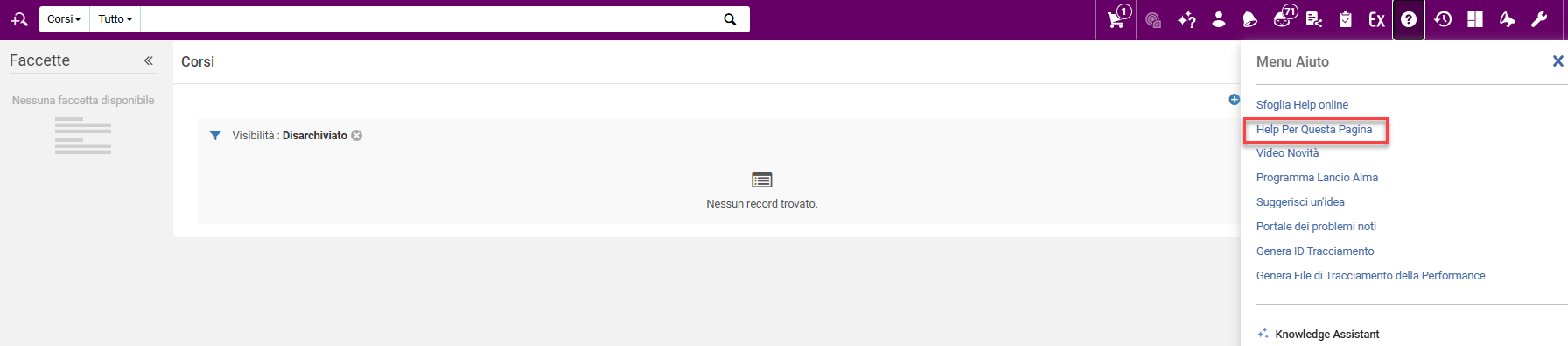
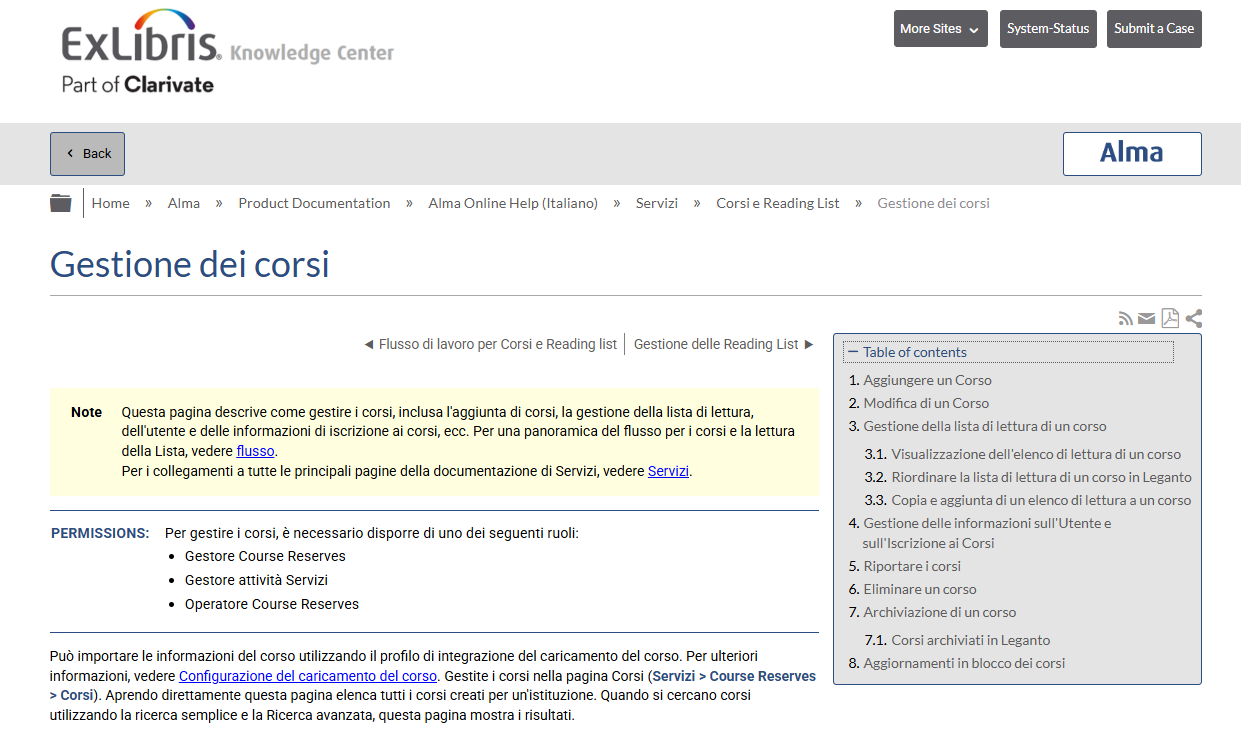
For more information, see Alma User Interface.
Enhanced Performance for Searching Combo Boxes in New UX
February 2026 User Experience, Accessibility & InfrastructureURM-317339
Enhanced functionality was added to support searching combo boxes with long lists of options (above 200) in the Alma new UX, for example, in the Advanced Search. Previously, when opening a combo box list with many options, opening the list caused performance issues. Now, as you scroll down, more options are auto-loaded. The user can now scroll to view all the results, and the general performance was improved without changing the current functionality of searching the combo box.
User ID Appended to System for Manual Jobs
February 2026 User Experience, Accessibility & Infrastructure
CERV Enhancement (ID#36485)URM-319756
When running manual jobs, the user ID can now be appended to "System" in Alma entities updated by the job. For example, when the user John_Branson runs a manual job, instead of "System" appearing in the Physical Item Editor Modified-By field, Alma now displays "John_Branson (System)".
This requires the detailed_creator_and_modifier_for_job_changes parameter (Configuration > General > General Configuration > Other Settings) to be set to true (false by default). Note that enabling this parameter causes a change in the data from this point on, and this data change cannot be modified retroactively. Disabling this parameter again causes a change in the data from that point onwards, and again cannot be modified retroactively.
This feature only applies to:
- Manual jobs (non-scheduled) when the Run Now button is used

- Scheduled jobs when the Run button is used
This field is commonly used in analytics reports (for example,Modified by in the Physical Items Subject Area). Upon enabling the new customer parameter, the data will change accordingly from this point forward, and no retrospective data correction is performed. The same applies when this parameter is disabled.
For more information, see Manual Jobs and Configuring Other Settings.
New Link to Known Issues Portal from Alma Help Menu
February 2026 User Experience, Accessibility & InfrastructureURM-318466
A new link to the Known Issues Portal was added to Alma's Help menu. This link opens the Known Issues page in a new browser tab. This update improves access to the Known Issues Platform, helping users stay informed about current issues and reducing the need to open support cases for existing known issues.
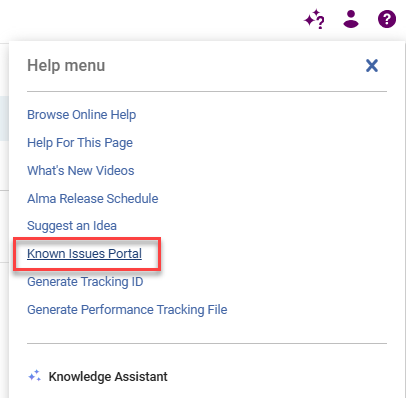
For more information, see Alma User Interface.
Support for Actions Configuration in Manage Sets List
February 2026 User Experience, Accessibility & InfrastructureURM-254477
You can now customize the display and order of the actions for the Manage Sets list.
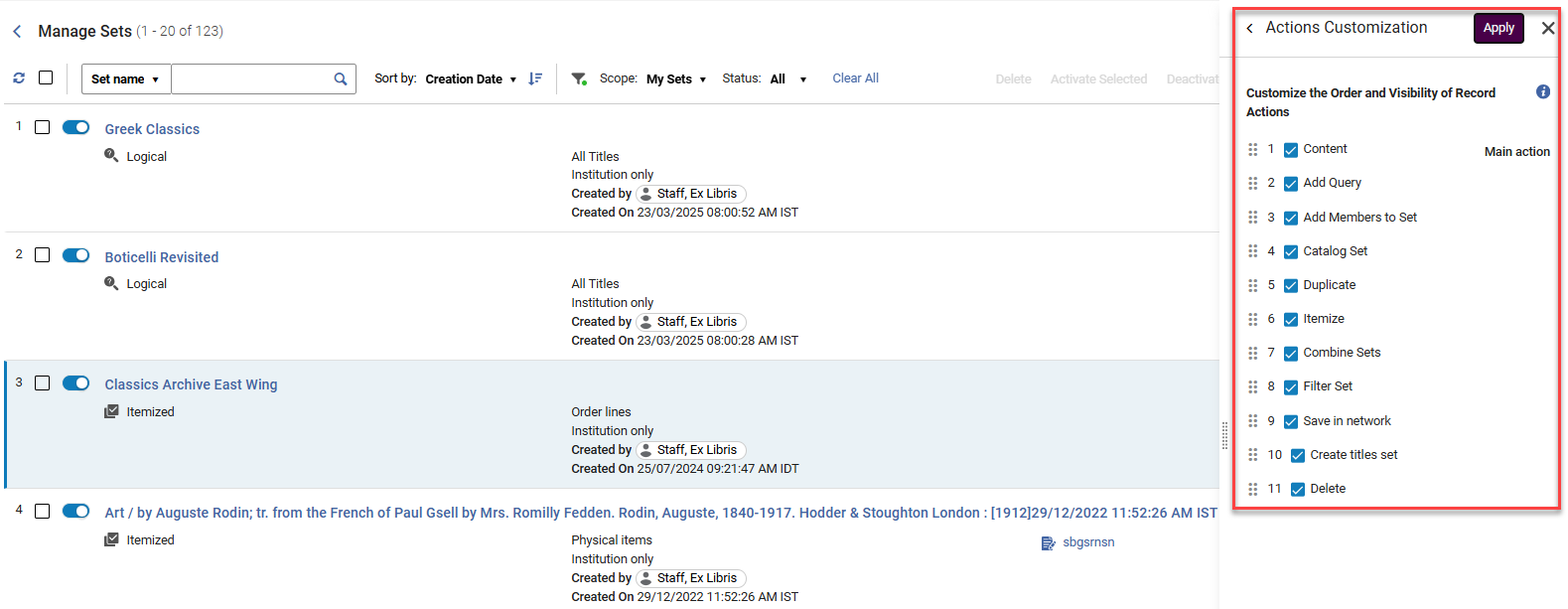
For more information, see New Layout.
Enhanced Display and Behavior for Related Sets, Filter and Combine Badges and Set ID Label in Manage Sets List
February 2026 User Experience, Accessibility & InfrastructureURM-315101
The Related Sets description in the Related Sets section in the Manage Sets interface was updated to be more meaningful and improve clarity and consistency as follows:
- New badges were introduced to indicate the type of relationship:
- Used for combined sets
- Combined set
- Used for filtered sets
- Filtered Set
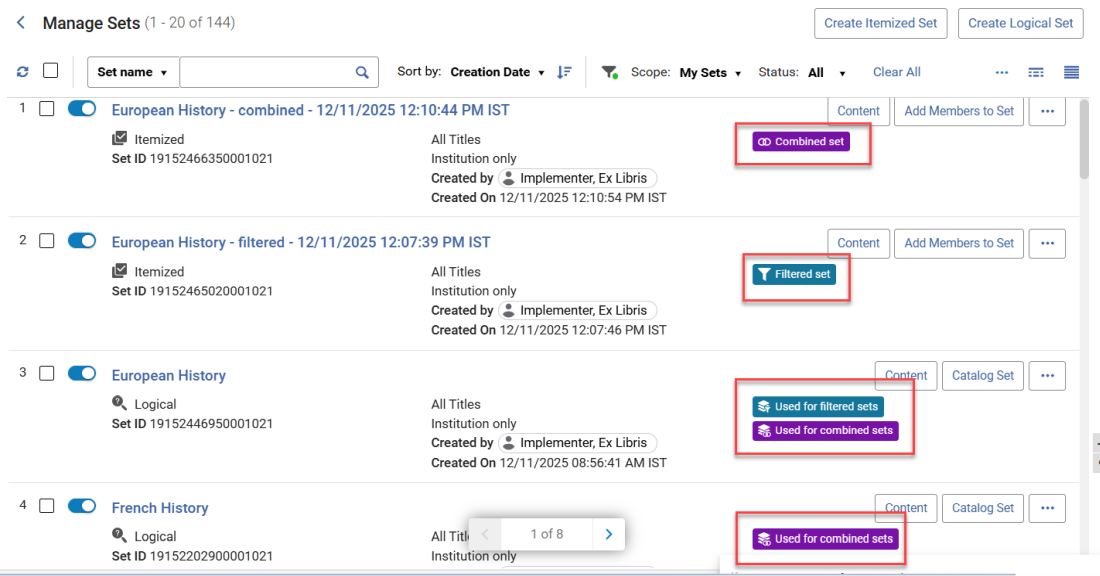 New Badges
- The Related Sets section in the Manage Sets page was enhanced to be more informative and improve clarity and consistency:
- Set IDs are now displayed at the end of each set name.
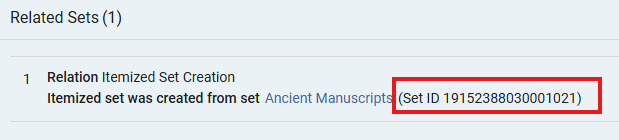 Set ID in Related Sets
 - The related sets display logic has been updated to better handle scenarios where sets are deleted or updated, ensuring an accurate representation of relationships. Filtered sets whose "parent" was deleted are now indicated as such.
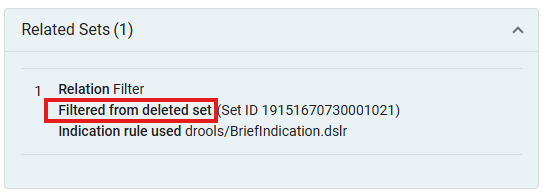 Deleted Parent in Related Sets
 - Additional relations are now included, showing related set details for actions like Create Titles Set and Itemize.
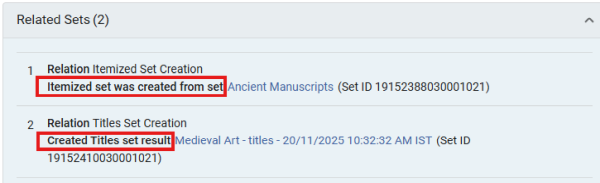 Itemized and Created Title Sets in Related Sets
- Set IDs are now displayed at the end of each set name.
- Updates/changes to sets (e.g., name change, adding members, etc.) that are part of a relation, no longer affect the display of the badges (for filter or combine operations) or the related set information in the Related Sets section.
- This change will not affect existing sets and existing sets relations and will take effect from this point onwards.
Additionally, the Manage Sets list now includes the Set ID information displayed in the first column of set information in the list, in addition to its current display in the right panel.
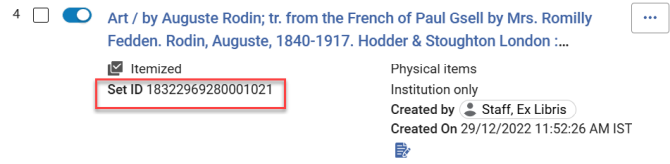
For more information, see Managing Search Queries and Sets.
Support for Plain Text Email
February 2026 User Experience, Accessibility & Infrastructure
Idea ExchangeURM-316414
Alma now provides an option to include plain text on top of the HTML version. This provides patrons with plain-text email clients the ability to view emails from Alma.
This feature can be enabled by setting the include_plain_text_in_emails parameter to true (Configuration > General > Other Settings).
For more information, see Configuring Other Settings.
User-Controlled Default Collapse State for Success Fly-In Messages
February 2026 User Experience, Accessibility & InfrastructureURM-254820URM-252468
The success fly-in messages checkbox was updated to enable users to set the default display state (collapsed or expanded) for success messages. Prior to this change, in pages with the new user interface, the default selection was for that specific message. Now, when selected, all similar message types on the same page follow the chosen default behavior. This change aligns the behavior with pages that do not have the new interface, and enables users to reduce visual clutter by collapsing success messages on the same page by default.
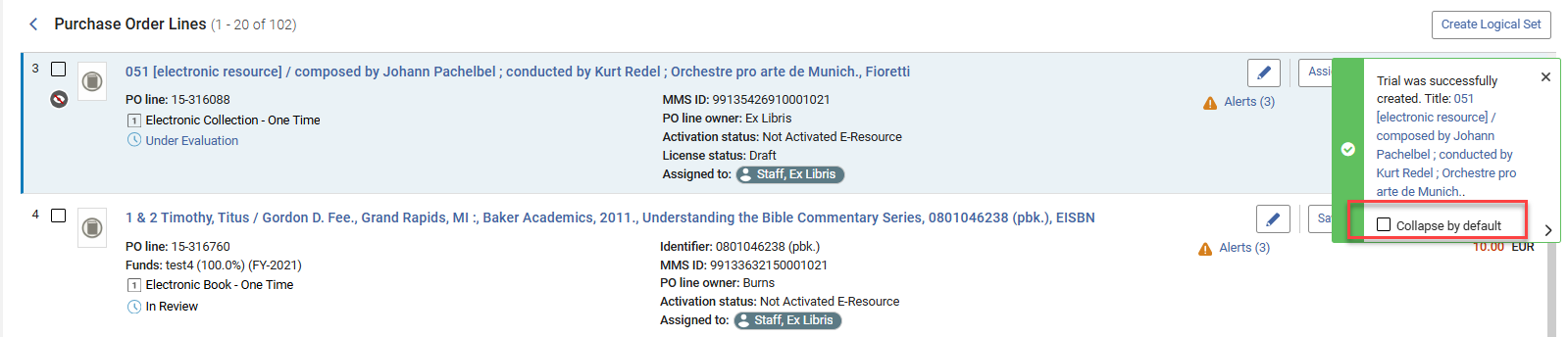
For more information, see Alma User Interface.
Search Users by Role and Scope
February 2026 User Experience, Accessibility & InfrastructureURM-221935
It is now possible to search for user records in the Advanced Search by role and scope, for example, to search for users with a circulation desk operator role in the scope of the Main Library. This new option enhances search options and enables the creation of user sets based on their roles and scopes.
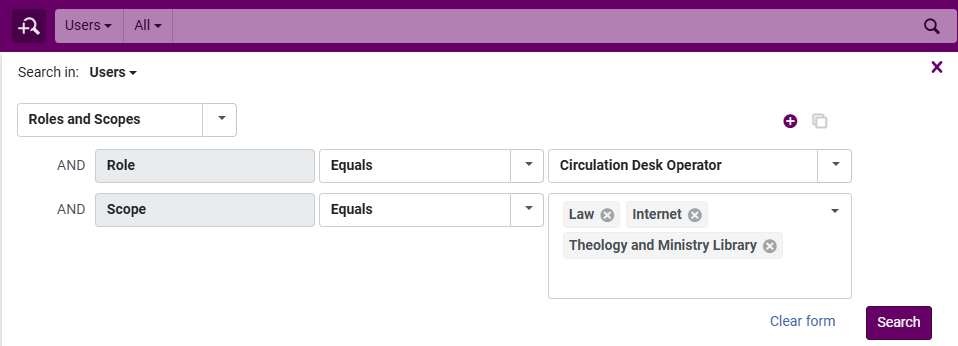
For more information, see Searching in Alma.
Secondary Search for Titles/Holdings Search Results and PO Lines
February 2026 User Experience, Accessibility & InfrastructureURM-254820URM-248061
When searching for titles, holdings or PO lines in Alma, it is now possible to perform a secondary search within the search results. This is also available when viewing logical set content, allowing for easy location of specific set members. This is especially useful for users who want to quickly or temporarily refine their search query, without having to update an advanced search with additional search criteria.
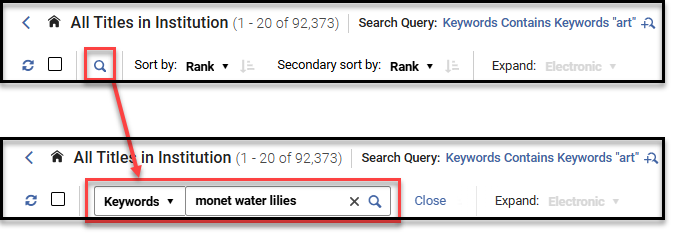
For pages with a Search Query, the secondary search is added to the search query.

After performing a secondary search, it is possible to save the refined results as a logical set.
The secondary search is also available when viewing the content of a logical set of any of these search types.
For more information, see Secondary Search.
New Encryption for User ID Encryption Field in Fulfillment Subject Area
February 2026 Analytics andInsightsURM-318457
The User ID Encryption field in the Fulfillment Subject Area in Analytics is used to obtain counts by user ID after the anonymization job is run, which deletes the Primary ID. This field is now calculated using a new encryption method.
Existing reports using a specific value as a filter may need to be reviewed and updated to ensure they continue to function as expected.
For more information, see Analytics Fulfillment Subject Area.
Flexible Definition of Local Parameters Being Sent to Analytics
February 2026 Analytics and InsightsURM-317332
Users can now decide which parts of a MARC field (indicators and subfields) are sent to Analytics through local parameters. This is possible for both bibliographic and holdings information. It provides more control over data granularity in reports, enabling a more accurate and focused analysis.
For more information, see Holding Details and Administrative Bibliographic Details.
Additional Enhancements
- February 2026 AcquisitionsURM-315421 In the receiving workbench, when selecting 25 or more PO lines for receiving, or when they have more than 25 items together, the receiving will now be done by a job. This is designed to enhance performance in cases of large selections. When the job has completed, a message is displayed that the job has finished, and the results of the receiving are displayed
Upcoming Issues to Note
Collection Development Consent Updates to Include Item-Level Data
July 2026 Resource Management
In the August 2026 release, the Collection Development data‑sharing consent will be updated to include discoverable item‑level data.
This update follows a request from our Early Adopters group, who found that discoverable item‑level data can be valuable in specific scenarios when making collection development decisions.
This change will not affect existing opt‑in status.
Updates to OCLC Control Number Indexes
In the May 2026 release, we will be changing the following indexes.
- Other System Number (035a)
- Other System (035a) Exact
- OCLC Control Number (035a)
- Other System Number (035z)
- OCLC Control Number (035z)
- Other System Number (035a+z)
- OCLC Control Number (035a+z)
The indexing of these fields will no longer split the values. For example, searching for SCR will now return values such as 202408SCR.
Enhanced Bibliographic Index Infrastructure
February 2026 Metadata & Linked Open DataURM-243681
Empower your institution with fully customizable bibliographic search indexes designed to deliver a smarter, more precise discovery experience. Our enhanced infrastructure lets you define indexes tailored to your institution's unique bibliographic data—giving you greater flexibility, improved search accuracy, and a powerful foundation for more intuitive workflows. With this new capability, you can shape your search experience to match your exact needs and elevate the way your users find and access information.
For more information, see Configuring Search.
Data Dictionary E-Inventory
February 2026 Analytics and InsightsURM-315554
As part of an ongoing project and in alignment with the Analytics Community of Practice, Ex Libris is currently enriching the documentation of analytics field tables with additional information. This initiative aims to assist and support users in comprehending how our Alma data is presented within the realm of Analytics fields. For this month, the following tables within the E-Inventory subject area have been updated:
Resolved Issues
| SF number | Area | Description |
|---|---|---|
| 08218470 07913344 URM-243237 | Acquisitions | Previously, there was an incorrect rounding in PO Lines created from an API when applying a discount, resulting in an inconsistency between the net price and total funds amount. This was fixed. |
| 8066446 URM-254712 | Acquisitions | In some cases, the classic Primo View It frame did not have white space padding between the Access Model field name and its value. This was fixed. |
| 8032144 URM-254885 | Acquisitions | Previously, PO line Ordered Collection results were inconsistent. This was fixed. |
| 8164681 URM-316372 | Acquisitions | Previously, the Has Content blue triangle indicator was missing from the Licenses History tab. This was fixed. |
| 8179190 URM-317510 | Acquisitions | Previously, the reclaim date did not behave consistently depending on how the date was changed. This was fixed. |
| 8232300 URM-319152 | Acquisitions | Previously, the request URL construction did not include proper normalization of spaces into valid encoded characters. This was fixed. |
| 07831409 08252574 08252187 08262143 07842204 08257233 08273133 08274260 08289623 08288954 URM-319251 | Acquisitions | Previously, when the parameter po_line_description_update_upon_bib_change(Configuration Menu > Acquisitions > General > Other Settings) was enabled in a Network Zone environment, when the Network Harvesting Job executed to distribute changes to the linked records in member institutions, the member registered was not updated. This was fixed. |
| 8242222 URM-319321 | Acquisitions | In some cases, the Import job failed. This was fixed. |
| Analytics and Insights | In cases of long harvesting jobs, data was missing from Analytics. This was fixed. | |
| 8082221 URM-314858 | Analytics and Insights | Previously, some successfully harvested COUNTER files were not loaded into Alma Analytics, causing missing usage data. This was fixed. |
| 8231753 URM-319238 | Analytics and Insights | After the fix, when an admin revokes a user's access to a report, the associated notification is automatically removed from that user's account. |
| 8230381 URM-319455 | APIs | Previously, when searching for a letter configuration for the SystemJobLetter using the API, the wrong configuration was returned. This was fixed. |
| 8242097 URM-320904 | APIs | Previously, the SAML Certificate Expiration Email was sent despite the letter being disabled. This was fixed. |
| 6776553 URM-205111 | Fulfillment and Resource Sharing | SLNP: Previously, Alma returned an error response 510 Command not supported to the ZFL server, even though the lending request was correctly created in Alma. This was fixed. |
| 8115275 URM-314820 | Fulfillment and Resource Sharing | Previously, the Creation Date on resource sharing partners copied from the Community Zone was set to the current date rather than the date the partner was created. This was fixed. |
| 8186877 URM-316613 | Fulfillment and Resource Sharing | Previously, the measure Days of Request to Material Arrival was not accurate. This was fixed. |
| 8152977 URM-316622 | Fulfillment and Resource Sharing | In some cases, partners originating from the Network Zone received incorrect information from the Community Zone. This was fixed. |
| 8169326 URM-317095 | Fulfillment and Resource Sharing | Previously,Fill Locally workflow sometimes created a lending request to the wrong member. This was fixed. |
| 8219563 URM-317155 | Fulfillment and Resource Sharing | Previously, when a loaned item was scanned, the booking request that was canceled remained in the system and was not deleted. This was fixed. |
| 8257361 URM-319328 | Fulfillment and Resource Sharing | There was no translation for the External Identifier on the Scan in Items. This was fixed. |
| 08258777 08119975 URM-319700 | Fulfillment and Resource Sharing | Previously, when using {rft.normalized_issn} in the General Electronic Services (GES), the ISSN value was removed entirely, resulting in an empty parameter (issn=&) instead of returning the normalized ISSN. This was fixed. |
| 8243713 URM-319882 | Fulfillment and Resource Sharing | Manage patron services: Previously, filtering loans by Loaning desk caused a display issue where the wrong number of loans was displayed. This was fixed. |
| 8239481 URM-320133 | Fulfillment and Resource Sharing | In some cases, using the Exact Open Days option in the Grace Period policy caused problems when trying to return loaned items. This was fixed. |
| 8275396 URM-320305 | Fulfillment and Resource Sharing | Previously, when a lending request's overdue message failed to send, no indication was listed on the lending request's history. This was fixed. |
| 08351319 08351300 08353288 08351653 08352823 08349278 08349033 08343093 08353249 08351194 08353522 08354221 08353992 08349257 08356724 08352289 08357481 08359400 08358859 08353385 08358739 08361919 | Metadata Management | (Updated on 12 February 2026) The LoC iframe no longer works. LoC links will now open in a new tab instead of an iframe. |
| URM-317212 | Metadata Management | (Updated on 26 January 2026) In Metadata Editor records, when text spacing was in use, some content was cut off. This was fixed and it is now improved to comply with accessibility standards. For the fix to be implemented, the text_spacing_extension_correction parameter (Configuration Menu > Resources > General > Other Settings) must be set to true (the default is false). |
| 07950333 08059340 07811933 07900249 08223318 08279617 URM-242356 | Metadata Management | In some cases, searches from the Network tab returned Community zone server is down error when it should not have. This was fixed. |
| 7998094 URM-253332 | Metadata Management | Held By Details page: Holdings suppressed on the location level were not shown as suppressed. This was fixed. |
| 8164017 URM-316029 | Metadata Management | In some very specific cases, when browsing bibliographic headings, the same heading was duplicated in the results list. This is fixed. |
| 8216305 URM-317976 | Metadata Management | In some cases, when partial linking was activated in the Network Zone and not in the Institution Zone, editing an NZ record and reselecting the linked authority using F3 sometimes duplicated the subfields. This is fixed. |
| 08232956 08042063 URM-254705 | Resource Management | In some cases, the Deleted bib records counter in the report of the Withdraw Physical Items job was incorrect. This was fixed. |
| 08226846 08106801 URM-254901 | Resource Management | Relink holdings to another bib: if a matching holdings was found in the target bib, and the source holdings had many (thousands) items, the relink action did not complete. This was fixed. |
| 08164382 08104481 URM-313547 | Resource Management | In some cases, when adding a new item in the Items List page, Alma returned to the Items List, but it was either empty or displayed fewer items. This was fixed. |
| 8100394 URM-314241 | Resource Management | Previously, the Remove titles from collection job displayed incorrect numbers. This was fixed. |
| 8203517 URM-317108 | Resource Management | Previously, the Network Zone Held by details page showed the same item twice, one in the permanent holding and once in the temporary (virtual) holding. This was fixed. When an item is in a temporary location, it is displayed in the virtual temporary holding, and does not also appear in the permanent holding entry. |
| 08240163 08246656 08284579 URM-319258 | Resource Management | Previously, due to corrupt data, an error was generated when opening the Electronic Resource Activation Task List (Resources > Manage Inventory > Manage Electronic Resource Activation). This was fixed. |
| 8274343 URM-321109 | Resource Management | In some cases, the wrong error message was generated for the Restore jobs tool in non-Network Zone environments. This was fixed. |
| 8271651 URM-321157 | Resource Management | Previously, the portfolio title was not displayed when the bib record is Dublin Core. This was fixed. |
| 8173478 URM-316352 | User Experience, Accessibility and Infrastructure | It is now possible to configure the OpenID Connect Login Link from the Help menu > Premium Sandbox. |
| 8259007 URM-319655 | User Experience, Accessibility and Infrastructure | Previously, the Print Queue showed printouts of another user when both users had the same first and last names. This was fixed. |
| 8261268 URM-320112 | User Experience, Accessibility and Infrastructure | Users created using SAML JIT were always created as account type EXTERNAL, even if the XSL specifically generated an XML with INTERNAL. This was fixed. |
Page tags: article:topicproduct:almacontent:Documentationlang:english
