
Alma July 2026 Release Notes
Features
New Alma AI Insights
July 2026 Artificial Intelligence
A new Alma AI insight is now available – Request processing trends in the last three months. The analyzed trends include the time for processing requests and for collecting requested resources at different libraries.
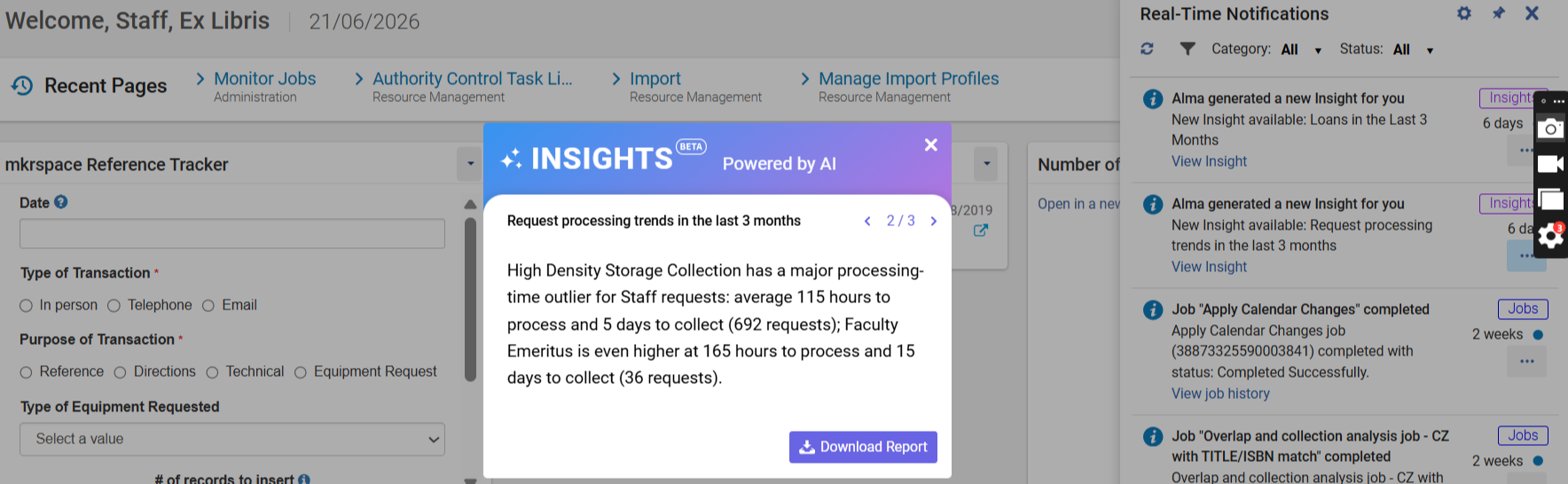
For more information, see Alma AI Insights.
Alma AI Assistant for Acquisitions Funds and Ledgers: Additional Action: Activate/Deactivate
July 2026 Artificial Intelligence AI documentation logo no background.png
The Alma AI Assistant enhances the user experience by enabling users to interact with Alma through a chat-based interface. Instead of navigating multiple screens and workflows, staff users can ask questions naturally and receive clear, relevant responses directly within Alma.
It is now possible to perform an additional action directly from the Assistant chat interface: Activate/Deactivate fund.
This is in addition to the existing supported actions.
As done for the other supported actions, before taking action, the assistant checks that all necessary information has been supplied and requests confirmation.
Actions are performed using the Alma APIs (which the assistant uses as tools). Similarly to cloud apps, which utilize APIs, the user who is kept as the modifier is the connected user.
For more information on enabling the feature, how it works, and our planned enhancements, refer to the Alma AI Assistant – Acquisitions Funds and Ledgers documentation. Also see Artificial Intelligence in Alma.
Requested Item ID in Lending Requests (Resource Sharing) Subject Area
July 2026 Analytics and Insights
A new Requested Item ID field has been added to the Lending Requests (Resource Sharing) Subject Area. This field indicates the exact item associated with the request, and is especially relevant for InnReach and Rapido Consortial Borrowing workflows, where lending requests are managed at the item level.
For more information, see Lending Requests (Resource Sharing).
Improved Internal Matching and Enhanced Additional Items Section
July 2026 Resource Management
Previously, recommendation generation relied solely on the MMS ID to identify internal matches. As a result, duplicate titles stored under different MMS records within the same institution were not recognized as related, leading to inaccurate item counts and skewed usage data.
The recommendations generation job now uses enhanced matching logic that evaluates multiple bibliographic attributes when identifying internal matches. This update ensures that records representing the same title—even when associated with different MMS IDs—are identified when generating recommendations.
The Additional Items section in the recommendation details panel has been redesigned to reflect this enhanced logic. It now displays item-level information based on data availability for each matching item, in addition to collection development context such as Included in Recommendations (project name and type; may include multiple names/types) and Included in (My library/location scope, Comparison libraries/locations, or Other libraries/locations).
If a matching title has a different MMS ID, it gets the Different Title label, enabling easier at-a-glance identification. Users can also add custom labels to items by selecting Add Labels, which helps group, track, or mark items.
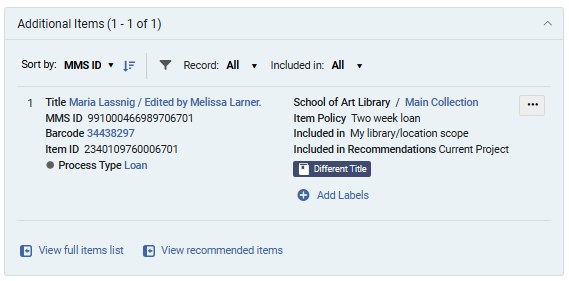
To support efficient review of larger item sets in the Additional Items section, users can:
-
Sort items by MMS ID, Library/Location, Temporary Location, or Status.
-
Filter results by:
-
Record (All, Same Record (matches based on the same MMS ID), or Matching Records (matches based on other factors, not MMS ID))
-
Included in (All, Comparison Libraries/Locations, Current Project Recommendations, My Library/Location Scope, Other Libraries/Locations)
-
By expanding internal matching beyond a single bibliographic record, this update ensures a more complete view of institutional holdings. Furthermore, the redesigned Additional Items section consolidates related items into a single structured view, enabling more accurate evaluation of recommendations across all relevant items.
As part of this enhancement, key calculated values (number of items, number of loans, and whether a title is included in a reading list) are now calculated across all matching title records rather than being limited to a single MMS record. Existing collection development projects are not automatically recalculated.
Internal Project Reports Can Now Be Generated Without Comparison Libraries
July 2026 Resource Management
Project reports for internal collection development projects can now be generated and exported even when no libraries or locations are selected in the Compare to section during project creation.
Previously, report generation required at least one comparison library/location and the presence of matching items. This requirement has been removed for internal projects, so reports can now be generated regardless of whether comparison libraries have been configured.
When no comparison data is available, the exported Excel file includes recommendation-related information only and excludes comparison-specific columns.
This enhancement enables users to review recommendations and associated data, such as usage metrics and item-level details, without requiring a comparison setup.
Support for generating and exporting external project reports without comparison institutions/libraries will be introduced in the August release.
Indication for Recommendations with Low Bibliographic Rank
July 2026 Resource Management
Rialto now provides a visual indicator for recommendations with a low Bibliographic Rank, helping users identify cases where incomplete bibliographic metadata may affect recommendation quality.
Recommendations with a Bibliographic Rank below 60 are marked with an Insufficient Metadata badge. The badge helps users quickly recognize recommendations that may be based on limited or low-quality bibliographic information. Selecting the badge opens the recommendation's Title Information section, where users can view the Bibliographic Rank field and review the item's score. Recommendations marked with the badge can also be located using the new Insufficient Metadata facet.
This enhancement makes recommendation quality more transparent and helps users make more informed collection development decisions.
To learn more about how Alma determines bibliographic ranks and assigns ranking values to bibliographic records, see Bibliographic Ranking in Metadata Editor.
Exclude Item Process Types from Recommendation Calculations
July 2026 Resource Management
Rialto now enables institutions to control whether items at their own institution with specific Alma process types are included in recommendation calculations for the institution's collection development projects.
Previously, local items with process types such as Lost, Missing, Claimed Returned, or Transit were always included in recommendation logic. In some cases, this inflated local item counts and affected title comparisons, resulting in less accurate retention and deselection recommendations.
To address this issue, a new configuration page is now available under Configuration > Collection Development > Workflows > Process Type Exclusion. Access to this page is available to users with the Rialto Administrator or Repository Administrator role.
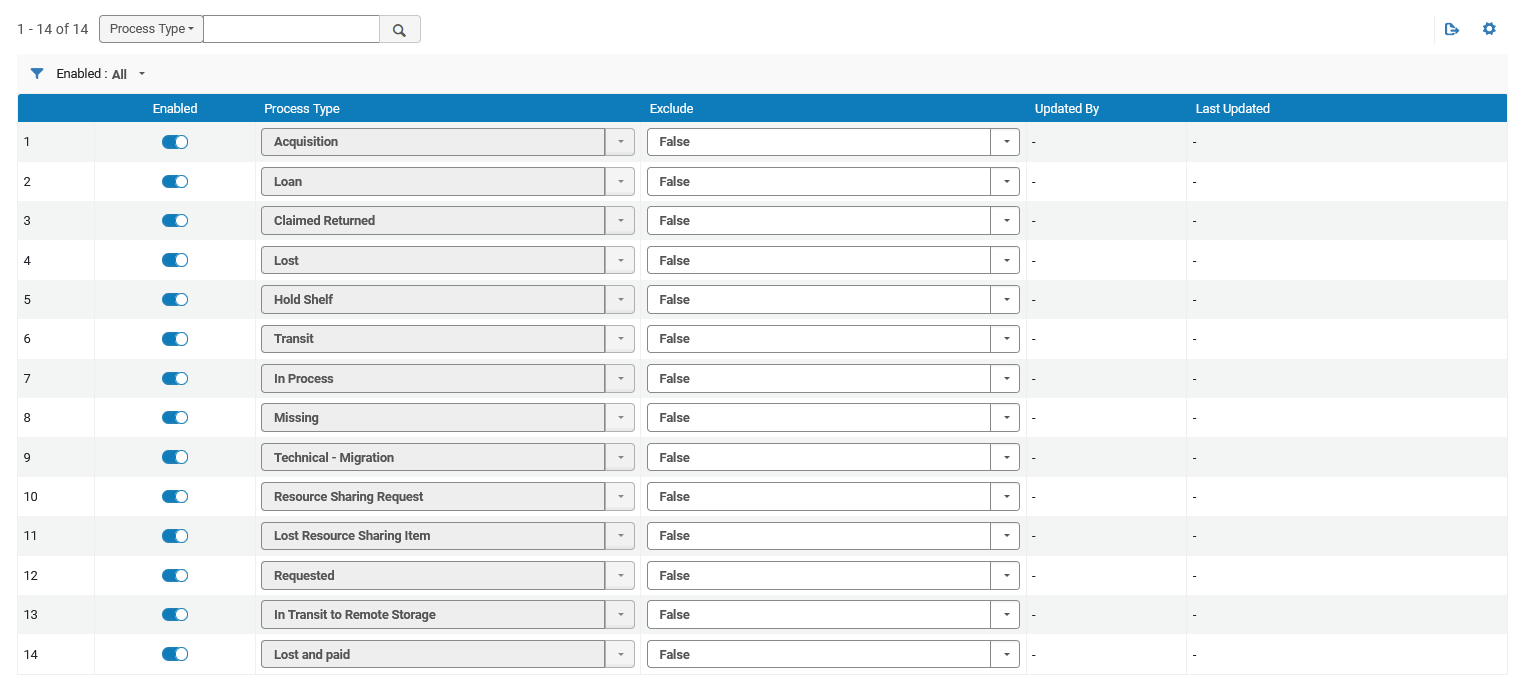
The page lists all Alma item process types. For each process type, administrators can use the Exclude setting to determine whether items at their institution with that status are included in recommendation calculations. By default, all process types are included in calculations (Exclude = False).
This enhancement gives institutions greater control over how their local collections are evaluated during recommendation generation.
Changes made on this page affect local items within the institution's collection development projects. The configuration applies only to items owned by the institution and does not impact other institutions. Title usage calculations are not affected by these settings.
Upcoming Issues to Note
Alma Specto Starter
August 2026 Resource Management
Beginning with the August release, Alma Specto Starter will transition from opt-in to opt-out, meaning it will be enabled by default for all Alma Digital customers unless you choose to disable it. Alma Specto Starter Release Notes and Documentation can be found here:
Documentation: https://knowledge.ag-software.clarivate.com/alma-specto/en-us/Product_Documentation/Alma_Specto_Starter/Specto_Starter.html
Release Notes: https://knowledge.ag-software.clarivate.com/alma-specto/en-us/Release_Notes/Alma_Specto_Starter/Alma_Specto_Starter_RN.htm
Updated Documentation for Analytics Tables
July 2026 Analytics and Insights
As part of an ongoing project and in alignment with the Analytics Community of Practice, Ex Libris is currently enriching the documentation of analytics field tables with additional information. This initiative aims to assist and support users in comprehending how our Alma data is presented within the realm of Analytics fields. For this month, the following tables within the E-Inventory Analytics Subject Area were updated:
Portfolio PO Line Approver
Electronic Collection PO Line
Electronic Collection PO Line Approver
Cost Usage POL Approver
Analytics Fields Marked For Deprecation
July 2026 Analytics and Insights
The fields Managed by Provider and Provider Name in the E-Inventory > Electronic Collection Analytics Subject Area are no longer used in Alma. These fields are marked for deprecation and are planned to be removed in the November 2026 release.
For more information, see Electronic Collection.
Collection Development Consent Updates to Include Item-Level Data
July 2026 Resource Management
In the August 2026 release, the Collection Development data‑sharing consent will be updated to include discoverable item‑level data.
This update follows a request from our Early Adopters group, who found that discoverable item‑level data can be valuable in specific scenarios when making collection development decisions.
This change will not affect existing opt‑in status.
Resolved Issues
| SF number | Area | Description |
|---|---|---|
| 7986201 URM-290815 | Acquisitions | Previously, the Recalculate PO Line Encumbrances Based on Current Exchange Rates job updated encumbrances that were not open. |
| 8343850 URM-325655 | Acquisitions | Previously, the Monthly Usage Data displayed inappropriate years, such as 1, 5, 10, and the DC UpdateMonthlyUsageData was not applied. This was fixed, and the DC UpdateMonthlyUsageData will be run after the July deployment. After running the DC, we will run a script to align the monthly usage data. |
| 8250748 URM-326340 | Acquisitions | Previously, the work order types were not translated in the scan in items page. This was fixed, and the translations for work order types are displayed. |
| 8369366 URM-326891 | Acquisitions | Previously, the Import PO approvals job failed, but the vendor received the invoices multiple times. This was fixed. |
| 8401948 URM-327387 | Acquisitions | Previously, invoices were created from funds that did not allow a negative balance. This was fixed. |
| 8400371 URM-327406 | Acquisitions | Previously, logical sets did not filter alerts for overdue PO lines that should not have been included in the results. This was fixed; however, the existing logical set may still return incorrect results and requires a full PO Line reindexing, or at a minimum, reindexing of the affected set. |
| 8433526 URM-328074 | Acquisitions | In some cases, when a PO line was linked to a standalone portfolio, an Oops error was displayed in the Portfolio tab form. This was fixed. |
| 8422740 URM-328525 | Acquisitions | Previously, sending the Vendors Claim Letter failed. This was fixed. |
| URM-329513 | Acquisitions | Previously, EDI failed when PO numbers included an additional space. This was fixed. |
| 07798070 08312181 08410182 URM-316502 | User Experience, Accessibility and Infrastructure | Previously, an error could occur when editing and saving a user record after modifying the user's statistics in the same session. This was fixed so that user records are now saved correctly regardless of the order in which changes are made across the different tabs. |
| 8276924 URM-321674 | User Experience, Accessibility and Infrastructure | Previously, in a specific case, the Creator field for Requests displayed the legal name instead of the preferred name. This was fixed. |
| 08349106 08382277 10612075 URM-324854 | User Experience, Accessibility and Infrastructure | In the configuration menu, switching back and forth between institution and library scopes sometimes caused some menu options to incorrectly disappear. This was fixed. |
| 8368067 URM-326385 | User Experience, Accessibility and Infrastructure | Previously, the scheduled manual job would run, but the number of processed records was 0. This was fixed. |
| 8359515 URM-326440 | User Experience, Accessibility and Infrastructure | Previously, the Change Physical Items Information job had a typo in the Excepted receiving date field. This was fixed. |
| URM-328187 | User Experience, Accessibility and Infrastructure | The Deque Audit Accessibility Issues were fixed. |
| 10566341 URM-329028 | Analytics and Insights | Previously, the LC Classification code DT546.3858 was displayed as Unknown in Analytics. This was fixed. |
| URM-330397 | Analytics and Insights | Previously, the default dashboard Analytics Objects > Top 5 most popular scheduled reports and widgets tab displayed a View Display Error. This was fixed. |
| 08113442 08376056 URM-314237 | Fulfillment and Resource Sharing | When adding a digital representation from a citation, the Ful Digitization Notification Item Letter contained a misleading error message. This was fixed. |
| 8192435 URM-319580 | Fulfillment and Resource Sharing | Previously, the ISO 18626 message sent from Alma to Tipasa included incomplete or truncated data in the volume and issue fields. This was fixed. |
| 08225129 08228283 08225800 08390596 URM-322110 | Fulfillment and Resource Sharing | Previously, the new Purge user's job report was not accurate. This was fixed, and now the report has two new links: 1- users that were purged successfully. 2- users who were not able to be purged. Selecting the link opens a list of all users in that category. |
| 8277416 URM-322814 | Fulfillment and Resource Sharing | Previously, an error was generated when scanning items for a title with multiple requests. In these cases, the Scan In should be done in the ALMA web UI. An appropriate error was added to these cases. |
| 08339530 08347966 08328686 08373075 08391852 08342012 08432397 10552673 10560189 08428480 10604820 10624641 10636623 URM-323916 | Fulfillment and Resource Sharing | In some cases, users received a Patron has duplicate request error in Primo, and the request was cancelled. This was fixed. |
| 08364811 08395036 URM-326657 | Fulfillment and Resource Sharing | The uresolver could return an incorrect full‑text link in consortium environments. This was fixed, and now only relevant services are returned. |
| 08357444 10582613 URM-327350 | Fulfillment and Resource Sharing | Previously, “Request Format” = Physical Input Parameter was not working as desired as in Borrowing Resource Sharing rule. This was fixed. |
| 8294317 URM-327493 | Fulfillment and Resource Sharing | In some cases, the Resource Sharing request form sometimes included information for the wrong title. This was fixed. |
| 8411287 URM-328330 | Fulfillment and Resource Sharing | In some cases, saving after editing a partner was not working. This was fixed |
| URM-313645 | Metadata Management | When creating an Itemized set from new UI pages, the Recent Entities list displayed it as an edited set and not as a new set. This was fixed. The new set is now displayed as Added, as expected (same as in old UI). |
| 08003746 08238601 08405807 10629471 URM-319306 | Metadata Management | When navigating out of the metadata editor via View Items or a similar action, performing a new search and then reopening and hiding the Metadata Editor would incorrectly restore the previous search rather than keeping the most recent one. This was fixed. |
| 8279546 URM-322988 | Metadata Management | When the manage location information function is used with a record linked to the SBN central catalog, and the SBN service returns a status of OK, a warning message is now displayed in the Metadata Editor. |
| 8280214 URM-323608 | Metadata Management | Previously, Brief Level rules could not be contributed to the Community Zone. This was fixed. |
| 8284534 URM-325656 | Metadata Management | In some cases, the MODS records intermittently generated validation errors for the xml:lang attribute. This was fixed. |
| URM-328021 | Metadata Management | Previously, the Rule/Templates/Records tabs did not include an aria-label attribute, which prevented screen readers from distinguishing between the selected and non-selected tabs. This was fixed. In addition, the Clear button in the Search & Browse > Search Resource form previously lacked a visible focus outline. This made it difficult for keyboard users to identify when the button was focused. This was also fixed. |
| 8440727 URM-328586 | Metadata Management | Upon import, when the customer parameters enable_import_computer_generated and normalize_decomposed_characters (Configuration Menu > Resources > General > Other Settings) were both set to true, the 005 field of a new or updated record was not updated with the current timestamp as expected. This was fixed. |
| 8188156 URM-319001 | Resource Management | When a New Order import was run and added orders to already-existing portfolios, the public access model was not saved on the portfolio. This was fixed. |
| 8317643 URM-323954 | Resource Management | Previously, the Resource type Map - Component Part was displayed as Unknown in Analytics. This was fixed. |
| 8364834 URM-326658 | Resource Management | Previously, in some areas of Alma, portfolio coverage was displayed in code format when the volume or issue was in an unexpected format, rather than being parsed to user-friendly text. This was fixed. |
| 8376246 URM-327671 | Resource Management | The Overlap Analysis Look Up Titles/Selected Titles job could fail or show incorrect results when uploading files containing certain special characters. This was fixed by improving how uploaded files are processed so the data is interpreted correctly. |
| 8407084 URM-327795 | Resource Management | Public item templates: it was impossible to update a public template that was created by another user. This was fixed. |
| 10581887 URM-329878 | Resource Management | Previously, the Receiving Operator role could not view the Export Physical Items or Jobs menu. This was fixed. |
