
Alma May 2026 Release Notes
Features
Prevent Requests for Blocked Loans
May 2026 Fulfillment and Resource Sharing idea exchangeIdea Exchange CERV CERV Enhancement (ID#36426)
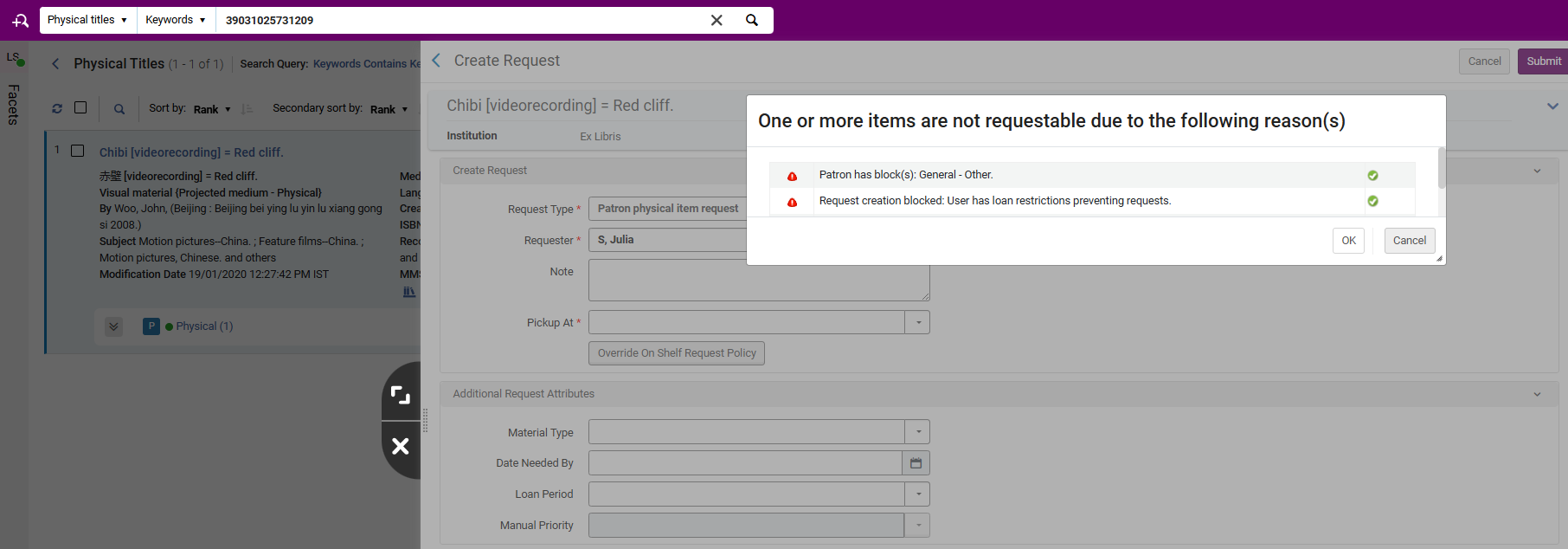
Alma can now be configured to block item requests when a patron is not eligible to loan the item based on its loan terms of use and any existing blocks on the patron. This ensures that patrons cannot place requests for materials that cannot be loaned to them under the library’s defined policies.
The configuration is controlled by the block_request_if_not_loanable parameter (Configuration > Fulfillment > General > Other Settings).
For more information, see Configuring Fulfillment Jobs, Creating a Request from the Institution and How to Set Up Blocks to Prevent Loaning, Renewing and Hold Requests for Patrons.
Update of User Data for Fulfillment Network in Real Time
May 2026 Fulfillment and Resource Sharing Idea Exchange
When the source institution of a user changes user details, all of its linked accounts now receive this update in real time. This update will help ensure that linked account information is consistent and accurate across all institutions.
For more information, see Linking Users in Collaborative Networks
RFID Support in Shipping Items Page
May 2026 Fulfillment and Resource Sharing
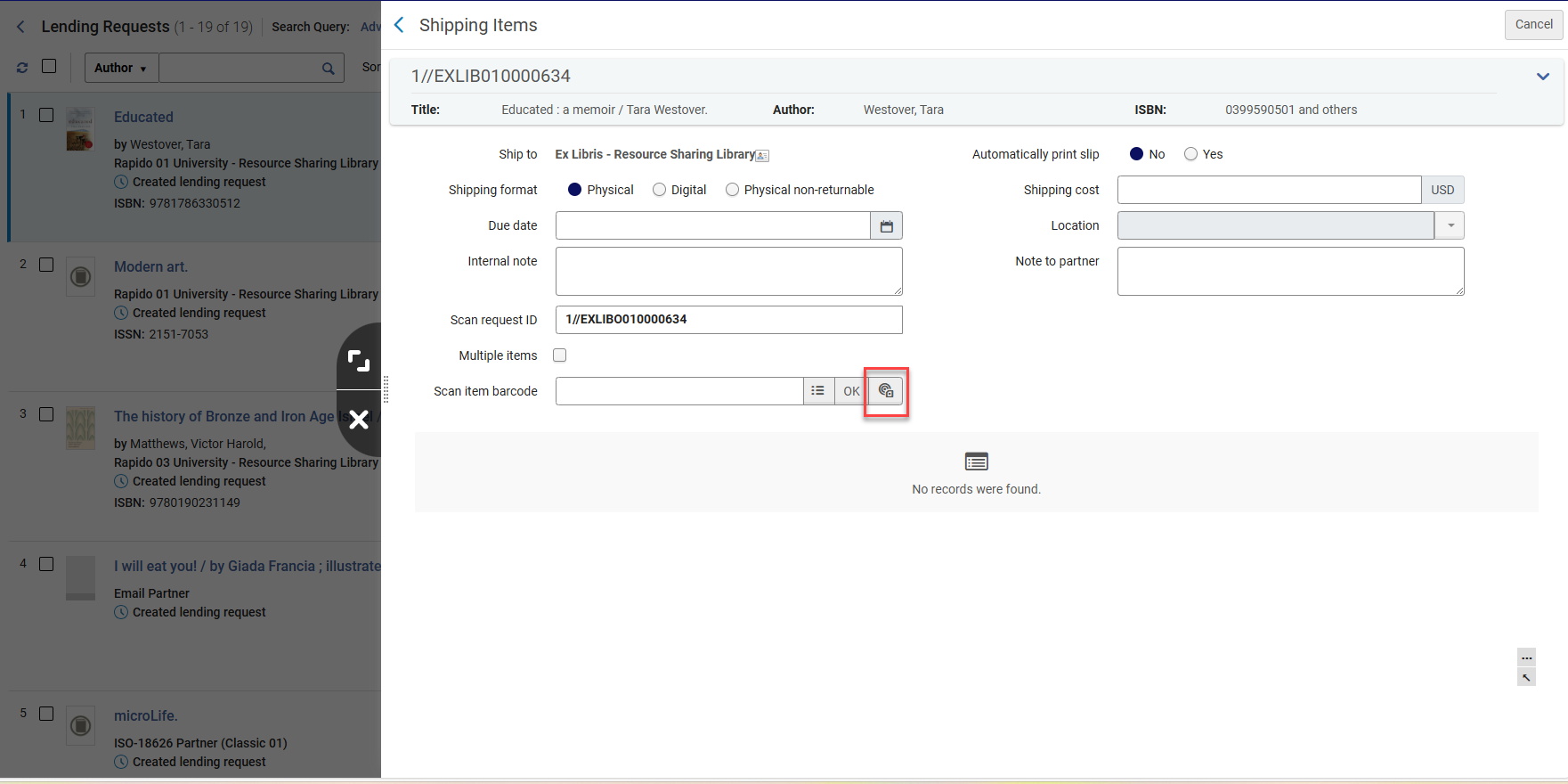
It is now possible to read the RFID tag when shipping an item for resource sharing.
Updated Customization Options for Document‑Delivery Login
May 2026 Fulfillment and Resource Sharing
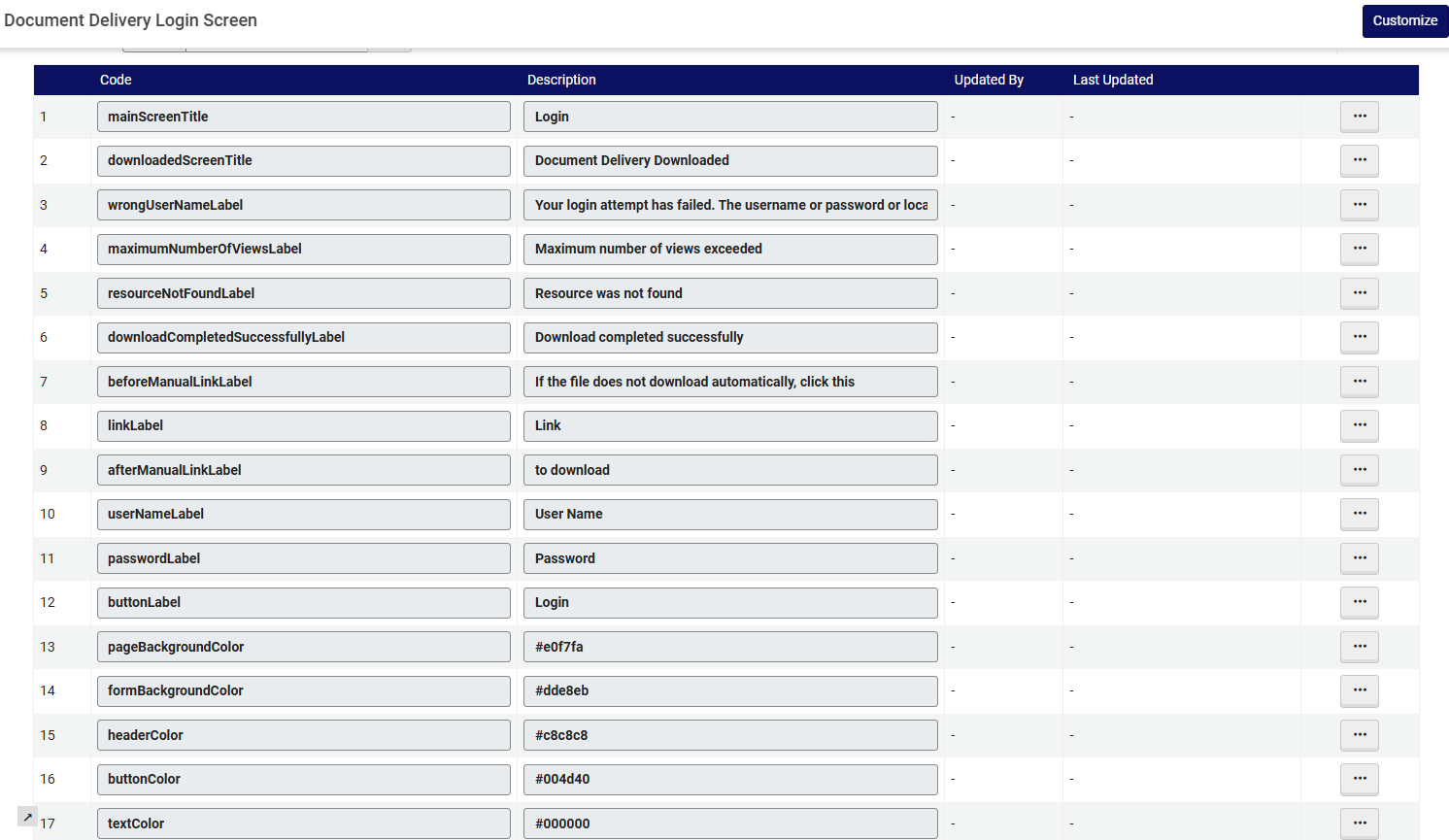
The login page (when authentication is done with an LDAP server or by the Ex Libris Identity Service) and the document download page for digitally supplied documents now support configurable labels and color settings, enabling a more tailored patron experience. You can access the configuration page at Configuration > Fulfillment > Document Delivery Login Screen.
For more information, see Configuration of Digital Shipping.
Additional Information Field for Borrowing and Lending Requests
May 2026 Fulfillment and Resource Sharing
A new Additional Information dropdown field was added to the Request Attributes section. The information is added to borrowing requests and can be viewed and edited in lending requests.
For more information, see Managing Borrowing Requests, Managing Lending Requests and Basic Resource Sharing Configurations.
Specific Edition Information Available on Lending Requests
May 2026 Fulfillment and Resource Sharing
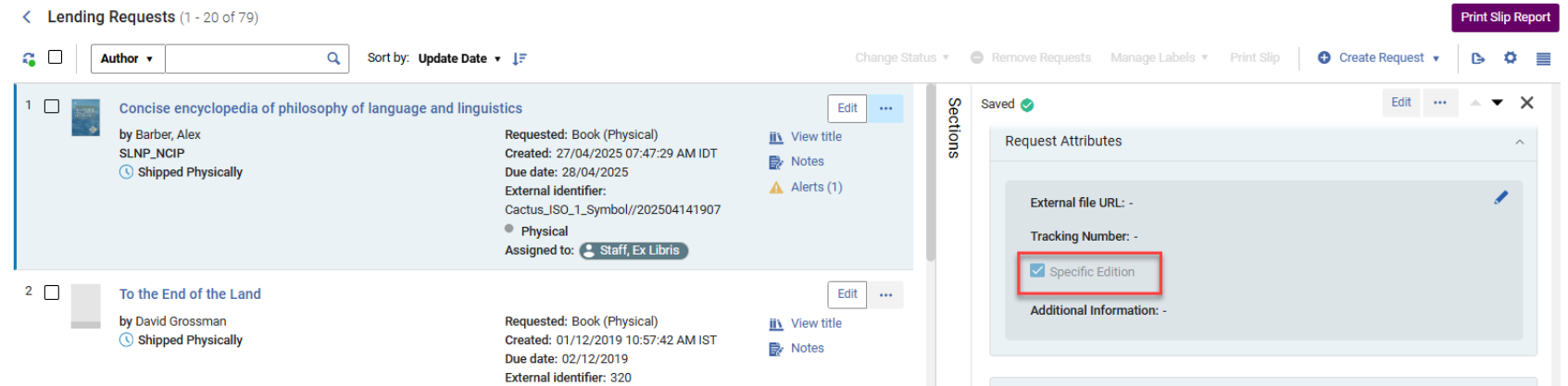
If a specific edition is selected on the borrowing request, whether added by staff manually creating the request or by the patron/library user, this information will now be visible in the Request Attributes section on borrowing requests and in the Request Attributes and Request Form sections in borrowing and lending requests. This provides users with more information to inform their workflow.
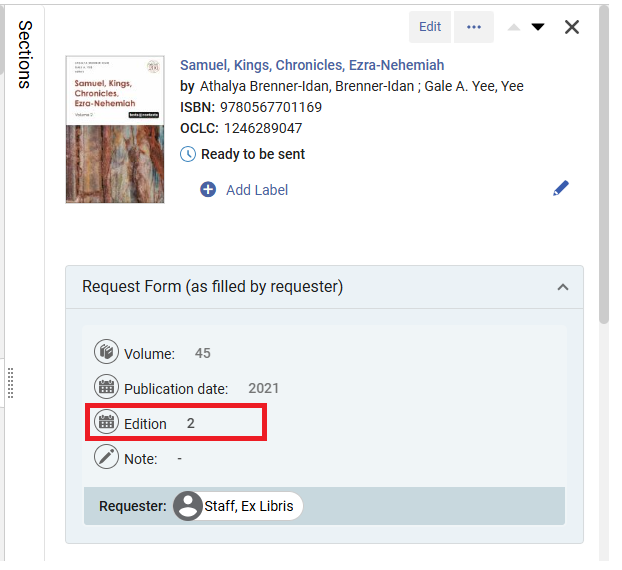
For more information, see Managing Borrowing Requests and Managing Lending Requests.
OCR for Received Documents
May 2026 Fulfillment and Resource Sharing
New functionality will determine if a digitally supplied PDF file already has Optical Character Recognition (OCR) applied. If not, OCR will automatically be applied when the lender ships requests from the lending workflow actions, before they are delivered to the borrowing partner.
For Alma as the lender for ISO partners, PDFs supplied by Alma lenders will also have the OCR automatically applied via the lending shipping actions.
For more information, see Managing Lending Requests and Digitization Processing.
Sharing Limits Across the Network
May 2026 Fulfillment and Resource Sharing
Libraries participating in a fulfillment network can now apply their local patron limits, such as maximum loans, requests, cash balance, or overdue thresholds, across the entire consortium. When a patron reaches a defined limit at any institution in the network, a library may choose to block the patron’s activity locally. This supports consistent policy enforcement and improved fairness by helping maintain equitable access to shared resources across the consortium, and it supports stronger network governance.
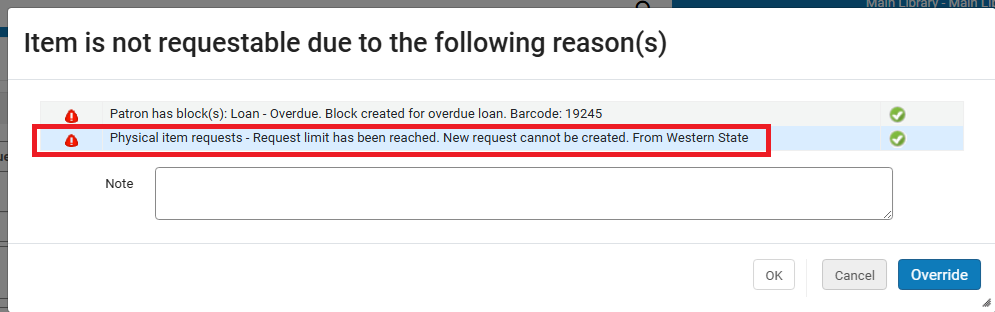
This feature affects all blocks in the Patron Limits list (Configuration > Fulfillment > Patron Configurations > Patron Limits) and the patron's Loan Limits that are defined per User Group (Configuration > Fulfillment > Loan Limits). The library can decide to block its own patrons and/or guest patrons, using the ful_network_limits_block_source and ful_network_limits_block_target customer parameters (Configuration > Fulfillment > General > Other Settings).
These limit‑based blocks do not appear in the user’s Blocks tab. Instead, librarians see them as pop-ups or messages during the workflow. The messages describe the problem and the originating institution.
- This feature impacts networks that use linked accounts or that share users in the Network Zone.
- It will be available on the Production and Sandbox environments in the release update, planned for 10 May.
For more information, see Configuring User Blocks and Configuring Fulfillment Jobs.
Partner‑Level Configuration for ignore_lender_due_date
May 2026 Fulfillment and Resource Sharing Idea Exchange
It is now possible to override the ignore_lender_due_date parameter at the individual partner level. This enhancement allows institutions to specify which lenders’ due dates should be disregarded when calculating a patron’s loan due date, while still honoring due dates from other partners as needed. This enables more precise policy alignment. Libraries can tailor due‑date handling to align agreements or expectations with specific lending partners.
For more information, see Configuring Fulfillment Jobs and Resource Sharing Partners.
Streamlined Document Delivery Upload and Notification
May 2026 Fulfillment and Resource Sharing
This new workflow enhancement enables staff on the borrower side to upload a digital file for fulfilling a patron’s document delivery request, update receive parameters such as costs, and simultaneously notify the lending library — all in a single action. This enables staff to complete fulfillment and lender notification in a single streamlined step, reducing processing time and manual effort.
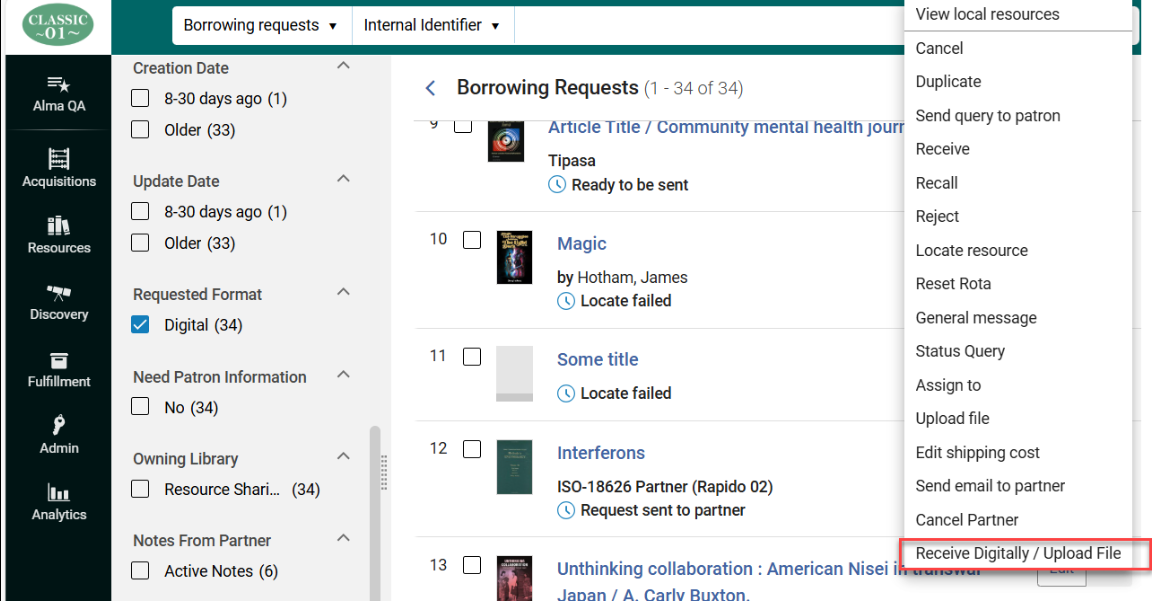
For more information, see Managing Borrowing Requests and Peer to Peer Resource Sharing.
Improved Navigation for Hold Blocks Information
May 2026 Fulfillment and Resource Sharing
The display of block information during hold, booking, and digitization request creation has been redesigned to streamline the workflow and reduce interruptions. Previously, block details appeared in a pop‑up after entering the Requester in the request form. Now, this information will only pop up after selecting the Calculate Blocks button in the request form, allowing staff to review block status only when needed.
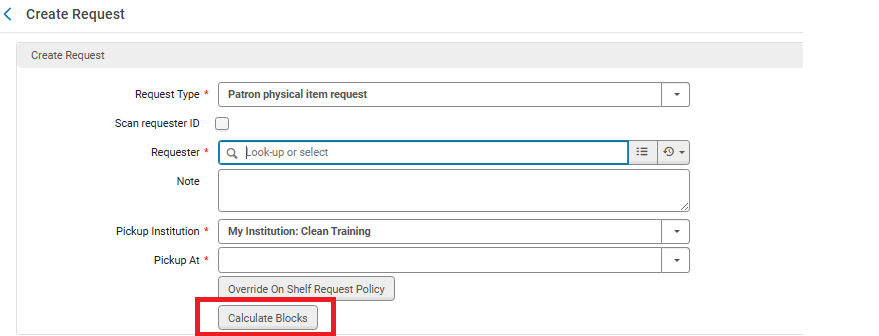
For more information, see Other Settings.
Automatic Due‑Date Adjustment for Early Patron Expiry
May 2026 Fulfillment and Resource Sharing Idea Exchange CERV CERV Enhancement (ID#6737)
Alma can now automatically update a patron's loan due dates when a patron's expiry date is moved to be earlier. If a loan’s due date extends beyond the new patron expiry date, the system can now adjust it to ensure the loan does not exceed the patron’s active account period. This is controlled by the Update Loans for Shortened User Expiry job (Configuration > Fulfillment > General > Fulfillment Jobs Configuration).
Due dates that were intentionally set beyond the patron’s expiry date using the extend_due_date_beyond_user_expiry parameter will not be changed. For institutions that enabled this customer parameter, loans whose loan date is before the new feature release will be excluded from this job.
Claim returned and lost loans are also excluded from the Update Loans for Shortened User Expiry job. Note that this job triggers the Loan Status Notice letter.
This enhancement prevents loans from remaining active past a patron’s eligibility and helps maintain accurate, policy‑aligned loan records.
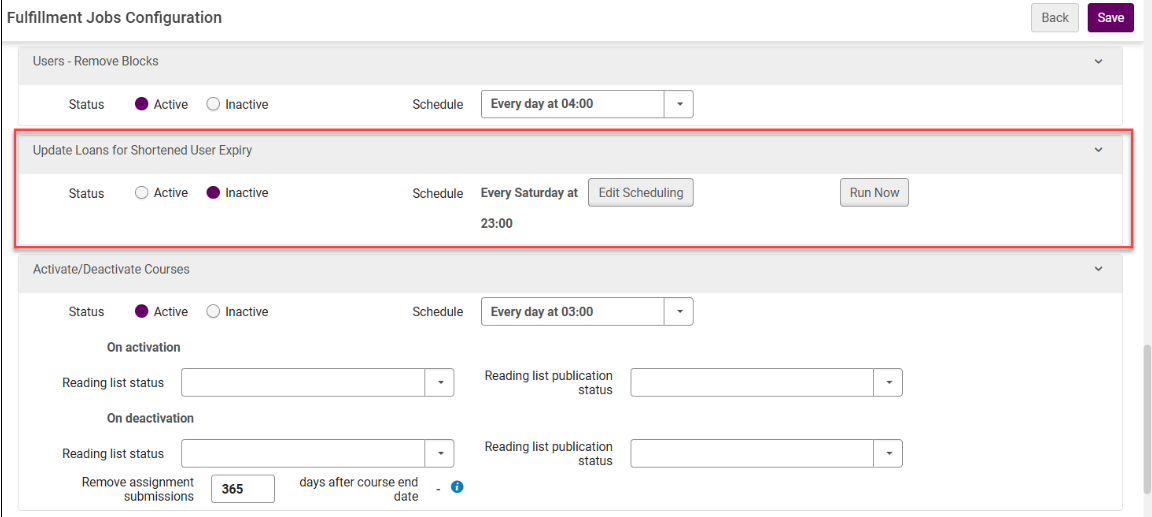
For more information, see Configuring Fulfillment Jobs and Scheduled Jobs.
Configure Resource Sharing Library as Temporarily Inactive
May 2026 Fulfillment and Resource Sharing
Idea ExchangeURM-222487
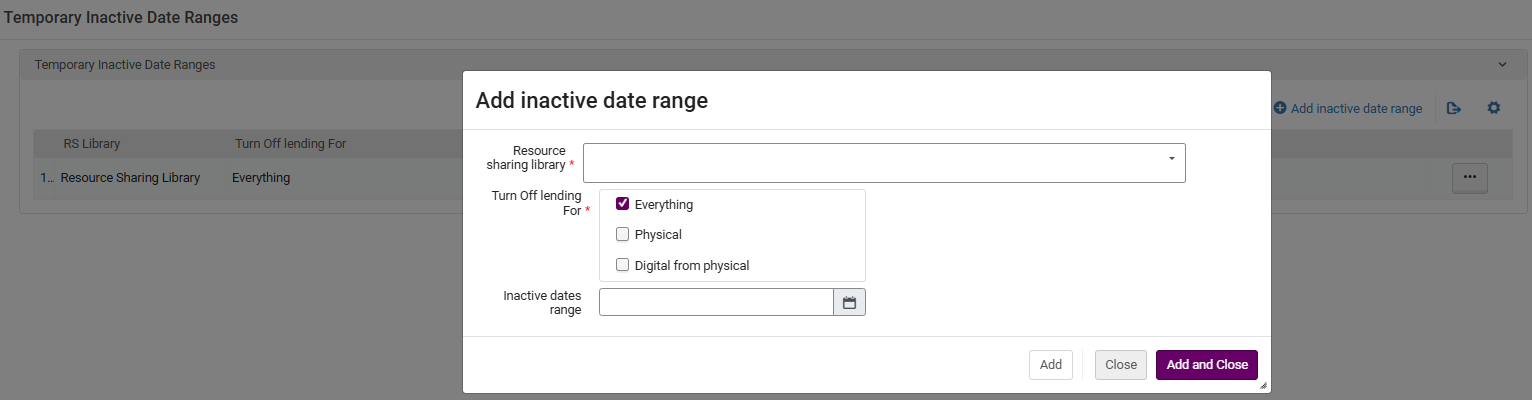
Fulfillment Services Managers and Fulfillment Administrators can now temporarily close a library for lending by adding an Inactive date range (Fulfillment > Resource Sharing > Temporary Inactive Date Ranges). This gives libraries greater flexibility and reduces the administrative workload associated with managing temporary closures. Note that Fulfillment Operators can also enable this feature by opening a ticket with the Support team.
Pickup Location Field Removed for Digital Resource Sharing Requests and Blank Request Forms
May 2026 Fulfillment and Resource Sharing
CERV Enhancement (ID#8562)URM-316507
The Pickup Location field on Resource Sharing Digital Request Forms and Blank Request Forms is now hidden when Institutions create a digital request. This helps reduce confusion since the Pickup Location field is relevant to the Physical Request forms.
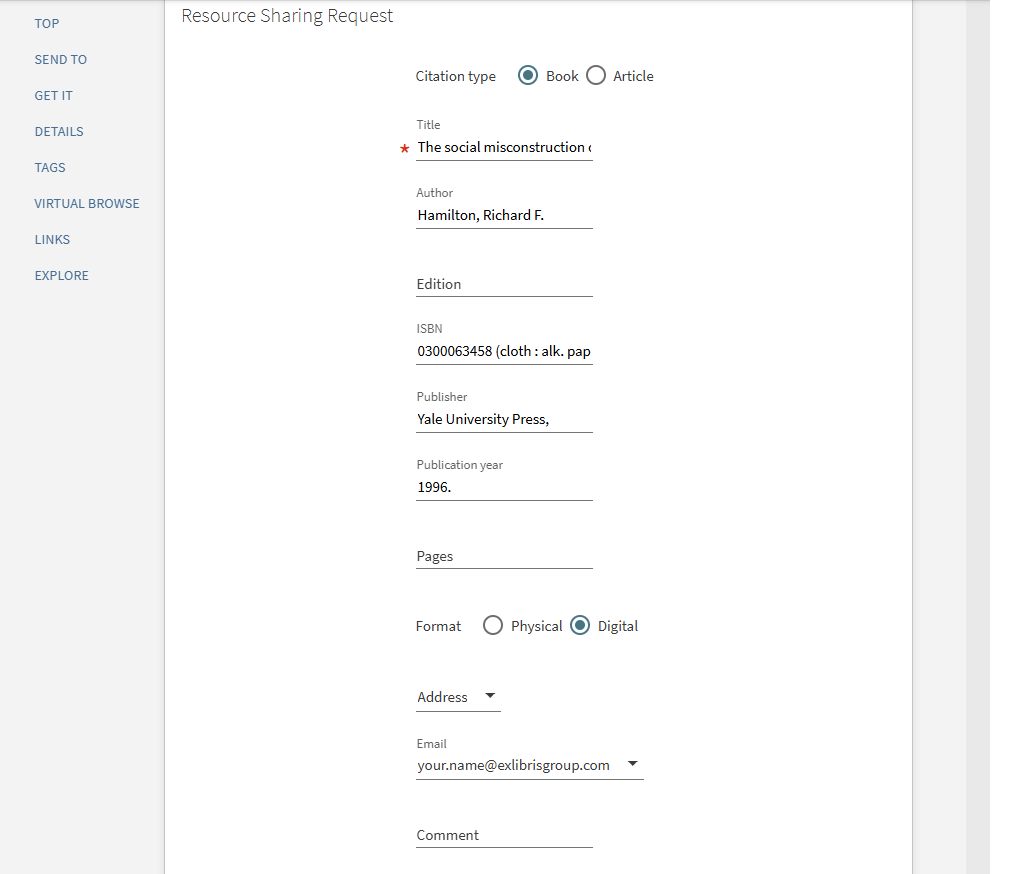
Pickup Location field removed
This is controlled by the rs_default_pickup_location_when_hide and rs_hide_pickup_location_for_digital parameters. For more information, see Other Settings.
Linking from Borrowing Request to Locate Process Log
May 2026 Fulfillment and Resource SharingURM-198624
It is now possible to link from the borrowing request to the job information for the last locate job that ran for the request. This makes it easier to understand how the locate process determined which partners to leave on the rota and which to remove.
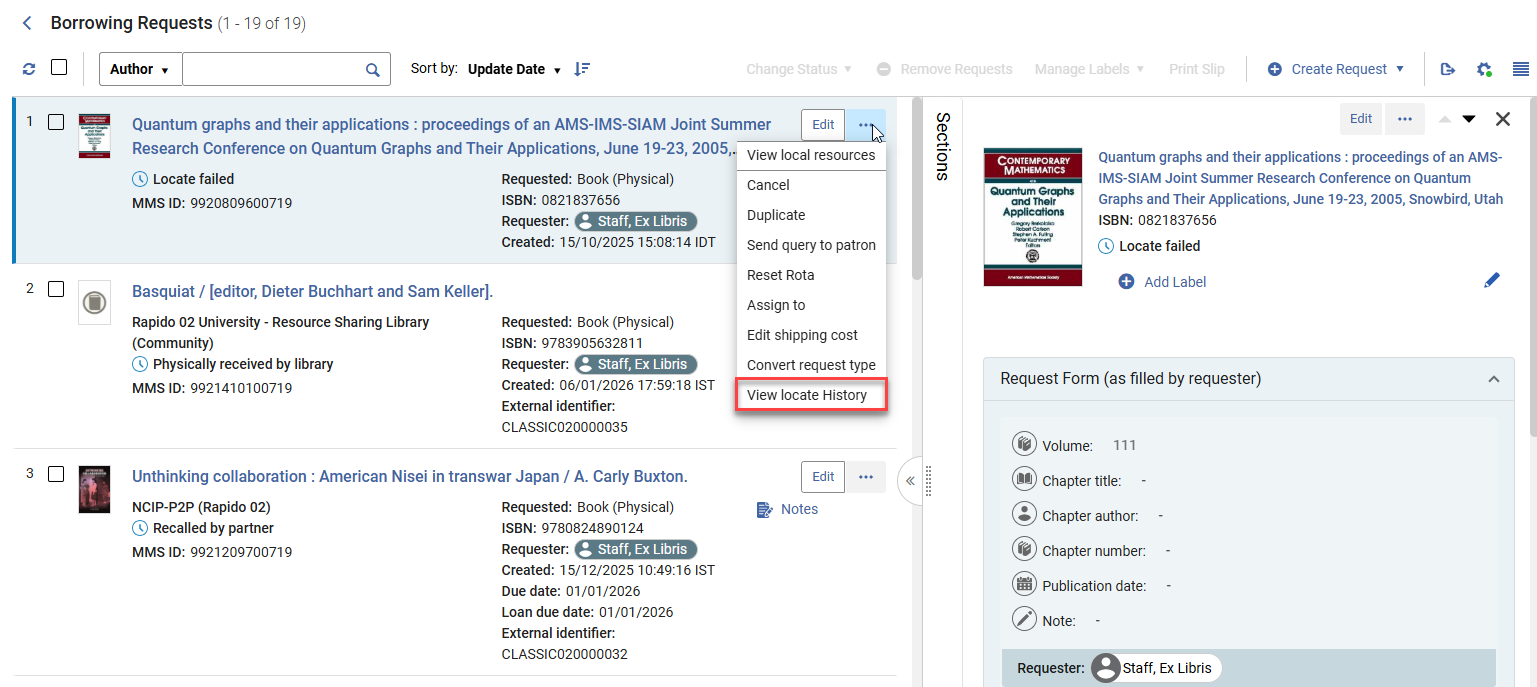
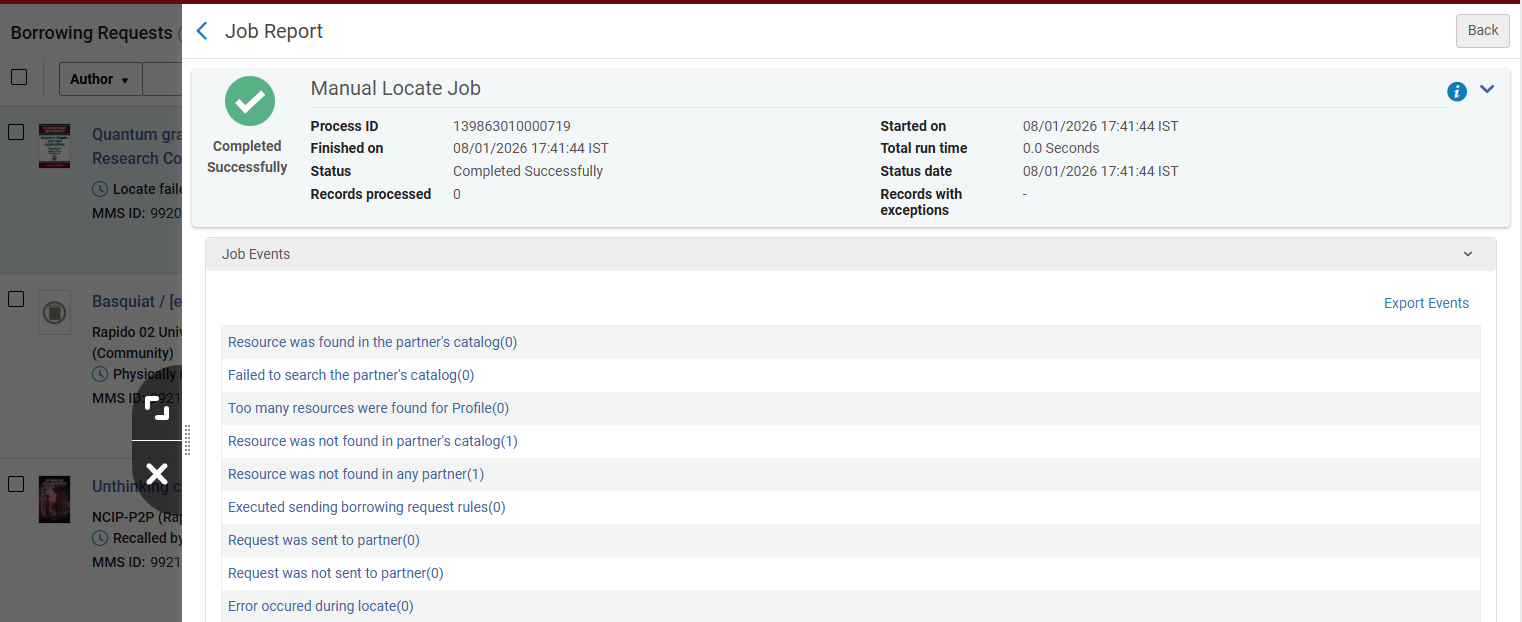 Manual Locate Job events
For more information, see Managing Borrowing Requests and Locating Items for Resource Sharing.
Update Records with Identical Metadata in Bulk
May 2026 Metadata & Linked Open Data
Catalogers can now add MARC21 fields to multiple titles at once via a simplified user interface, efficiently managing large batches of records and saving time.
-
Catalogers can select one or more titles from a list or search results, or select a set to which the job will be applied.
-
Catalogers can define up to five different MARC21 fields (tag, indicators, and subfield values) to add.
-
Only users with the relevant role can run the job.
- If a field can't be added to a title, the job continues to the next title. Any skipped or failed additions are logged and noted in the Job and Events Report.
- Electronic portfolios only support MARC family records, excluding MODS, BIB Frame; therefore, DC records cannot be used to create a local portfolio (even in the MD editor).
- Physical items only support MARC when creating a physical item.
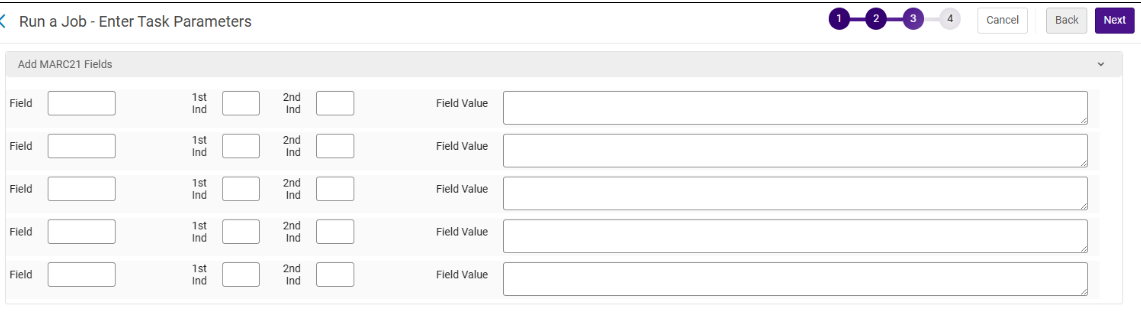
For more information, see Manual Jobs.
Storage Location ID Can Now Be Managed as a Closed List
May 2026 Metadata & Linked Open DataURM-319471 URM-318578
A new option is now available to manage the Storage Location ID field as a controlled list on the physical item. Enabling this feature also provides a configuration option for maintaining the entries. This enhancement is particularly beneficial for libraries that work with remote storage facilities and maintain a large number of Storage Location ID entries on their physical items in Alma.
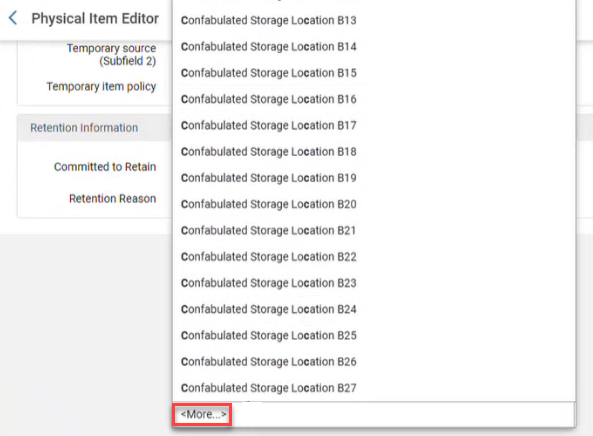
- Contact Support to enable this feature.
- This capability is available for up to 100,000 storage IDs.
- The <More...> indicator is for informational purposes only and will be updated in a later release when the Item page moves to the NG layout.
For more information, see Storage Location ID.
Update MARC21 Bibliographic Resource Types
May 2026 Metadata & Linked Open Data Idea Exchange
This update enhances the Alma MARC21-Based Resource Type classification to improve the accuracy, coverage, and usability of bibliographic resources. Alma determines the resource type automatically based on metadata fields, enabling more precise filtering and reporting. The enhancement introduces additional resource types that were previously unavailable, enriching the classification system.
For more information, see Rules Used to Create the Resource Type Field – MARC 21/KORMARC and UNIMARC.
Enhanced Sorting by Full Publication Date
May 2026 Metadata & Linked Open Data SF: 06754320 07730972
Previously, sorting by Publication Date was limited to the year component only. With this update, when full date metadata is available, sorting is now performed using the complete date, including year, month, and day. This aligns with existing indexing and sorting logic and enables accurate chronological ordering. As a result, institutions managing daily or frequently published content benefit from improved discoverability and a more consistent and precise sorting experience.
For more information, see Sorting Search Results.
Expose Linked Headings in Simple Record View
May 2026 Metadata & Linked Open Data Idea Exchange
When a user opens a bibliographic heading from the Authority Control Task List (ACTL) reports, Alma now presents the new All Titles search page instead of the old page’s simple view. The new page clearly shows whether each bibliographic heading is linked to an authority record, eliminating the need to enter edit mode in the MD Editor to verify the link. This change aligns the ACTL workflow with the next‑generation search experience and surfaces the linked heading status directly in view mode.
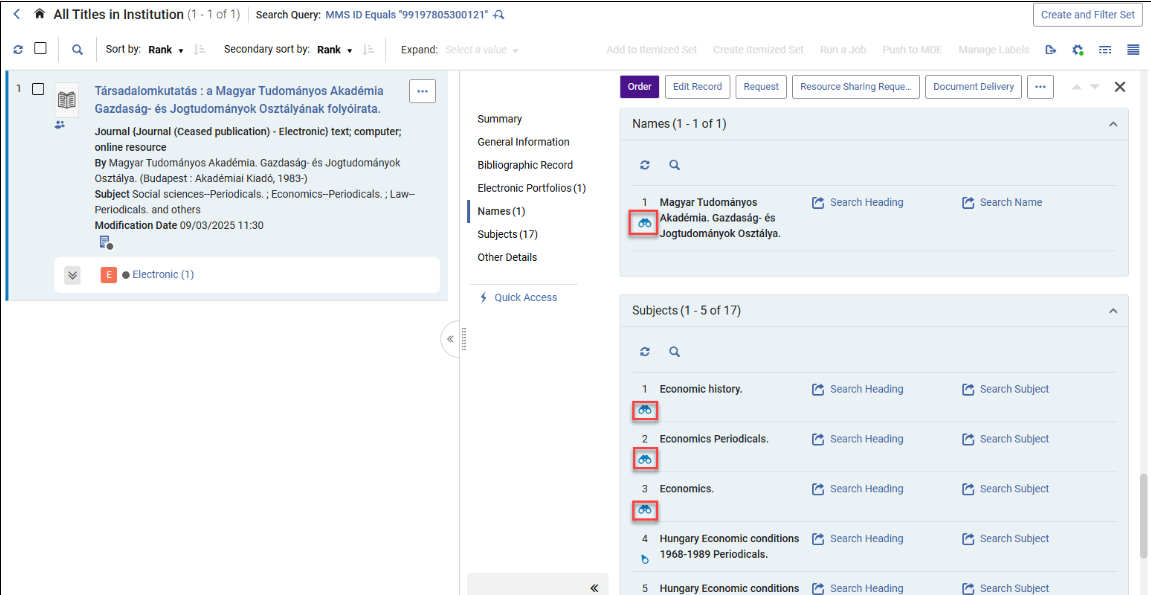
Configurable Pop-up Assistance
May 2026 Metadata & Linked Open Data
Idea ExchangeURM-122158
Catalogers can now customize their workflow by toggling the pop-up assistance on or off for selected subfields, giving catalogers more flexibility and control, reducing frustration and improving efficiency.
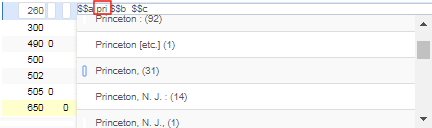
For more information, see Configuring Other Settings.
Linked Open Data (LOD) BIBFRAME Editor Enhancements
Form Editor Actions
May 2026 Metadata & Linked Open Data
The following actions are now available in the LOD BIBFRAME editor:
-
View Work (for class instance only)
-
Duplicate
-
Create Instance (for class work only)
-
View Instance (for class work only)
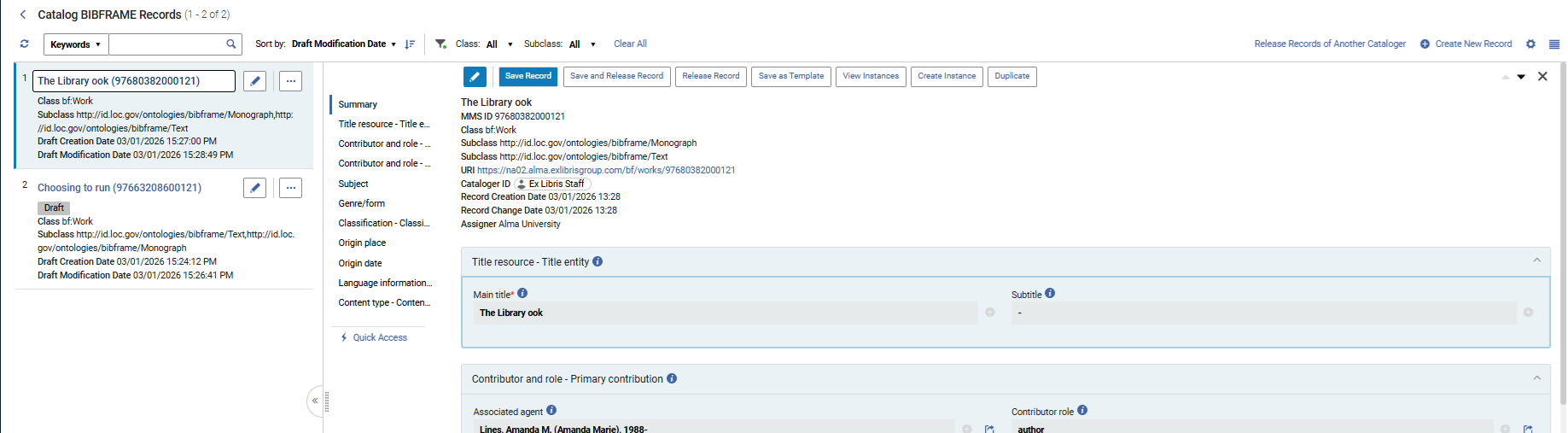
For more information, see LOD Editor Actions.
Enhancements to the Linked Open Data Editor Form and Templates
May 2026 Metadata & Linked Open Data
When editing a BIBFRAME record, section-level and field-level actions for adding, duplicating, and deleting sections are now available.

When hovering over the Add Section/Field or Duplicate Section/Field icons, a horizontal line appears, indicating where the section/field will be added.
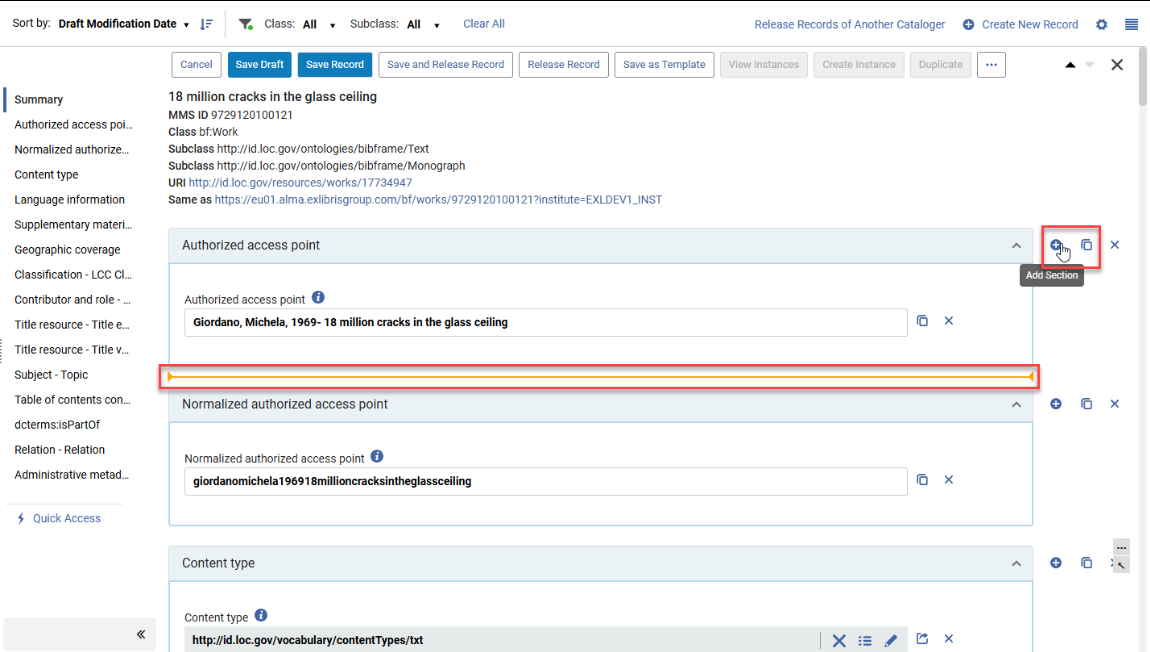
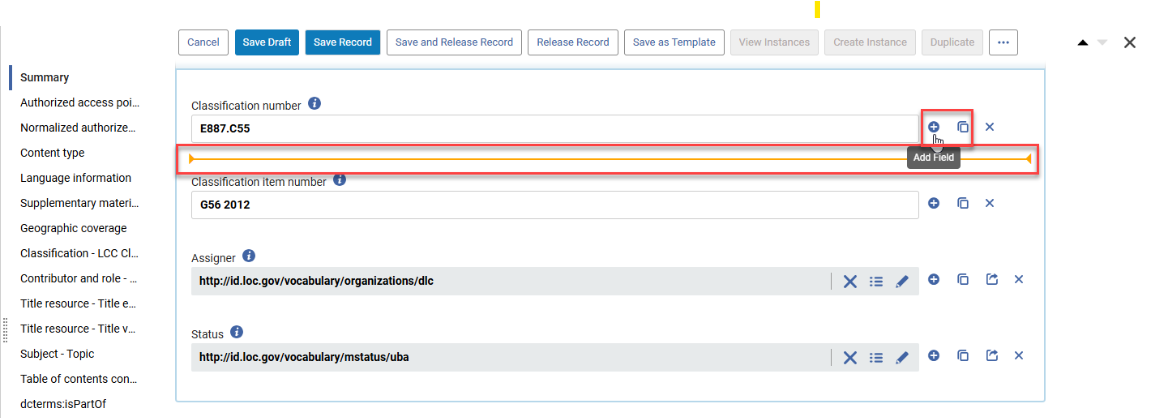
It is still possible to scroll to the end of the sections and use the Add Section/Add Field buttons to the end of the sections.
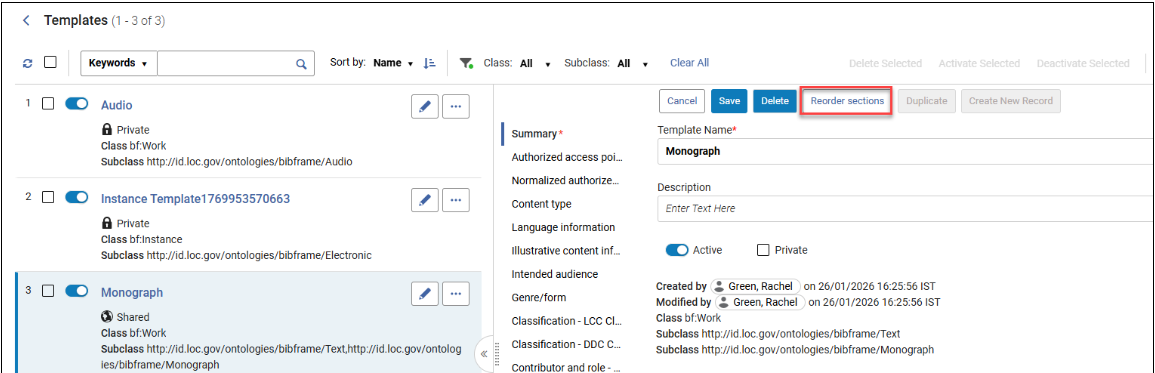
Additionally, BIBFRAME records and template sections can now be reordered using the Reorder button. The new order is then applied when creating and editing records and templates.
User Interface Languages Now Supported for Wikidata in Info Cards and Contributor Page
May 2026 Metadata & Linked Open Data
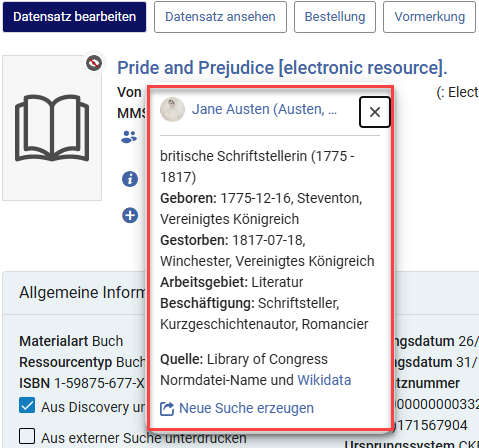
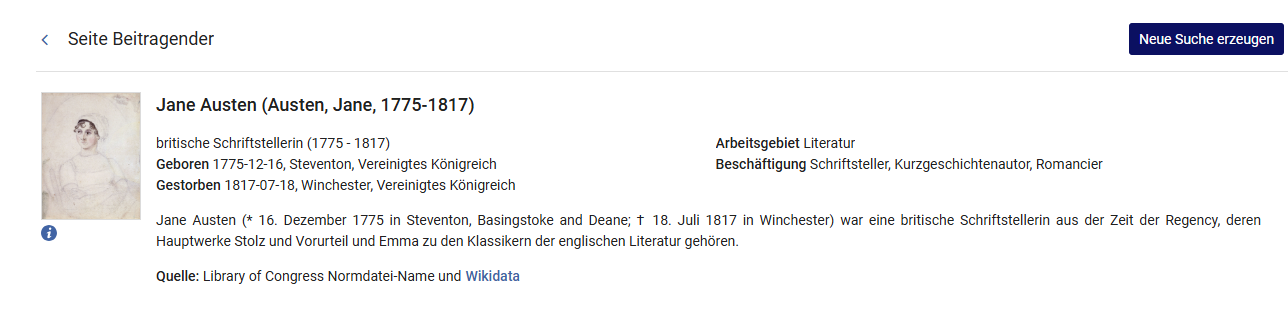
When available, the Wikidata in the Info Card and Contributor Page is now displayed in the user's interface language.
LOD Editor — Manual Input Now Available for Lookup
May 2026 Metadata & Linked Open DataURM-321069
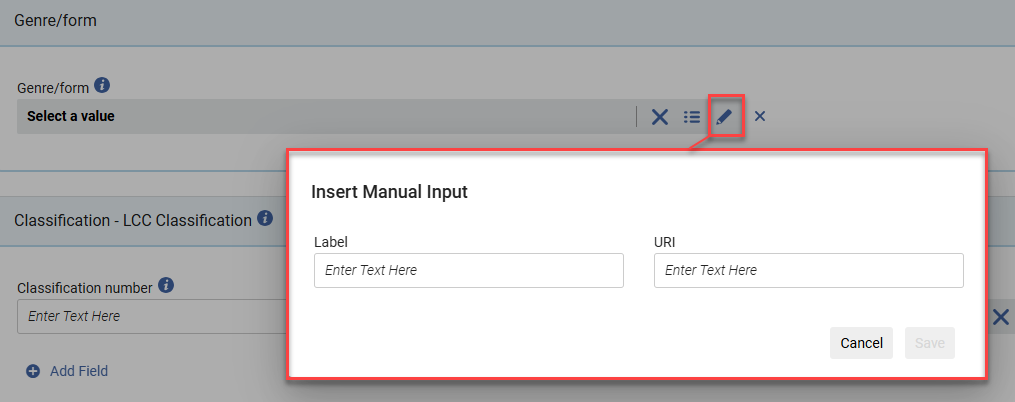
When using the lookup service, a Manual input of data, label and/or URI icon is now available for catalogers to manually add labels and/or URIs.
For more information, see How the Lookup Service Appears in the Editor.
Relations for BIBFRAME from the LOD Editor
May 2026 Metadata & Linked Open DataURM-249613
The out-of-the-box templates now include a relations section that is valid with the ontology and supported within Alma's relations job.
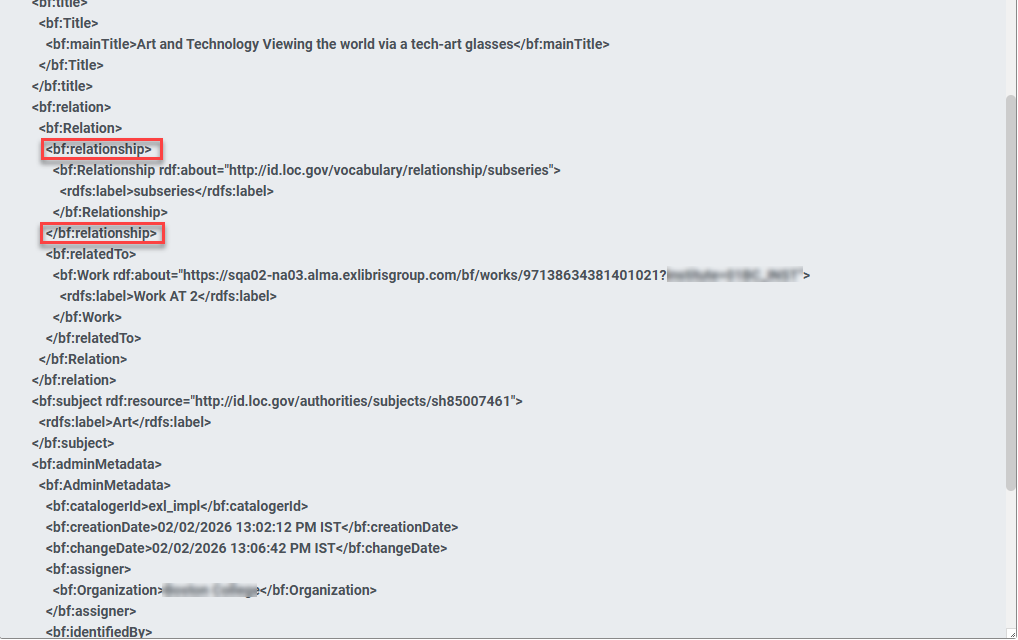
For more information, see BIBFRAME Support and Creating a BIBFRAME Records and Templates.
BIBFRAME and BFLC Ontology Update
May 2026 Metadata & Linked Open Data
Alma has updated the metadata standard for BIBFRAME and the BFLC extension to support version 3.0, maintaining the standard to support valid BIBFRAME creation within Alma.
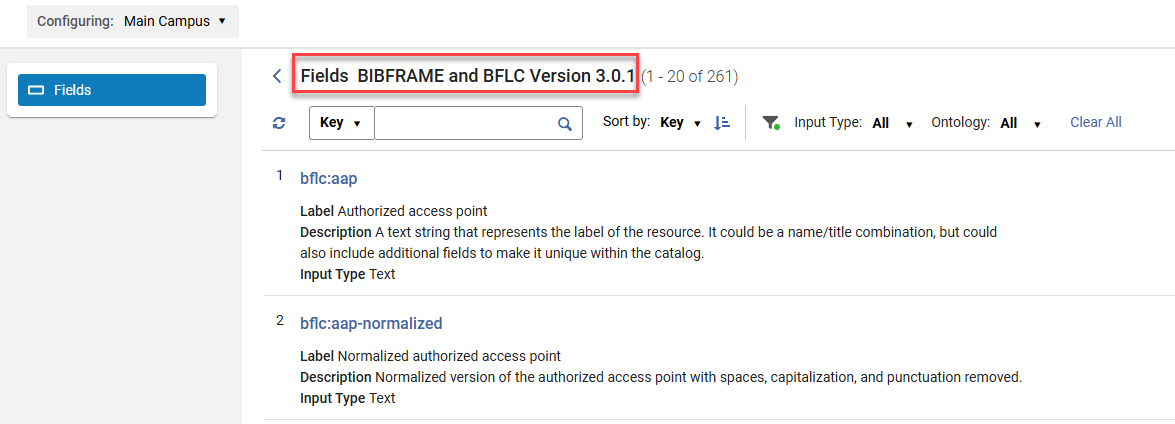
Additionally, a Restore action is now available on the Linked Data Active Profile views to restore the out-of-the-box default value for any changes applied to an ontology.
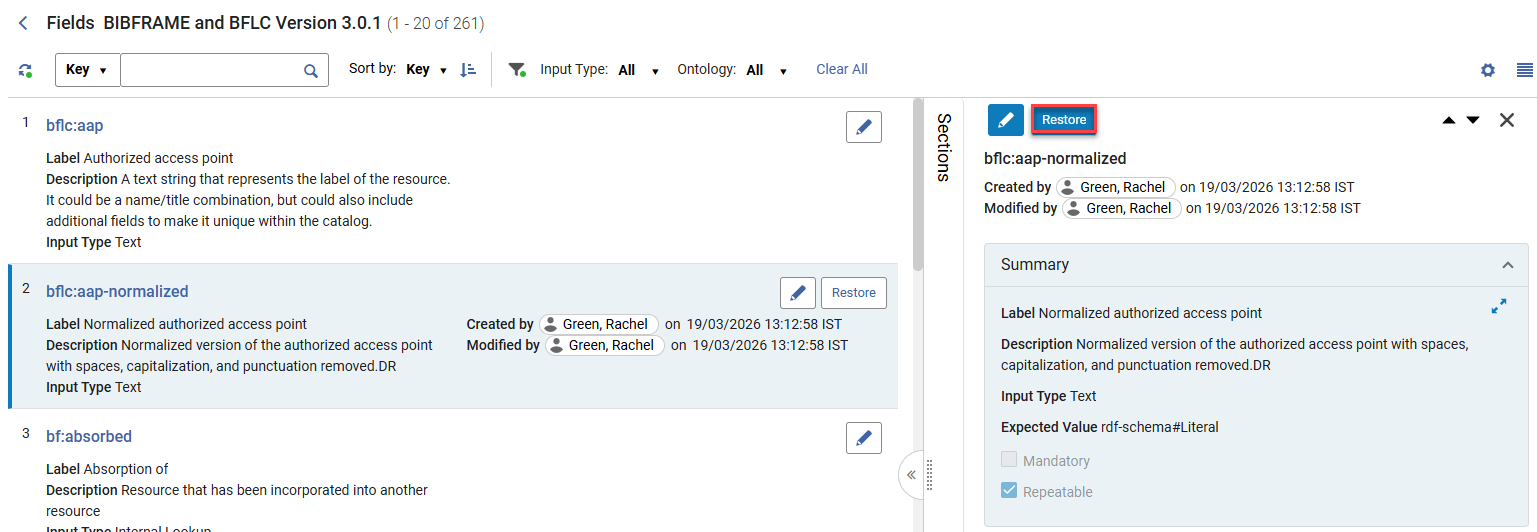
For more information, see Customizing Field Labels and Descriptions.
Supporting Sets for BIBFRAME Works
May 2026 Metadata & Linked Open Data
Librarians can now create sets for BIBFRAME works, for both logical and itemized sets. Using work sets in different workflows will expand over time, based on need and use cases. Currently, sets can be created within a work search and edited and managed from the Manage Sets menu.
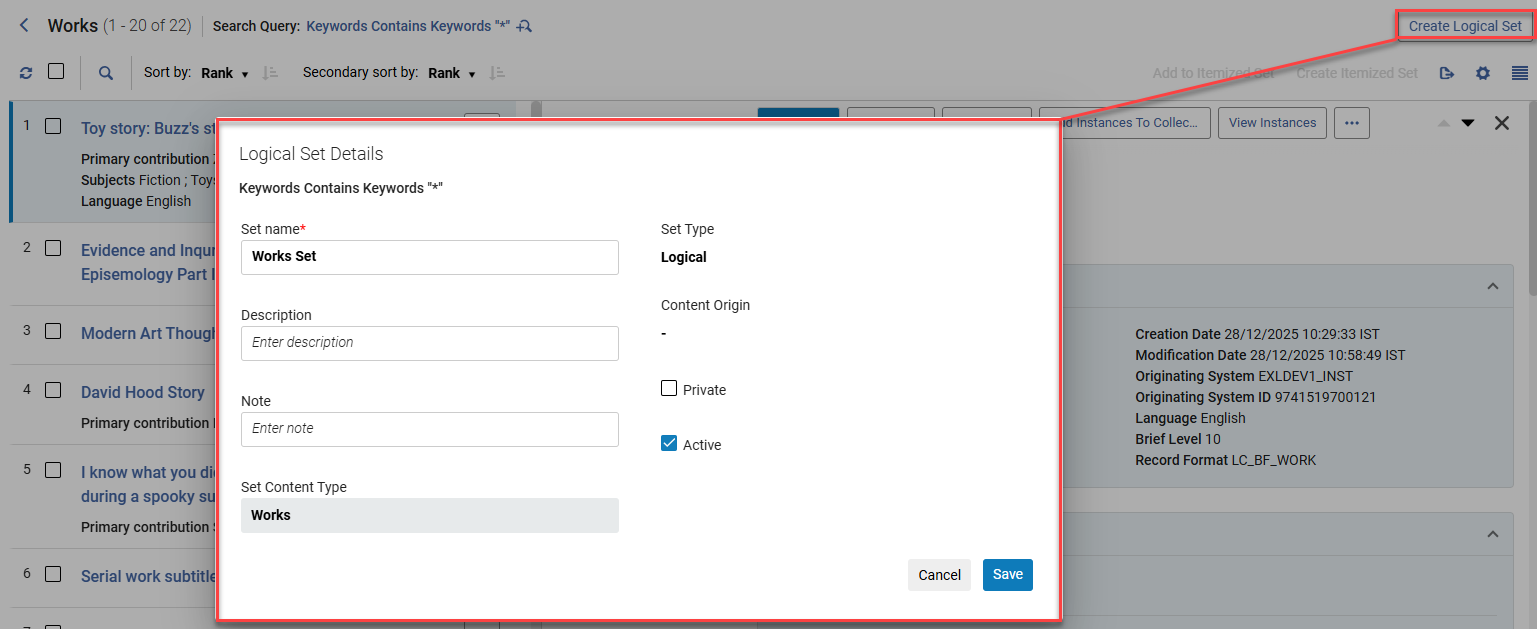
The bulk actions in the work search were replaced to align with the general Alma bulk action standard.
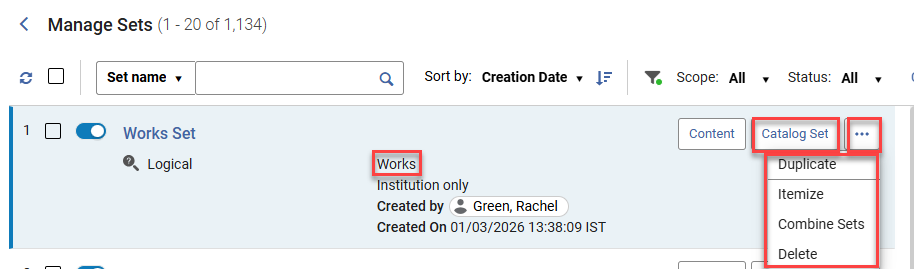
For more information, see Set Content Types and Work Search.
Enhanced Handling of Library and Location in the Physical Holdings Search
May 2026 Metadata & Linked Open Data
The holdings search was updated so that it is now possible to:
-
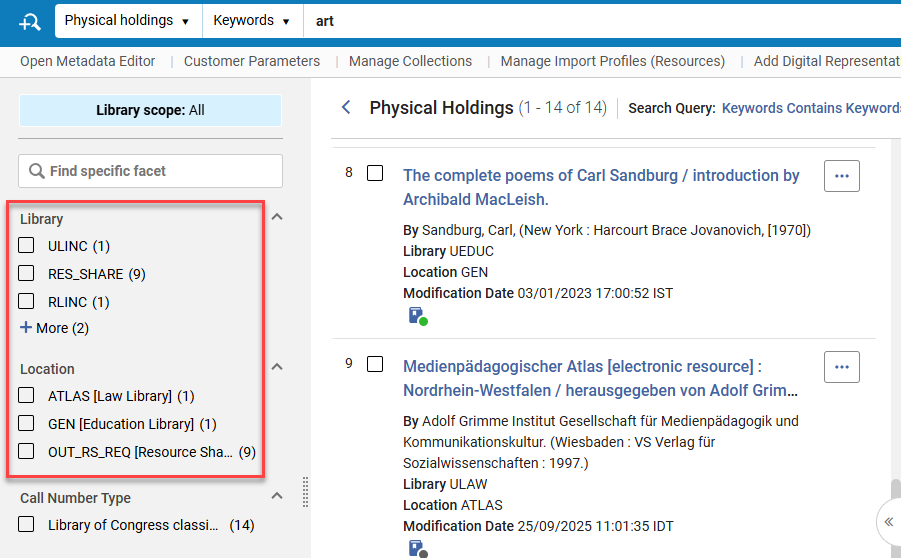
Facet by location without first faceting by library — the library name is displayed in brackets to distinguish between similar locations in different libraries.
-
See the library and location information according to the Repository search results configuration — in the record view, facets and export to Excel.
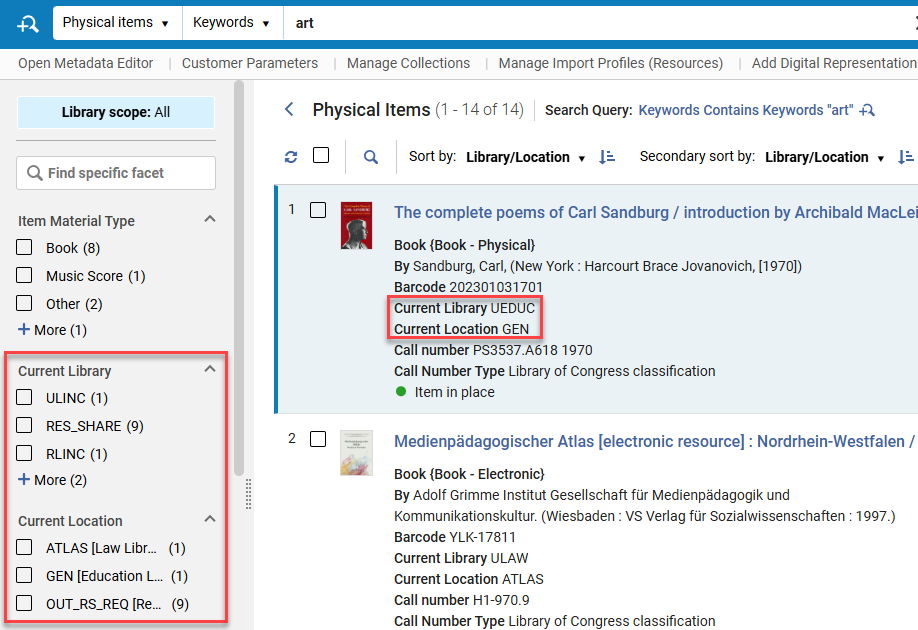 This update may impact the content of the exported holdings file.
 -
Configure a separate display for the table view of the search results to enable libraries to select a more condensed view for the table, maximizing the value of the table format.
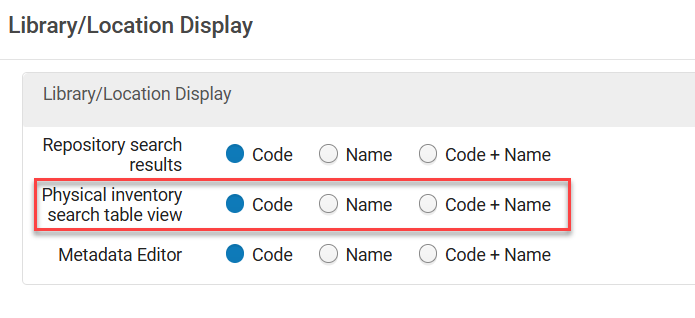
For more information, see Customizing How Library and Location Appear.
New View Options for BIBFRAME Records
May 2026 Metadata & Linked Open DataURM-236917
Alma now supports easy navigation between different BIBFRAME record views, so each user can find the view that best suits them.
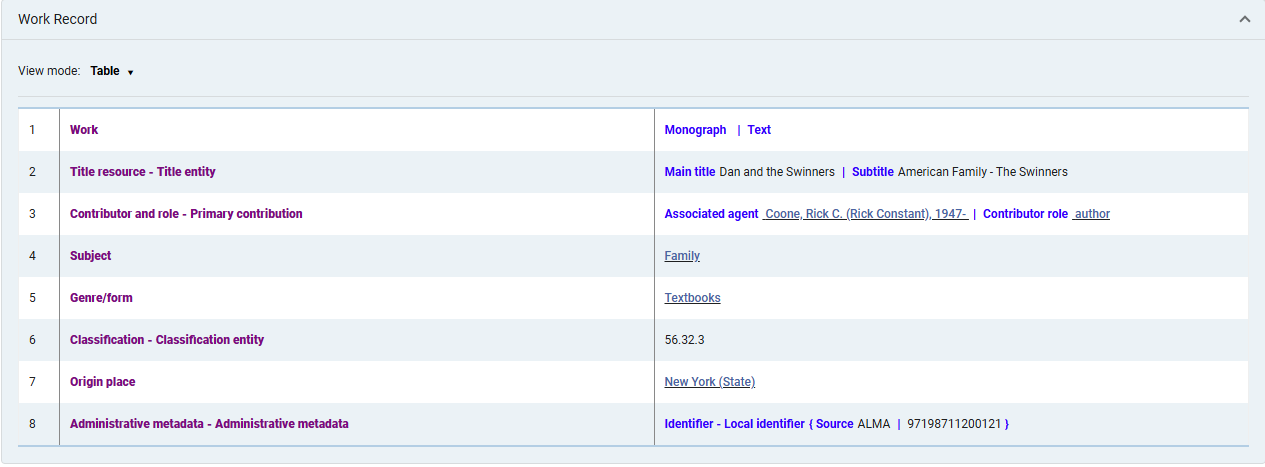
To enhance interoperability of BIBFRAME, the BIBFRAME work record now includes the Turtle (.ttl) view mode option.
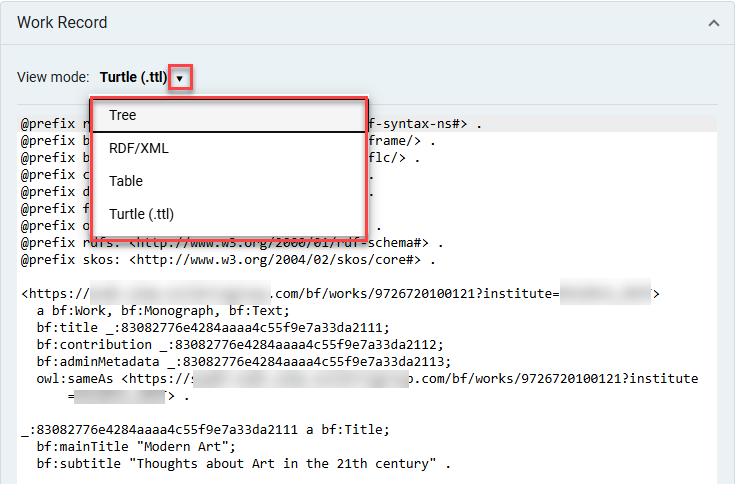
Additionally, we have introduced a new condensed display for BIBFRAME records in a table view, enabling as much metadata as possible within a section and using the familiar display known to catalogers from MARC formats.
For more information, see Work Search.
Improved Language Support in AI Metadata Assistant, Using Optical Character Recognition
May 2026 Artificial Intelligence AI documentation logo no background.
The AI Metadata Assistant enables catalogers to easily extract metadata from images and files to streamline the cataloging process. The text is extracted from images by the AI LLM model used in the assistant, as part of the metadata generation process. However, for some languages, scripts, and resource types, lower LLM optical character recognition accuracy may result in lower metadata quality. It is now possible to apply a dedicated OCR tool to improve results for those resources — the LLM then generates metadata based on the text extracted by the OCR tool, rather than directly from the image, leading to improved support for more languages and resource types. Catalogers can select their preferred text extraction method for the specific resource being cataloged:
-
AI Metadata Assistant — text processed by the LLM as part of the metadata generation (as today).
-
Azure Document Intelligence — an advanced, AI-based OCR service with extensive language support.
-
Tesseract — a seasoned, robust OCR tool for extracting text from images and files.
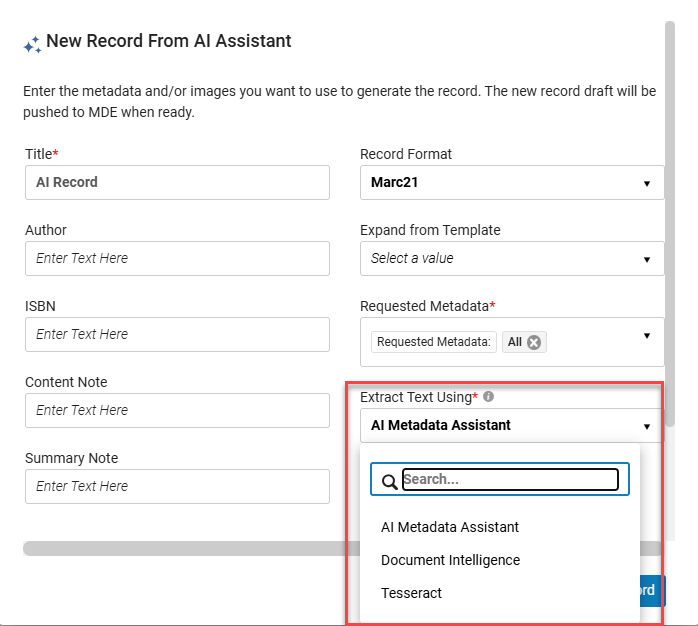
This is especially beneficial for libraries cataloging resources in languages and scripts with lower LLM OCR capabilities (e.g., non-Latin scripts).
For more information, see Enriching a Brief Record.
Enrich Bibliographic Records in Bulk Using a Streamlined Copy — Cataloging Process and AI Title Matching
 URM-325022
A new job, Enrich Bibliographic Records,enables the library to enrich a set of up to 1000 records, streamlining the search for matching records in its existing search profiles and copy-cataloging partners, filtering and assessing the results, and providing copy-cataloging recommendations to the cataloger.
As a first step, the Enrich Bibliographic Records job supports searching in Alma copy-cataloging partners to avoid overwhelming external resources with a large volume of search queries they’re not prepared to handle. Support for external copy-cataloging partners will be added in the future, based on the community's needs and subject to their ability and agreement to handle a large volume of search queries.
This is especially useful for libraries enriching their bibliographic records from copy-cataloging partners, making the process easier, faster, and more efficient.
For more information, see Working with the Enrich Bibliographic Records Job.
Alma AI Assistant for Acquisitions Funds and Ledgers: Now Supports Actions! (and additional improvements)
URM-322774The Alma AI Assistant for Acquisitions Funds and Ledgers was introduced in the February 2026 release in preview mode (beta). After an additional phase of feedback and improvements, it is now available for general availability and can be enabled in Configuration Menu > Acquisitions >AI Features > AI Features Management.
The Alma AI Assistant enhances the user experience by enabling users to interact with Alma through a chat-based interface. Instead of navigating multiple screens and workflows, staff users can ask questions naturally and receive clear, relevant responses directly within Alma.
Supported Actions
It is now possible to perform actions directly from the Assistant chat interface.
Supported actions include:
- Allocate money to a specific fund
- Transfer money from fund to fund
The activate/deactivate a specific fund action will be available in a future release.
Similar to the assistant's follow-up questions, it might also suggest actions to take, depending on the conversation's context. For example:
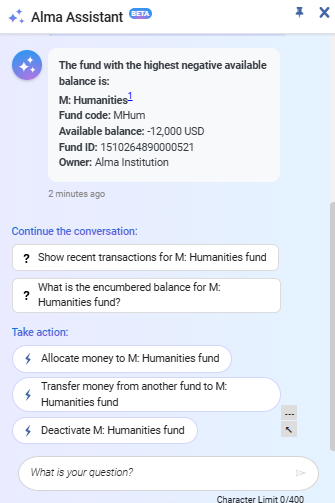
You can use the assistant suggestions for actions, or alternatively start a conversation with your desired action, for example, "I want to..."
Before taking action, the assistant checks that all necessary information has been supplied and requests confirmation.
The action is performed using the Alma APIs (which the assistant uses as a tool). Similarly to cloud apps, which utilize APIs, the user who is kept as the modifier is the connected user.
Additional Improvements
- The Alma Assistant now identifies funds regardless of the case. For example, questions on fund "data" are answered even when the fund name in Alma database is DATA.
- Questions on fund transactions are answered with information on the transaction's related PO line or invoice. Until now, the ID was returned, which is not useful. Now, the response includes the PO line number or invoice number with the line number. Staff users can use the information and continue their work in Alma.
- The assistant now supports special characters in fund names, e.g. "Art & History fund".
For more information on enabling the feature, how it works, and our planned enhancements, refer to the Alma AI Assistant – Acquisitions Funds and Ledgersdocumentation. Also see Artificial Intelligence in Alma.
New Setting for Community-Linked Electronic Services to Keep Portfolios Active When Removed from the Community
May 2026 Resource Management idea exchangeIdea Exchange
Services of collections activated from the Community Zone now include a new configuration option that controls whether portfolios deleted from the Community Zone and localized in the institution are deactivated or kept active. The new setting (Automatically deactivate portfolios removed from service?) is relevant when the service is configured as non–auto-delete (meaning portfolios are localized rather than deleted when removed from the Community Zone). The setting determines how localized portfolios behave after they are removed from the Community, giving customers more granular control over Community Zone linked resources.
-
Deactivate — This is the default. It preserves the current behavior. Portfolios are unlinked from the Community Zone and set to Not Available in the institution.
-
Keep all active — Portfolios are unlinked from the Community Zone but remain Available in the institution.
-
Keep perpetual access portfolios active — Portfolios are unlinked from the Community Zone and handled based on their access type:
-
Portfolios with perpetual or current and perpetual access remain available.
-
Portfolios with current access are deactivated.
If the portfolio does not have an access type defined, the collection’s access type will be used.
-
For existing electronic services defined as non–auto-delete, the existing behavior will remain, and they will, by default, be defined to automatically deactivate.
The new setting can be updated manually in the service editor or in bulk using the Change Electronic Collection Information job, E-Collection Quick Update cloud app or via the API.
As before, linked portfolios that were deleted from the Community Zone will be reported on the Community Zone Updates Task List, but with a new dedicated report type for portfolios that were kept active in the institution.
The new setting will be available for reporting in Analytics, allowing users to create reports based on resource configurations. For more information, view the data dictionary for the e-inventory subject area (see E-Inventory).
For more information on this feature, see Activating Electronic Resources from the Community Zone and Managing Electronic Resources.
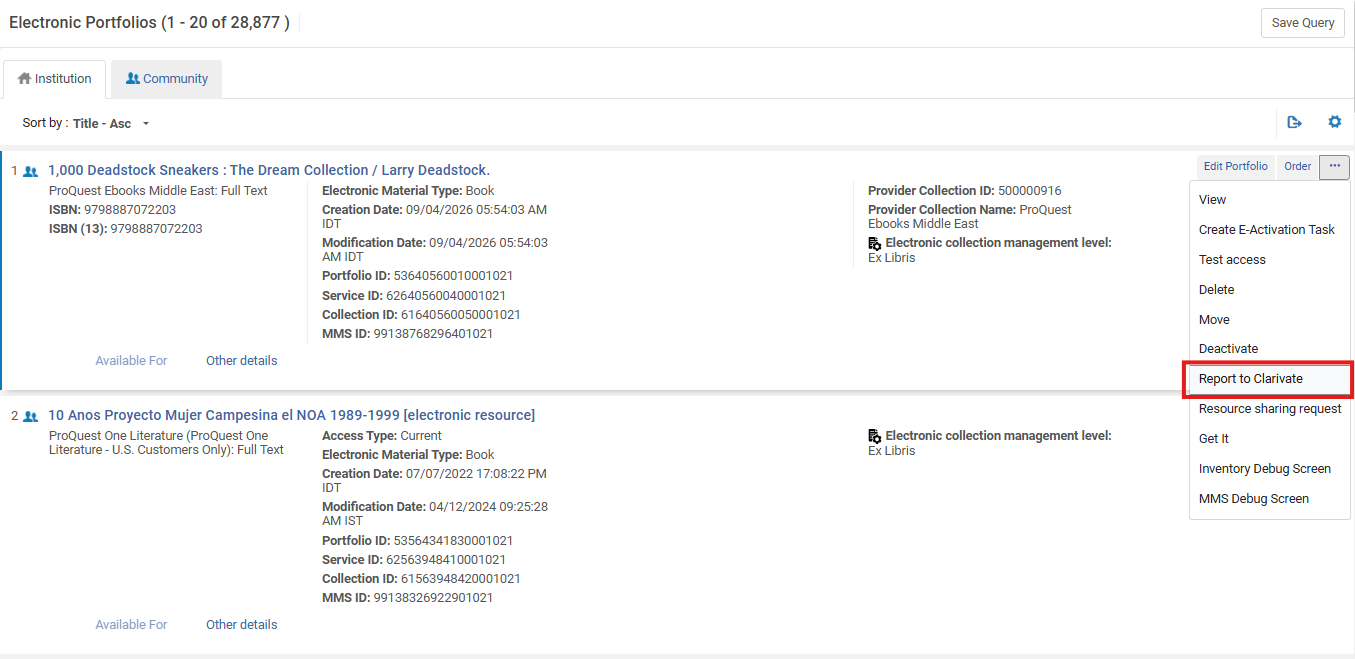
The following fields were also added to the Additional info section to include all information that might be needed to fix the issue.
-
Indication if the collection is an autoholding and if the autoholding profile is defined
-
Provider collection ID and name
-
DBID
-
Portfolio ID (local Portfolio ID i.e., IZ id and global Portfolio ID i.e., CZ id)
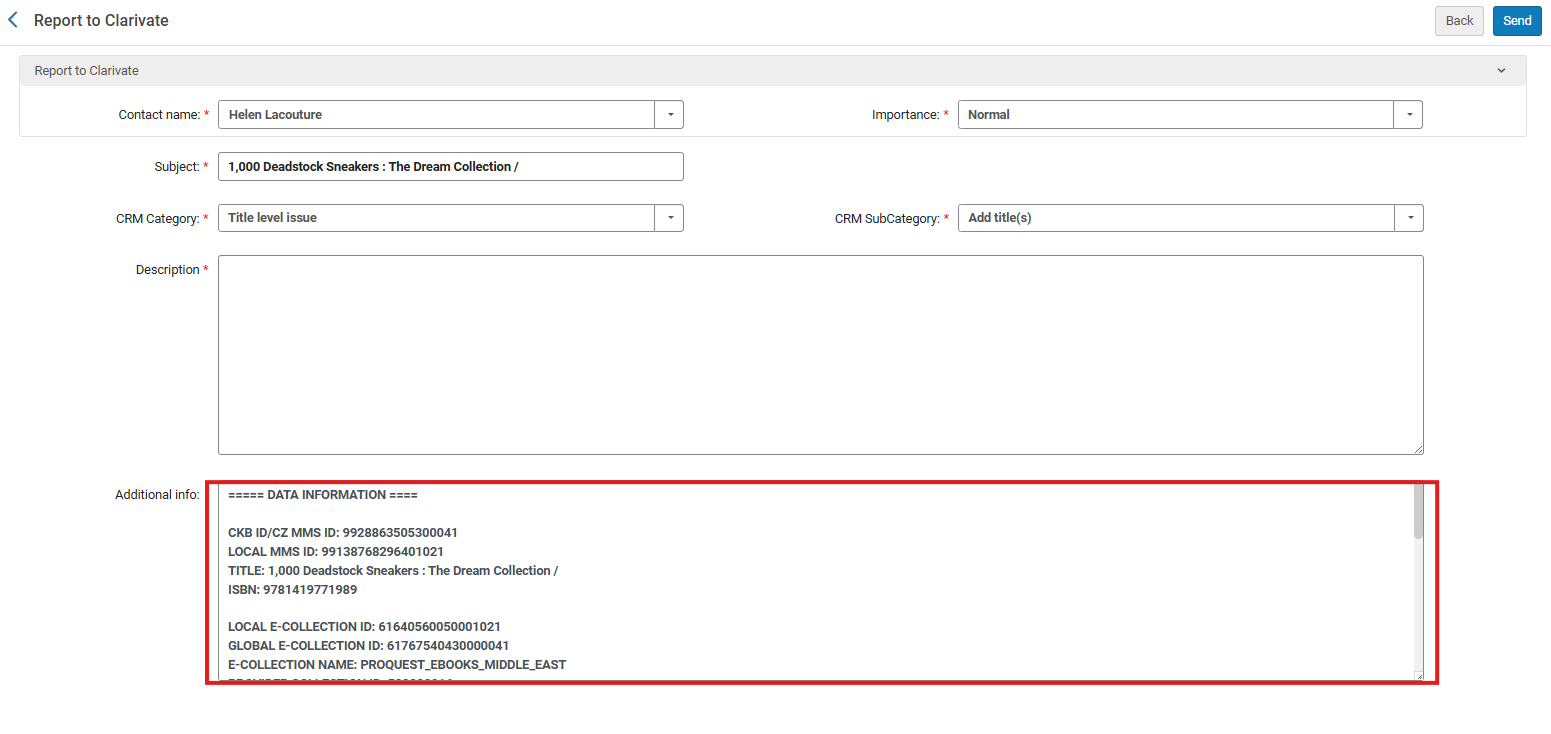
The Additional info now consistently displays the relevant information, even when updating the CRM category.
For more information, see Configuring CRM Contacts.
A Streamlined Rialto Experience for Non-Rialto Institutions
May 2026 Resource Management
To strengthen integration between Rialto and Alma and better support collection development activities, a streamlined marketplace experience called Rialto Search is now available for institutions without Rialto. Activation of Rialto Search happens automatically; no opt-in is required.
Rialto Search provides a lightweight marketplace discovery experience within Alma. Users at institutions without Rialto can now access the Collection Development > Market section to:
-
Perform basic and advanced searches in the Rialto marketplace for title availability and pricing
-
View real-time calls for holdings, course materials (if Leganto is enabled), and books available through resource sharing (if Rapido is enabled)
-
Explore curated lists featuring high-quality titles across a range of subjects
-
Export marketplace results for further review and analysis
Market searches perform real-time calls to Alma for local and network holdings to provide accurate visibility into owned access. From the search results, Rialto Search users can email marketplace offers to other Alma users within their institution. They can also create purchase requests for selected items, if they have the appropriate Alma role.
This update expands access to Rialto capabilities across a broader user base, enabling more staff to participate in resource discovery and selection workflows. For more information, see Rialto Search.
This feature is not available in Sandboxes prior to the May release.
Advanced Tools Added to the Collection Development Menu
May 2026 Resource Management
To ensure all tools relevant to collection development are available in one central location, selected advanced tools are now also accessible from the Collection Development menu. These tools remain available in their original location (Resources > Advanced Tools) and function identically from both menus.
The following tools have been added to Collection Development > Advanced Tools:
-
Overlap and Collection Analysis — Comparison of collections and title lists to identify overlapping and unique content, which enables data-driven decisions for purchases, renewals, and cancellations.
-
Duplicate Title Analysis — Identification and grouping of potential duplicate bibliographic records, which supports metadata cleanup and reduces overall redundancy.
-
Merge Records and Combine Inventory — Consolidation of duplicate records into a single preferred record, which leads to cleaner and more accurate catalogs.
To access and use these tools, a user must have the Collection Development Manager role plus the specific operational role required for each tool:
-
Overlap and Collection Analysis — Purchasing Operator, Purchasing Manager, Repository Manager, or Electronic Inventory Operator
-
Duplicate Title Analysis — Repository Manager
-
Merge Records and Combine Inventory — Catalog Administrator, Catalog Manager, or General System Administrator
This update improves visibility of key collection development tools, helping users discover and use functionalities that may have previously been overlooked. For details, see Advanced Tools.
Support for Barcodes When Creating Projects from a File
May 2026 Resource Management
Previously, creating collection development projects from a file required the uploaded file to include a column with item IDs. With this update, you can now also create projects from a file that contains a column of barcodes.
Once a file with barcodes is uploaded, the rest of the project creation process works exactly as it does when using a file that contains item IDs.
This enhancement makes project creation more intuitive by enabling staff to use barcodes—the identifiers they most likely work with daily—rather than system-generated item IDs, reducing extra steps and making file creation more intuitive.
Deeper Insight into External Holdings
May 2026 Resource Management
To support deeper cross-institution analysis, Rialto now offers expanded bibliographic details in the Compare To section when inspecting individual recommendations in projects with external comparisons.
While the Compare To section itself remains unchanged in the main view, the sliding panel under View full list and additional information now displays expanded metadata for matching holdings. Newly added fields include:
-
Library
-
Publication Place
-
Edition
-
Material Type
-
Language
-
OCLC
These additional data points provide deeper insight into external holdings, enabling more informed retention and deselection decisions when comparing your collection to other institutions.
Country-Based Selection in the Compare To Section
May 2026 Resource Management
The Compare To section for retention and deselection projects that include comparisons with external institutions has been enhanced to provide a more structured, country-based selection experience.
When creating a new project or editing an existing one, users can now browse comparison institutions using a country tree view. First, select a country to display all available institutions within it. You can then choose specific institutions individually, or select the checkbox next to the country name to automatically include all institutions within that nation.
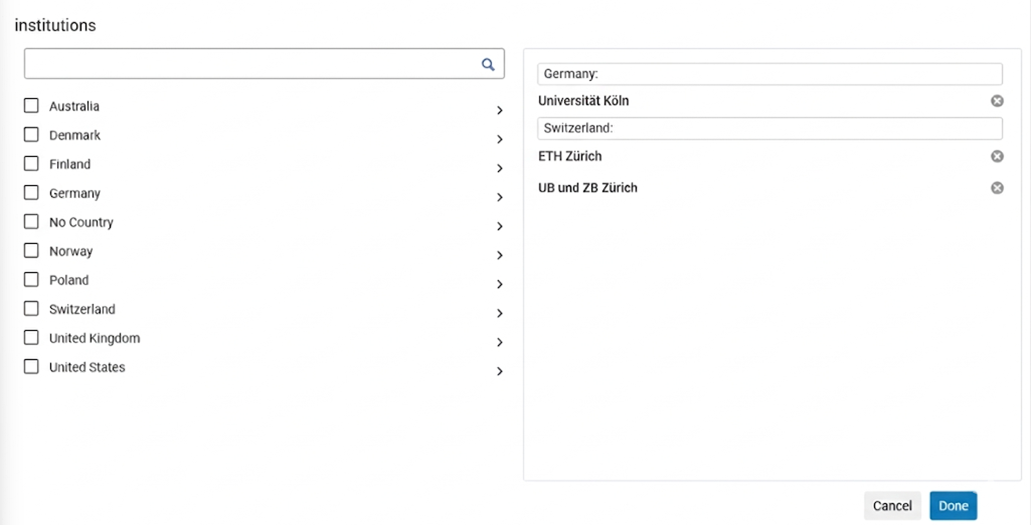
This enhancement simplifies the process of selecting comparison institutions and makes it easier to locate relevant libraries without having to navigate a long alphabetical list.
Enhanced Sorting for Collection Development Recommendations
May 2026 Resource Management
Rialto now provides more flexible sorting options when viewing recommendations in retention and deselection projects. In addition to sorting by Title and Publication Date, you can now also arrange recommendations by:
-
Library / Location
-
Call Number
You can also apply a secondary sort to further refine the results' order. The secondary sort uses the same set of fields—Title, Publication Date, Library / Location, and Call Number—and enables additional ordering when multiple recommendations share the same primary sort value.
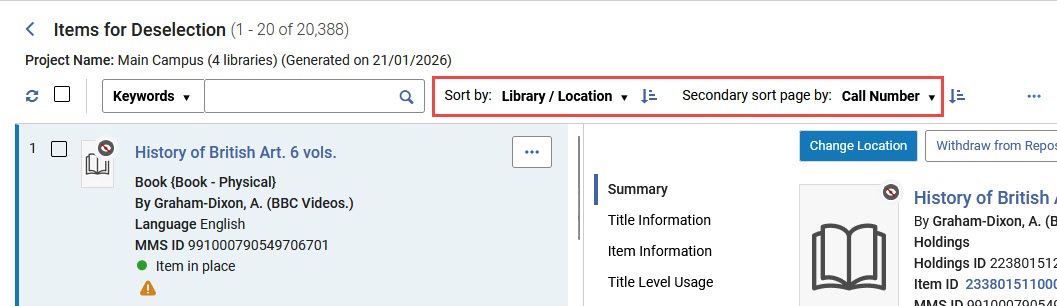
These enhancements make it easier to review, compare, and organize recommendations, especially when working with large result sets that include many items from the same library or publication period.
New Fields in Change Electronic Portfolio Information Job for Expanded Batch Updates
May 2026 Resource Management Idea Exchange
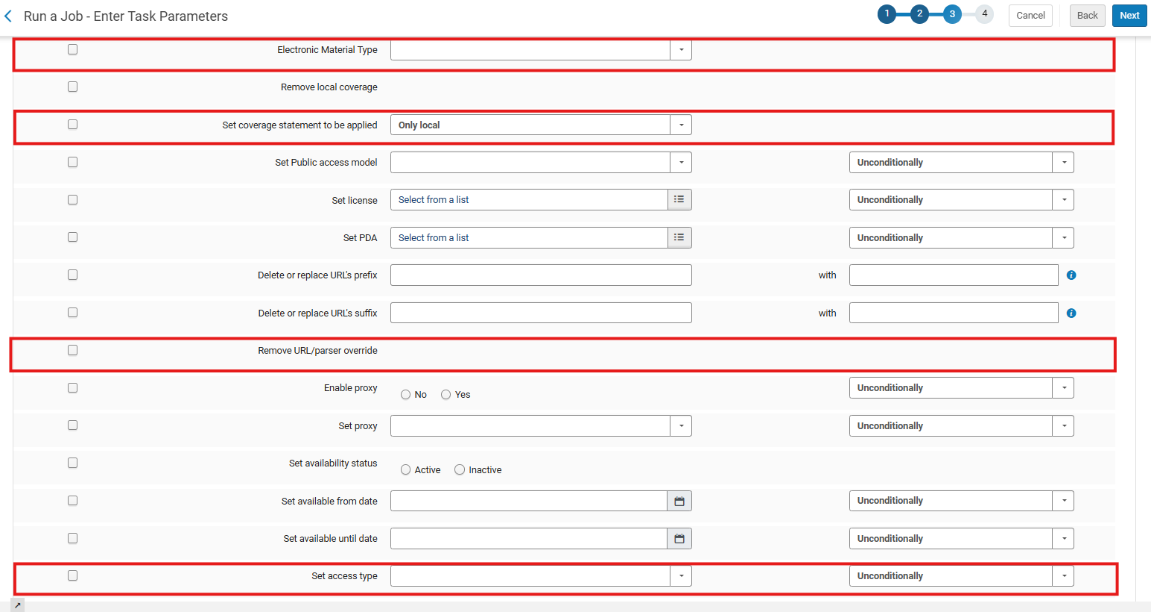
New fields were added to the Change Electronic Portfolio Information job to support expanded batch updates:
-
Set coverage statement to be applied — A new dropdown (Only local, Global and local, Global or local, Only global) that updates the Which coverage statement will be applied? value in the Portfolio Editor. Note that this does not update standalone portfolios.
-
Set access type – A new dropdown (Current, Perpetual, Current and perpetual, Empty) with condition options (If field empty, If field not empty, Unconditionally – default). It updates the portfolio Access Type field.
-
Remove URL/parser override — A new option that clears all URL/parser override fields in the portfolio Linking tab (Parser parameters override, Dynamic URL override, Static URL override).
-
Electronic Material Type — A new empty option – The existing dropdown now includes an empty value that clears the field, aligning with the Portfolio Editor UI. Note that if the portfolio is linked to the Community Zone (CZ), and the linked portfolio in the CZ has an Electronic Material Type, then when selecting an empty value, the job will overwrite this field with the value in the CZ. For example, if the value in the CZ is Journal, and you select the empty value, then after saving, the field in the local portfolio is updated to Journal.
For more information, see Manual Jobs.
Easier Organization for Description Templates
May 2026 Resource Management idea exchangeIdea Exchange
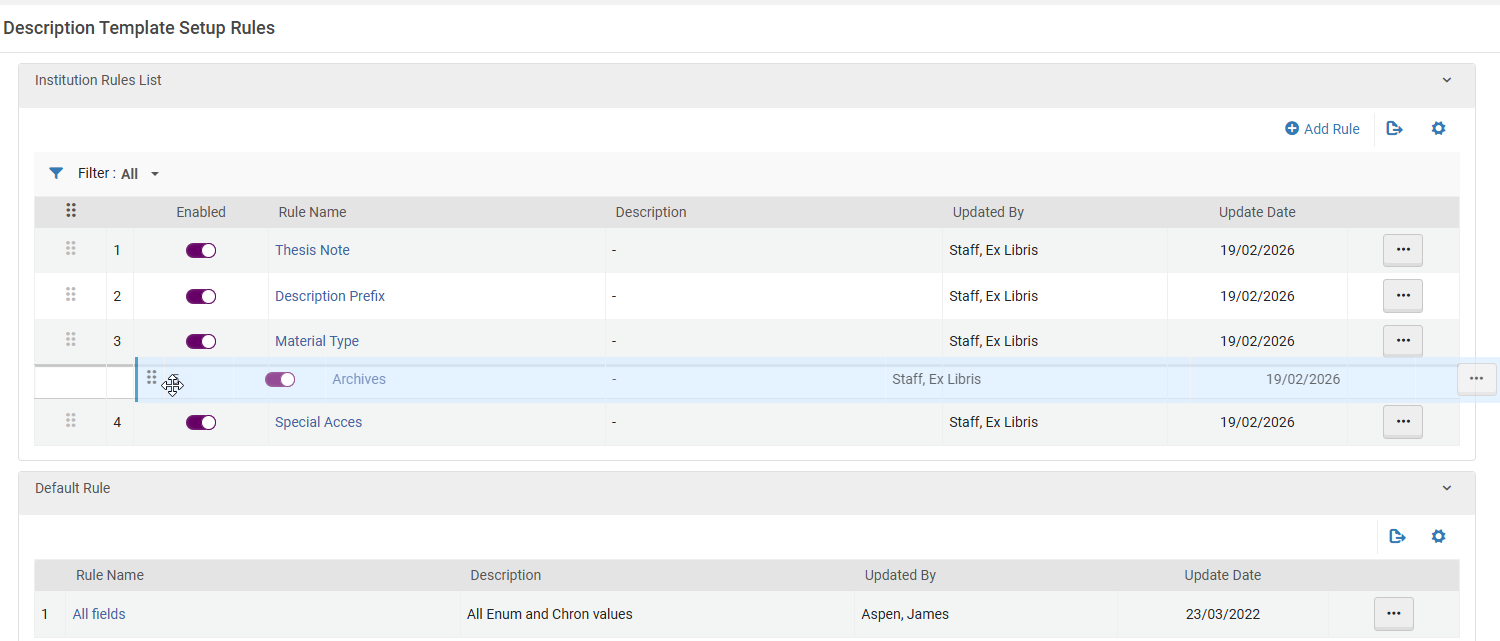
The description templates configuration page (Configuration > Resources > Description Templates) has been enhanced to allow easier rule reordering via drag-and-drop.
For more information, see Configuring Item Description Templates.
Upcoming Electronic Collections
May 2026 Resource Management
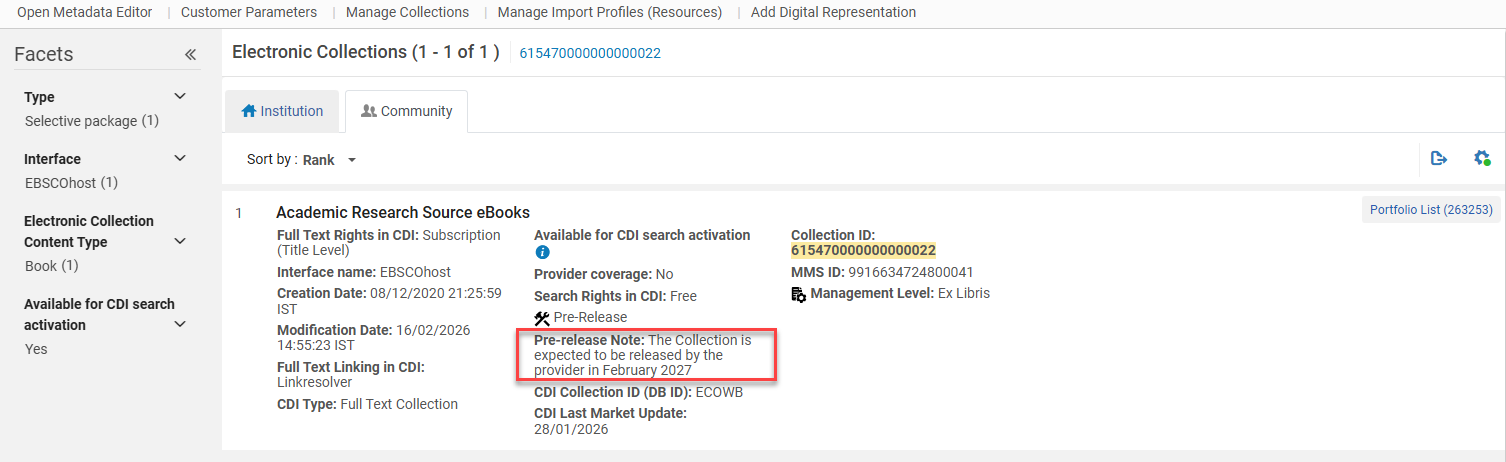
Providers can now send Ex Libris information about collections that do not yet have title lists, provided the collection name is already available.
In these cases, a new “placeholder” collection containing the collection name, provider collection ID, provider name, and expected due date will be created in the CZ, with no option to activate it. The expected due date indicates when the title list is expected to be delivered to Ex Libris, with an additional one-month buffer.
The upcoming collection feature will support better advanced planning for e-resource management by making it possible to see which collections are awaiting title lists and by increasing the overall transparency of the Community Zone.
Once a collection is populated with a title list, activation will be available, as well as other functionality such as acquisition and CDI descriptive fields. Once the collection is populated, we will notify the community in the standard Content Knowledge Base Release Notes, where we announce new collections.
In the Community Zone tab, an upcoming collection will appear with a pre-release indication and a pre-release note, with information from the provider on the planned release of the title list.
We will gradually roll out this development with Adam Matthew. As additional providers include an indication of upcoming collections with a release date, we will be able to extend this solution to other providers as well, as long as they support fully automated metadata delivery.
For more information, see Activating Electronic Resources from the Community Zone.
Prioritizing Online Services in Discovery Based on Current Year Access
May 2026 Resource Management CERV CERV Enhancement (ID#36385)
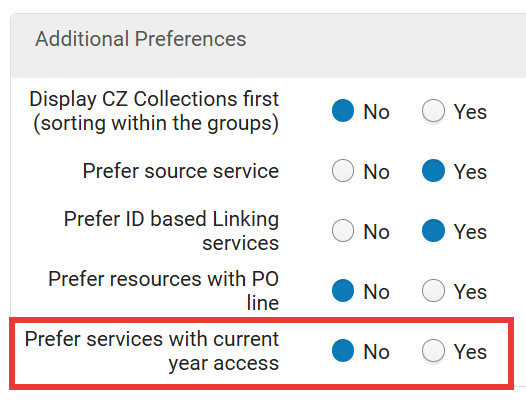
The Additional Settings section on the Online Services Order configuration page (Configuration Menu > Fulfillment > Discovery Interface Display Logic > Online Services Order) now includes a new configuration option: Prefer services with current year access. This enables institutions to prioritize services with coverage dates within the current calendar year. By default this setting is turned off. When enabled, Alma pushes the current year access resources (according to the portfolio's coverage and embargo definitions in the current year) to the top of the list. This takes priority over all the other criteria.
 For Consortia, Network Zone services with current access are prioritized together with Institution Zone services with current access.
For more information, see ViewIt.
Suppress Bibliographic Records Localized When Ordering Electronic Collections from Community Zone
May 2026 Resource ManagementURM-321113
The suppress_bib_upon_cz_ordering parameter was added to Configuration > Resources > Other Settings. When set to true, any newly localized bibliographic record created as part of Community Zone collection ordering is automatically suppressed in the Institution Zone. Bibliographic records that already exist in the Institution Zone, such as when re‑ordering a collection that was previously activated, are not suppressed. The default for this parameter is false.
- Suppression is applied only when a new bibliographic record is localized during the ordering workflow.
- This functionality applies only to ordering electronic collections from the Community Zone. The behavior for ordering portfolios from the Community Zone remains unchanged.
For more information, see Configuring Other Settings (Resource Management) and Activating Electronic Resources.
4th and 5th Reporting Codes Supported in Invoice Lines API and Export Payment
May 2026 Acquisitions
The 4th and 5th reporting codes can now be retrieved and updated by the invoice lines API. Additionally, these codes will now be part of the Export Invoices For Payment job (which can be configured in Configuration Menu > General > Integration Profiles > Editing a Finance profile > Actions).
For more information, see Invoices and Invoice Payment in the Developer Network.
Invoice Creation from PDF/Image by AI (Early Access)
May 2026 Acquisitions AI documentation logo no background.
A new early access capability is now available: creating an Alma invoice directly from a PDF or image file upload.
Watch a quick demo here: Create invoice from PDF - DEMO
This feature is offered as part of an early access program to gather feedback from a broad range of real-world use cases.
Powered by AI, the process combines OCR (Optical Character Recognition) to extract data from the file with Gen-AI, which transforms this information into a structured invoice, helping streamline and accelerate invoice creation.
Like other AI-based capabilities, this feature is opt-in and must be enabled by an administrator via the AI Features Management configuration page.
Once enabled, a new option will appear under Acquisitions > Create Invoice > From File.

The feature supports PDF uploads of up to 20 pages. Generated invoices are placed in review and clearly marked as AI-created.
This feature is currently available only for early tester institutions. The early access program has reached its maximum capacity and is now closed.
Legal Deposit Acquisition Methods in PO Lines
May 2026 Acquisitions
The Legal Deposit workflow in Alma includes two letters that are sent:
-
Legal Deposit Order Letter
-
Legal Deposit Receipt Letter
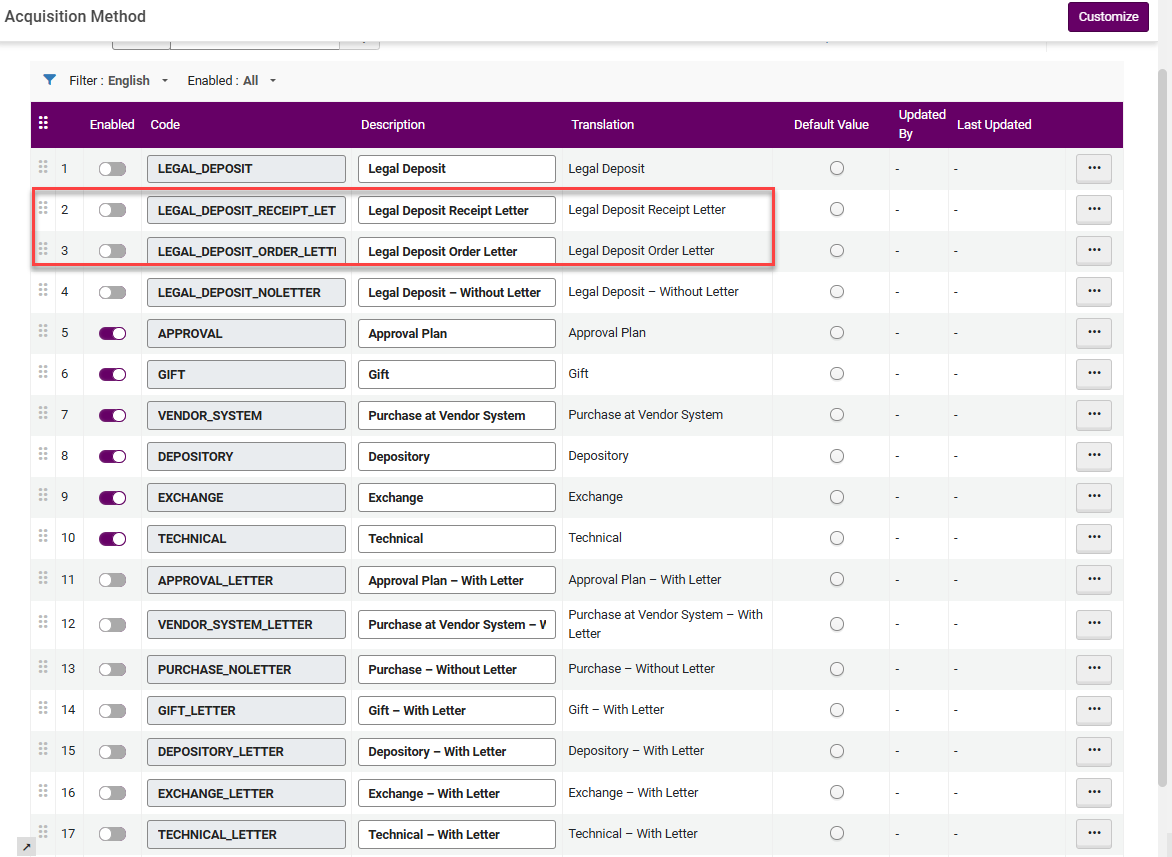
Until now, when selecting the Legal Deposit Acquisition Method in the PO line, both letters were sent. When selecting Legal Deposit - Without Letter, neither of these two letters were sent. Now, two Acquisition methods were added for cases in which only one of the letters should be sent for the PO line:
-
Legal Deposit - Order Letter — Only the order letter is sent
-
Legal Deposit - Receipt Letter — Only the receipt letter is sent
For example, when the item has already arrived at the library, upon creating the PO line, the Legal Deposit - Receipt Letter acquisition method can be selected, as there is no need to ask the provider to supply the item.
The Legal Deposit claim is not affected by the Acquisition method selected and will be sent per the Claiming workflow.
For more information, see Manually Creating a PO Line, Configuring Acquisition Methods and Creating Legal Deposit PO Lines.
Hide Configuration links from 'Old' Menu (Partner Account Allowances, Partner Sectors, Partner Organization Type)
May 2026 Collaborative Networks Consortia
After adding the Partner Account Allowances, Partner Sectors and Partner Organization Type configurations to the Consortia Central Configuration dashboard in the February release, they have now been removed from the 'old' Alma and Primo VE configuration menus of the Network Zone. Network Zone administrators, while operating at the Network Zone institution, now access those configurations directly through the Central Configuration Dashboard.
The removed configurations from the Alma and Primo VE configuration menus at Network Zone Level are:
-
Partner Account Allowances
-
Partner Sectors
-
Partner Organization Type
For more information on related configurations, see Consortia Central Configuration Dashboard.
Feature Rollout Preferences Page is Available in Consortia Central Configuration Dashboard for Management Purposes
May 2026 Collaborative Networks Consortia
It is now possible for Network Zone operators to manage the Feature Rollout Preferences page via the Consortia Central Configuration Dashboard. This improves efficiency and supports central offices in their efforts to manage information across the Network Zone.
This feature is relevant only for consortia operating with a Network Zone setup.
For more information, see Sections and Configuration Options.
AI Features Management Page Now Available in Consortia Central Configuration Dashboard for Management Purposes
May 2026 Collaborative Networks Consortia
It is now possible for Network Zone operators to manage the AI Features Management page via the Consortia Central Configuration Dashboard. This new page centralizes all AI features, and replaces, in their respective locations, the AI Usage Profile configurations available in the Consortia Central Configuration under the Acquisitions, Resources and General sections today. This improves efficiency and supports central offices in their efforts to manage information across the Network Zone.
This feature is relevant only for consortia operating with a Network Zone setup.
This feature is relevant only for consortia operating with a Network Zone setup.
For more information, see Sections and Configuration Options.
Protection of Shared Rules in a Consortia
May 2026 Collaborative Networks Consortia
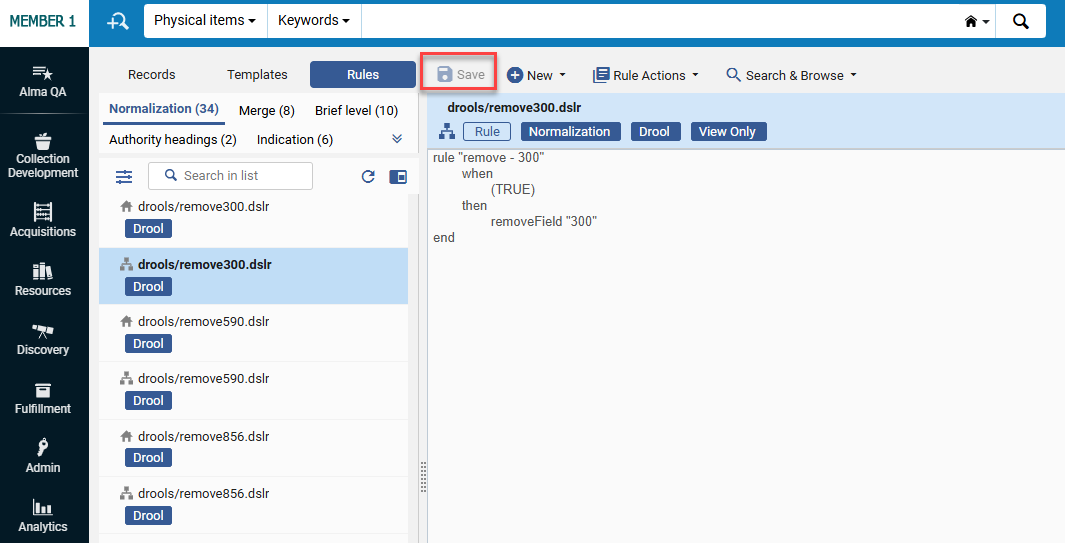
It is now possible for Network Zone operators and Institution Zone operators to protect their shared rules (Normalization, Merge, Authority Headings, Brief Level and Indication) from being edited or deleted by other Institution Zone users, when the Protection of Shared Rules feature is enabled (Configuration > Resources > General > Other Settings > enable_shared_rules_protection set to True).
Shared rules can now be marked as Protected and will remain fully visible and executable by Institution Zone users, but cannot be modified or removed. Only Network Zone users with appropriate permissions or the Member institution Zone users who created these shared rules can edit or unprotect them. This ensures that only the Network Zone and the creator at the Institution Zone can make changes, thus preventing accidental changes or deletions of shared rules that impact multiple member institutions.
This feature is relevant only for consortia operating with a Network Zone setup.
For more information, see Working with Rules.
Enhancements in New UX for Table-View Navigation in Lists
May 2026 User Experience, Accessibility & Infrastructure
The table view was redesigned for improved accessibility and usability. Opening the details pane is now done only through the Title field or the view icon in the Actions column - the entire row is no longer clickable. This enables the user to easily copy text from the table cells without opening the right panel.
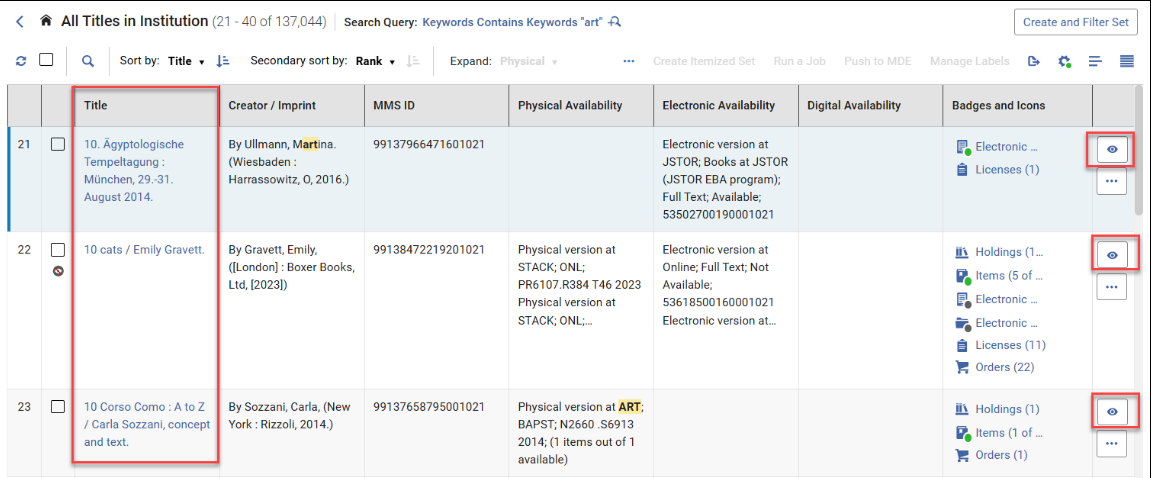
This behavior applies to all pages that use a table view.
Now, when the right panel is open in split view, the table displays two columns and the Actions column with the view icon/s. Showing two columns instead of one when the right-panel is open, makes more information easily visible, and switching to the desired row much easier.
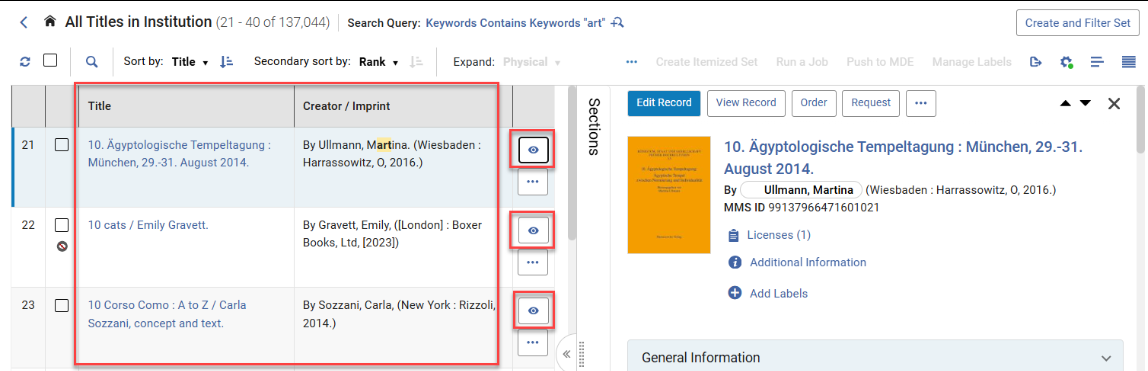
In addition, navigation using the Up/Down arrow keys was added.
When the focus is on the title in split view, and the user navigates using the Up/Down arrow keys, the focus on the title is kept, and the right panel is auto-refreshed to display the details of the current record in focus. When focused on any field other than the title and navigating with the Up/Down arrow keys, the focus moves to the next/previous item in the table, but the right panel does not refresh.
This provides users with more precise control when opening records in table view, avoiding unintended row clicks and using clear entry points via the Title or the view icon, which reduces unintended right-panel openings when navigating the table.
For more information, see New Layout.
Rebranding of Ex Libris/Clarivate Logos
May 2026 User Experience, Accessibility & Infrastructure
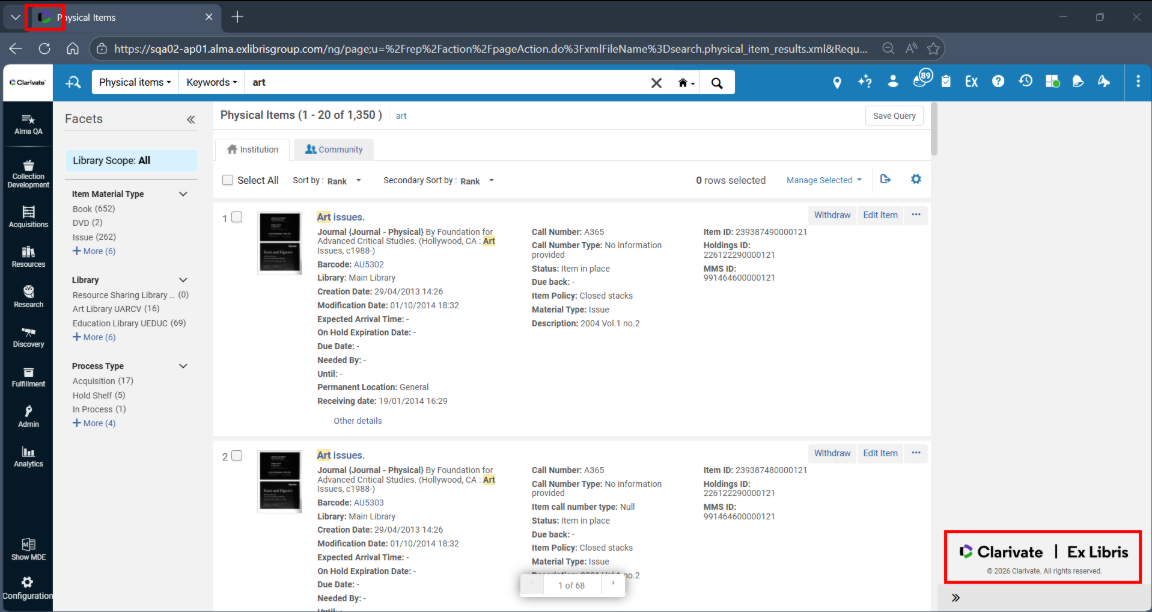
The Ex Libris/Clarivate logos were rebranded, and the new logos now appear throughout, for example, in the Alma UX, Customer Support Portal, Developer Network, Current Status page, etc.
Your institution's logo will not be replaced.
FrenchSupport for "Fuzzy Search" in Alma Menu Search Bar
May 2026 User Experience, Accessibility & Infrastructure
We have expanded the functionality of the Alma search menu to include "smart" search capabilities in French (FR). Historically, this feature has supported English, Hebrew and German. However, beginning in May 2026, it has also been extended to the French interface. The search functionality offers suggestions for synonyms, interchangeable terms, and even assists with simple spelling errors. This enhances user navigation, simplifying the process of locating items within the Alma search menu.
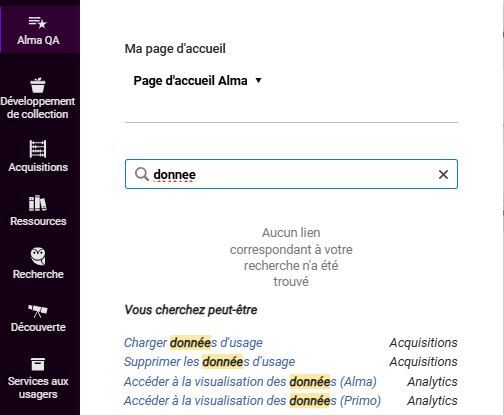
For a video demonstrating this functionality in English, see Improved Search Menu.
For more information, see Alma User Interface.
Supportfor Create Itemized Set and Add to Itemized Set Actions When Using Select All
May 2026 User Experience, Accessibility & Infrastructure
For the lists that support the Select All option and for users with roles that support creating sets, the Select All functionality was enhanced to support two additional bulk actions: Create Itemized Set and Add to Itemized Set. In addition, when users select all results, only supported actions are displayed. The actions run in the background, and users receive completion notifications through the Real-Time Notifications panel (see Real-Time Notifications).
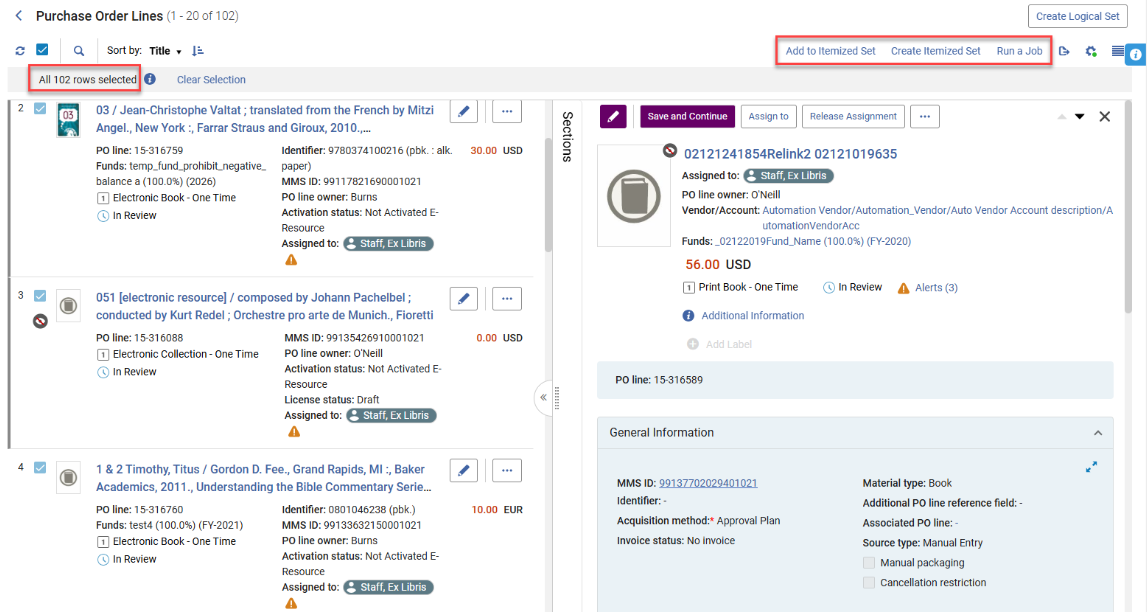
For more information, see Managing Search Queries and Sets.
Search by Set ID in Manage Sets
May 2026 User Experience, Accessibility & Infrastructure
A new 'Set ID' search option was added to the Manage Sets screen. The search by ID is an exact match search and requires the full ID number. This gives users an additional search option to support their search workflows, allowing them to find sets directly by ID. Accessibility operations remain unchanged, so users relying on keyboards and screen readers can continue using the Search option as before.

Set ID
For more information, see Managing Search Queries and Sets.
Centralized AI Features Management Page
May 2026 User Experience, Accessibility & Infrastructure AI documentation logo no background.
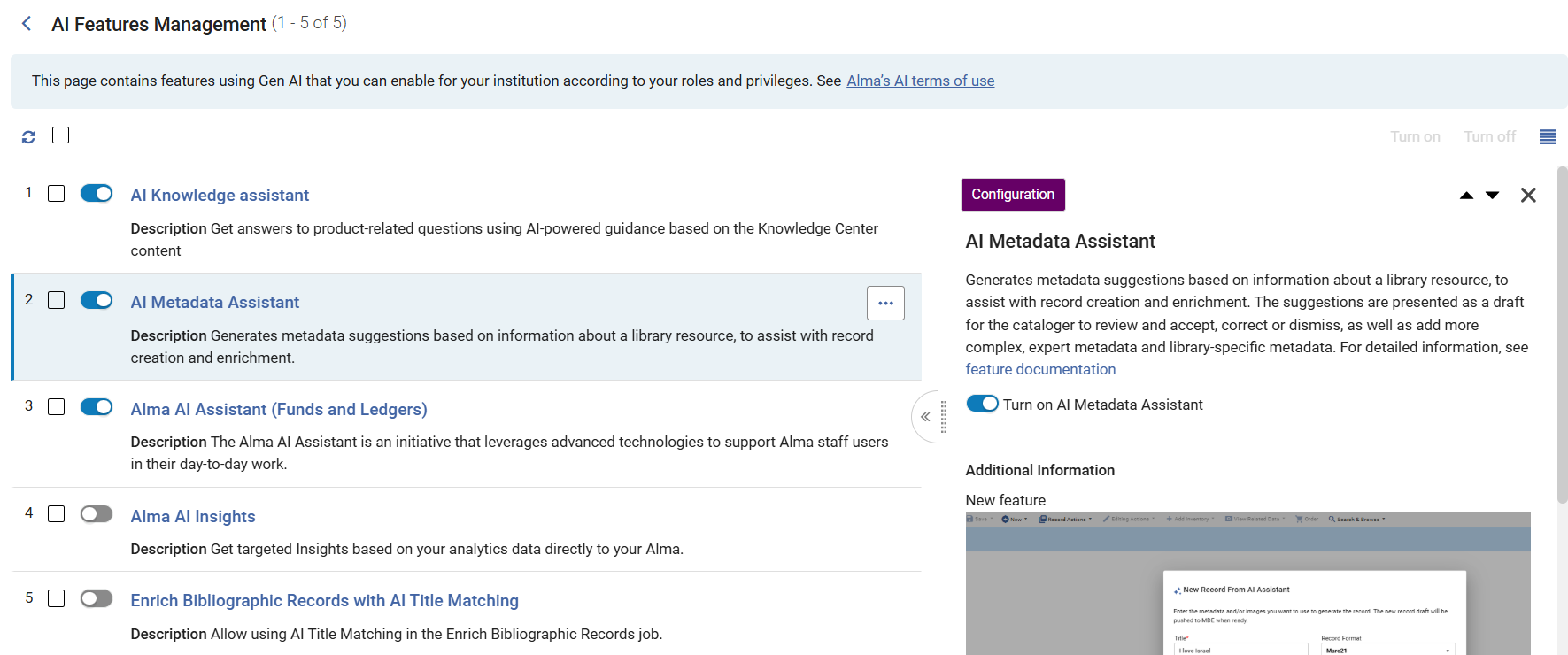
A new institution-level configuration page, AI Features Management, was introduced in Alma. This page consolidates the enablement and configuration of all AI-based features (that will be added to this page gradually, starting with the AI Metadata Assistant, AI Insights, AI Knowledge Assistant, Alma AI Assistant and AI Title Matching). This page includes feature descriptions, enable/disable toggles, and role-based visibility of the relevant AI features. This centralized page streamlines the management and configuration (when available) of AI features, enhances clarity and control, and enables institutions to turn AI capabilities on or off according to their institutional preferences.
Users with the General System Administrator role can access the page at Configuration > General > AI Features > AI Features Management. Users with admin roles for their area can access the page via their specific area in the menu. For example, a Repository Administrator can access the Metadata Assistant from the Resources menu, which leads to the AI Features Management page. Each feature on the page is visible only to its specific role/s. For example, an Acquisitions Administrator will see Alma AI Assistant on this page.
-
If you turn a feature on or off, the change applies to the entire institution.
-
Users that already activated a feature will still have it enabled, and no action is needed as a result of the page move.
For more information, see AI Features Management.
Number of Lending Requests Added to Consortial Analytics Filters
May 2026 Analytics and Insights
Consortial Analytics now supports incorporating ILL lending requests into the Book Deselection Analysis report filters. This enhancement enables members to account for lending activity across the consortium, along with local loan metrics, when analyzing title usage. Members gain a more complete view of item usage, ensuring that materials frequently requested by other institutions are properly considered in deselection decisions.
For more information, see Consortial Analytics.
Additional Enhancements
-
May 2026 Fulfillment and Resource Sharing
Institutions can now customize copyright status labels in Alma, which enables libraries to align terminology with local regulations and practices.
You can configure these labels in Configuration > Fulfillment > Copyright Management > Citation Copyright by updating the text in the Description column.
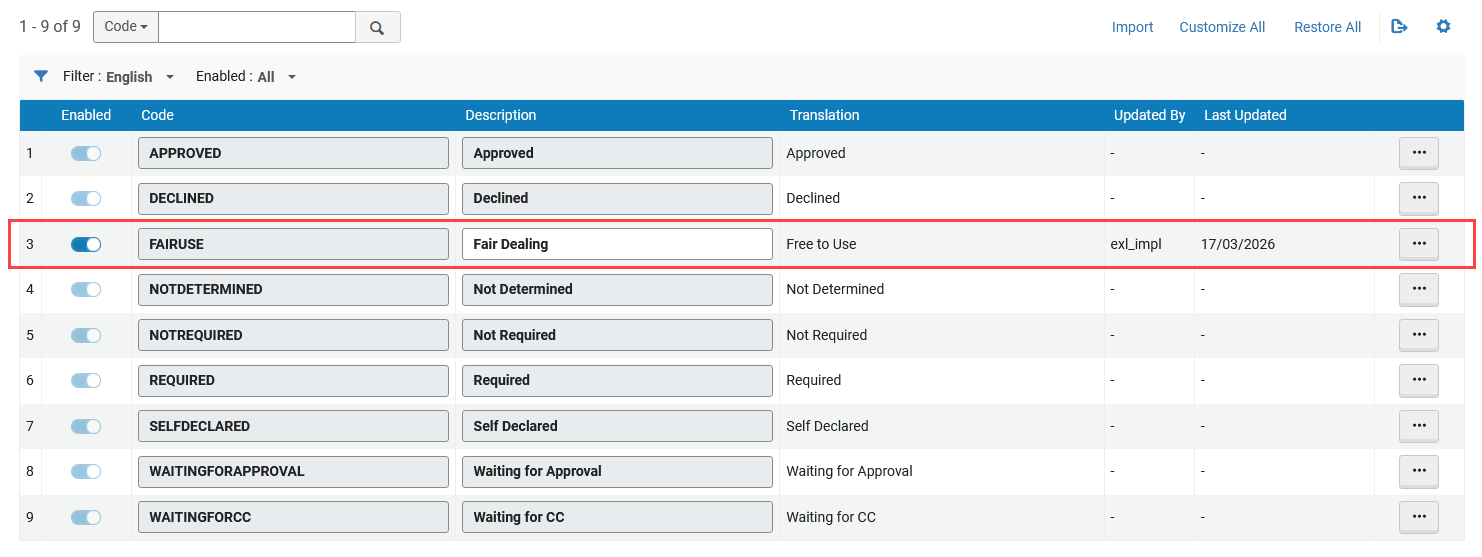
Institutions cannot add/delete entries or modify the underlying code in the Citation Copyright table; only the display text (Description) can be edited.
After updating the Description column, the custom label appears in Fulfillment > Course Reserves > Citations for all items with the corresponding copyright status. Updated labels are also reflected in facets and are available when applying bulk changes using Change Copyright Status.
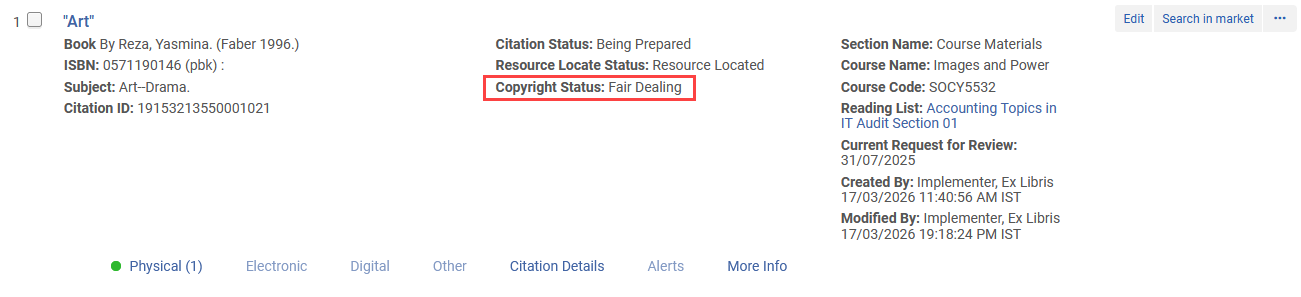
-
May 2026 Metadata & Linked Open Data
To provide consistent Analytics reporting across MARC formats UNIMARC data was added to Analytics to align with the data already available for MARC21.
For more information, see Bibliographic Details.
-
May 2026 Metadata & Linked Open Data
Updates to MARC21 Profile MARC21 bibliographic update No. 41 (December 2025), MARC21 holdings update No. 41 (December 2025), and MARC21 authorities update No. 41 (December 2025), including Bibliographic, Authorities, Classifications, and Community changes and updates to the MARC21 Holdings.
For more information, see MARC21 Search Indexes.
-
May 2026 Metadata & Linked Open Data
-
LOD Editor — bf:hasInstance and bf:instanceOf are now consistent and reciprocal. To ensure a smooth workflow, incompatible links between BIBFRAME Works and Instances are no longer allowed.
- May 2026 Metadata & Linked Open DataURM-319214 When performing a Wikidata lookup in a language other than the English default, the selected language tag is stored for that specific record field, ensuring future record updates do not revert to the default language.
For more information, see Wikidata-Specific Features.
- May 2026 Metadata & Linked Open DataURM-318550When creating a new BIBFRAME record (work or instance) from a template, the template name now appears at the beginning of the summary section to indicate to the cataloger which template was selected. The template name is visible until the record is saved to the database.
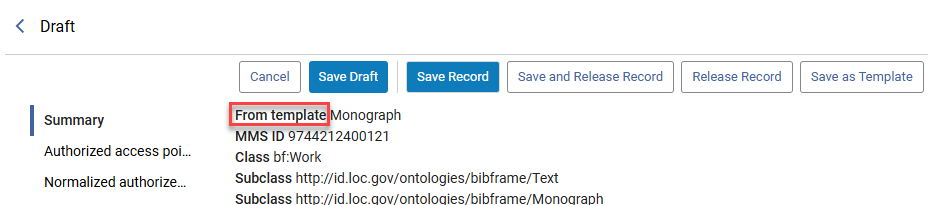 "From template" Indication
 - May 2026 Metadata & Linked Open DataURM-253699 Updates have been made to the GND Profile. These updates are ongoing.
-
May 2026 Metadata & Linked Open Data
In the new UX titles and holdings searches, a new display field, Short Title, was added that contains only the title proper (245 $$a). This field is hidden by default, but can be added to the table or record displays by configuring the views. It is especially useful for users who want to minimize the space the title takes in the table view, and can now choose to display a Short Title column instead of the Title column.
-
This new field was also added when exporting all fields from the search results to Excel.

Upcoming Issues to Note
Collection Development Consent Updates to Include Item-Level Data
In the August 2026 release, the Collection Development data‑sharing consent will be updated to include discoverable item‑level data.
This update follows a request from our Early Adopters group, who found that discoverable item‑level data can be valuable in specific scenarios when making collection development decisions.
This change will not affect existing opt‑in status.
Resolved Issues
| SF number | Area | Description |
|---|---|---|
| 8237372 URM-319045 | Acquisitions | In some cases, addresses and email addresses were duplicated in the Contact Information tab. This was fixed. |
| 08251001 08357169 URM-321035 | Acquisitions | Previously, the Manage Items pages defaulted to the first page after closing the item editor. This was fixed. |
| 8227840 URM-322645 | Acquisitions | Previously, when selecting the Release Encumbrance checkbox, the disencumbrance data disappeared. This was fixed. |
| 8309271 URM-322714 | Acquisitions | Previously, funds disappeared after being moved. This was fixed. |
| 8332848 URM-323796 | Acquisitions | Previously, the PO Line Packaging job failed repeatedly. This was fixed. |
| 8287298 URM-323914 | Acquisitions | Previously, you were unable to create an invoice from an Excel file containing 0 percent of VAT. This was fixed. |
| 8330927 URM-324077 | Acquisitions | Previously, invoice lines created with API for invoices could only be edited/deleted with permissions at the institutional level. This was fixed. Now, invoice lines created with API for invoices can be edited/deleted with permissions at the library level. |
| 8377786 URM-326103 | Acquisitions | Previously, when searching for order lines in the Advanced Search > PO Status: Sent, no results were returned. This was fixed. |
| 8352393 URM-326192 | Acquisitions | Previously, after receiving Print POLs, a mandatory field was missing or an erroneous field was mistakenly added. This was fixed. |
| 08392075 08415406 URM-326907 | Acquisitions | Previously, the PO line Sent Date differed between Analytics and Alma. This was fixed. |
| 08379533 URM-326014 | User Experience, Accessibility and Infrastructure | Previously, the log contained a misleading error message. This was fixed. |
| 07798070 08312181 08410182 URM-316502 | User Experience, Accessibility and Infrastructure | Previously, an error could occur when editing and saving a user record after modifying the user's statistics in the same session. This was fixed so that user records are now saved correctly regardless of the order in which changes are made across the different tabs. |
| 08244828 08333940 URM-322116 | User Experience, Accessibility and Infrastructure | Previously, the SAML Integration Profiles Updated By and Status Date fields were incorrect. This was fixed. |
| 8321512 URM-322984 | User Experience, Accessibility and Infrastructure | Previously, the Patron Services sliding panel was not displayed correctly. This was fixed. |
| 8356340 URM-324840 | Analytics and Insights | Previously, the Search Analytics Objects feature did not correctly display object results based on the search terms. This was fixed. |
| 8250999 URM-320475 | APIs | Previously, the due date policy in a specific case of the Retrieve Items List API was inconsistent. This was fixed. |
| 08368965 08379417 08371034 08332352 08362690 10552970 URM-325788 | Fulfillment and Resource Sharing | Updated the underlying logic to ensure that the item level message displays correctly under all conditions. |
| 8257740 URM-320437 | Fulfillment and Resource Sharing | Previously, when expanding the user account window to Full page display, the tabs menu under the User Details page was missing. This was fixed. |
| 8277416 URM-322814 | Fulfillment and Resource Sharing | Previously, an error was generated when scanning items for a title with multiple requests. In these cases, the scan in should be done in the ALMA web UI. An appropriate error was added to these cases. |
| 08339530 08347966 08328686 08373075 08391852 08342012 URM-323916 | Fulfillment and Resource Sharing | In some cases, the error, "Patron has duplicate request error in Primo, and the request was cancelled" was generated. This was fixed. |
| 8334976 URM-324284 | Fulfillment and Resource Sharing | Previously, an error was generated when editing the Request Pickup Configuration Rule. This was fixed. |
| 8355594 URM-325997 | Fulfillment and Resource Sharing | When navigating through reading lists using the Tab key, the JAWS screen reader incorrectly read out cover thumbnails, resulting in confusing information. This was fixed. |
| URM-315229 | Metadata Management | When applying an XSL normalization rule to a MARC record, the resulting MARC XML record was not validated. This was fixed. |
| 08279289 URM-321503 | Metadata Management | In some cases, when call numbers contained special characters, the browse bibliographic heading did not return matched records. This was fixed. |
| 08217325 08217171 URM-317281 | Metadata Management | Previously, local extensions were not added to Community Zone records. This was fixed. |
| 8187017 URM-321161 | Metadata Management | Previously, the search index Physical Item > In temporary location returned inconsistent results. This was fixed. |
| 08285170 08337696 URM-321211 | Metadata Management | When the customer parameter sbn_version was set to 2.03 or 3.02, Uniform Title links in SBN bibliographic records using the element but with tipoLegame=500 were not handled correctly. This was fixed. |
| 8316595 URM-323907 | Metadata Management | In some cases, when adding a new holdings record (after adding an item or from search results), the holdings record did not appear in the list of the inventory screen in the MDE or the search results. This was fixed. |
| 07977003 08355443 08428782 URM-313662 | Resource Management | Previously, collection name translations were not displayed correctly in the UI. This was fixed. |
| 8283400 URM-321279 | Resource Management | Previously, there was a mismatch between the Number of Loans and Number of In-House Uses displayed in Alma and corresponding values in Analytics. This was fixed. |
| 08335932 08371550 URM-324326 | Resource Management | Previously, saving a Collection in the Chinese interface overwrote the English Collection name. This was fixed. |
| 8341556 URM-324381 | Resource Management | The “Link a set of records to the Network Zone” job failed when executed on bibliographic records containing local extensions where subfield $$6 was used for purposes other than linking to an 880 field, and the $$6 value length was exactly five characters. This was fixed, and the job now completes successfully when handling such records. |
| 8344058 URM-325522 | Resource Management | Previously, there was an error when trying to open the bibliographic record from a collection. This was fixed. |
| 8298610 URM-325674 | Resource Management | In some cases, when using the Extended Export option in the CZ Update Task List, part of the entries were not included in the Excel file (this happens only when the extended export is done via a job, for more than 5,000 entries). This was fixed. |
