
Alma November 2026 Release Notes
Features
Reading List Peer Recommendations in onCourse
onCourse can now help instructors discover reading-list materials used in similar courses at other institutions. Peer recommendations use anonymized, aggregated data from Alma and Leganto, including derived CIP codes, reading-list citations, and usage counts. This shared intelligence helps instructors identify relevant materials and make more informed decisions when designing or improving courses.
Institutions can manage their participation through the Data Sharing Profile > Reading Lists Data Sharing preference. Participation is enabled by default, and institutions can opt out at any time.
Add Notes to Fulfillment Configuration Entities
Fulfillment and Resource Sharing Idea ExchangeURM-330100
Libraries can now add, view, edit, and delete internal notes on the following Fulfillment configuration entities:
-
Fulfillment Policies
-
Fulfillment Units (FUs)
-
Fulfillment Unit Rules
-
Overdue & Lost Loan Profiles
-
Fulfillment Terms of Use (TOUs)
These notes enable staff to capture local procedures, implementation decisions, and other operational information directly within the relevant configuration record, making it easier to document and maintain fulfillment settings. Notes are associated with the specific configuration entity and can be managed from within the entity's configuration page.

For more information, see Configuring Physical Fulfillment and Configuring Loans.
More Item Information in Printout Slips
Fulfillment and Resource Sharing Idea ExchangeURM-329314
The XML of slips that include <available_item> information (such as FulReasourceRequestSlipLetter) has been enhanced to include also enumeration, chronology and description information of each available item.
Renew Loan from Network Activities Tab (Source Institution)
Fulfillment and Resource Sharing  URM-172353URM-333968
Previously, renewing a loan in the Patron Services workbench was only possible when working at a desk of the institution that owned the item. Now, staff at the source institution can renew loans directly from the Network Activities tab of the Manage Patron Services page. This improves cross-institution circulation workflows by enabling efficient loan renewals from the source institution, reducing operational friction for staff and enhancing patron service.
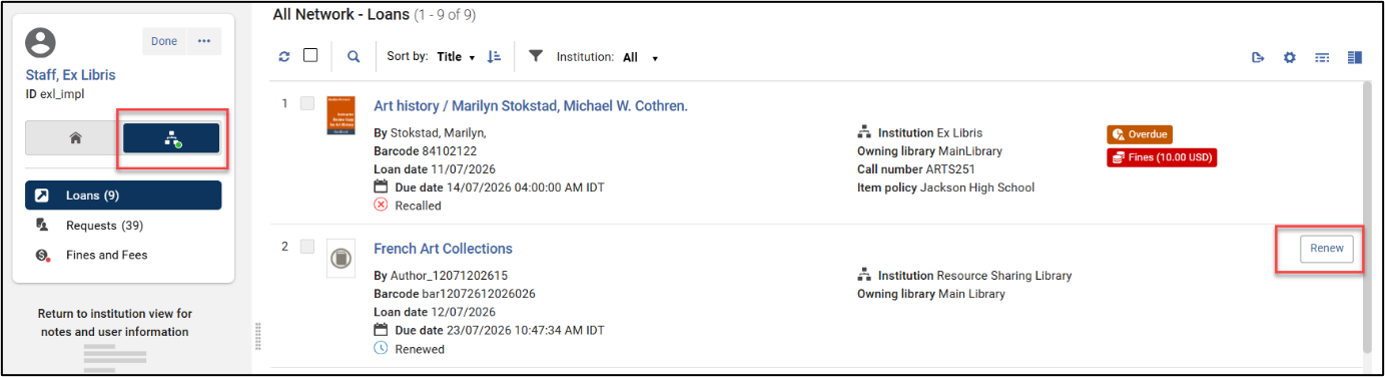
For more information, see Managing Patron Services at a Circulation Desk and Fulfillment Networks.
Update Network Zone User Records from Institution Zone
Fulfillment and Resource SharingIdea ExchangeURM-333937
Libraries who manage the user accounts in the Network Zone can now propagate updates made to user records in an Institution Zone (IZ) directly to the corresponding Network Zone (NZ) record.
The capability is available through:
-
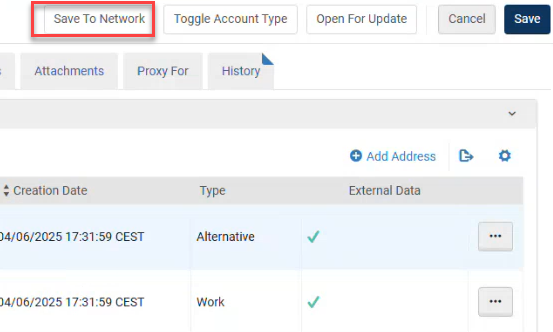
User management UI via a new Save to Network button. The USER_UPDATE_PUSH_TO_NZ privilege required for activating the new button is off by default. . Contact support to enable this for your user manager and user administrator roles.
-
User APIs using the new push_to_nz parameter (see Update User Details and Create user).
-
The Update Users job through a new Propagate updates to Network Zone option
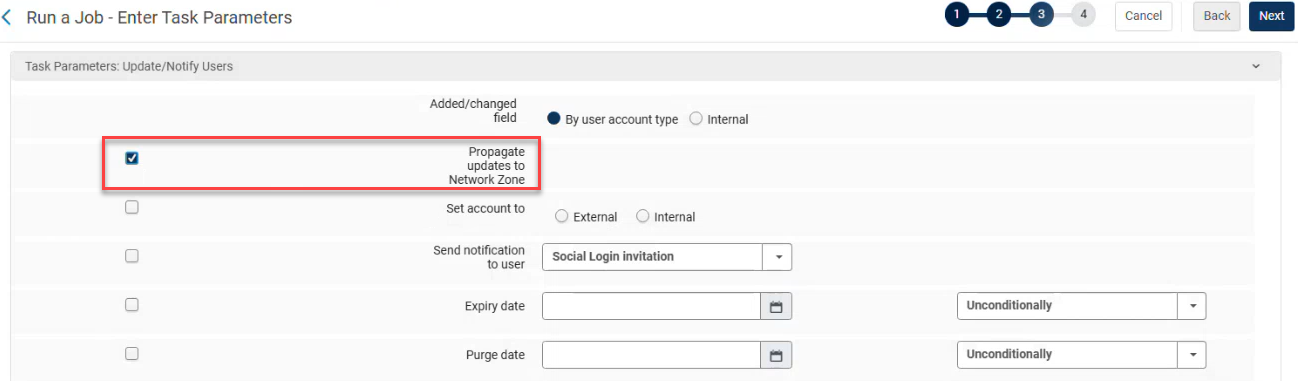
When enabled, updates made in the IZ are applied to the NZ record and propagated to other linked Institution Zones as appropriate. In addition to core user information, the following user segments can be propagated to the Network Zone:
-
Contact information
-
Identifiers
-
Notes
This enhancement helps maintain user data consistency across the network and reduces the need for manual updates.
For more information, see Centrally Managing Users in a Network Zone, Manual Jobs, Privileges for Roles in Alma and the Developer Network.
Option to Send Borrowing Activity Report in the Update/Notify Users Job
Fulfillment and Resource Sharing Idea ExchangeURM-168982
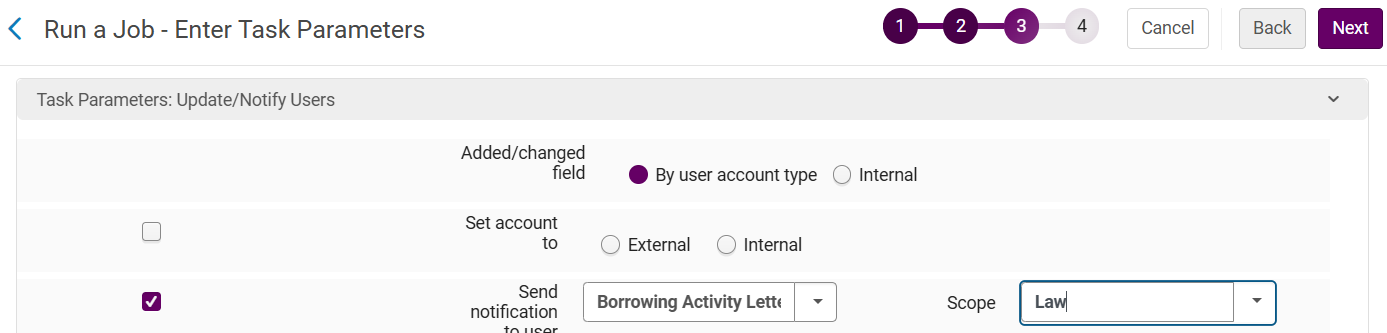
The Update/Notify Users job can now be used to send the Borrowing Activity Report to a selected set of users. The report can be scoped to a specific library.
This improves automation and reduces manual effort by enabling libraries to proactively distribute borrowing activity information to relevant users.
Unlike other jobs with similar workflows, this job does not use the separate_patron_notifications_by_library parameter Whatever scope the user selects when running this job will be used as the scope of the generated letters.
For more information, see Manual Jobs.
Prevent Requesting When Items Are Available in the Same Library
Fulfillment and Resource Sharing URM-320898
A new On Shelf Policy option was added to provide libraries with more granular control over requesting behavior. Until now, Fulfillment Units could block requests if any item was available or block requests of the same holding as the available item.
With this enhancement, libraries can now configure an On Shelf Policy that blocks requesting whenever any available item exists within the same library, regardless of the holdings location. This supports more efficient local fulfillment, reduces unnecessary internal transfers, and ensures patrons are directed to the nearest available item within their library.
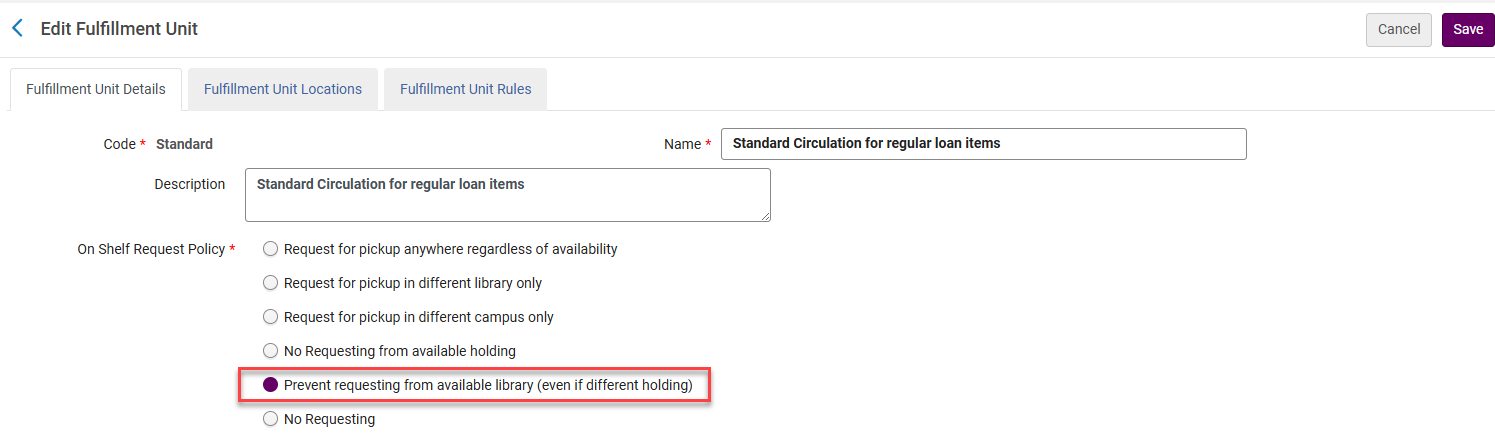
For more information, see Configuring Physical Fulfillment.
Opt-In “Keep My Loan History” Setting
Fulfillment and Resource Sharing URM-94453
A new “Keep My Loan History” option is available in the user update form, enabling staff to set whether a patron wishes to retain their loan history. When this option is enabled, the patron’s loans will not be anonymized during the loan anonymization process. This indication is also available via the User API and Student Information (SIS) load, and can be updated in bulk using the Update/Notify Users job, enabling consistent handling of patron preferences across systems.
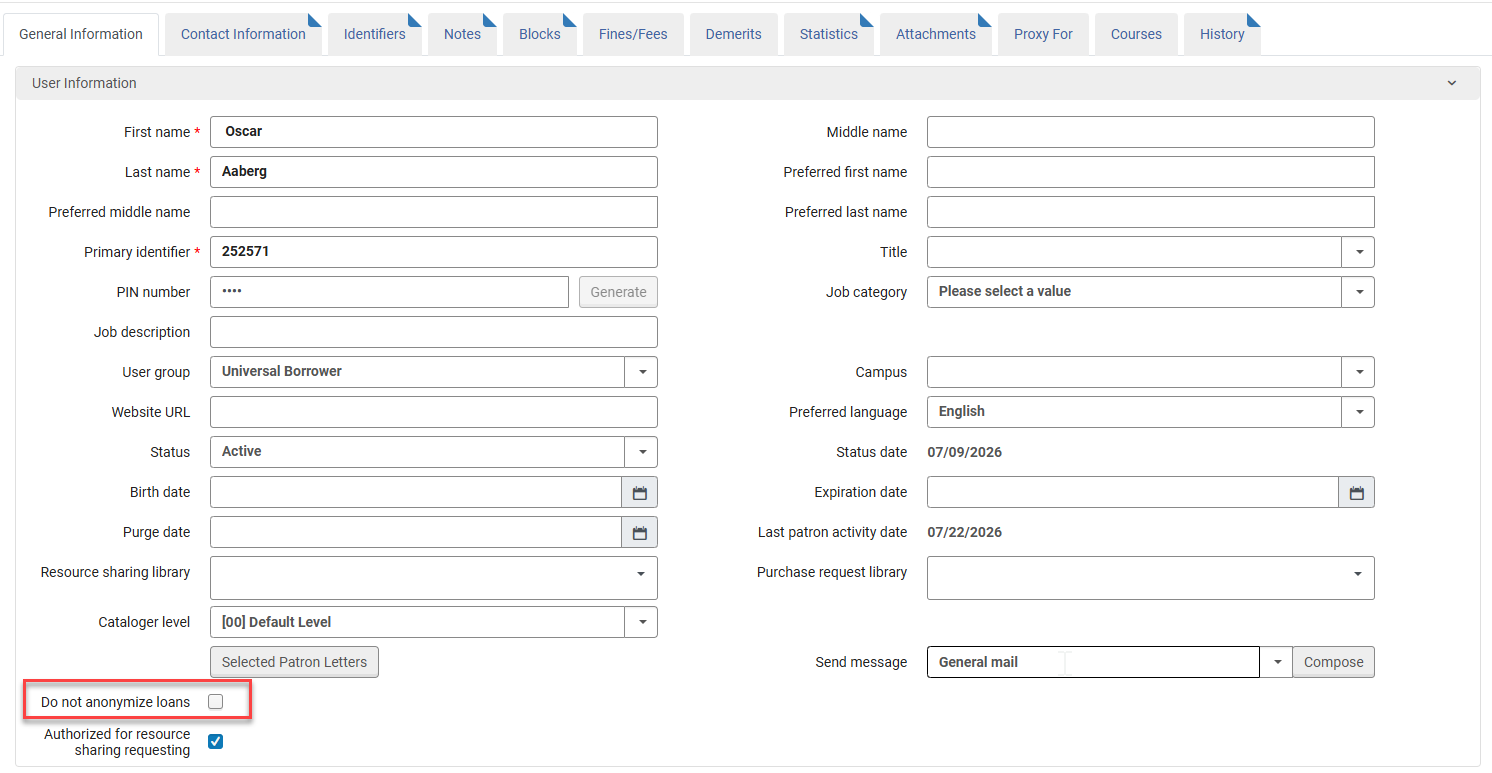
For more information, see Managing Users, Configuring Fulfillment Jobs and Manual Jobs.
Items Search UX Opt-Out
Metadata & Linked Open Data URM-315058
Beginning with the November 2026 release, the new items UX will be turned on by default for all users.
Several improvements of the new items UX are being introduced, following community feedback:
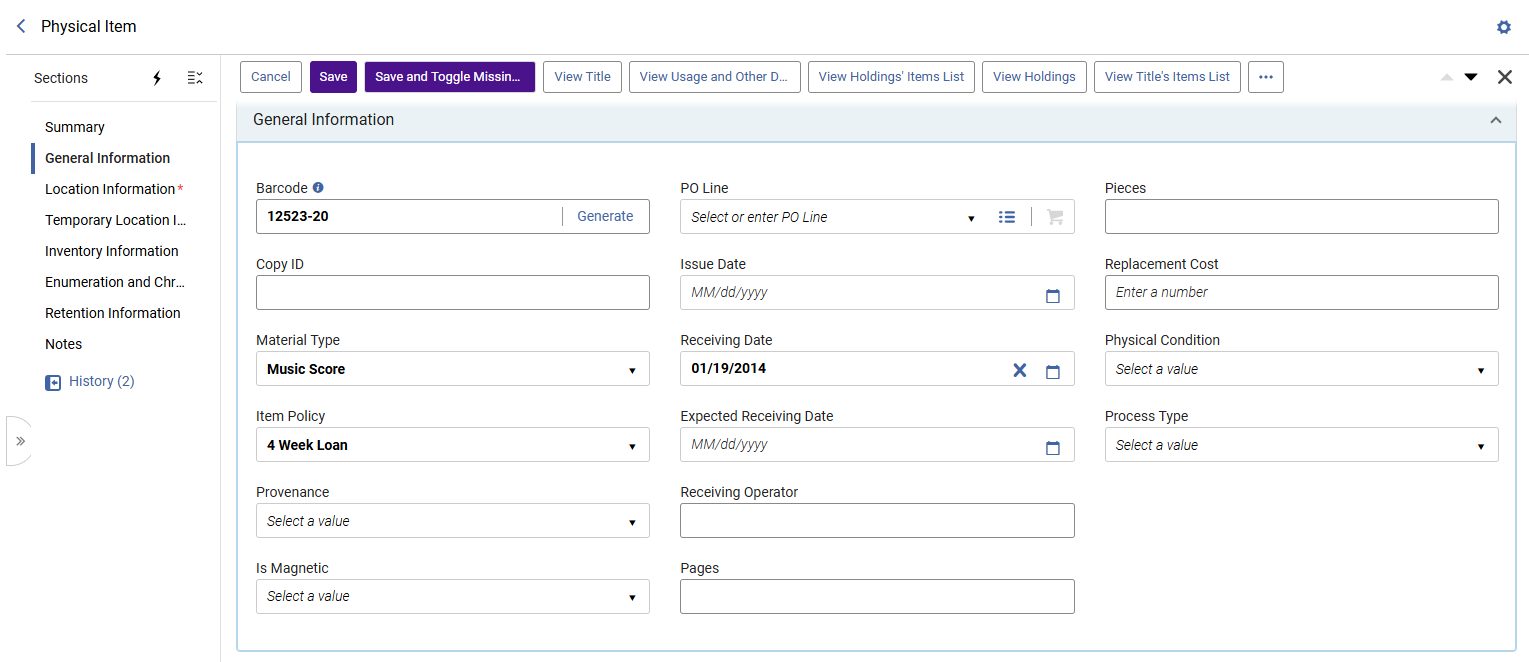
The generic Enter a value placeholders in text fields were removed to provide a cleaner, more accessible editor. The text fields now show placeholders only where they deliver meaningful information to the user (e.g. "Enter a number" indicating the a field must contain a numeric value). This makes it easier to scan the editor and identify empty fields.
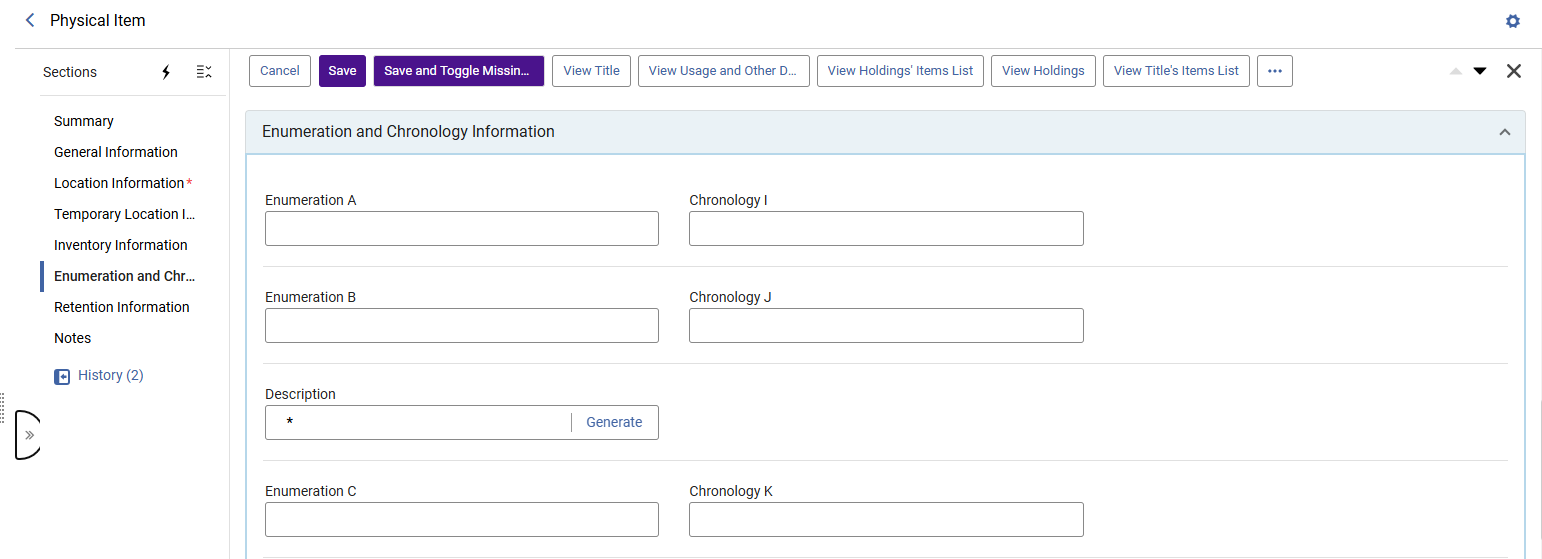
The Enumeration and Chronology Information section was improved to help serials operators enter information. The improvements include:
-
This section is now a more static section, with paired enumeration and chronology fields displayed at a maximum of 2 columns, to make it easier to identify and fill in related enumeration and chronology information(Enumeration A - Chronology I, Enumeration B - Chronology J, etc.). This pairing means that in wide screens, where more than a single column is displayed, the enum/chron fields are organized side-by-side (rows), and not from the top downwards (columns) as the rest of the sections.
-
A separating line is displayed under each pair, to further assist in filling in the form.
-
The Description field is placed after the most common enum/chron fields (Enumeration A-B, Chronology I-J), to streamline the generation of a description based on these fields. The description field is separated from the enum/chron fields above and below it using a separating line, to make it easy to distinguish and fill in - in wide screens, where more than a single column is displayed, it will appear as a single column (with no other fields in that row).
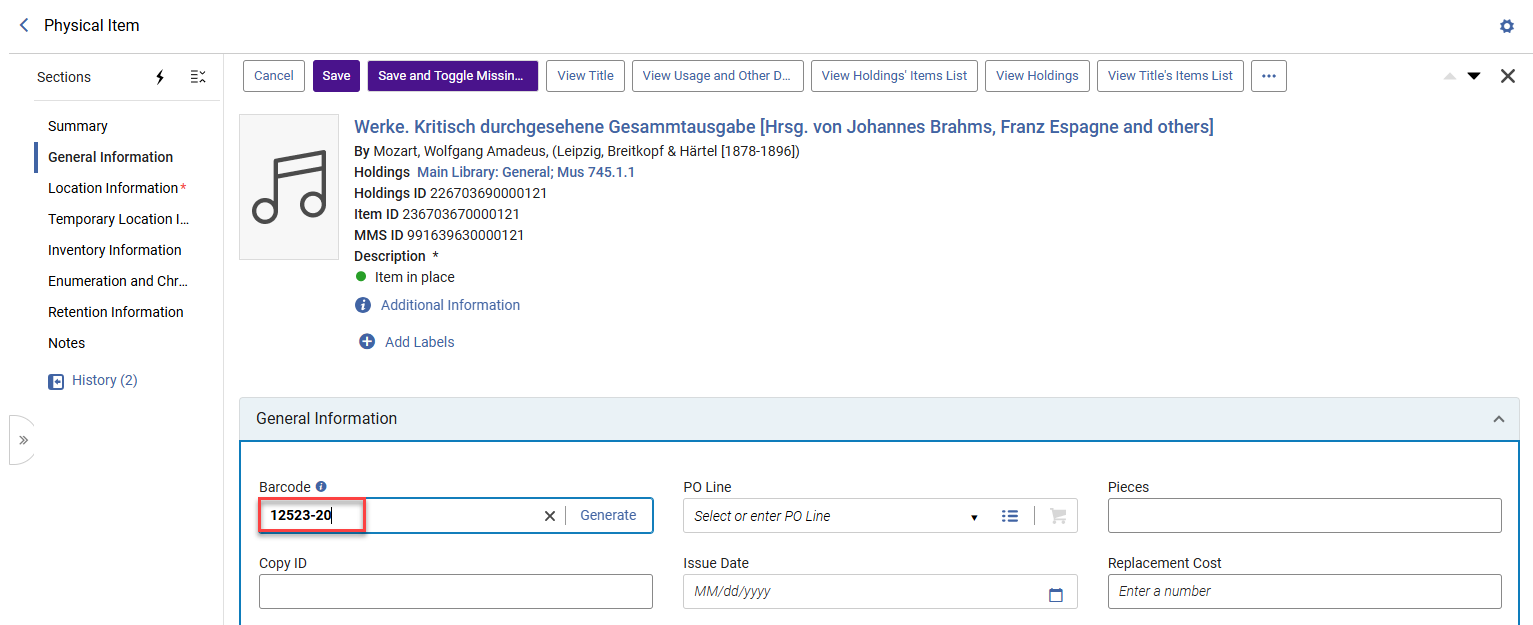
Streamlined editing: selecting the Edit button now focuses on the first editable field of the item upon opening the editor - out-of-the-box, this is the Barcode field in the General Information section. If the editor was customized to place another editor section first, the focus will be placed on the first editable field of that section. This streamlines item editing and offers better support for workflows such as Barcode entry.
Improved Linking in MARC Record Section in New UX Searches
Metadata & Linked Open Data URM-328042
When links such as URIs exist in a MARC record, the record section presents them as links that open in a new tab upon clicking. This improves linked open data and ease of navigation.
For more information, see the Bibliographic Record.
Introducing a New AI-Powered Insight: Insights – Metadata Quality
Metadata & Linked Open Data URM-333767
Alma's AI Insights feature now includes a new insight type: Insights - Metadata Quality. This insight is available to users with Cataloger, Cataloger Extended, Catalog Manager, or Catalog Administrator roles.
For more information, see Alma AI Insights.
Edit Community Zone Authority Records from View Mode
Metadata & Linked Open Data Idea ExchangeURM-315058
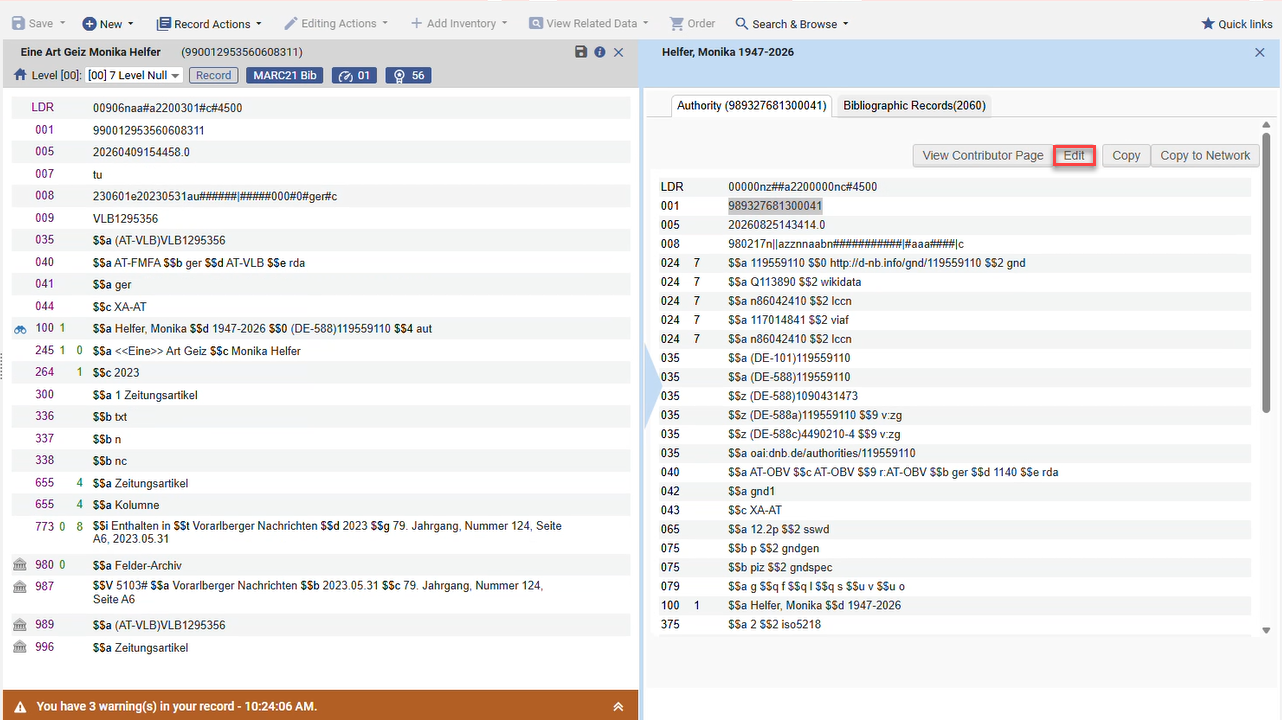
An Edit button is now available in view mode for Community Zone authority records (GND, BARE, NLI), accessible from Browse Authority Headings, binoculars, and F3. Permissions are enforced.
For more information, see Unique Community Zone (CZ) Authority Management for Allowed Institutions.
Partial Linking Icon in Browse Bibliographic Headings
Metadata & Linked Open Data URM-318004
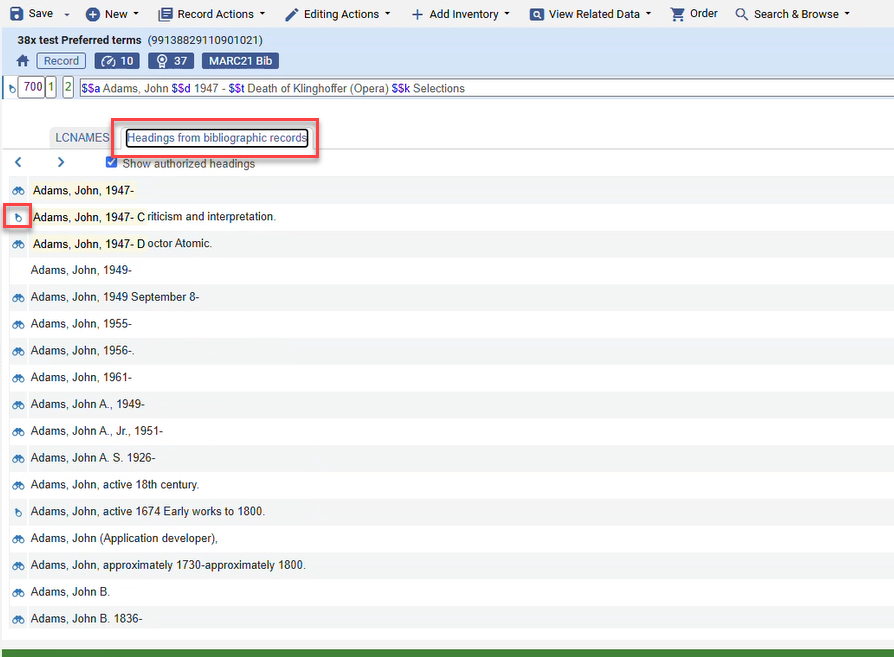
The Browse Bibliographic Headings list now shows the correct indication for partially linked Name/Title headings, consistent with Metadata Editor and record View.
For more information, see the Viewing Linked Names/Subject Headings from a Bibliographic Record.
Updated German MARC Field Help Links
Metadata & Linked Open Data URM-329511
The German UI MARC field help links for GND records were updated to use the new official documentation base URL.
For more information, see Online Help.
Support for SRU in Compliance with the NorZIG Profile
Metadata & Linked Open Data URM-335399
Alma's SRU services now fully support the NorZIG 1.2 profile, enabling interoperability with Norwegian library systems.
For more information, see the SRU/SRW Search and the Developer Network.
2026 MARC21 Profile Update
Metadata & Linked Open Data URM-321741
We have implemented updates to the MARC21 profile.
For more information, see the MARC21 Search Indexes.
GND Profile Update
Metadata & Linked Open Data URM-252989
We have applied ongoing GND profile updates.
AI Metadata Assistant Improvements
Artificial Intelligence URM-335218
The AI Metadata Assistant now works with a more advanced LLM model - gpt_5, with reasoning capabilities. This enables it to provide better metadata suggestions.
As part of this enhancement, note the following:
-
The reasoning process may take a little longer to provide the metadata suggestions.
-
For better clarity, the 520 summary note field's $7 (Data provenance) contains Transcribed by AI when a published description is copied. Generated by AI is used when a summary is generated.
-
The 505 content note field gets a data provenance $7, containing Transcribed by AI, for better clarity.
-
Sandbox environments were updated as part of the November release.
Do not run the Synchronize AI settings job in sandboxes until the November release is out in Production as well.
For more information, see The AI Metadata Assistant in the Metadata Editor - Frequently Asked Questions.
More Clearly Inform Users When Interacting with AI Systems
Artificial Intelligence URM-333585
Alma’s AI features were updated to more clearly inform users when they are interacting directly with AI systems, as part of our ongoing commitment to responsible AI and regulatory readiness, to support the transparency requirements of new AI regulations, including in particular the European Union Artificial Intelligence Act (EU AI Act).
For more information, see Enhancing Transparency for AI-Generated Content.
Network Zone Proxy Support for Electronic Resources
Resource Management URM-313911
Until now, full text services in discovery always had the IZ default proxy applied, even when the resource was defined in the NZ.
Depending on a new customer parameter "Network Proxy Management", Libraries can now assign specific Network Zone (NZ) proxies to NZ-managed electronic resources. When users access full-text services from Discovery, Alma will apply the proxy configured for the resource in the NZ, enabling consistent proxy management across the network and supporting resources that require a proxy other than the default one. This reduces the need to maintain identical proxy definitions in each Institution Zone (IZ) and ensures the correct proxy is used when generating full-text links.
For more information, see Access to Services and Configuring Distributed Access to Electronic Resources from the Network Zone.
Open Predicted Items in Bulk for an Entire Set of Holdings Records
Resource Management Idea Exchange URM-321917 URM-328497 URM-332287
Alma now supports opening predicted items for a set of holdings records using the new Open predicted items in bulk job. This saves significant time for managing serial records with ongoing subscriptions. The job can be run from the manual jobs page or directly from the Holdings and Physical Titles search results pages, using the Run a job bulk action. The input for the job should be a set of holdings records with prediction patterns defined on each record. For the list of supported roles, see Manual Jobs.
For more information, see Prediction Patterns.
Portfolio History Tab Contains Information on Bib Linking Updates
Resource Management URM-332037
The history tab of electronic portfolios now also includes indications for bib record linking changes, i.e., when the portfolio was linked to a different mms_id.
For more information, see Managing Electronic Resources.
Export Physical Items Job Enhancements
Resource Management Idea ExchangeURM-34802
The Export Physical Items job has been enhanced to include three additional fields in the export output:
-
Storage Location ID
-
ISBN
-
ISSN
These new fields provide additional item information and bibliographic metadata, enabling more comprehensive exports for reporting, integrations, and inventory management use cases.
For more information, see Manual Jobs on Defined Sets.
Upload Electronic Holdings: Improved Matching for Wiley and Ovid Collections
Resource Management URM-336069 URM-21922
The Upload Electronic Holdings (UEH) process has been enhanced for Wiley journals and books, and for Ovid books and journals to improve portfolio matching when multiple Community Zone portfolios share the same title but differ in coverage or identifiers. Instead of relying solely on ISBN/ISSN matching, Alma can now use specific unique identifiers when available, enabling more accurate portfolio activation and holdings updates. This enhancement reduces skipped matches and helps ensure that holdings and coverage information are correctly reflected in Alma.
For more information, see Automatic Upload of Electronic Holdings.
Improved Display of Overlapping Coverage Statements
Resource ManagementURM-222087
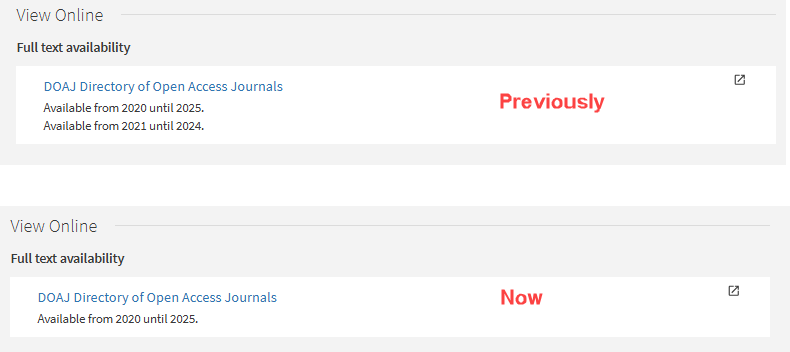
It is now possible to simplify the display of full text service coverage when a portfolio contains overlapping coverage statements. If one coverage statement is fully/partially included within another, only the broader statement will be displayed to end users in the link resolver and Discovery. This provides a clearer and less confusing presentation of resource availability to end users, while preserving the original coverage data stored in Alma. This is controlled by the new consolidate_coverage_for_services parameter (Configuration > Resources > Other Settings).
For more information, see Configuring Other Settings (Resource Management).
Status of Last Full Indexing
Resource ManagementURM-336604
Until now, Alma displayed the status of the last indexing job that was run, regardless of whether it was a full indexing or not. Now, by default, the status of the last full indexing is displayed. This is controlled by the status_of_last_full_indexing parameter (General > Other Settings).
For more information, see Support Services and The Alma User Interface.
Added “Legal Deposit Aggregated Claim Letter”
Acquisitions Idea ExchangeURM-335587URM-244833
Alma now supports an aggregated claim letter for Legal Deposit orders, as well as other order types which are already supported.
To activate it, the claim_aggregated_letter customer parameter (Configuration > Acquisitions > General > Other Settings) must be set to true. This parameter already includes aggregated claim letters of regular orders and now also will apply to legal deposit orders.
Note: If a vendor has more than 200 PO lines to claim, they will get more than one claim email. For example if there were 400 PO lines, there would be two separate emails, each with 200 PO lines.
For more information, see Configuring Other Settings (Acquisitions) and Configuring Alma Letters.
New PO Line Templates Management Page
AcquisitionsIdea ExchangeURM-320310
Alma now provides a dedicated PO Line Templates page where users can view and manage PO line templates.
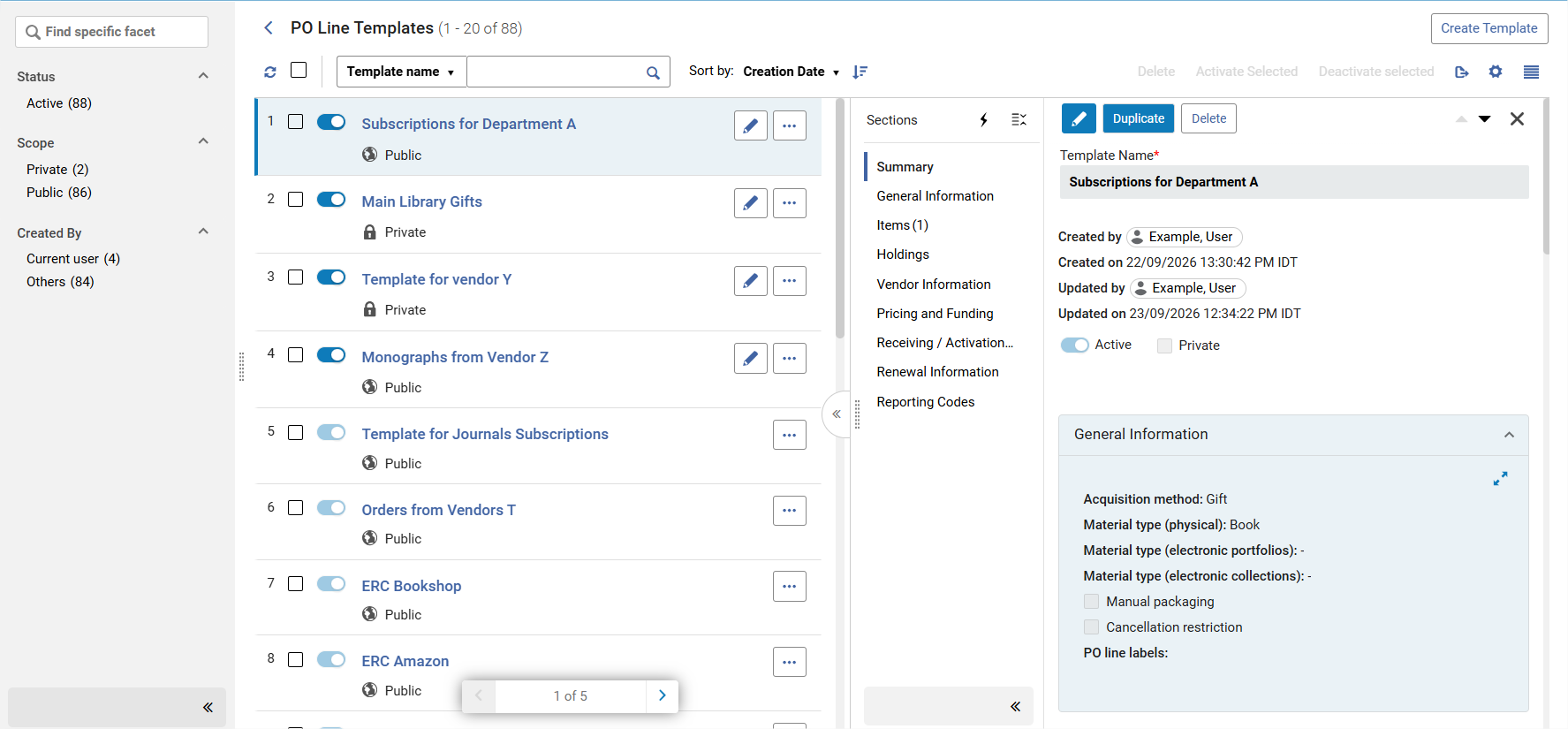
Until now, it was possible to create a template based on a PO line in the PO lines list, but it was not possible to view the created template. It was also not possible to edit an existing template, only to override it entirely.
Having a new dedicated page for managing PO line templates makes it easier and more reliable for users. Institutions can now review the available templates they have and easily manage them.
What's new in the new Management page?
- Viewing templates values: It is now possible to view the field values in each template, and edit them as needed.
- It is now possible to update a private template to be public.
- Users can update a template name.
- Template creation: Templates can be created from scratch, from an existing PO line, or by duplicating another template.
- Activate/Deactivate: It is now possible to deactivate a template, while it is being worked on. Deactivated templates will not appear when creating PO lines.
- Additional fields that are now saved as part of the template (see the full list of fields in PO Line Template Sections and Fields):
- Material type (electronic)
- Material type (collection)
- Cancellation restriction
- Access Provider
- Expected receipt - Days after ordering or Date
- Activation due after ordering (days)
- Vendor reference number type
- Claiming grace period (days)
- Reclaim interval (days)
- Subscription Interval
- Access Model
- Renewal type
- Renewal cycle
- Subscription from date
- Subscription to date
- Renewal note
- Flexible roles definitions: As today, users with Purchasing Manager, Purchasing Operator and Purchasing Operator Extended roles can create and manage templates. With the new dedicated page, separate privileges handle the following and can be removed (by asking Clarivate support).
- Ability to Create and manage templates: Institutions can decide, for example, to remove this from the Purchasing Operator role.
- Ability to edit and delete public templates that were created by others: Institutions can decide, for example, to remove this from the Purchasing Operator role. Note that this privilege is also part of the Acquisition Administrator and General System Administrator user roles. However, it also requires purchasing roles to be enabled (since access to the PO line Templates page depends on the purchasing roles). If the user does not have purchasing role/s, the privilege has no impact and does not enable any template capability.
For more information, see PO Line Templates and Privileges for Roles in Alma.
PO Lines API Enhancements: Quantity for Pricing, Net Price Update, and Import Job ID Search
AcquisitionsURM-327554
The PO Lines API was enhanced to support the quantity_for_pricing and update_net_price_according_to_items_quantity field in create, update, and retrieve flows. In addition, Retrieve PO-Lines now supports searching by import_job_id, allowing integrations to retrieve all PO lines created by a specific import job in a single API call.
When quantity_for_pricing is omitted or invalid, electronic PO lines default to 1, and physical PO lines default to the number of items.
When update_net_price_according_to_items_quantity is omitted or invalid, it defaults to false and is not affected by the po_line_quantity_updated_with_items_number parameter.
For more information see the Developers Network.
Additional Enhancements for the Consortial Communication Tool
Collaborative Networks URM-331836URM-334033
New enhancements were released for the Consortia Communication Tool:
-
Enhanced notifications:
-
Popup notifications in Alma to alert NZ staff and members when a message is created or updated
-
Email notifications for new messages to alert NZ staff
-
Popup notifications in Alma to indicate when the communication tool is closed or reopened by NZ staff
-
-
Institution visibility in group chats to enable NZ operators to easily see which member has answered in the group chat
-
Export improvements (formatted export to Excel e.g., multi line display)
-
URL links are now clickable
-
Use of the DateFormat customer parameter definition in Alma to align the format of Time and Date in the Communication tool with what was already defined for your institution (no change is required from the user i.e., this is automatic)
-
NZ operators can customize the text of the offline chat status by selecting the wheel icon of the Communication tool. This text customization supports multi-languages.
-
Communication tool navigation to the previous page (by selecting the communication tool icon or the left arrow in the Communication Tool Chats header)
-
The communication tool icon now has a dark blue background
-
Users can use CTRL+ V to add screenshots and images into a message
-
Messages in the Communication tool are now linked to a status. By default, new messages have the Open status. NZ operators can change the status of a communication to Close, Archive or Delete. Only NZ operators can reopen a closed or archived message. Deletion is definitive. NZ operators have the possibility to filter the list of communications by status.
Those enhancements improve the usability of the communication tool for both NZ and IZ users.
For more information, see Consortial Communication Tool.
Protection of Shared Templates in the Metadata Editor for Consortia
Collaborative Networks URM-331465
It is now possible for Network Zone operators and Institution Zone operators to protect their shared templates from being edited or deleted by other Institution Zone users in the Metadata Editor.
Shared templates will now be marked as Protected and will remain fully visible and executable by Institution Zone users but cannot be modified or removed. Only Network Zone users with appropriate permissions or the Member institution Zone users that created the shared templates can edit or unprotect them. This ensures that only the creator Institution Zone and the Network Zone can make changes.
This enhancement improves data governance and stability within consortia by preventing accidental changes or deletions of shared templates that impact multiple member institutions. It supports a controlled, centralized approach to managing shared templates in Metadata Editor across the Network Zone.
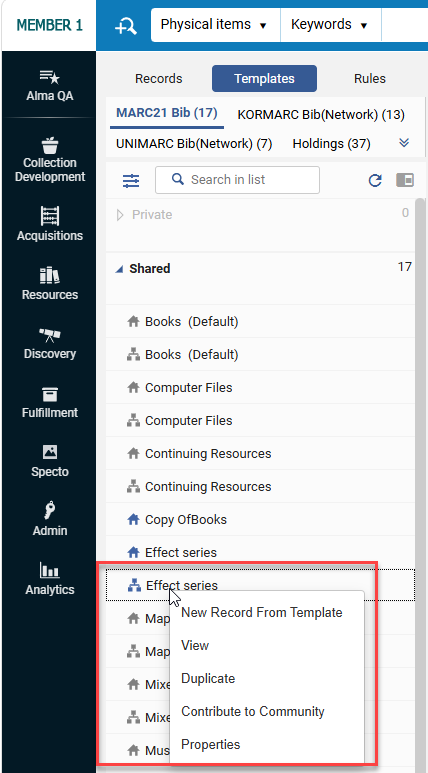
For more information, see Working with Record Templates and Configuring Other Settings (Resource Management).
Requesting on Behalf of Patrons Across Institutions
Collaborative Networks URM-331873
The Network Search tab now supports placing requests directly on behalf of patrons. After selecting one of the “Held By” institutions, staff users can initiate a request for an item held at another institution within the network.
Booking requests are not supported.
This enhancement streamlines cross‑institution requesting workflows, reduces the need to switch contexts or re‑search items, and enables staff to efficiently assist patrons in accessing resources from partner institutions.
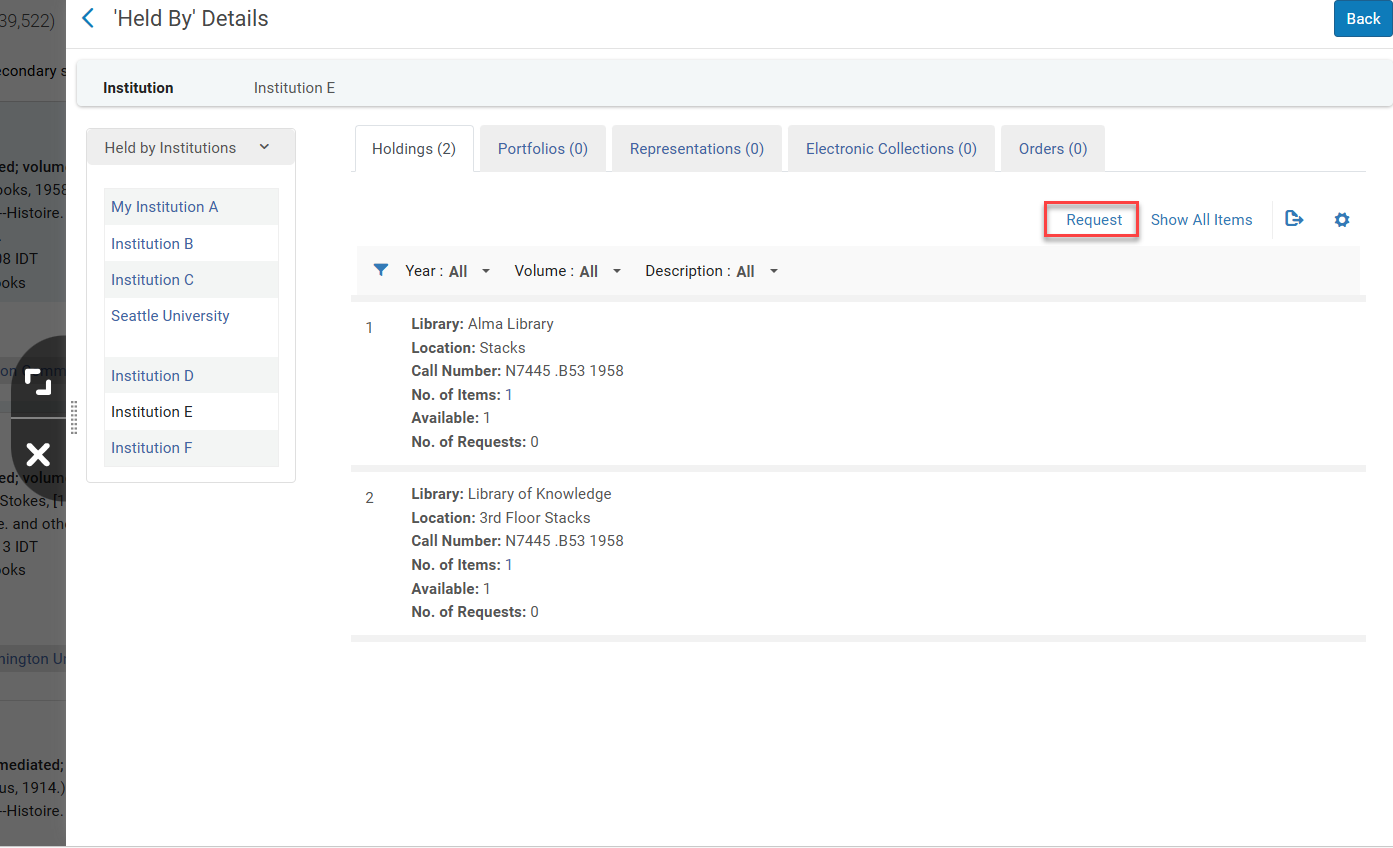
For more information, see Repository Search When Using a Network Zone.
New “Central Record Management” Page
Collaborative Networks URM-331828URM-332812
It is now possible for members of a Network to configure a separate default placement (Network versus Local) for records created via Quick Cataloging, independent of standard cataloging. A new Alma configuration page has been added, bringing together the Central Record Management and the new Central Brief Record Management parameters to distinguish between regular cataloging and Quick Cataloging settings.
This new page will be available via the Central Configuration Dashboard under Resources > General at the Network Zone level, and under Configuration > Resources > General at the Institution Zone level.
This enhancement prevents brief records from unintentionally cluttering the Network Zone.
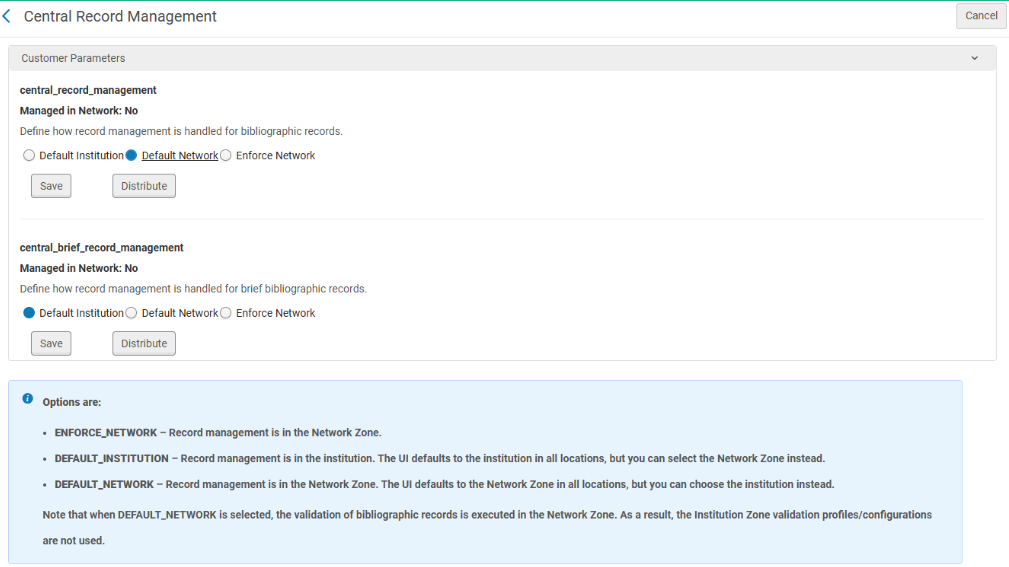
-
This feature is relevant only for consortia operating with a Network Zone setup.
-
The new feature does not change the existing functionality, unless the user changes the central_brief_record_management customer parameter (see Configuring Other Settings (Resource Management)
For more information, see Network Managed Records in a Network Zone..
Course Recommendation Rules Added to the Central Configuration Dashboard for Management
Collaborative Networks URM-332812
It is now possible for Network Zone operators to manage the Courses Recommendation Rules configuration from Rialto (available for all Alma customers if they opt-in in the Data Sharing Profile page in Alma).
This enhancement improves efficiency and supports central offices in their centralized approach to managing and distributing rules information across the Network Zone.
For more information, see Sections and Configuration Options.
Configurations Added to Consortia Central Configuration Dashboard Removed from Previous Menus
Collaborative Networks URM-332019
After adding new configurations to the Consortia Central Configuration dashboard in May and August releases, they have now been removed from the 'old' Alma and Primo VE configuration menus of the Network Zone. Network Zone administrators, while operating at the Network zone institution, now access those configurations through the Central Configuration Dashboard directly.
The removed configurations from the Alma and Primo VE configuration menus at the Network Zone Level are:
-
Profiles User registration form
-
Manage License Terms
-
Sound configuration page
-
Manage Borrowing Alerts
-
Manage Lending Alerts
-
Patron Additional Information
-
Rapido Request Forms Customization
For more information on related configurations, see Consortia Central Configuration Dashboard.
Improve the UX for the Operator Toggle in the Advanced Search
User Experience, Accessibility & Infrastructure URM-333005
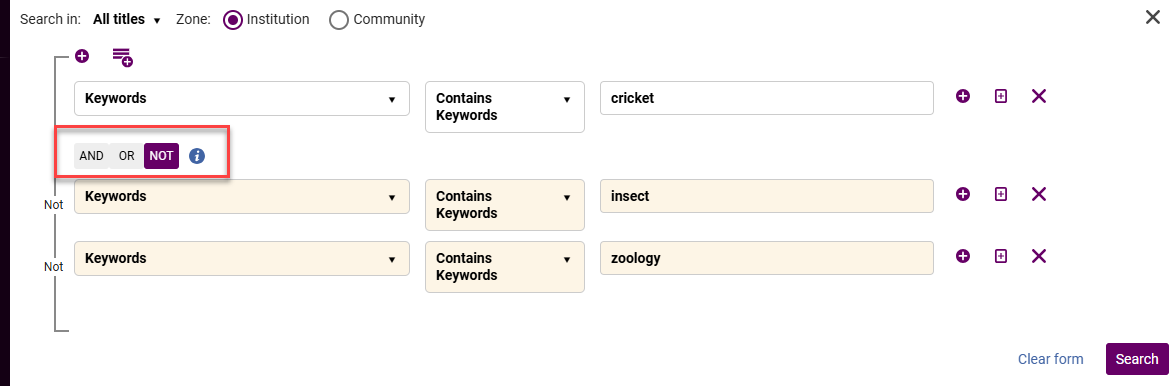
In the new UX advanced search, the operator toggle was lowered to make the search experience more intuitive, in particular for the NOT operator.
For more information, see Searching in Alma.
Add NOT Boolean to New UX Advanced Search
User Experience, Accessibility & Infrastructure  CERV Enhancement (ID#36492)URM-316060URM-332056
In the new UX advanced search, a NOT Boolean operator was added for supported searches that use the new search infrastructure, such as All Titles, Physical Titles, etc.
The new feature enables users to define a group of conditions and exclude the entire group with a single action, significantly reducing the effort required when excluding multiple terms or values across different fields.
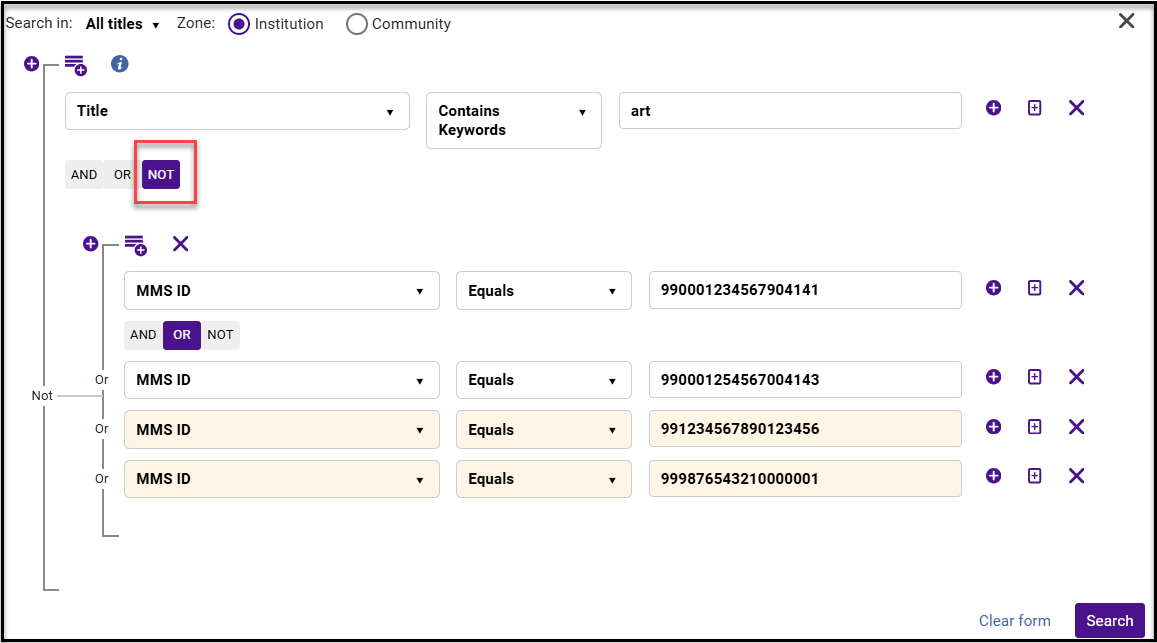

Note that the boolean operator defined for a subgroup of conditions applies between the keyword conditions . Therefore, when using NOT in the following example, only the members in the group that come after the first member will be false.
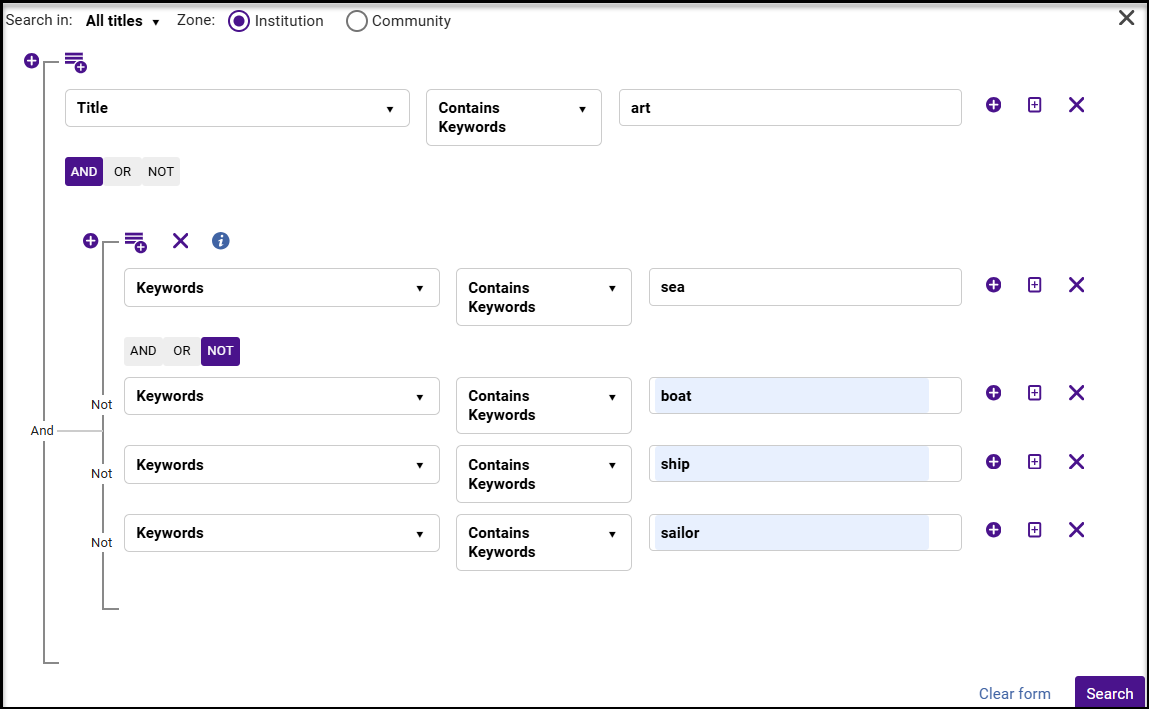

The advanced search uses hierarchical entity levels. For example, a Physical Title can have multiple Holdings, and a Holding can have multiple Items. Because of this structure, using the Boolean ‘NOT’ may return results that seem counter-intuitive when your search entity level and index level differ. For more information, see Searching in Alma.
Guided Tours
User Experience, Accessibility & Infrastructure
Alma now offers contextual Guided Tours that provide step-by-step guidance directly within relevant workflows.
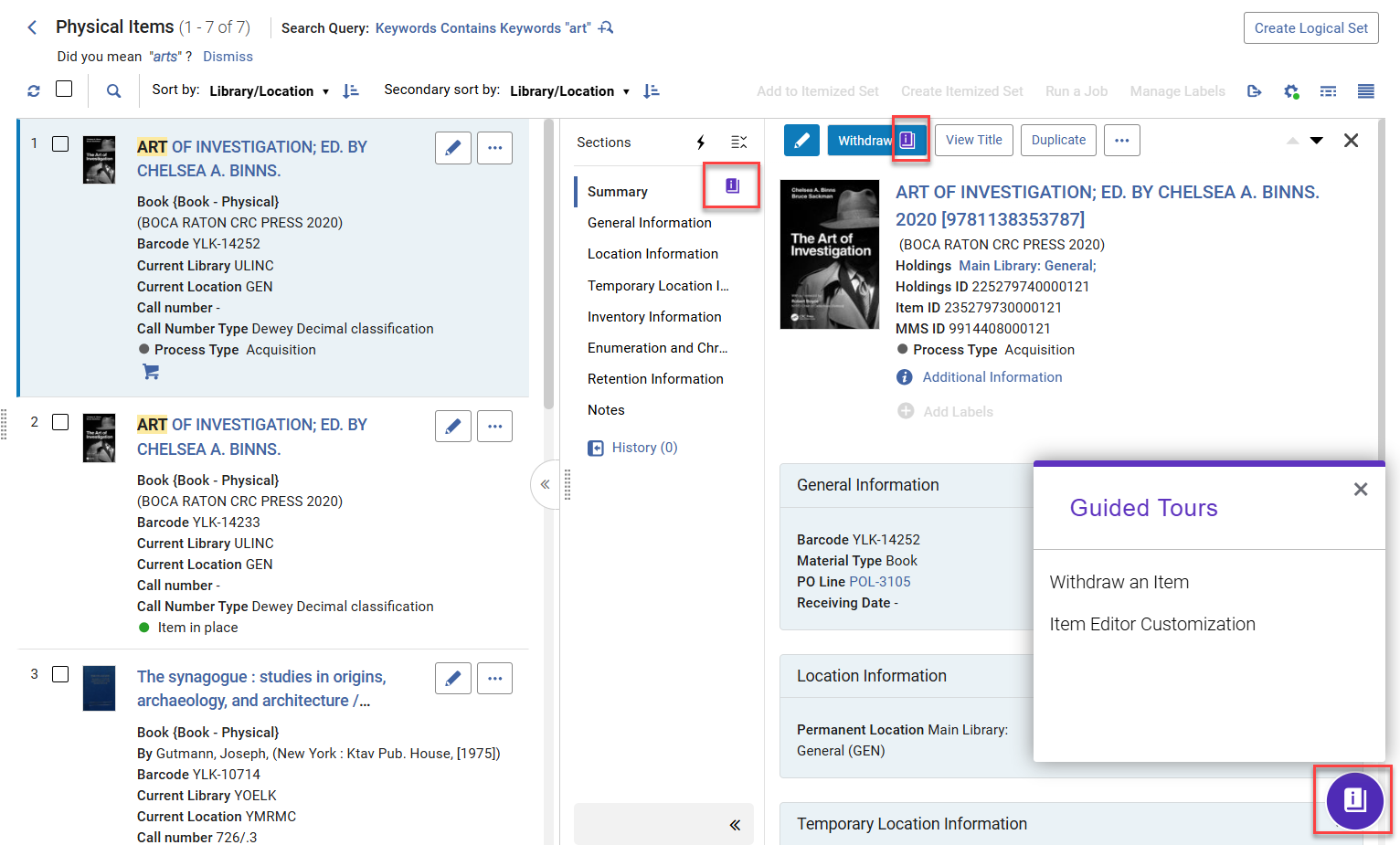
The guided tours for the November release focus on the new Physical Items search.
For more information, see New Layout.
Alma Knowledge Portal Access
User Experience, Accessibility & Infrastructure URM-331443
The "Browse Online Help" link has been renamed to "Alma Knowledge Portal" and now opens the new portal directly in a new tab. The legacy Knowledge Assistant options have been removed.
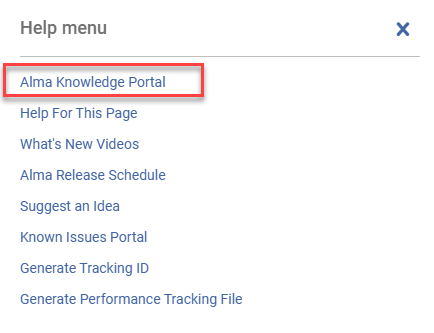
For more information, see The Alma User Interface.
Select All for Label Management
User Experience, Accessibility & Infrastructure URM-332276
It is now possible to use Select All to apply label changes across all pages that support the Manage Labels action. Note that for the PO lines list, Manage Labels is available only for single page selection and not for the multi-page Select All.
The action runs in the background and supports adding or removing labels for the entire result set. This enhancement makes it easier to manage labels at scale, enabling users to update labels for all matching records directly from the list.
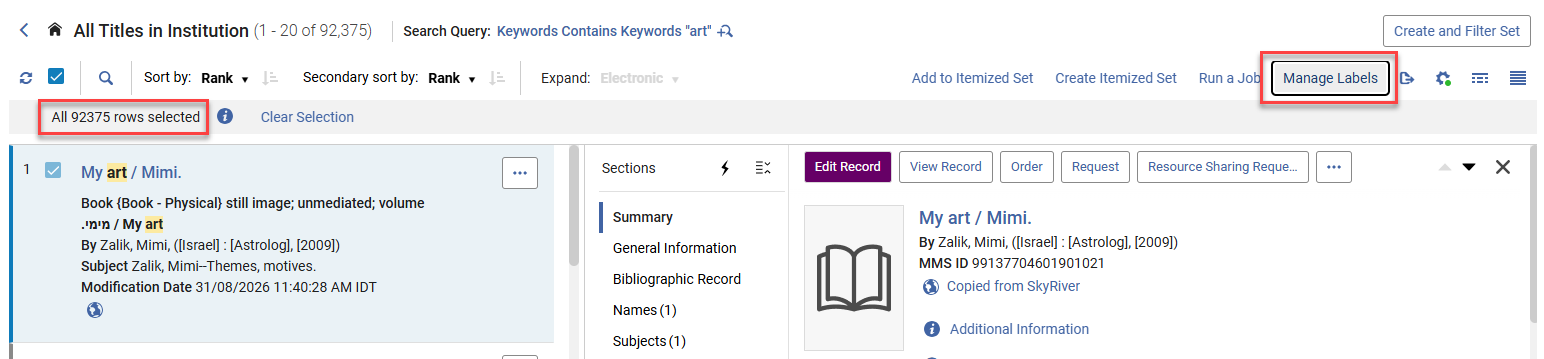
For more information, see Managing Search Queries and Sets.
Expand/Collapse All Sections in the Details Pane
User Experience, Accessibility & Infrastructure URM-331583
A new Expand/Collapse All control was added to the details pane, allowing users to open or close all sections with a single action. The control dynamically reflects the current state and is grouped with Quick Actions in the header for easier access. This improves navigation and efficiency when reviewing or editing records with multiple sections, reducing the need to expand or collapse sections individually.
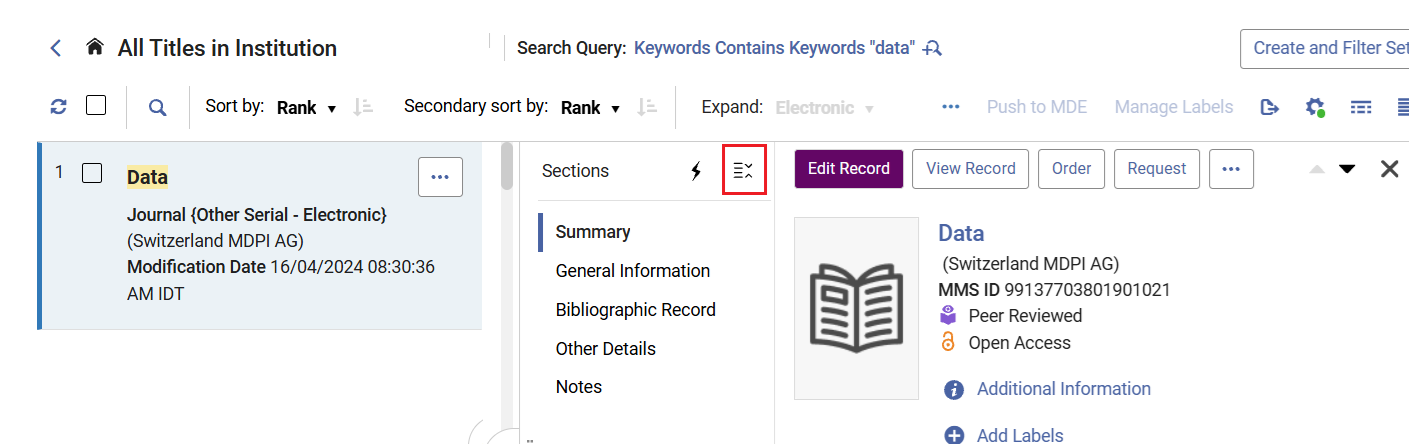
For more information, see New Layout.
Sticky Width for Resizable Sliding Panels
User Experience, Accessibility & Infrastructure URM-332367
When users resize a sliding panel, the new size is automatically applied the next time the user opens a sliding panel. The saved preference is kept across sessions.
For more information, see New Layout.
Horizontal Scrolling for Wide Tables
User Experience, Accessibility & Infrastructure URM-333981
Wide tables can now be viewed using horizontal scrolling, making all columns accessible without resizing them to fit the available screen width. Key columns remain visible during scrolling. This improves readability and navigation in tables with many columns, enabling users to access and work with all table data more efficiently.
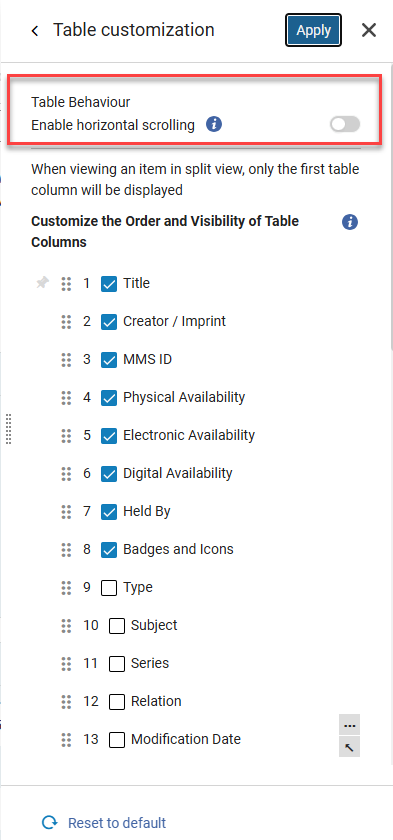
For more information, see New Layout.
Two-Line Column Headers for Better Table Usability
User Experience, Accessibility & Infrastructure URM-332335
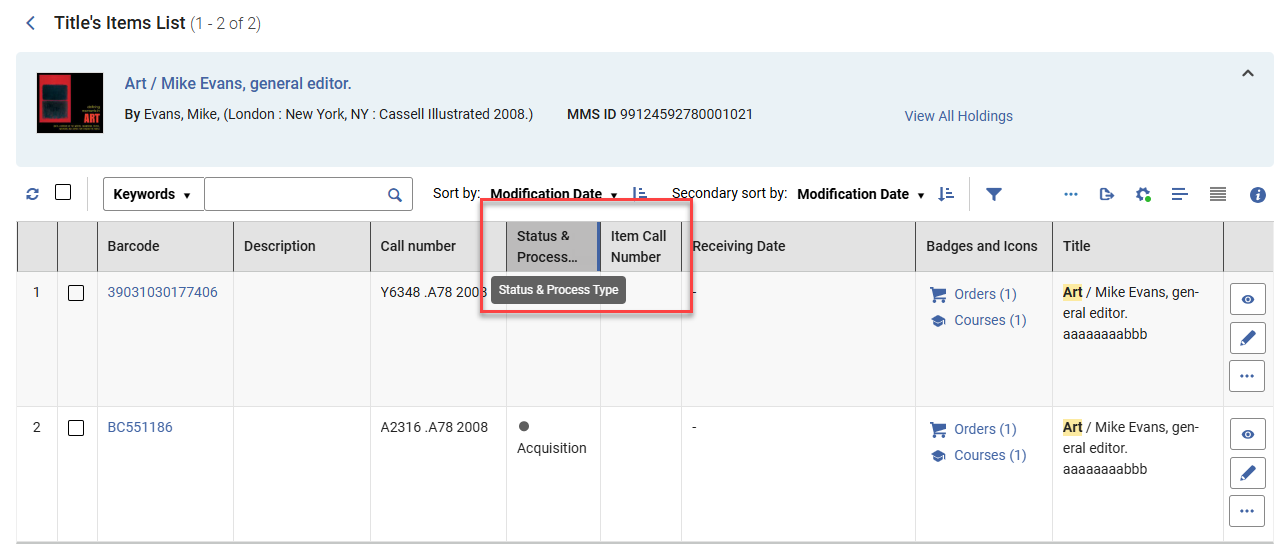
Table column headers now wrap up to 2 lines. If the field name exceeds 2 lines, it is truncated with an ellipsis (hover to see the full name). This balances readability and layout efficiency, by displaying more of the column header name than a single truncated line, while maintaining a compact table layout.
Ability to View AI Insights Reports in Analytics
Analytics and Insights URM-315885
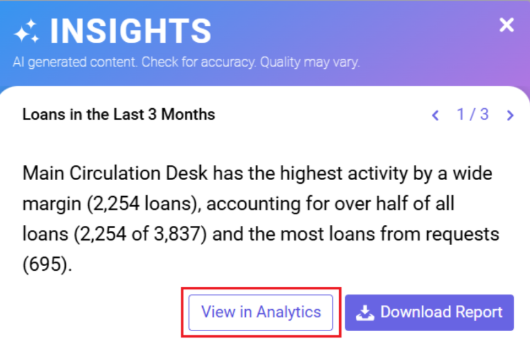
A new "View in Analytics" action has been added to Alma AI Insights notifications. Users with the Design Analytics role can now open the underlying Analytics report directly from the insight in a new browser tab, making it easier to review and edit report details, filters, and configuration.
The existing Download Report option remains available for all users.
For more information, see Alma AI Insights.
Removed Fields from E-Inventory Subject Area
November 2026 Analytics and InsightsURM-327473
As previously announced in July 2026, the fields Managed by Provider (To Be Deprecated)and Provider Name (To Be Deprecated ) have been removed from the E-Inventory (Electronic Collection) Analytics Subject Area.
Enhanced Subject Area Documentation with Data Type and Data Size Information
November 2026 Analytics and Insights
To help Analytics users better understand the data available for reporting, Data Type and Data Size information has been added to selected tables in the Alma Analytics Subject Area documentation. This information makes it easier to understand field characteristics when creating reports. Additional tables will be enhanced as part of future monthly updates. For this release, the following tables were updated:
-
Benchmark > Institution Profile
-
Benchmark > Inventory KPIs
-
Benchmark > KPI Date
-
Benchmark > Resource Sharing KPIs - Borrowing Requests
-
Benchmark > Resource Sharing KPIs - Lending Requests
-
Benchmark > Usage KPIs - COUNTER Reports
-
Benchmark >Acquisition KPIs - POLs
-
Benchmark > Fulfillment KPIs - Loans
-
Benchmark > Fulfillment KPIs - Requests
-
Borrowing Request (Resource Sharing) > Borrowing Creation Date
-
Borrowing Request (Resource Sharing) > Rapido Attributes
-
Borrowing Request (Resource Sharing) > Partner
-
Borrowing Request (Resource Sharing) > Requester
-
Borrowing Request (Resource Sharing) > Assigned To
For more information see, Alma Analytics Subject Areas.
Updated Documentation for Analytics Tables
November 2026 Analytics and InsightsURM-336021
As part of an ongoing project and in alignment with the Analytics Community of Practice, Ex Libris is currently enriching the documentation of analytics field tables with additional information. This initiative aims to assist and support users in comprehending how our Alma data is presented within the realm of Analytics fields. For this month, the following table within the Titles Analytics Subject Area was updated:
-
Titles > Title Measures
For more information, see Titles.
Upcoming Issues to Note
No issues match your criteria.
Resolved Issues
| SF number | Area | Description |
|---|---|---|
|
08293786 |
Acquisitions | Previously, EDI Invoices with incorrect charges were included in the Overhead field. This was fixed.URM-322195 |
|
08323920 |
Acquisitions | Previously, EDI order line cancellation processes ended with "Input file contains invalid XML". This was fixed.URM-325673 |
|
10562199 |
Acquisitions | Previously, the Manage EDI tasks included a mix of Spanish and English languages in the response summary (Acquisitions > Purchase Order Lines > Manage EDI Tasks). This was fixed. Now, the response summary is only displayed in the configured UI language.URM-328803 |
|
08396612 |
Acquisitions | In some cases, PO lines were not created based on the New order import file. This was fixed.URM-329061 |
|
10656803 |
Acquisitions | Previously, the Fund Allocation Loader job did not display the correct error message when the file contained formatting issues. This was fixed.URM-332560 |
|
|
Acquisitions | There was an issue with funds API, which did not correctly handle rule inheritance: When "child" fund rules were updated, the Override Rules Information button behavior in the UI was incorrect. Additionally, parent funds were incorrectly updated in attempts to update their "child" funds.URM-332873 |
|
10584341 |
Acquisitions | When an invoice is assigned to a library that is later removed from the vendor's available libraries, the invoice can no longer match a valid vendor-owner combination, so the library appears as id (not listed). This is expected behavior. We did improve the display by showing, for example, Main Library (not listed) instead of the library ID. In addition, users will now receive an error when attempting to save, preventing an invalid vendor-owner combination from being saved.URM-333015 |
|
10572507 |
Acquisitions | Previously, users could update interest on a PO line even when the API operation failed. In addition, the API behavior was aligned with the UI, allowing PO Lines that use the Technical Acquisition Method to be saved without funds. The acquisition method and fund validation rules now match the UI behavior.URM-333224 |
|
10656074 |
Acquisitions | Previously, the Physical Item editor Save and Receive action did not include a no Brief Record warning. This was fixed, and the brief bib alert was added to the Save and Receive confirmation message.URM-334701 |
|
10681025, 10694749 |
Acquisitions | Previously, when the po_line_description_update_upon_bib_changes parameter was set to true, the POL bib record was updated even though no changes were made to it. This was fixed.URM-335713 |
|
10745814 |
Acquisitions | In some cases, an error was generated when searching for PO lines. This was fixed.URM-336556 |
|
10754228 |
Acquisitions | Previously, the Scheduled Update PO Lines Advanced job showed inconsistent PO Lines. This was fixed.URM-336900 |
|
10749225 |
Acquisitions | Previously, SUSHI Harvest failed when the Parent URI Length exceeded 200. This was fixed.URM-337188 |
|
10767632 |
Acquisitions | Previously, searching invoices by Additional PO Line displayed caused an unhandled error. This was fixed.URM-337375 |
|
08399818 |
Acquisitions | Previously, the PO Line Approver Identifier was listed as System rather than the user who had approved the PO. This was fixed.URM-337715 |
| 10728859 | Analytics | Previously, some valid LC classification codes were not recognized in Analytics and were therefore displayed as Unknown in reports. This was fixed. |
|
10723236 |
User Experience, Accessibility and Infrastructure | Previously, when a fine was created through an automatic process, Advanced Search for users with the Fine/Fee total sum field did not work properly. This was fixed.URM-334714 |
|
10730694, 10741463, 10736846, 10732056 |
User Experience, Accessibility and Infrastructure | The Allow Developer Network management by NZ accounts checkbox is now available under Configuration > General > Network Member configuration for Admin and Network members.URM-334815 |
|
10747776 |
User Experience, Accessibility and Infrastructure | In some cases, activating/deactivating users from the user list view failed with an error. This was fixed.URM-335637 |
|
08355610 |
User Experience, Accessibility and Infrastructure | When creating a linked account in Fulfillment Network using Cross Consortia Identifiers and the source user had multiple identifiers of the same type, only one identifiers was copied to the linked user. This was fixed.URM-335721 |
|
10738052 |
User Experience, Accessibility and Infrastructure | Searching for electronic collections in the Community Zone was sometimes extremely slow. This has been fixed pending reindexing, meaning that the performance will improve gradually during November as the full indexing progresses.URM-335987 |
|
10772366 |
User Experience, Accessibility and Infrastructure | In some cases, the Electronic Deletion Job generated an error when viewing the progress details. This was fixed.URM-336879 |
|
10689572 |
Collaborative Networks | In some cases, linked accounts were not updated after changes were made in the source user. This was fixed.URM-335845 |
|
08369585 |
Fulfillment and Resource Sharing | Previously, when using the Done action in Manage In Process Items, the From Department field in the Reshelve Without Transit rule was not applied correctly for circulation desk-managed departments. This was fixed.URM-328108 |
|
|
Fulfillment and Resource Sharing | Previously, the Location column in the Create Move/Digitization Request popup displayed the external location name rather than the actual location name. This was fixed by renaming the column to External Location Name and adding a configurable Location Name column.URM-330213 |
|
10605388 |
Fulfillment and Resource Sharing | In some cases, an item was marked as On Loan to a non-existent user. We have fixed the data to complete a stuck, active loan with a given return date and release the item, so both the loan and item are properly saved and indexed. The item process type is cleared, and the loan is marked complete.URM-332016 |
|
08437328 |
Fulfillment and Resource Sharing | Previously, a resource-sharing request recall cancellation was not properly applied in German. This was fixed.URM-333034 |
|
10553615 |
Fulfillment and Resource Sharing | When loaning an item through MPS in a reading room, the RFID security tag was incorrectly deactivated. This was fixed.URM-333215 |
|
10566948 |
Fulfillment and Resource Sharing | Previously, the Resource Request Slip Letter displayed Personal Delivery as the destination, even when the request was ultimately routed to the Hold Shelf following scan-in due to a patron block preventing Personal Delivery. This was fixed. The letter now correctly displays the Hold Shelf circulation desk as the destination.URM-333925 |
|
10681081 |
Fulfillment and Resource Sharing | Previously, when using the fulfillment_network_unique_barcodes (Configuration Menu > Fulfillment > General > Other Settings) configuration to loan items across a fulfillment network, items whose barcodes contained a hash sign (#) could not be loaned. This was fixed.URM-335026 |
|
10725556 |
Fulfillment and Resource Sharing | Previously, in some cases, the Alt + number shortcut did not work correctly when navigating between the Patron Services sections: Loans, Returns, Requests, and Fines and Fees. We added a new shortcut: Alt + Q, followed by the number of the desired section. Use this shortcut to navigate between the Patron Services sections. The existing Alt + number shortcut will continue to navigate between internal sections within a specific row.URM-335311 |
| Fulfillment and Resource Sharing | Previously, for Primo requests, the Fill Locally check was performed before request metadata was augmented, so it did not consider all available metadata. This was fixed.URM-335666 | |
|
10698407 |
Fulfillment and Resource Sharing | Previously, the search was incorrectly available within the Network Zone loans scope. This was fixed, and the search is no longer available within this scope.URM-335715 |
|
10662379 |
Fulfillment and Resource Sharing | In a specific case, digitization requests with a long note could not be cancelled or deleted. This was fixed.URM-335717 |
|
10723427, 10764357, 10785696 |
Fulfillment and Resource Sharing | Previously, the Closed Fee Statuses did not work as expected. This was fixed.URM-335870 |
|
10624032 |
Fulfillment and Resource Sharing | Previously, the library IDs for the Loans - Due Date Correction after Calendar Change job only supported 200 characters. The parameter calendar_changed now supports values up to nearly 4000 characters, allowing long lists of libraries to be accommodated.URM-336733 |
|
10794346 |
Fulfillment and Resource Sharing | Previously, the description of the borrower_document_delivery_maximum_views customer parameter incorrectly indicated that it applied only to RapidILL Document Delivery. This was fixed.URM-336901 |
|
06658360, 08022017 |
Metadata Management | In some cases, UNIMARC headings were displayed in MARC subjects. This was updated to account for all requirements.URM-193363 |
|
10634208 |
Metadata Management | Previously, there was a synchronization failure between Institution Zone and Network Zone records due to malformed 880 fields. This was fixed.URM-334399 |
|
10686468 |
Metadata Management | When a record had several types of inventories, indexing was duplicating its headings. This is fixed.URM-335103 |
|
10703310, 10797631, 10785265, 10836668 |
Metadata Management | Previously, the Excel export was limited to 100 results when searching local fields (900-949). This was fixed.URM-335133 |
|
10741969 |
Metadata Management | Previously, two functions were assigned to the Ctrl+Alt+P shortcut. This was fixed. We have changed the Insert Unicode Characters keyboard shortcut to Ctrl+Alt+Q in the MDE.URM-335418 |
|
10775249, 10765913, 10786953, 10810430 |
Metadata Management | Previously, the Status & Process Type values were not included in the Physical Item export file. This was fixed.URM-336377 |
|
10803306 |
Metadata Management | Previously, when switching to the New Item Editor view, the Save and Receive > Keep in Department checkbox setting was not maintained. This was fixed.URM-337196 |
|
10675255, 10632787, 10647595, 10655497, 10685819, 10780656, 10871206 |
Resource Management | Previously, the Upload E-Holdings jobs for Sage and for Taylor & Francis failed to match on some portfolios with specific non-identifier values in their parser parameters. This was fixed.URM-333295 |
|
10697842 |
Resource Management | In some cases, completed system jobs displayed 01/01/1970 as the finish date rather than the actual date. This was fixed.URM-333322 |
|
10652033 |
Resource Management | Advanced search for the Electronic Collection Name index, using the equals operator, retrieved inaccurate results. This was fixed. Note that full inventory indexing is required for this fix to take effect.URM-335152 |
|
10784261 |
Resource Management | Local bibliographic records in a consortia network member, upon being linked to the CZ, were not automatically cached in the Network Zone. This was fixed. There's an option to opt out of the new behavior by setting the new customer parameter cache_records_in_nz_on_link_local_to_cz (Configuration > Resources > Other Settings) to false. This fix is for future relinking operations only and doesn't cache titles retroactively.URM-336881 |
|
10760231 |
Resource Management | In some cases, the modification date in the Export physical item job was incorrect. This was fixed.URM-337664 |
