
Alma January 2026 Release Notes
Features
Electronic Resource Network Data Accessible in a Single Location in Analytics
January 2026 Analytics and InsightsURM-315114
All electronic resource Network fields are now available in a single location within the Portfolio Details for Consortia Members folder in the E-Inventory Subject Area. Users can easily access all Network-related information in a single place, providing a clear and organized view.
For more information, see Analytics When Using a Network Zone and Portfolio Details for Consortia Members.
Electronic Collection Pending Deletion Reason and Alternative Collections CZ ID Fields Now Available in Analytics
January 2026 Analytics and InsightsURM-313864
Two new fields,Electronic Collection Pending Deletion Reason and Alternative Collections CZ ID, are now available in the E-Inventory Subject Area, specifically in the Electronic Collection and Portfolio Details for Consortia Members > Electronic Collection folders. Additional information about collections pending deletion in the Community is now available in analytics, making it accessible even after the Pending Deletion collection has been deleted in Alma.
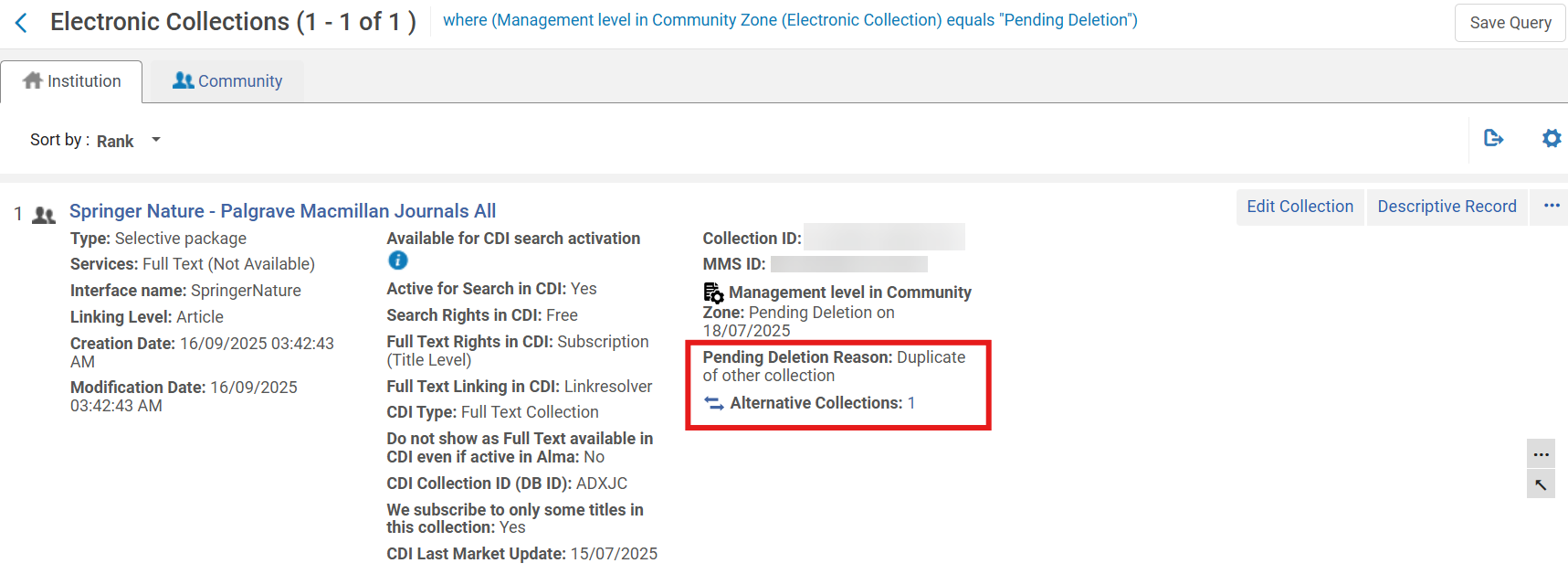
For more information, see Electronic Collection and Portfolio Details for Consortia Members (Electronic Collection).
Set "No List Expected" in Bulk Using Course Bulk Update Task
January 2026 Fulfillment and Resource Sharing
 Idea ExchangeURM-240421
The Course Bulk Update job (Admin > Run a Job > Courses > Course Bulk Update) now supports the No list expected attribute. Staff can select the No list expected checkbox in the job and choose either Add No list expected or Remove No list expected for all courses in the selected set, which enables efficient large-scale updates.

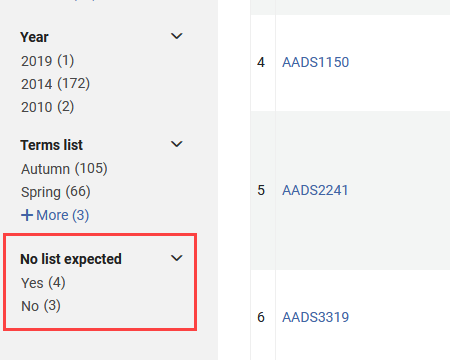
A new No list expected facet is also available on the Fulfillment > Courses page. It enables staff to filter courses based on whether the No list expected attribute is selected (Yes) or not selected (No). This enhancement improves course management by enabling institutions to quickly identify and organize courses that are intentionally not expected to have lists.
Related Records from Recommendation Summaries
January 2026Resource ManagementURM-316541
Rialto now displays a Related Records link in the Summary section when viewing a retention or deselection recommendation that has associated bibliographic records. The link indicates the number of related records in parentheses.
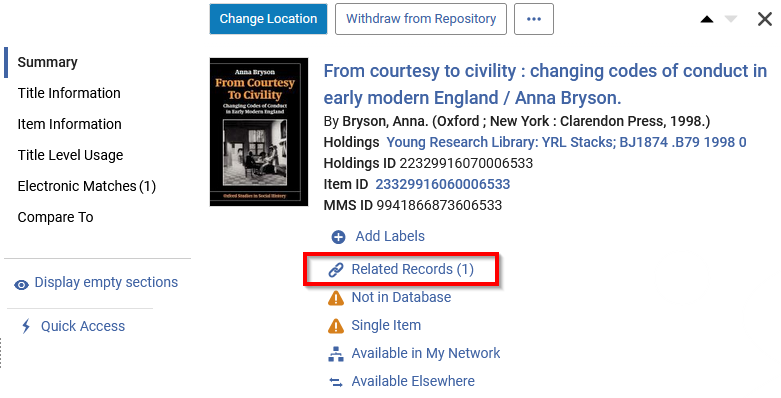
Selecting Related Records opens a sliding panel with a list of all bibliographic records associated with the recommendation's MMS ID.
This enhancement makes it easy to find connected records when examining recommendations and helps users understand the broader bibliographic landscape of a title.
Expanded Details in Item-Level Compare To Sections
January 2026Resource ManagementURM-253024
Item-level Compare To sections for both retention and deselection recommendations now include detailed data for other institutions' resources. Users can view this data by selecting the View full list and additional information link in the Compare To sections.
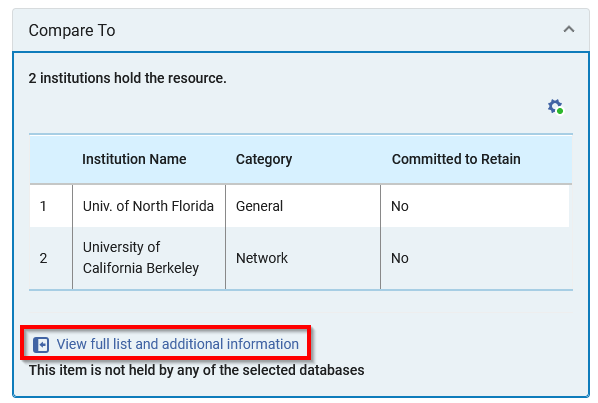
Selecting View full list and additional information opens a detailed sliding panel that displays various data related to all matching holdings in comparison institutions, such as:
- MMS IDs
- Titles
- Authors
- Publication date
- Publisher name
- ISBNs
- Other system numbers
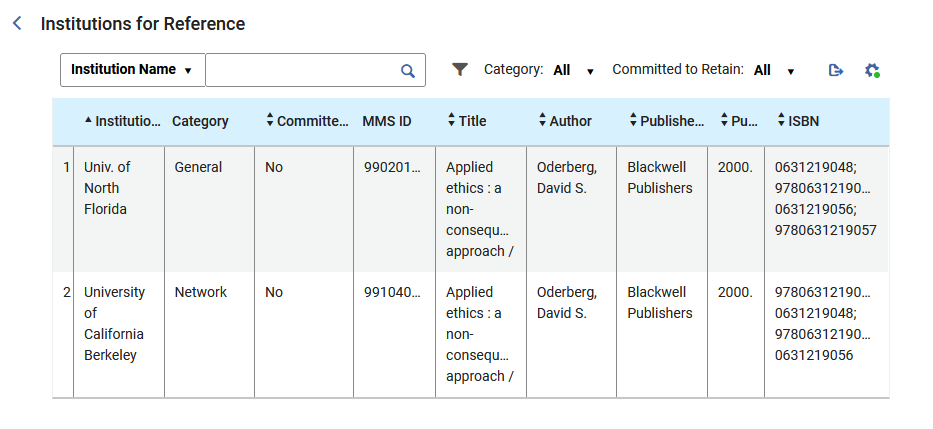
The panel presents one row per matching MMS ID per institution. For example, if a single institution holds two matching MMS IDs, the panel lists two rows—one for each match. Additionally, if multiple identifiers exist, the sliding panel displays all of them in the same field.
Some data points are hidden by default; use the panel's configuration button to add additional columns to the sliding panel.
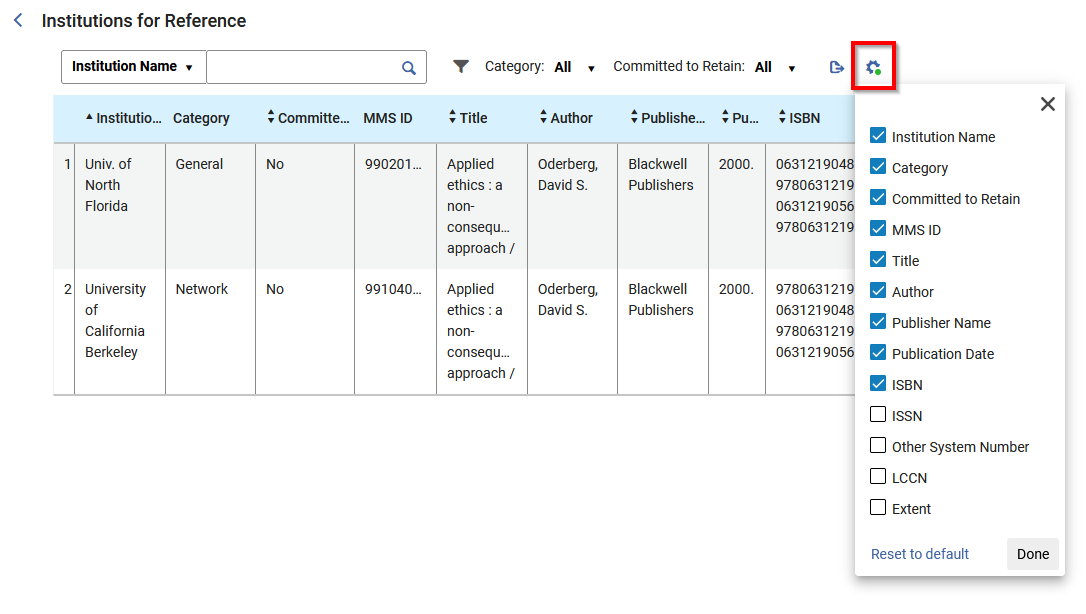
This update increases transparency across comparison institutions and supports more confident decision-making when assessing items for retention and deselection.
Create Collection Development Projects from a File
January 2026Resource ManagementURM-314774
Rialto now enables users to create retention and deselection projects by uploading a file that contains a predefined list of items. Users can upload a tab-delimited text file or an Excel file with item IDs to serve as the project's data source from which Rialto can generate recommendations. The uploaded file must be smaller than 10 MB and include a column named Item ID in the header row.
This capability is ideal for libraries that manage curated title lists outside of Rialto—for example, lists exported from previous projects, inventory analyses, or collaborative collection studies.
When creating a new project, a new Upload Project From File option is available on the Add New Project window (Collection Development > Workflows > Retention or Deselection). When selected, the window updates to include a field for uploading a file.
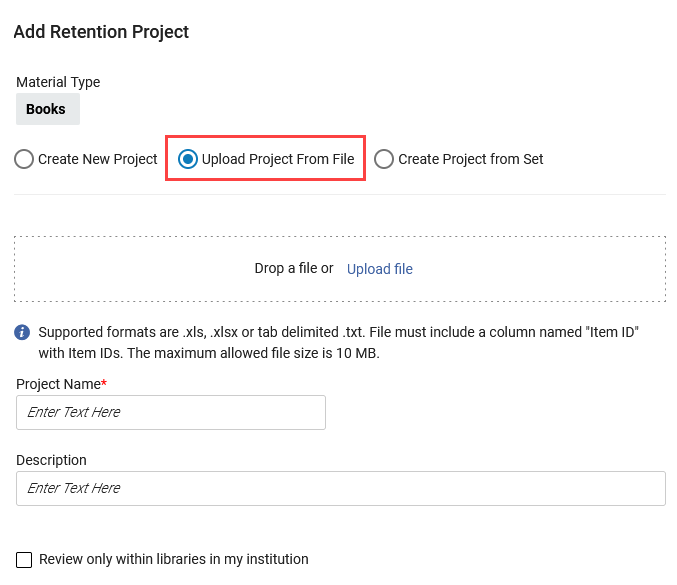
This enhancement gives libraries greater flexibility when creating collection development projects. Direct file uploads also reduce manual setup time and improve accuracy when analyzing preselected title lists. For more information, see Creating a Deselection Project from a File and Creating a Retention Project from a File.
Create Collection Development Projects from an Alma Set
January 2026Resource ManagementURM-306178
In addition to creating a project from a file, users can now also create new projects directly from existing Alma physical item sets. This enhancement applies to both retention and deselection projects.
When creating a new project, a Create Project from Set option is now available on the Add New Project window (Collection Development > Workflows > Deselection or Retention). Once selected, users can choose any Alma set containing physical items from the Select Physical Items Set dropdown. When generating recommendations for a project created this way, Rialto evaluates only the items included in the selected Alma set.
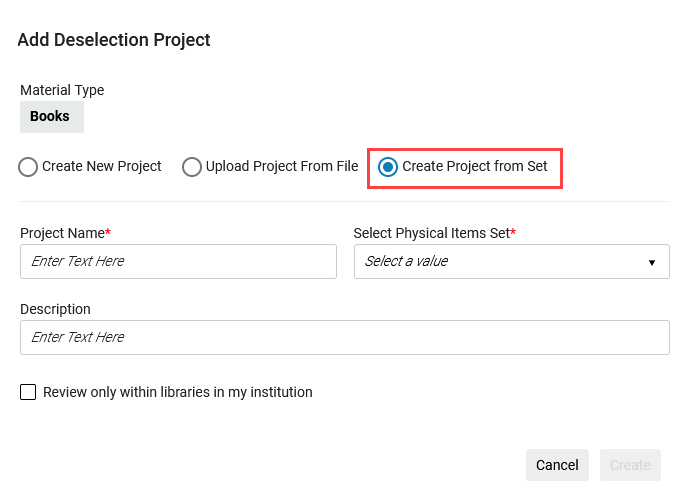
This enhancement streamlines project setup and strengthens the connection between Alma's inventory management and Rialto's collection development workflows. For more information, see Creating a Deselection Project from a Set and Creating a Retention Project from a Set.
Define Usage Scope in Retention Projects
January 2026Resource ManagementURM-254904
Rialto now enables users to include usage criteria when defining the scope of retention projects. Previously, usage filters were available only for deselection projects.
A new Suggest when total usage per title is more than field has been added to the Scope section of the retention Criteria form. This field includes two dropdowns:
- A usage count dropdown (1 –10) that specifies the minimum number of uses per title.
- A timeframe dropdown (1 –10 years) that defines the period during which usage is calculated.
The field is optional and is blank by default.
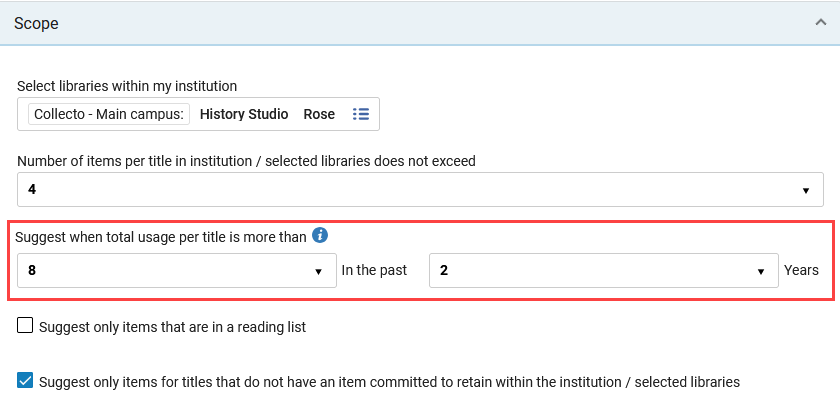
This enhancement helps libraries preserve high-value materials by basing retention decisions on measurable usage patterns.
Include Digitization Requests in Usage Calculations
January 2026Resource ManagementURM-306180
Rialto now enables institutions to account for digitization requests when calculating item usage in retention and deselection projects.
A new configuration option,DIGITIZATION_REQUESTS, is now available in the table found in Configuration > Collection Development > Workflows > Usage Calculation. When enabled, Rialto includes digitization requests in the total usage count used for generating project recommendations.
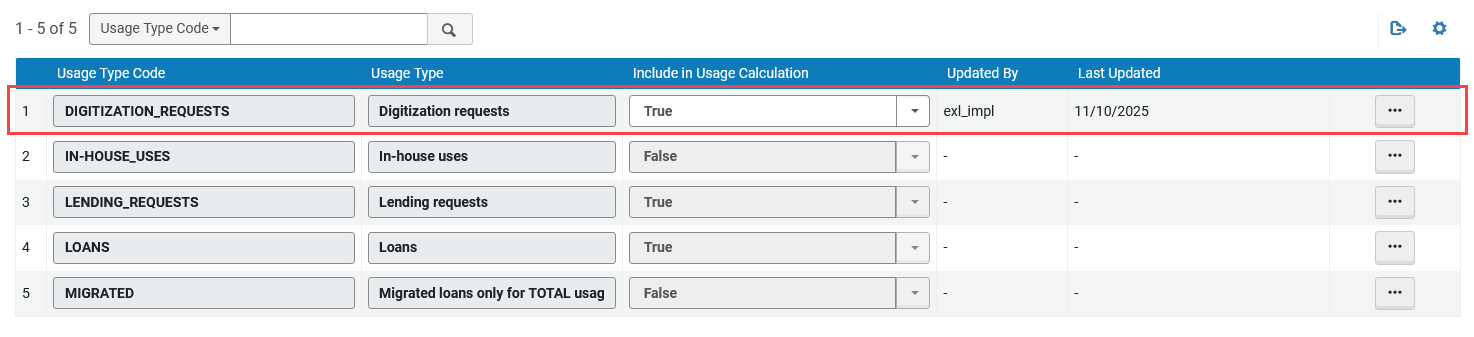
Digitization requests represent instances where users or staff request the creation of a digital copy of a physical item.
By incorporating digitization requests into the overall usage calculation, libraries gain a more accurate understanding of how their collections are accessed and valued. This helps institutions make better-informed decisions when identifying titles for retention or deselection.
Search Within Recommendations
January 2026Resource ManagementURM-313438
Users can now search within the recommendations list in both retention and deselection projects. A new search bar has been added to the View Recommendations page, next to the existing sort control. You can search by several indexed fields, including:
- Keywords
- Creator
- Edition
- MMS ID
- Publisher
- Title
- Title Local Labels
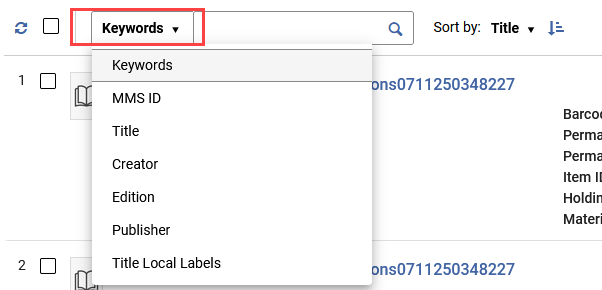
Any selected facets remain applied when running a search. If no titles match the entered keywords, the page displays a message indicating that no results were found.
This improvement makes it easier to locate specific titles among large recommendation sets.
Additional Enhancements
- January 2026 Fulfillment and Resource SharingURM-315436 Alma now records which user uploaded a file to a citation. When a file is uploaded, the system stores either the uploader username or, if the file was added by a job, the job ID.
In Alma, this information is visible in the File Upload component under the label Uploaded by. This information will be added to analytics in a future release
 Information on who uploaded a file
Resolved Issues
| SF number | Area | Description |
|---|---|---|
| 08171726 URM-315955 | Acquisitions | Previously, when the Solr search language was in Korean/Japanese/Chinese, searching for a purchase request with a title in Korean/Japanese/Chinese did not return results. This was fixed. |
| 08130242 08227742 08036238 08100455 08098008 URM-253923 | Acquisitions | Previously, purchase orders were not closed when purchase order lines were closed by the invoice process. This was fixed. |
| 06985469 08209793 08232790 URM-318978 | Acquisitions | Previously, the serial item/s receiving process did not update the expected receiving date on the PO line. This was fixed. |
| 08118687 URM-315921 | Acquisitions | Previously, it was possible to generate fund transfers between different fiscal periods. This was fixed. |
| 08082352 URM-314357 | Acquisitions | Previously, the Manage EDI tasks included both English and the selected UI language in the response summary (Acquisitions > Purchase Order Lines > Manage EDI Tasks). This was fixed. Now only the selected UI language is displayed. |
| 07977013 URM-318601 | Fulfillment and Resource Sharing | When changing the due date on multiple loans, the new due date was not displayed in the This Session filter. This occurred in cases where the loan ID was longer than 14 digits. This issue has been resolved, and the new due date is now displayed immediately for all loans in "This Session". |
| 08184667 URM-316616 | Fulfillment and Resource Sharing | In some cases, hiding the General Hold Request button using Display Logic Rules (DLR) when a General Electronic Service (GES) existed did not work. This was fixed. |
| 08142256 08031444 08186472 08144502 08084155 08031561 08070341 08221355 08189769 URM-253656 | Fulfillment and Resource Sharing | In some cases, the manage patron services indicated users had active requests when those requests were not active. This was fixed. |
| 07964481 URM-252320 | Fulfillment and Resource Sharing | Previously, reading room items that were loaned were not renewed when they were re-scanned. This was fixed, and now reading room items with an AT_USER status are renewed when re-scanned. |
| 07982690 08015756 URM-248092 | Fulfillment and Resource Sharing | Previously, when an item on loan had a Temporary Move Request and was checked in using the Return Items at the destination library, an error occurred, and the return was not processed. This was fixed, and the loan is now successfully returned. |
| 07911914 URM-248185 | Fulfillment and Resource Sharing | Previously, requests for serial items with identical item descriptions ignored the Pickup Location. This was fixed. |
| 06807126 URM-246886 | Fulfillment and Resource Sharing | In some cases, creating borrowing requests triggered a timeout. This was fixed. |
| 08282063 URM-320789 | Fulfillment and Resource Sharing | In some cases, Rapido tiles were not displayed for users who were not logged in. This was fixed. If customers prefer to hide these tiles for non-logged-in users, adjust the setting under from Configuration > Resource Sharing > Hide Rapido Options, and check the Hide section when user is not loggedin checkbox. |
| 08212024 URM-318609 | Metadata Management | Previously, Alma always preserved the literal # character in MARC21 007 fields when storing the record in the database. This behavior is now configurable, and when the parameter is set to false, all # characters in MARC21 007 fields are replaced with spaces before being stored in the database. Contact support to change this parameter setting. |
| 08197214 URM-318602 | Metadata Management | In some cases, the record was not returned in the LC Subject search. This was fixed. |
| 08223775 URM-318277 | Metadata Management | In some cases, searches containing special characters returned incomplete results. This was fixed. |
| 08241533 URM-318888 | Metadata Management | Previously, portfolios whose collections contained special characters were not viewable in an All Title search. This was fixed. |
| 08153386 URM-316406 | Metadata Management | New titles search: In some cases, an "Oops" error was displayed when selecting the Licenses link. This was fixed. |
| 08216442 URM-318575 | Metadata Management | In some cases, scheduled manual jobs failed and were not restarted. This was fixed. |
| 08197357 URM-318025 | Metadata Management | Previously, the normalization rule was not considered when matching by the POLine/v endor reference number in the Update Inventory import profile. This was fixed. |
| 08155855 URM-314669 | Metadata Management | When an authority or bibliographic record was created in Alma, then contributed to SBN, the record's originating system id was not reset to be the SBN record id. Because the originating system id for an authority record did not match the external (SBN) system id, the authority import profile's match method "001 To ORIGINATING_SYSTEM_ID" did not match the Alma record to the SBN record, which resulted in the SBN authority alignment job creating duplicate authority records in Alma. This was fixed. |
| 08170475 URM-315899 | Resource Management | In some cases, the Open Predicted Items job took a long time to complete. This was fixed. |
| 08097888 URM-315046 | Resource Management | Previously, local extensions were deleted after adding portfolio contributions. This was fixed, and the local extensions now remain intact. |
| 08075239 08071233 URM-254239 | Resource Management | In some cases, when the Delete Electronic Collection job and the Electronic activation job accidentally ran almost in parallel, bibliographic records that had live portfolios were deleted. As a result, these portfolios turned to "orphans". To prevent this, a dependency has been added between these two jobs, so that they can no longer run in parallel. |
| 08158585 08013989 URM-252807 | Resource Management | Unsuppress record from Electronic Activation Task list: when this involved an electronic collection with thousands of portfolios, the Unsuppress action got stuck and timed out. This was fixed. |
| 08033240 URM-252709 | Resource Management | In some cases, when selecting Electronic Collection > Portfolio list > Other details > selecting a course with a linkable number, an error occurred, and the course was not displayed. This was fixed. |
| 08143772 URM-318429 | Resource Management | Previously, Controlled Vocabulary tables were not displayed when the UI's results per page was set to a value lower than the number of tables. This was fixed. |
| 07977003 URM-313662 | Resource Management | Previously, collection name translations were not displayed correctly in the UI. This was fixed. |
| 08222944 URM-318528 | User Experience, Accessibility and Infrastructure | In some cases, the text from the multi-select text boxes was missing on the Staff-mediated Deposit form (Specto > Deposit > Staff-mediated Deposit). This was fixed. |
| 08168238 URM-315656 | User Experience, Accessibility and Infrastructure | Previously, the Bulk Fine Waiving functionality from a set did not work for all users in large sets. This was fixed. |
| 08203650 URM-318546 | User Experience, Accessibility and Infrastructure | Previously, translations were missing for Draft, Submitted, and Withdraw labels on the patron Deposit form. This was fixed. |
| 08243441 URM-318532 | User Experience, Accessibility and Infrastructure | Previously, when the Staff-mediated Deposit form (Specto > Deposit > Staff-mediated Deposit) was open, the file uploader appeared inactive. This was fixed. |
Page tags: article:topicproduct:almacontent:Documentationlang:english
