
Alma August 2026 Release Notes
Features
AI‑Powered Recommendations in Resource Sharing Letters
Fulfillment and Resource Sharing
Institutions can now enhance several resource‑sharing notifications with AI‑generated recommendations for similar resources. When enabled, Alma uses an AI component to analyze the requested item and automatically generate an optimized search query based on its bibliographic details.
The query is run against a library‑selected search scope, and the resulting recommendations are included in supported letters, such as the request confirmation, document delivery, and cancellation letters, helping patrons discover additional relevant materials.
Activation of this feature is fully optional and controlled within each letter’s setup.
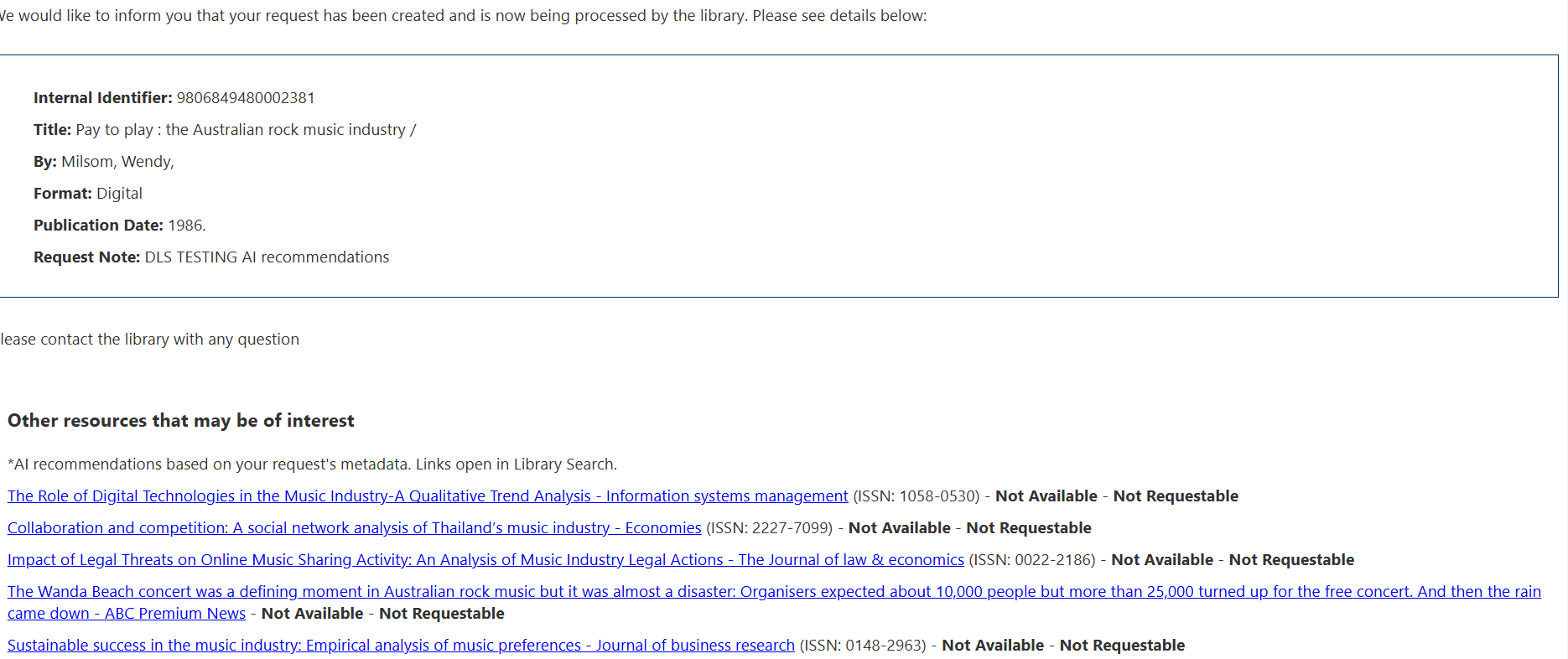
For more information, see Configuring Alma Letters.
Configurable Closed Fee Statuses
Fulfillment and Resource Sharing  Idea Exchange
Alma now supports up to 10 configurable closed fee statuses, allowing institutions to define their own labels for how fines and fees are resolved. This enables staff to close a fee using a selected close type. Any fee assigned one of these statuses is treated as Closed throughout Alma. These statuses can also be applied through the Bursar Import, enabling external systems to set the appropriate close type. This enhancement improves clarity, reporting, and control over fee resolution workflows.

The action appears only if at least one additional type is activated (see Patron Charges Configuration).
For more information, see Managing Patron Services and Developer Network.
Improved Ability to Block Requesting by Loan Blocks
Fulfillment and Resource Sharing URM-330131
The ability to block requesting by loan blocks (using the block_request_if_not_loanable parameter) has been improved to ignore the following blocks, which will not block requesting:
- Item is on hold shelf for another patron
- Item is on expired hold shelf for another patron
- Item is currently on loan by another patron
- Item is requested by another patron
- Item is requested by the library
- Item has not been received by Acquisitions Department
For more information, see Configuring Fulfillment Jobs.
Purged Request Fee
Fulfillment and Resource Sharing Idea ExchangeURM-180322 URM-328255
Configurable Purged Request Fee for Hold Requests
A new Purged Request Fee can now be configured in the Hold Request Terms of Use (Configuration > Fulfillment > Terms of Use and Policies), similar to the existing option for booking requests. When staff process expired holds from the hold shelf using Reshelve, Transit, or Activate Next, the system consults the Hold Request Terms of Use (TOU) and automatically applies the appropriate fee. This gives libraries more precise control over cost recovery and ensures consistent handling of expired hold requests.

For more information, see Configuring Physical Fulfillment and Managing the Hold Shelf.
Sticky Preference for ‘Receive Digitally / Upload File’ Option
Fulfillment and Resource Sharing Idea ExchangeURM-330985
Updated on 26 July 2026
The selected option (Receive or Files) in the Receive Digitally / Upload File page is now saved as a user preference. Once selected, the system will remember the user’s last choice and apply it automatically in subsequent sessions.
This improves usability by remembering the user’s last selected option (Receive or Files) in the Receive Digitally / Upload File page, reducing repetitive actions and streamlining the workflow.
Control Over Canceling Hold Requests in Transit
Fulfillment and Resource Sharing URM-180322 URM-328255
A new circulation policy now allows libraries to determine whether a hold request can be canceled once it has been put in transit. This added control helps prevent unintended cancellations during fulfillment, strengthens workflow reliability, and ensures that items already en route continue through the process as intended.
The policy is controlled by the allow_cancel_in_transit_requests parameter (Configuration > Fulfillment > General > Other Settings).


For more information, see Configuring Fulfillment Jobs and Managing the Hold Shelf.
Date of Work Now Supported in Leganto
Fulfillment and Resource Sharing Idea ExchangeURM-228160
Leganto now supports the display of a work's original publication date through the Date of Work field, enabling institutions to distinguish between the original publication date of a title and the publication date of a later edition or format.
The Date of Work field is not enabled by default. Institutions that want to display this information must configure the relevant bibliographic mapping and display settings.
To map the field in Alma, go to Configuration > Fulfillment > Courses > Bibliographic Mapping Rules and update the production Drools rules to map the desired MARC field to the date_of_work field. For example:
rule "Display - Date of work"
when
MARC is "240"."f"
then
set citation."date_of_work" to MARC."240" subfields "f"
end
You can verify the mapping using Configuration > Fulfillment > Courses > Test BIB to Citation Normalization by entering an item's MMS ID and confirming that the Date of Work field is populated as expected.
- Go to Configuration > Leganto > UI > Citation Field Mapping.
- Map Date of Work to a Book type (and/or other material type).
- Configure the display order.
- Choose whether the field appears immediately when a user opens Item details or under More details.
- Specify whether the field is mandatory.
Once configured, the Date of work field appears in Leganto under the item's Item details tab.
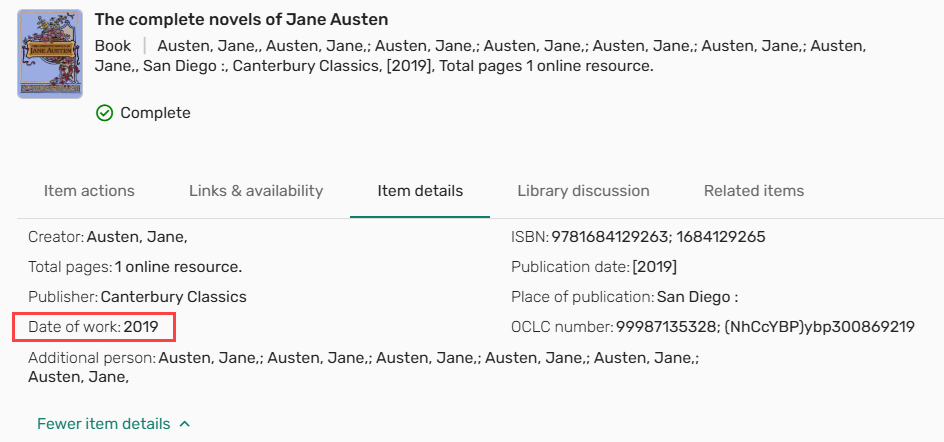
Institutions using Primo or Summon can also display this information in discovery records. Configure the field in Configuration > Leganto > Discovery > Primo Mapping or Configuration > Leganto > Discovery > Summon Mapping using the date_of_work code (for details, see Primo Mapping and Summon Mapping).
This enhancement improves metadata clarity and helps users identify the original publication date of a work, regardless of the format or edition being used.
Upgraded Course Loader Integration Profile
Fulfillment and Resource Sharing Idea ExchangeURM-321492
The Course Loader integration profile (Configuration > General > External Systems > Integration Profiles) has been enhanced to enable easier file import and to support the import of additional data.
The course loader integration profile now enables users to upload a file containing course information directly from their computer. Previously, course loading required uploading a tab-delimited file to an FTP server before running the integration. Users can now select and upload a local file, eliminating the need for FTP. The course loader integration profile still supports loading data from an FTP server.
A new Upload file field is now available in the Actions tab of the Course Loader integration profile. Users can use this field to upload a file containing course information, save the uploaded file, and run the job to ingest the course data.
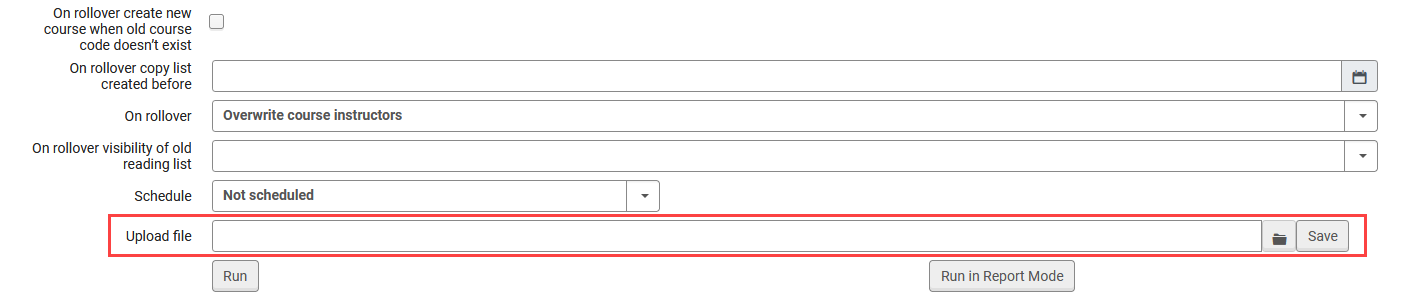
When a file is uploaded via Upload file, scheduling is disabled for that run.
Additionally, the Course Loader integration profile has been enhanced with a second version that supports importing School/Faculty information for courses and provides a more flexible structure for future data expansion. A new Version field has been added to the Actions tab, enabling users to choose between two input file formats for course data. The available options are:
- Version 1 — Existing file structure and behavior (default for all existing Course Loader profiles).
- Version 2 — Updated file structure with the following changes:
- Adds a School/Faculty field (SCHOOL_FACULTY), which replaces TERM1.
- Replaces TERM2 with a single MULTIPLE_TERMS field.
- Introduces a new ALL_INSTRUCTORS OPERATION field for one or multiple comma-separated instructors. This field replaces the previous INSTRUCTOR1 -INSTRUCTOR10 fields.
Both versions support FTP-based course loading and direct file upload.

Here is an example of a Version 2 file illustrating the new file format.
Within the course loader integration profile, the layout of the Actions tab has also been updated with visual separators between different operations (such as creating, updating, or rolling over courses) to improve clarity when configuring Course Loader profiles.
This enhancement simplifies the course loading process, reduces reliance on FTP-based workflows, and introduces a future-ready file structure. For details, see Configuring Course Loading.
Digitization Request Queue Indicator
Fulfillment and Resource Sharing Idea ExchangeURM-145473 URM-328254
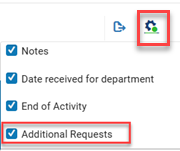
Manage In‑Process Items now highlights when an item has additional digitization requests waiting in the queue. Staff can use the new View Queue row action to manually activate the next one, improving workflow efficiency and ensuring queued digitization work progresses smoothly. Completing the active request automatically activates the next in the queue.
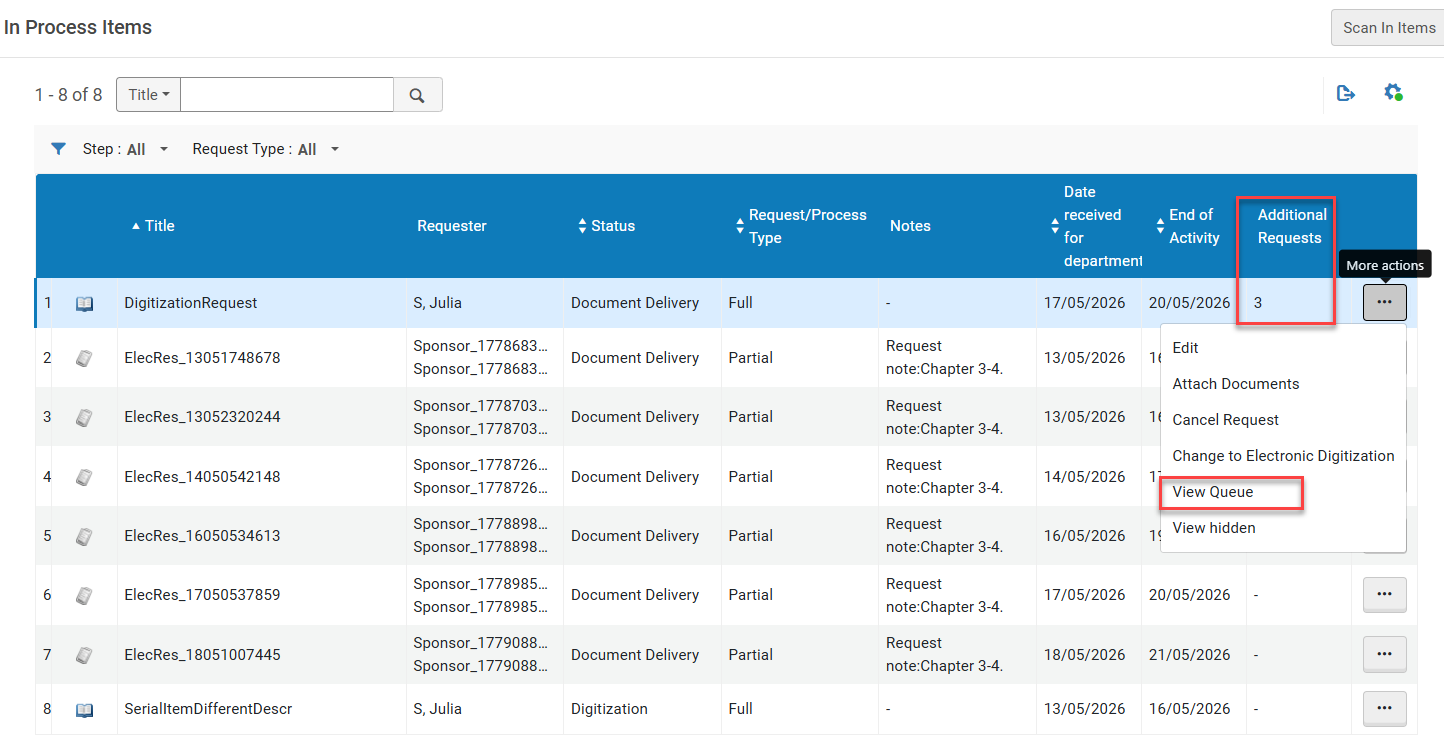
The new Additional Requests column is hidden by default. Select the customization (gear) icon to display it.
For more information, see Digitization Processing.
Set 'Date Needed By' to Mandatory on Patron Physical Request
Fulfillment and Resource Sharing Idea ExchangeURM-322733
When creating a request, if the new mandatory_last_needed_date_request parameter (Configuration > Fulfillment > General > Other Settings) is set to true, the Date Needed By field (the latest date by which a requested item is actually needed) becomes a mandatory field on the Alma Request forms.
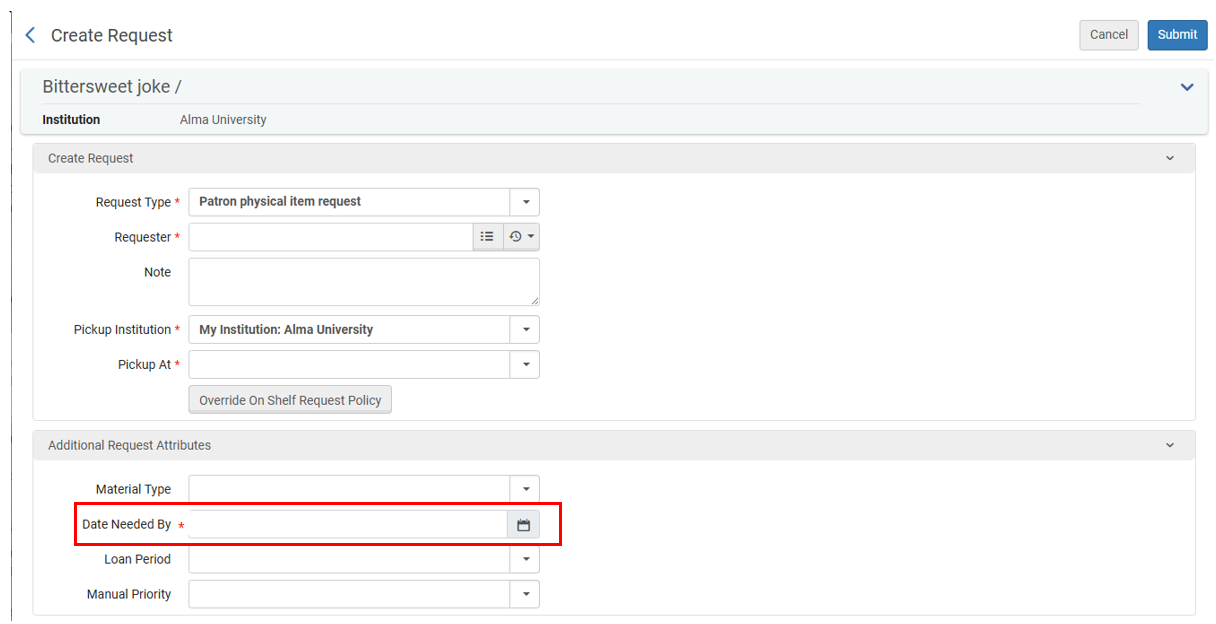
The automatically populated Date Needed By field is evaluated independently of the Hold Shelf Period and may cause a request to be cancelled before or shortly after arrival, even if hold shelf time remains.
For more information, see Configuring Fulfillment Jobs and Creating a Request from the Institution.
New 'Date Needed By Period' Policy Type for Request Terms of Use Policies
Fulfillment and Resource Sharing Idea ExchangeURM-322733
A new Date Needed By Period policy type was added to the request Terms of Use Policies (Configuration > Fulfillment > Terms of Use and Policies). When turned on, the Date Needed Byfield on the request form is auto-populated by the default value configured in the policy (independently of whatever value exists in the mandatory_last_needed_date_request parameter). All values are calculated on a calendar-day basis, including closed periods. The date can be overridden when editing the request form. Existing Terms of Use will default to a policy with a value of "None".
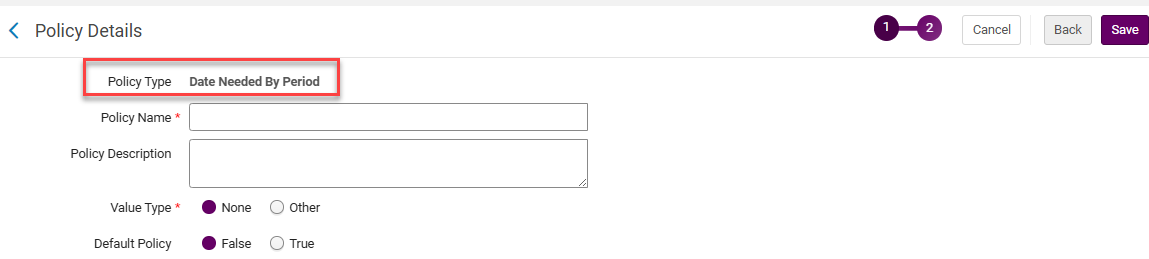
When multiple items have the same title but different Date Needed By Periods, Alma uses the latest date.
For more information, see Configuring Physical Fulfillment and How to Setup Requesting Policies.
Automatic Cleanup of Temporary Location After Restore Request
Fulfillment and Resource Sharing Idea ExchangeURM-103876 URM-103876
When an item is assigned a temporary location, one option for returning it to its permanent location is to process a Restore Request. Previously, after fulfilling a Restore Request, the temporary location flag on the item was correctly set to No, but the temporary location field still displayed the old temporary location value. With this enhancement, once a Restore Request is fulfilled, the temporary location field is automatically cleared, fully restoring the item’s location status and preventing confusion about its real location.

This behavior is controlled by the force_empty_temp_location_when_disabled parameter (Configuration > Fulfillment > General > Other Settings).
For more information, see Scanning Items and Configuring Fulfillment Jobs.
Additional Information in Resource Sharing Directory Members API
Fulfillment and Resource Sharing URM-103876 URM-253329
The Resource Sharing Directory Members API has been enhanced to include the directory member's email and phone number.
For more information, see Developer Network.
Consortial Fulfillment Limits
Fulfillment and Resource Sharing  URM-206692
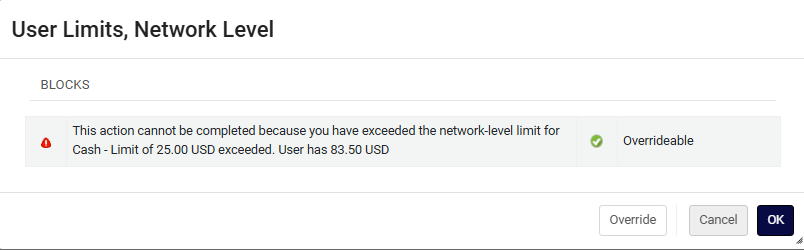
Networks can now define fulfillment limits at the network level, enabling consistent policies across all member institutions. For example, a user group can be restricted to a maximum of 10 concurrent loans across the entire network.
Supported limit types include:
- Max Cash
- Max Overdue Loans
- Max Bookings
- Max Overdue Recalls
- Max Digitization Requests
- Max Physical Item Requests
- Max Loans
This enhancement allows libraries to enforce tighter, centralized consortial policies and ensure a more controlled resource sharing experience.
Below is a sample loan cash limit:

Below is a sample request limit:

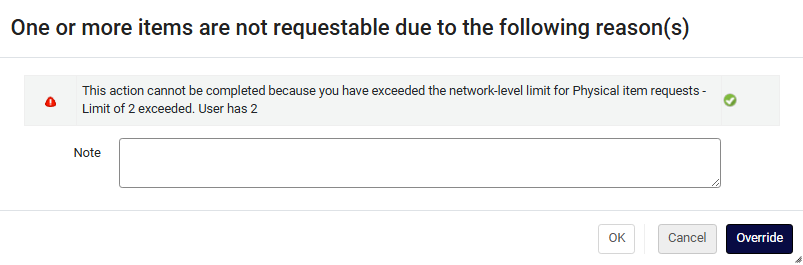
For more information, see Configuring Fulfillment Jobs and Network Related Limits.
Improved Use of Network Resources in Course Reading Lists
Fulfillment and Resource Sharing Idea ExchangeURM-320851 URM-323964 URM-326240
Institutions can now add resources from the Network Zone directly to locally managed reading lists. When a Network Zone resource is used in a citation, the reading list will display its availability across the consortium, including Held By information for all participating libraries.
This enhancement streamlines course support and improves visibility into shared network holdings.
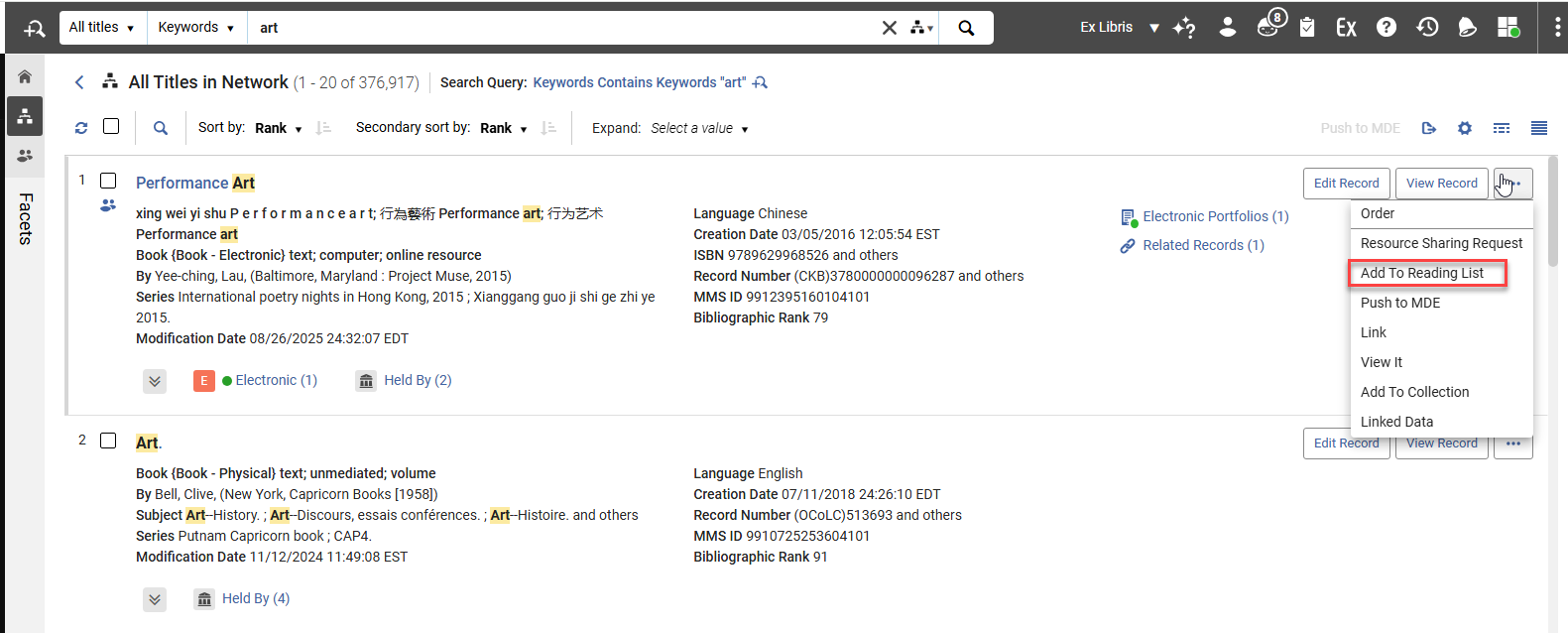
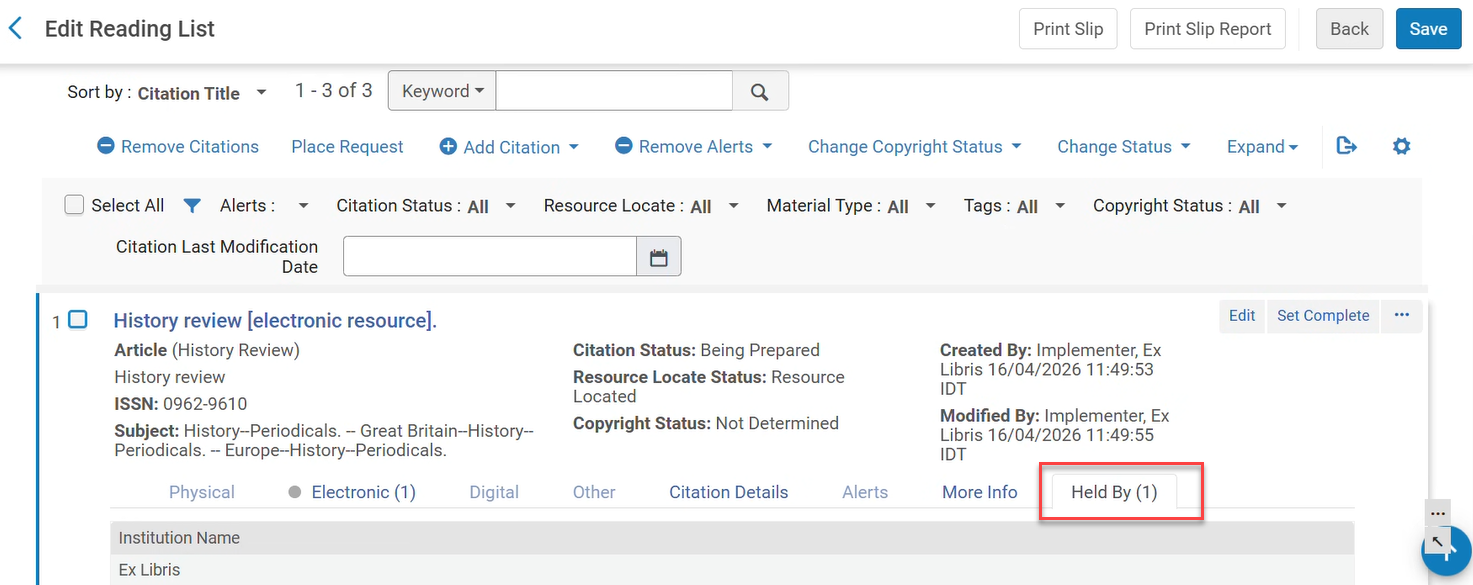
For more information, see Managing Citations.
Introducing the New Physical Items Experience
Alma's physical items workflows are upgraded with new UI concepts, resulting in faster, simpler searches and streamlined workflows, saving time and boosting productivity.
The new item editor offers more customization options and new capabilities, such as updating work order statuses.
The new physical items search and lists offer a side-by-side editor, more actions available directly from the search, and enhanced navigation options. The new search offers the new UI capabilities, including improved advanced search, facets, and search performance - with gradual loading, showing information as soon as it is available and adding more details as they become ready and enabling users to start working faster.
To turn on the new physical items experience, select your user icon  in Alma's persistent bar, select Feature Rollout Preferences, and activate the New Physical Items Search toggle.
For information about the upcoming experience, see the Introduction to the New Physical Items Experience and Working with Items.
Improved Visibility for Temporary Location
Metadata & Linked Open Data URM-330681
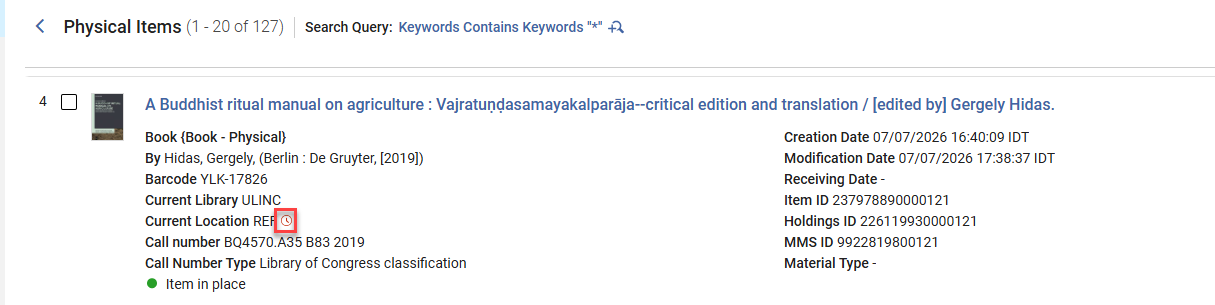
In the new repository searches, a clock  icon indicates when items are in a temporary location. This icon was updated to show more prominently, making it easier to identify temporary locations at a glance.
Profile Update Changes
UNIMARC Bibliographic and Authority Profiles Updates
Metadata & Linked Open Data URM-328421
We updated the UNIMARC Bibliographic and Authority profiles to reflect the latest IFLA standards
For more information, see UNIMARC Search Indexes.
Update DC Records with Identical Metadata in Bulk
Metadata & Linked Open Data URM-327694
The Add Metadata Fields job (previously named Add MARC21 Fields job) now enables catalogers to add DC metadata fields in bulk to DC records. Additionally, sets can now include both MARC 21 and DC records, and the relevant records will be updated with the appropriate metadata.
For more information, see Add Metadata Fields.
SBN Indice 3 Handling of Legami for 606 and 676 Fields
Metadata & Linked Open Data URM-326922
Updates to the 606 and 676 fields are now applied to SBN records while complying with data ownership rules.
SBN Authority Alignment Handling of 899 Fields
Metadata & Linked Open Data URM-325698
The 899 fields are now maintained when the SBN integration profile for Authority Alignment runs.
Updated German MARC Field Help Links
Metadata & Linked Open Data URM-326004
To ensure uninterrupted cataloging workflows, Alma now links to the new official German MARC documentation base URL.
Improved Network Zone Import Stability
Metadata & Linked Open Data URM-320679
To improve import stability and reduce conflicts that can occur when multiple Consortia or Network members update the same Network Zone record simultaneously, Alma now provides enhanced management of centralized Network Zone records. This new approach introduces more advanced handling of shared records within the Network Zone, ensuring that updates are processed more reliably, reducing the risk of record contention, and improving consistency across member institutions. As a result, collaborative cataloging workflows become more stable, efficient, and predictable, particularly in environments where centralized records are frequently updated by multiple participants.
New Bibliographic Reminders Task List
Metadata & Linked Open Data Idea ExchangeURM-175385
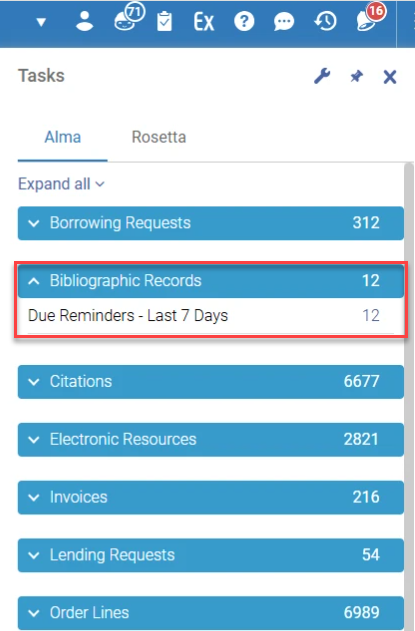
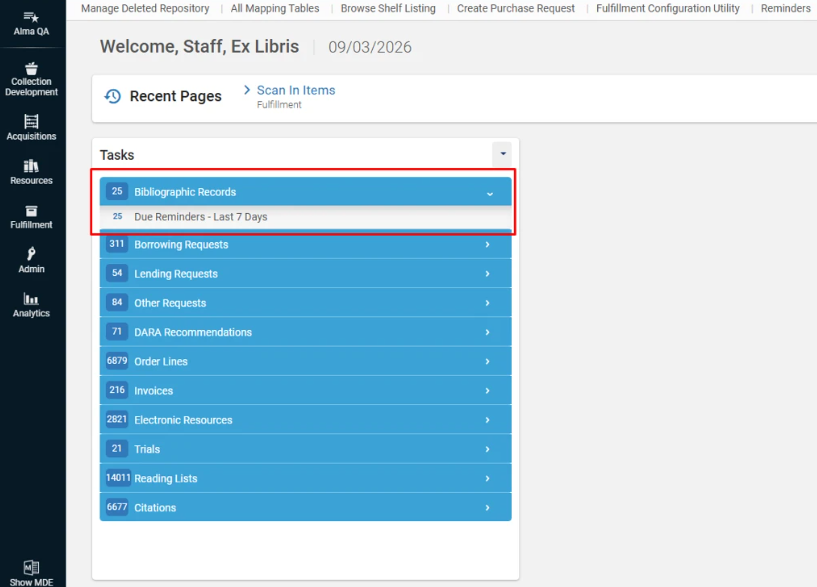
Alma now displays existing bibliographic record reminders as actionable tasks within the Tasks widget and Tasks menu. A new task list titled Bibliographic Records includes an entry called Due Reminders - Last 7 Days, which displays a counter for reminders whose due date has arrived within the last 7 days. Selecting this task opens the existing Reminders list page, filtered to show the relevant due reminders for follow-up.
For more information, see Tasks and Task Lists and Viewing Due Reminders.
Estonian Language Support – Search, Sort, and Browse
Metadata & Linked Open Data URM-326552
Alma now provides full support for Estonian language characters and sorting rules across the system, ensuring accurate searching, browsing, and sorting.
For consortia environments, both the Network Zone (NZ) and all Institution Zones (IZs) must be re-indexed after Ex Libris enables the new language.
For more information, see Estonian Characters.
Lithuanian Character Support for PO Lines and Courses
Metadata & Linked Open Data SF: 06040382URM-163000
All search, browse, and sorting operations for PO Lines and Courses now follow the correct Lithuanian alphabetical collation.
This alphabetical sorting will only be effective after the semi-annual indexing.
For more information, see Lithuanian Characters.
Improved Related Records Handling
Metadata & Linked Open Data Idea Exchange
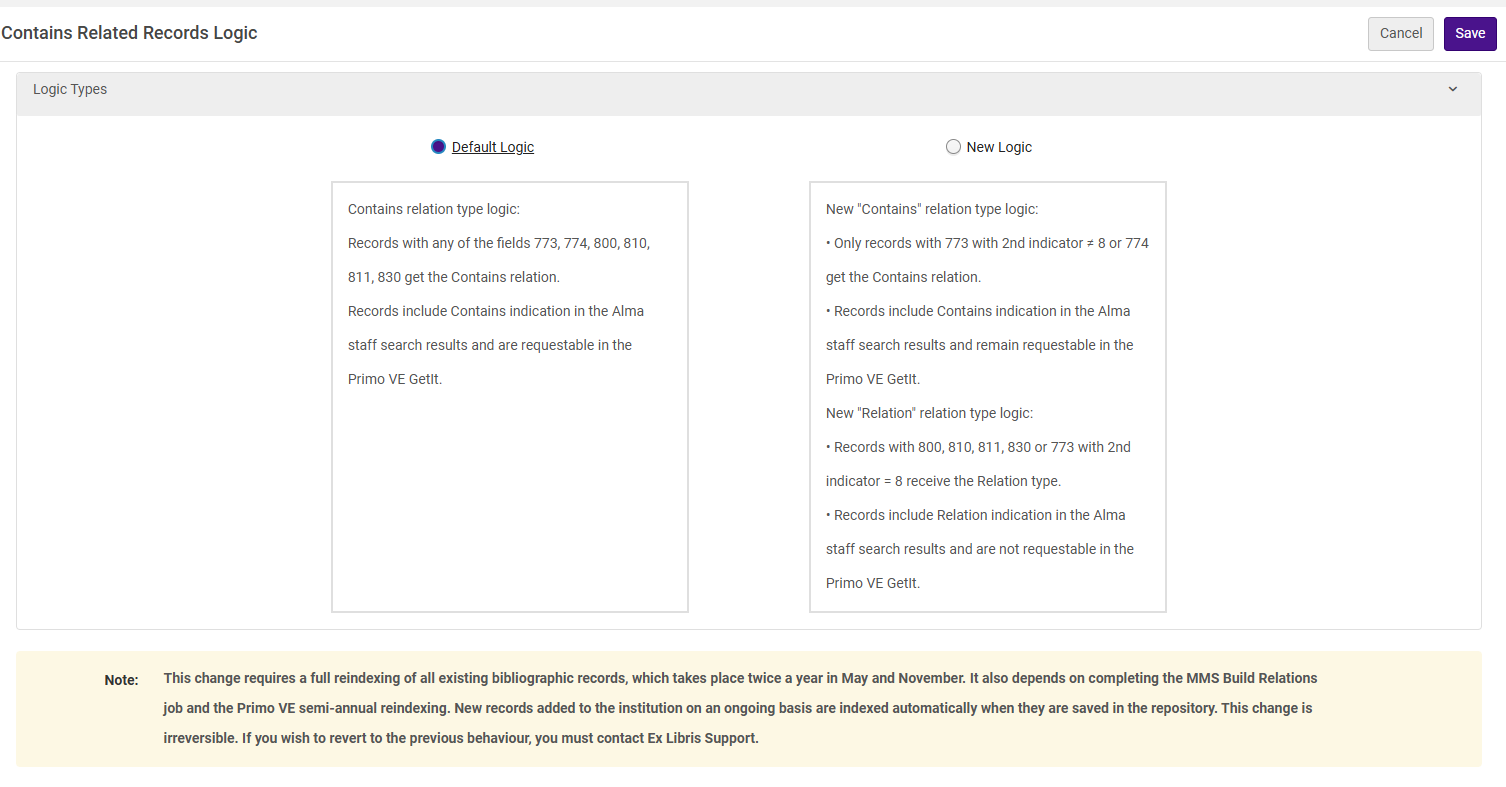
Catalogers can now better control how Contains/Part of related records are interpreted, reducing unintended request propagation for multi-volume and series records.
When the New Logic mode is enabled, it refines how relationships between records are classified in Alma, ensuring more accurate handling of connections. It introduces a new Relation type as an alternative to Contains/Part of, providing a clearer distinction between item level relationships and series or other related records. This ensures more consistent and predictable assignment of relationships.
In Primo VE, holdings of related records are only displayed for records defined with a Contains/Part of relation. This ensures that Get It only reflects true containment relationships, improving the accuracy of availability, discovery, and fulfillment.
For more information on relation types in Alma, see New Contains Relation Type Logic.
Rename Normalization, Indication, and Merge Rules
Metadata & Linked Open Data Idea ExchangeURM-38800
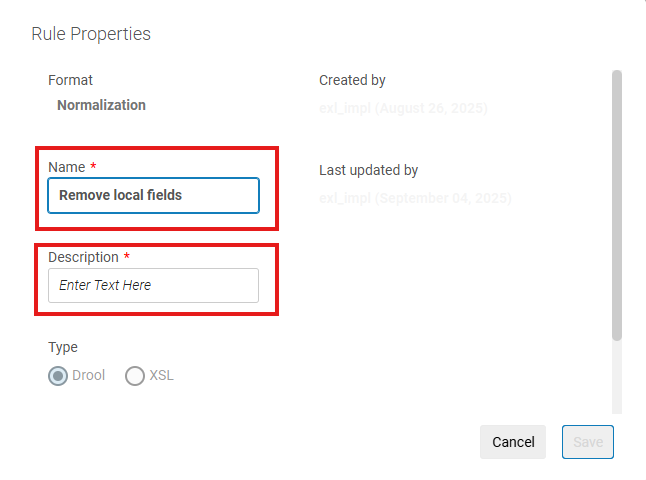
To streamline rule management, when the parameter rename_rules (Configuration > Resources > General > Other Settings) is set to true, users can now rename Alma Normalization, Indication, or Merge rules directly in the UI. As part of this enhancement, when a rule is renamed, Alma automatically reflects the updated name across all processes that use the rule, helping maintain accuracy and consistency and reducing the need for workarounds when updating rule names.
Improved Visibility of Unsaved Changes in the Metadata Editor
Metadata & Linked Open Data Idea ExchangeURM-217748
The Metadata Editor now applies the Draft badge, which appears in both the Metadata Editor sidebar and header, for any Bibliographic, Authority, or Holding record that is edited but not saved, whether the record was created as a draft or the record was modified. This applies to all records—whether they were originally created as drafts or as regular, saved records. This enhancement provides a clearer, more consistent visual signal that a record contains unsaved changes, helping users stay aware of their editing state and reducing the risk of leaving a record without saving the changes.
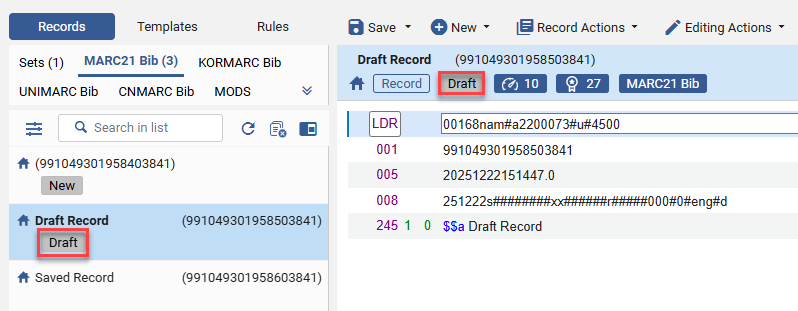
For more information, see Navigating the Metadata Editor Page.
New Crosswalks Management Platform
Metadata & Linked Open Data URM-317264
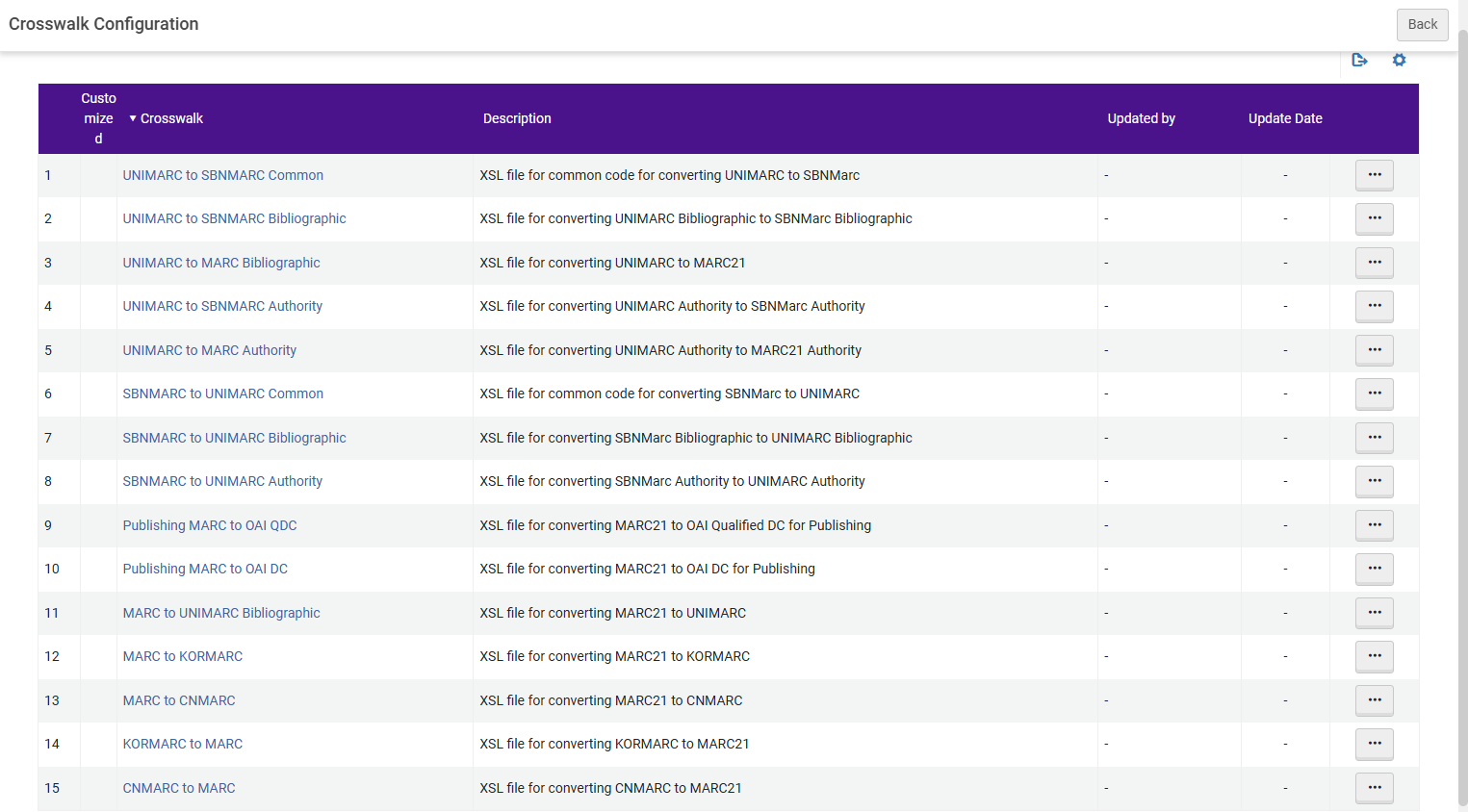
Alma now enables institutions to tailor metadata conversions by editing the out-of-the-box metadata crosswalks used to convert records between formats. This helps better meet local standards and workflows, improving the accuracy and consistency of imported, published, and shared records.
A new Crosswalks Management interface provides direct access to the XSL files that control conversions between formats such as MARC21, UNIMARC, CNMARC, KORMARC, and SBNMARC. From this page, authorized users can view the default crosswalks, create local customizations, test changes, and restore the original behavior if needed.
Customizations apply across relevant Alma processes, including import, publishing, and search-related workflows. Authorized roles can access these settings, and safe restore options ensure institutions can easily revert to the standard Alma crosswalks at any time.
The Crosswalks Management configuration replaces the Digital Publishing Crosswalk XSLs.
Linked Open Data — BIBFRAME Record BIG Validation
Metadata & Linked Open Data URM-253378
Alma now validates BIBFRAME Work and Instance records against PCC BIBFRAME Interoperability Group (BIG) rules, ensuring your linked data meets community standards at the point of creation.
- BIG-aligned validation — Records are checked for mandatory fields, repeatability, and structural requirements based on DC TAP rules for monographs and serials.
- Configurable by institution — Admins can activate, adjust, or deactivate rules and set severity levels (warning or block).
- Clear cataloger feedback — Actionable messages on save guide catalogers to fix issues quickly.
BIG validation reduces manual review, improves data quality, and ensures interoperable BIBFRAME records as the library community transitions to linked data.
The BIG validation configuration table is available to Admin users under Configuration > Resources > Metadata Configuration > LC BIBFRAME Instance/Work Profiles > Validation. Admin users can activate or deactivate validation rules.
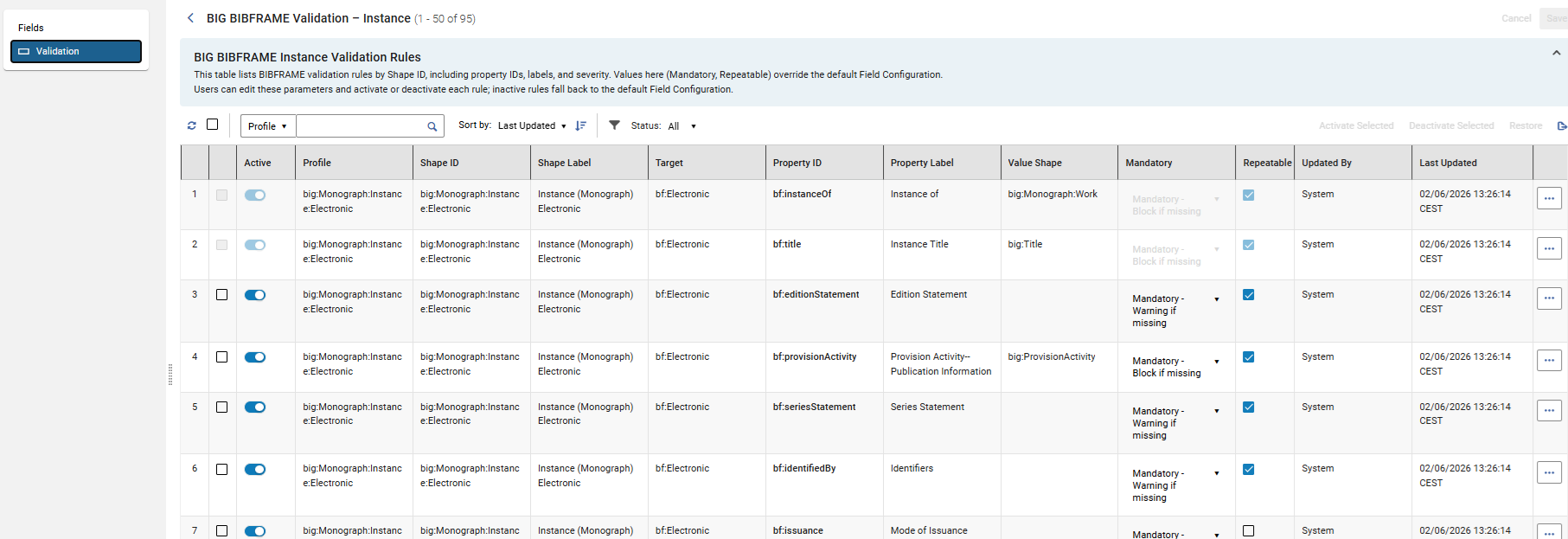
For more information, see BIG BIBFRAME Validation Rules.
Linked Open Data — View Versions Action
Metadata & Linked Open Data URM-314097
Record versions are now available for modified records in the Linked Open Data editor. The action is visible for records with previous versions.
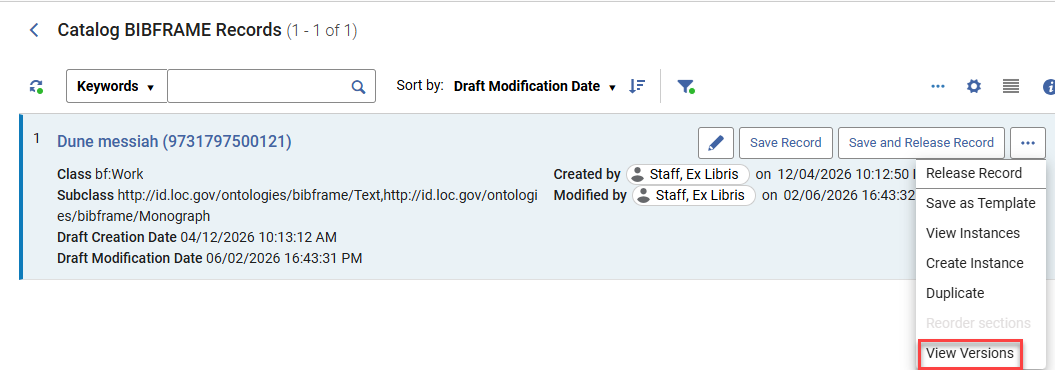
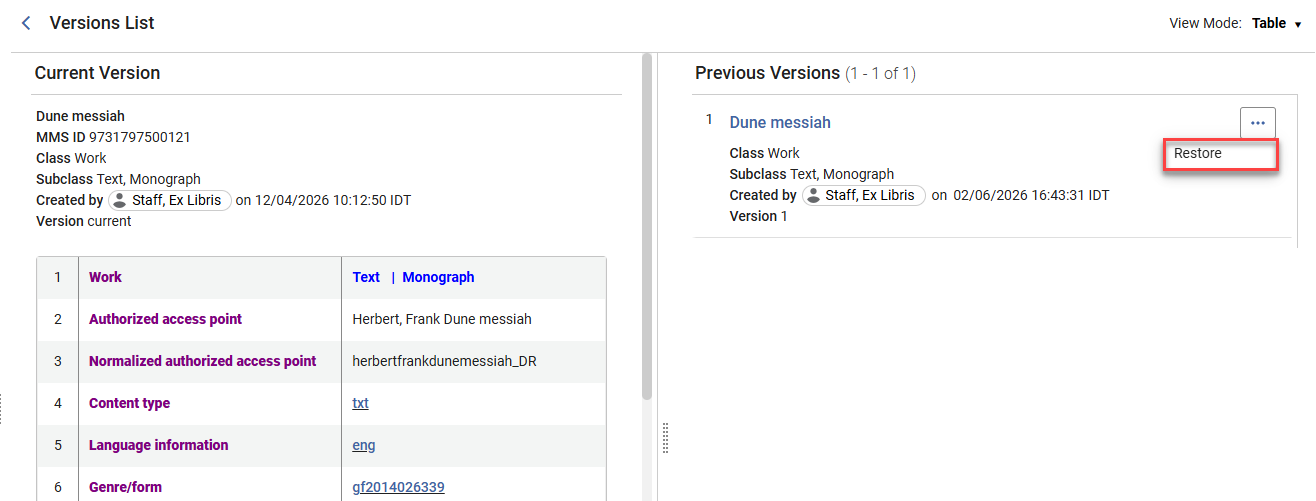
For more information, see LOD Editor – Actions.
Collection Development Data-Sharing Consent Updated
Resource Management URM-328073
As announced in previous releases, the collection development data-sharing consent has been updated to include discoverable item-level data. This change follows feedback from the Rialto Collection Development Workflows Early Adopters group, which identified discoverable item-level data as valuable in specific collection development scenarios.
The consent text on the Data Sharing Profile page (Configuration > General > General Configuration > Data Sharing Profile) has been updated to reflect this change. Existing opt-in selections are preserved, so institutions do not need to update their current settings.
More Comprehensive Information in Extended Project Reports
Resource Management Idea ExchangeURM-244257
Extended project reports now include additional usage, bibliographic, location, and weeding data, providing a more complete view of collection information. The following values are now included in reports:
- Total Usage and Usage in Project Scope — Now available in both internal and external collection development project reports. These values are included only for the user's institution.
- Comparison Library & Location — Now also available in external collection development project reports and in the View Full List and Additional Information panel accessible from the Compare To section when viewing individual recommendations.
- Comparison Barcode and Comparison Bibliographic Rank— Now also available in external collection development project reports and in the View Full List and Additional Information panel of the Compare To sections. Both values are hidden by default when the panel opens; select the cog icon to add them to the table.
- Bibliographic Rank— Now also available in external collection development project reports. This value indicates ranks of bibliographic records within the user's institution.
- Weeding Number and Comparison Weeding Number — Weeding Number (for the recommended item) is now available in both internal and external project reports, while the Comparison Weeding Number for the matched internal item is now available in internal reports. Both values have also been added to the Item Information and Additional Items sections when viewing individual recommendations.
These enhancements provide richer insights across reports and recommendation details, helping libraries make more informed collection development decisions.
Internal Project Reports Can Now Be Generated Without Comparison Libraries
Resource Management URM-329733
Project reports for internal collection development projects can now be generated and exported even when no libraries or locations are selected in the Compare to section during project creation.
Previously, report generation required at least one comparison library/location and the presence of matching items. This requirement has been removed for internal projects, so reports can now be generated regardless of whether comparison libraries have been configured.
When no comparison data is available, the exported Excel file includes recommendation-related information only and excludes comparison-specific columns.
This enhancement enables users to review recommendations and associated data, such as usage metrics and item-level details, without requiring a comparison setup.
Support for generating and exporting external project reports without comparison institutions/libraries will be introduced in the August release.
Indication for Recommendations with Low Bibliographic Rank
Resource Management URM-327414
Rialto now provides a visual indicator for recommendations with a low Bibliographic Rank, helping users identify cases where incomplete bibliographic metadata may affect recommendation quality.
Recommendations with a Bibliographic Rank below 60 are marked with an Insufficient Metadata badge. The badge helps users quickly recognize recommendations that may be based on limited or low-quality bibliographic information. Selecting the badge opens the recommendation's Title Information section, where users can view the Bibliographic Rank field and review the item's score. Recommendations marked with the badge can also be located using the new Insufficient Metadata facet.
This enhancement makes recommendation quality more transparent and helps users make more informed collection development decisions.
To learn more about how Alma determines bibliographic ranks and assigns ranking values to bibliographic records, see Bibliographic Ranking in Metadata Editor.
Exclude Item Process Types from Recommendation Calculations
Resource Management URM-324602
Rialto now enables institutions to control whether items at their own institution with specific Alma process types are included in recommendation calculations for the institution's collection development projects.
Previously, local items with process types such as Lost, Missing, Claimed Returned, or Transit were always included in recommendation logic. In some cases, this inflated local item counts and affected title comparisons, resulting in less accurate retention and deselection recommendations.
To address this issue, a new configuration page is now available under Configuration > Collection Development > Workflows > Process Type Exclusion. Access to this page is available to users with the Rialto Administrator or Repository Administrator role.
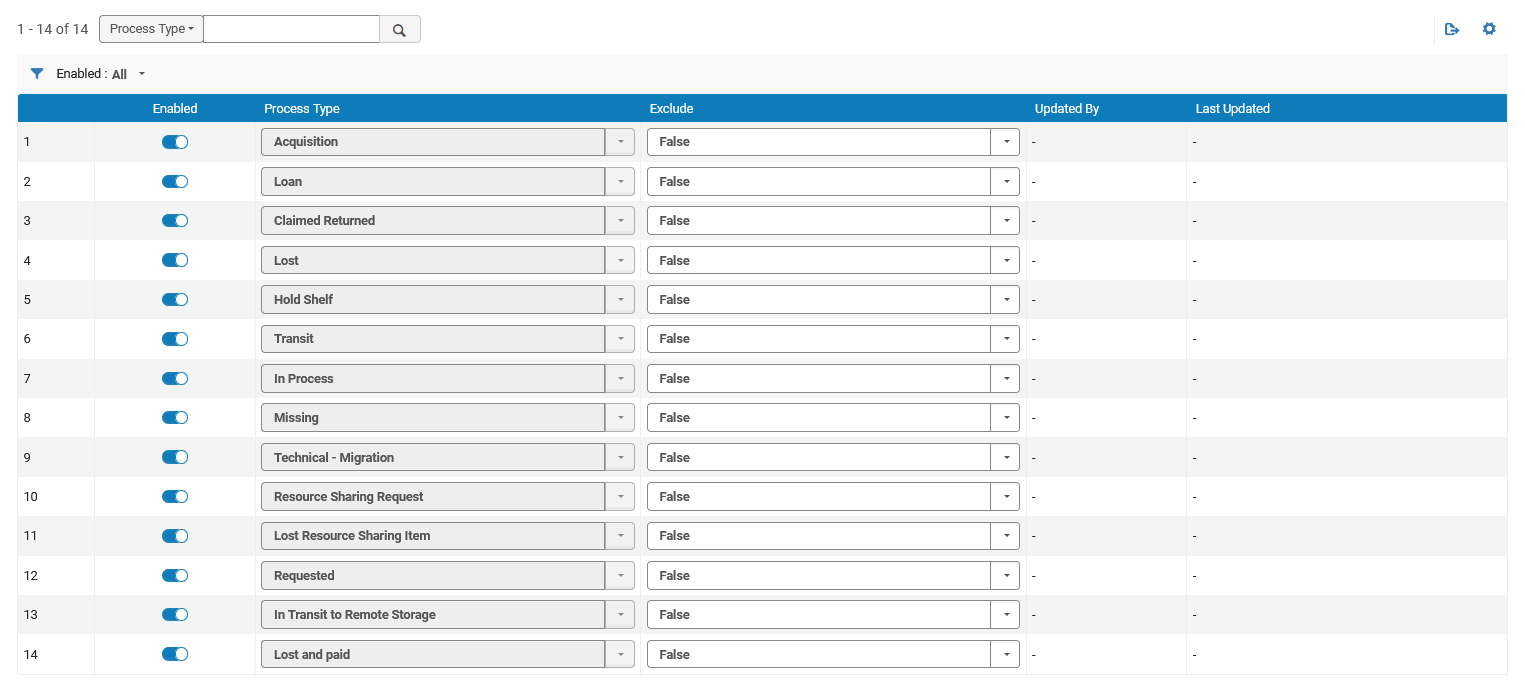
The page lists all Alma item process types. For each process type, administrators can use the Exclude setting to determine whether items at their institution with that status are included in recommendation calculations. By default, all process types are included in calculations (Exclude = False).
This enhancement gives institutions greater control over how their local collections are evaluated during recommendation generation.
Changes made on this page affect local items within the institution's collection development projects. The configuration applies only to items owned by the institution and does not impact other institutions. Title usage calculations are not affected by these settings.
Electronic Matches in Retention and Deselection Projects
Resource Management URM-252440 URM-315033 URM-306275 URM-314553 URM-325045 URM-326679
Rialto now identifies whether recommended print titles in retention and deselection projects have electronic matches within the institution or its Network Zone.
A new Electronic Matches step has been added to project creation, enabling users to control how electronic matches affect recommendations:
- For retention projects, users can exclude items with electronic matches or limit recommendations to items without perpetual electronic access.
- For deselection projects, users can focus on items that have electronic matches or limit recommendations only to those with perpetual electronic access.
By default, electronic matches are not considered when creating retention and deselection recommendations.
Identified electronic matches are displayed in a new Electronic Matches section within each recommendation. This section presents key bibliographic details and indicators, including whether the match is from the Network Zone and whether it has perpetual access. Users can also view associated electronic portfolios from this section.
Two new badges have been introduced to support quick identification of electronic availability:
- The Perpetual Electronic Match badge appears when a recommendation has at least one electronic match with perpetual access.
- The Electronic Match Found badge appears when at least one electronic match exists, but none provide perpetual access.
Additionally, two new facets, Electronic Match Found and Perpetual Electronic Match, enable quick filtering of recommendations based on electronic availability, which is helpful when working with large result sets.
This update helps libraries make more informed retention and deselection decisions by showing when recommended print titles have electronic equivalents. For details, see Electronic Matches in Retention Projects and Electronic Matches in Deselection Projects.
New Courses Recommendation Rules Configuration Page
Resource Management URM-324695
Previously, recommendation calculations for retention and deselection projects considered all courses, regardless of their status or year. With this update, institutions can now define whether inactive courses are considered in projects and limit the time range of courses considered when generating recommendations.
A new Courses Recommendation Rules configuration page (Configuration > Collection Development > Workflows > Courses Recommendation Rules) enables institutions to define which courses are considered during recommendation calculations. The following settings are available:
- Include Inactive Courses – Determines whether inactive courses are included in recommendation logic.
- Course Years – Defines which course years are considered.
Once set, these settings are applied during the recommendations generation process, and only items included in courses that match the selected criteria receive the Courses badge. Access to this new configuration page is limited to users with the Rialto Administrator or Repository Administrator roles.
This enhancement provides greater control over recommendation logic, helping institutions tailor results based on course relevance and lifecycle. For details, see Courses Recommendation Rules.
Collection Development Now Respects Excluded Process Types for External Matches
Resource Management URM-325632
Collection development workflows now take into account the Exclude Process Types from Publishing mapping table in Alma when identifying matches at external institutions during retention and deselection recommendation generation.
Previously, items at participating institutions could be considered during cross-institution analysis even if those institutions had configured the items' process types (for example, lost or missing) to be excluded from discovery. As a result, items intentionally hidden from discovery could still be counted as available matches.
With this update, items at external institutions that are excluded from discovery through the Exclude Process Types from Publishing configuration are also excluded from retention and deselection matching.
This enhancement improves the accuracy of recommendation results by ensuring that external matches reflect the holdings that participating institutions make discoverable to users.
This update applies only to matches found at external institutions. It does not affect how an institution's own items are analyzed within retention and deselection projects. Support for applying process-type exclusions to internal collection development analysis is planned for the July 2026 release.
Extended Reports for Internal Comparison Projects
Resource Management URM-324693
Until now, the extended report creation was available only for external retention and deselection projects. With this update, libraries can now generate and download a detailed report for internal projects (currently available only if specific libraries are selected in Compare To during project creation; planned for all internal projects in July).
Creating a report produces a single-sheet XLSX file that includes active recommendations from the institution and item-level details from selected internal comparison libraries, such as status, locations, call numbers, policies, labels, and badges. The Export Extended Report and Download Extended Report options are available in the project actions list.
This enhancement improves the comparison workflow by enabling libraries to generate detailed reports for internal retention and deselection projects. For details on how report generation works, see Creating and Downloading an Extended Project Report.
Compare to Specific Locations in Internal Projects
Resource Management URM-324611
Internal collection development projects now support comparison at the location level, in addition to the institution and library level. Previously, users could filter by library, but could not directly compare holdings to specific internal locations within a library.
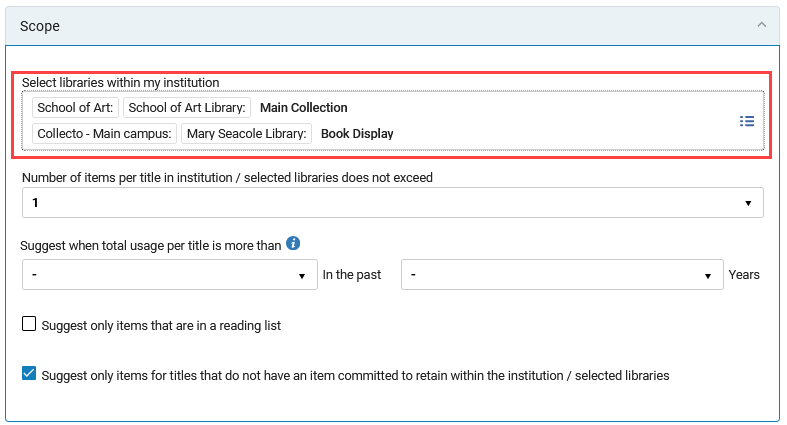
Users can now select a specific institution, library, or location within a library in the Compare To and Scope sections when creating or editing a collection development project. This enhancement enables more targeted comparison workflows and more precise project planning.
The UI of the Compare To and Scope sections has been enhanced to surface a structured overview of selected comparison targets, including institutions, libraries, and now specific internal locations.
Improvements for Sending EDI
Acquisitions URM-331087
We are currently working to improve EDI sending performance by implementing technical improvements. Due to the complexity of this, it will be gradually implemented across institutions to ensure a safe roll-out. Once implemented, the The PO Line packaging job will include information on the success and failure of sending EDI messages.
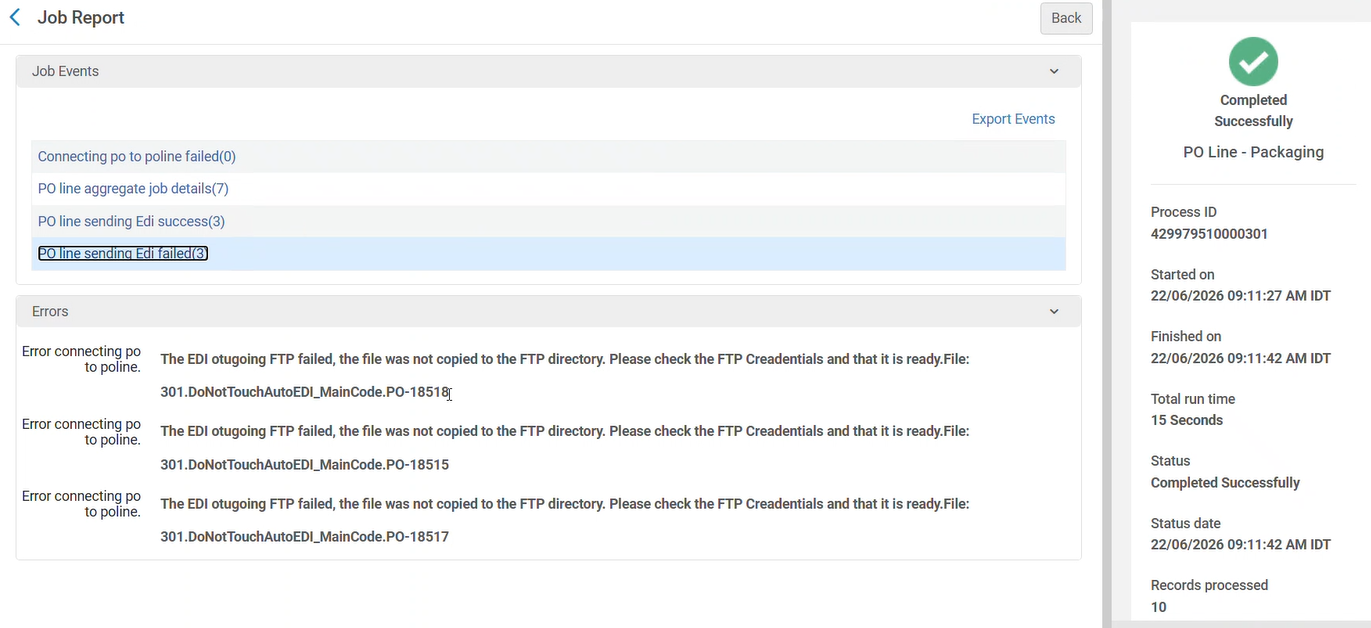
For more information, see Electronic Data Interchange (EDI).
Option to Sort Purchase Request List via API
Acquisitions URM-327347
Today, when retrieving purchase requests list via API, the list is automatically ordered by the request ID in ascending order. Providing a sort option by creation date, with 'Ascending' and 'Descending' options, ensures the most recent records are retrieved first, making it easier to manage the list.
The following query string parameters were added to GET purchase requests API:
- order_by (available option: created_date)
- direction (available options: asc, desc)
For more information, see the Developer Network.
User Registration Form Management and Distribution From the Consortia Central Configuration Dashboard
Collaborative Networks URM-326183
It is now possible for Network Zone operators to manage the User Registration Form via the Consortia Central Configuration Dashboard. This improves efficiency and supports central offices in their centralized approach to managing information across the Network Zone.
This feature is relevant only for consortia operating with a Network Zone setup.
For more information, see Sections and Configuration Options.
License Terms Management and Distribution from the Consortia Central Configuration Dashboard
Collaborative Networks URM-217427
It is now possible for Network Zone operators to manage the License Terms via the Consortia Central Configuration Dashboard. This improves efficiency and supports central offices in their efforts to manage information across the Network Zone.
This feature is relevant only for consortia operating with a Network Zone setup.
For more information, see Sections and Configuration Options.
Profiles Management and Distribution From the Consortia Central Configuration Dashboard
Collaborative Networks URM-210043
It is now possible for Network Zone operators to manage the Profiles via the Consortia Central Configuration Dashboard. This improves efficiency and supports central offices in their centralized approach to managing information across the Network Zone.
This feature is relevant only for consortia operating with a Network Zone setup.
For more information, see Consortia Central Configuration Dashboard.
Distribution of General Electronic Services Order and General Electronic Services Bib Fields Enrichment Configurations From the Consortia Central Configuration Dashboard
Collaborative Networks URM-327376
It is now possible for Network Zone operators to distribute both GES Order and GES Bib Fields Enrichment tables via the Consortia Central Configuration Dashboard. This improves efficiency and supports central offices in their centralized approach to managing information across the Network Zone.
This feature is relevant only for consortia operating with a Network Zone setup.
For more information, see Consortia Central Configuration Dashboard.
Consortial Communication Tool in Alma
Collaborative Networks URM-321273
It is now possible for a member staff user in their Institution Zone to create and send a chat communication to a Network Zone (NZ) operator, and for an NZ operator to manage and answer those chat communications centrally in the Network Zone. At the NZ level, the new Communication tool enables group chats where all NZ operators with the relevant roles can participate.
This provides a better communication tool between members and NZ operators in a collaborative network for better cooperation.
The tool is available through a dedicated icon on the top right corner of the Alma Homepage screen at both levels (Institution Zone for Members and Network Zone for NZ operators).

This feature is only relevant to Consortia with a Network Zone setup, for NZ/IZ members with the Chat with Consortia role.
For more information, see Consortia Communication Tool, Privileges for Roles in Alma and Managing User Roles.
Unified Sound Configuration for System Notifications and Alerts
User Experience, Accessibility & Infrastructure Idea ExchangeURM-328178 URM-254811 URM-328934
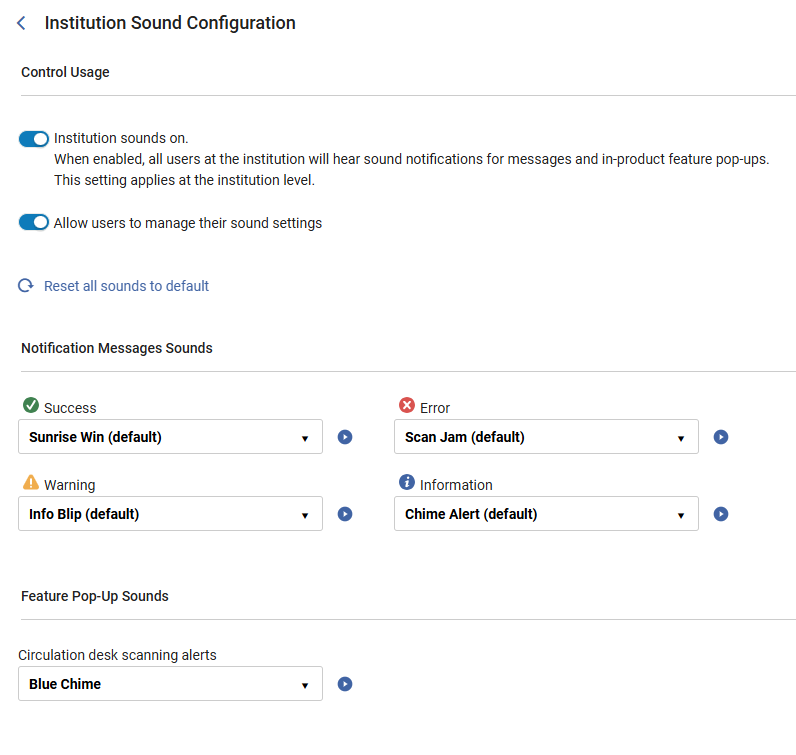
Alma now provides a centralized configuration page for managing sounds for system notifications and circulation desk pop-up notifications. Administrators can configure sounds for the institution from a single location and optionally allow users to customize their own notification sounds. This centralized approach promotes a more consistent user experience and simplifies sound management. It also improves accessibility by providing auditory cues for Alma messages.
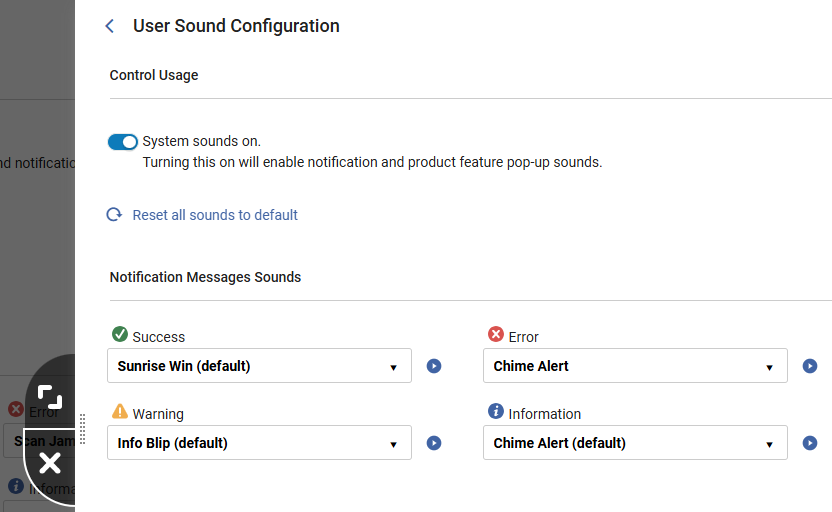
Institutions can enable users to configure their own sounds. If enabled, users can also reset all their sounds to default and configure the notification message sounds (User Menu > UI Preferences > Advanced Sound Settings).
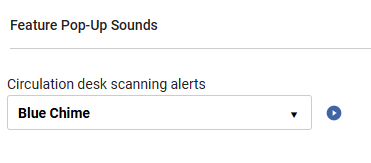
Existing sounds for circulation desk pop-up notifications that were previously configured for the circulation desk on the Configuring Sound Alerts page will remain fully functional and unchanged. They can now be updated by administrators in the Feature Pop-Up Sounds area of the Institution Sound Configuration page. Fulfillment administrators can access this from Configuration > Fulfillment > Sound Configuration.
For consortia operating with a Network Zone setup, Network Zone operators can manage the Sound Configuration page via the Consortia Central Configuration Dashboard (see Sections and Configuration Options).
For more information, see Institution Sound Configuration and The Alma User Interface.
Progress Details for Bulk Jobs
User Experience, Accessibility & Infrastructure URM-331620
Alma jobs run batch processes on a large number of entities. Some jobs split the job population into discrete units of work called bulks, which are not dependent on one another, and can be processed in parallel.
For these jobs, progress details are available, providing information about the job's progress throughout its runtime, increasing transparency into its state and helping determine its health.
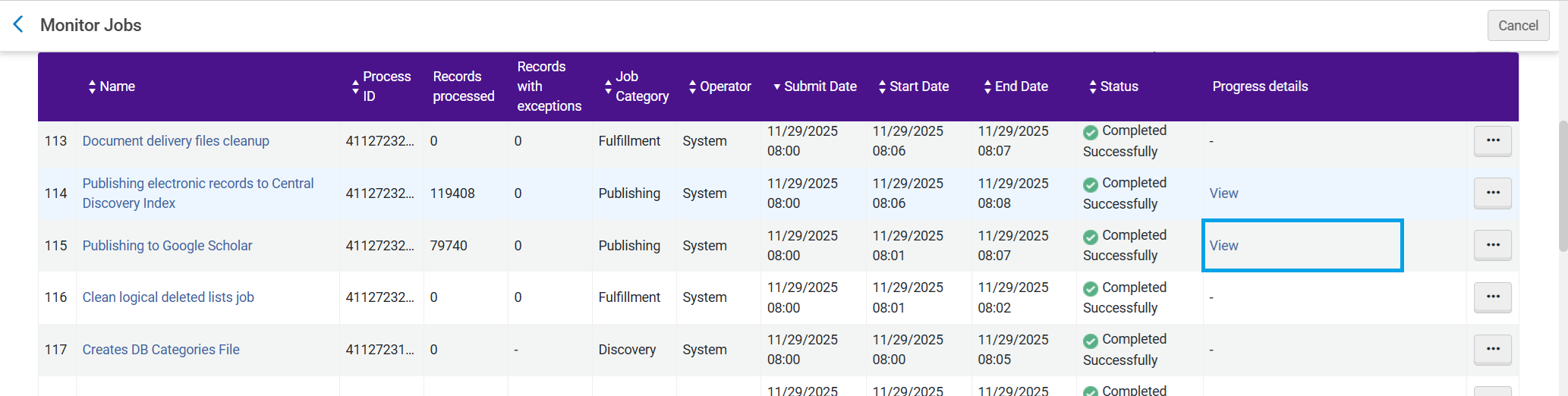
For more information, see Job Progress Details.
New Knowledge Center
User Experience, Accessibility & Infrastructure URM-323054
Starting with the August release, the Alma documentation will be published and maintained in the new knowledge portal. The current Knowledge Center will continue to be available but will not be updated. The Alma AI Knowledge Assistant will be discontinued in November.
Did You Mean Search Suggestions for Simple Search
User Experience, Accessibility & Infrastructure  CERV Enhancement (ID#36332)URM-326565 URM-253535 URM-328523
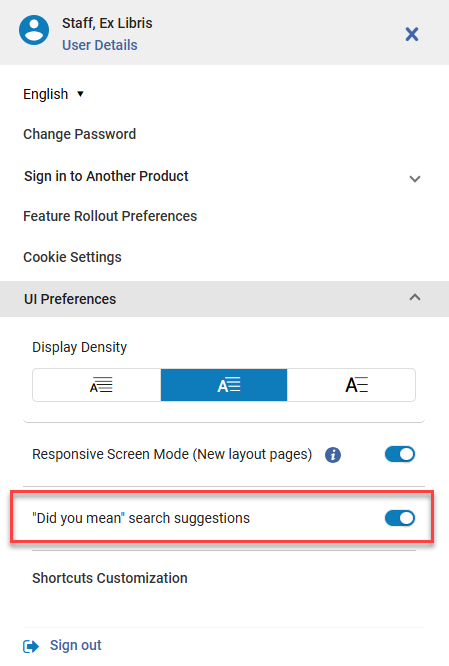
This development introduces the UI functionality for displaying "Did you mean" suggestions in supported simple searches. When enabled at the institution and user levels, the interface displays an alternative suggested term when a search returns 0 -15 results. Users can click the suggested term to trigger a new search or dismiss the suggestion.
Users thus receive helpful alternative term suggestions when searches may contain typos or minor variations, improving discoverability and reducing the need for repeated searches.

A new user-level toggle was added to the User menu, controlled by the institution-level configuration parameter at Configuration > General > General Configuration > Other Settings > did_you_mean_search_suggestion. This enables users to opt out as needed. It is enabled by default.
- This feature applies to all searches in the new UX.
- It is activated when searching by "Keywords" or "All".
- This feature works only for Institutional searches (IZ only, not NZ or CZ).
For more information, see Searching in Alma, Alma User Interface and Configuring Other Settings.
Digital Adoption Popup Translations
User Experience, Accessibility & Infrastructure
Starting with the August release, Digital Adoption Feature Promotions (popup messages) will be translated automatically based on users' interface language settings.
Translations are provided by Pendo and will be displayed according to each user's selected interface language.
While translations are generally accurate, some terminology may not always be translated perfectly. As this functionality is managed by Pendo, translation quality and improvements are controlled by the vendor.
Additional Information Field Added to Borrowing and Lending Requests Subject Areas
Analytics and Insights URM-330539
A new Additional Information field is now available for Alma Analytics in the Borrowing Requests (Resource Sharing) and Lending Requests (Resource Sharing) Subject Areas. The field displays the additional information provided by the borrower or the lender.
For more information, see Borrowing Requests (Resource Sharing) and Lending Requests (Resource Sharing).
Shipping Address Information for Lending Requests
Analytics and Insights URM-328755
Shipping address information is now available for Alma Analytics in the Lending Requests (Resource Sharing) Subject Area. The newly added fields are Shipping City, Shipping State, and Shipping Country. These fields provide greater visibility into the actual shipping details used when the request was shipped, enabling accurate tax compliance and geographic reporting.
Upcoming Issues to Note
Updated Documentation for Analytics Tables
Alma Specto Starter
Beginning with the August release, the new Specto menu will transition fromopt-in to opt-out, meaning it will be enabled by default for all Alma customers unless you choose to disable it. General availability is planned for the November Release for all Alma customers.
The new Specto menu centralizes actions related exclusively to digital cataloging and digital content management.
The menu does not contain any new actions, but rather is a consolidation of the existing actions that relate to digital asset management.
All digital-only actions have been relocated to the new Specto menu, and any actions that are used for other use-cases have been duplicated into the Specto menu. The purpose is to simplify the workflows for those managing digital content, and to remove those actions from areas where they are not relevant.
A full list of the Alma Roles to whom this menu will be available can be found under the Alma Specto Starter Menu Roles article.
Alma Specto Starter Release Notes and Documentation can be found here:
Documentation: https://knowledge.ag-software.clarivate.com/alma-specto/en-us/Product_Documentation/Alma_Specto_Starter/Specto_Starter.html
Release Notes: https://knowledge.ag-software.clarivate.com/alma-specto/en-us/Release_Notes/Alma_Specto_Starter/Alma_Specto_Starter_RN.htm
Resolved Issues
| SF number | Area | Description |
|---|---|---|
08377838 | Acquisitions | In some cases, using the API with a PO Line ID could cause an error. This was fixed, and the API now works as expected.URM-327680 |
| 08237372 | Acquisitions | Previously, there was an issue with the Web Addresses pagination, where moving to another page could still show results from the previous page. This was fixed.URM-328240 |
| 08398857 | Acquisitions | In some cases, PO Lines were not included in the Claim list when they should have been. This was fixed.URM-330177 |
| 10585597 | Acquisitions | An API issue was identified where the invoice's explicit ratio was not considered during invoice line creation. This was fixed.URM-331533 |
| 10637013 | Acquisitions | Receiving Workbench: Previously, Alma was unable to receive additional items after the first 20 items were received. This was fixed.URM-331817 |
| 10608722 | User Experience, Accessibility and Infrastructure | Previously, the Responsive Mode toggle button did not work in Firefox. This was fixed.URM-330029 |
| 08417793 | APIs | The default status ALL actually returns all PO lines except for Closed and Cancelled, and the documentation has now been updated to reflect this.URM-328656 |
| 08109495 | Analytics and Insights | The link resolver subject area included requests from bots and crawlers, causing the numbers to be inaccurate. This was fixed, and such requests are now blocked in Discovery.URM-318381 |
| 10624799 | Analytics and Insights | Previously, the out-of-the-box Report Repository Size by Assets Category and Type showed the same number/size regardless of the different number of files per asset type. This was fixed.URM-330928 |
| 08153470, 10691244 | Fulfillment and Resource Sharing | When a citation with copyright information was copied or duplicated to another reading list, the copyright data was lost and became editable. This was fixed so that the copyright information is retained and remains disabled for editing, just as it is on the original citation.URM-315007 |
| 08120273 | Fulfillment and Resource Sharing | When a loaned item was returned through Return Items, and the next request in the queue was a lending request, no error message was displayed to inform staff that the item must be transferred to the ILL Department. This was fixed, and now an error occurs that blocks the item from being returned.URM-316999 |
| 08215138 | Fulfillment and Resource Sharing | Previously, when creating an AFN request, the borrowing request displayed the correct pickup location, but the fulfillment request on the lending side displayed a library from another consortia institution. This was fixed.URM-317673 |
| 08260370 | Fulfillment and Resource Sharing | Previously, there was a problem moving the sequence of the Resource Sharing partners, and then saving the request. This was fixed.URM-321317 |
| 08229461 | Fulfillment and Resource Sharing | Previously, booking requests were allowed even when the Due Range dates conflicted with an existing resource sharing request period. This was fixed.URM-322779 |
| 08312285 | Fulfillment and Resource Sharing | Previously, the Requests - Handle Expiration job failed to process a large number of requests. This was fixed.URM-323950 |
| 08332751, 08347689, 08348017 | Fulfillment and Resource Sharing | When using the check_patron_duplicate_borrowing_request configuration, Alma now considers the Chapter title.URM-324184 |
| 08300560 | Fulfillment and Resource Sharing | Previously, NCIP messages with the d1p1 prefix processing were failing. This was fixed.URM-324571 |
| 08388271 | Fulfillment and Resource Sharing | When a work order request was cancelled for an item that was already In Process and has since been loaned, Alma now correctly maintains a consistent state between the item’s process type and the loan record. Cancelling the work order no longer leaves the item in a mixed state. After the fix, the loan can be returned normally and the item’s status is updated correctly.URM-326432 |
| 08384283 | Fulfillment and Resource Sharing | Previously, there was an issue exporting the Lending Request page in xlsx format. This was fixed.URM-326644 |
| 10556177 | Fulfillment and Resource Sharing | In some cases, when a reject message was sent, the reject message didn't go through and didn't update the borrowing request. This was fixed.URM-329754 |
| 08289097 | Fulfillment and Resource Sharing | In some cases, the feature Allow preventing requests when loans are blocked caused performance issues. We improved the process and performance is now significantly better.URM-329895 |
| 10585300 | Fulfillment and Resource Sharing | The block_request_if_not_loanable setting activates all loan blocks to stop a hold request.URM-331212 |
| 08357332 | Metadata Management | Previously, control fields were presented with collapsed spaces, which caused incorrect control field positioning. This was fixed.URM-325854 |
| 08269394 | Metadata Management | Previously, a specific publishing job failed after running for 144 hours. This was fixed.URM-320306 |
| 08222939 | Metadata Management | When multiple 264 fields exist, publication details could be derived from all of them, resulting in mixed information. Publication details are now taken only from the first 264 field in cataloging order.URM-318214 |
| 08186867 | Metadata Management | Previously, when the parameter ignore_cz_records was active, importing a record using an import profile that matched a Community Zone cache record resulted in an error with manual handling. This was fixed.URM-324557 |
| 08407372 | Metadata Management | Previously, an error occurred when the title exceeded the allowed length. This was fixed.URM-327625 |
| 08408529 | Metadata Management | Previously, the LDR's out-of-the-box position 17 was a blank space rather than a # character. This was fixed.URM-327827 |
| 0339925 | Metadata Management | Previously, a Missing title error occurred when searching records while a new draft was open in the Metadata Editor. This was fixed.URM-327856 |
| 08433741 | Metadata Management | Previously, an issue occurred when bulk jobs were executed simultaneously and attempted to access the same resource. This was fixed.URM-328703 |
| 08381046 | Metadata Management | Previously, out-of-the-box position values a and b for UNIMARC authority field 120, position 0, were reversed. This was fixed.URM-328704 |
| 10562254 | Metadata Management | Occasionally, related record links were not updated in records imported during the Aleph Update From Central Catalog job with a status of UPDATE. This was fixed.URM-328718 |
| 10655297 | Metadata Management | Following the Java upgrade from 17 to 21, XML parsing became stricter. Alma now cleans XML-invalid characters before building XML from the Z39 MARC record.URM-331948 |
| 08257659 | Resource Management | In some cases, in Discovery, some journals with current coverage were missing from the full text availability results. This was fixed.URM-329164 |
