
Mover fondos
En esta página encontrará instrucciones para mover fondos en Alma. For working with funds and ledgers in Alma see Managing Funds and Ledgers. For an overview of working with acquisitions in Alma, including links to relevant sections such as Invoicing, Working with Orders/PO Lines, Renewals, Configuration, etc., see Introduction to Acquisitions.
Para mover los fondos, se debe tener el siguiente rol:
- Gerente de fondos
You move funds on the Funds Transfer Page (Acquisitions > Acquisitions Infrastructure > Move Funds in Hierarchy).
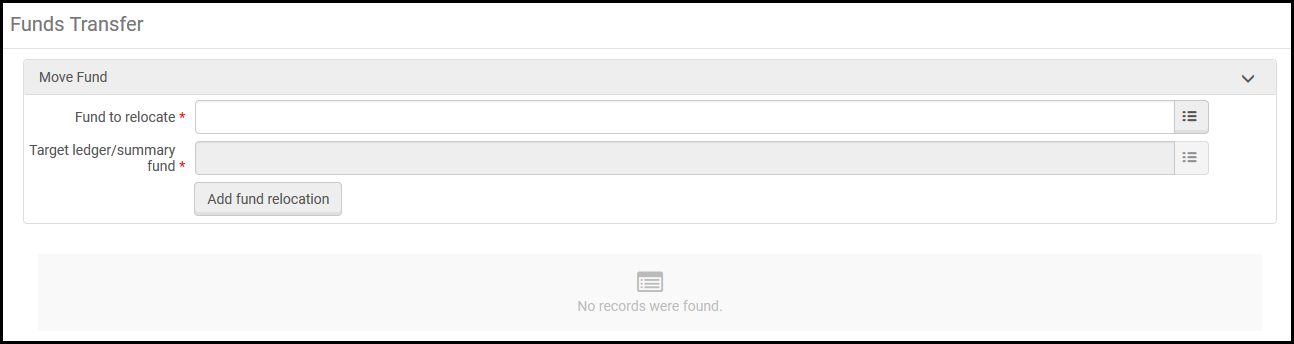
Se pueden mover fondos dentro de una jerarquía de libro mayor, de manera que el fondo se mantenga alojado debajo el mismo libro mayor, pero que esté asociado a una cuenta diferente dentro del libro mayor. También se pueden mover los fondos desde un libro mayor a otro, siempre que ambos libros mayores estén en el mismo periodo fiscal y sean propiedad de la misma unidad organizativa (la institución o una biblioteca específica).
Solo es posible mover fondos después de que hayan sido activados.
Para mover fondos:
- On the Funds Transfer page, in the Fund to relocate field, select a source fund.Alternatively, on the Funds and Ledgers page, select Move fund beneath the specific fund that you want to relocate. In this case, the Fund to relocate field is pre-populated.
- In the Target ledger/summary fund field, select a target fund..
- Select Add Fund Relocation and select Confirm in the confirmation dialog box. El fondo reubicado con su nueva ubicación y su vieja ubicación aparecen al final de la página de Transferencia de fondos.
Page tags: article:topicproduct:almacontent:Documentationlang:englishmove fund
