
Gestionar fondos y libros mayores
Funds contain the money to purchase materials. Funds belong to ledgers, which are available for specific fiscal periods. Funds can be organized into hierarchies, with summary funds containing other funds.
This page describes how to manage funds and ledgers including basic terms, ledger and fund ownership/availability and working with exchange rates. También incluye instrucciones para añadir y eliminar fondos y libros mayores, así como para activarlos/desactivarlos. For information on moving funds see Moving Funds and for transferring allocations between funds see Transferring Money Between Allocated Funds. For an overview of working with acquisitions in Alma, including links to relevant sections such as Invoicing, Working with Orders/PO Lines, Renewals, Configuration, etc., see Introduction to Acquisitions.
- Gerente de fondos
- Visor de fondos-libro mayor (solo visualizar)
- Gerente de libro mayor
- Visor de fondos-libro mayor (solo visualizar)
Un fondo representa dinero en una cuenta. Un libro mayor es esencialmente una colección de fondos. Los libros mayores se definen por un rango de fecha específico, como por ejemplo desde el 1 de septiembre de este año hasta el 31 de agosto del año siguiente. You manage funds and ledgers from the Funds and Ledgers page (Acquisitions > Acquisitions Infrastructure > Funds and Ledgers).
For more information, watch Ledgers and Funds(5:58 min)
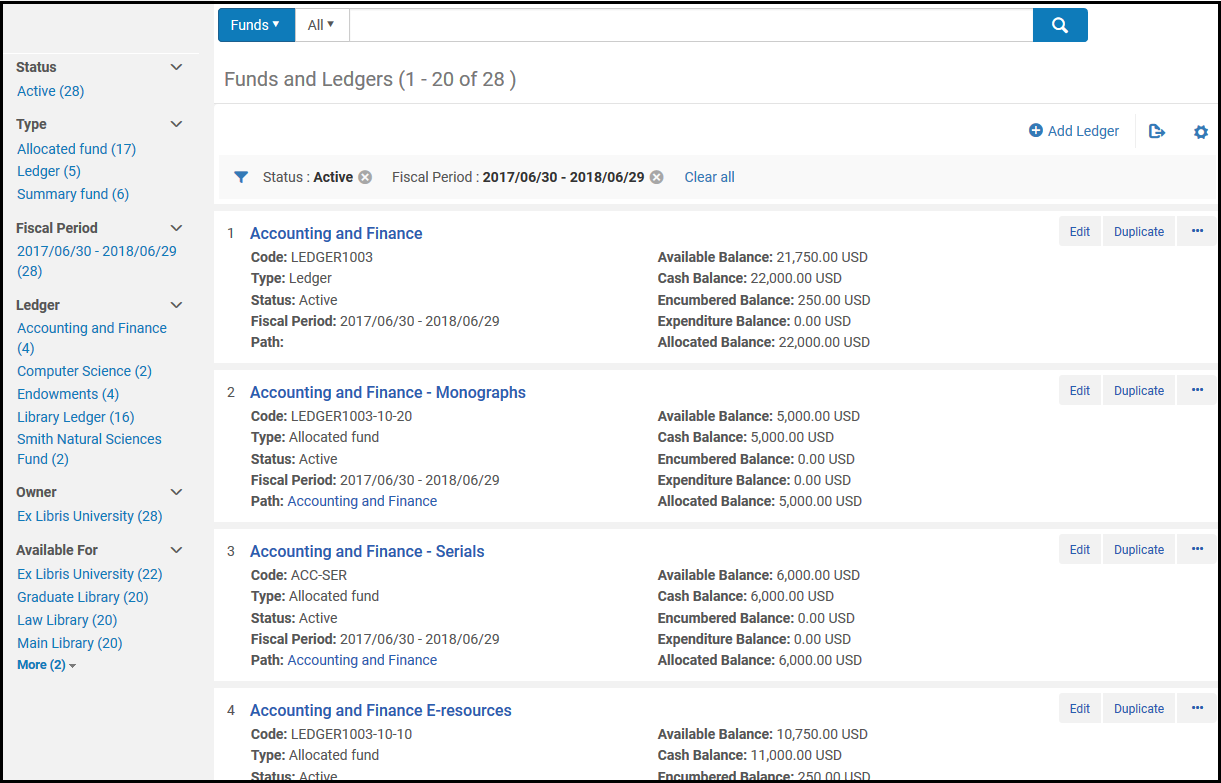
The items in this page appear in a record list; for information about configuring the list, see Record Lists. Los registros se ordenan por orden ASCII (alfabéticamente por letras mayúsculas y después alfabéticamente por letras minúsculas). Los campos de cada ejemplar (fondo o libro mayor) de esta página son los siguientes. See Fund Transaction Terminology for more information about fund and balance types.
- Name- The fund or ledger name
- Code- The fund or ledger code
- Type-Ledger,Allocated fund, or Summary fund
- Status-Active(operational),Draft(not yet active), and Inactive(no longer active)
- Fiscal Period- The financial year to which the ledger applies. See Configuring Fund and Ledger Fiscal Periods.
- Path- The ledger / summary funds to which this fund belongs. Seleccionar un ejemplar en la ruta para ver el libro mayor / fondos resumidos. Este campo está vacío de libros mayores.
- Available Balance- See Fund Transaction Terminology
- Cash Balance- See Fund Transaction Terminology
- Encumbered Balance- See Fund Transaction Terminology
- Expenditure Balance- See Fund Transaction Terminology
- Allocated Balance- See Fund Transaction Terminology
- Acciones de lista:
- Edit- See Editing a Ledger and Editing a Fund.
- Duplicate- Add a ledger or fund by duplicating it; see Adding a Ledger and Adding a Fund.
- Deactivate / Activate- See Activating and Deactivating Funds and Ledgers.
- Delete- See Deleting Funds and Ledgers.
- Move Fund(fund only) - See Moving Funds.
To transfer allocations between funds, see Managing Fund Allocation Transfer.
Fund Transaction Terminology
- Se puede asignar un fondo o resumen.
- A summary fund is not used for ordering and invoicing, but provides aggregate reporting on subordinate funds. Se pueden añadir otros fondos a este tipo de fondo.
- An allocated fund contains money that has been paid out or has been reserved for an open purchase.Se puede asociar un Fondo de libro mayor con un Fondo de resumen o Fondo asignado. A Summary Fund can only be associated with an Allocated Fund. A specific Allocated Fund (i.e. Allocated Fund 101) can only be associated with only one Ledger or Summary Fund, but not both.
- A transaction can be an allocation, encumbrance, disencumbrance, or expenditure:
- An allocation adds money to the fund, increasing its available balance.
- An encumbrance indicates money that is expected to be paid out, as the result of a PO line. Por lo que disminuye el balance disponible. El compromiso se cierra si existe una liberación de fondos igual y vinculada a la misma línea de la orden de compra.
- An expenditure subtracts money from the fund, decreasing its available balance. Añadir un gasto enlazado a una línea de orden de compra aumenta el valor de la liberación de fondos relacionada con esa línea de la orden de compra.
- A disencumbrance is added or increased when adding an expenditure linked to the same PO line as an encumbrance. Nunca hay más de una liberación de fondos para cualquier compromiso. Por ejemplo:
- Un fondo tiene un compromiso de 100$ para una línea de orden de compra. Se recibe una factura de 50$ vinculada a esa línea de orden de compra. El compromiso continua siendo de 100$, se añade un gasto de 50$ y se añade una liberación de fondos de 50$.
- Tras recibir otra factura de 50$ para la línea de orden de compra, se acumulan dos gastos (cada uno de 50$), un compromiso de 100$ y una liberación de fondos de 100$. Ahora el compromiso se considera completamente pagado y se cierra.
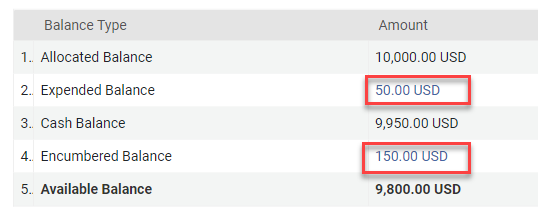
- A fund's available balance is its allocated balance, less (encumbrances minus disencumbrances) and less expenditures.
- A fund's cash balance is its allocated balance less expenditures.
- A fund's allocated balance is its total allocation, not counting any expenditures or encumbrances/disencumbrances.
- A fund's encumbered balance is the sum of its encumbrances minus disencumbrances. This field links to the list of all purchase order lines that have an encumbrance transaction on the fund (even if the purchase order line already has an invoice and is fully dis-encumbered).
- A fund's expenditure balance (Expended Balance) is the sum of its expenditures. Este campo se enlaza con la lista de todas las líneas de orden de compra que tienen una transacción de gasto en el fondo.
Ledger and Fund Ownership and Availability
Un libro mayor pertenece a la institución o a una biblioteca. Cualquier fondo añadido al libro mayor pertenece a la misma entidad que posee el libro mayor. Si un fondo pertenece a una biblioteca, está disponible solo para esa biblioteca. Si un fondo pertenece a una institución, se puede poner a disposición de todas las bibliotecas de la institución, un grupo de bibliotecas de la institución o solo una biblioteca de la institución. This applies to both allocated and summary funds.
Al crear un libro mayor, se puede otorgar la propiedad del libro mayor a una biblioteca (la institución se selecciona por defecto). A user with a role with an institution scope can later change the ownership of a ledger from the library to the institution, but not the reverse (the user cannot change the ledger from being owned by the institution to now be owned by a library). Cambiar la propiedad del libro mayor modifica el alcance de disponibilidad del libro mayor y la propiedad de todos sus fondos, pero no cambia el alcance de disponibilidad de los fondos.
Al crear el libro mayor, se puede restringir la disponibilidad del libro mayor a una o más bibliotecas de la institución. The availability of the Fund must be within the Ledger's availability (it is highly recommended to save the ledger before adding its funds - in this way the Fund's availability is taken from the ledger's). Para ver o gestionar un libro mayor o un fondo disponible para una biblioteca en particular, un usuario debe tener el rol correspondiente con competencia en la institución o en esa biblioteca.
Los usuarios con roles asignados a una biblioteca específica no podrán ver los fondos y libros mayores que sean propiedad de la institución (incluso si el fondo y el libro mayor están marcados como "Disponibles para" la biblioteca específica). In order for users to be able to view funds/ledger which are "Available for" the libraries the users are scoped to (and owned by the institution), there is an option to enable a dedicated privilege for this (Fund ledger view by available for). Para habilitar este privilegio para las roles pertinentes, póngase en contacto con el equipo de soporte de Ex Libris.
Un usuario con un rol con alcance en la institución puede cambiar la disponibilidad de un libro mayor o un fondo para incluir a más o menos bibliotecas. Al eliminar la disponibilidad de un libro mayor de una o más bibliotecas, los fondos asociados también dejan de estar disponibles para dichas bibliotecas. Al añadir disponibilidad a un libro mayor para una o más bibliotecas, los fondos siguen sin estar disponibles para las bibliotecas a menos que también los añada.
Al transferir fondos entre libros mayores, solo se puede mover el fondo a un libro mayor con exactamente la misma disponibilidad que el mismo desde el que transfiere el fondo.
Tratamiento de la tipo de cambio en los fondos
Cuando una línea de la orden de compra crea un compromiso en una divisa diferente a la divisa del fondo, el balance disponible se calcula en base al tipo de cambio entre las dos divisas. The exchange rates and calculated values of open encumbrances in a foreign currency are recalculated weekly by the Recalculate PO Line Encumbrances Based on Current Exchange Rate job (see Viewing Scheduled Jobs). El tipo de cambio y la fecha del tipo de cambio de una liberación de fondos son siempre las mismas que para su compromiso asociado.
En el siguiente ejemplo, se hace una compra en USD el jueves y las facturas se reciben el domingo y el martes. El fondo está en EUR y su balance disponible era de 1.000 (mil EUR) antes de la compra. El balance disponible es siempre su asignación total menos (compromisos calculados menos liberación de fondos calculada) y menos gastos.
| Fecha | Eventos | Tipo de cambio EUR/USD | Gravamen | Gastos | Liberación de fondos | Balance disponible |
|---|---|---|---|---|---|---|
| Jueves | Se envía una línea de orden de compra de 100 USD, para ser pagada desde un fondo en EUR | 0,91 | Value: 100 USD Calculated: EUR 91 Exchange Rate Date: Thursday Status: Open |
909 EUR:
1000
- 91 encumbrance
|
||
| Viernes | 0,92 | Value: 100 USD Calculated: EUR 91 Exchange Rate Date: Thursday Status: Open |
909 EUR:
1000
- 91 encumbrance
|
|||
| Sábado | Se ejecuta la tarea de recálculo | 0,93 | Value: 100 USD Calculated: EUR 93 Exchange Rate Date: Saturday Status: Open |
907 EUR:
1000
- 93 encumbrance
|
||
| Domingo | Llega una factura de 50$ asociada con esta línea de la orden de compra | 0,94 | Value: 100 USD Calculated: EUR 93 Exchange Rate Date: Saturday Status: Open | 1: 47 EUR: (50 USD en base a la fecha de tipo de cambio del domingo) | Value: 50 USD Calculated: EUR 46.50 (50 USD calculated at 0.93 EUR) Exchange Rate Date: Saturday |
906.50 EUR:
1000
- (93 encumbrance - 46.50 disencumbrance)
- 47 expenditure
|
| Lunes | 0,92 | Value: 100 USD Calculated: EUR 93 Exchange Rate Date: Saturday Status: Open | 1: 47 EUR | Value: 50 USD Calculated: EUR 46.50 (50 USD calculated at 0.93 EUR) Exchange Rate Date: Saturday |
906.50 EUR:
1000
- (93 encumbrance - 46.50 disencumbrance)
- 47 expenditure
|
|
| Martes | An invoice for $50 associated with this PO line arrives The PO line is fully paid and the encumbrance is closed. | 0,90 | Value: 100 USD Calculated: EUR 93 Exchange Rate Date: Saturday Status: Closed | 1: 47 EUR 2: 45 EUR (50 USD based on Tuesday's exchange rate date) | Value: 100 USD (50 USD + 50 USD) Calculated: EUR 93 (50 USD calculated at 0.93 EUR + 50 USD calculated at 0.93 EUR) Exchange Rate Date: Saturday |
908 EUR:
1000
- (93 encumbrance - 93 disencumbrance)
- 47 expenditure
- 45 expenditure
|
Tipos de cambio explícitos
For institutions that purchase resources with a different currency than the default currency and have agreements on specific exchange rates, you can define a fixed exchange rate in the Explicit Exchange Rates code table (Configuration Menu > Acquisitions > Invoices > Explicit Exchange Rates), for more information see:Configuring Explicit Exchange Rates. La configuración del Tipo de cambio explícito afecta los compromisos (líneas de orden de compra) y gastos (facturas) asociadas al fondo, ya que el tipo de cambio se aplica a la línea de orden de compra cuando esta se crea y a la factura cuando esta se aprueba.
Adding a Ledger
Añade un libro mayor y después añade fondos a este libro mayor desde la página de Fondos y libros mayores.
- On the Funds and Ledgers page (Acquisitions > Acquisitions Infrastructure > Funds and Ledgers), select Add Ledger. Aparece la página de Detalles de resumen.
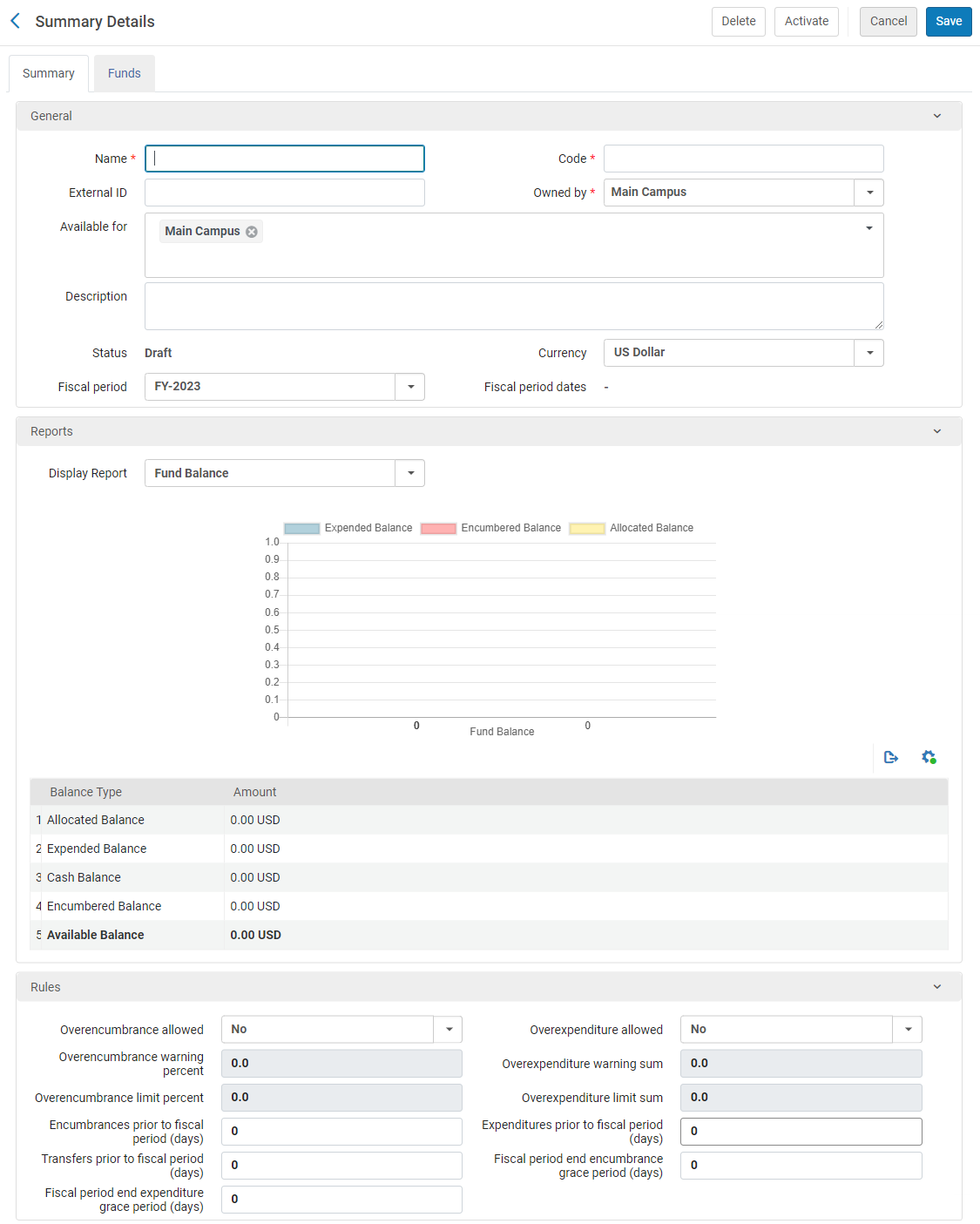 Añadir libro mayor - Detalles de resumenTo create a copy of a ledger, select Duplicate in the row actions list for the ledger on the Funds and Ledgers page. Después de copiar el libro mayor, modifíquelo como se requiera.
- In the Summary tab, enter the name and code for the ledger (mandatory).The code is reused when you roll over the ledger to a new fiscal period, so don't use a year-based code, such as MAIN LEDGER 2015. El nombre del libro mayor se puede cambiar cuando se traspasa a un nuevo año fiscal.El límite del campo es de 255 caracteres (se aplica tanto al código como al nombre).
- Configure the optional fields for the ledger in the General section.
Detalles generales del libro mayor Campo Descripción ID externo Este ID se usa para enlazar a otras claves del sistema. El límite del campo es de 255 caracteres. Propiedad de La institución o biblioteca propietaria. Un libro mayor puede tener solo un propietario. Por defecto, es la institución, quien permite que el libro mayor esté a disposición de todas las bibliotecas en la institución. If the ledger should be available to more than one library in the institution, but not all of them, under Owned by, select the institution, and then, under Available for, select all of libraries that can use it. If you change Owned by to one of the libraries, the ledger will only be available to that library.Al cambiar esto más adelante, se puede cambiar la propiedad de una biblioteca a una institución, pero no puede cambiar la propiedad de una biblioteca a otra biblioteca o de la institución a una biblioteca.Disponible para Las bibliotecas que pueden usar fondos de este libro mayor. By default, this matches the selection under Owned by: either the institution or a single library. Si es una única biblioteca, este campo no se puede modificar. Si es la institución, todas las bibliotecas en la institución pueden utilizar el libro mayor, pero se puede modificar el campo para que solo ciertas bibliotecas puedan hacerlo.
Para que solo algunas bibliotecas pueden utilizar el libro mayor:
- Select the field to open a dropdown list of the institution and all of its libraries.
- Quitar la marca de verificación de la institución y seleccionar todas las bibliotecas para quienes el libro mayor estará disponible. Las bibliotecas seleccionadas se agregan al campo. For example, in the illustration below, the institution, Main Campus, is the owner of the fund, but it is cleared from the Available for field, while three specific libraries are added to the field; the ledger is thus available only to the three selected libraries.
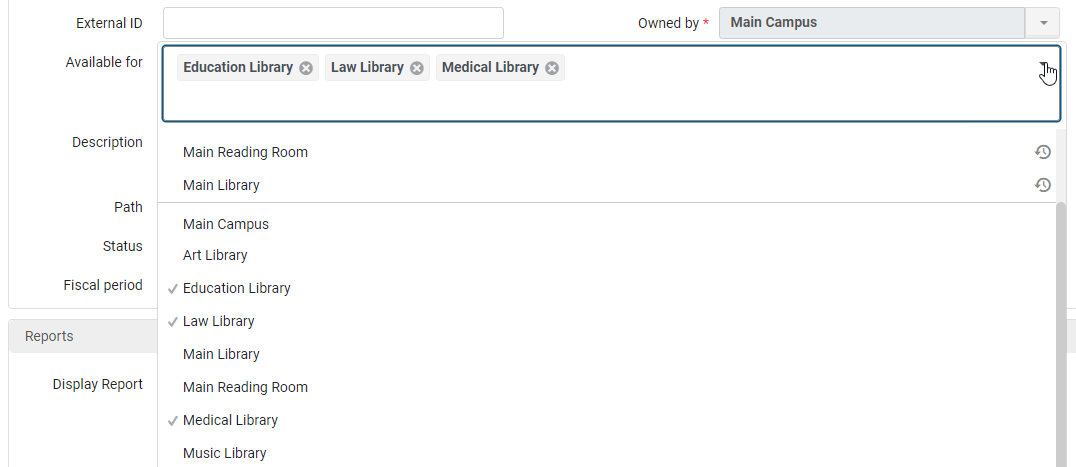
Asegúrese de eliminar la selección de la institución si desea limitar el acceso al libro mayor para bibliotecas específicas. Si no lo hace, cuando guarda el libro mayor, todas las selecciones de biblioteca se eliminan, y solo permanece la institución.
Descripción The ledger's description. Estado The ledger's status: - Active – Operational in the system
- Draft – Configured in the system but not yet operational
- Inactive – Not operational in the system (after previously being active)
Se ha creado el proveedor correctamente. La unidad de divisa por defecto para el libro mayor. To configure currencies, see Configuring Currencies. Período fiscal El año fiscal al que corresponde el libro mayor. Only Active fiscal periods appear in the list. To configure these options, see Configuring Fund and Ledger Fiscal Periods. Also, for more information on fiscal periods, see Fiscal Period Closure. Fechas del período fiscal Las fechas fiscales a las que corresponde el libro mayor. For information, see Configuring Fund and Ledger Fiscal Periods. - In the Reports section, select the type of report you want to display from the Display report field:
- Fund Balance – Displays the previously labeled Balance report
- Fund Burn Down – Displays the Fund Burn Down report configured in Alma Analytics
- In the Rules section, configure the fields associated with the policy behavior of encumbrances and expenditures for this ledger.
Ledger Rules Campo Descripción Compromiso máximo permitido Si el fondo le permite añadir un gravamen cuyo importe exceda el balance disponible del fondo (el balance asignado menos todos los gastos y gravámenes). Los valores válidos son: - No
- Yes – Alma checks the specified limit in the fund and performs a calculation against the fund's amount. (If no limit is specified, the limit is assumed to be 0, which means that Yes will function like No.)
- No Limits – indicates that overencumbrances are allowed without limits. Alma no comprueba el límite especificado o el fondo tiene dinero.
Calculating the Overencumbrance Limit:
A + B
- A = Saldo asignado
- B = Overencumbrance Limit Percent (The amount of the allowed Overencumbrance is calculated by the percentage from the total allowed Balance, so that if the balance is 100 and the limit percent is 50%, then the Overencumbrance Limit is 150.)
The Overencumbrance Limit takes into account and is compared to (PO line Net Price + Encumbrance Balance) when checking if the fund can be used for a specific PO Line. This depends on its Net Price and the Encumbered Balance.
The Overencumbrance Limit cannot be less than the combined amount of the PO line Net Price + Encumbrance Balance.
Gasto máximo permitido Si el fondo le permiter añadir un gasto cuyo importe exceda el balance disponible del fondo. Los valores válidos son: - No
- Yes
- No Limits – indicates that overexpenditures are allowed without limits.
Porcentaje de advertencia del compromiso máximo El porcentaje de compromisos máximos permitidos antes de que el sistema envíe una advertencia. Cuando se alcanza esa cantidad, aparece una alerta de que se ha alcanzado el límite de advertencia de compromiso máximo. Si el usuario confirma que la transacción se debe añadir, se añade una alerta para la entidad que creó la transacción del fondo. Importe de advertencia de gasto máximo La cantidad de gasto máximo antes de que el sistema envíe una advertencia. Porcentaje límite de compromiso máximo El porcentaje máximo de compromisos permitidos antes de que el sistema bloquee la creación de un compromiso. Cuando se alcanza esa cantidad, se bloquea la creación de la transacción. Importe límite de gasto máximo La cantidad de gasto máximo (contrastada con el balance asignado) antes de que el sistema bloquee la creación de un gasto máximo. Alma realiza la verificación sumando el importe del sobregasto al saldo asignado y, a continuación, restando los gravámenes y gastos de esa suma. Compromisos previos al periodo fiscal (días) El número de días, previos a la fecha de inicio del período fiscal, en que se pueden crear nuevos compromisos. En caso negativo, no se puede crear compromisos durante el número de días especificado después de la fecha de inicio del periodo fiscal.When working with accrual accounting, it is recommended to set this to 365(or as early as required to enter the accrual invoices). See Working with Accrual Accounting.When creating PO lines in a non-manual way (API, EOD etc.): If a fund for the current period is active at the same time as a fund from the next fiscal period, the one from the next fiscal period is used if this value permits it. If you do not want encumbrances added to the fund from the next fiscal period while the fund from the current fiscal period is still active, set this to 0.When creating PO lines manually: When creating a PO line, the user chooses the fund. If there are two funds available, one for the current fiscal period and another for the next fiscal period, the user chooses which fund to use. En este caso, el compromiso/gasto se ejecutará en el fondo seleccionado.Gastos previos al periodo fiscal (días) El número de días, previos a la fecha de inicio del periodo fiscal, en que se pueden crear nuevos gastos. En caso negativo, no se pueden crear gastos durante el número de días especificado después de la fecha de inicio del periodo fiscal.When working with accrual accounting, it is recommended to set this to 365(or as early as required to enter the accrual invoices). See Working with Accrual Accounting.Transferencias previas al periodo fiscal (días) El número de días, previos a la fecha de inicio del período fiscal, en que se pueden crear nuevas transferencias de dinero. En caso negativo, las transferencias de dinero se bloquean durante el número de días especificado después de la fecha de inicio del periodo fiscal.When working with accrual accounting, it is recommended to set this to 365(or as early as required to enter the accrual invoices). See Working with Accrual Accounting.Solo se puede transferir dinero entre fondos del mismo periodo fiscal. For more information, see Managing Fund Allocation Transfer.Periodo de gracia para compromisos tras finalizar el periodo fiscal (días) El número de días, después de la fecha de finalización del período fiscal, en que se pueden crear nuevos compromisos. En caso negativo, el sistema bloquea los nuevos compromisos durante el número de días especificados antes de la finalización del periodo fiscal.Periodo de gracia para gastos tras finalizar el periodo fiscal (días) El número de días, después de la fecha de finalización del período fiscal, en que se pueden crear nuevos gastos. En caso negativo, el sistema bloquea nuevos gastos durante el número de días especificados antes de la finalización del periodo fiscal. - In the Funds tab, select Add Fund to add a fund to the ledger. For information, see Adding a Fund. This option is available only if you selected Edit to edit an existing ledger.
- Select Save to store the ledger information that you entered and return to the Funds and Ledgers page.Las actualizaciones en el tipo de cambio pueden provocar que Alma recalcule los compromisos y los gastos.
Editar un libro mayor
Se puede actualizar la información introducida para un libro mayor.
- On the Funds and Ledgers page (Acquisitions > Acquisitions Infrastructure > Funds and Ledgers), select Edit in the row actions list for the ledger whose information you want to update. Aparece la página de Detalles de resumen. See Adding a Ledger.
- On the Summary Details page, edit the ledger information as required (note that the Code,Currency, and Fiscal Period fields are not editable). For information on this page, see Adding a Ledger.Cambiar la propiedad del libro mayor modifica el alcance de disponibilidad del libro mayor y la propiedad de todos sus fondos, pero no cambia el alcance de disponibilidad de los fondos. Al eliminar la disponibilidad de un libro mayor de una o más bibliotecas, los fondos asociados también dejan de estar disponibles para esas bibliotecas. Al añadir disponibilidad a un libro mayor para una o más bibliotecas, los fondos siguen sin estar disponibles para las bibliotecas a menos que también los añada.
- In the Funds tab, add, edit, duplicate, deactivate, or move funds as required. For information on adding funds, see Adding a Fund.
- In the Notes tab, add, update, or delete notes for the ledger. See Notes Tab.
- In the Attachments tab, add, update, or delete attachments for the ledger. See Attachments Tab
- To store your changes and deactivate the ledger, select Deactivate. To activate the ledger select Activate. Otherwise, to store your changes, select Save.
Adding a Fund
Las reglas se heredan automáticamente del libro mayor. Todos los cambios que se aplican a las reglas del libro mayor se pueden ver automáticamente en los fondos asociados a ellas (por ejemplo, período de gracia). The inheritance works, if there is nothing configured in the Fund tab.
Thus, if you configure extra fund rules, which causes the Ledger Rules to be overridden and the inheritance to be annulled, the tab Restore Rules Information will appear. You need to select Restore Rules Information, and then restore each one individually. Se pueden establecer reglas específicas para cada fondo, de lo contrario, cada uno heredará todas las reglas del Libro mayor general.
In the Fund tab, in the Rules section, if there is a tab Restore Rules Information, it indicates that the rules have been customized for the fund. If you select Restore Rules Information, the values will be inherited from the upper level of the hierarchy.
Once the rules are restored, the tab Override Rules Information will appear, which enables you to define your own rules for the fund.
Por consiguiente, si aparecen las siguientes pestañas, quiere decir que:
-
Override Rules Information- that the current values are inherited and have not yet been customized.
-
Restore Rules Information- that the current values have been customized.
Se puede añadir un fondo a un libro mayor o a un fondo resumido. Solo es posible añadir compromisos al periodo fiscal de un fondo o libro mayor si:
-
The fiscal period is Active
-
El rango de fechas del período fiscal incluye la fecha actual
Alternatively, you can add encumbrances to a fund's fiscal period prior to or after the actual fiscal period, provided the relevant fields are configured in the Rules section of the Summary Details page (select Add Ledger). For details on the fields in the Rules section, see Adding a Ledger.
- On the Funds and Ledgers page (Acquisitions > Acquisitions Infrastructure > Funds and Ledgers), select Edit in the row actions list for the ledger or summary fund to which you want to add a fund.
- Select the Funds tab. The Funds List page appears.
- Select Add Fund and select either Allocated fund or Summary fund. Aparece la página de Detalles de resumen.
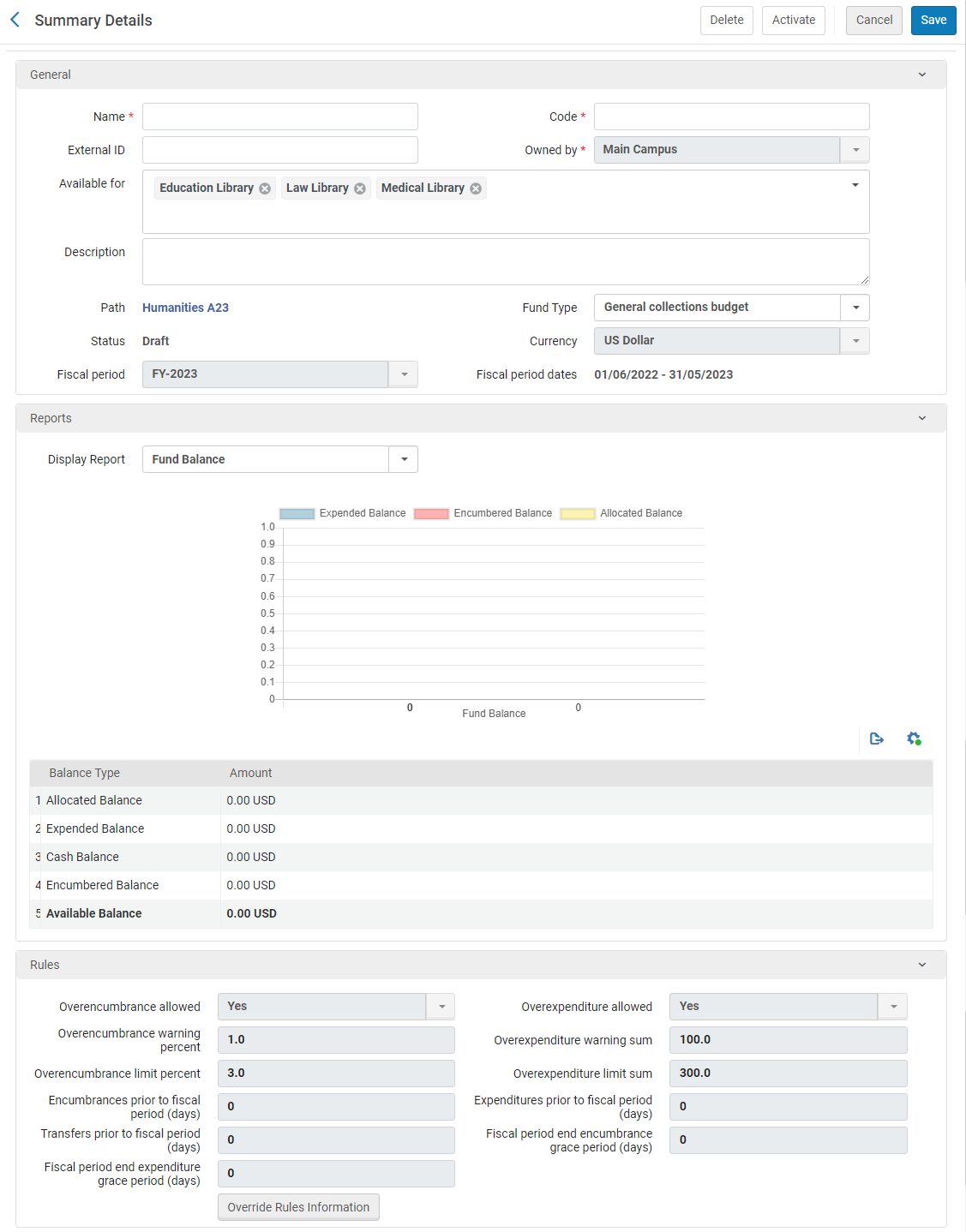 Añadir fondo - Detalles de resumenIf you want to create a copy of a fund, select Duplicate in the row actions list for the fund you want to copy. Una vez se haya copiado el fondo, es posible modificarlo según sus necesidades.
- Introducir el nombre y el código del fondo (obligatorio).The code is reused when you roll over the ledger to a new fiscal period, so don't use a year-based code, such as MAIN FUND 2015. El nombre del fondo se puede cambiar cuando se traspasa a un nuevo año fiscal. If you are working with accrual accounting (see Working With Accrual Accounting), do not change the name of the fund in the new fiscal period.The field limit is 255 characters (applies to the code and the name). Se recomienda que el código no contenga caracteres especiales.
- Opcionalmente, introducir un ID externo al fondo que se pueda usar para vincular a otras claves de sistema, y una descripción del fondo.Owned by,Path, Currency,Fiscal period, and Fiscal period dates are inherited from the ledger and cannot be modified.Available for is also inherited, but you can remove libraries to make it more restrictive in the next step.
- If the fund's parent ledger / summary fund was available to more than one library, select the libraries to which this fund is available in Available For. Se puede hacer que la disponibilidad del fondo sea más restrictiva que la de su principal.
- Opcionalmente, introducir un tipo de fondo. To configure fund types, see Configuring Fund Types.To make this fund available for attaching to resource sharing requests, the fund type must be Resource Sharing. See Borrowing Requests Associated with Funds.
- To override the rules set by the ledger, in the Rules area select Override Rules Information and then configure the fields associated with the policy behavior of encumbrances and expenditures for this fund. For an explanation of these fields, see Adding a Ledger.
- Para un fondo resumido:
- In the Reports section, select the type of report you want to display from the Display report field, as follows:
- Fund Balance – Displays the previously labeled Balance report.
- Fund Burn Down – Displays the Fund Burn Down report configured in Alma Analytics.
- in the Funds tab, select Add Fund to add a fund to the ledger (starting with step 1 of this process).
- In the Reports section, select the type of report you want to display from the Display report field, as follows:
- Select Save to store the fund information.
Once the fund is saved, the Fund Code cannot be modified.
Editar un fondo
Se puede actualizar la información introducida en un fondo.
- On the Funds and Ledgers page (Acquisitions > Acquisitions Infrastructure > Funds and Ledgers), select Edit in the row actions list for the fund whose information you want to update.
- En la página Detalles de resumen, editar la información de fondo como se requiera. For more information on this page, see Adding a Fund. Note that the fund's code is not editable.
- For allocated funds, select the Transactions tab to perform transactions on the fund. For more information on transferring and allocating funds, see Performing Fund Transactions.
- In the Notes tab, add, update, or delete notes for the fund. See Notes Tab.
- In the Attachments tab, add, update, or delete attachments for the fund. See Attachments Tab.
- To store your changes and deactivate the fund, select Deactivate. To activate the fund, select Activate. Otherwise, to store your changes, select Save.
For funds with 10 or more PO lines, when updating the fund name/code, the related PO lines are re-indexed. This is done by a background job that appears in the Monitor Jobs page. El usuario que realizó las actualizaciones que desencadenaron esta reindexación aparece como operador.
Activar y desactivar Fondos y Libros mayores
Antes de poder usar un fondo, este debe estar activo.
Después de asignar todos los fondos necesarios para un libro mayor, se debe activar el libro mayor para poder usarlo.
Se puede desactivar un fondo o libro mayor que en la actualidad no se necesite pero que se pueda necesitar más adelante. You also must deactivate a fund or ledger before it can be deleted (see Deleting Funds and Ledgers).
On the Funds and Ledgers page (Acquisitions > Acquisitions Infrastructure > Funds and Ledgers), select Activate or Deactivate in the row actions list for the ledger or fund that you want to activate or deactivate.
- You can also activate a fund while adding or editing it by selecting the Activate link on the Funds List page, or by selecting Activate in any of the fund's tabs, after you have configured the fund. You can also activate a ledger while editing it by selecting Activate in any of the ledger's tabs.
- You can also deactivate a fund by selecting the Deactivate link on the Funds List page, or by selecting Deactivate in any of the fund's tabs. You can also deactivate a ledger while editing it by selecting Deactivate in any of the ledger‘s tabs.
- Al desactivar un libro mayor o fondo resumido, se pedirá que se desactiven los fondos asociados con el libro mayor o fondo resumido. Todos los fondos asociados con un libro mayor o fondo resumido deben ser desactivados antes de poder desactivar el libro mayor o fondo resumido.
Borrar fondos y libros mayores
Cuando un libro mayor o fondo ya no se necesita para un periodo fiscal, se puede borrar del sistema. Note that the fund/ledger must be Inactive or Draft to be deleted.
On the Funds and Ledgers page (Acquisitions > Acquisitions Infrastructure > Funds and Ledgers), select Delete in the row actions list for a fund or ledger. Si el fondo (o fondos asociados con el libro mayor) no tiene transacciones asociadas (compromisos, gastos o asignaciones), se eliminará. Si un libro mayor se borra, todos los fondos asociados con el libro mayor también se borrarán.
Si el fondo (o fondos relacionados con el libro mayor) tienen transacciones asociadas, el fondo debe activarse para que muestre la pestaña Transacciones, de modo que las transacciones se puedan borrar. Después de que todas las transacciones se borran, el fondo se vuelve inactivo para borrarlo.
Performing Fund Transactions
Fund transactions are performed in the Transactions tab, accessible by selecting Edit in the row actions list for an allocated fund on the Funds and Ledgers page (Acquisitions > Acquisitions Infrastructure > Funds and Ledgers). The Transactions tab lists all of the transactions performed on an allocated fund.
En esta pestaña se puede:
- Ver detalles de una transacción
- Asignar dinero a un fondo asignado
- Transferir dinero de un fondo asignado a otro. También se pueden transferir fondos
- To reduce a fund's allocation, you allocate money using a negative number.
- Any change of PO line fields related to an existing transaction (for example PO line price,Reporting codes etc.) will re-create the transaction and the recreated transaction will display in the Transactions tab. The user who performed the field change displays as the Creator in the transaction.
- Las búsquedas en la pestaña de transacciones de los Fondos distinguen entre mayúsculas y minúsculas.
In the Transactions tab, select View in the row actions list for a transaction. Aparecerá la página de Detalles de la transacción con datos para la transacción especificada.
- In the Transactions tab, select Allocate Funds.
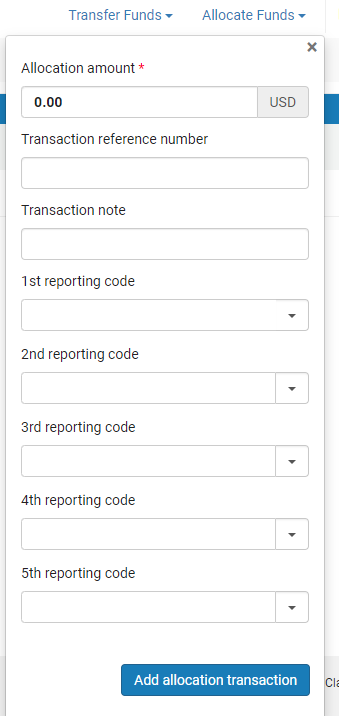 Página de Transacción de asignación
- Introducir la cantidad de asignación y rellenar los siguientes campos opcionales:
- Transaction reference number – A number that may be used to reference a particular allocation to the fund
- Transaction note – A description of the transaction
- Reporting codes(s)- A code that can be used for analyzing acquisitions in subsequent reporting. For more information, see Configuring Reporting Codes.
- Select Add Allocation Transaction and select Confirm in the confirmation dialog box.
- Select Save.
- In the Transactions tab, select Transfer Funds.The From fund field contains the value of the current fund, which cannot be changed.
- Continue as described in Transferring Money Between Allocated Funds, starting from step 2.
Page tags: article:topicledgerproduct:almacontent:Documentationlang:englishencumbrancefundadd fundadd ledgeredit fundedit ledgeractivate fundactivate ledgerdeactivate funddeactivate ledgerfund transactionavailable balancecash balanceallocated balanceexpenditure balanceencumbered balancedisencumbrancetransactionsummary fundallocated fundexpendituredisemcumbrancefund ownerledger owneravailable fundexchange rateexchange rate recalculationoverencumbranceoverexpenditurefund balancefund burn down
