
Configurazione del lancio delle funzionalità
Configurazione delle opzioni di lancio delle nuove funzionalità di Alma per l'istituzione
Per configurare le impostazioni di rollout per la Sua istituzione, è necessario disporre del seguente ruolo:
- Amministratore di Sistema Generale
The instructions on this page apply to users with the Staff Record Type (see Managing Users).
Le nuove funzionalità di Alma vengono distribuite in fasi. Questo permette al personale di Ex Libris di assicurarsi che essi funzionino correttamente e ad Alma Utente di familiarizzarsi con loro prima di sostituire completamente i processi esistenti.
Il lancio di una nuova funzionalità procede nelle seguenti fasi:
- Sandbox: Two weeks before its official rollout, a new feature is made available to institutions for preliminary testing purposes in the sandbox environment (see Alma Sandbox Environments).
- Phase 1 (Off by default): The official rollout of the new feature – phase 1 – takes place as part of a quarterly release. Durante questa fase, la nuova funzionalità non è attivata di default, ma è disponibile per l'istituzione e per il singolo utente che desidera attivarla.
- Phase 2 (On by default): Some time after the official layout, as part of a later quarterly release, phase 2 of the rollout begins. Durante questa fase, la nuova funzionalità è attivata di default, ma l'istituzione e il singolo utente possono disattivarla se lo desiderano.
- Full implementation: The final stage of a rollout takes place as part of a later quarterly release. In questa versione, la nuova funzionalità è implementata per tutti gli utenti. Da questo momento in poi né l'istituzione né il singolo Utente possono rinunciare.
During phases 1 and 2, administrators can override the default handling of a rollout in their institution. Ad esempio, possono attivare una nuova funzionalità per default nella loro istituzione durante la fase 1 del rollout. In addition, they can choose to completely opt out of a new feature for their entire institution (although this is not generally recommended; see Turn off and hide, below), and they can monitor the adoption of new features by individual users.
This page explains how to configure the institution-level configuration options. For information about how individual users can manage their own settings, see Opting In or Out of a New Feature.
Configuring the Rollout Settings for the Institution
The Feature Rollout Configuration page (Configuration Menu > General > User Interface Settings > Feature Rollout Configuration) lists all of the features that are currently in the process of being rolled out. La Lista appare nel pannello di sinistra (#1 nell'illustrazione), insieme alle informazioni su se ciascuna funzionalità è attualmente abilitata o disabilitata a livello globale nella Sua istituzione (e.g, #2). Per ogni nuova funzionalità distribuita, gli amministratori possono scegliere come la funzionalità viene adottata nella loro istituzione durante il rollout (#3) e monitorarne l'adozione da parte dell'utente.
This page uses the New Layout that is being rolled out in some Alma pages beginning with the August 2022 release. For information about working with this layout, see New Layout 2022.
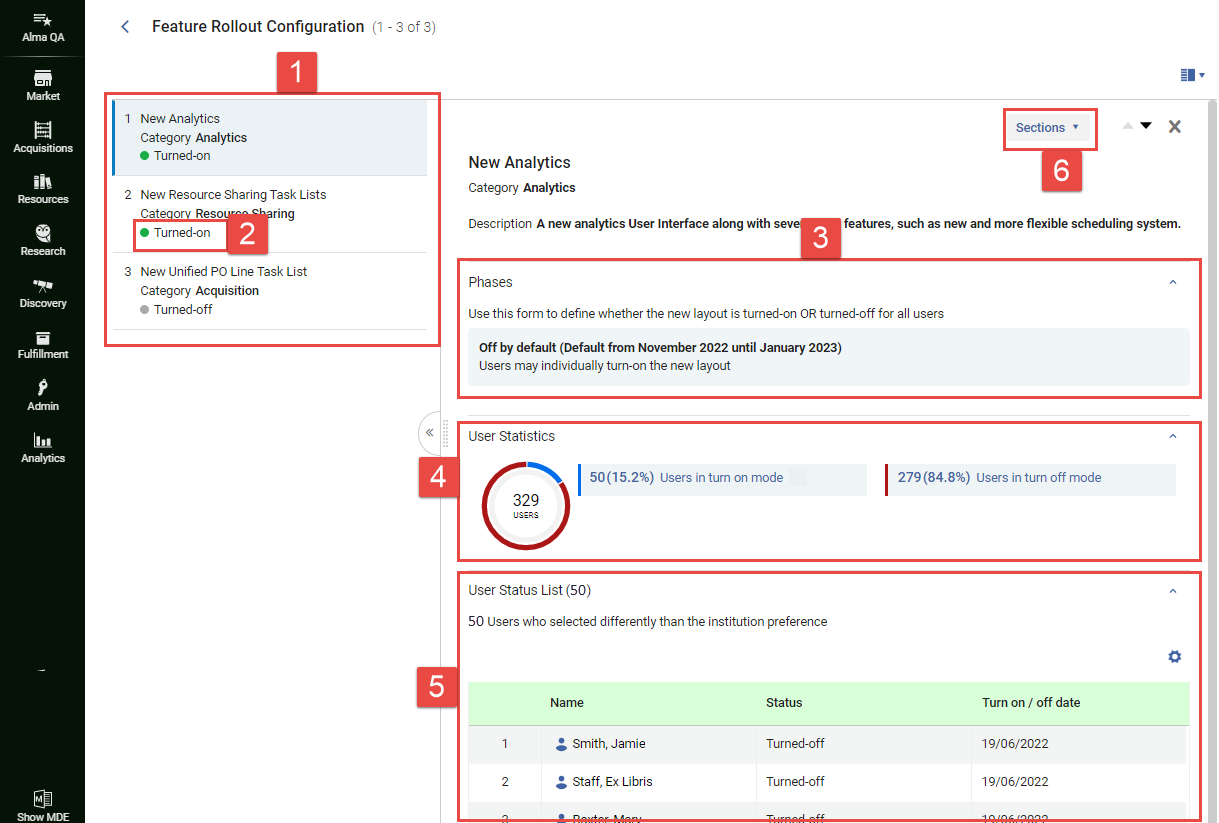
- In the Feature Rollout Configuration page (Configuration Menu > General > User Interface Settings > Feature Rollout Configuration), in the left panel (#1), select the feature. Nel pannello destro viene visualizzata una breve descrizione della funzionalità. L'impostazione di rollout attualmente selezionata è visualizzata nella sezione Fasi (n. 3). For the Off by default and On by default options, the time period in which this option is activated by default is also shown. For example,Off by default (Default from November 2022 until January 2023) indicates that the currently selected option is Off by default, and that this option is selected by default when the November 2022 quarterly release is active.
- Select the line in which the currently selected option appears.
 Selezionare la riga dell'opzione attualmente selezionataSi apre la finestra Modifica fasi e elenca le opzioni disponibili. In parentheses beside the Off by default(#7 below) and On by default(#8) options, the time period in which each of these options would be activated by default is also shown.
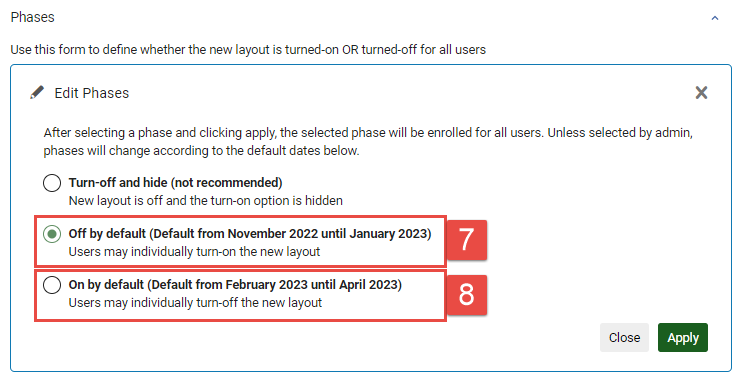 Finestra Modifica Fasi
- Selezioni l'opzione richiesta, come segue:
- Turn off and hide: Turn the feature off for the entire institution, and do not allow individual users to override this selection. When this option is selected, individual users will not see this feature in the list of features they can choose to turn on or off (see Opting In or Out of a New Feature). Questa opzione non è consigliata e dovrebbe essere implementata solo nei casi in cui la nuova funzionalità stia effettivamente causando un problema grave nel vostro sistema. In questo caso, dopo aver scelto questa opzione, contatti l'assistenza tecnica e descriva loro il fascicolo.
- Disattivato per default: Disattiva la funzionalità per l'intera istituzione, ma consenta ai singoli utenti di attivarla se lo desiderano.
- On by default: Turn the feature on for the entire institution, but allow individual users to turn it off if they wish.
- Selezionare Applica. La selezione viene implementata nella Sua istituzione e sovrascrive le impostazioni esistenti selezionate dal singolo utente. (Se ha selezionato Disattivato per default o Attivato per default, l'Utente può quindi selezionare nuovamente le opzioni che aveva scelto in precedenza, se lo desidera.) La pagina di configurazione del rollout delle funzionalità si chiude e si home apre la pagina iniziale di Alma. L'impostazione scelta rimane in vigore nella Sua istituzione finché non viene modificata manualmente o finché non giunge la fine della fase (momento in cui viene implementata l'opzione default per la fase successiva).
Monitoraggio dell'adozione di nuove funzionalità
La pagina Configurazione del lancio delle funzionalità include informazioni su quanti Utente della Sua istituzione hanno adottato ciascuna nuova funzionalità e quali Utente hanno scelto di non seguire le impostazioni consigliate dall'istituzione. Può utilizzare queste informazioni per aiutarLa a individuare i problemi che si sono verificati con la nuova funzionalità e per identificare l'Utente da contattare in Ordine per scoprire perché ha scelto come ha fatto. When a feature is selected in the left panel, this information appears in the User Statistics and User Status List sections of the right panel (#4 and #5).
It may take up to a minute for the user data to load, especially in large institutions with many users.
Statistiche utente
Under User Statistics(#4), the breakdown of users who have and have-not retained the institution-default setting is presented in two formats:
- Un grafico a torta con codifica a colori
- A key showing which group is represented by each color and presenting more detailed data about each group.
Elenco stato utente
Under User Status List(#5), information is displayed about which users have opted not to retain the institution-default setting. Selezioni il nome di un Utente per accedere alle sue informazioni di contatto (indirizzo email e numero di telefono).
Page tags: article:topicproduct:almacontent:Documentationlang:english
