
Merging Patron Records
「ユーザーの統合」オプションを実行するには、下記の役職のいずれかが必要です:
- ユーザーマネージャー - ユーザー統合権限あり
- ユーザーアドミン - ユーザー統合権限あり
重複するユーザーレコードを別のユーザーレコードに統合するジョブを設定できます。統合により、すべてのフルフィルメントアクティビティ(貸与、リクエスト、罰金または手数料、関心のあるユーザー、および貸出・返却履歴)が新しいユーザーレコードに移動され、統合するセグメント(連絡先、識別子、メモ、ブロック、デメリット、統計、付属物、プロキシ)を決定するオプションが含まれます。Select the Merge Users page (Admin > User Management > Merge Users).
When this process runs, the duplicate user is deleted (the equivalent of "Fully Remove", see Configuring User Deletion.The "Delete User Policy" setting configured on the Delete User Policy page (Configuration Menu > User Management > General > Delete User Policy) is ignored in this case.)
統合されるレコードには、ユーザー以外の役職があってはいけません。When merging an AFN account, loans and requestswill notbe merged.User records are merged at the user institution.これらはアイテム所有者機関で管理されるため、これはFNリクエストと貸出には影響しません。
この機能を有効にするには、Ex Librisカスタマーサポートにお問い合わせください。
Watch the Merge Duplicate Patron Records video (2:17 min).
如果您是在中国大陆,请访问 此链接 以便获取更好的体验

To merge users:
- ジョブの追加を選択します
- Select the From User and To User by typing the user name or by selecting from the pick list.
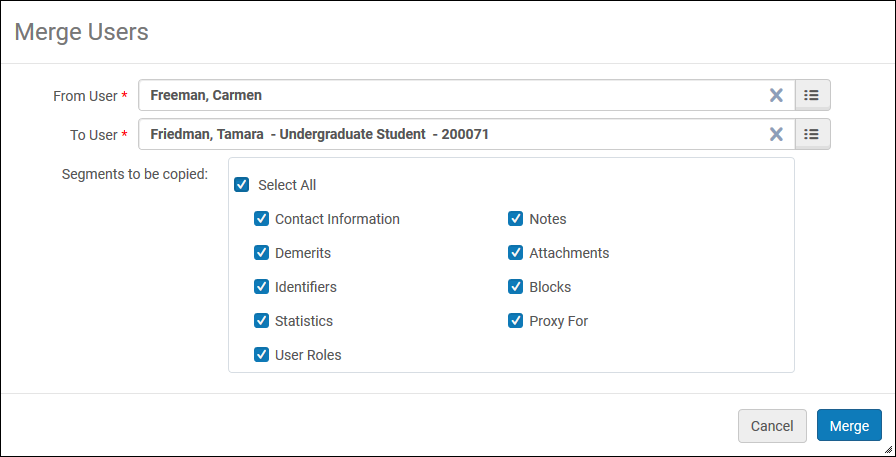
- コピーするセグメントチェックボックスで希望するセグメントを選択します。
- 統合および確認を選択します。確認メッセージが示すように、アクションは元に戻せません。確認すると、「ユーザーの統合」ジョブが実行されます。
統合されるレコードには(「From」ユーザー」)、ユーザー以外の役職があってはいけません。If the "User Roles" checkbox is selected, then that Patron role is copied to the destination user (the "To" user).チェックボックスがオフの場合、この役職は宛先ユーザーにコピーされません。
