
Managing User Roles
ユーザー役職と貸出・返却受付オペレータを管理します。
This page describes how to manage user roles including adding and removing roles individually or through profiles, managing circulation desk operators, role privileges, etc. For information on configuring user roles and registration, see Roles and Registration Configuration.For working with users see Managing Users.
- ユーザーマネージャー
- ユーザー管理者
See also Configuring Role Profiles.
For information on viewing user roles and assigning user roles to a user, watch Managing User Roles(5 mins).For an overview of Alma Administration, see Introduction to Alma Administration.
For convenience, circulation desk operators can be deleted, exported, or imported by running batch jobs (see Running Manual Jobs on Defined Sets).
For a list of roles that can be managed at the library level, see Roles Managed at the Library Level, below.
Adding Roles to Users
ユーザーに役職を追加する方法は次の通りです。
- Configuring role assignment rules that add roles automatically to a newly created user (see Adding Users and Configuring Role Assignment Rules) based on their job category, user group, or some other criteria.
- 以下で説明する通り、役職プロファイルを選択する。
- 以下で説明する通り、役職を個別に選択する。
- Running the Update/Notify Users job to add roles to users in bulk; see Update/Notify Users.
When a user's role assignments have been edited, the user is required to log out and log in again for the changes to take effect.
For information about roles and the SIS load, see https://developers.exlibrisgroup.com/alma/apis/xsd/rest_user.xsd#user_roles.Note that roles are NOT part of the SIS load.
Adding Roles Individually
各役職を手動で選択することで、ユーザーに役職を追加できます。
To add roles to a user by selecting them individually:
- Navigate to the User Roles area on the General Information tab of the User Details page (Admin > User Management > Manage Users).>
- 行アクションリストで編集を選択します。
- 役職を追加を選択します。The Add New Roles page appears.
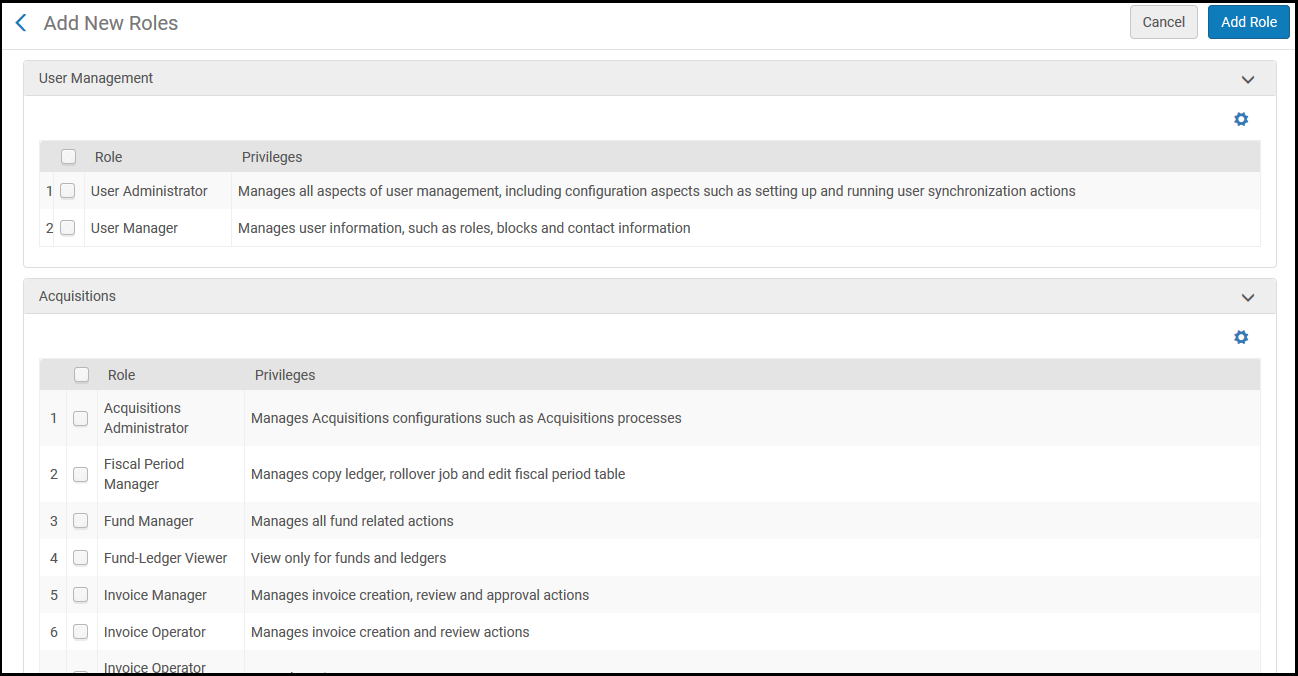
- ユーザーに割り当てる役職を選び、[役職を追加]を選択します。For descriptions of the roles that can be configured for users, see User Roles – Descriptions and Accessible Components.役職を1つ選択すると、[ユーザー役職の詳細]ページが表示されます。See Editing Roles Assigned to Users.複数の役職を選択した場合、それらの役職がユーザーに追加されます。
Adding Roles from Profiles
プロファイルから役職を選択することで、ユーザーに複数の役職を追加することができます。
To add roles to a user by selecting them from a profile:
- Navigate to the User Roles area on the General Information tab of the User Details page (Admin > User Management > Manage Users).
- 行アクションリストで編集を選択します。
- 役職を追加を選択します。[新規役職を追加]ページが表示されます。
- プロファイルから追加を選択します。The Profiles List page appears with the defined role profiles (pre-defined by a system administrator; see Configuring Role Profiles).
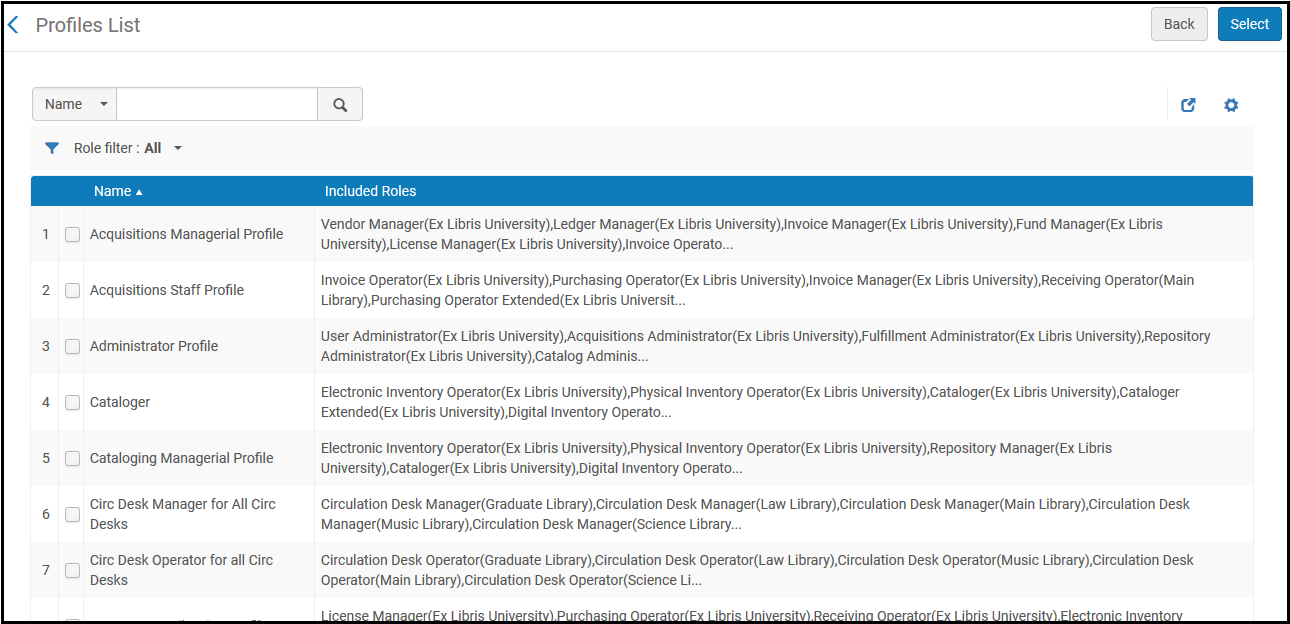
In some cases the User Manager may be restricted from adding, removing, or editing roles (see User Manager).In this case the restricted (and non restricted) roles are displayed in the Profiles List.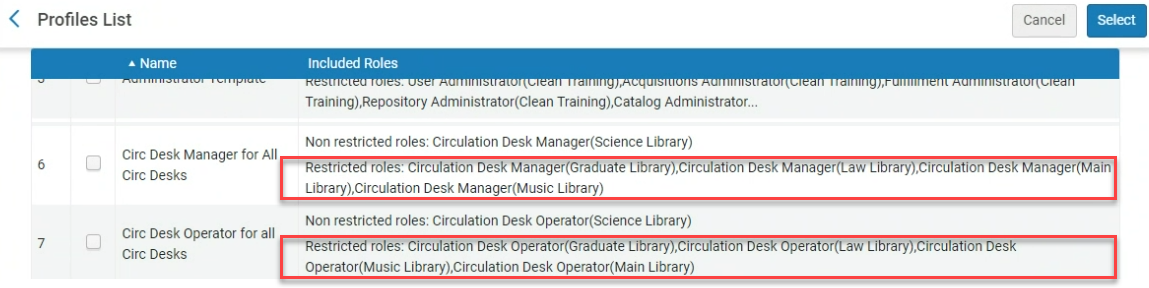
- Select the required role profiles and then Select.選択したプロファイルに関連付けられているすべての役職が、ユーザーに追加されます。役職プロファイルは、ユーザーに役職を割り当てるために使用されますが、それ自体はユーザーに関連付けられていません。
- 役割がプロファイルから追加されたことをユーザーに知らせるために、メモがメモタブに自動的に追加されます。This helps you to find the users to which the role profile was applied.The note is also added automatically when profiles are added from Automatic Role Assignment Rules ( see Roles and Registration Configuration) and when adding users via the API or SIS systems.
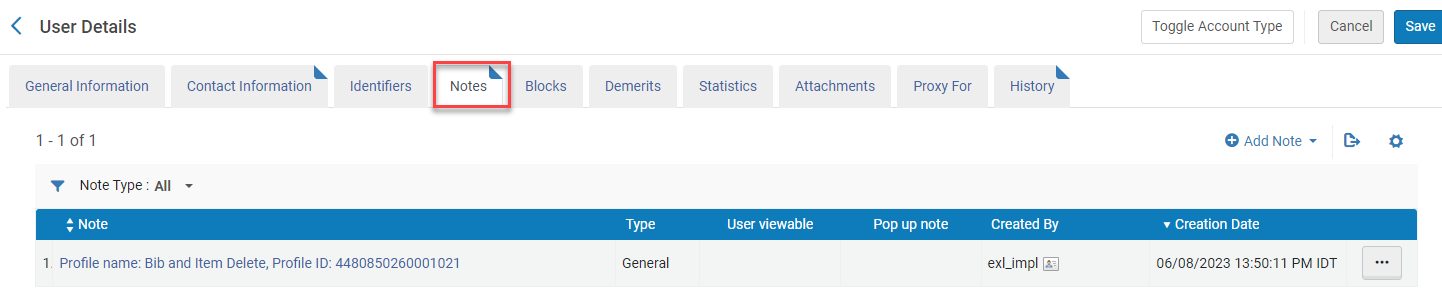
プロファイル名またはIDで検索すると、このプロファイルに関連付けられているすべてのユーザーを見つけることができます。
The automatic adding of a note can be deactivated by using the User Management menu (Configuration > User Management > General > Other Settings) to set the show_profile_in_user_notes parameter to false.
- [保存]を選択します。Roles that require additional configuration (such as selecting a scope) are inactive until you edit them; see Editing Roles Assigned to Users.
場合によっては、ユーザー役職を選択すると、保存ボタンを押さずにすぐに割り当てられる場合があります。
Filtering Roles
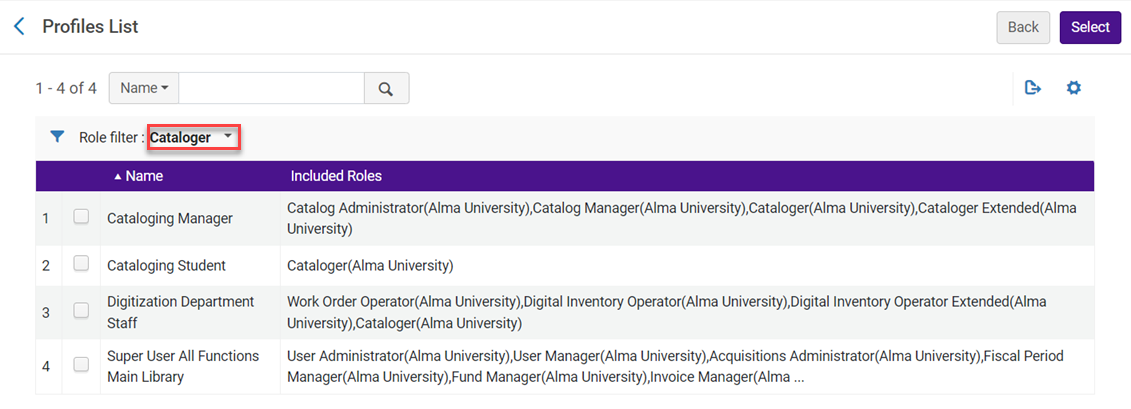
Profile lists can be filtered to display a select role.When a specific role is selected from the Role filter dropdown list (User Management > Roles and Registration > Profiles) only those roles are displayed in the Profiles List.
Editing Roles Assigned to Users
ユーザーの役職を有効または無効にでき、ユーザーの役職の範囲を変更できます。When multiple roles are added all at once to a user (see Adding Roles to Users), roles that require additional configuration (such as selecting a scope) remain inactive until they are edited.
To edit a role assigned to a user:
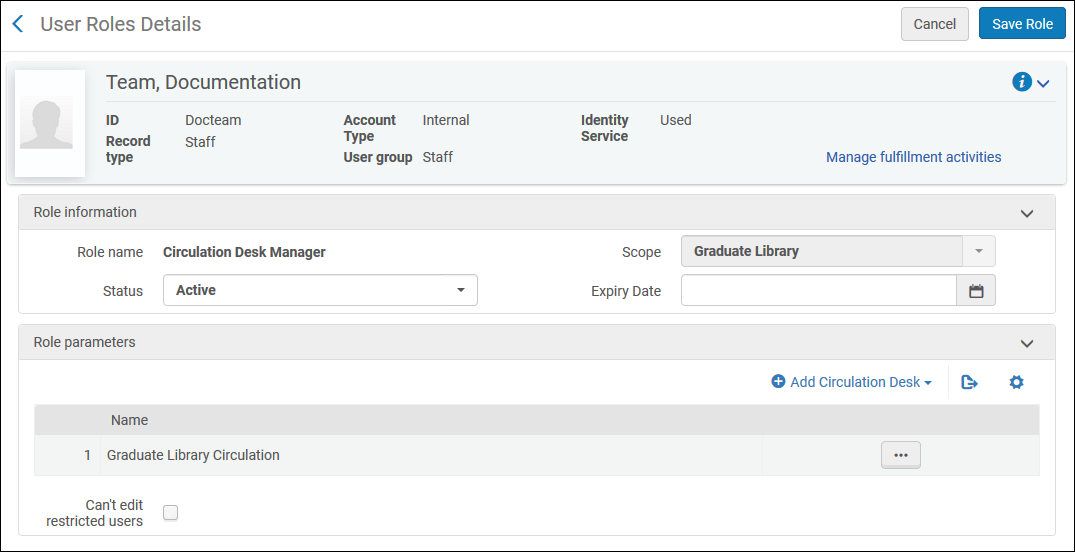
- In the User Roles area on the User Details page (Admin > User Management > Manage Users; select Edit in the row actions list), select the role or select Edit in the row actions list.The User Roles Details page appears.
- 必要な情報を編集します。
役職情報のフィールド
フィールド 説明 役職名 役職の名前です。 範囲 このフィールドで赤いアスタリスクは表示されませんが、入力は必須です。 - 機関全体に対して常に適用される役職の場合、範囲はその機関に設定され、変更できません。
- 図書館/キャンパスレベルで設定された役職の場合、その役職が適用されるキャンパス/図書館(利用可能な場合は機関)を選択します。
After selecting the scope, some roles require additional information in the Role Parameters section, such as a service unit or circulation desk.Select the required values for these parameters, as described in User Roles – Descriptions and Accessible Components.
複数の図書館/キャンパスを追加するには、その都度異なる図書館/キャンパスを選択して、ユーザーに役職を複数回追加します。
ユーザーの範囲を機関レベルから図書館レベルに縮小したり、図書館レベルの範囲をユーザーから削除したりすると、そのユーザーは、自分に割り当てられていても範囲外になったエンティティを管理できなくなります。
ステータス その役職がアクティブか非アクティブかを選択します。 The role is considered inactive after the role expiry date even if its status is still ‘Active'.For a role to be considered active it must have both an ‘Active' status and no expiry date that is in the past.
有効期限 その役職が非アクティブになる日付です。 The role is considered inactive after the role expiry date even if its status is still ‘Active'.For a role to be considered active it must have both an ‘Active' status and no expiry date that is in the past.
制限付きユーザーは編集できません
これは、次の役職に適用されます。
- 統括システム管理者
- ユーザー アドミン
- ユーザーマネージャー
- 貸出・返却受付マネージャー
- 貸出・返却受付オペレータ
- 貸出・返却受付オペレータ - 限定
- リポジトリマネージャー
User accounts can be defined as 'restricted for editing' in the Users Restricted for Editing table (Configuration Menu > User Management > Roles and Registration > Users Restricted for Editing).See Restricting Users for Editing.
If all of this user's roles have Can't edit restricted users selected, the user has no edit/delete access for restricted users.This user will still be able to view the user records, but not to make changes (such as editing contact info, etc.).If this user is assigned several of the above roles, and some roles have "Can't edit restricted users" selected and other roles do not, the user can still make changes.
- [役職を保存]を選択します。役職が保存されます。
- [保存]を選択します。ユーザーの詳細が保存されます。
場合によっては、ユーザー役職を選択すると、保存ボタンを押さずにすぐに割り当てられる場合があります。
If the scope is properly set for a role, you can activate or deactivate a role by selecting the slider in the User Roles area on the User Details page.
Removing Roles from Users
ユーザーに割り当てられた役職を削除できます。
To remove roles from users:
- In the User Roles area on the User Details page (Admin > User Management > Manage Users; select Edit in the row actions list) , select the role or select Delete in the row actions list or select the roles and select Remove Selected.確認ダイアログボックスが表示されます。
- 確認ダイアログボックスで[確認]を選択します。役職が削除されます。
- [保存]を選択します。ユーザーの詳細が保存されます。
In some instances, user roles may be removed immediately when selected without the need to press Save.
User Roles – Descriptions and Accessible Components
次のテーブルで、ユーザーに対して設定できる役職と、各ユーザー役職がアクセスできるAlmaのコンポーネントについて説明します。All users can search (see Searching in Alma), view certain widgets (see Managing Widgets), and potentially view analytics information in a link or widget (see Working with Analytics Objects).
以下のジョブを実行するには、機関スコープが必要です。For the list of roles managed at the library level, see Roles Managed at the Library Level.
ユーザー役職(実際には、役職に関連付けられた機関内の権限)は、ユーザーがアクセスできるページを決定します。また、多くの場合、ユーザーがこれらのページで実行できるフィールド、オプション、ジョブ、アクションも決定します。残念ながら、Alma の各ページで各役職が利用可能なすべてのオプションとアクションについて、広範囲の正確なリストをここで提示することはできません。See Role Privileges below for detailed information on privileges required to access each page and, in some cases, perform a specific action on the page.Additional information is provided in the Roles Report and Privileges Report.For more details on jobs and the roles that are required to be able to run them, see Manual Jobs and Their Relevant Parameters.
| モジュール | 役職 | アクセス可能なコンポーネント | 説明 | 範囲 | 役職パラメータ |
|---|---|---|---|---|---|
|
ユーザー管理 |
ユーザー管理者 |
ADMIN:
受入:
|
ユーザー同期アクションの設定と実行など、設定に関する面を含め、ユーザー管理のすべてを管理します。Can manage Patron record type. ユーザーに、ユーザー管理設定の表示のみを許可し、編集は許可しない場合、[読み取り専用]を選択します。 ユーザー管理者は、内部ユーザーのパスワードを変更できます。 ユーザー管理者はユーザーを削除できます。 |
機関 |
|
|
ユーザーマネージャー |
ADMIN:
受入:
|
役職、ブロック、コンタクト情報などのユーザー情報を管理します。ユーザーレコードタイプを管理できます。 ユーザーマネージャーは、内部ユーザーのパスワードを変更できます。 ユーザーマネージャーはユーザーを削除できます。 In some cases (depending on the user_restrict_manage_roles_by_scope customer parameter at Configuration > User Management > General > Other Settings) the User Manager may be restricted from adding, removing, or editing roles for users of libraries to which the User Manager does not have access.This also applies to user profiles (see Adding Roles from Profiles). These limitations do not apply to users with the the User Administrator role or the User Manager role with institution scope. |
機関/図書館 |
||
|
受入 |
受入管理者 |
受入:
ADMIN:
|
注文書レビューのルール、リポートコード、実行中の受入関連ジョブなど、受入設定を管理します。 ユーザーに、受入設定の表示のみを許可し、編集は許可しない場合、[読み取り専用]を選択します。 |
機関 |
インポートプロファイルを表示した後に戻るボタンをクリックすると、受入管理者ロールを持つユーザーについて読み取り専用が選択されている場合、編集オプションが利用できるようになる既知の問題があります。 |
|
会計期間マネージャー |
受入:
|
発注・受入オペレータの役職と組み合わせて割り当てられた場合、元帳のコピーと、会計期間の帳票の編集を管理します。 |
機関 |
||
|
ファンドマネージャー |
受入:
|
予算の割当と取引、予算の設定、更新、閉鎖など、予算に関連するすべてのアクションを管理します。 |
機関 / 図書館 |
||
|
予算・元帳ビューア |
受入:
|
予算と元帳のみを表示します。 |
機関 / 図書館 |
||
|
請求書マネージャー |
受入:
|
請求書の作成・レビュー・承認を管理し、請求書を他のオペレータに割り当てます。 This role enables users to view the Assigned to Others tab. |
機関 / 図書館 |
||
|
請求書オペレータ |
受入:
|
請求書を作成・編集・レビューします。請求書を他の請求書オペレータに再度割り当てます。 |
機関 / 図書館 |
||
|
請求書オペレータ(拡張) |
受入:
|
請求書を削除できます。 |
機関 / 図書館 |
||
|
元帳マネージャー |
受入:
|
元帳の作成と編集、予算と割当の追加、取引の実行、元帳と予算の更新を可能にします。 |
機関 / 図書館 |
||
|
ライセンスマネージャー |
受入:
ADMIN:
|
ライセンスおよびライセンスの改正に関連するアクティビティを管理します。 |
機関 |
||
|
ライセンスビューア |
受入:
|
ライセンスのみを表示します。 |
機関 |
||
|
購入リクエストマネージャー |
受入:
ADMIN:
|
購入リクエストを管理し、他のオペレータとマネージャーに割り当てます。この役職が一図書館の範囲で定義されている場合、ユーザーは、その図書館内のリクエストまたは特定の図書館に属さないリクエスト(所有図書館フィールドが空欄のもの)だけを表示して割り当てることができます。 |
機関 / 図書館 |
||
|
購入リクエストオペレータ |
受入:
ADMIN:
|
購入リクエストを管理し、依頼者情報を編集します。この役職が一図書館の範囲で定義されている場合、ユーザーは、その図書館内のリクエストまたは特定の図書館に属さないリクエスト(所有図書館フィールドが空欄のもの)だけを表示することができます。購入リクエストを他の購入リクエストオペレータに再度割り当てます。 |
機関 / 図書館 |
||
|
購入リクエスト オペレータ(拡張) |
受入:
|
購入リクエストを削除できます。Must be combined with Purchase Request Operator or Purchase Request Manager. |
機関 / 図書館 |
||
|
購入マネジャー |
受入:
RESOURCES:
ADMIN:
|
注文書のレビューと承認、電子資源の有効化、購入オペレータに対する注文明細の割り当て、注文明細にライセンスをリンクするなど、正式な購入業務を管理します。Can also view vendor data, ledgers and funds, and invoices.Can create and edit holdings by scope. |
機関 / 図書館 |
||
|
購入オペレーター |
受入:
RESOURCES:
ADMIN:
|
注文明細の作成、レビュー、更新、電子リソースの管理、ライセンスの注文明細へのリンクなど、すべての購入操作を管理します。When defined for a specific library scope, only PO lines owned by that library can be viewed and edited.PO lines that are assigned to others can be viewed but not updated.ベンダーのデータ、元帳と予算、および請求書も表示できます。Can create and edit holdings by scope.書誌レコードに関連付けられている最後のアイテムを削除する場合、その書誌レコードも削除できます。 上記のアイテムは最後の冊子アイテムではありません。最後の在庫品目 (一般に = 最後の目録資料) を記述しています。 If Rialto is enabled, this role receives additional Rialto privileges.For more information, see Managing Rialto User Roles. |
機関 / 図書館 |
||
|
購入オペレータ(拡張) |
受入:
|
注文明細を消去できます。 購入オペレータと組み合わせる必要があります。 |
機関 / 図書館 |
||
|
受入オペレータ |
受入:
RESOURCES:
|
購入した冊子アイテムと電子アイテムの受入を管理します。 上記のアイテムは最後の冊子アイテムではありません。最後の在庫品目 (一般に = 最後の目録資料) を記述しています。 この役職を設定する際は、サービスユニット(受入部門)を割り当てる必要があります。 |
機関 / 図書館 |
|
|
|
受入オペレータ(限定) |
受入:
|
受信オペレータ権限がありますが、注文とアイテムを編集することはできません。書誌レコードに関連付けられている最後のアイテムを削除する場合、その書誌レコードも削除できます。 この役職を設定する際は、サービスユニット(受入部門)を割り当てる必要があります。 |
機関 / 図書館 |
|
|
|
セレクタ |
受入:
ADMIN:
|
この役職はRialtoが使用するためのものです。ここに記載されている機能は、購入リクエストオペレーター/マネージャーに転送されます。For more information, see Managing Rialto User Roles. |
機関 / 図書館 |
||
|
セレクタ(拡張) |
この役職は使用されていません。 |
||||
|
トライアルマネージャー |
受入:
ADMIN:
|
受入の事前処理の一環として、電子資源のトライアルと評価を管理し、トライアルオペレータを管理します。書誌レコードに関連付けられている最後のアイテムを削除する場合、その書誌レコードも削除できます。 上記のアイテムは最後の冊子アイテムではありません。最後の在庫品目 (一般に = 最後の目録資料) を記述しています。 |
機関 |
||
|
トライアルオペレータ |
受入:
|
受入の事前処理の一環として、電子資源のトライアルと評価を管理します。書誌レコードに関連付けられている最後のアイテムを削除する場合、その書誌レコードも削除できます。 上記のアイテムは最後の冊子アイテムではありません。最後の在庫品目 (一般に = 最後の目録資料) を記述しています。 |
機関 |
||
|
トライアル参加者 |
なし |
電子資源トライアルに参加するよう招待された個人です。 |
機関 |
||
|
利用統計データオペレータ |
受入:
|
ベンダー用のCOUNTERデータを手動でアップロードまたは削除し、アップロードされたデータファイルを管理し、利用状況データを表示します。 |
機関 |
||
|
ベンダーアカウントマネージャー |
受入:
|
ベンダーのレコードにおけるベンダーアカウント要素を管理します。 |
機関 / 図書館 |
||
|
ベンダーマネージャー |
受入:
|
ベンダーレコードのすべてを管理します。 |
機関 |
||
|
ディスカバリー |
ディスカバリー - 管理者 |
DISCOVERY:
受入:
|
Almaのプラットフォーム上で、Primoのすべてのディスカバリー機能(検索プロファイルやディスカバリービューなど)の設定を有効にします:
|
機関 |
|
|
ディスカバリーオペレーター - 限定 |
DISCOVERY:
|
管理者がAlma ディスカバリー設定メニューの次のオプションを制限します:
|
機関 |
||
|
表示管理 |
DISCOVERY:
|
管理者がAlma ディスカバリー設定メニューの次のオプションを制限します:
|
機関 |
||
|
フルフィルメント |
Leganto Bolkコースオペレータ |
FULFILLMENT:
|
ボルクリクエストを開始および管理できます。 |
機関 |
|
|
貸出・返却受付マネージャー |
FULFILLMENT:
受入:
ADMIN:
|
ブロック上書きオプションを使用して、貸出、返却、更新などの貸出・返却受付のアクションを管理します。リクエストメモの追加・編集・削除、期日と返却日の変更、ブロックの追加と削除、アイテムの紛失マーク付け、およびアイテムの変更が可能です。 この役職を設定する際には、貸出・返却受付を割り当てる必要があります。 同じ範囲内の複数の貸出・返却受付にこの役職を設定するには、同じ役職内の複数のパラメータとして受付を割り当てます。 |
図書館 |
|
|
|
貸出・返却受付オペレータ |
FULFILLMENT:
受入:
ADMIN:
|
貸出、返却、更新といった貸出・返却受付のアクションを管理します。メモの追加・編集・削除、期日と返却日の変更、アイテムの紛失マーク付け、罰金と手数料の処理、およびオフラインでの貸出・返却を実行できます。 この役職を設定する際には、貸出・返却受付を割り当てる必要があります。 同じ範囲内の複数の貸出・返却受付にこの役職を設定するには、同じ役職内の複数のパラメータとして受付を割り当てます。 ある内部ユーザーがユーザー以外の役職を持たず、その役職の有効期限が切れていない場合、貸出・返却受付オペレータは、そのユーザーのパスワードを変更できます。 |
図書館 |
|
|
|
貸出・返却受付オペレータ – 限定 |
FULFILLMENT:
受入:
ADMIN:
|
貸出・返却受付オペレータの権限がありますが、削除は実行できません。 この役職を設定する際には、貸出・返却受付を割り当てる必要があります。 貸出・返却受付オペレータ-ある内部ユーザーがユーザー以外の役職を持たず、その役職の有効期限が切れていない場合、そのユーザーのパスワードを変更できます。 The Circulation Desk Operator - Limited operator can use the Scan In page only for scanning in items, but has no access to the ‘Change Item Information' tab of this page. |
図書館 |
|
|
|
コースリザーブマネージャー |
FULFILLMENT:
受入:
ADMIN:
|
予約リストと図書リストの割り当てを管理します。 |
機関 / 図書館 |
||
|
コースリザーブオペレータ |
FULFILLMENT:
受入:
|
コースリザーブを参照して、図書リストを作成し、リクエストを移動します。 Can see own lists + unassigned. |
機関 / 図書館 |
||
|
コースリザーブビューア |
FULFILLMENT:
|
コース(コースリスト権限が有効な場合)、読書リストおよび引用への読み取り専用アクセス。 |
機関 / 図書館 |
||
|
フルフィルメント アドミン |
FULFILLMENT:
ADMIN:
受入:
|
ポリシー、利用規約、フルフィルメントユニット、貸出・返却受付など、フルフィルメントに関連する設定を管理します。 ユーザーに、フルフィルメント設定の表示のみを許可し、編集は許可しない場合、[読み取り専用]を選択します。 役職が特定の図書館にスコープされているユーザーの場合:
|
機関 / 図書館 |
|
|
|
フルフィルメントサービスマネージャー |
RESOURCES:
FULFILLMENT:
受入:
ADMIN:
|
Manages the library's authoritative fulfillment service actions, such as course reading list assignments, assigns digitization requests, and assigns and handles resource sharing requests. |
機関 / 図書館 |
||
|
フルフィルメントサービスオペレータ |
FULFILLMENT:
受入:
ADMIN:
|
移動のリクエストとともに、コースリザーブと図書リストに関連する図書館のフルフィルメントサービスを管理します。 You may assign a service unit if the Fulfillment Service Operator manages courses, but this is not mandatory. The Fulfillment Services Operator needs the scope of a library to be able to see Resource Sharing requests.役割の範囲が機関レベルにある場合、リソース共有リクエストは表示されません。 |
機関 / 図書館 |
|
|
|
インストラクター |
Almaでは直接利用できません。 |
図書リストが関連付けられているコースに従い、Legantoを使用して図書リストを作成および管理します。 |
機関 / 図書館 |
||
|
Legantoコースオペレータ |
Almaでは直接利用できません。 |
Legantoを使用して、すべての図書リストを作成および管理します。 |
機関 / 図書館 |
||
|
Leganto インターフェイス管理者 |
Almaでは直接利用できません。 |
Leganto UI に関するアイテムを設定します。This role has access to the Leganto UI, features, label functions, and courses. |
機関 |
||
|
ユーザー |
USER MANAGEMENT:
|
指定された図書館からサービスを受けます(機関が指定されている場合、ユーザーはその機関内のすべての図書館からサービスを受けます)。サービスには、ローンの受け取り、冊子アイテムのリクエスト、アイテムのデジタル化が含まれます。 To limit patron's circulation activity, you can set either the user card OR the Patron role expiry date.A patron cannot perform fulfillment activities if either the user card or the Patron role is expired.For more information about the user expiry date, see Expiration Date. |
機関 / 図書館 |
||
|
リクエストオペレータ |
FULFILLMENT:
受入:
ADMIN:
|
リクエストを作成する、取置き棚からアイテムをピックアップする、アイテムを輸送中取置き棚または保留中取置き棚に置くなど、リクエストのフルフィルメントを管理します。 この役職を設定する際には、貸出・返却受付を割り当てる必要があります。 |
図書館 |
|
|
|
リソース共有パートナー管理者 |
FULFILLMENT:
受入:
|
リソース共有パートナーを管理して、Almaとリソース共有システムの間で利用可能な通信のタイプを定義します。また、パートナーのグループをリソースシェアリクエストに添付できるように、勤務表テンプレートを管理します。 |
機関 / 図書館 |
||
|
ワークオーダーオペレータ |
受入:
ADMIN:
|
デジタル化アクティビティなど、内部図書館リクエストを管理します。 この役職を設定する際は、サービスユニットを割り当てる必要があります。 特定のワークオーダータイプのワークオーダーオペレータパラメーターには機能値がなく、パラメーターをユーザー役職に追加すると、すべてのワークオーダータイプを実行できるようになります。 |
機関 / 図書館 |
作業指示ロールを持つユーザーは、自身のロールがスコープ設定されている作業指示部門に、オペレーターとして登録されている必要があります。 |
|
|
目録 |
CDI目録オペレータ |
受入:
|
When the CDI model is set to the Fully Flexible activation model, users with this role can activate or deactivate a CDI electronic collection, remove the CDI-only full text activation, and edit fields in the CDI tab in the Electronic Collections Editor. この役割は、個別に設定することも、電子目録オペレータと組み合わせて使用することもできます。2つの役割を組み合わせると、ユーザーはアクティブ化ウィザードを使用する際に、1つのアクションでCDI検索アクティブ化とフルテキストアクティブ化を設定できます。See Activating an Electronic Collection Using the Activation Wizard. |
機関 / 図書館 |
|
|
コレクション目録オペレータ |
RESOURCES:
受入:
|
サブコレクションを作成・編集し、サブコレクションを親コレクション間で移動できます。書誌レコードに関連付けられている最後のアイテムを削除する場合、その書誌レコードも削除できます。 上記のアイテムは最後の冊子アイテムではありません。最後の在庫品目 (一般に = 最後の目録資料) を記述しています。 |
機関 / 図書館 |
||
|
コレクション目録オペレータ(拡張) |
RESOURCES:
受入:
|
トップレベルコレクションの作成と編集、トップレベルコレクションとサブコレクションの削除、およびサブコレクションからトップレベルコレクションへの昇格が可能です。書誌レコードに関連付けられている最後のアイテムを削除する場合、その書誌レコードも削除できます。 上記のアイテムは最後の冊子アイテムではありません。最後の在庫品目 (一般に = 最後の目録資料) を記述しています。 |
機関 / 図書館 |
||
|
保証金マネージャー |
RESOURCES:
受入:
|
保証金設定を管理します。For more information, see Configuring Deposits. |
機関 / 図書館 |
||
|
デポジットオペレーター |
RESOURCES:
受入:
|
保証金を承認します。For more information, see Deposits. |
機関 / 図書館 |
||
|
保証金オペレータ(拡張) |
RESOURCES:
受入:
|
保証金を承認または拒否します。For more information, see Deposits. 保証金オペレータと組み合わせる必要があります。 |
機関 / 図書館 |
||
|
デジタル目録オペレーター |
RESOURCES:
FULFILLMENT:
受入:
ADMIN:
|
Manages the institution's digital inventory, including adding digital representations to the repository, running and monitoring processes, and creating and managing sets.書誌レコードに関連付けられている最後のアイテムを削除する場合、その書誌レコードも削除できます。 上記のアイテムは最後の冊子アイテムではありません。最後の在庫品目 (一般に = 最後の目録資料) を記述しています。 メタデータのタイプは機能しません。 |
機関 / 図書館 |
||
|
デジタル目録オペレータ(拡張) |
RESOURCES:
受入:
ADMIN:
|
デジタル目録を削除できます。書誌レコードに関連付けられている最後のアイテムを削除する場合、その書誌レコードも削除できます。 上記のアイテムは最後の冊子アイテムではありません。最後の在庫品目 (一般に = 最後の目録資料) を記述しています。 デジタル目録オペレータと組み合わせる必要があります。 |
機関 / 図書館 |
||
|
電子目録オペレータ |
RESOURCES:
受入:
ADMIN:
|
Manages the institution's electronic inventory, including adding local electronic collections, and local portfolios, managing electronic resource activation, and creating and managing sets.書誌レコードに関連付けられている最後のアイテムを削除する場合、その書誌レコードも削除できます。 上記のアイテムは最後の冊子アイテムではありません。最後の在庫品目 (一般に = 最後の目録資料) を記述しています。 If this role is not combined with the CDI inventory operator, when using the Activation Wizard to activate a collection, the default settings will be used for the CDI search activation and other CDI related fields.See Activating an Electronic Collection Using the Activation Wizard. |
機関 / 図書館 |
||
|
電子インベントリオペレータ - 限定 |
This role is identical to the existing Electronic Inventory Operator role, except that the privilege to perform the Relink to another bibliographic record function is disabled by default. |
||||
|
電子目録オペレータ(拡張) |
RESOURCES:
受入:
|
This role is identical to the existing Electronic Inventory Operator role but can also delete electronic inventory. 書誌レコードに関連付けられている最後のアイテムを削除する場合、その書誌レコードも削除できます。 上記のアイテムは最後の冊子アイテムではありません。最後の在庫品目 (一般に = 最後の目録資料) を記述しています。 子の役割は、電子目録オペレータと統合する必要があります。 |
機関 / 図書館 |
||
|
冊子目録オペレーター |
RESOURCES:
受入:
ADMIN:
|
Adds and edits inventory records to the repository for the library and/or institution's print materials, and creates and manages sets.Moves inventory from one bibliographic record to the other. ユーザーは、定義した範囲外の図書館に対して次の機能を実行できません。冊子の検索結果からアイテムを編集するか、アイテムリストページからアイテムを編集、複製、行方不明の切り替え、予測アイテムを開く、または製本します。役職の範囲は、バッチジョブによって実行される冊子目録の操作には影響しません。その結果、機関レベルでは、冊子アイテムの変更ジョブがより高い権限を持つユーザーのみによって実行されるようにする必要があります。 |
機関 / 図書館 |
||
|
冊子目録オペレータ(拡張) |
RESOURCES:
受入:
|
冊子目録を削除できます。書誌レコードに関連付けられている最後のアイテムを削除する場合、その書誌レコードも削除できます。定義された範囲内でアイテムを引き出すことができます。 上記のアイテムは最後の冊子アイテムではありません。最後の在庫品目 (一般に = 最後の目録資料) を記述しています。 冊子目録オペレータと組み合わせる必要があります。 |
機関 / 図書館 |
||
|
冊子目録オペレーター限定 |
RESOURCES:
受入:
|
Same as Physical Inventory Operator, but does not move inventory from one bibliographic record to the other. |
機関 / 図書館 |
||
|
リポジトリ管理者 |
RESOURCES:
ADMIN:
受入:
|
目録に関連する機関と図書館の設定を管理します。書誌レコードに関連付けられている最後のアイテムを削除する場合、その書誌レコードも削除できます。 上記のアイテムは最後の冊子アイテムではありません。最後の在庫品目 (一般に = 最後の目録資料) を記述しています。 ユーザーに、リソースの設定の表示のみを許可し、編集は許可しない場合、[読み取り専用]を選択します。 |
機関 |
|
|
|
リポジトリマネージャー |
RESOURCES:
ADMIN:
受入:
|
メモの追加・編集・削除、目録オペレータの管理、オペレータに対する電子資源の有効化の割り当て、目録の管理、リポジトリジョブの管理、MDエディタにおける目録の追加・編集・削除・リンクなど、正式な目録関連のアクションを管理します。書誌レコードに関連付けられている最後のアイテムを削除する場合、その書誌レコードも削除できます。 上記のアイテムは最後の冊子アイテムではありません。最後の在庫品目 (一般に = 最後の目録資料) を記述しています。 |
機関 / 図書館 |
||
|
カタログ |
目録管理者 |
RESOURCES:
ADMIN:
受入:
|
目録の設定を含む、目録管理を行います。インポート/エクスポートプロセスの追加と監視、セットの作成と管理など、書誌レコードと所蔵レコードの目録作成アクティビティを実行できます。正規化ルールを管理できます。 |
機関 |
|
|
目録マネージャー |
RESOURCES:
ADMIN:
受入:
|
Manages the institution's catalog records, including cataloging activities for bibliographic records, adding and monitoring import/export processes, creating and managing sets, and deleting bibliographic records using the Delete Bibliographic records job.正規化ルールを管理できます。Can assign and release records to a specific cataloger in the Metadata Editor. |
機関 |
||
|
目録編集者 |
RESOURCES:
ADMIN:
受入:
|
書誌レコード、所蔵レコード、および典拠レコードの目録作成アクティビティを実行し、セットを作成・管理します。正規化ルールを管理できます。Can assign and release records to a specific cataloger in the Metadata Editor. |
機関 |
||
|
目録者(拡張) |
RESOURCES:
受入:
|
Delete records managed as a Cataloger via the Metadata Editor. 目録者と組み合わせる必要があります。 |
機関 |
||
|
その他 |
API Infra読み取り |
外部アプリケーションがInfra APIを呼び出せるようにします。For details on APIs, see:https://developers.exlibrisgroup.com/alma/apis |
機関 |
||
|
APIラベル印刷読み取り |
「印刷用ラベルの取得」ウェブサービスを使用する際に、印刷用の冊子アイテムラベルの作成を有効にします。For details, see https://developers.exlibrisgroup.com/alma/apis |
機関 |
|||
|
サポートとチャットする |
スタッフユーザーがサポートチームとのチャットセッションを開くことができるようにします。For more information, see The Persistent Menu. 現在、この機能は Alma、Leganto、Primo VE、および Rialto でサポートされています。 For more details, see Online Chat Support and Chat Support Availability. |
機関 |
|||
|
クラウドアプリオペレーター |
CLOUD APPS CENTER:
|
Enables access to Cloud Apps, depending on the options selected in the Cloud Apps Configuration page (see Enabling Cloud Apps). |
|||
|
一般システム管理者 |
受入:
FULFILLMENT:
RESOURCES:
ADMIN:
ANALYTICS:
|
Almaシステム設定すべての全般的な管理者です。 ユーザーに設定の表示のみを許可し、設定の編集やジョブの実行は許可しない場合、[読み取り専用]を選択します。 |
機関 |
インポートプロファイルを表示した後に戻るボタンをクリックすると、受入管理者ロールを持つユーザーについて読み取り専用が選択されている場合、編集オプションが利用できるようになる既知の問題があります。 |
|
|
レター アドミン |
ADMIN:
受入:
|
レターの構成、アクティビティ、プロセスを管理します。 ユーザーに、レターの表示のみを許可し、編集は許可しない場合、[読み取り専用]を選択します。 |
機関 |
|
|
|
印刷キューマネージャー |
ADMIN:
|
[印刷キュー]リンク([アドミン] > [印刷キュー] > [印刷])にアクセスできます。印刷キューからすべてのレターを表示および印刷できます。 |
機関 |
||
|
印刷キューオペレータ |
ADMIN:
|
[印刷キュー]リンク([アドミン] > [印刷キュー] > [印刷])にアクセスできます。印刷キューから自分の印刷したレターを表示および印刷できます。 |
機関 |
||
|
推奨事項マネージャー |
ADMIN:
|
Data Analysis Recommendation Assistant (DARA) によって提供される推奨事項を表示して割り当てます。For more information, see the DARA documentation. |
機関 |
||
|
SKD書き込み |
APIにSDK(Alma Software Development Kit)を使用する際に、Almaのテーブルへの書き込みと更新を有効にします。 |
機関 |
|||
|
アナリティクス |
アナリティックス管理者 |
ANALYTICS:
|
アナリティックスを設定し、アナリティクスを他のスタッフオペレータに公開できるようにします。 |
機関 |
|
| コンソーシアム分析消費者 | AlmaでOTBコンソーシアム分析レポートにアクセスします | ネットワーク内の他の機関のデータを表示できます | 機関 | ||
|
デザインアナリティクス |
ANALYTICS:
受入:
|
分析レポートの作成ができます If a user has this role and one of the following three limited design analytics roles, this role overrides those roles and allows access to all analytics options |
機関 |
機関ごとに 1 つの役割のみ利用できます コンソーシアム分析用に構成されたコンソーシアム メンバーのみがこのロールにアクセスできます。For more information, see Adding a Role by the Institution. |
|
|
デザイン分析 – 受入 |
ANALYTICS:
|
Limits access to the Cost Usage, Funds Expenditure, Purchase Requests, Licenses, and Usage Data (COUNTER) subject areas.Includes Titles, Local Authorities, Benchmark and External Vendor data. All reports, both those in the catalog and those in the Shared with Me area, are visible to users with this role, but only ones in the subject areas to which they have access run successfully. |
機関 |
To have this role available, you must set the support_partial_analytics_designer parameter (Configuration > Analytics > General Configuration > Other Settings) to true. |
|
|
デザイン分析 – フルフィルメント |
ANALYTICS:
|
Limits access to the Borrowing Requests (Resource Sharing), Course Reserves, Fines and Fees, Fulfillment, Lending Requests (Resource Sharing), and Requests subject areas.Includes Titles, Local Authorities, Benchmark, and External Vendor data. All reports, both those in the catalog and those in the Shared with Me area, are visible to users with this role, but only ones in the subject areas to which they have access run successfully. |
機関 |
To have this role available, you must set the support_partial_analytics_designer parameter (Configuration > Analytics > General Configuration > Other Settings) to true. |
|
|
デザインアナリティクス - Primo |
ANALYTICS:
|
この役割では、Alma Starterなど、非標準のAlmaの実装のためにPrimo Analyticsメニューにアクセスできるようになります。For more information, see Alma Starter. この役割は、標準のAlmaの実装には適用されません。 |
機関 |
To have this role available, you must set the support_partial_analytics_designer parameter (Configuration > Analytics > General Configuration > Other Settings) to true. |
|
|
デザイン分析 – リソース |
ANALYTICS:
|
Limits access to the Digital Inventory, Digital Usage, Digital Waitlist, E-Inventory, Link Resolver Usage, Physical Items, and Physical Items Historical Events subject areas.Includes Titles, Local Authorities, Benchmark and External Vendor data. All reports, both those in the catalog and those in the Shared with Me area, are visible to users with this role, but only ones in the subject areas to which they have access run successfully. |
機関 |
To have this role available, you must set the support_partial_analytics_designer parameter (Configuration > Analytics > General Configuration > Other Settings) to true. |
|
|
Design Analytics – System Usage |
ANALYTICS:
|
Limits access to Analytics Objects, Analytics Usage Tracking, API Usage, Configurations (Limited), DARA, and System Events subject areas.Includes Titles, Local Authorities, Benchmark and External Vendor data. All reports, both those in the catalog and those in the Shared with Me area, are visible to users with this role, but only ones in the subject areas to which they have access run successfully. |
機関 |
To have this role available, you must set the support_partial_analytics_designer parameter (Configuration > Analytics > General Configuration > Other Settings) to true. |
|
|
Design Analytics – Users |
ANALYTICS:
|
ユーザーの主題領域へのアクセスを制限します。Includes Titles, Local Authorities, Benchmark and External Vendor data. All reports, both those in the catalog and those in the Shared with Me area, are visible to users with this role, but only ones in the subject areas to which they have access run successfully. |
機関 |
To have this role available, you must set the support_partial_analytics_designer parameter (Configuration > Analytics > General Configuration > Other Settings) to true. |
|
|
ライブラリ・レベルの分析コンシューマー |
ANALYTICS:
|
ライブラリレベルで分析レポートを使用できるようにするユーザーがレポートでデータを閲覧することを制限するライブラリにスコープを設定します。 |
機関 / 図書館 |
||
|
リサーチ |
These roles appear if you are using Esploro.For more information, see Esploro User Roles. |
||||
|
Rialto |
コレクション開発マネージャー |
COLLECTION DEVELOPMENT:
|
コレクション開発マネージャーは、Rialtoでコレクション開発ワークフローを実行する責任を負います。コレクション開発内のワークフローメニューにアクセスし、プロジェクトの作成から推奨事項の生成・レビューに至るまで、プロジェクトレベルの全アクションを実行できるのは、これらのユーザーのみです。 | 機関 | |
|
構成員 |
These roles appear if you are using Rialto.For more information, see Managing Rialto User Roles. |
||||
| Rialtoアドミン | |||||
| Rialto管理者 | |||||
| Rialto購入者 | |||||
| セレクタ | |||||
| セレクタ(限定) | |||||
| スーパーセレクタ | |||||
Managing Circulation Desk Operators
貸出・返却受付ユーザーに、貸出・返却受付関連の役職を一括して追加または削除できます。たとえば、貸出・返却受付に割り当てられた既存のユーザーのリストをエクスポートする、リストを変更する、リストをAlmaに再インポートして役職の割り当てを合理化する、といったことが可能です。これは、図書館でパートタイムや臨時の学生ワーカーの高い離職率を管理する際に便利です。For general information on circulation desks see Managing Patron Services at a Circulation Desk.
For information on adding circulation roles to users in bulk (or removed these roles), watch Assign User Roles Automatically (3:05).
貸出・返却受付の役職を一括して削除または追加する前に、影響を受けるユーザーと役職を含むファイルを準備する必要があります。このファイルの構造の詳細については、以下の手順4を参照してください。
貸出・返却受付ユーザーに追加または削除できる役職は次の通りです。
- 貸出・返却受付オペレータ
- 貸出・返却受付オペレータ(限定)
- 貸出・返却受付マネージャー
- リクエストオペレータ
- Fulfillment Administrator (Note: Library level scope does not limit this feature to the library.)
If a circulation desk supports work orders, when an import is performed, any imported circulation desk operators will also be given the role of work order operator for the scope that has been defined in work order types (see Configuring Work Order Types).
You perform these operations on the Load Desk Operators page (Admin > User Management > Load Desk/Department Operators).

To manage circulation desk operators:
- On the Load Desk Operators page, select Add Job.The Add Job page appears.
- 操作のタイプを選択します。
- 削除 - 貸出・返却受付の役職を削除するユーザーのリストを含むファイルをインポートします。
- Import - Import a file containing the list of users to which to add circulation desk roles.
- エクスポート - 1つの貸出・返却受付でユーザーの貸出・返却受付関連の役職を含むファイルをエクスポートします。このファイルをテンプレートとして使用して、これらの役職をユーザーのリストに追加・削除するためのファイルを作成します(他のオプション)。
選択に応じて、さまざまなフィールドでページが更新されます。
- 削除またはインポートを行う場合、[ファイル名]フィールドが表示されます。インポートするファイルを参照してください。ユーザーに役職を追加・削除するために必要な.xlsファイルを作成するには、まずエクスポートを行い、必要に応じてファイルを変更してから、インポートや削除を行います。ファイルは.xlsファイルでなくてはいけません(.xlsxファイルはサポートされていません)。手順4を参照してください。
エクスポートを行う場合、図書館フィールドが表示されます。図書館を選択してください。[デスク]フィールドが表示されます。貸出・返却受付を選択してください。
The Load Desk Operators job can only process up to 1000 rows in a single .xls file.1000 行を超えるファイルをアップロードすると、ジョブが失敗します。
- 削除またはインポートを行う場合、[アップデート]を選択します。ファイルがアップロードされ、指定されたユーザーにその役職が追加・削除されます。
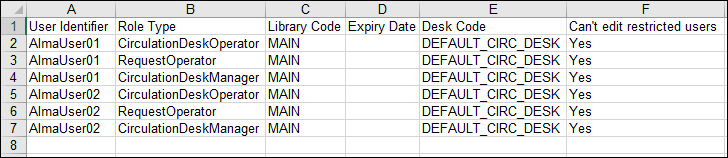
エクスポートを行う場合、[エクスポート]を選択します。ファイルは、1枚のシートの.xlsファイルにエクスポートされます。ファイルの最初の行はヘッダーです。1人のユーザーに割り当てられた役職ごとに1つの行があります(したがって、1人のユーザーがファイル内の複数の行に関係している場合があります)。各列は次の通りです。
- ユーザ識別子 - ユーザーのプライマリID
- 役職タイプ - 役職コードです。One of CirculationDeskOperator,CirculationDeskOperatorLimited,CirculationDeskManager, or RequestOperator.
- 図書館コード
- 期限日 - 役職の有効期限日(ある場合)。
- デスクコード
- Can't Edit Restricted Users - If all of a user's roles have this value set to Yes, the user will have edit/delete access only for users that are not restricted.
ジョブに関する詳細がページに表示されます。
- [デスクオペレータのロード]ページに戻るには、戻るを選択します。For more information about monitoring jobs, see Viewing Running Jobs and Viewing Completed Jobs.
Roles Managed at the Library Level
次の役職は、図書館レベルで管理できます。
- 貸出・返却受付マネージャー
- 貸出・返却受付オペレータ
- 貸出・返却受付オペレータ - 限定
- コレクション目録オペレータ
- コレクション目録オペレータ(拡張)
- コースリザーブマネージャー
- コースリザーブオペレータ
- コースリザーブビューア
- 保証金マネージャー
- デポジットオペレーター
- 保証金オペレータ(拡張)
- デジタル目録オペレータ
- デジタル目録オペレータ(拡張)
- 電子目録オペレータ(拡張)
- フルフィルメントサービスマネージャー
- フルフィルメントサービスオペレータ
- ファンドマネージャー
- 予算・元帳ビューア
- インストラクター
- 請求書マネージャー
- 請求書オペレータ
- 請求書オペレータ(拡張)
- 元帳マネージャー
- Legantoコースオペレータ
- ユーザー
- 冊子目録オペレータ
- 冊子目録オペレータ(拡張)
- 冊子目録オペレーター限定
- 購入リクエストマネージャー
- 購入リクエストオペレータ
- 購入リクエスト オペレータ(拡張)
- 購入マネージャー
- 購入オペレータ
- 購入オペレータ(拡張)
- 受入オペレータ
- 受入オペレータ(限定)
- リポジトリ管理者
- リクエストオペレータ
- リソース共有パートナー管理者
- ベンダーアカウントマネージャー
- ワークオーダーオペレータ
Role Privileges
For the Role Privileges page, see Roles and Registration Configuration.For the list of roles with related privileges, see Privileges for Roles in Alma.
