
ユーザーの削除の設定
ユーザーの削除を設定するには、次の役職のいずれかが必要です。
- ユーザー管理者
- 一般システム管理者
You can configure what happens to user information when you delete users using the purge users job (see Purging Users) or API.Whenever you change the policy to be more restrictive (remove more data), Alma applies the new policy to all previously purged users as well.
- This configuration does not affect what happens when you manually delete users (see Deleting Users).
- ユーザーのパージ ジョブでは、保留シェルフにあるリソース共有リクエストを持つユーザーは削除されません。
- ユーザー削除ポリシーは、ユーザー削除APIにも適用されます。詳細については、開発者ネットワークでのユーザー削除APIを参照してください。
You configure user deletion on the Delete User Policy page (Configuration Menu > User Management > General > Delete User Policy.
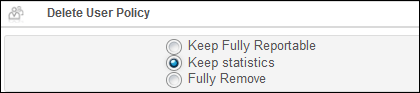
To configure user deletion:
- [ユーザー削除ポリシー]ページで、ユーザー削除ポリシーの設定を選択します。
- 完全にリポート可能なままにする – ユーザーのステータスを[削除済み]にします。すべてのリクエストはキャンセルされ、ユーザー識別子は無効になります。ユーザーの残りのデータはシステムに保持されます。
- 統計情報を保持 – ユーザーの統計データが保持されます。つまり、個人を特定できないすべての統計データ(ユーザーグループやジョブカテゴリなど)と、[統計]タブ上にあるデータが保持されます。プライマリ識別子は姓になります。他のすべてのデータは削除されます。Note that user data may already be anonymized; see Configuring Anonymization.
- Keep statistics and remove primary ID (recommended) – The user's statistical data is retained: that is, all non-identifying statistical data, (such as the user group and job category) are retained, as well as data on the Statistics tab.The primary ID is removed and an internal unique Alma ID is moved into the last name.他のすべてのデータは削除されます。ユーザーデータはすでに匿名化されている場合があります。See Configuring Anonymization.If this option is chosen and the prior selection was Keep fully reportable or Keep statistics, a confirmation message is displayed to indicate that user records that were previously purged using the previously selected option will also be updated and you are asked to confirm the choice.When you confirm, a new job updates the previously purged user records.
- 完全に削除 – 統計データを含むすべてのユーザーデータが削除されます。
- [保存して実行]を選択します。選択したユーザー削除ポリシーが保存され、すでに削除されているすべてのユーザーに対して適用されます。
