Allows you to define the allowed resolution of your booking request.ポリシーには4つの値があります。
Minutes- The booking will be defined by date, hour, and minutes.これがデフォルトです。
Hours- The booking will be defined by date and hour.
Days- The booking will be defined by date only.
Days plus overnight- The end time of the booking will be defined to the next opening time of the library.
When a booking request is created in Alma or Primo, the start and end time fields are now dependent on the value in this policy.If the value is Minutes, time fields are displayed with hours and minutes.値が日または日数プラスオーバーナイトの場合、時間フィールドは非表示になります。値が時間の場合、時間フィールドは時間と分で表示されますが、警告メッセージは時間のみを選択する必要があることを示します。
If Days is selected, you can configure whether or not Alma should block same day booking with the allow_same_day_booking parameter (Configuration > Fulfillment > General Other Settings).
Expand to previous and next open times- Adjusts the start/end time according to the library's opening hours and allows booking over closed library periods.開始/終了日時を自動的に調整する必要がある場合、Almaはアイテムの最大予約ポリシーを無視します。これは、ユーザーが休館期間中に保管できるようにするアイテムに適しています。
Attemptexpanding if within maximum allowed booking length- Adjusts the start/end time according to the library's opening hours and allows booking over closed library periods.開始/終了日時を自動的に調整する必要がある場合、Almaはアイテムの最大予約ポリシーを考慮に入れ、予約期間を短縮する場合があります。これは、ユーザーが一晩保管できるが、長期間保管できないアイテムに適しています。
Only allow booking during open times- Adjusts the start/end time according to the library's opening hours and does not allow booking over closed library periods.予約ウィンドウに休館時間が含まれている場合、開始日または終了日/時間は、アイテムの最大予約ポリシーも考慮して、リクエストされた予約ウィンドウ内の最初の開館期間になるように自動的に調整されます。図書館や机などのアイテムの予約に適しています。
ユーザーが持つことができるアクティブなリソースシェアリクエストの最大数。The following request statuses will not be included when counting the number of requests for this policy: Completed, Canceled, Canceled by Patron, Cancel Requested, Rejected by Partner and Deleted.Active requests (including those in Loan) which were already returned from the patron to the library, but were not yet returned to the lender are ignored when calculating this limit.
特定の年にユーザーが許可されるリソースシェアリクエストの最大数。リクエストを消去すると、このカウントでは考慮されません。The year is counted starting from the date that is configured in the rs_yearly_ill_limit_start_date parameter (See Configuring Other Settings).
Office(Deliver items only to an office/work address)
A patron can request personal delivery only if he/she has defined a home or office/work address, or defined an additional personal delivery location on the User Details page (see Managing User Contact Information) and there are no blocks on the user.In Primo VE it is possible to update the home/work/additional address - see Setting Personal Delivery Locations from Hold Request Form.An item that is requestable for personal delivery, is in addition to the general request ability of a physical pickup location.
個別配送料
配送料が冊子アイテムの個別配送に関連付けられているか。
値:なし/その他。[その他]を選択した場合、ローカル通貨で支払う金額を入力します。
閉館図書館ILL(受付)の期限管理
ILL(受付)の返却期限日が図書館の閉館日に当たらないように図書館が計算できるようにします。
使用可能な値は次のとおりです:
保持 – 期日は変更されません。これがデフォルトです。
Move Backward - When the Library will close before the Due Time of a lending request, shorten the due time to the Library's closing time.
Move Forward - When the Library will close before the Due Time of a lending request, lengthen the due time to the Library's next opening time.
返却期限日
アイテムを借入できる期間。値は次のとおりです。
Fixed – Based on your institution's calendar, the end of a term.学期を選択します。
If you set the Unit of Measurement field to Days,Month, or Week, you can also specify a specific time.If you don't specify a time, the default is your institution's closing time.
また、更新中のアイテムにリクエストが存在する場合、更新は拒否されます。If requests exist on the title that is being renewed, the renewal succeeds or is rejected based on the configured block preferences setting (see Configuring Block Preferences).
リソースシェアリコール期間
借り手がリコールされたアイテムを返却しなければならない日数。
値:なし/その他。[その他]を選択した場合、値を日数で入力します。
This value takes into account calendar days and not library open days.
For more information on recall requests, see Recall Requests.
If Is Recallable is set to false, the loan status changes to Recalled but the due date does not change.
どちらの場合も、アイテムは更新できなくなります。Making recalled loans renewable can be done by configuring the Loan Recalls (Request Configuration) mapping table (see Configuring Loan Recall Requests).
If this setting is True and Recalls Loans = No on the Loan Recalls (Request Configuration) mapping table, the loan is not recalled (see Configuring Loan Recall Requests).リコール貸与=はいの場合のみ、利用規約ポリシーが適用されます。
An item can be renewed only if both Is Recallable is not enabled and Recalls Loans = No on the Loan Recalls mapping table (see Configuring Loan Recall Requests).
For example, if the item's due date is May 10 and an item is recalled on May 7 with a Recall Period value of 5 days, the item's due date is effectively May 12 (5 days after the item was recalled).現在の期日は変更されず、5月10日のままであることに注意してください。
This policy may also affect the due date at loan time if the item is requested by another patron when it is not already on loan (see Requested Item Due Date).
For more information on recall requests, see Recall Requests.
返却期限日
アイテムを借入できる期間。値は次のとおりです。
Fixed – Based on your institution's calendar, the end of a term.学期を選択します。
If you set the Unit of Measurement field to Days,Month, or Week, you can also specify a specific time.If you don't specify a time, the default is your institution's closing time.
取り置きリクエストを出すと、最も長く貸与されたアイテムのみがリコールされ、他のアイテムは更新がブロックされます。リコールされたアイテムが延滞して返却された場合、そのアイテムにはリコール延滞罰金が割り当てられ、他の期限のあるアイテムには延滞罰金が割り当てられます。この動作は設定できます。For more information see Configuring Loans.
値:なし/その他。[その他]を選択した場合は、値と時間単位を入力して期間を定義します。
アイテムがユーザーに貸与されているときに、そのアイテムに対してリクエストが行われると、元の貸与に対してリコールリクエストが作成される場合があります。For more information see Recall Requests.
猶予期間
アイテムが遅れて返却されても罰金が適用されない時間の長さ。
Under Value Type, select None if there is no grace period in this policy, or Other to configure a grace period.
A grace period is defined as a Value(e.g., "2") and a Unit Of Measurement(e.g., "Days").
次の単位を使用できます:
Days - A number of days, calculated from and including the item's due date.For example, if the item's due date is March 1 and the grace period is 2 Days, the end of the grace period is March 2, after which a fine is applied (so that if you use the Days unit of measurement, a grace period of 1 day is essentially meaningless).猶予期間を過ぎてもアイテムが返却されない場合、罰金は期日までさかのぼって適用されます。
罰金対象外の日数 - 「日数」と同様ですが、罰金は猶予期間の終了後からのみ課されます。
Open Days - Only open days will be included in the grace calculation.'Open days' will be considered in the same way as by the overdue fine policy 'Open days'.For example, if the library is closed over the weekend and the grace period is 5, then a full calendar week of grace is used.If the patron is overdue more than 5 open days, then whether or not the open days will be included in the fine calculation depends on the Overdue Fine policy ('All Days' or 'Open Days').
Open Days - Excluded from Fine: Like Open Days, but fines are applied only from the end of the grace period.
Exact Days - A number of days, calculated from the day after the item's due date.For example, if the item's due date is March 1 and the grace period is 2 Exact Days, the end of the grace period is March 3.猶予期間を過ぎてもアイテムが返却されない場合、罰金は期日までさかのぼって適用されます。
Exact Days - Excluded from Fine: Like Exact Days, but fines are applied only from the end of the grace period.
Open Exact Days - Only open days will be included in the grace calculation, and the due time will be considered, i.e., returning after the due time adds a day to the calculation.'Exact Open days' will be considered in the same way as by the overdue fine policy 'Exact Open days'.For example, if the library is closed over the weekend and the grace period is 5, then a full calendar week of grace is used.If the patron is overdue more than 5 open days, then whether or not the open days will be included in the fine calculation depends on the Overdue Fine policy ('All Days' or 'Open Days').ただし、この場合は(開館日とは異なり)、期限も考慮されます。つまり、期限後に返却すると、計算に1日が追加されるということです。
Open Exact Days - Excluded from Fine: Like Open Exact Days, but fines are applied only from the end of the grace period.
Hours - A number of hours, calculated from the time at which the item was due.If the grace period passes and the item is not returned, the fine is applied retroactively to the due time.
Open Hours - Only open hours will be included in the grace calculation.'Open hours ' will be considered in the same way as by the overdue fine policy 'Open hours'.
Hours - Excluded from Fine: Like Hours, but fines are applied only from the end of the grace period.
Open Hours - Excluded from Fine: Like Open Hours, but fines are applied only from the end of the grace period.
Minutes: A number of minutes, calculated from the time at which the item was due.If the grace period passes and the item is not returned, the fine is applied retroactively to the due time.
Minutes - Excluded from Fine: Like Minutes, but fines are applied only from the end of the grace period.
Open Minutes: Only open minutes will be included in the grace calculation.'Open minutes' will be considered in the same way it is considered by the overdue fine policy 'minutes'.
Open Minutes - Excluded from Fine: Like Open Minutes, but fines are applied only from the end of the grace period.
Months: A number of months, calculated from and including the item's due date.猶予期間を過ぎてもアイテムが返却されない場合、罰金は期日までさかのぼって適用されます。
Months - Excluded from Fine: Like Months, but fine are applied only from the end of the grace period.
Weeks - A number of weeks, calculated from and including the item's due date.猶予期間を過ぎてもアイテムが返却されない場合、罰金は期日までさかのぼって適用されます。
Weeks - Excluded from Fine: Like Weeks, but fines are applied only from the end of the grace period.
猶予期間は、通常の貸与されたアイテムとリコールされたアイテムの両方に適用されます。
更新可能
ユーザーがアイテムの貸与を更新できるか。
値:真/偽
最長更新期間
貸与の最長時間。この値には、更新によって貸与に追加された時間が含まれます。
値:なし/その他。[その他]を選択した場合、値と時間測定単位を入力します。
たとえば、この値が21日の場合 :
14日間の貸与のアイテムは、最大7日間(14 + 7 = 21)更新できます。
10日間の貸与のアイテムは、最大11日間(10 + 11 = 21)更新できます。
This value takes into account calendar days and not library open days.
このポリシータイプの値のタイプ = なしの場合、貸与更新期間に制限はありません。
閉館図書館返却期限管理
図書館が閉館しているときにフルフィルメント活動を管理する方法。
この設定には、利用規約管理ページ(設定 > フルフィルメント > 利用規約とポリシー)からもアクセスできます。現在の設定によっては、ドロップダウンリストに一部の値のみが表示される場合があります。To view all the values, select Edit Policy from the row actions menu.
The available values are described below, according the following example: If a due date policy is calculated to fall on a Saturday at 12:00 PM and the library is closed over the weekend but open on weekdays 08:00 AM – 21:00 PM.
維持 – 期日は土曜日の12:00のままです。
Move backward – the due date will be Friday at 21:00 PM.
前方に移動 – 期日は月曜日の08:00です。
次の営業日の終わりに移動 – 期日は月曜日の21:00になります。
Move to next open day (same hour)- the due date will be Monday at 12:00 PM.
Move to previous open day (same hour)- the due date will be Friday at 12:00 PM.
延滞貸与が返却されたときに、ユーザーレコードでブロックをトリガーするか否か。ブロックは、貸与の延滞時間に応じて一定期間(開館日またはすべての日に基づいて)指定されるか、または固定された期間に指定されます。デフォルトでは、すべてのアクティビティがブロックされますが、ブロックは貸与、更新、リクエストに限定して適用することもできます。The block is automatically lifted once the configured expiry date passes, as part of the Users - Remove Blocks job.
Prevents reloaning items to a patron that has just returned the item.同じ資料タイプで同じタイトル(同一の書誌レコードに紐づく資料)の異なるコピーは、このポリシーで単一の資料と見なされます。ポリシータイプには、次の3つのオプションがあります。
None - there is no limit on borrowing copies of the same title (items attached to the same bib record).これは以前の機能であり、デフォルトです。
If an item of the same title (items attached to the same bib record) was recently loaned to a specific patron, it needs to be set to one of the override options to allow a user to check out more than one volume or copy of a title.
Parallel- the patron may not check out two copies of the title at one time.
Whether a physical item can be requested to fulfill a physical resource sharing lending request.The value of this field is applied only for fulfillment rules which do not depend on patron qualities, e.g. user group, since resource sharing lending requests do not reference a requester.
値:真/偽
はデジタルリソース共有のリクエストが可能です
Whether a physical item can be requested to fulfill a digital resource sharing lending request.The value of this field is applied only for fulfillment rules which do not depend on patron qualities, e.g. user group, since resource sharing lending requests do not reference a requester.
A patron can request personal delivery only if he/she has defined a home/work address on the User Details page (see Managing User Contact Information) and there are no blocks on the user.
デジタル化リクエストに対して請求されるデジタル処理費用。It is applied when the patron digitization request is completed or approved, if approval is necessary.デフォルトは[無料]です。これは、Almaのユーザーのデジタル化リクエストフォームおよびディスカバリーの[入手する]タブで[デジタル処理費用を計算]ボタンを選択したときに表示される料金にも影響します。The fee calculation is: <Digitization Fee per Digitization> + <number of pages> * < Digitization Fee per Page>.
ページあたりのデジタル処理費用
デジタル化リクエストに対してデジタル化されたページごとに請求される費用。承認が必要な場合は、ユーザーのデジタル化リクエストが完了または承認されたときに適用されます。デフォルトは[無料]です。これは、Almaのユーザーのデジタル化リクエストフォームおよびディスカバリーの[入手する]タブで[デジタル処理費用を計算]ボタンを選択したときに表示される料金にも影響します。The fee calculation is: <Digitization Fee per Digitization> + <number of pages> * < Digitization Fee per Page>.
ユーザー登録料
新しいユーザーを登録するためにローカル通貨で支払う金額。This applies to an internal user only.The fee is applied only when registering the user from Manage Patron Services.
If a Patron role in the scope of the institution or the circulation desk's library expires within the alert period, a system note alerts the operator to this.
ユーザー役職更新期間
ユーザーの役職が更新される時間。
値:
なし:このユーザーにこの権限は失効しません。
その他:値と時間測定の単位を入力します。
検索範囲を更新する
The scope in which a user's Patron role can be renewed.
値:機関/図書館
ユーザー更新期間
The amount of time by which the user's registration is renewed (until the estimated date when the user is expected to leave the institution).
値:
なし:このユーザーに期限切れになりません。
その他:値と時間測定の単位を入力します。
許可と承認の詳細については、有効期限を参照してください。
このポリシーには、測定単位としての正確な日数が現在機能していないという既知の問題があります。
冊子フルフィルメントルールを設定します。
翻訳可能
This page describes theconfiguring of physical fulfillment including physical locations, request policies, terms of use, and fulfillment units.For a high level overview of the workflow for configuring booking see Booking Configuration.For links to all the main fulfillment documentation pages see Fulfillment.
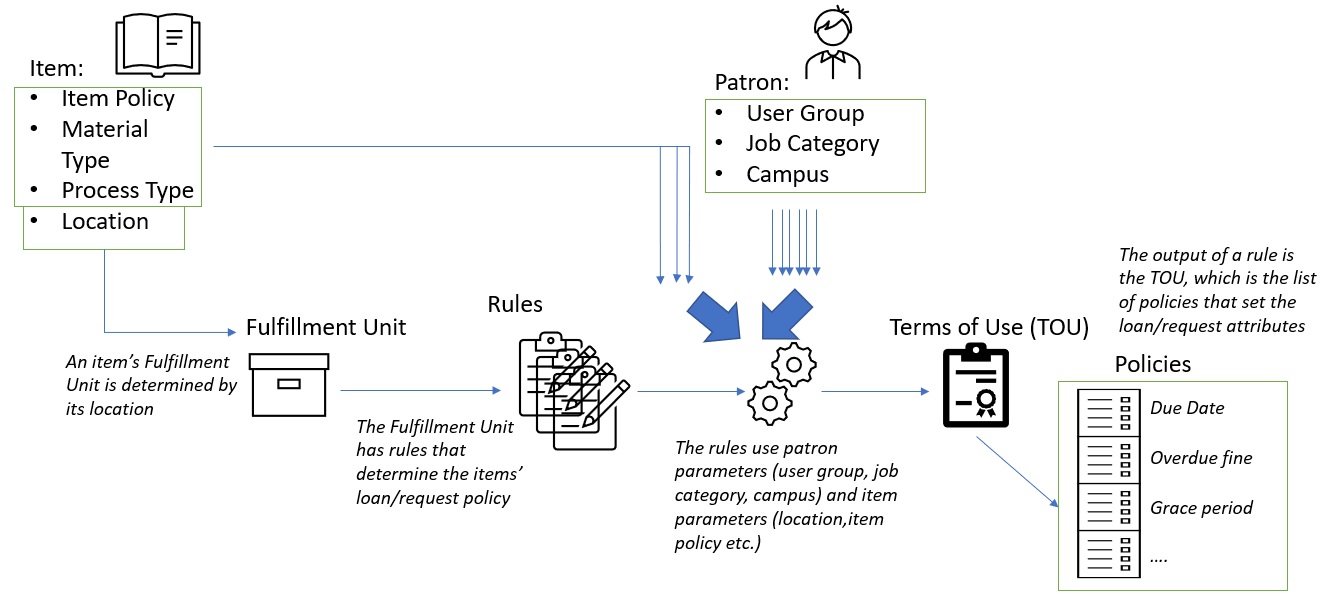
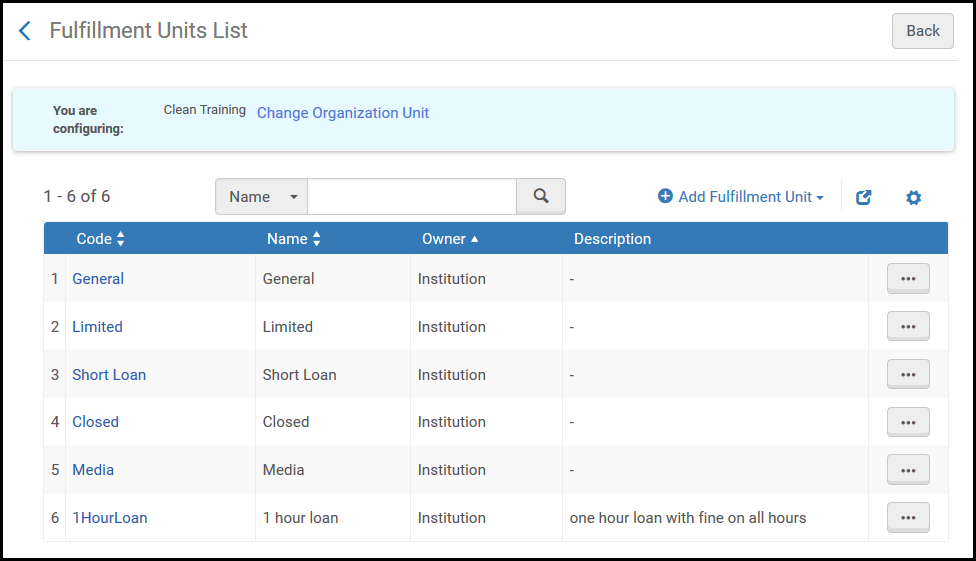
A fulfillmentunit is one or more physical locations within an institution that follow the same policies.フルフィルメントユニットには、ユーザーのポリシーを定義する利用規約 (TOU)があります。
Create fulfillment and item policies – See Adding Fulfillment Policies.これらのポリシーは、アイテムに適用されます。更新可能か、受け取ることができるロケーション、チェックアウトできる期間、アイテムが紛失した場合の罰金などを指定します。
If a title has a physical holding at a physical location that is associated with a fulfillment unit for which On shelf request policy is set to No requesting, then any physical holding of that title, regardless of the On shelf request policy setting of the fulfillment unit at its location, is not requestable.This means that other holdings of the title that belong to any fulfillment unit cannot be requested (for instance, by patrons through Primo).To avoid this scenario,On shelf request policy should instead be set to No requesting from available holdings.
新しいフルフィルメントユニットを定義したら、フルフィルメントユニットを編集して、フルフィルメントユニットに関連付けられている物理的なロケーション、およびフルフィルメントユニットに適用される利用規約を指定します。For details, see Editing a Fulfillment Unit below.
Editing a Fulfillment Unit
フルフィルメントユニットに関する次の情報を編集できます。
Fulfillment Unit Details – The parameters configured when adding a fulfillment unit (see To edit fulfillment unit details in Editing a Fulfillment Unit).
Select the existing locations that you want to attach to the fulfillment unit and select Select(you can select multiple locations).ロケーションは、フルフィルメントユニットに添付されているロケーションのリストに追加されます。
出力パラメータセクションで、入力パラメータが満たされたときに適用される使用条件を指定します。使用可能な利用規約のリストは、以前に選択したルールタイプに従って動的に決定されることに注意してください。TOU詳細を選択して、選択した利用規約の詳細を表示します。For details on configuring terms of use, see Configuring Terms of Use.
フルフィルメントユニットのルールタブでフルフィルメントユニットに複数のルールを定義している場合は、上矢印と下矢印を使用してルールのオーダーを設定できます。Almaは、有効な最初の(そして唯一の)適切なルールを適用します。適切なルールが見つからない場合、システムはデフォルトのルールを使用します。Note that using the Move Up and Move Down arrows will update the Update Date column, but not the Updated By column.
Use the rule's Actions menu to edit, duplicate, or delete a rule.スライダーを切り替えて、ルールを有効/無効にします。
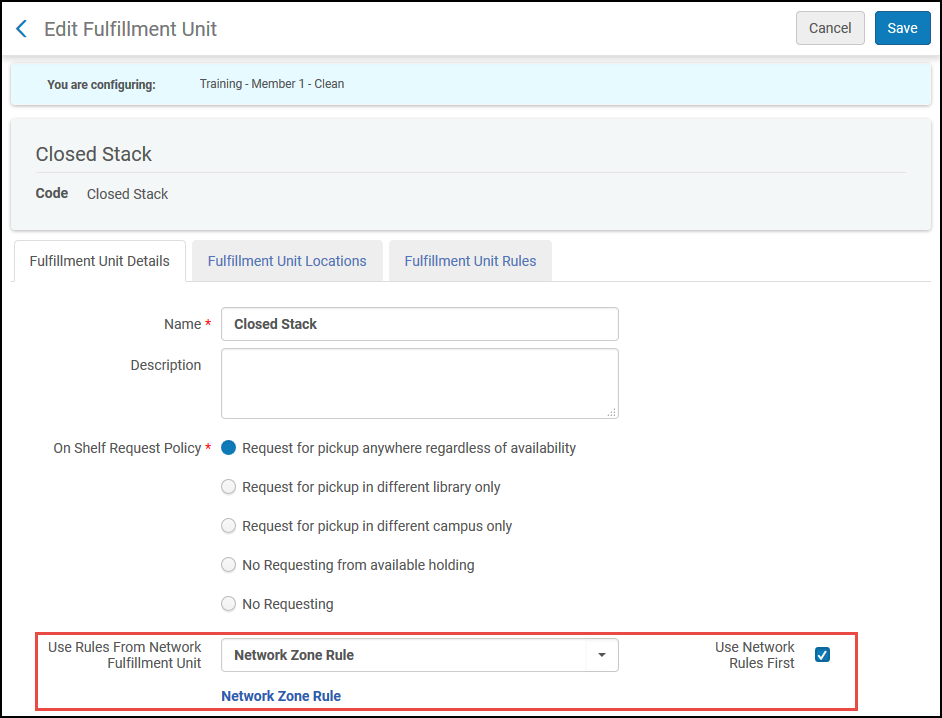
コラボレーションネットワークでは、ネットワークゾーンにフルフィルメントユニットを作成し、それをメンバー機関に共有できます。メンバー機関は、共有されたレコードの表示を許可されますが、それらを編集または削除することはできません。メンバー機関に存在しないネットワークゾーン機関で入力パラメータが選択されている場合、ルールは適用されません。When the Network Zone fulfillment unit has been distributed, the local rules contain two additional fields,Use Rules from Network Fulfillment Unit and Use Network Rules First.
If no rules are configured, the requested items will be marked as missing when running the Requests.For more information, see Configuring Request Pickup Rules.
このページでは、フルフィルメントポリシーを設定する方法について説明します。For a high level overview of the workflow for configuring booking see Booking Configuration.
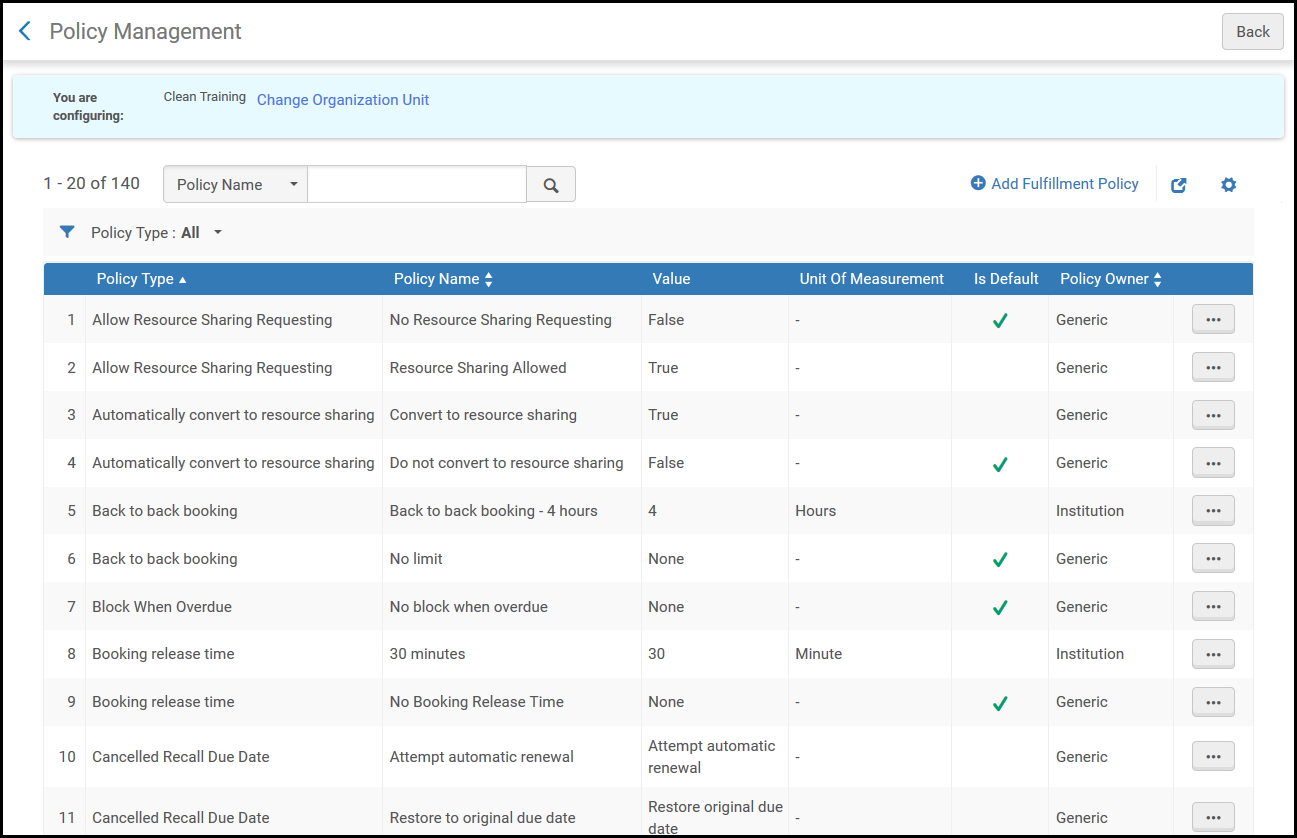
フルフィルメントポリシーは、ユーザーが図書館からサービスを受領するときに課される図書館サービスの属性とパラメータを定義します。たとえば、フルフィルメントポリシーは、アイテムの貸与時期、アイテムが遅れて返却される猶予期間、貸与中にアイテムを紛失したユーザーが支払うべき手数料を決定する場合があります。Fulfillment policies are divided into policy types, such as Due Date,Grace Period, and Lost Item Fine(see Adding Fulfillment Policies).タイプごとに多数のフルフィルメントポリシーを作成できます。特定のタイプに複数のフルフィルメントポリシーが存在する場合、デフォルトを指定できます。
The due date policy's description is what is shown in the Primo Get It tab's item list.If no description is defined, the Get It tab displays the due date policy's value and unit of measurement.
デフォルトポリシーフィールドで、偽または真を指定して、特定のポリシータイプに複数のポリシーが存在する場合、新しいポリシーがポリシータイプのデフォルトポリシーであるかを示します。新しい利用規約を追加すると、デフォルトのポリシーがポリシーのドロップダウンリストのデフォルトオプションになります。For details on configuring terms of use, see Configuring Terms of Use.
メンバー機関で機関レベルの利用規約、ポリシーにリンクされているネットワークゾーンポリシーを削除することはできません。The Job Report page for failed records (select ViewFailed Records from the row actions list) displays the link,Could not delete.利用規約はこのポリシーに関連しています。リンクを選択して、ポリシーを表示できます。ポリシーは、ネットワークポリシーから機関ポリシーに変更されます。
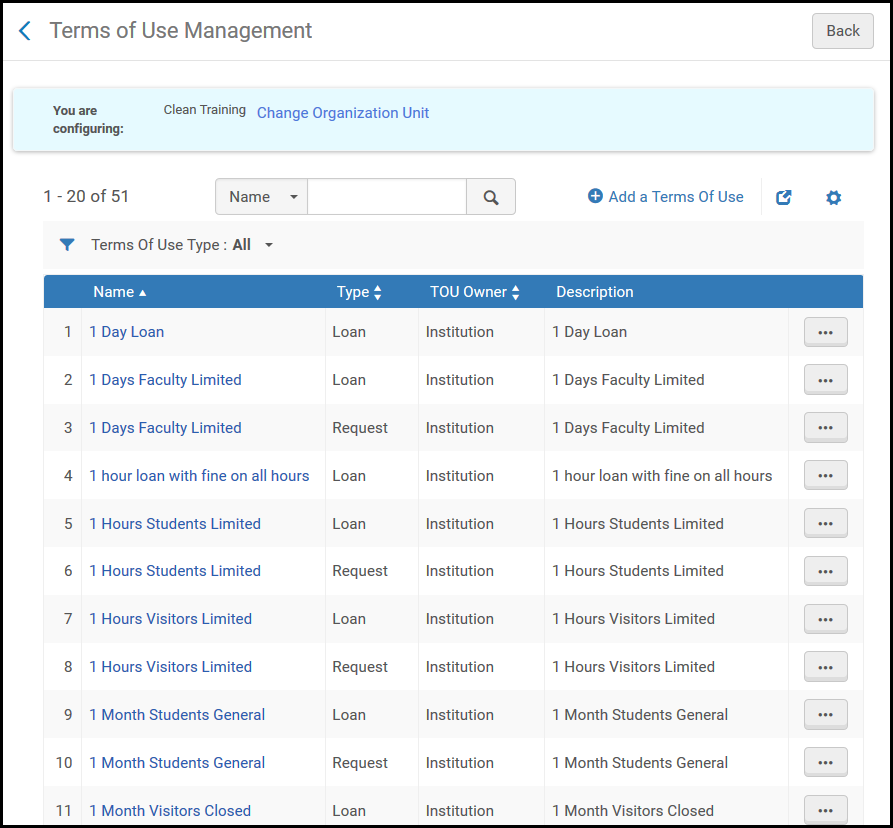
このページでは、利用規約を設定する方法について説明します。For a high level overview of the workflow for configuring booking see Booking Configuration.
利用規約 (TOU)は、サービスの提供または終了に応じて、ユーザーに対する機関/図書館のコミットメントを定義するポリシーのリストを指します。利用規約は、貸与、リクエスト、ユーザー登録などの特定のタイプのフルフィルメントアクティビティに関連付けられています。For details on the policies that can be included in terms of use, see Configuring Fulfillment Policies.
保存を選択して、新しい利用規約の詳細を保存します。新しい利用規約のセットがリストに追加されます。必要に応じて、使用可能なフィルタと検索コントロールを使用して、リストで新しい利用規約を見つけます。For details on Terms of Use, see Configuring Terms of Use.
ユーザーが個別配送住所で受け取りするためにリソースシェアアイテムをリクエストできるようにするには、ユーザーはホームまたは職場の住所が定義されている必要があります。A patron's address type is configured on the patron's User Details page (Admin > User Management > Manage Users).Select the Contact tab and add an address in the Addresses section (see Managing Users).
利用できないアイテムに対して冊子アイテムのリクエストが行われると、より高い列のロケーションをより優先度の高いユーザーに割り当てるために、自動優先順位付けを行うことができます。See also Request Priority in the Fulfillment Policy Types table.