
コースの読み込みの設定
- フルフィルメント アドミン
- 一般システム管理者
For general information about courses, see Managing Courses.For information about course rollover, see Rolling Over Courses(Alma) and Leganto Course Rollover(Leganto).
コース管理システムからコース情報をインポートできます。Almaは、設定したスケジュールで実行されるコースローダー統合プロファイルを使用してこれをサポートします。また、設定後にプロファイルを手動で実行したり、プロファイルを編集または削除することもできます。
The course information must be in a tab-separated value file(not comma-separated) in a dedicated directory on an FTP server accessible by Alma, saved either as a .txt,.csv,.xls, or a .xlsx file.
- FTPディレクトリを他の目的に使用しないでください。
- 各ファイルには有効な日付スタンプが必要です。プロファイルは、プロファイルが最後に実行された日時より後の日付スタンプを持つファイルのみをロードします。
- ファイルは、CRLF行終端のあるUTF-8またはASCII形式である必要があります。
ファイルには、コースのリストが各行に1つずつ、それに続く列とともに順番に含まれている必要があります。各行は、新規コース、変更されたコース、削除されたコース、またはロールオーバーされたコースを示します(操作列を参照)。
- カンマは列内の値を区切るためにのみ使用されるため、次の列の値にはコンマ区切りの値を含めることができます。それぞれについて、以下のコースローダーフィールドの表で詳しく説明しています:
- SEARCH_ID3
- MULTI_INST
- CAMPUS_AND_PARTICIPANTS
- ある行/すべての行の列に値が含まれていない場合でも、すべての列が存在する必要があります。
- 重要なフィールドはコードおよびセクションIDです。これらのフィールドはコースを識別します。Valid values in the Course Title and Processing Department fields are also mandatory.Operation is mandatory (but see below).他のすべてのフィールドは任意です。
- 特定のコードとセクションIDを持つ最初の行のみが処理されます。同じコードとセクションを持つ後続の行はエラーを発生させ、無視されます。
- Start Date and End Date and Submit By Date must be strings in the format specified in the integration profile.Number of Participants,Weekly Hours, and Year are integer fields.その他のすべてのフィールドは文字列です。
- 旧コースコードと旧コースセクションは、操作フィールドにロールオーバーの値を持っている場合のみ必要とされます。下記参照。
- 同じコードとセクションIDを持つ行を含めることで、その後のファイルの中のコースを編集することができます。
- 参加者数の変更は情報提供のみです。コースに関連付けられたリーディングリストに添付されている引用のステータスは変更されません。
- インストラクターを変更すると、読書リストをコースに関連付けることができる人が変わります。すでにコースに関連付けられているリーディングリストは変更されません。
- When editing a course and a field is marked for overwrite (see overwrite options below), or when rolling over a course, then entering a plus sign (+) as a value in the field instructs the job to keep the old value in this field (as if overwrite was not selected).If the field contains multiple values, all old values are maintained.Any other value (including an empty value) is used instead of the old value.
コース編集時の新しいフィールド値 入力ファイルのフィールドは... 空のまま プラス記号(+) その他の値 上書きが選択されている Empty (remove old value) 古い値 新しい値 上書きが選択されていない 古い値 古い値 古い値 検索可能なIDフィールドのいずれの場合、もし:
空のままにすると、削除された場合は古い値になります。
a + is entered as a value in addition to other values, the current values are retained, and all other entered values are added as additional values.
新しい値が追加されると、その新しい値が古い値を置き換えます。
| フィールド | コード(下のサンプルファイル) | 説明 | 値 |
|---|---|---|---|
| コース・コード(必須) | COURSE_CODE | 必須。250文字まで。LTI統合プロファイルを使用する場合、このフィールドは、LTI統合プロファイルを使用してインポートされたコース識別子と一致する必要があります。 | |
| コースタイトル(必須) | COURSE_TITLE | コース名 | 最大255文字 |
| セクションID | SECTION_ID | コースセクションID。コースは、学生向けのリソースとアクティビティをより適切に整理するためにセクションに分割されています。各セクションの指導は異なる教員によって可能であり、個別の説明が含まれ、教員が必要とするだけのリソースが含まれています。 | 必須ではありませんが、上記の注を参照してください。50文字まで。 |
| 学術部署 | ACAD | 学部コード。学部テーブルのコード(ラベルまたは名前ではなく)を使用します。その他の値は無視されます。See Configuring Academic Departments. | |
| 処理部署(必須) | PROC_DEPT | 処理部署のコード。処理部署テーブルのコード(ラベルまたは名前ではなく)を使用します。その他の値は無視されます。See Configuring Processing Departments. | |
| 期間1 | TERM1 | 期間テーブルの期間コード。See Configuring Course Terms. | |
| Term2 | TERM2 | ||
| Term3 | TERM3 | ||
| Term4 | TERM4 | ||
| 開始日 | START_DATE | コースの開始日。入力されていない場合、値はcourse_start_dateから取得され、定義されていない場合は、現在の日付から取得されます。 | 統合プロファイルで指定されたフォーマットの文字列。 |
| 終了日 | END_DATE | コースの終了日。入力されていない場合、値はcourse_end_dateから取得され、定義されていない場合は、現在の日付から取得されます。 | 統合プロファイルで指定されたフォーマットの文字列。 |
| 参加者数 | NUM_OF_PARTICIPANTS | 10桁までの整数。 | |
| 週当たりの時間 | WEEKLY_HOURS | 10桁までの整数。 | |
| 年 | YEAR | コース年度 | Integer up to 4 char. |
| 検索可能なID 1 | SEARCH_ID1 | コースID、上で入力したコースコードとは異なる追加のコースIDをLMSで使用している場合。 | 50文字まで。When editing or rolling over a course, if a + is entered here, any IDs added in the Searchable ID columns are appended to the existing course IDs. |
| 検索可能なID 2 | SEARCH_ID2 | ||
| すべての検索可能なID | SEARCH_ID3 | 検索可能なすべてのIDのリスト。上記の2個のフィールドの代わりに、このフィールドを使用できます。 | コンマ(,)で区切られた検索可能なIDのリスト。このフィールドには文字数制限はありません。このフィールドを使用して、1つの列に複数の検索IDを入力します。When editing or rolling over a course, if a + is entered in any of these fields, any IDs added in the Searchable ID columns are appended to the existing course IDs. |
| インストラクター1 | INSTR1 | インストラクターの一人の名前 | Almaユーザーのプライマリ識別子。Almaの既存のユーザーと一致しない値は無視されます。ユーザーにインストラクターの役割がまだない場合は、Almaが役割を追加するように設定できます。コースの既存のリーディングリストに、新しく追加されたインストラクターを所有者として自動的に追加するかどうかも設定できます。See Configuring Reading List Ownership.コースを編集するときに、 +をここに入力すると、インストラクター列に追加されたインストラクターは、コース内の既存のインストラクターと統合されます(この機能はロールオーバーでは機能しません)。 |
| インストラクター2 | INSTR2 | ||
| インストラクター3 | INSTR3 | ||
| インストラクター4 | INSTR4 | ||
| インストラクター5 | INSTR5 | ||
| インストラクター6 | INSTR6 | ||
| インストラクター7 | INSTR7 | ||
| インストラクター8 | INSTR8 | ||
| インストラクター9 | INSTR9 | ||
| インストラクター10 | INSTR10 | ||
| すべてのインストラクター | ALL_INSTRUCTORS | すべてのインストラクターのリスト。上記の10個のフィールドの代わりに、このフィールドを使用できます。 | コンマ(,)で区切られたインストラクターのリスト。このフィールドには文字数制限はありません。コースを編集またはロールオーバーするときに、このフィールドの任意の場所に+ を入力すると、インストラクター列に追加されたインストラクターは、コース内の既存のインストラクターと統合されます。 |
| 操作(必須) | OPERATION | このフィールドは、厳密には次のいずれかの場合にのみ必須です。
|
Empty — If left blank, perform the default operation. NEW— Create a new course UPDATE— Update the existing course DELETE— Delete the course ROLLOVER— Duplicate the course 空のままにすると、同じコードとセクションを持つようなコースがAlmaに既に存在しない場合、コースに(「新」が追加されます。それ以外の場合、コースは「更新」されます。See the note above. DELETEに設定した場合、関連するコース(第1列および第3列(コードおよびセクションID)によって識別される)はAlmaから削除されます。ROLLOVERに設定されている場合は、次の2つのフィールドを参照してください。 これを実装するには、「統合プロファイル」で、関連する「上書き」チェックボックスも更新する必要があります。 |
| 旧コースコード(ロールオーバーのみ) | OLD_COURSE_CODE | 旧コースの情報が新しいコースにコピーされます。 | 操作がロールオーバー に設定されている場合 、ここに旧コースコードを入力し、次のフィールドに旧コースセクションを入力します。操作がROLLOVERでない場合、これらのフィールドは必要ありません。 |
| 旧コースセクションID(ロールオーバーのみ) | OLD_COURSE_SECTION | 旧コースの情報が新しいコースにコピーされます。 | 操作がロールオーバー に設定されている場合 、このフィールドに旧コースセクションを入力し、前のフィールドに旧コースコードを入力します。The old course section must be identical to the section ID to perform ROLLOVER to the record.操作がROLLOVERでない場合、これらのフィールドは必要ありません。 |
| 送信期日 | SUBMIT_LISTS_BY | 統合プロファイルで指定されたフォーマットの文字列。 | |
| キャンパスとキャンパス参加者 | CAMPUS_AND_PARTICIPANTS | キャンパスコードがAlmaで定義されていない場合は、キャンパスは<code> not foundという名前で作成されます。参加者数は任意です。 | カンマで区切られたキャンパスコードのリスト。各コードには、次のように、縦線の後に参加者の数を含めることができます: <code>|<number of participants>。例:RIVERCAMPUS|10, UPCAMPUS。 |
| リーディングリスト名 | READING_LIST_NAME | 操作がROLLOVERに設定されている場合は、リーディングリスト名を入力します。操作がROLLOVERでない場合、このフィールドは必要ありません。 |
引用が作成された元の日付が保持されます。
See an example file here.
- 統合プロファイルのS/FTP接続を作成します。For more information, see Configuring S/FTP Connections.このプロファイルには、FTPサーバー上の一意の専用ディレクトリが必要です。
- コースのアクティブ化/非アクティブ化ジョブが有効になっていることを確認します。See Configuring Fulfillment Jobs.
- 統合プロファイルリストページ(設定メニュー > 一般 > 外部システム > 統合プロファイル)で、統合プロファイルを追加を選択します。統合プロファイルページが表示されます。

- 統合タイプフィールドで、 コースローダーを選択します。ページがさまざまなフィールドで更新されます。
- プロファイルのコードと名前を入力します。
- プロファイルのS/FTP接続を選択します。任意の説明を入力することもできます。注: デフォルトフィールドは、将来の使用のためにそのままにしておきます。
- システムフィールドは必須であり、Ex Librisの情報の提供のみを目的としています。
- 次へを選択します。ウィザードの2ページ目が表示されます。
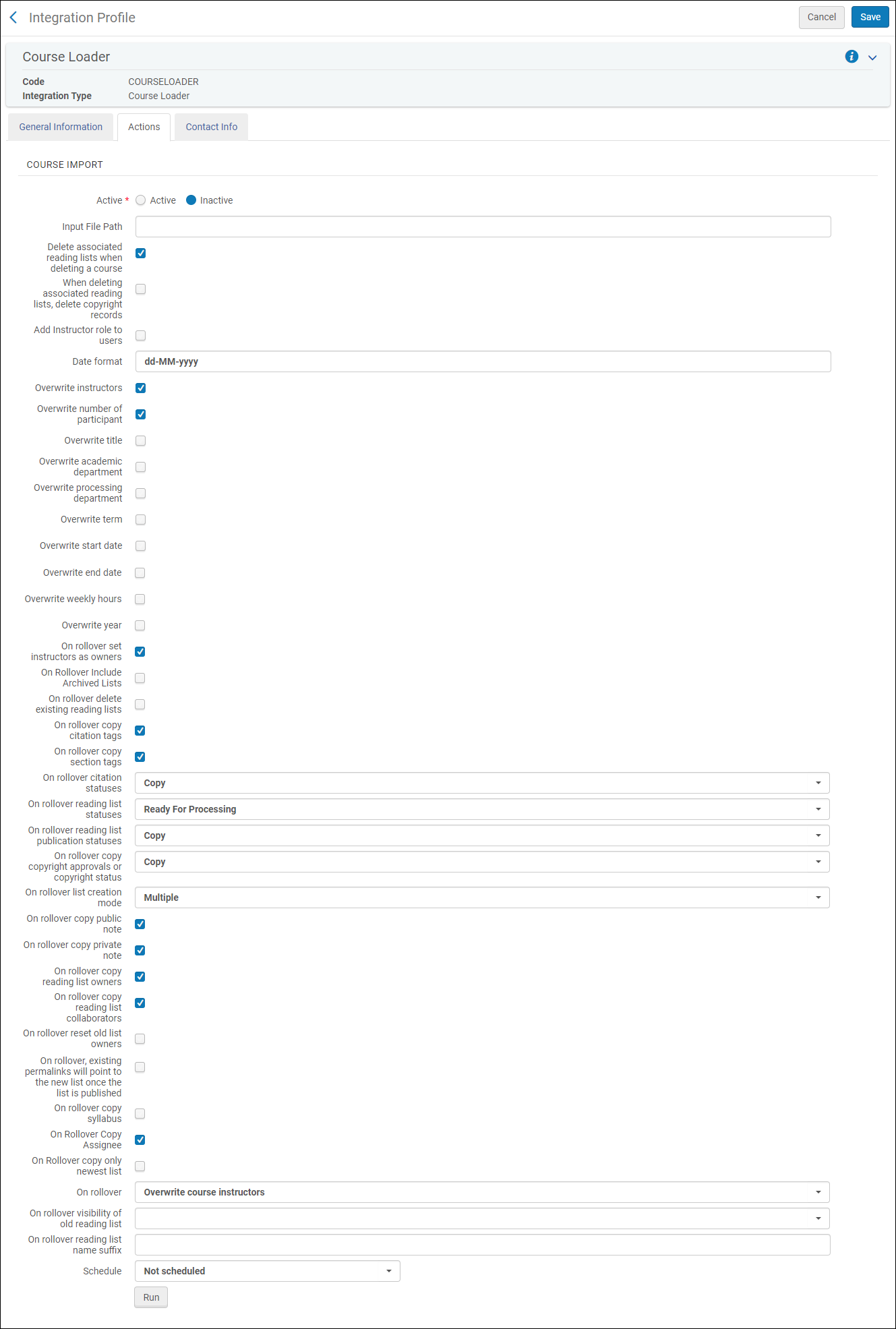 統合プロファイルコースローダー - [アクション]タブ
- 以下のフィールドを設定します。
- Active— Whether this profile is active or inactive.非アクティブなプロファイルをスケジュールまたは実行することはできません。
- Input File Path— If the course file information is located in a subdirectory at the FTP connection, enter the subdirectory.それ以外の場合は、./を入力します。Both .csv and Excel files are supported.
- Delete associated reading lists when deleting a course— Whether reading lists (and associated sections and citations) are deleted from Alma when their associated course is deleted.選択されていない場合、リーディングリストはコースとの関連付けなしでAlmaに残ります。If any courses are deleted, the profile's job report indicates the number of deleted courses.
- When deleting associated reading lists, delete copyright records— Whether to also delete the copyright information about a deleted reading list if you enabled the previous setting (Delete Associated Reading List when Deleting a Course); this information is normally preserved for record keeping.
- Add instructor role to users— Whether to automatically add the Instructor role to all users listed in columns as instructors.
- Date format— The expected date format for date fields (for example, MM/dd/yyyy).For permitted values, see https://docs.oracle.com/javase/7/docs/api/java/text/SimpleDateFormat.html.
- Overwrite options— Whether new values overwrite existing values for instructors, number of participants, course title, academic department, processing department, term, start date, end date, weekly hours, and year.これを実装するには、アップロードされたファイル内で、関連する「オペレーション」の値も更新する必要があることに注意してください。
- Rollover options— Note that you also need to update the relevant Operation value in the uploaded file for this to be implemented.When performing a rollover, select whether:
- On rollover include archived lists— Whether to include archived lists.
- On rollover delete existing reading lists— Whether the old lists are removed.
- On rollover copy citation tags— Whether citation tags are copied.
- On rollover copy section tags— Whether section tags are copied.
- すべてのタグ - 設定されたすべてのタグを含めます。
- Select tags — Include selected tags.
- On rollover citation statuses— Whether to copy the citation statuses, recalculate them (When recalculated, some may automatically be set to Complete; see Configuring Default Statuses for Citations/Reading Lists.All others are set to Ready for Processing.) or set all citations to Being Prepared.
- On rollover reading list statuses— The status of the new reading lists:Being Prepared,Ready for Processing,Complete, or Rolled Over.
- On rollover reading list publication statuses— Whether to copy the reading lists' publication statuses or set the new ones to Draft.
- On rollover copy copyright approvals or copyright status— Whether to copy any existing copyright records or manual statuses (Copy), not copy existing records or statuses (None), or submit all new citations for copyright approval (Recalculate).Note that a DCS license type and status is copied, regardless of what this is set to; see Integrating with the UK's Digital Content Store (DCS).著作権レコードがコピーされると、著作権承認の日付範囲がコースの日付範囲にアップデートされます。
- On rollover list creation mode—Multiple(create a new reading list for each course) or Single(if the reading list already exists, attach it to the new course).このオプションは、複数のコースを単一のリーディングリストに関連付けることができる場合に関連します。例えば、ファイル内で、コースC1をC2にロールオーバーしたく、また、コースC1をC3にもロールオーバーしたい場合、次のようになります。
- This option is set to Multiple— Two lists are created, one associated with C2, and one associated with C3.
- This option is set to Single— One list is created, associated with both courses C2 and C3.
- On rollover copy public note— Whether to copy citations' public notes.
- On rollover copy private note— Whether to copy the citation's fulfillment notes.
- On rollover copy student discussion(Leganto only) — Whether to copy student discussions.ユーザーの名前は各コメントから削除されます。
- On rollover copy reading list owners— Whether to copy the reading list's owners.
- On rollover send owner subscription letter— Whether to send an owner subscription letter after the completion of a rollover.For more details on letters, see Configuring Alma Letters.
- On rollover copy reading list collaborators— Whether to copy the reading list's collaborators.
- On rollover reset old list owners— Whether to reset the old list owners.
- On rollover, existing permalinks will point to the new list once the list is published— Whether existing permalinks should point to the new list (once it is published) or remain pointed at the old list.
- On rollover, copy syllabus(Leganto only) — Whether to copy the reading list's syllabus.
- On rollover Copy Assignee— Whether to copy the reading list's assignee.
- On Rollover copy only newest list— Whether to copy only the newest list during rollover.これにより、何らかの理由で複数のリストがコースに関連付けられている場合に、ロールオーバー中にリストが重複するのを防ぎます。
- On rollover copy internal library note— Whether to copy or reset internal library notes during rollover.
- On rollover copy instructor note— Whether to copy instructor notes during rollover.
- On rollover create new course when old course code doesn't exist— Whether to create a new course during rollover even if OLD_COURSE_CODE does not exist..古いコースコード欄が空欄のままの場合、その行はスキップされ、新しいコースは作成されません。
- On rollover copy list created before— Relevant only for institutions who run the rollover job more than once per term, to ensure that reading lists that were previously rolled over in preparation for the upcoming term are not rolled over again.The rollover job checks if a reading list is already associated with the new course (COURSE_CODE) and if so, if it was created before the date defined in this field.If the reading list was created prior to the defined date, the reading list associated with the old course (OLD_COURSE_CODE) is rolled over to the new course (as defined in COURSE_CODE).それ以外の場合、読み取りリストはロールオーバーされません。最初のロールオーバーの後、現在の期間の最初のロールオーバーの日付を入力します。後続のロールオーバーに使用するために、日付を含む統合プロファイルを保存します。ロールオーバージョブは必要な回数だけ実行でき、ジョブはまだロールオーバーされていないリストのみをロールオーバーします。次の期間の最初のロールオーバーを実行する前に日付を削除してから、上記の手順に従って日付を再度更新します。
- ロールオーバー時に:
- Keep course instructors— Keep the existing course instructors and ignore the instructors in the uploaded file.
- Overwrite course instructors— Remove the old instructors and add the instructors from the file.
- On rollover visibility of old reading list(Leganto only) — Select the publication status of the old list after a rollover (the new list will be in Draft).空白のままにして、既存の公開ステータス(その内容に関係なく)を保持します。
- A list's copyright clearance is reset on rollover.ただし、クリエイティブコモンズライセンスが引用に対して宣言されている場合、この宣言はロールオーバーされます。
- プロファイルを実行するタイミングを選択します。The scheduling options vary depending on your time zones but include not scheduled, every 6 hours, every day, every week, and every month.
- 保存を選択して、プロファイルを保存します。When Operation is set to ROLLOVER, you can set the name of the newly created list using the Field Normalization table (Leganto configuration menu > General > Field Normalization).See Configuring Normalization Rules.名前が設定されていない場合、名前はデフォルトで1の接尾辞が付いた古い名前になります。
スケジュールされたジョブのリストでジョブを確認できます。See Viewing Scheduled Jobs.
- 統合プロファイルリストページ(設定メニュー > 一般 > 外部システム > 統合プロファイル)で、コースローダー統合プロファイルの行のアクションリストから編集を選択します。プロファイルは一般情報タブを事前に選択した状態で表示されます。連絡先情報タブは、将来使用しますので、そのままにしておきます。
- アクションタブを選択します。アクションタブが表示されます。
- 実行を選択して、プロファイルを実行します。The job number appears on the page OR Select Run in Report Mode to run the job in report mode.Report Mode creates a report as if the Course Loader had run, detailing the course records that would have been created, updated, and deleted, and a list of anticipated issues, warnings, or errors.レポートモードは、コースレコードの更新と削除を含む、コースの読み込みにのみ関連します。レポートモードでロールオーバーファイルを実行すると、レポートはファイルを検証しますが、ジョブの完全な結果は表示しません。
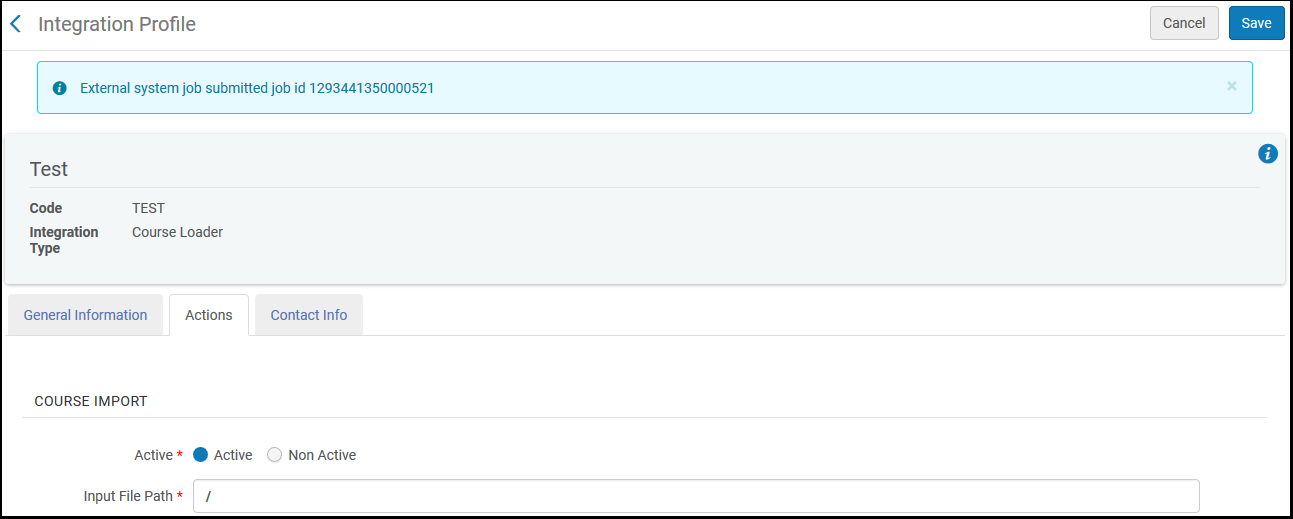
作業の監視ページでジョブを監視できます。See Viewing Running Jobs and Viewing Completed Jobs.
- 統合プロファイルリストページ(設定メニュー > 一般 > 外部システム > 統合プロファイル)で、コースローダー統合プロファイルの行のアクションリストから編集を選択します。
- すべての変更(上記のコース読み込みプロファイルを手動で実行する方法を参照)を入力し、保存を選択します。プロファイルが変更されます。
統合プロファイルリストページ(設定メニュー > 一般 > 外部システム > 統合プロファイル)で、コースローダー統合プロファイルの行のアクションリストから削除を選択し、確認ダイアログボックスで確認を選択します。プロファイルが削除されます。
Page tags: article:topicproduct:almacontent:Documentationlang:english
