
Editing Targets

You can edit targets from the List of Targets.

To edit a target:
  1. Click the Edit button edit_btn.gif next to the target you want to edit.
    • If the target is global, not available for CDI activation, the following dialog box opens:
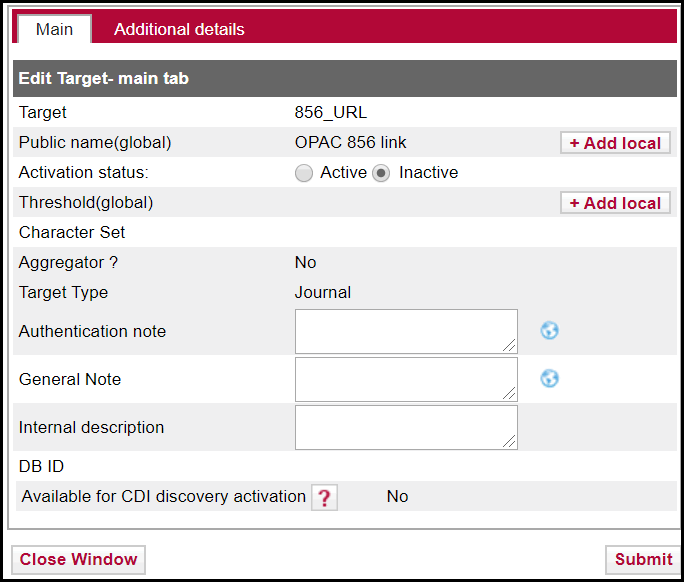
      edit_target_no_institute.gif

      Edit Target
      1. Fill in the fields according to the following table:
        Edit Target
        FieldDescription
        TargetThe name of the target for internal use.
        Public NameThe title of the target displayed to the user in the SFX menu. Do not use the # character in the public name of the target. This causes problems when exporting database information.
        Activation StatusIndicates if the target is active. If institutes have been defined in the instance, the Institute field is displayed, indicating the activation per institute. For more information about institutes, refer to the Institute Feature section of the SFX Advanced User's Guide.
        ThresholdLimitations on the availability of this target
        Character SetThe type of characters used to display information by this target. By default, the character set used for targets is LATIN-1. The Character Set field can be used to specify a different character set for a particular target. See the Character Set Values Used in the Target char_set Field for a complete list of character set values that can be chosen.
        AggregatorIndicates if the target is an aggregator.
        Target TypeThe type of the target. Possible values are:
        • Journal
        • Book
        • Mixed
        • A&I
        • Web Service
        • OPAC
        Authentication Note

        User authentication to be displayed in the SFX menu. For example, you can enter the user name and password needed to log on to the target. HTML tags can be used to make text italic or bold. For example:

        Authentication needed -

        login:bibuser

        password:xxxxx

        To assign different local authentication notes per language defined in the instance, click the Globe icon.

        The globe icon appears gray if no local translations exist and appears yellow if local translations were added.

        General Note

        General information to be displayed in the SFX menu.HTML tags can be used to make text italic or bold.

        To assign different local general notes per language defined in the instance, click the Globe icon.

        The globe icon appears gray if no local translations exist and appears yellow if local translations were added.

        Internal DescriptionInternal notes for a target. These are displayed only in the Admin Center interface.
        DB IDAn identifier used in CDI. Included in the CDI export for the SFX instance when publishing the CDI holdings file of the institution.
        Available for CDI discovery activationYes indicates that this target can be activated for discovery independent from its full text activation status. This is the case for targets where at least 80% of the collection is indexed either directly (via provider content) or indirectly (via alternative coverage by metadata from other collections that index the same material) in CDI. Note that other targets of the same provider may also be indexed in CDI even if they are not marked as Available for CDI discovery activation. This is the case if a target cannot be activated for discovery in CDI separately from the full text activation.

        Some HTML/JS tags are not allowed in KBManager fields for security reasons (to prevent XSS). It is possible to disable XSS for specific fields, for example, if you want to embed license information in iframes in the SFX menu. For more information on disabling XSS, see the XSS - Cross-Site Scripting Security Breach section of the SFX System Administration Guide.
      2. To add a local public name, click +Add local. The Public Name (local) field appears with a globe icon:

      3. public_name_local.png

        Add Public Local Name

        The globe icon appears gray if no local translations exist and appears yellow if local translations were added.

      4. To remove the local public name, click Clear local. Note that clicking this button also removes the language specific local public names you added (see the next step).

      5. Enter a local public name. To assign different local public names per language, click the Globe icon. The languages that you have configured appear (see Show Language Drop-Down). For example:
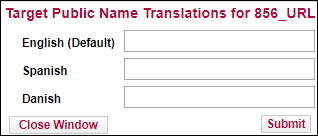
        target_public_name_translations.png

        Public Local Name Translations
      6. Enter a public local name for each language. These override the local public name you entered on the previous page.

      7. Click Submit.

      8. To add a local threshold, click +Add local. (See Threshold Composer for more information.)

    • If the target is not available for CDI activation, the following dialog box opens:
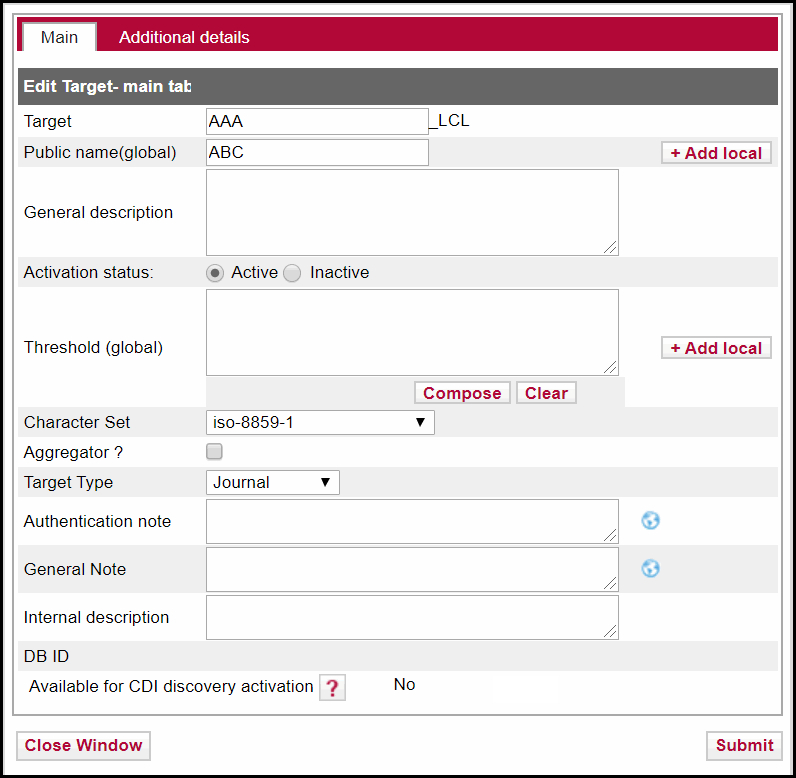
      edit_local_target_no_institute.gif

      Edit Local Target

      Fill in the fields as described in Edit Target.

    • If the target is available for CDI activation, the following fields appear in the Edit Target dialog box:

      edit_target_with_CDI.png

      Edit Target in CDI

      The following table describes the fields of this dialog box:

      Edit Target – Search Target
      FieldDescription
      Search RightsPossible values are:
      • Free – the target’s content can be searched for free
      • Subscription – the target requires a subscription to search its content.
      Full Text RightsPossible values are:
      • Open Access – the target does not require a subscription to access full text.
      • Subscription (target level) – The target requires a subscription for fulltext and is set to available on the target level. It does not use the link resolver for selectively setting the target content to available.
      • Subscription (Title Level) – The target requires a subscription for fulltext and the availability setting is performed selectively on the item level, based on your link resolver activations.
      • Partially Open Access – The target is part of a mixed collection where some of the records are available as Open Access while other records are restricted or have no access to full text.
      • Hybrid – The target is part of a collection where some of the records contain full text links and some do not:
        • Records with a fulltext link in the record are returned as available in a filtered search, with linking from Direct Link/Link in Record.
        • Records with no fulltext link in the record are returned in a filtered search when they match to other active subscriptions with linking from Link Resolver.
      LinkingIndicates which type of link (target level or link resolver) is needed to provide full text for a target. Valid values are:
      • Linkresolver – link to fulltext via Link Resolver
      • Link in record – link to fulltext via the Link in the CDI provider record.
      • Hybrid – link to fulltext is from Link Resolver for part of the collection content (for records with ISSN/ISBN identifiers) and from Link in Record for the other records in the collection (for content without identifiers)
      Newspapers?Possible values are:
      • Yes – the target’s content is available in both the Newspaper search interface and the Primo search interface.
      • Yes, Newspapers Search only – the target has content that is available exclusively with the Newspaper search interface and not the Primo search interface.
      • No – the target is not available using the Newspaper search interface because it does not contain newspapers.
      Number of recordsThe number of records currently indexed in CDI. This number is updated in SFX for each target twice a year.
      Resource TypesLists up to 5 of the most frequently index resource types for the target. This list is updated in SFX for each target twice a year.
      CDI update frequencyThe estimated update frequency of the target in CDI. Possible values are Weekly, Monthly, Quarterly and Yearly. The update frequency is based on the average update frequency of the last 12 months and is updated in SFX for each target twice a year.
      Provider coverageYes – this target is updated with data we directly receive from the provider. No – the target is not updated by a data feed directly from the provider, but at least 80% of the content of the target is covered in CDI by data received from other providers.
      Coverage percentageThe percentage of the collection covered in CDI, and the last time the percentage was calculated
      CDI TypeValues can be:
      • Abstracting & Indexing database
      • Full Text Collection
      • Hybrid – part of the collection has full text and part is A&I only
      CDI Last Market updateLast update date for this target in CDI
      Active inThe two types of activation for this target:
      • Activation for linking and full text availability – if selected, the target is active for SFX and (depending on the type of target), appears in the SFX menu, the A- List, and the eBook Search. Note that target services and portfolios (if available) need to be active as well. This indication is read-only.
      • Activation for search/discovery in CDI – If selected, the target content is searchable in CDI from Primo.
      If the target has institute specific activations, the activation for fulltext and CDI searching is configurable in the separate Institute section of the Edit Target dialog box.
      Selective?Indicate the type of subscription for this target: Select Yes to indicate a selective subscription and No to indicate a non-selective target. Selecting No for non-selective targets causes the FullText Available indicator to appear for non-selectively subscribed targets, and improves the fulltext availability indication for non-ID (ISSN/ISBN) content that is harder to match to customer subscriptions.
      Do not show as Full Text available in CDI even if active in SFXSet this option to Yes if you want the full text active for the link resolver, but you do not want the same full text visible in the filtered search in discovery.
  • For additional details, click the Additional Details tab.

  • To confirm the changes, click Submit.

Before the SFX June 2021 release, targets with CDI search rights set to Subscription could not be activated for search. From the SFX June 2021 release and later, it is possible to use both discovery and the full activation for targets with the CDI search rights set to Subscription. Both types of activations ensure that the collection is searched in CDI.