
Displaying Resources Based on the Absence of Fields
When you want to offer resource links by matching a field in the coverage database (TITLE, for example) only if some other field is not present in the OpenURL (ISSN, for example), use a field test of the type Field not present.
To use a Field not present test, you:
- Create one or more field selectors.
The definition of the field selector is used in the field test to identify an OpenURL element. This is the element that must be missing from the OpenURL when the Field not present test is applied. The Field not present test does not examine the value of OpenURL elements. The test evaluates only the presence or absence of the elements. Therefore, the results of regular expressions in field selectors are not used by Field not present tests. - Create the Field not present test.
- Assign the Field not present test to one or more target resources.
To create a field test that displays resources only if one or more fields are missing from the OpenURL:
- Create the Field not present field test:
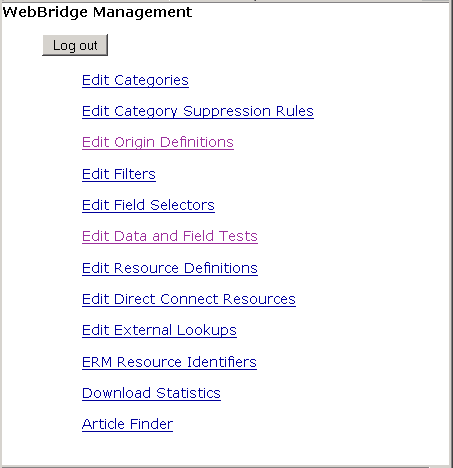
- Access the WebBridge Management menu by either:
- entering http://your_library_[domain]/webbridge/edit in the browser address window
- choosing Admin | WB Edit in an application
NOTE
Only one user can be logged in to the WebBridge Management menu's edit function. Other users can access the menus in View Only Mode.
If there is no activity by a login within the timeout period, the user is automatically logged out.
- Choose Edit Data and Field Tests.
The WebBridge Management - Data and Field Tests menu displays. - Choose Create New....
The WebBridge Management - Data and Field Tests menu displays.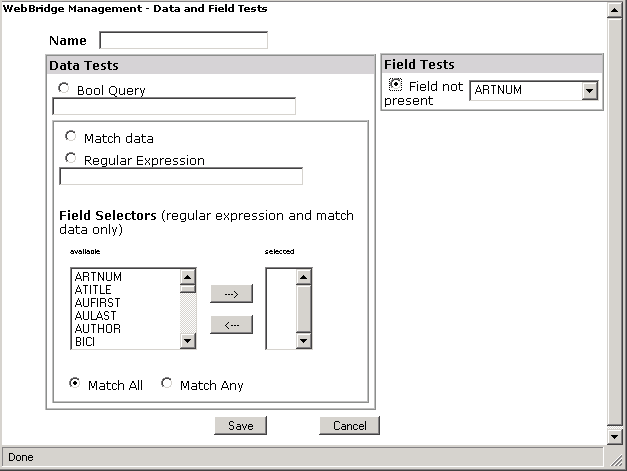
- Enter a Name.
- Choose Field not present.
- Choose a field selector from the drop-down menu.
- Choose Save.
- Access the WebBridge Management menu by either:
- Assign the field test to a resource.
Typically, field tests determine the absence of fields in an OpenURL. See Assigning Data Tests to Resource Links from External Origins. - Test the query:
Submit an OpenURL that passes the field test (i.e., an OpenURL that does not have the fields specified in the field selector) to the WebBridge resolution server.
The target resource will display (i.e., resources without the fields specified in the field selector display).
