
Displaying or Suppressing Links
You control which target resources display by using categories, filters and data tests.
The system default is to display all resources defined in your system whenever the user selects a WebBridge or Other Resources button.
To display only the most meaningful resources, you suppress some of the links.
When to Display Resources
The link to a target resource should display if and only if the patron will be able to:
- receive meaningful additional information
- successfully follow the link
For the link to provide meaningful additional information and work correctly, several factors are required, including:
- a link that is correctly formed for the target resource's server
- access for the patron on the target resource's server
- access for the patron to relevant information on the target resource's server
- a context-sensitive target resource
The link works correctly when you create:
- filters to block users from target resources that they are not allowed to access
- "match" data tests to verify that the contents of the coverage database match the info in the OpenURL
- "has" data tests for the OpenURL to verify that it contains the elements required by the link to the target resource
Links are context sensitive because:
- the origin generates an appropriate OpenURL from the patron's request
- the WebBridge server uses the OpenURL to generate the link to the target resource
Determining if a Resource Link Displays
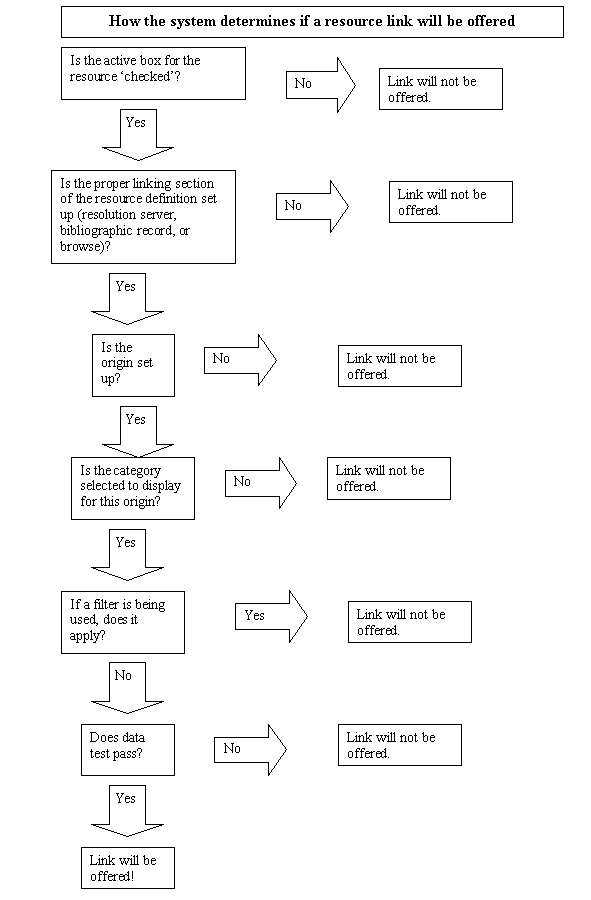
Suppressing Resource Links
Links to target resources are suppressed in three phases:
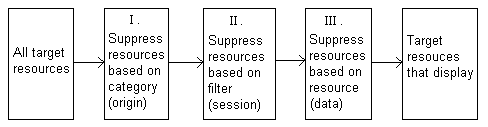
In the first phase, the system looks for a match between the origin and each target resource, based on category. It works like this:
- The system examines the list of categories contained in the origin's definition.
- The system examines the category to which the target resource is assigned.
- If the system matches the target resource's category to a category in the origin's list, the resource displays. If they do not match, the resource link is suppressed.
After the system completes this phase, the links the patron sees are a function of the categories listed in the patron's origin.
Categories are not optional.
In the second phase, the system looks for a match between the properties of the session and each target resource, based on filters. It works like this:
- The system examines the properties of the session.
- The system examines the list of filters contained in the resource's definition.
- If a filter matches a property of the session, the resource does not display. If they do not match, the resource link displays.
After the system completes this phase, the links that the patron sees are a function of the:
- categories listed in the patron's origin
- the properties of the patron's session
Filters are optional.
In the third phase, the system applies each data test contained in the resource's definition to the data in the displayed record. If the data passes:
- all of the tests, the resource displays
- some of the tests and the Show resource if any test passes option is selected, the resource displays
- some of the tests and the Show resource if all tests pass option is selected, the resource is suppressed
- none of the tests, the resource is suppressed
After the system completes this phase, the links that the patron sees are a function of the:
- categories listed in the patron's origin
- the properties of the patron's session
- data in the displayed record
Data tests are optional.
