
Setting the Statistics Log File Size
You can set the maximum size of the WebBridge LR statistics log file.
When the file reaches 90% of the maximum size, WebBridge LR sends an alert by email. When the file reaches the maximum size, WebBridge LR stops collecting statistics and sends a second alert by email.
Set the maximum file size, email address for alerts, and email subject line for alerts in the menu:
- Enter:
A > ADDITIONAL system functions
A > ALTER system parameters
S > SYSTEM codes
O > Set system OPTIONS
D > Database maintenanceThe Database maintenance menu displays: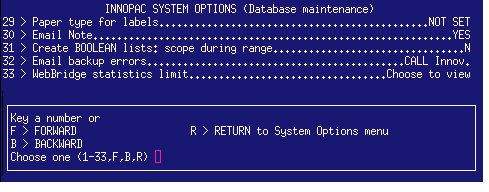
- Choose WebBridge statistics limit by entering its associated number.
The WebBridge statistics limit system option displays: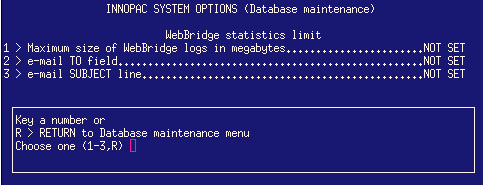
- Choose to set the maximum file size by entering 1.
- Enter the maximum size of the WebBridge LR statistics log file in megabytes. You can enter a size between 0 and 100 GB.
The default maximum size of the file is 50 MB. - Choose to set the email address to which alerts should be sent by entering 2.
- Enter the email address.
- Choose to set the email subject line for alerts by entering 3.
- Enter the email subject line.
- When prompted, choose to save your changes.
