
Release Date: April 10, 2024
Potential Service Disruption
Vega Discover One Hour Maintenance Window on April 17
Vega is releasing a critical infrastructure update that may cause some users to experience unresponsive pages during the 1 hour maintenance window on April 17.
Out of an abundance of caution to have extra time for testing and warning for end users, we will delay the release for Discover only until April 17. There is no release for Discover on April 10.
This applies to Discover only (Staff and Patron UIs). It does not impact LX Starter or Promote.
-
na and ca regions: Midnight PST / 3am EST
-
sg and ap regions: 12 SG / 5 am NZST
-
eu region: 2pm EST / 7 pm GMT
We apologize for any inconvenience this causes at your library.
Release Date: April 17, 2024
Potential Service Disruption
Vega Discover One Hour Maintenance Window on April 17
Vega is releasing a critical infrastructure update that may cause some users to experience unresponsive pages during the 1 hour maintenance window on April 17.
Out of an abundance of caution to have extra time for testing and warning for end users, we will delay the release for Discover only until April 17. There is no release for Discover on April 10.
This applies to Discover only (Staff and Patron UIs). It does not impact LX Starter or Promote.
-
na and ca regions: Midnight PST / 3am EST
-
sg and ap regions: 12 SG / 5 am NZST
-
eu region: 2pm EST / 7 pm GMT
We apologize for any inconvenience this causes at your library.
Generate Syndetics Covers
A new addition to the Staff Help documentation shows you how to generating covers in different sizes. Search for "Generate Syndetics covers".
You can use the URLs below to generate small, medium, or large covers and use them for social media or a blog.
To generate a cover, substitute the ISBN and your library code as in the following example:
https://syndetics.com/index.aspx?isbn=<ISBN>/SC.GIF&client=<library code>&type=xw12
Small
https://syndetics.com/index.aspx?isbn=978-0-387-37235-8/SC.GIF&client=bccls&type=xw12
Medium
https://syndetics.com/index.aspx?isbn=978-0-387-37235-8/MC.GIF&client=bccls&type=xw12
Large
https://syndetics.com/index.aspx?isbn=978-0-387-37235-8/LC.GIF&client=bccls&type=xw12
To generate Syndetics covers
-
In the URL for the cover size that you want, substitute the following values:
-
ISBN for the item
-
Your library code
-
-
Copy and paste the URL into your browser address bar.
-
Right-click on the cover and select Copy image.
-
Save the cover image.
BUG FIX
Small Font for Custom Header
A bug was fixed where libraries with a custom header saw a small font in the:
-
Header
-
Footer
-
Advanced/Basic search
-
Announcement
Unresponsive showcase widget on full resource card - NA2 only
We have uncovered a performance issue related to the query on the full resource card, which displays the showcase widget when the resource is part of a showcase. We are temporarily hiding this widget until the query is modified so that it does not degrade performance.
Users can still create showcases, add them to the home page and websites
Release Date: April 24, 2024
System Status for Vega Hosted Systems
We are partnering with the Ex Libris cloud services team to provide improve planned and unplanned event communications on the Ex Libris Status Page for Innovative customers using the Vega platform. The Status Page will provide transparency around service availability and performance for Vega Discover, Vega Promote, and LX Starter.
To find out more information regarding this page, and to subscribe, please read our supportal article: System Status for Vega Hosted Systems.
Home Page Background Color
Premium and Consortia libraries
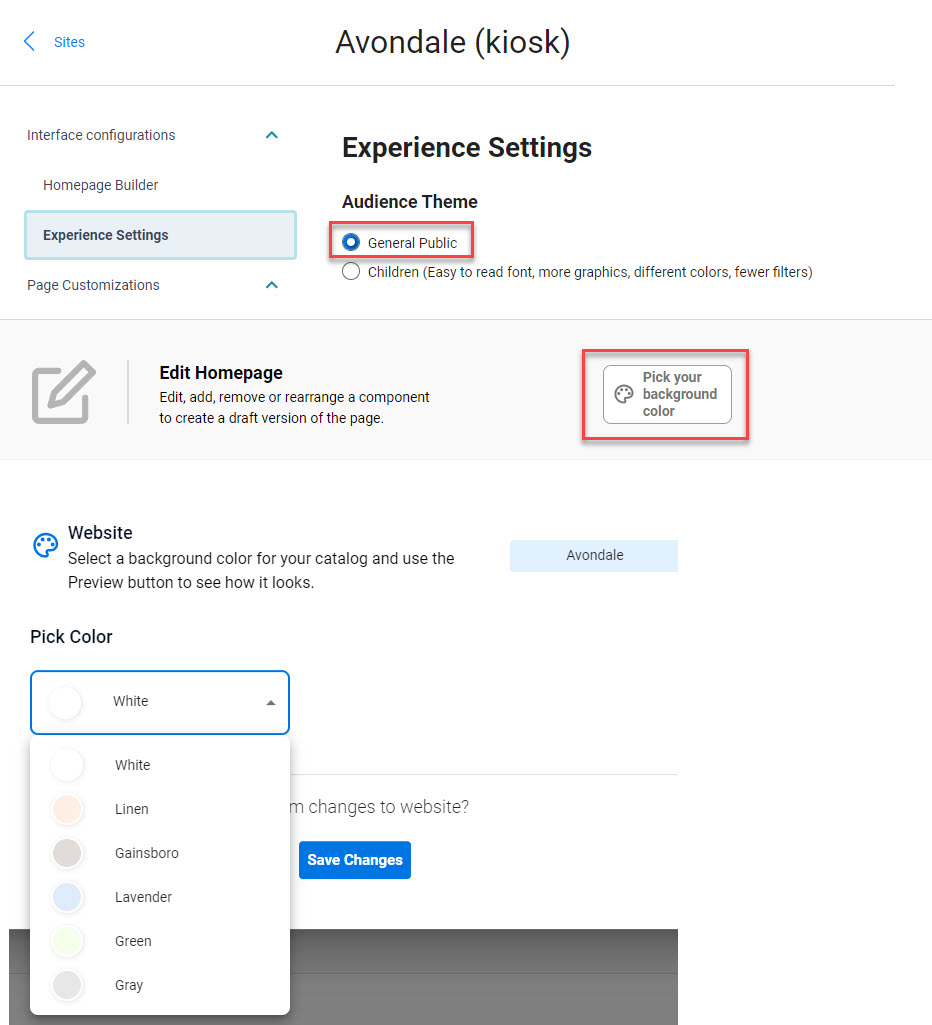
A background color can be added to a collection site when the Audience Theme is set to General Public. Once the setting is enabled, staff will see the option to pick a background color. After selecting a color, use the Preview button to test how the color looks with your content.
Limiting Search Results on Polaris for a Collection Site
Premium and Consortia libraries
Polaris libraries have the option to limit by Collection and Shelf Location. When a patron searches on a collection site, the results will be limited to the collection and/or shelf locations configured.
-
Cog Menu
-
Library defaults > Site Configuration
-
Select a site > Edit
-
Content Scoping > Limit Content
BUG FIXES
Home Page Cover Pills
A bug was fixed where an edited cover pill took users to showcase results instead of opening a URL tab.
Swedish Language Issue with Bookshelf
A bug was fixed for Patrons using the Swedish translation of Vega Discover where they could not view their patron checkout, holds, fines/fees, or profile after viewing the bookmarks, saved searches, or reading history tabs. All bookshelf content can now be viewed when the desired section is clicked.


