
Release Date: November 06, 2024
Vega Program Integration for Collection Sites
This change requires post-deployment processing and is expected to be completed by Friday.
We are excited to introduce a new feature that enables different Vega Program environments to link directly to collection sites for consortium members. This enhancement allows libraries to set up dynamic home page event components.
To configure Vega Program integration, do the following:
-
Create a Vega Program API key.
-
Configure Vega Program integration in Vega.
To create a Vega Program API key:
-
In Vega Program, from the Event Management menu, select Advanced.
-
Select Manage API Keys.
-
Select Create New API Key.
-
Enter a name and select Create.
-
Copy the API name and key and save them in a secure place.
-
Select Close.
To configure Vega Program integration:
-
In Vega, from the Collection Site Settings menu, select Third-party connections.
-
Next to Vega Program, select CONFIGURE.
-
Enter the Vega Program API key.
-
Enter the URL for Vega Program.
-
Select Use Vega Program for Events.
-
Select Save.
Accessibility Enhancements
These enhancements aim to create a more inclusive and user-friendly experience for all patrons.
-
Screen Reader Support (NVDA)
-
Search Results Page: Book titles are now read aloud when tabbing through the page.
-
Showcase View All Page: Both book titles and available copies at specific locations are announced.
-
Format Group Material Page: The labels for Custom Passthrough and INN-Reach links are now read.
-
Bookmarking Titles: The 'For Later' label has been updated to confirm that the item has been added to the booklist.
-
Showcase Name: The showcase name is now read as the page label.
-
Overall Page Reading: Search results are read when navigating the entire page.
-
-
Zoom Functionality:
-
The 'Expand Bookshelf' button is fully accessible without horizontal scrolling when zoomed in.
-
Location drawer item details are visible and accessible.
-
Patron info popups are now easier to access.
-
Calendar information for selecting hold dates is fully visible with vertical scrolling.
-
-
Language and Visual Improvements:
-
When changing the catalog language, dropdown information is communicated view aria-bales.
-
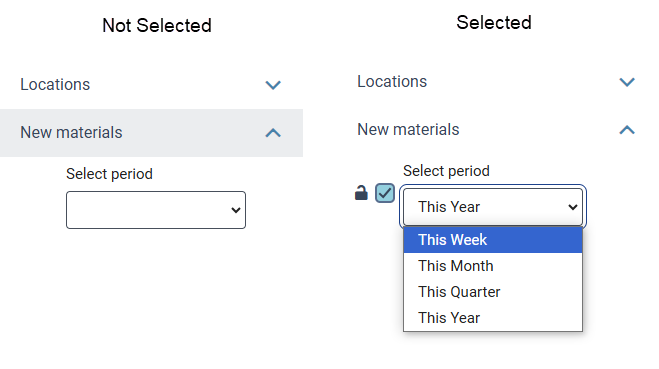
The 'New Materials' button features improved the color contrast and added a double outline to indicate the active state.
-
Bug Fixes and Improvements
Back Button Functionality
Fixed an issue so that the back button correctly returns users to the main page after a search.
Home Page Image Handling
Resolved a bug that caused home page components to reorder due to different images sharing the same file name.
Home Page Scheduling
Improved scheduling functionality; when a start date is selected, the end date now automatically opens at that start date.
Favicon Display
Resolved a bug affecting smaller screens, ensuring the favicon tool tip wraps correctly.
Saved Search Update
Fixed an error message that occurred when updating a saved search.
Passthrough Search Cancel Button Behavior
Adjusted the Cancel button on the collection staff site to keep users on the collection site when adding or editing sources, rather than redirecting to the main site.
Kids Catalog Layout
Fixed a layout issue in kid's catalogs where the help character disrupted the display when the item descriptions are brief.
New Material Facet Combinations
This fix requires a post deployment indexing step that will be run by Innovative.
A problem was fixed when using the New Material Filter in combination with other fields to retrieve and/or save search results. With this fix applied, when the New Material facet is used to narrow search results on a collection site, a format-group appears in the search results only if an edition in the format-group meets the New Materials data criteria AND that same edition is located at a preferred location for the collection site.
OAI Collection Site Level Configuration
A problem was fixed with the Collection Site level OAI configuration form. It now displays the correct form after briefly displaying a non-integrated eContent form.
Hoopla Inactive Materials
In order to apply this change to existing Hoopla titles in your catalog, updates of Hoopla subscription ingests will be run by Innovative over the next weeks.
Hoopla record processing was updated to improve how we handle inactivated records from your Hoopla subscription. Inactive records will now be correctly processed for deletion from Vega in nightly updates after they are disincluded from available collection titles due to price, etc via the Hoopla collection administration tools. Vega does not ingest inactive titles from Hoopla.
Release Date: November 25, 2024
Bug Fixes and Improvements
Custom Passthrough
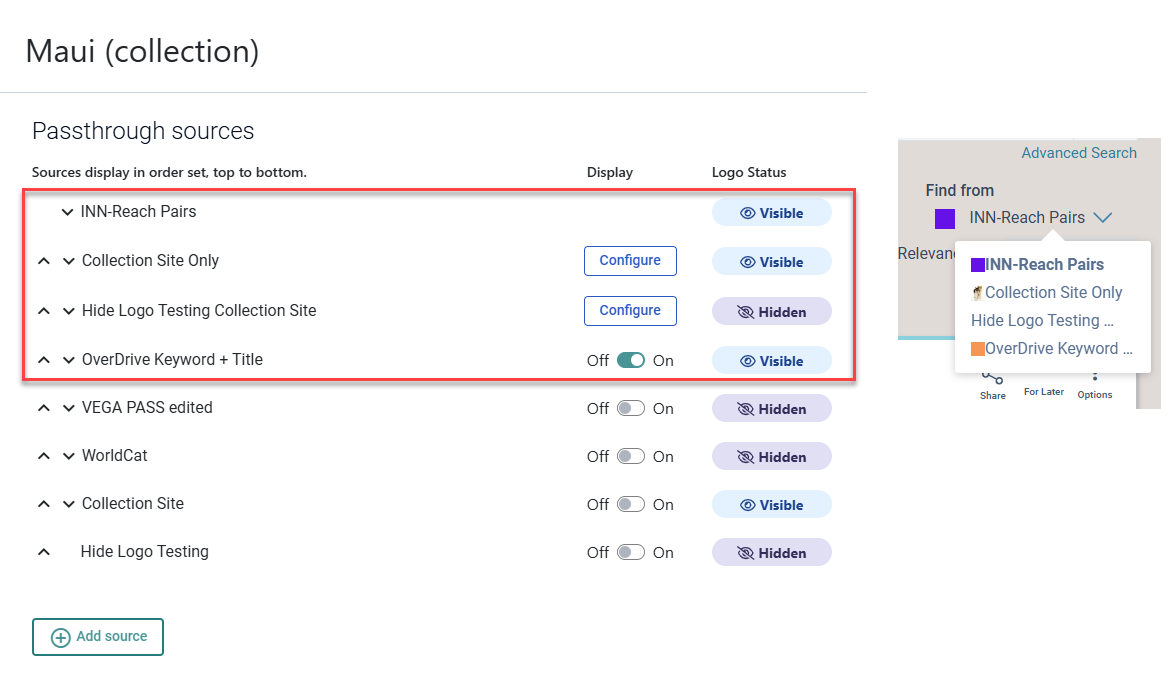
Improvements have been made to the main site and collection site configuration screens. At the collection site, you can more clearly see:
-
Column headings.
-
If a passthrough from the main site is turned on or off.
-
If the Logo status from the main site is hidden or visible.
In the example below, four of the passthrough searches are configured to show on a collection site:
-
INN-Reach Pairs was created by the main site and is not editable from the collection site. The logo is set to visible.
-
Collection Site Only was created for the collection site. It is editable using the Configure button and the logo is visible.
-
Hide Logo Testing Collection Sites was created for the collection site. It is editable using the Configure button and the logo is set to hidden.
-
OverDrive Keyword + Title was created by the main site. It has been set to display on the collection site, and we can see the main site configuration is set to show the logo.
Grid View Icons Updates
The list of grid view icons has been updated to be in alphabetical order. Based on strategic partner feedback, the Vox, Playaway icon has been renamed Book + Audio. Other icons that have been added or updated are:
-
Atlas
-
eAudiobook
-
eBook
-
eGovernment Document
-
eGraphic Novel
-
eMagazine
-
eEquipment
-
eResource
-
eGame
Schedule a Showcase in Discover Additional Info
An improvement was made to explain the timing of a scheduled showcase. This is a scheduled process that runs every 6 hours. Scheduled components may take up to 6 hours to appear when scheduled for the same or next day.
Home Page Watermark Improvements
-
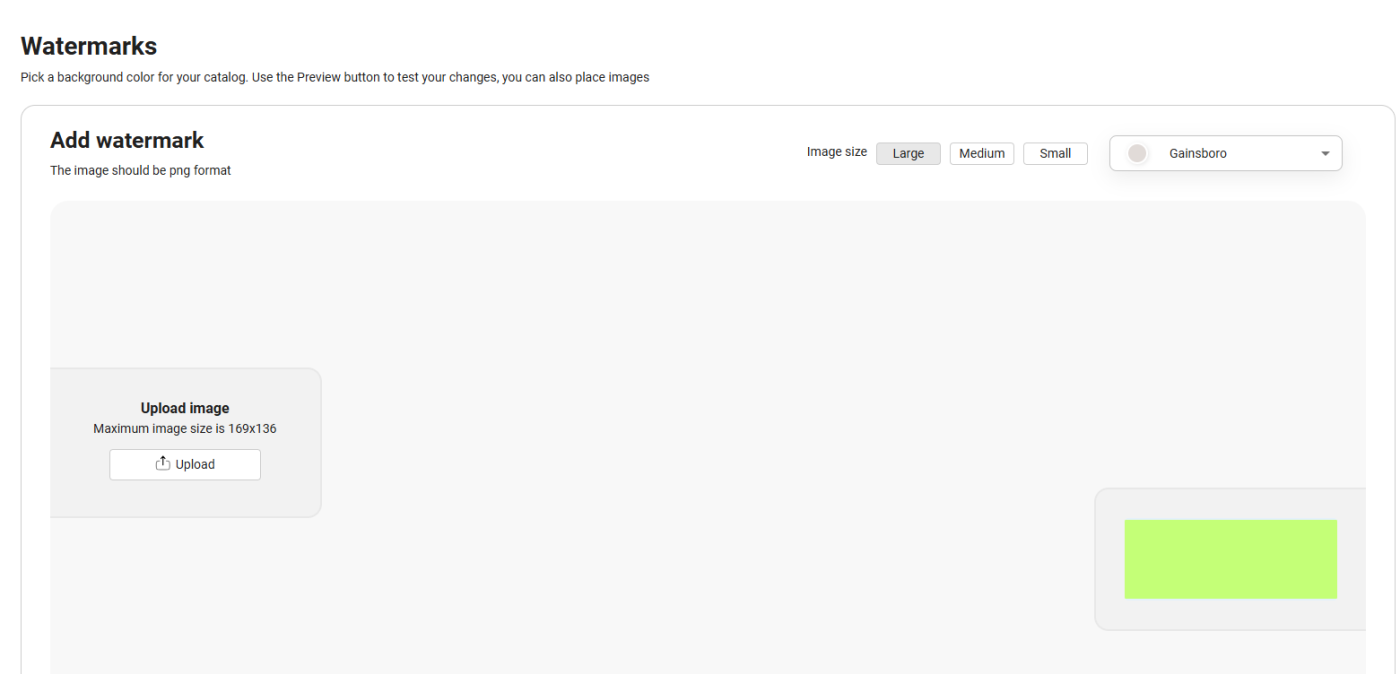
Improvements have been made to the "Pick your background" configuration screen.
-
Combined the watermark images on the wireframe.
-
Choosing the size of the watermark changes the wireframe example.
-
-
A bug was fixed where the watermark image size reverted to large when the site was edited and republished.
Find From Text on Full Record View has moved
Find from is now located above the connection/dropdown which ensures it remains outside when multiple sources are shown.
One source

Multiple sources

Default Value for Scheduled Showcases is now Published
The default value selected in the "Publish manually or scheduled for later setting" when adding a new component to a Home Page is now set to "Publish now". This resolved a related bug where editing a scheduled showcase component displayed an error message.
Vega Icons Fix
A problem was fixed with that caused some icons to disappear in the Patron and Staff interfaces of Vega Discover. These expired icons have been exchanged for the same icon from the owned icon library.
Translation Fix: Item Formats in Bookshelf
Item formats displayed for checkouts, holds, etc in the bookshelf now use the same string as the format displayed elsewhere in Vega Discover and will appear with the current translation string.
Confirm Location Step Fix in Borrow by Mail Workflow for Polaris Libraries
Patrons of Libraries that use Borrow by Mail will now be able to complete a borrow by mail loan request with the confirm button.
Mouse Point Hover
A bug was fixed where the hover over a cover pill created with a showcase had a mouse point instead of a pointed finger.
