
Release Date: January 4, 2024
Literary Form Facet (Fiction/Non-Fiction)
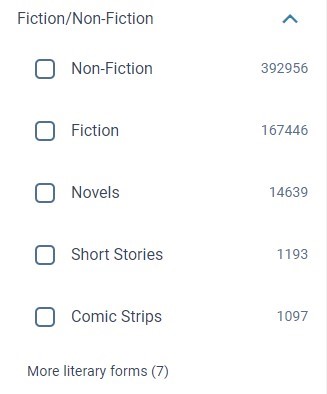
A new Literary Form facet has been added to Vega Discover. The Literary Form facet displays the value from the 008/33 Literary form (006/16). You can turn on this facet in the Vega Admin under the Facet Administration settings. If you would like to change the display of the Literary Form facet string, you can search for 'Literary form" in the translation strings to update this string to your preferred display string. Note that there are a few references to 'literary form' that should be all be updated for consistency in display. The Literary Form facet values have also been added to the translation strings.
Vega Admin Staff Users Can Save Searches and Create Showcases
Previously we added the ability for Vega Admin Users to appear as logged in when navigating to the Vega Discover Patron Interface after logging in to the Admin Settings. Admin Users could also create Bookmark Lists in our last update. Now Admin Users can also create Saved Searches and turn Lists and Searches into Showcases. Admin Users have Showcase Admin privileges.
BUG FIXES
Language Settings Remain after adding and removing a language
Language settings are now returned to defaults if a language is added and then removed.
Type Ahead Search Doesn't Work when Replacing a Showcase
A bug has been fixed so that you can use the type-ahead search to select a replacement showcase using the home page builder.
Announcements Publish Date
A bug has been fixed so that the status date updates after saving.
Announcements Cancel Button
A bug has been fixed so that clicking the cancel button reverts back to the previous page.
Polaris Collection Scoping (available to Early Adopters)
A bug has been fixed so scoping can be applied to an individual collection site instead of all collections sites for the kids or themed home page.
Release Date: January 24, 2024
Vega Admin User Additional Permissions in Patron UI
Vega Super Admin Users have been granted all Staff Admin features when they login to the Vega Admin site and then navigate to the Patron UI interface of Vega Discover. Admin Users will see their Admin Name and a note that they are logged in as an admin user in the Patron Info. Admin Users have the same permissions as Library Admin type Users and can create Bookmark Lists, Save Searches, and Create, Publish and Delete Showcases in Vega Discover.
Location Names, Material Types, Item Statuses and Hold Statuses can be Translated
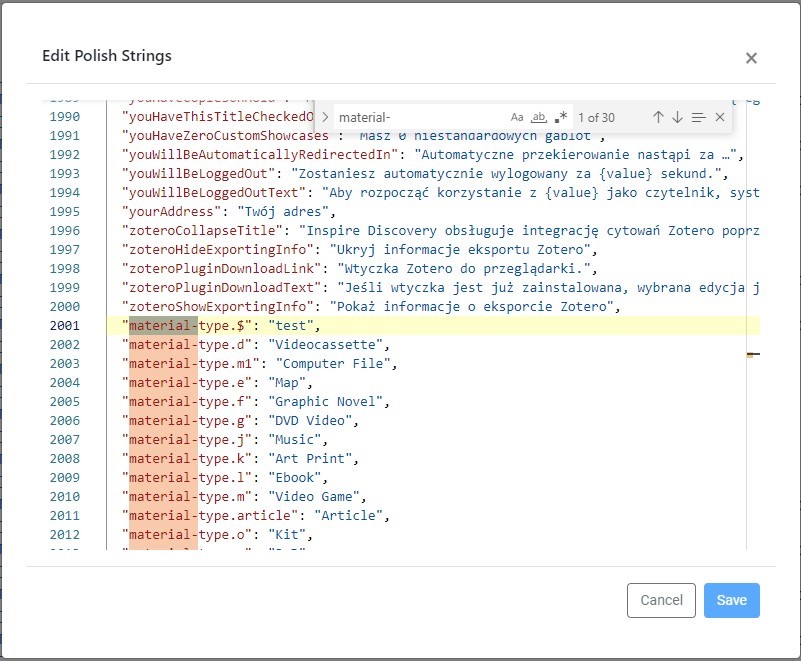
Vega now synchronizes all library defined Location Names, Materials Types, and Item Statuses as customizable strings in the Translation strings file. Vega also allows for the translation of Hold Statuses. Hold Statuses are mapped from the ILS to a set of Vega specific hold statuses. These new strings can be found at the end of your Translation files.
Locations strings will display as location.<location_code>.
EX: "location.adam": "Adamsville",
Material Types strings will display as material-type.<material_type_code>.
EX: "material-type.q": "Paperback",
Item Statuses strings will display as item-status.<item_status_code>.
EX: "item-status.b": "BINDERY",
Hold Status strings are found interfiled with other Vega Strings and include:
-
"holdFrozen": "Frozen",
-
"holdReadyForPickup": "Ready for pickup",
-
"holdReadyToBorrow": "Ready to borrow",
-
"holdStatusInTransit": "In Transit",
-
"holdStatusPending": "Pending",
-
"holdStatusSent": "Sent",
-
"holdStatusWaiting": "Waiting",
Home Page Cleanup
Text changes have been made throughout the home page builder for clarity. A few examples include:
-
Show title of showcase block? has been changed to Show block title?
-
Show title of showcases? has been changed to Show showcase title for each pane?
-
Would you like to have background image? has been changed to Add a background image?
-
Start Date and Time has been changed to Start date and time
-
End Date and Time has been changed to End date and time
BUG FIXES
Announcement Languages
A bug was fixed where the order of the languages changed when you clicked on the Cancel button or reloaded the page.
Event Description
A bug was fixed where the character counter showed 160 available characters but cut the description off on the published page. The character count has been lowered to 70 so the full description is visible when published.
Release Date: January 31, 2024
Vega One Hour Maintenance Window January 31
Vega is releasing a critical infrastructure update that may cause some users to experience unresponsive pages during the 1 hour maintenance window. Refreshing the page will reload content. This applies to LX Starter, Promote, and Discover (Staff and Patron UIs).
-
na and ca regions: Midnight PST / 3am EST
-
sg and ap regions: 12 SG / 5 am NZST
-
eu region: 2pm EST / 7 pm GMT
Rearranging of Pills in a Component
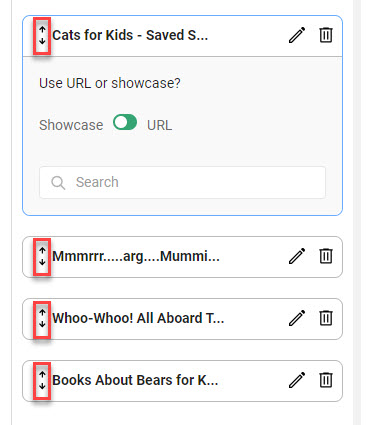
When more than one showcase or URL has been added to a component type, use the up/down arrows to rearrange the order. This functionality is available for:
-
Showcase Group: Cover Pills
-
Showcase Group: Image Pills
-
Showcase Group: Collage Panels
-
Showcase Group: Image Panels
-
Showcase Group: Custom Pill
-
Hero Carousel
-
Events
-
Authors
Default Translations Provided for Polish and Swedish Languages
We have updated the existing Polish language file by providing a professionally translated default translation. We have also added Swedish to our supported languages with a professional translation. You can find these new language files in the Vega Admin > Localization Settings > Configuration. To add one of these languages to your Vega Discover language dropdown, select it in the Customize Languages Menu. To modify any displayed language's default translation or to add translations for library defined strings such as material types and locations, use the Manage Translations settings to edit the language file in our editor. Remember that if you click inside the editor popup that you can search for specific strings by using CTRL-F to open a search box!
BUG FIXES
Recently Returned Status Display Issue Fixed
A problem was introduced with the display of custom Recently Returned statuses when we updated our language files to include translations for Item Statuses. This problem caused the defined Recently Return status to not display for newly available materials. This problem has been fixed. Please note that a string that will allow the Recently Returned Status to be translated will be coming later this quarter.
