
Release Date: December 04, 2024
Home Page Pills
Improvements have been made to the showcase group and author components. By default, the pill name is pulled from the showcase or author selected. After the pill name has been edited, you can change the showcase or author and the edited pill name is not updated to the the replacement showcase or author.
Bug Fixes
Advanced Search on a Mobile Device
When on a catalog using a kid's theme, a bug was fixed where the 'View All' link of a cover carousel showcase was hidden behind the Advanced Search link.
Facet Filtering Improvements
After recent changes to facet filtering APIs the Availability facet was not delivering the correct counts for other facets when applied. Now when you limit to Online, the Format facet only shows available online formats. When you lint to At the Library, the Format facet only shows available physical formats. Limiting to Online will result in no Locations displaying in the Location facet as no online materials have items at physical locations. Limiting to At the Library, will still display all locations, as Online is still considered a non-location that all library branches share content from.
Release Date: December 18, 2024
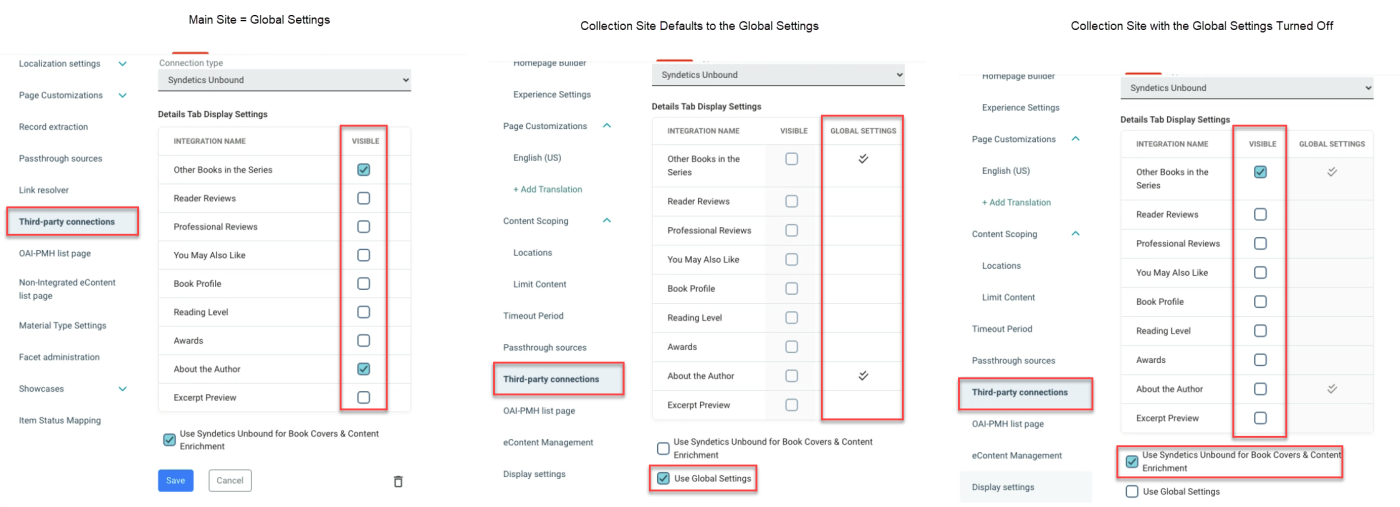
Syndetics Widgets Configurable at the Collection Site Level
This feature requires a post-deployment step and is anticipated to be available by Friday, December 20 or Saturday, December 21.
Availability: Premium and Consortium Licenses
We are excited to introduce a new feature that allows you to configure Syndetics widgets at the collection site level. This enhancement provides greater flexibility and customization for your collections.
-
Collection-Specific Settings: You can now turn off the main site Syndetics settings for individual collections and select a different set of widgets. Simply deselect the "Use Global Settings" box and select the "Use Syndetics Unbound for Book Covers & Content enrichment" box to enable this functionality.
-
No Changes Needed: If you are satisfied with your main site Syndetics settings, no action is required. Your collection sites will continue to use the global settings by default.
-
Easy Reversion: To revert back to the global settings at any time, just select the "Use Global Setting box.
This feature empowers you to tailor the Syndetics experience to better meet the needs of your specific collection sites.
Polaris Pickup Areas
For Polaris libraries who have Pickup Areas configured the following features are now available in Vega Discover.
-
Patrons who have selected a Preferred Pickup Location that has associated Pickup Areas will now see an option to set their preferred pickup area as well. The default setting is 'select pickup area' and will result in the patron needing to choose a pickup area each time they place a hold.
-
The hold forms for the Work Format Level Hold and Edition Level Holds now include pickup area selectors for location that have pickup areas. If a patron has a preferred pickup area selected for their preferred locations these settings will be selected by default in these windows. If a patron selects a pickup location that has pickup areas they will also need to select a pickup area to complete the hold.
-
A code synchronization was added that creates customizable language strings for each pickup are a library has configured. This sync runs every 24 hours according to the ILS code synchronization schedule set in the Vega Admin > Cog many > Integrations > ILS code synchronization settings. The pickup area strings are added at the bottom of your translation file with other custom ILS strings and are prefixed with "pickup-area". Example strings:
-
"pickup-area.15": "Lobby",
-
"pickup-area.16": "Drive thru window",
-
"pickup=area.17": "Hold counter",
-
"pickup-area.18": "Smartlocker",
-
"pickup-area.19": "Curbside".
-
If you have setup Pickup Areas in Polaris for a Location and are displaying the '(none)' option, Vega is unable to support this configuration due to available API options and you must create the main Pickup Area for holds in the location as a Pickup Area option, such as Circulation Desk or Hold Shelf.
Pickup Areas in Bulk Holds and the Hold modification workflow in the Patron Holds tab are planned.
Hold Setting Option Available for Restricted Consortias
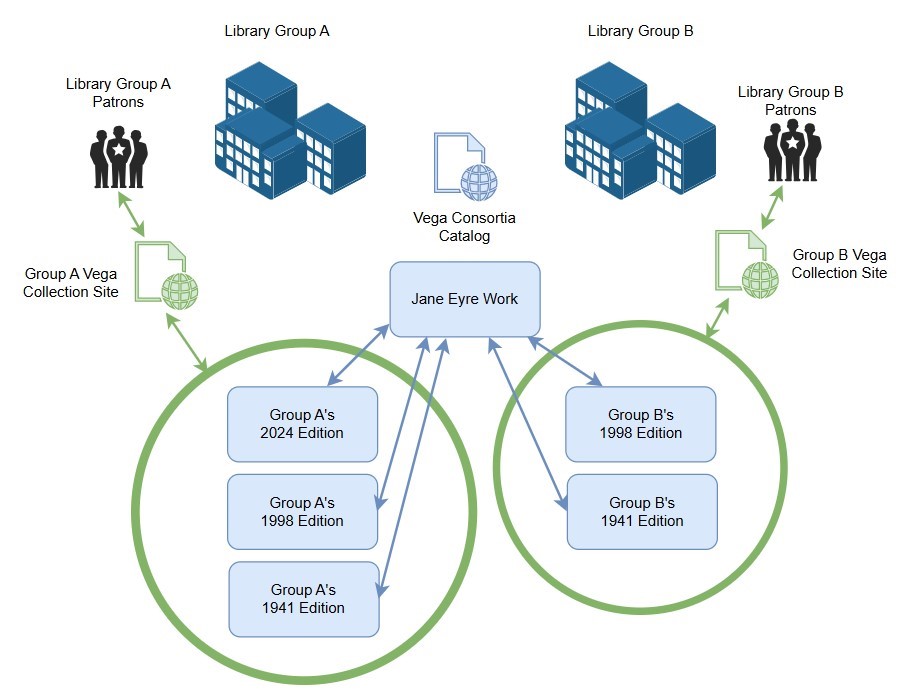
For Closed Group Consortias that do not share freely between all of their member libraries a setting has been created to prevent the holds logic from selecting an edition hat is not displayed in the site. If your library has separate groups of branches that catalog editions and items separately, this setting will fix frequent request failure issues caused by the default Vega hold logic selecting editions from the entire work, rather than only the restricted displayed editions in your restricted sites. This setting must be requested from support and is applied to all sites that have been restricted to only display the preferred locations when enabled.
If you have more question about this setting see this Supportal Article.
Bug Fixes
Favicon Display Issue
We have fixed a bug where saving a new favicon was visible from the staff admin tab but not on the main page or collection site tabs. This ensures that your favicon updates will now be consistently displayed across all tabs.
Kids Catalog on Mobile Devices
A bug affecting home pages using a kids theme on mobile devices has been resolved. The extra spacing for the helper has been removed, providing a cleaner and more user-friendly experience on mobile.
Release Date: December 24, 2024
Polaris Libraries Forcing Pickup Areas for Placing Holds
We are writing to provide an important update regarding the recent issue with placing holds that some Vega Discover customers have been experiencing since Friday, December 21. We appreciate your patience and understanding as we worked to resolve this matter.
In QAing the deployed hotfix, we found additional scenarios requiring a fix related to multiple pickup areas. In light of these scenarios, we will need more time to comprehensively address all potential issues to ensure a stable and reliable solution.
We have temporarily disabled the Multiple Pick-Up Areas feature across all regions. We believe this action will help stabilize holds for all Polaris customers.
-
an and ca regions: Tuesday, December 24
-
eu region: Tuesday, December 24
-
sg and ap regions: Wednesday, December 25
We sincerely apologize for any inconvenience this situation has caused your library and its patrons.
We appreciate your continued patience and will provide further updates as soon as they become available. If you have any questions or concerns, please don't hesitate to contact our support team.
Additional Details of Issue
The issue presented as Vega forcing a Polaris user to choose a Pickup Area when placing a hold.
-
If your library had pickup areas enabled, but the selected pickup branch did not have any pickup areas, then a pop-up displayed the following error: "Your request for this material was unsuccessful. Hold Request Pickup Area disabled for Pickup Branch."
-
If your library had pickup areas enabled at one time, but have since disabled them, the defined pickup areas were displayed. Vega did not allow the hold request to be placed without selecting a pickup area. If a pickup area was selected, and one chosen, the following error appeared: "Your request for this material was unsuccessful. Hold Request Pickup Area Disabled for system. "
-
If your library had pickup areas enabled at one time and never setup actual pickup areas in Polaris, the pickup area drop-down displayed the only pickup area listed as "pickup-area 1". Vega would not allow the hold request to be placed without selecting a pickup area. If a pickup area was selected, and one chosen, the following error appeared: "Your request for this material was unsuccessful. Hold Request Pickup Area Disabled for system."
-
If your library did not have pickup areas enabled, and never had pickup areas enabled, then Vega displayed a drop-down for the pickup area, however, the display of the drop-down was confusing.
