
Alma February 2025 Release Notes
Upcoming Issues to Note
AI Metadata Assistant Update
In November 2024, we launched the Preview Mode of the AI Metadata Assistant for all Alma libraries. This initial testing phase enabled libraries to experience metadata enrichment and provide valuable feedback. We appreciate the many libraries and librarians who contributed their insights to help us improve the assistant!
Phase I: Full Availability
Phase I of the AI Metadata Assistant is now fully available, featuring:
- Improved Metadata - Enhanced metadata generation based on community feedback. We will continue to refine this by monitoring catalogers' feedback and collaborating with the community.
- PDF Support - Upload a PDF file of up to four pages containing a resource description (for example, publisher's description). If a larger file is uploaded, only the first four pages are processed.
- Streamlined Workflow:
- Select a template for creating new records. The AI-generated draft expands from this template, adding fields not generated by the AI. The system remembers the cataloger's selection for future use.
- Upload up to four images of the resource, supporting cases where more than two images are needed (for example, books with a long table of contents).
- New Configuration Options
- Normalization Process: Create a process to correct AI-generated metadata by removing, replacing, or adding metadata fields and subfields.
- Merge Method: Select a merge method for enhancing records with the AI Metadata Assistant.
- Version Tracking - For records created or enriched using the AI Metadata Assistant after the February release, it is possible to identify the version created with the assistant when viewing record versions.
For more information about the AI Metadata Assistant, see the recording of the Alma 2025 Roadmap Webinar Series:The AI Metadata Assistant in the Metadata Editor.
We continue to work with our community to further improve the AI Metadata capabilities in Alma. Stay tuned for future enhancements!
Elevating Your Experience with Our Service Excellence Program
We are committed to enhancing your experience through our Service Excellence Program, driven by your valuable feedback and support needs.
Key initiatives for the upcoming year include:
- Improved visibility into cases requiring development support.
- Estimated timelines for issue resolutions.
- Consistent updates: Regular status updates on cases at set intervals.
To achieve these goals, we are launching the Defect Backlog Resolution Project for Alma and PrimoVE in collaboration with the ELUNA and IGELU Steering Committees.Resolved issues will be documented in the release notes.
We will keep you informed of our progress and appreciate your ongoing feedback. We look forward to continually enhancing your experience.
Features
Alma New UX Developments
New Manage Patron Services UX - Opt Out
 ) in Alma's persistent bar, select Feature Rollout Preferences, and deactivate the New Manage Patron Services toggle.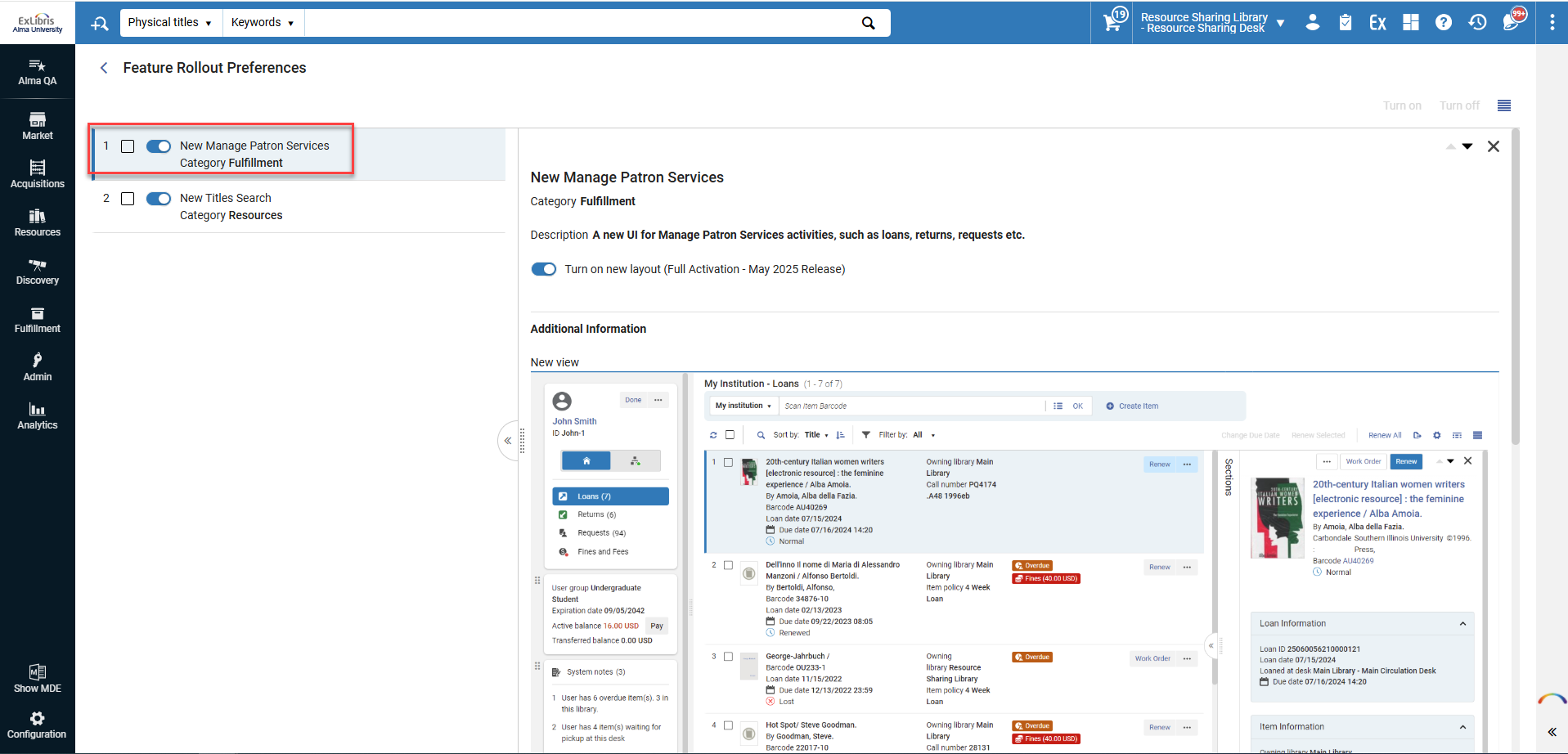
If you're experiencing an issue preventing you from working in the new UX, please open a support case and add “Circulation new UX opt-out” or “Search new UX opt-out” to the case title so that it will be communicated to the Alma product team.
Sound Alerts in New Manage Patron Services UX
 IdeaExchangeURM-84312

Updates to the Holdings Search User Experience
-
Search results table view
-
Search configuration - both at the institution level and the personal user level
-
Performing more actions directly from the search results, including:
-
Running jobs on selected holdings
-
Adding and updating itemized holdings sets
-
A new items section enabling users to perform actions on items directly from the holdings search. Users who want to retain access to the old items list section can enable it through the configuration settings.
-
A smart link for items provides configurable, one-click access to the items section, the holdings' items list, or an items search by holdings ID.
-
Suppressing the holdings record.
-
-
An enhanced details pane, including the Quick-access component and renaming of the sections for a more intuitive user experience.
-
Exclude facets
-
Search labels
-
Viewing cataloger notes for the holdings record
New Titles Search UX - Opt Out
) in Alma's persistent bar, select Feature Rollout Preferences, and deactivate the New Titles Search toggle.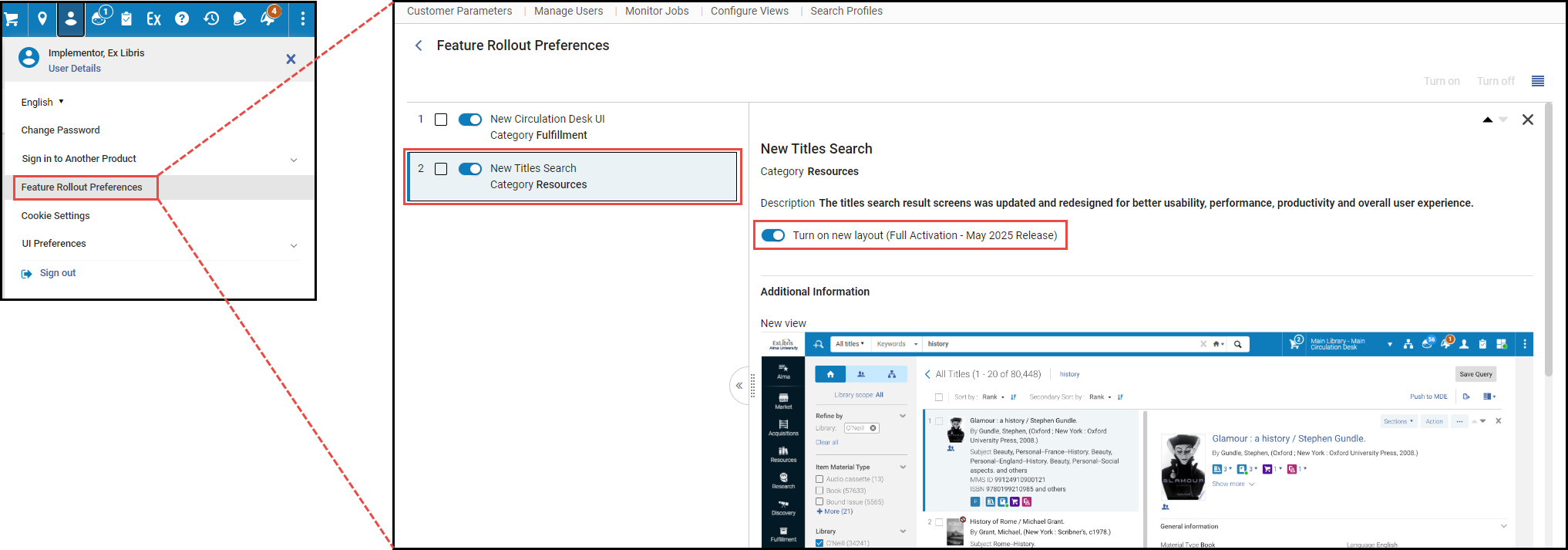
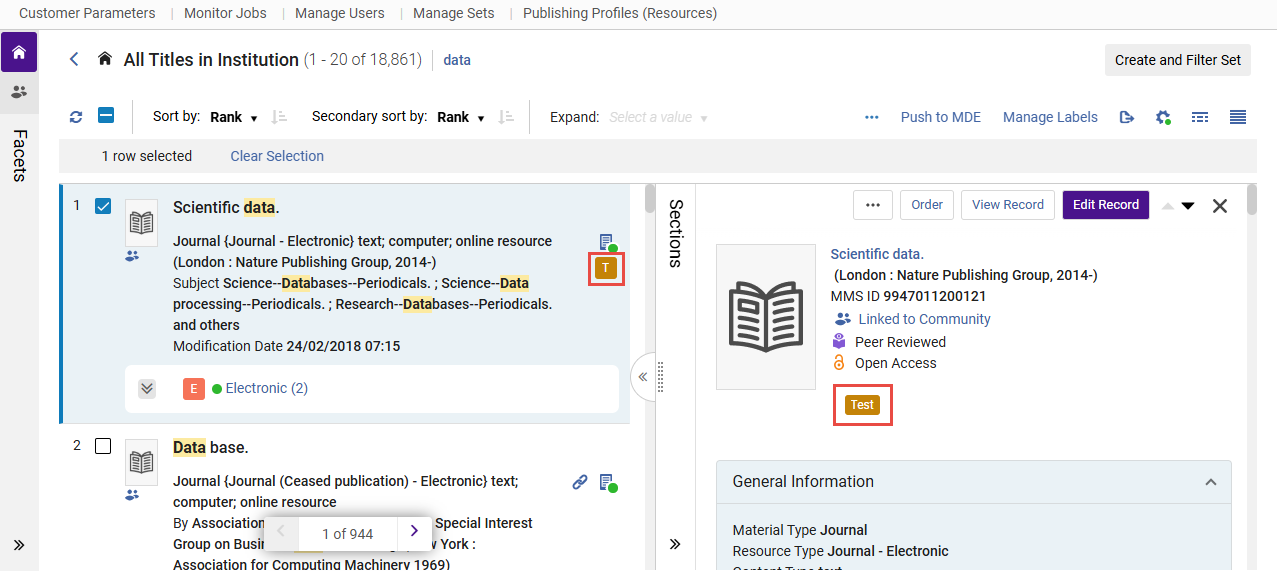
Viewing Cataloger Notes in the Title Searches
Repository Search Labels
Enhanced Names and Subjects Navigation Options in the Title Search
February 2025 MetadataManagementURM-230138
This feature requires re-indexing and will therefore be fully operational in sandbox environments for new, updated and re-indexed records only, or following the sandbox refresh or re-indexing.
The linked open data & navigation sections of the new search UX, based on the bibliographic headings of the record, enable for easy access and navigation, both to external Linked Open Data resources such as Wikidata, and to internal searches of the linked authority/bib headings information in the library's catalog.
It is now also possible to navigate to a broader catalog search, searching the normalized value from the bibliographic record in the "Names" and "Subjects" title search indexes. As part of this enhancement, the "Contributors" section was renamed to "Names" section, following feedback from the community - to make its content and use more intuitive. This new search option is most helpful when a search by a bibliographic heading information may be too limiting, such as bibliographic headings that aren't linked to authorities, or consortia members where a bibliographic heading information is maintained in the network and will not retrieve local results.
For more information, see Enhanced Navigation and Linked Open Data Sections.
Searching and Faceting Bibliographic Records with Purchase Order Lines
February 2025 MetadataManagementURM-229291
When working in the new titles search, it is now possible to search for bibliographic records with or without purchase orders and use the "Has orders" facet to filter search results. Setting the facet "Has orders=Yes" retrieves only bibliographic records with a Purchase Order Line (POL) linked to them.
-
Relinking a POL to another bibliographic record impacts which records are retrieved.
-
For a consortia that places orders in the network institution, it will be possible to search in the network scope for network records that have an order, and a new “Network Orders” icon (
 ) was added in the network scope to reflect this.
For more information, see:Searching in Alma.
Enhanced Navigation Options from Title Search Results
February 2025 MetadataManagementURM-233008
In the new Title Search UX, single-click links are added for more related entities, including courses, licenses, reminders and related records, alongside the existing orders and requests links.
Users can customize their view and hide these links if they are not needed in their workflow by using the configuration cogwheel ( ).
).
Additionally, the display of these links in the details pane now match the layout of the orders and requests links, ensuring a more intuitive and consistent user experience.
This enhancement enables users to quickly identify and access related entities like courses, licenses, reminders and related records directly from the search results.
For more information, see Using Navigation Links.
Advanced Physical Title Search by Permanent Call Number
February 2025 MetadataManagementURM-236962
Previously, performing an advanced search for physical titles using a permanent call number required specifying the call number type. Now, it's possible to search by permanent call number without specifying the type, except when searching by a call number range.
This enhancement is especially useful for libraries that want to combine permanent call number searches with other search conditions.
For more information, see Searching in Alma > Searching for an Exact Phrase.
Choose Which Citation Tags to Copy on Rollover (Bulk Rollover Only)
February 2025 Fulfillment and Resource Sharing
CERV Enhancement (ID #7180)URM-227486
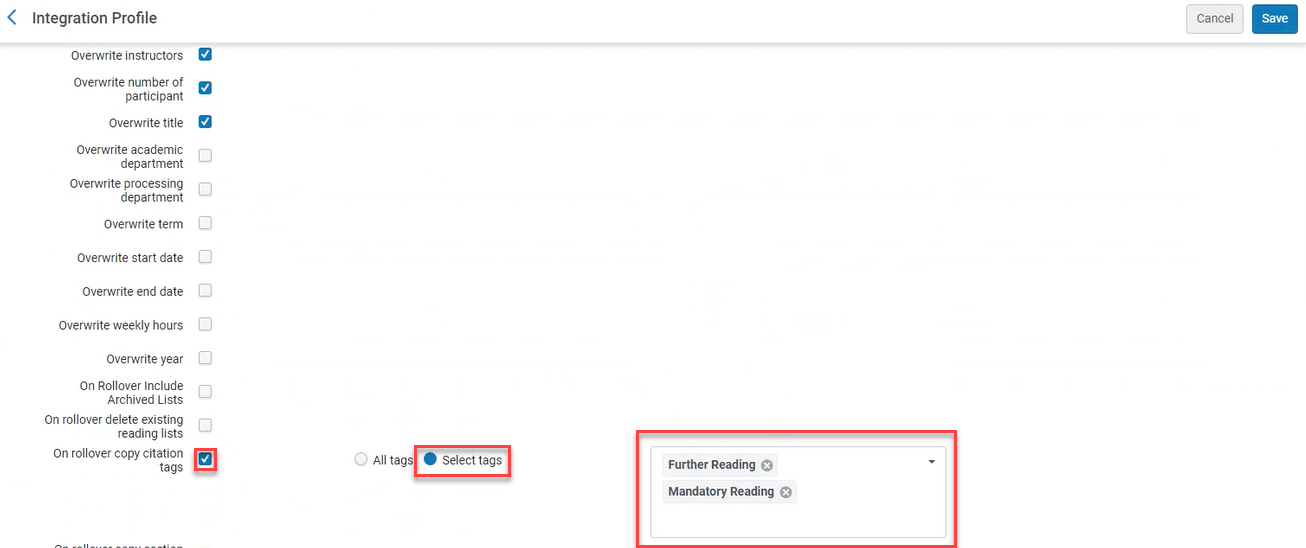
When the On rollover copy citation tags checkbox is checked, and Select tags is selected from the Course Loader Actions (Configuration > Leganto > LTI > Integration Profiles), tags to include can be selected from the dropdown list. When the job runs, only the selected tags are copied to the duplicated list.
For more information, see Configuring Course Loading.
Access Digitized Content Without Authentication
February 2025 Fulfillment and Resource SharingURM-XXXXXX
Libraries can now include a link in the Document Delivery Notification Letter email that does not require authentication. This enables patrons to access digital requests that are not subject to copyright restrictions, without first authenticating.
When the parameter rs_no_authentication_document_delivery(Configuration > Fulfillment > General > Other Settings) is set to true(default false), and the label without_authentication(Configuration > General > Letters > Letters Configuration > Document Delivery Notification Letter) is enabled, the Without authentication link is included in the Document Delivery Notification Letter and does not require user authentication when opening the link.
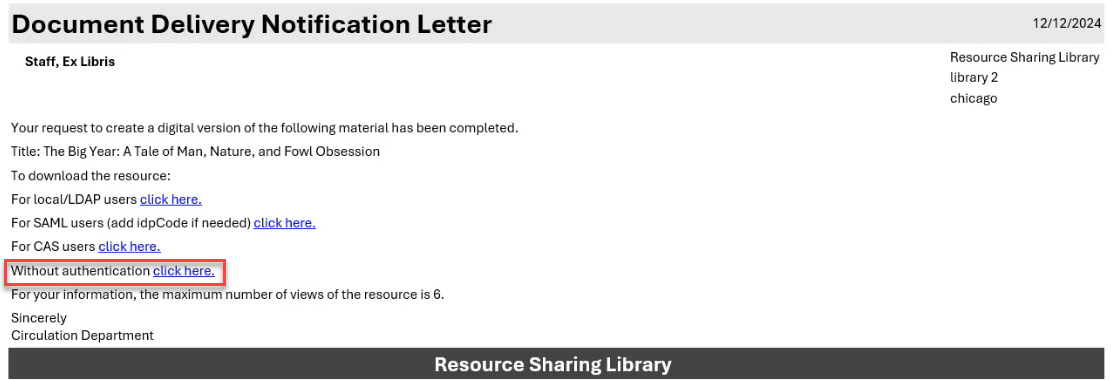
For more information, see Digitization Processing.
Option to Share Operator Name Across the Fulfillment Network
February 2025Fulfillment and Resource Sharing
Institutions in a Fulfillment Network can now opt-in to share the name of their operators who have put items of another institution in transit. This improves transparency, and enables owning institutions more clarity on who at their partner institution is the last person to have handled items they own.
This option is turned off by default.
The operator name displays in the following locations:
-
Resource Request Monitoring
-
General tab of the Physical Item Editor (right hand information pane)
-
History tab of the Physical Item Editor (for Item changes and Fulfillment activities)
-
Loan history (Loan Audit Trail)
For more information, see Configuring Other Settings.
Marking In-process Items as Missing
February 2025Fulfillment and Resource Sharing
CERV Enhancement (ID#8918)
Users who want to change the status of items not in place to 'missing', no longer need to do so from the linked request. They can now do this directly from the items list. This enables simpler management of missing items that were previously in a library process, such as in transit from one library to another, technical migration, etc.
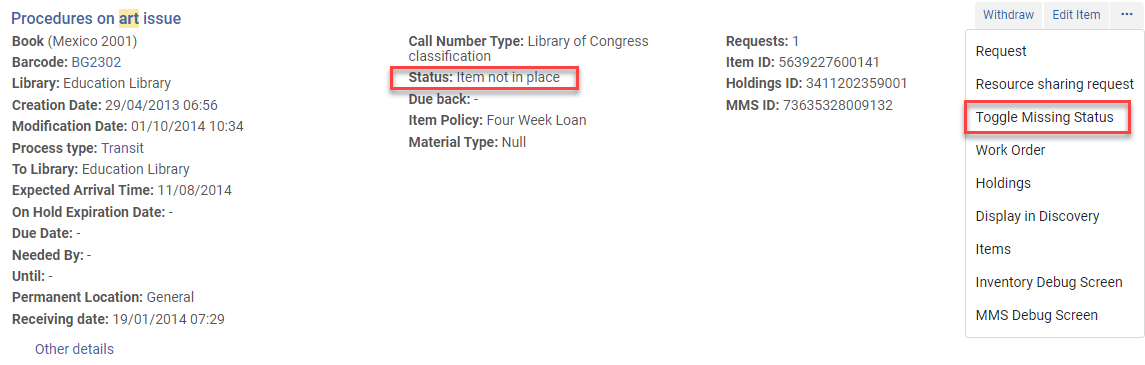
For more information, see Working with Items.
Prioritization of Off-site Storage Location
February 2025Fulfillment and Resource SharingURM-206415
When fulfilling requests, Alma uses items in remote storage locations as either the first or last priority, depending on whether "Prefer Over Other Locations" was selected. It is now possible to turn off this behavior so that remote storage items will be considered like any other item for prioritization purposes. This enables libraries to improve request fulfillment logistics and supply time when their remote storage facilities are neither automatic storage nor remote off-site storage.
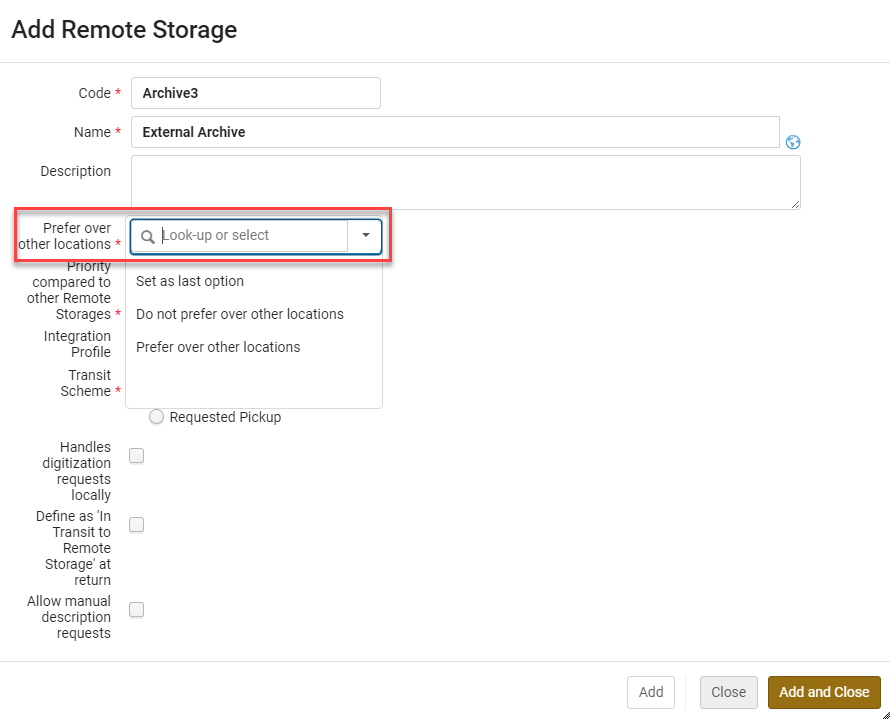
Libraries that currently have this parameter checked will be migrated to have the 'Prefer over other locations' value selected. Libraries that currently have this parameter unchecked will be migrated to have the 'Set as last option' value selected. Libraries that want to use the new functionality need to select the "Do not prefer over other locations" option. See Configuring Remote Storage Facilities for more information.
Saving Selected Request Type
February 2025Fulfillment and Resource SharingURM-215130
The request type selected on the patron request form in Alma is now saved as a preference, and is automatically selected as the default choice the next time the request form is opened. This enables skipping the step of selecting the request type when creating a patron request in Alma.
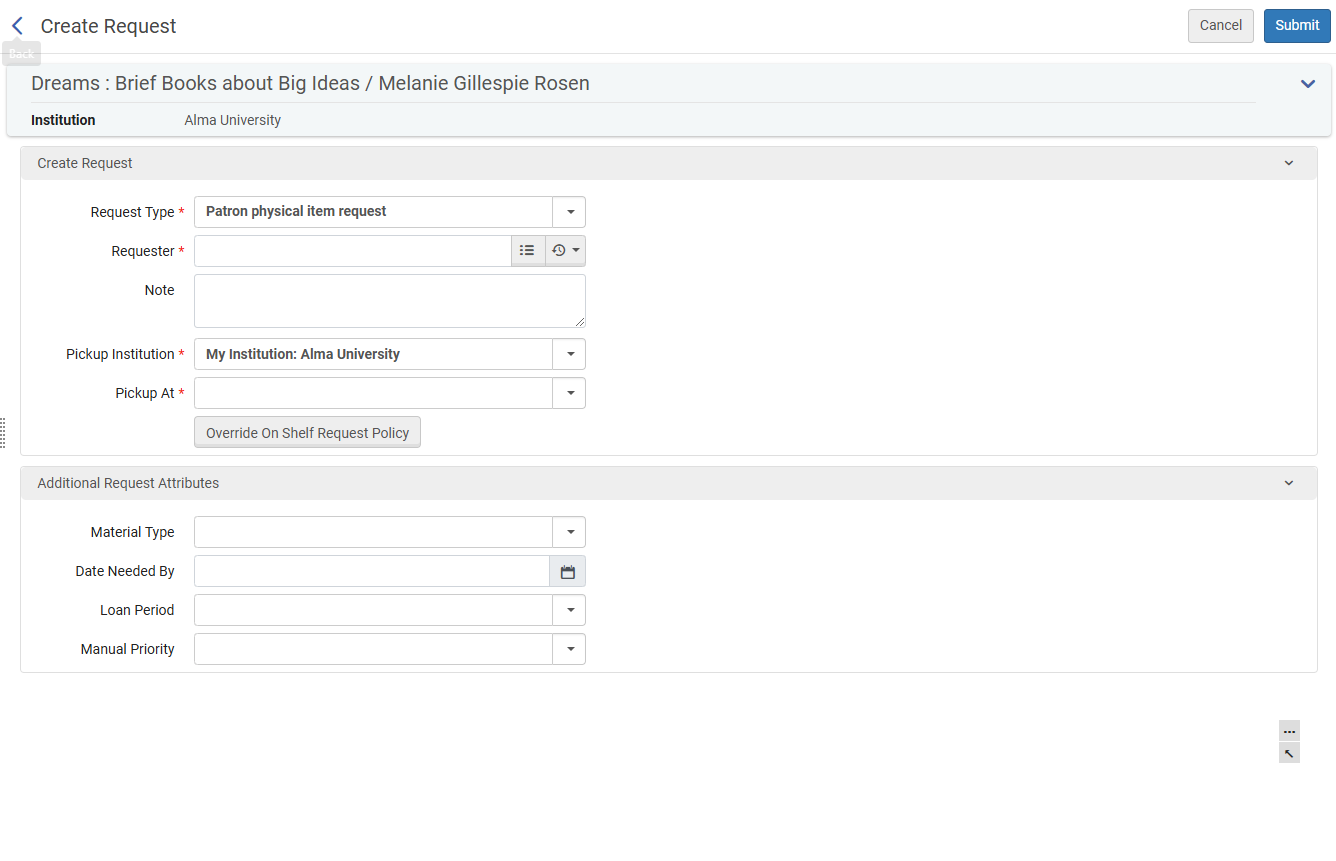
For more information, see Creating a Request from the Institution and Managing Patron Services.
Completion of Alma Integration with NACSIS-ILL
February 2025Fulfillment and Resource SharingURM-146873
The integration of Alma with the NACSIS-ILL system to streamline NACSIS-ILL workflows with Alma Resource Sharing has been completed. All relevant borrowing and lending workflows are now fully integrated, ensuring that all necessary functionality for NACSIS-ILL operators using Alma is available. This includes creating and synchronizing NACSIS borrowing/lending requests, reflecting NACSIS status and related information on Alma requests, full support for NACSIS shipping costs, and actions based on request status, among other features.
For more information, see Integration with NACSIS-ILL.
Permanent Linked Data Enrichment Configuration for MARC Records
February 2025 Linked OpenDataURM-224169
(Updated January 30, 2025) This feature will be released as part of the release update on February 9, 2025.
Permanent Linked Data enrichment can now be configured in addition to on-the-fly enrichment. Users can enable permanent enrichment of their MARC records through the linked data configuration. When this feature is activated for an authority in the enrichment configuration, the URI will be permanently added to the record in the designated subfield.
Impact: Institutions can now permanently embed the URI of the linked authority into their records, ensuring that this information is saved as part of the record rather than being applied temporarily.
The availability of this feature in your environment is subject to the completion of the semi-annual indexing in your Alma instance.
For more information, see Linked Data Enrichment Configuration.
Work Search Capability for BIBFRAME
February 2025 Linked OpenDataURM-183219
To enhance user accessibility to linked instances and related works, a dedicated "Work Search" functionality is implemented. This feature allows users to search for works directly, in addition to the current capability of searching instances across all titles. Currently, users can only view work details through instances; the new feature enables direct access to works.
The implementation involves creating a "Work Search" section that replicates existing search indexes for works and, if necessary, introduces new indexes to support comprehensive search capabilities.
This functionality will be available only if BIBFRAME support is enabled. For more information, see BIBFRAME support.
For more information, see Searching in Alma > Work Search.
New Link BIB Headings Rules to Enhance Control Over Automated Linking to Authority Records
February 2025 Metadata Management
Idea Exchange / Alma Authority Focus Group (AAFG) Highly Requested Enhancement
Authority control rules enable libraries to determine scenarios in which Alma automatically links bibliographic headings to authority records. When active, Alma evaluates these rules from the top and applies the first rule that meets all input parameters. To enhance control over automated linking, the following new input parameters for Link BIB Headings Rules have been added: "Subfield codes = not identical" and "Diacritics = not identical".
These enhancements enables libraries to better control automatic linking to authority records, improving the quality of authority control in their catalog.
For more information, see Linking Bibliographic Headings Rules.
Enhancements to Browse Bibliographic Headings
February 2025 MetadataManagementURM-210597
Previously,Browse Bib Headings displayed a single result per display value, grouping together all bibliographic headings with the same value, regardless of their linked authority records. This approach sometimes caused confusion, especially in cases where similar authority records had different source codes or when bibliographic headings varied in subfields not included in the display value. As a result, the authority record shown in the right pane might not always correspond to all grouped headings.
Now, headings are displayed more precisely to reflect the catalog's structure. When similar values are linked to multiple authority records,Browse Bib Headings displays a separate line for each authority record, accurately showing the connection between headings and their respective authority records. Bibliographic headings that are not linked to any authority record are displayed on a separate line.
As part of this enhancement, we've also introduced the following improvements:
- Source Code Display: When browsing (blank) source codes, the source code is now displayed in brackets, enabling librarians to easily identify the desired headings.
- Estimated Heading Count: Due to performance limitations, the exact number of bibliographic headings cannot always be displayed. Instead, we show the minimum identified number, accompanied by a plus (+) sign to indicate the actual count may be higher.
- "Open in Repository Search" Enhancement:
- When browsing (blank) source codes, repository searches will also exclude source codes, ensuring all relevant results are shown.
- The "Heading Information" advanced repository search index now aligns with Browse Bib Headings. For Browse Type = "TITLE", the "Family" drop-down has been removed, ensuring title-based searches return comprehensive results.
These enhancements make Browse Bib Headings a more effective tool for librarians, enabling them to assess their catalog more accurately, identify relationships between bibliographic headings and authority records with greater clarity, and seamlessly transition between browsing and repository searches.
FTP Configuration Supports Maximum Number of Files
February 2025 MetadataManagementURM-231011
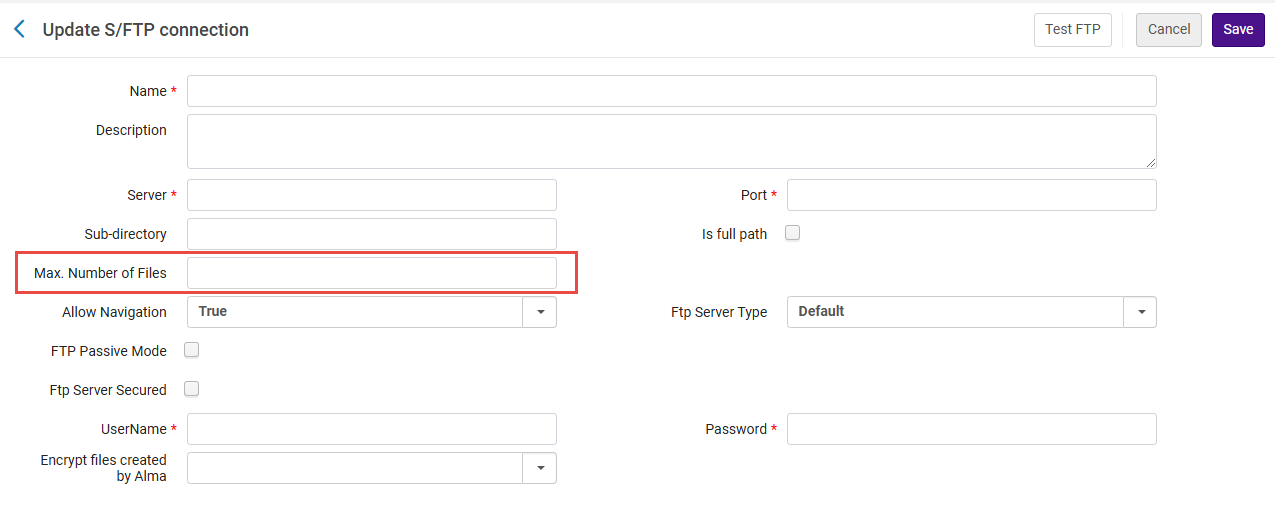
The FTP configuration now supports a Max. Number of Files setting, which was previously non-functional. This feature enables users to limit the number of files processed by a job, specifically within Import Profiles. This allows better control over file imports, enabling them to set a maximum number of files to be handled during each import process. This enhancement provides greater flexibility and control over file management workflows.
For more information, see Creating/Editing an Import Profile: General Profile Information.
Automatic Upload Electronic Holdings from Sage
February 2025 Electronic Resource Management
IdeaExchangeURM-227507
Sage journals and books are now supported by the Automatic Upload of Electronic Holdings feature. With this feature enabled, libraries can seamlessly update their Sage holdings. The system automatically retrieves a standardized KBART file containing holdings information from the provider's platform and updates the corresponding collections. This integration removes the need for manual updates, reducing staff workload, saving time, and enhancing accuracy and efficiency.
For more information, see Upload Electronic Holdings from Sage.
Overlap Collection Analysis Now Takes Into Account Embargo Periods
February 2025 Electronic ResourceManagementURM-174677
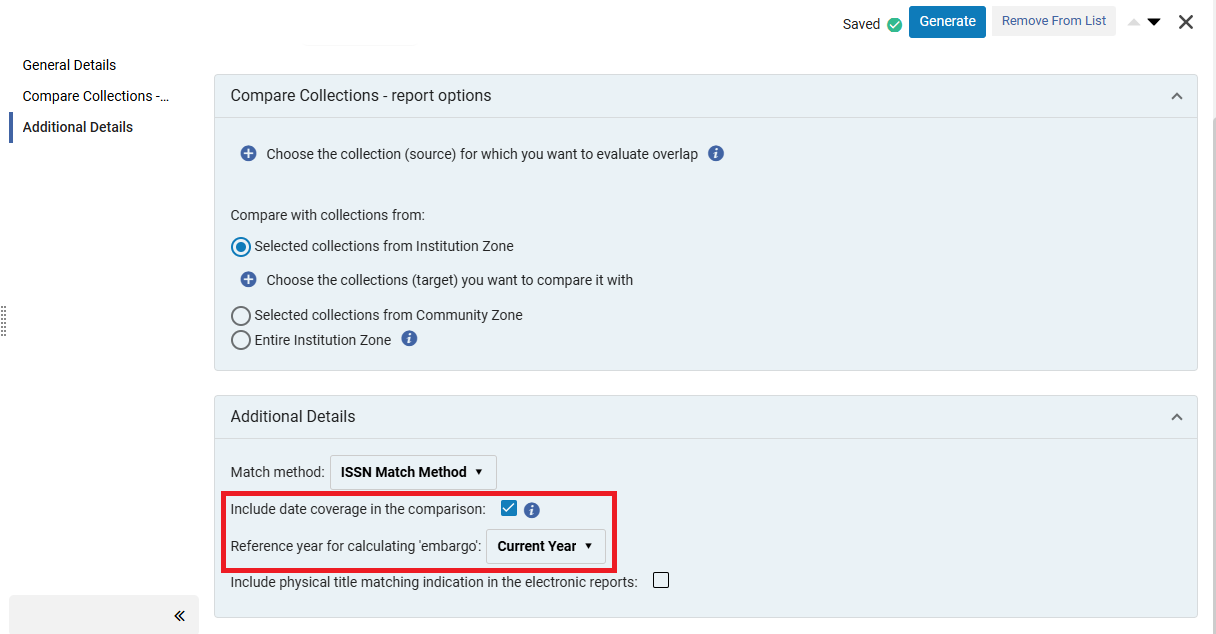
Overlap collection analysis now takes into account embargo periods when coverage comparison is enabled ("Include date coverage in the comparison"). You can also select to calculate the embargo based on a reference year, which can assist in evaluating your future inventory.
This enhancement provides a clearer and more accurate view of the coverage overlap between titles in the compared collections.
For more information, see Working with Overlap and Collection Analysis.
Support for COUNTER R5.1 Reports
February 2025AcquisitionsURM-230432
Alma now supports loading of COUNTER R5.1 reports, both manually and by SUSHI harvesting. By adhering to the updated standard, Alma ensures that usage statistics are collected consistently across various electronic resources, enabling librarians to effectively assess resource utilization and justify expenditures.
COUNTER R5.1 reports' usage will be added to the current R5 folder in Analytics, and will be comparable with usage data in R5. This is aligned with the COUNTER guidelines (see "Are Release 5.1 reports comparable to Release 5 reports?" in the FAQs).
Harvesting COUNTER R5.1 Reports
To harvest reports in R5.1, an account of R5_1 type is needed. For background on the considerations that led to this decision, see the knowledge article.
For new publishers, add a new SUSHI account of type R5_1, and fill the relevant fields.
For existing publishers transitioning from R5 to R5.1, create a R5.1 SUSHI account based on their current R5 account, using the new Create R5.1 account. This will create a R5.1 account with the same details as the R5 account, except for the name (SUSHI Account), Vendor URL and Override URL, which you will need to enter manually.
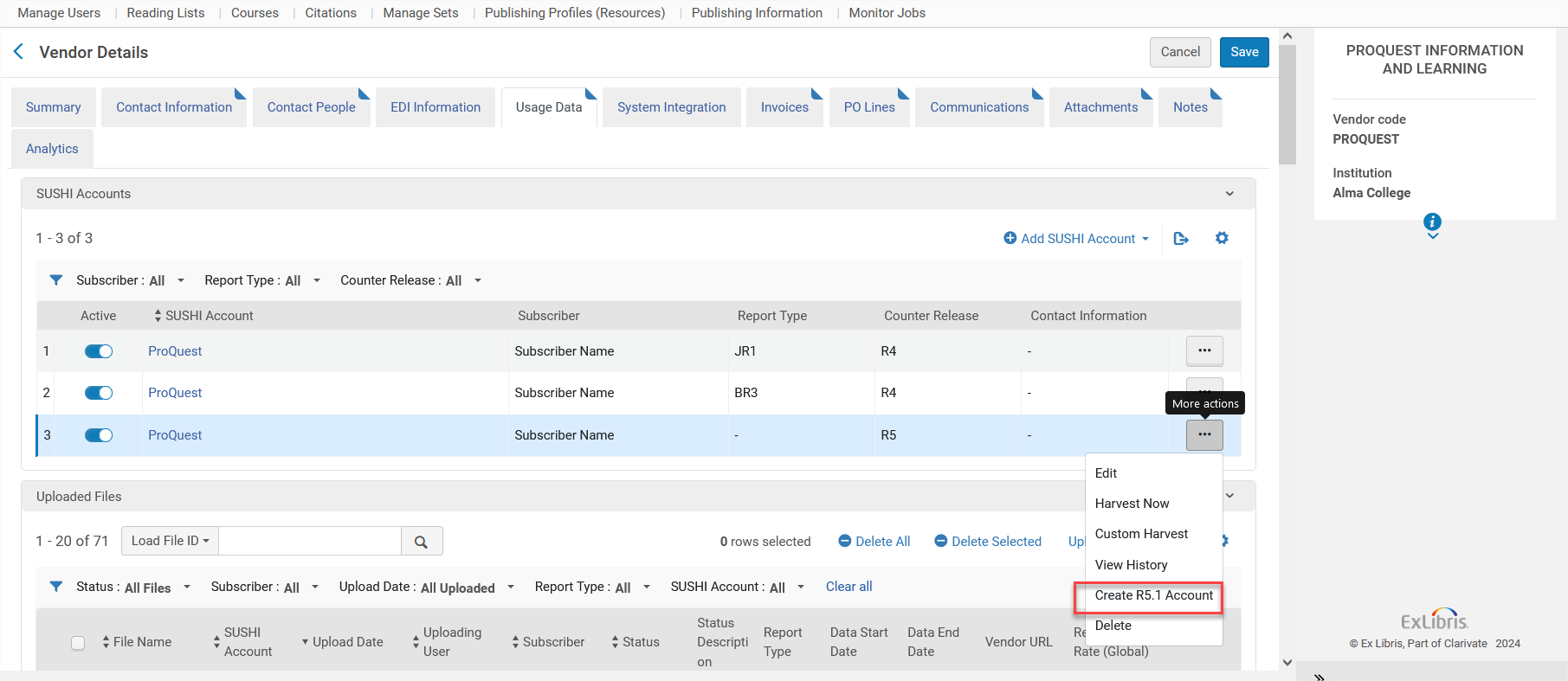
Note that the newly created R5.1 account will start harvesting from the last R5 harvesting onwards (using the scheduled job or the Harvest Now action) to avoid data duplication.
For more details on the recommended workflow when transitioning to R5.1, see Managing COUNTER-Compliant Usage Data.
Viewing Reports in Analytics The reports will be added to the current R5 folder in Analytics, and the data is comparable. There are some specific changes in R5.1 that may impact the Analytics reports. For details, see Usage Data (COUNTER).
Enhanced "PO Line - Claiming" Scheduled Job Report
February 2025Acquisitions
IdeaExchange
CERV Enhancement (ID #8936)
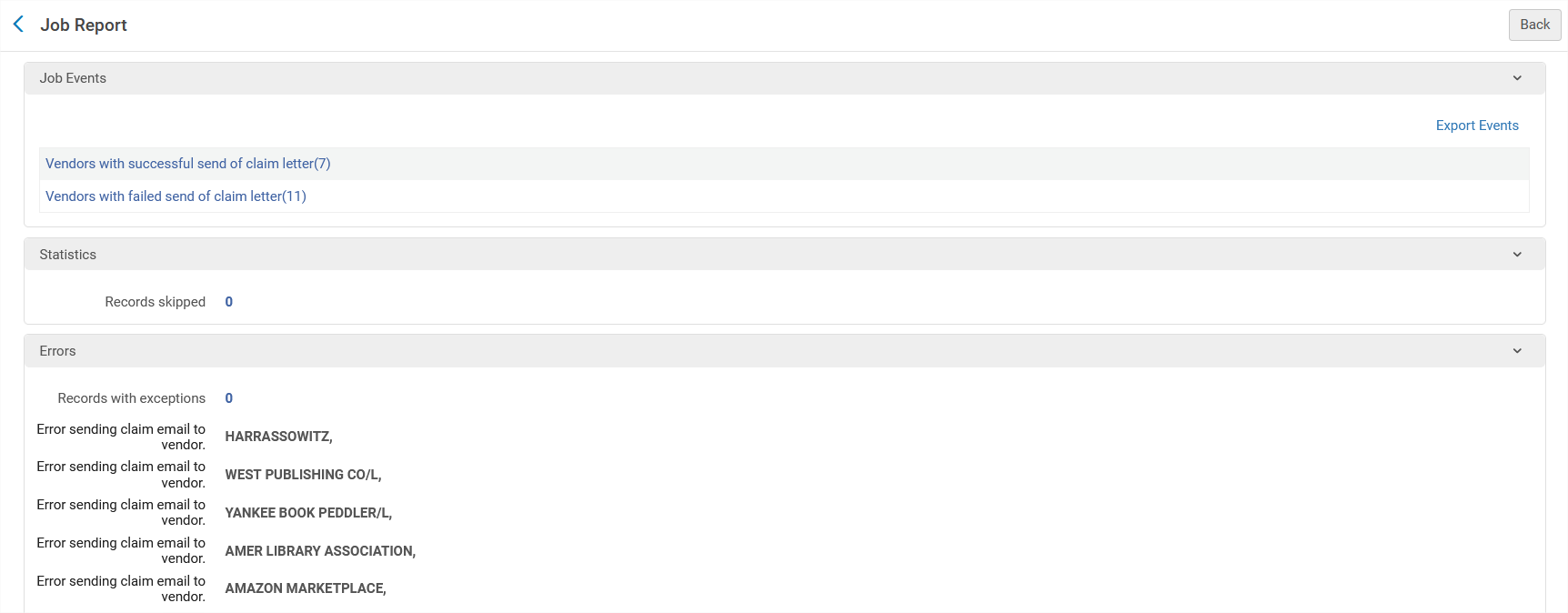
The job report now includes a list of vendors to which claim letters were successfully sent, as well as a list of send failures. The lists include the related PO line numbers.
For more information, see Processing Claims.
Changes in Bibliographic Records Reflected Automatically in PO Lines
February 2025Acquisitions
Idea ExchangeURM-154433
Alma can now automatically update linked PO lines when changes are made to bibliographic records. This improves order accuracy and eliminates the need for manual updates.
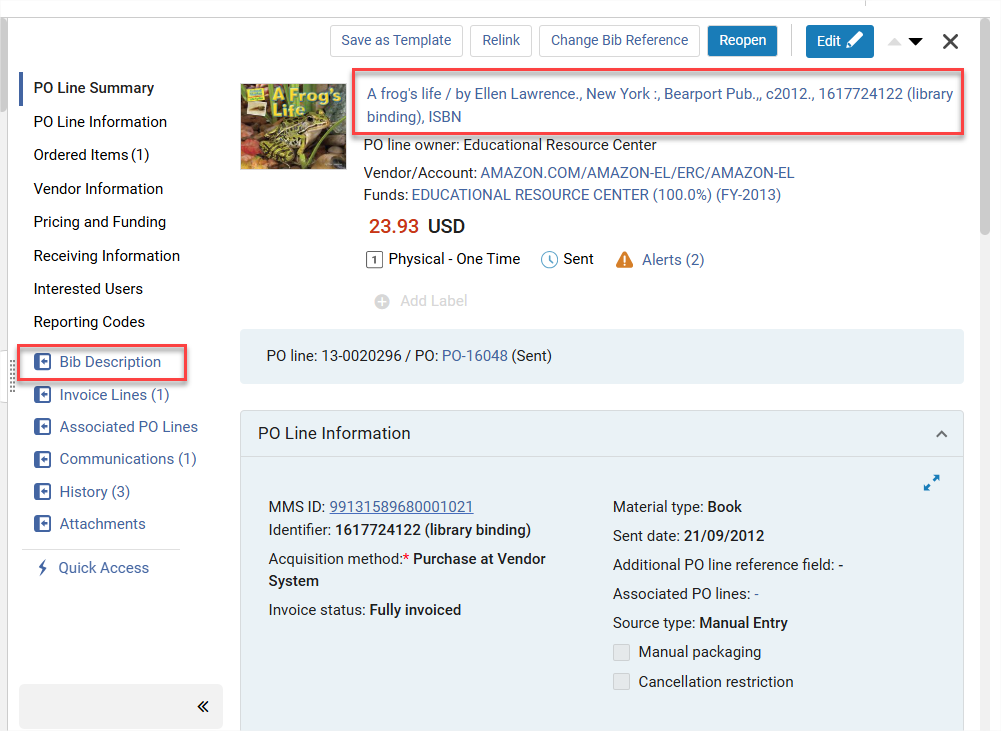
The new configuration is disabled by default. To enable it, go to Configuration Menu > Acquisitions > Other Settings and update the po_line_description_update_upon_bib_change parameter to true.
For more details see Other Settings.
Change PO Lines Types for Different Inventory and Continuity
February 2025Acquisitions
Idea Exchange
CERV Enhancement (ID#8861)URM-234029
The Update PO Lines Information - Advanced job now changes the PO line type, even when the inventory type and/or continuity are different. This can help with alignment for statistical purposes and provide a 'simple' error-fixing method in the daily work.
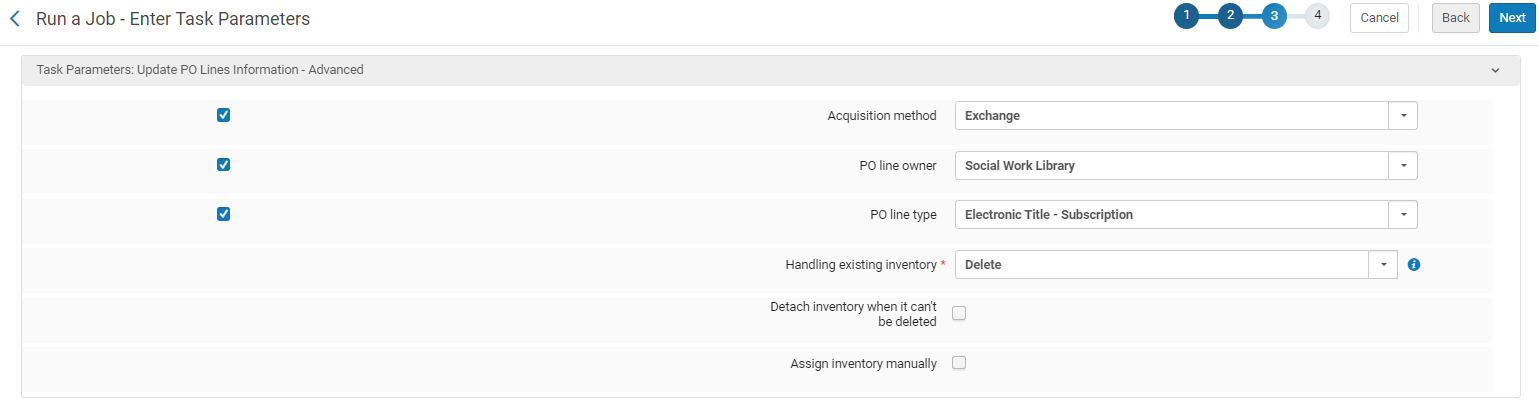
When selecting to change the PO line type, three additional fields will appear:
-
Handling existing inventory - The available options are: Detach from PO line/Delete.
-
Detach inventory when it can't be deleted- Appears when Delete is selected for "Handle existing inventory".
-
Assign inventory manually - Change the PO line type without automatically creating inventory.
For more details, see Manual Jobs.
Changes to Display of PO Lines
February 2025Acquisitions
The following changes were made to the PO line display:
-
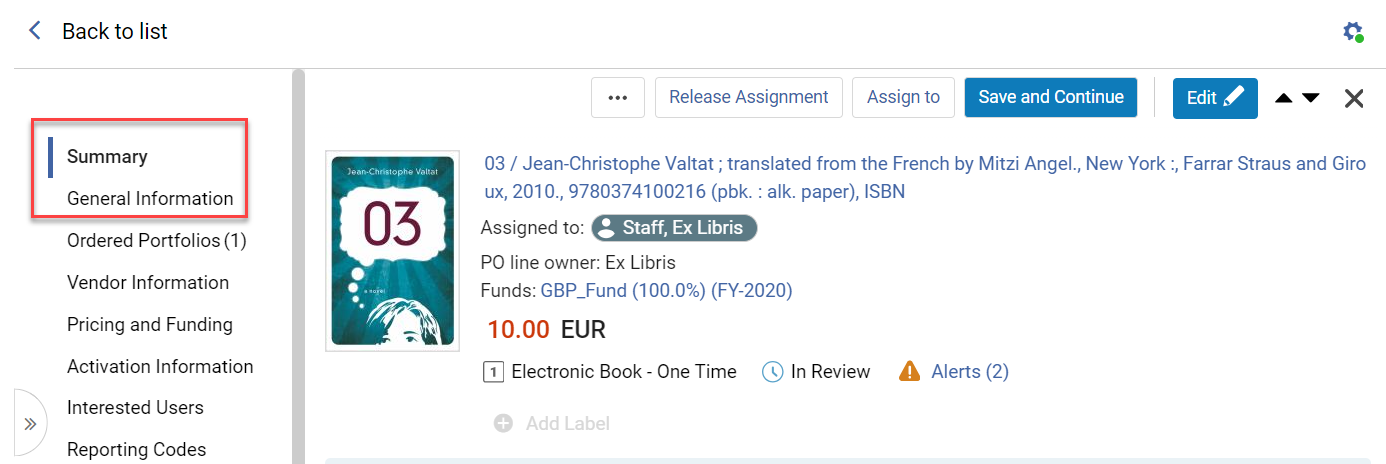
The following PO line section names were changed to align with the new Alma UI:
-
PO Line Summary was changed to Summary.
-
PO Lines Information was changed to General Information.
-
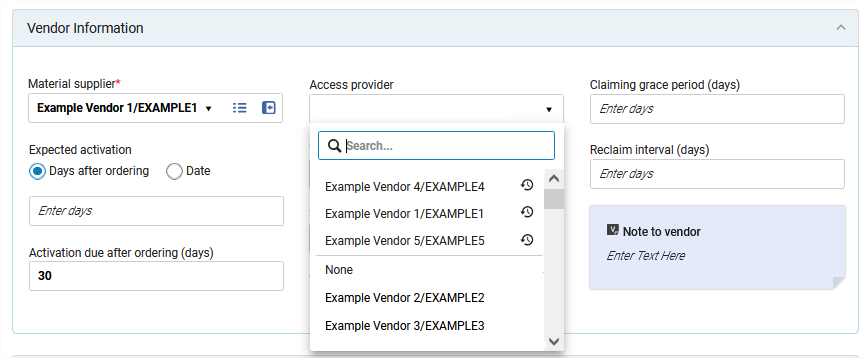
The recent selection list was added to the following PO line fields:
-
Acquisition method
-
Material type
-
Access provider
-
Vendor reference number type
-
Currency
Quick Access Links in PO Lines
February 2025AcquisitionsURM-227802
Users working on PO lines can now more efficiently search the relevant fields to update by using the Quick Access module.
The Quick Access feature appears when the PO lines list operates in split view and in full page view (as opposed to list view). This module enables searching for sections, fields, and actions within the form. Users can initiate the module by using the keyboard shortcut (period '.') or by selecting the Quick Access link below the section links in the side menu area.
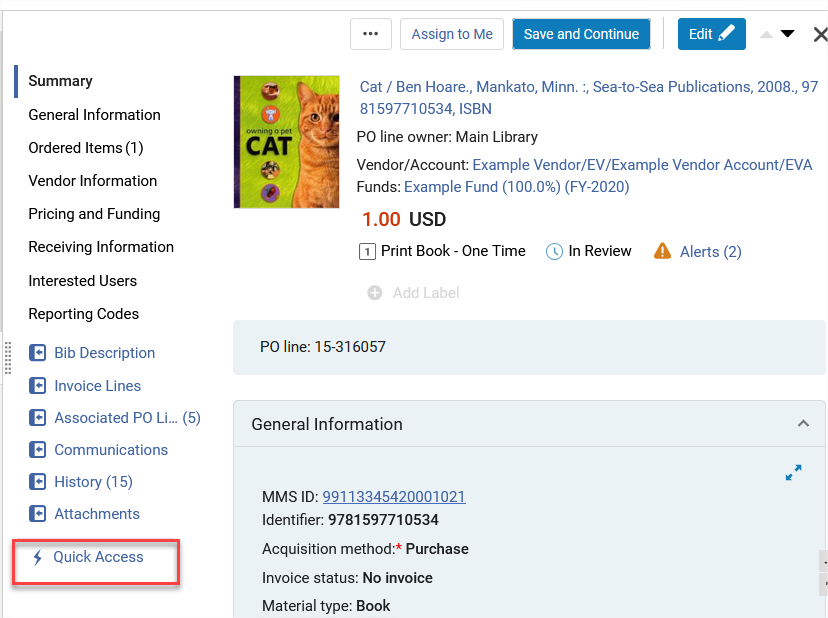
This provides users with a more streamlined and intuitive way of interacting with the form-focused search module.
For more information, see Quick Access Module.
Pagination in PO Line Related Inventory
February 2025AcquisitionsURM-227381
Pagination was added to the following PO Line sections:
-
Ordered Items
-
Ordered Portfolios
-
Ordered Collections
By default, the pagination appears when there are more than 20 rows in the list.
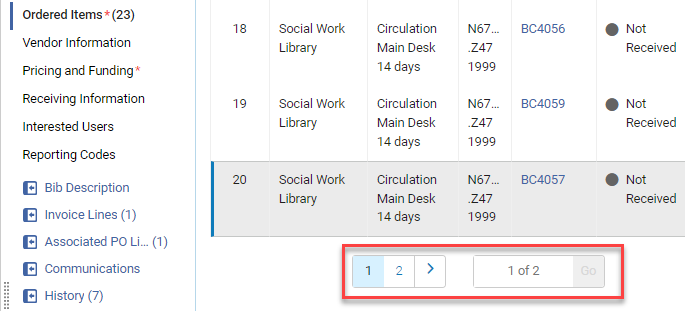
In the slider, you can change the number of rows required to make the pagination appear.

Alma saves the slider value after logging out or refreshing the page.
Holdings and Representations do not have pagination as they usually don't have many items in the list.
For more information, see Manually Creating a PO Line.
Opening Hours Configuration in the Consortia Central Configuration Dashboard
February 2025 CollaborativeNetworks
It is now possible for the Network Zone operator from the Central Configuration Dashboard to manage standard opening hours (Calendar Management, Summary information, Contact information and IP addresses information) at the institution level and/or Library level (when appropriate). It is also possible to distribute the calendar information from the Central Configuration Dashboard to its institution members using one of the existing distribution mode (Proposed/Imposed/Hybrid) of the Central Configuration Dashboard from Network Zone level to Institution Zone level (Members level) while keeping the current behavior:
-
Libraries inherit events and exceptions from the institution.
-
Libraries inherit institution opening hours.
This feature improves efficiency by enabling centralized management of Opening hours (e.g. Summary information, Contact information, Calendar information and IP addresses information) at the Network Zone level, as well as offering the possibility to distribute the Calendar information to its members for better cooperation.
This new feature is only relevant to Consortia with a Network Zone setup.
For more information, see Sections and Configurations Options.
Hide Configuration Links for Code and Mapping Tables in the Alma Configuration Menu at Network Zone Level
February 2025 Collaborative Networks
URM-231809
Six months after the General Availability (GA) of the new Consortia Central Configuration Dashboard, all Code and Mapping table configurations have been removed from the 'old' Alma and Primo VE configuration menus of the Network Zone. Network Zone administrators, while operating at the Network zone institution, now access those configurations through the Central Configuration Dashboard directly.
The removed configurations from the Alma and Primo VE configuration menus at Network Zone Level are only:
- Code Tables
- Mapping Tables
For more information on related configurations, see Consortia Central Configuration Dashboard.
Accessibility Conformance Report (ACR/VPAT) Update
February 2025User Experience, Accessibility &Infrastructure (Added February 2, 2025)
As part of our ongoing commitment to accessibility, an independent audit of Alma was conducted by Deque, a leading accessibility consulting firm, in 2023. Based on the audit findings, the Alma team has made significant accessibility improvements throughout late 2023 and during 2024. We are pleased to announce the publication of the updated Accessibility Conformance Report (ACR), which provides a comprehensive overview of Alma's compliance with WCAG 2.1 AA standards as of February 2025.
For the updated report, see Alma Accessibility Conformance Report.
For more information, see the Alma Accessibility Statement.
Thumbnails Include Images from Syndetics
February 2025User Experience, Accessibility &InfrastructureURM-232953
The infrastructure functionality for retrieving the thumbnail images for records was enhanced. It now includes Syndetics as an external source of records cover images, in addition to the existing external source of Google Book Cover. This increases the number of records that will have thumbnail images.
For more information, see Customizing the Thumbnail Display.
Auto Completion in Statistical Category Search
February 2025User Experience, Accessibility &InfrastructureURM-235564
When searching in Users > Statistical category in the advanced search with more than 1000 statistical categories, an auto-complete option appears, starting with the first 3 characters. This provides enhanced searching functionality for institutions with high amounts of user Statistical Categories data.
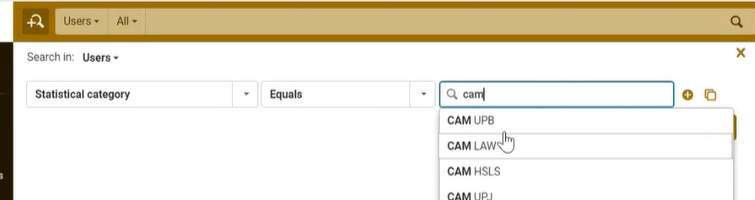
For more information, see Searching in Alma.
Multiple Saved Facets
February 2025User Experience, Accessibility &InfrastructureURM-233737
On the Manage Sets page, multiple combinations of facets can now be saved under different names. This makes it easier to manage different sets of facets and access them as needed.
The saved facets are available in the Saved drop-down list.
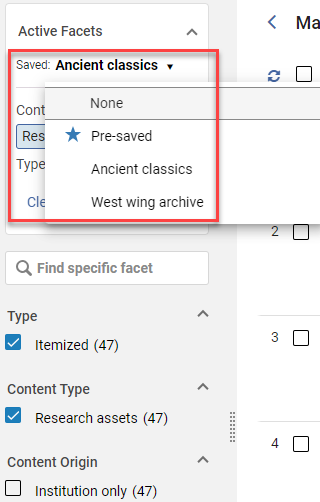
Users who previously saved facets on the Manage Sets page before this change was implemented, will see those facets in the drop-down list with the name Pre-saved.
For more information, see New Layout.
Manage Sets - Export Current View
February 2025User Experience, Accessibility &InfrastructureURM-213191
When exporting sets, there is now an option to export the current view rather than all sets.
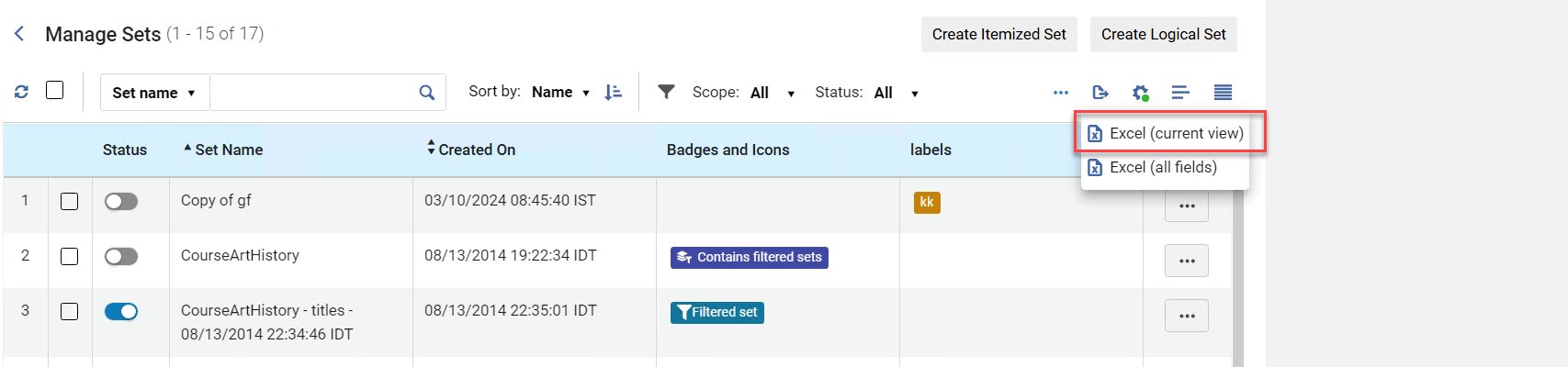
For more information see New Layout.
Enhanced Information for Results of Bulk Actions in Sets
February 2025User Experience, Accessibility &InfrastructureURM-235207
After running bulk actions for sets, information displays at the top of the page showing the results, including the number of successes and failures and a link to the results.
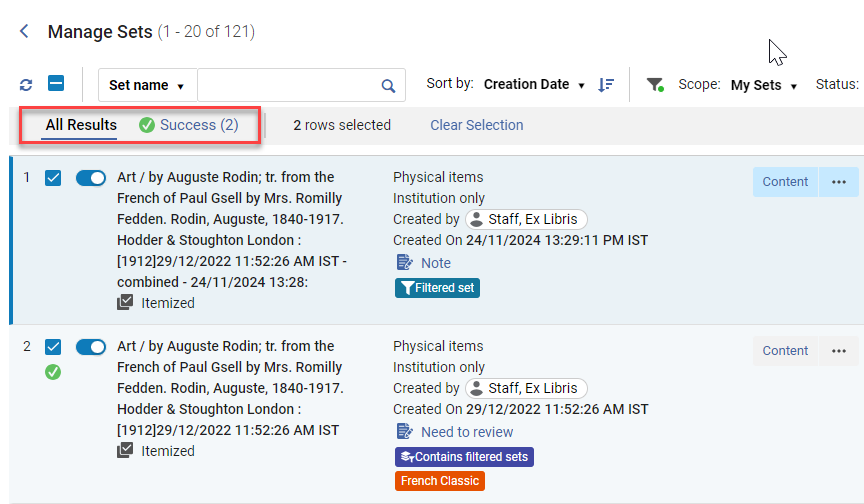
For more information, see Manage Sets and Queries.
Labels on Manage Sets Page
February 2025User Experience, Accessibility &InfrastructureURM-231701
The Manage Sets page now supports labels, providing an improved sets management and maintenance experience. Users see the labels as badges in the list of sets.

The labels are also added to the Manage Sets facets. For more information, see Managing Labels in Alma.
Improved UX for Updating Sets
February 2025 User Experience, Accessibility & Infrastructure URM-232527
When adding or updating sets where the content type uses the new UI, the set header and search information is now displayed in separate rows to make it easier for the user to differentiate between them.
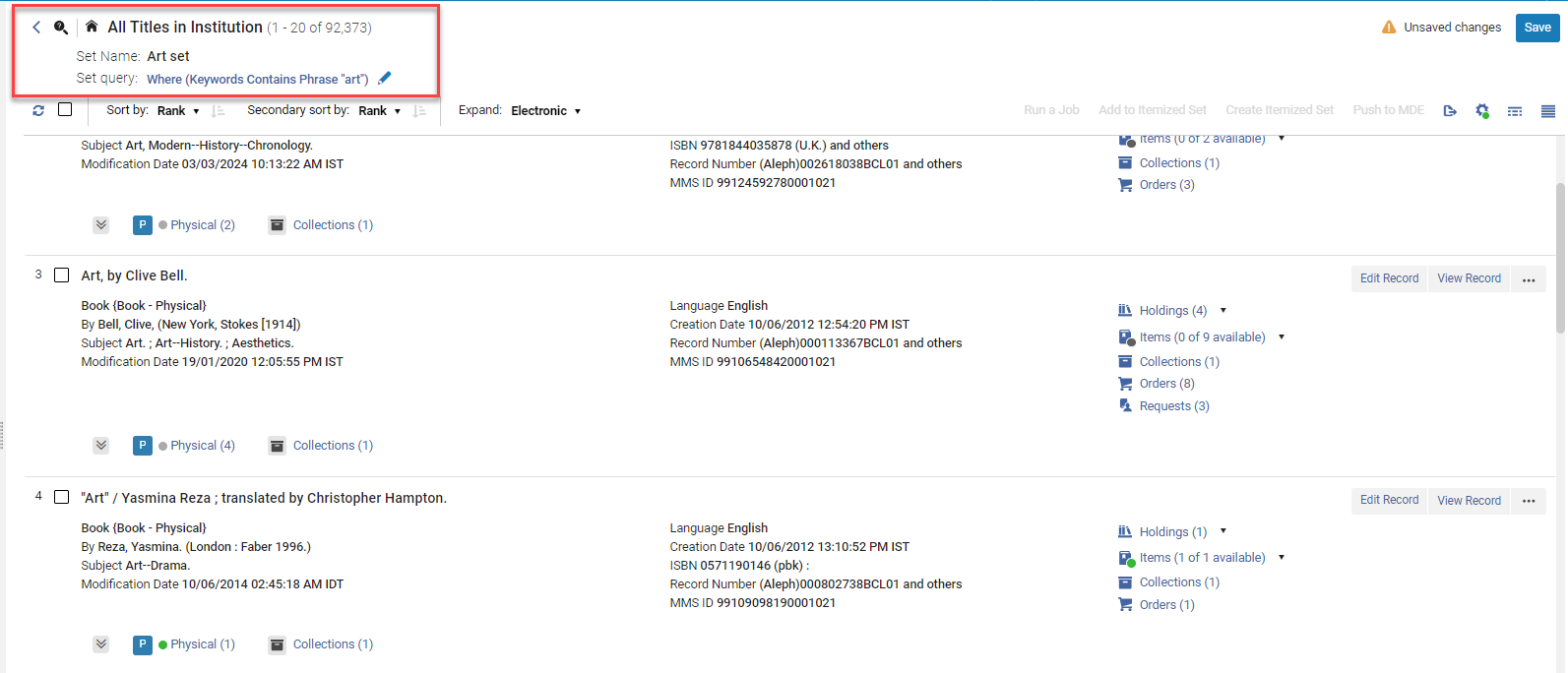
When editing the search query, the advanced search appears as a pop up, separate from the persistent advanced search. This makes it clearer to the user that the search is in the context of sets.
The advanced search pop up also appears when adding members to an itemized set. In addition, when adding members to an itemized set, you no longer have to exit to the Manage Sets page and search for the new set. Instead, you can now immediately view the new set content by selecting the View Members button.
For more information, see Managing Search Queries and Sets.
New DV Dashboard Now Available: Bibliographic Records Distribution by Language and Publication Place
February 2025 Analytics and InsightsURM-225193
The new Bibliographic Records Distribution by Language and Publication Place dashboard is now available under the Alma > Titles > Data Visualization folder. This Diversity, Equity, and Inclusion (DEI) dashboard represents the variety of languages in which the library's titles are available, highlighting the linguistic diversity of the collection. It also maps out the countries where these titles were published, offering a global perspective on the library's resources. Users can filter and explore data to see how well the collection represents different cultures and regions. The dashboard includes all active titles in the library.
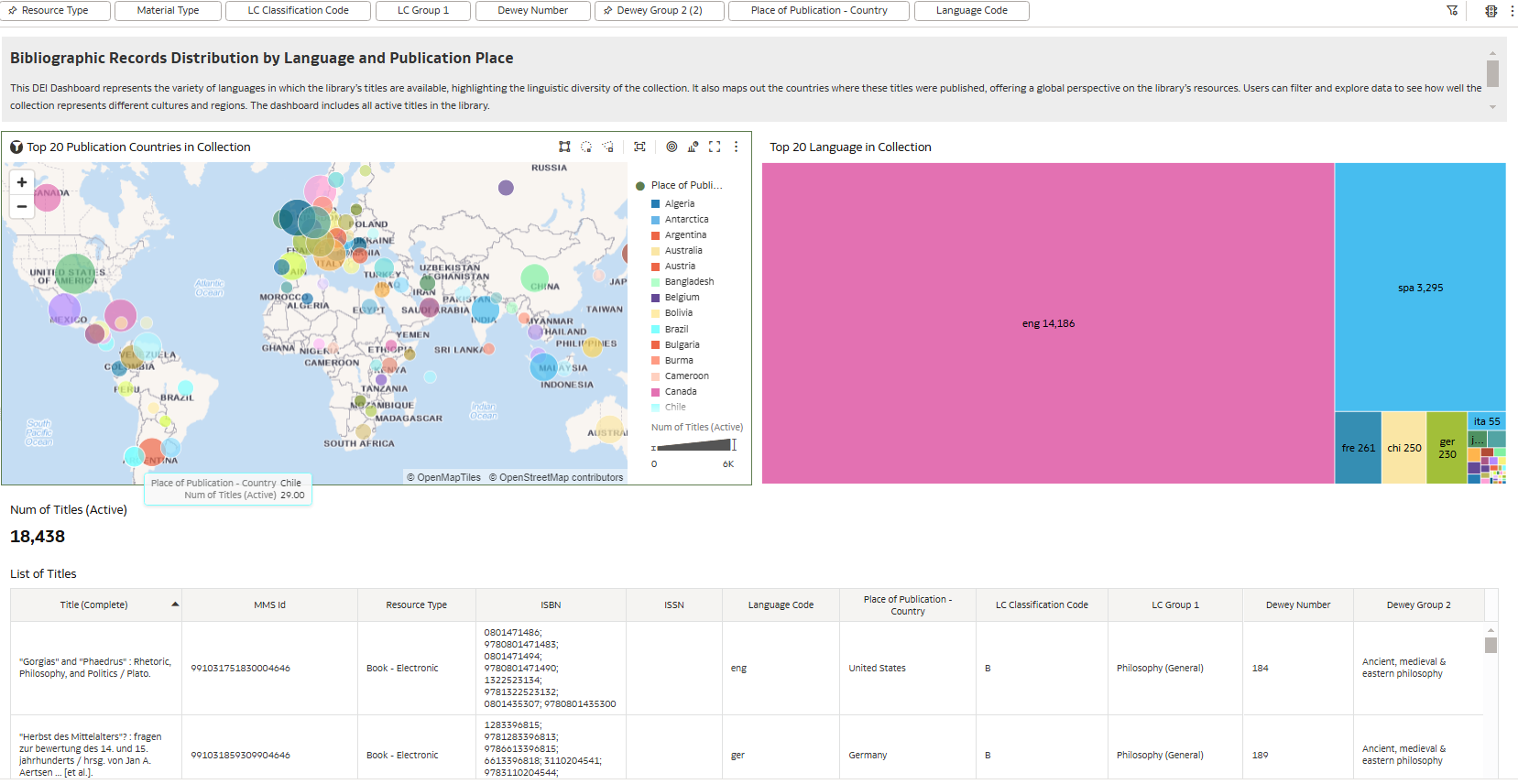
Additional Enhancements
- February 2025 Fulfillment and Resource SharingURM-232431 The Citation System Tags field was added to the Citations folder in the following subject areas. This field displays all tags not mapped to a tag type, including tags added from the integration with the UK Digital Content Store and possibly tags added from the Leganto Questions feature.
- Leganto Student Usage
- Course Reserves
- Leganto Instructor Usage Events
- Purchase Requests
- February 2025 Fulfillment and Resource SharingURM-192949SF: 06737730 The Year facet is now displayed in a logical order.
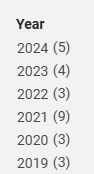 Year facet
 - February 2025 Fulfillment and Resource SharingURM-233734 Alma resource sharing is now aligned with the NACSIS ILL termination points.
- February 2025 Metadata ManagementURM-231183 Physical Description Extent From 300$$a Available in Search Results: When working in the new titles search UX, record customization allows adding information from MARC 21 300$$a to the displayed metadata in the search results.
This feature requires re-indexing and will therefore be fully operational in sandbox environments for new, updated and re-indexed records only, or following the sandbox refresh or re-indexing.
- February 2025 User Experience, Accessibility & InfrastructureURM-231857 Various fixes and enhancements were done to improve accessibility and to comply with the standards.
Resolved Issues
| SF number | Area | Description |
|---|---|---|
| 07208090 07760353 URM-229203 | Acquisitions | The "min_expected_arrival_date" and "max_expected_arrival_date" parameters were not working in the po-lines web service. This was fixed. |
| 07167317 URM-229112 | Acquisitions | In some situations, users could not search by title or date when creating an invoice from a PO. This was fixed. |
| 06659147 06678786 06395876 07709657 URM-189306 | Acquisitions | Sending claims did not work for some orders. This was fixed. |
| 07699916 URM-235837 | Analytics and Insights | The Generate Recommendations based on Analytics reports job did not work. This was fixed. |
| 07168769 URM-228694 | Digital Resource Management | The Add Digital Representation workflow did not perform DC metadata validation when creating a new digital bibliographic record. This was fixed. |
| 07725840 07006742 URM-214693 | Electronic Resource Management | Upload electronic holdings - Elsevier job frequently fails after running for hours. This was fixed by implementing ListSafeInOperator to retrieve pids when dealing with a large number of records. |
| 07216367 URM-230904 | Fulfillment and Resource Sharing | Circulation desk operators deleted by API still appeared in the operator list. This was fixed. |
| 07806579 URM-238813 | Fulfillment and Resource Sharing | Return Items gave an incorrect due date for borrowing requests in the new UI. This was fixed. |
| 07790780 07781800 URM-237733 | Fulfillment and Resource Sharing | There was an issue with the time display in the new UI for patron services. This was fixed. |
| 07145915 URM-237070 | Fulfillment and Resource Sharing | In the copyright declarations configuration there was an option to change the organization unit. This is not needed and therefore it was removed. |
| 07763233 07780434 URM-236946 | Fulfillment and Resource Sharing | Only users with Circulation desk manager roles could access user information with a link from the manage patron services page in the new UI. This was fixed. |
| 07703545 07493830 URM-233139 | Fulfillment and Resource Sharing | The Query to Patron Letter incorrectly displayed the "Type_6_header" under the To/From label. This was fixed. |
| 07795695 07777404 07786448 07756541 URM-234654 | Fulfillment and Resource Sharing | The tab titles in the browser were incorrect in the new UI for Manage Patron Services. This was fixed and the updated tab titles are as follows:
|
| 07495850 URM-236279 | Fulfillment and Resource Sharing | Importing a calendar Excel file for an institution with a time zone over 12+ caused the date to shift by one day. This was fixed. |
| 07772704 07801289 07739599 07761618 07791750 07785974 URM-235791 | Fulfillment and Resource Sharing | In the new UI for Manage Patron Services, searching for external users generated a general error. This was fixed. |
| 07805148 07801050 07801614 07813094 07803925 07801951 07806377 07797669 URM-234769 | Fulfillment and Resource Sharing | Loan/Return receipts were not printed in the new UI when using quick print. This was fixed. |
| 06729615 07033226 URM-196165 | Fulfillment and Resource Sharing | Operators were unable to create multiple requests on a title for the same patron even though the "Override Block Request" privilege was enabled. This was fixed. It is now possible to create multiple requests for the same patron by adding a different note for each request. |
| 07693594 URM-236179 | Fulfillment and Resource Sharing | There were issues with the display in the partner list with more than 1000 partners. This was fixed. |
| 07246283 URM-233829 | Fulfillment and Resource Sharing | There were issues using address3 in the xsl form of the letter. This was fixed. |
| 07112073 URM-231314 | Fulfillment and Resource Sharing | There were issues with the date format for newspapers in some cases. This was fixed. |
| 07175788 URM-230449 | Fulfillment and Resource Sharing | When performing the "renew" action on a borrowing request, an internal note did not appear in the request's note. This was fixed. |
| 07227870 URM-230446 | Fulfillment and Resource Sharing | The "issue" and "volume" metadata fields on borrowing requests were both inserted in the "volume" field on the lender side. This was fixed. |
| 06982787 URM-218659 | Fulfillment and Resource Sharing | There were issues with the Fulfillment Unit rule for resource sharing requests from Primo VE. This was fixed. |
| 07700292 URM-234331 | Fulfillment and Resource Sharing | The "Default item policy" field was mandatory for NCIP partners. This was fixed to be not mandatory. |
| 07779010 07207592 URM-236305 | Fulfillment and Resource Sharing | In some cases, the manual download label was not translated correctly when downloading a file from the document delivery. This was fixed. |
| 07185462 URM-225164 | Fulfillment and Resource Sharing | When adding a conditional label when editing a request, the request remained in the Created Lending Request set rather than moving to the Conditional set. This was fixed. |
| 07732397 07491957 URM-174745 | Fulfillment and Resource Sharing | Previously, when Enable Display of License Information (Configuration > Fulfillment > Discovery Interface Display Logic > Other Settings) was enabled, the Terms and Internal description were not displayed for Network Zone resources. This was fixed. |
| 07691727 URM-231581 | Metadata Management | ID based linking overrides IDs in subfield $1. This was fixed by adding subfield 1 to the list of subfields to be preserved when executing the Preferred Term Correction job, or by using F3 functionality in the MD Editor, for the specified data fields. |
| 07792256 URM-237857 | Metadata Management | General Publishing > Republish by Date Range - a discrepancy of explanations between UI and Online Help. This was fixed. The info message was updated to indicate that this option republishes the records that were processed within the selected date range, not only the records that were actually published. |
| 07713611 07016467 07713586 07745610 URM-233092 | Metadata Management | INN-Reach V.3 - The hourly item publishing job gets stuck processing only one item until the profile and sets are recreated. This happened after rejecting a lending request from Alma (which runs publishing for one item). This was fixed, so the scheduled publishing job is not affected. |
| 07090953 URM-228603 | Metadata Management | General Publishing - when the 'File name' is configured with a dot character, the published filename is created with “-new” in the wrong place. This was fixed. |
| 06989139 URM-221730 | Metadata Management | Publishing to Primo, Classification Enrichment - When MARC field 084 (Other Classification Number) has any subfield in addition to subfields $a and $2, the field's content is published, but no enrichment is done. This was fixed so the record is enriched with preferred and non-preferred terms. |
| 07801622 URM-239046 | Metadata Management | New Search - the results for grouped searches were inconsistent. This was fixed. |
| 07823747 07812083 URM-238841 | Metadata Management | There were issues with ranking in the new Titles Search. This was fixed. |
| 07834411 URM-238572 | Metadata Management | The new Titles Search caused issues with the testing of Primo VE normalization rules. This was fixed. |
| 07808041 URM-238508 | Metadata Management | In the new Title Search, the order of the MARC title fields on the bibliographic record section was inconsistent. This was fixed. |
| 07713217 URM-234316 | Metadata Management | Attach to an electronic collection button was not working. This was fixed. The cause of this issue was incorrect redirection when editing a portfolio from the Metadata Editor. Previously, editing redirected to the Electronic Portfolio Editor's Coverage tab, which caused issues with back URLs and led to errors. This was updated so that editing now redirects to the General Information tab of the Electronic Portfolio Editor. |
| 07238176 URM-230216 | Metadata Management | Release all records for user - does not release records. This was fixed. Now when releasing records for another user they actually get released. |
| 07228739 07154434 URM-229404 | Metadata Management | Metadata Editor: Holding record warnings displayed without any message or information on field 854. This was fixed by adding checks for fields 854 and 855 hidden fields. |
| 07205245 URM-227566 | Metadata Management | In the Metadata Editor, a 'Page Unresponsive' error occurred when cataloging a field linked to a Controlled Vocabulary with many values. This issue has been resolved, and now results are retrieved immediately, displaying no more than the first 100 entries, which are updated dynamically as characters are typed. |
| 07135223 URM-224710 | Metadata Management | Adding Undefined Subfields showed that validation did not work for all fields. The problem occurred for certain fields and only in the networkzone. This was fixed by changing the process so that Ex Libris validates all fields regardless if we are in an institution or network zone. |
| 07046299 07052527 URM-218114 | Metadata Management | When a normalization rule contains a comment (a hash sign followed by a text), the comments preceding the rule are sometimes deleted after saving. This was fixed. |
| 06680341 URM-197246 | Metadata Management | When adding a portfolio in the Metadata Editor's split view, it does not populate the right bibliographic information for the selected record. This is now fixed, so that only in the case where the left pane is the holdings record and the right pane is InventoryNavigationPresenter, is information taken from the left pane; otherwise, it is taken from the pane that is the focus. |
| 06765635 URM-195218 | Metadata Management | When the 'font_for_special_characters' customer parameter was enabled, the controlled vocabulary drop-down list in the Metadata Editor remained in the old font. This was fixed. |
| 07208631 URM-228749 | Metadata Management | An issue occurred when more than one authority names was defined. When more then one was defined, an error message appeared without any information. This was because when trying to add a prefix to vocabularies, the ID was null. This was fixed by changing the way we get the registry ID. |
| 06378761 URM-178951 | Metadata Management | When adding a local extension to a field, the extension now appears in the indication rule form. Previously, it was missing because the system fetched institution-configured fields first, followed by the general profile fields, causing the institution-configured fields to be overridden. The issue was resolved by adjusting the order in which fields are fetched. |
| 07821435 URM-237932 | Metadata Management | When there were headings not linked to any fields in the records, the PTC job failed with the flip linking active. This is fixed, and from now the PTC no longer fails. |
| 07698202 URM-232511 | Metadata Management | In a record, when a subfield to preserve ended with a dot, the Preferred Term Correction job duplicated it. This is fixed. |
| 06807651 URM-205021 | Metadata Management | The preferred term correction job did not correct headings where the only difference between the preferred and non-preferred terms was in the diacritics. This was fixed, and the headings are now correct. |
| 07226077 URM-228182 | Metadata Management | Registry Type Label in Field Configuration: Translation is complex as the registry is fetched by ID and shared across untranslated profiles in other areas (e.g., Config > Menu > Resources > Metadata Configuration). Further discussion and planning are needed to address this. |
| 06780819 06780800 URM-206278 | Metadata Management | Translation Fix for "Mandatory" Label in MARC21 Profiles: The "Mandatory" label was not translated in MARC21 profiles under metadata configuration. The following areas were fixed:
Further fixes depend on customer needs and discussions with the product owner. |
| 07718661 URM-233823 | Metadata Management | The UNIMARC Bibliographic 7XX4-OTB vocabulary was not available in Italian, and five new codes were missing. This issue was resolved by adding the missing codes and ensuring the vocabulary is now fully available in Italian. |
| 07776494 URM-235950 | Metadata Management | Update From Central Catalog job - Merge fails when one of the records is a ghost record. This was fixed. |
| 07178339 URM-226026 | Metadata Management | When crosswalking NACSIS bibliographic records to MARC, the NACSIS PTBNO= field could contain multiple subseries, and each subseries could have an associated a subseries volume. This is now handled correctly. |
| 06971678 URM-212804 | Metadata Management | Alma did not add Romanized transliterations of NACSIS CJK reading values when importing NACSIS records with "variant title" fields (NACSIS field |
| 07634242 URM-236162 | Physical Resource Management | Item editor: When moving an item (which is the last item in a holdings record) to a new location, a warning message is displayed, stating that the holdings record will be deleted. However, if the holdings record is the only one in the bibliographic record, the holdings record is not deleted; only its library/location data is changed according to the destination. This was fixed and the warning message now includes this information. |
| 07212536 URM-231294 | Physical Resource Management | Item statuses appeared in English even if a non-English UI was being used. This was fixed and now the item statuses are translated. |
| 07195791 URM-225702 | Physical Resource Management | Slowness, lagging, and system crashing occurred when trying to retrieve a line from the "Statistical Note 1" field in the Item Editor. This was fixed by changing the statistical fields component. |
| 06939827 URM-211582 | Physical Resource Management | Physical Item Editor > History Tab: Library and location changes should be tracked in the "Holdings changes" section, as these modifications are made at the holdings level. Historically, permanent library and location changes were listed under the "Item changes" section before introducing the "Holdings changes" section. This approach sometimes caused inaccuracies, as location changes were not described at the correct level. This was fixed and to address this, location change entries were removed from the "Item changes" section and can be reviewed in the "Holdings changes" section as they used to be. However, permanent library changes remain in the "Item changes" section, and were improved. This is necessary to support cases where an item is moved between holdings records, a process that cannot be tracked in the "Holdings changes" section. |
| 06298133 06297781 URM-171172 | Physical Resource Management | Physical Item Editor > History Tab: Library and location changes are now tracked in the "Holdings changes" section, as they occur at the holdings level. Previously, such changes appeared in the "Item changes" section, leading to inaccuracies. This was fixed and now location change entries have been removed from "Item changes" and can be reviewed in "Holdings changes." However, permanent library changes remain in "Item changes" to support cases of item moves between holdings records, which cannot be tracked in "Holdings changes." |
| 07242991 URM-228793 | Physical Resource Management | The physical item condition was not translated in the physical items list. This was fixed and now the condition is translated. |
| 07812085 URM-239264 | Electronic Resource Management | Updated - February 9, 2025- Some portfolios in the 'Elsevier ScienceDirect Journals' e-collection were unlinked from the Community and made unavailable in error. This data was fixed. |
| 07084065 07083861 URM-237533 | User Experience, Accessibility & Infrastructure | Updated - February 23, 2025 When internal users logged into Primo VE, no 'Successful login - Primo' event was generated in the Alma database. This was fixed. This also fixes an issue of a false-positive for primo login events. |
| 06937296 07039267 URM-212677 | User Experience, Accessibility & Infrastructure | In some cases, user history lines were added by the system with no actual change. This was fixed. In some cases, as a result of the resolution, a one-time creation of an unnecessary history entry may occur. |
| 07718181 URM-235199 | User Experience, Accessibility & Infrastructure | In a record where multiple headings had the same normalized or sub-normalized value, saving after selecting an authority using F3 sometimes broke the link. This was fixed. |
| 07491939 URM-233188 | User Experience, Accessibility & Infrastructure | An error occurred in some cases for saved searches after switching the UI language. This was fixed. |
| 07755751 URM-234642 | User Experience, Accessibility & Infrastructure | Help for this page in Alma did not link to the correct Portuguese page. This was fixed. |
| 07062904 URM-233499 | User Experience, Accessibility & Infrastructure | The Alma Configuration button disappeared or was hidden on iPad/Tablet devices. This was fixed. |
| 07777353 07724641 URM-233598 | User Experience, Accessibility & Infrastructure | When viewing a user role without saving it, it no longer appeared in the filtered roles list and only reappeared if the user record was saved. This was fixed. |
Page tags: article:topicproduct:almacontent:Documentationlang:english
