
Alma August 2025 Release Notes
Upcoming Issues to Note
SAML SSO - Self-Signed Certificates to Replace CA-Signed Certificates
Currently, the existing SAML SSO CA-Signed certificate is available until January 2026. Because of recent industry changes, we will deprecate the use of DigiCert certificates in Alma's SAML. Instead, starting from the November 2025 Release, the self-signed certificate will be enhanced with a shorter expiry date (3 years) and longer key (4k). For more information, see SAML SSO - Self-Signed Certificates to replace CA-Signed Certificates.
Security for API Keys
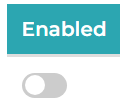
For security purposes, API keys that remain unused for over one year will be automatically deactivated. A note will be appended to the key's description, for example, “Deactivated on 2025-08-14 after 1 year of inactivity.” If necessary, the key may be re-enabled by toggling the switch at https://developers.exlibrisgroup.com/manage/keys/
Main Features
Embedding the Knowledge Center's AI Assistant in Alma
August 2025User Experience, Accessibility & InfrastructureURM-235941
Have a question for the Knowledge Center AI assistant? No problem! Users no longer need to open the Knowledge Center in order to chat with its AI Assistant.
The Knowledge Center AI Assistant can now be accessed directly from the Alma user interface in the following two locations:
- Dedicated icon on the top-right menu
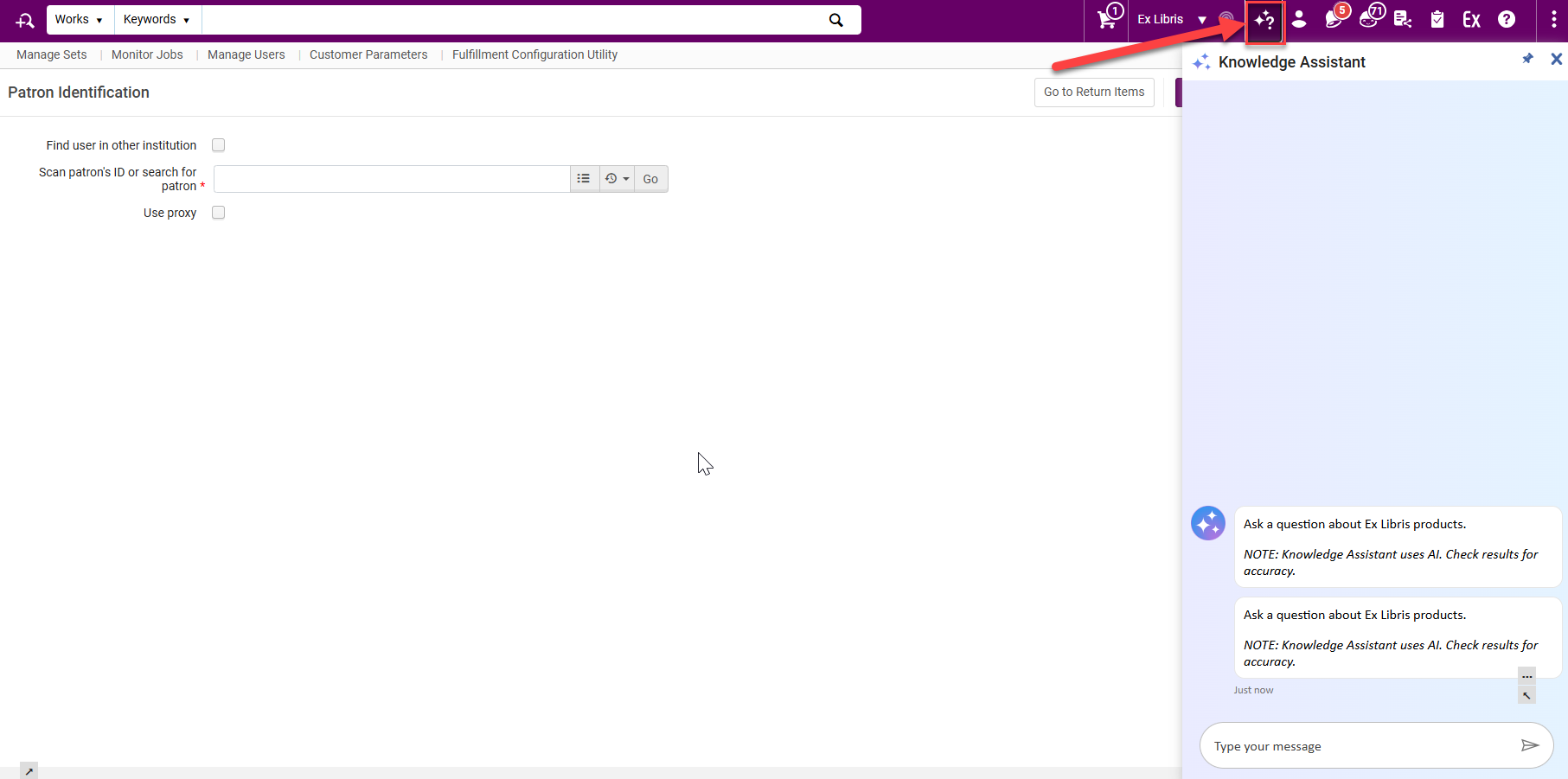
Knowledge Assistant icon in top-right menu - Help Menu
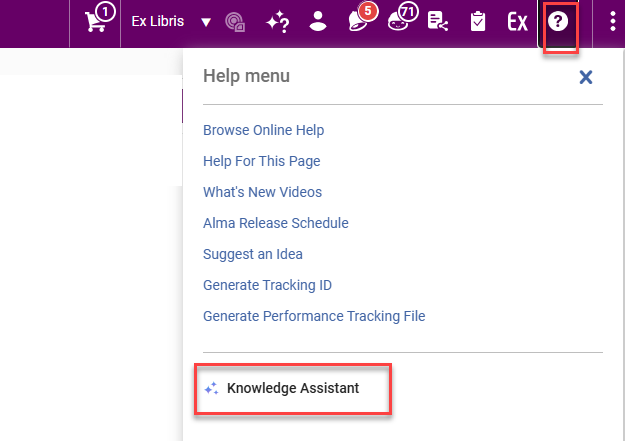
Knowledge Assistant link in Help menu
The AI Assistant panel can be pinned to allow easy navigation while keeping the conversation panel open.
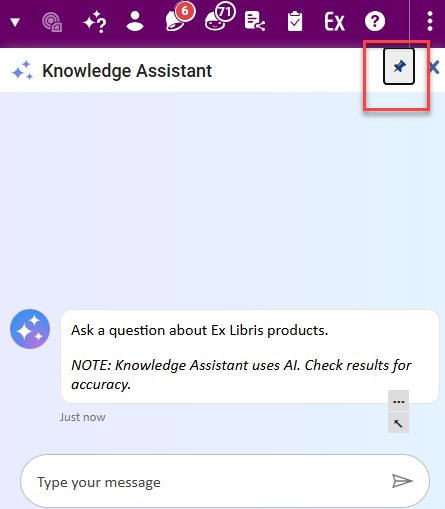
The chat history is saved in the current session until you log out of the Alma UI or refresh the page, in which case it is reset.
The supported languages are the same as for the online help.
For more information, see New Layout.
Upcoming Enhancements for the New UX in the August 2025 Release
Alma introduces major UX improvements in the August 2025 Alma Release, bringing enhanced workflows, improved readability, and a smoother transition to the new UI experiences.
Title Searches — Classic UX Sunset and New UX Enhancements
August 2025 Metadata ManagementURM-246294
The new, next-generation Alma UX design is available for Alma's title searches. In this release, the new UX is automatically set as the default for all users, with no option to opt-out.
For more information, see:
The August release includes several enhancements to the new Title Searches UX, addressing feedback and fixing known issues.
Navigation Links Added to the Title Searches Export
August 2025 Metadata ManagementURM-243408
The new title search interface introduced single-click links to additional related entities - Related Records, Courses, Licenses, Reminders, and Notes. These fields are now also included in the search export to Excel, alongside existing links like Orders and Requests.
This enables users to easily identify in exported files which records are linked to related entities such as courses or licenses.
For more information, see Using Navigation Links.
Multi-select Option for "Has Orders" Facet
August 2025 Metadata ManagementURM-242710
The Has Orders facet in Alma has been enhanced from a single-select to a multi-select facet through the addition of checkboxes. This update enables users to select Has Orders alongside other facets, streamlining the filtering workflow.
Displaying Originating System Version in the Title Details' General Information Section
August 2025 Metadata ManagementURM-246494
When Originating System Version is populated, it now shows in the General Information section of the title details. This is useful for libraries that rely on the version information in their bibliographic record workflows.
Item Availability - No Items Label
August 2025 Metadata ManagementURM-246497
The label indicating that there are no items in a holdings (whether because they were never cataloged or because they are temporarily in another holdings) was updated to No items to more clearly reflect this.

For more information, see Viewing Inventory and Collection Information.
Smart Links Improvement
August 2025 Metadata ManagementURM-246780
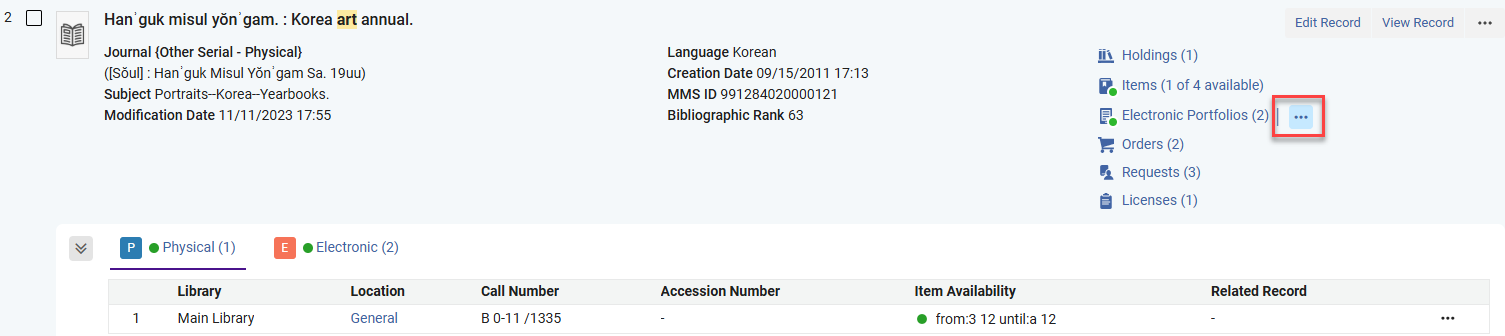
Smart Links, that let users access inventory information in several ways as well as select a default action for the link, were enhanced to make it clearer and easier for users to work with. On hover, the single-click action menu is displayed.
Creation and Modification 'i' Information Added to New UX Searches
August 2025 Metadata ManagementURM-239734
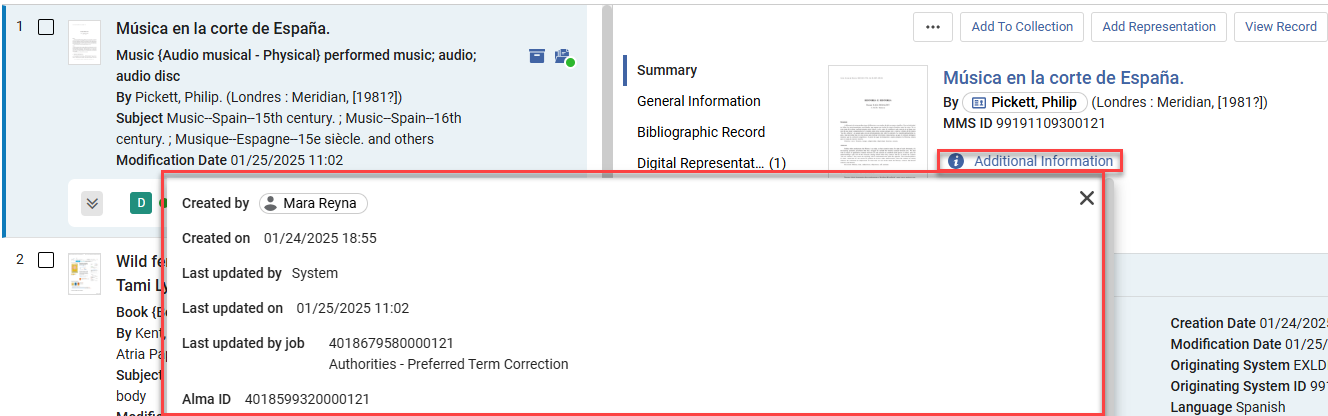
The Additional Information button available in the record view and other Alma pages is now included also in the title and holdings details pane in the new search UX.
This is helpful for users who want to easily view the creation and modification information of a record.
Always Show the Add & Duplicate Search Rule Buttons
August 2025 Metadata ManagementURM-240553
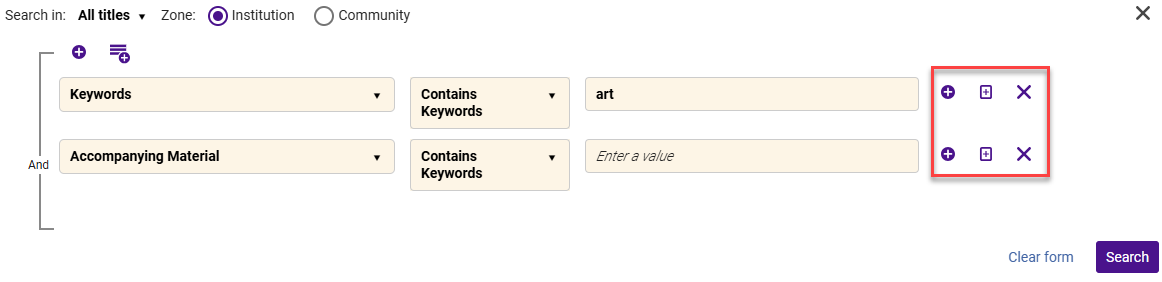
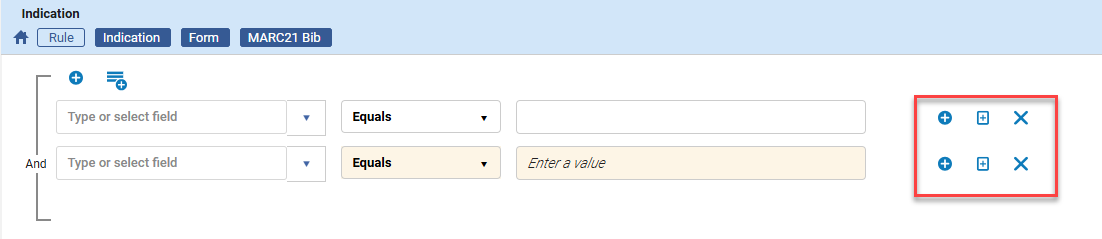
Before, the add & duplicate rule buttons in the new UX advanced search and the Metadata Editor's indication rule form only appeared when hovering over the rule. Now they always show. This is helpful for users who want to know what action options they have when creating a search query or indication rule.
Sorting Current Page Results When Viewing Titles and Holdings Itemized Set Content
August 2025 Metadata ManagementURM-248533
Itemized sets are lists of entities, randomly sorted (as the sorting mechanisms available for searches and logical sets cannot be applied to them). It is now possible to sort the displayed results on the current results page (between 10-50 results, according to the user's preferences), to more easily scan the results page.
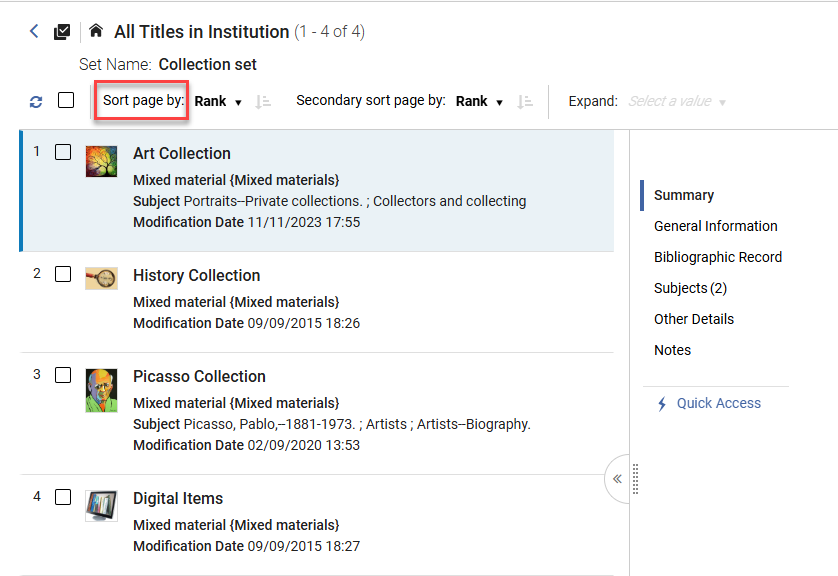
Viewing the results displayed on the page in a specified order is especially useful for librarians working on small itemized sets, or performing tasks on set members (more easily tracking their advance down the results page).
For more information, see Itemized Sets.
Enhanced Set Management with Save as New Button
August 2025 User Experience, Accessibility & InfrastructureURM-233732
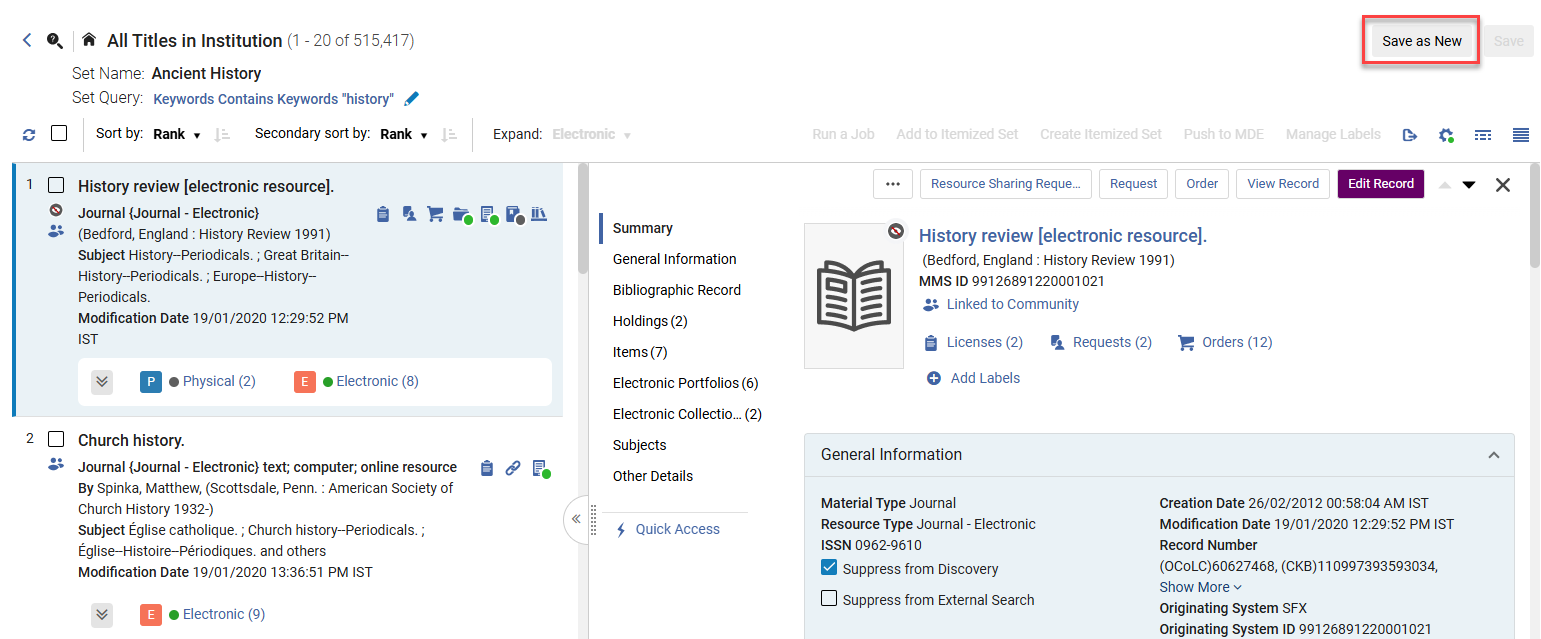
This release introduces key improvements to set management. Users can now easily create a new set from an existing logical set by updating the set query using the Save as New button. This update benefits customers with streamlined set management and improved user interface flexibility when creating new sets.
This applies to sets with the following content types:
- All titles
- Order lines
- Physical titles
- Physical holdings
- Electronic titles
- Digital titles
- Digital files
Keep Quick Links Menu Available in Sliding Panel
August 2025 User Experience, Accessibility & InfrastructureURM-245963
The sliding panel now opens in a view that leaves the Quick links menu visible. This is helpful for users who want to easily navigate to their commonly used actions directly from the sliding panel.
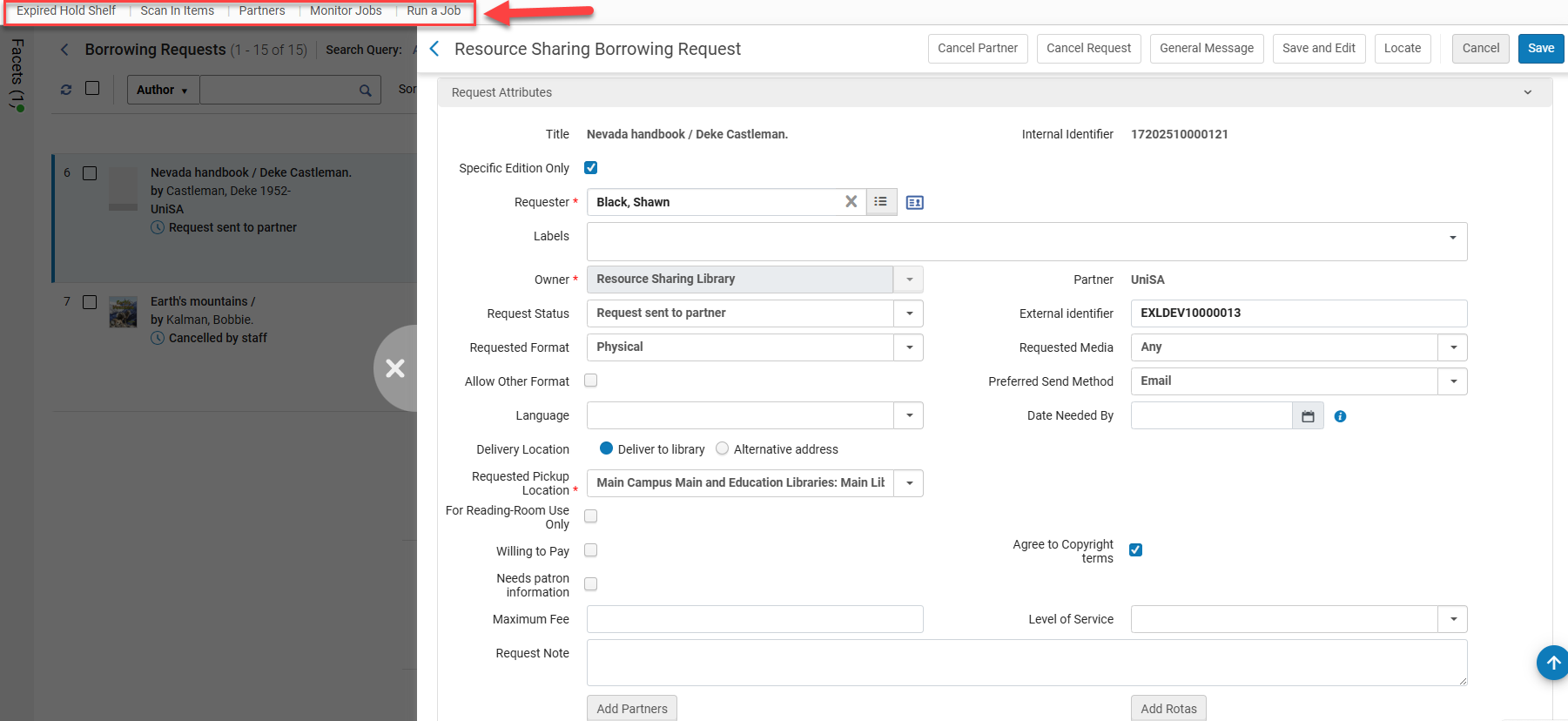
Note that this does not apply to pickup lists, since in these cases the persistent menu is part of the sliding panel, and it overlaps some of the links in the Quick links menu.
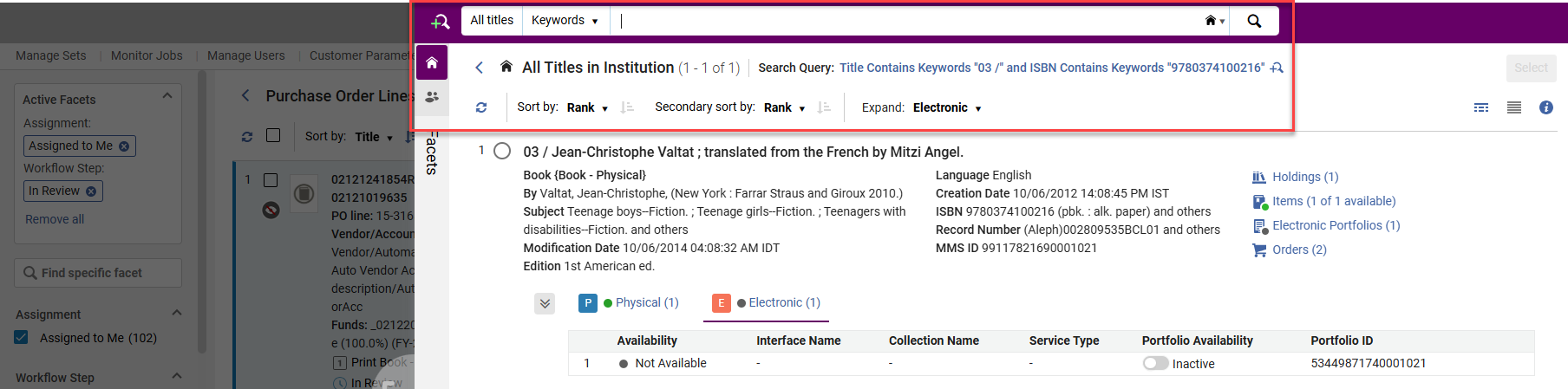
UI Improvements for PO Lines List
The PO line improvements listed below were added as a result of a survey conducted with Acquisitions users.
Exclude Facets
August 2025 Acquisitions
 Idea ExchangeURM-216942
Users can now exclude facets in the PO lines list. Additionally, as part of this enhancement, the search operator "Not Equals" was added to all of the PO lines search fields in the advanced search, except for:
- Cancellation Restriction
- Interested Users
- PO Line in Claim
- Rush
For more information, see New Layout.
Customization for Actions on the Customize Menu
August 2025 Acquisitions
Idea ExchangeURM-179698
In the new Actions Customization area, users can now re-order the actions of the PO lines and hide irrelevant actions, thus enhancing flexibility and enabling users to tailor functionality to their specific workflows.
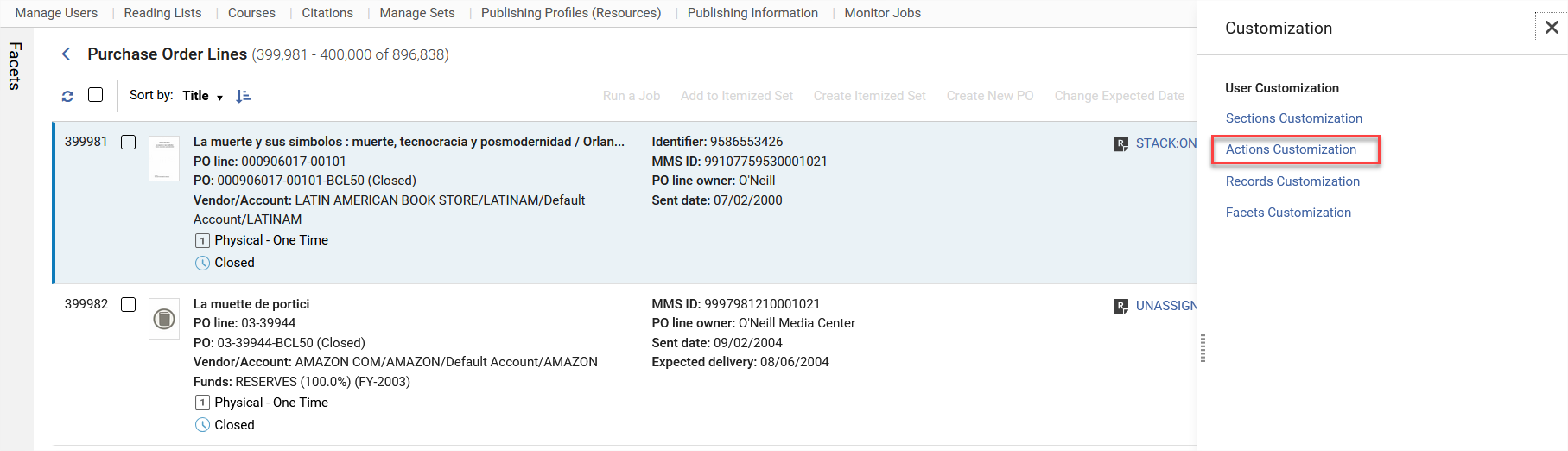
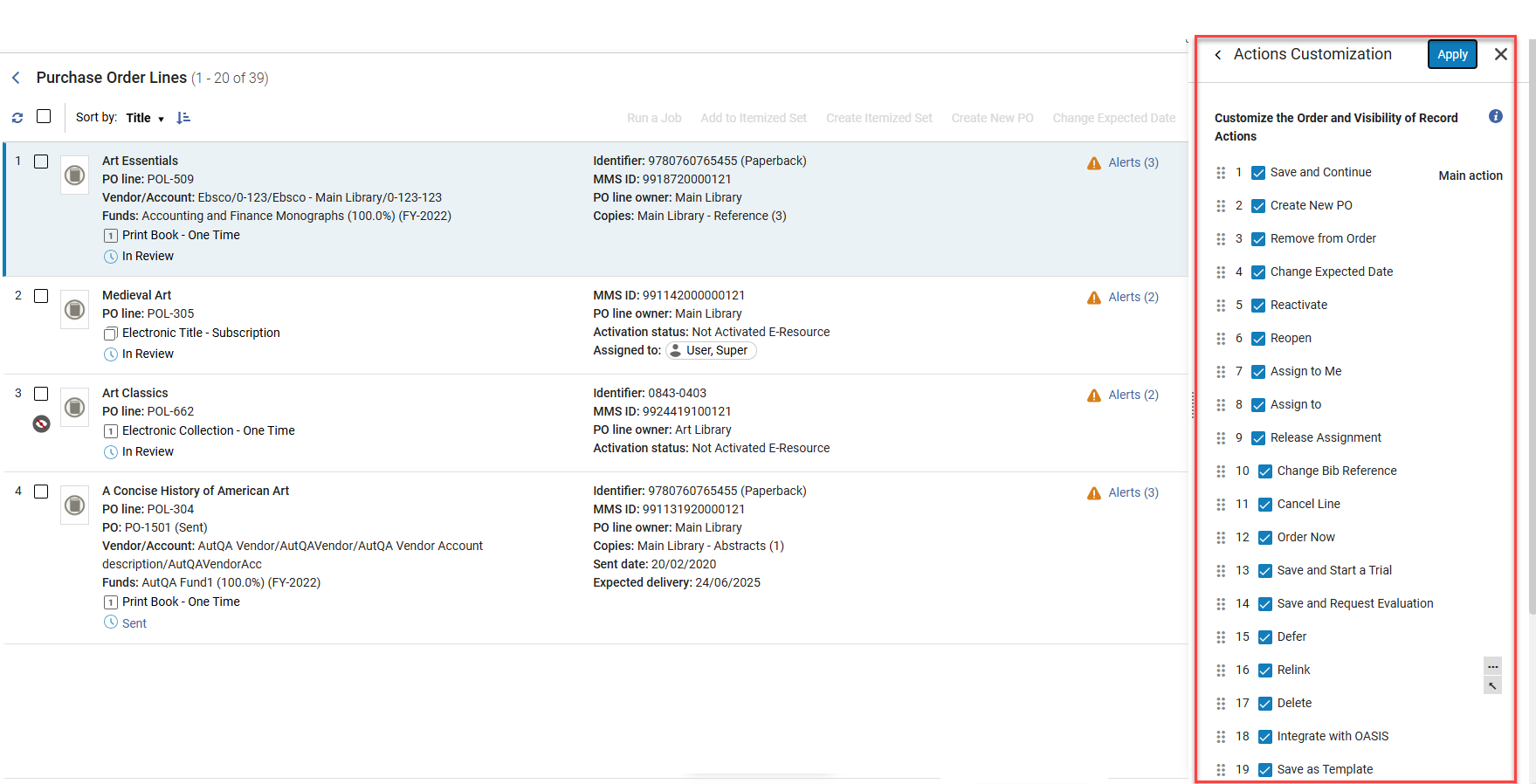
- Users will see actions in the customization menu per their roles/privileges.
- Only the relevant actions are displayed for each PO line type/workflow step.
For more information, see New Layout.
Bulk Actions Related to PO Lines Search List
August 2025 Acquisitions
Idea ExchangeURM-216928
The following new actions are displayed in the PO lines list view, enabling users to carry out more operations directly from the search results:
- Create Itemized Set - Save the search results as an "Itemized Set".
- Add to Itemized Set - Add the search results to an existing itemized set.
- Run a Job - Run a job on the list of results.
- For more information, see:
Indications for Success and Failure of Bulk Actions in the PO Lines List
August 2025 AcquisitionsURM-216929
Indications for the success and failure of bulk actions in the PO Lines were added, enabling users to efficiently monitor outcomes, promptly address any errors, and maintain confidence in the integrity of the process. When executing the Change Expected Date and Assign Selected bulk actions, there will now be an indication for the number of PO lines that were updated successfully, and the number of PO lines that failed to update. The failure reason also appears, allowing staff users to correct the situation.
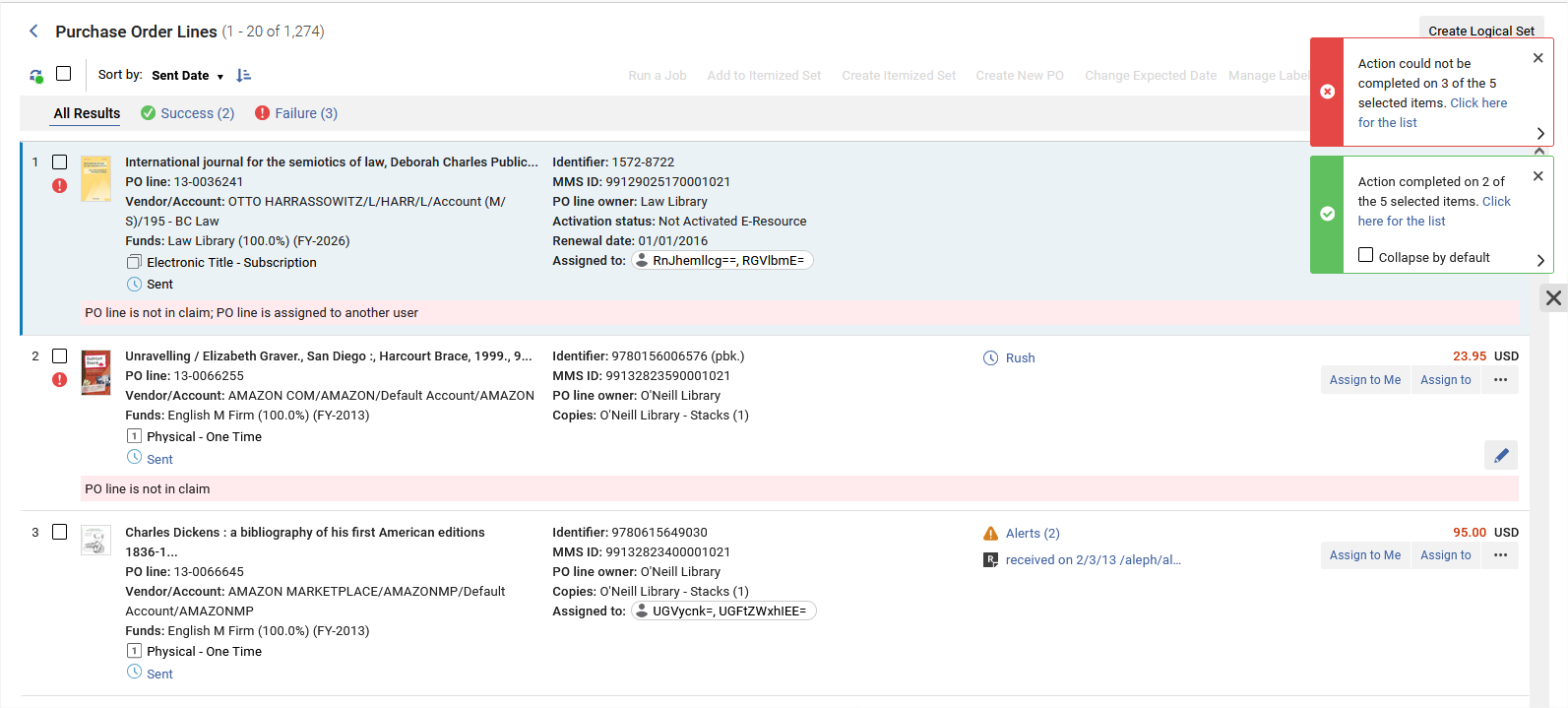 Bulk Action Messages for PO Lines
For more information, see Processing Claims and Reviewing and Managing PO Lines.
Link to Additional Information from PO Lines
August 2025 AcquisitionsURM-238101
The PO line summary section now includes a link to additional information. This helps users understand the order's history, who handled it, and when, making it easier to manage and troubleshoot.
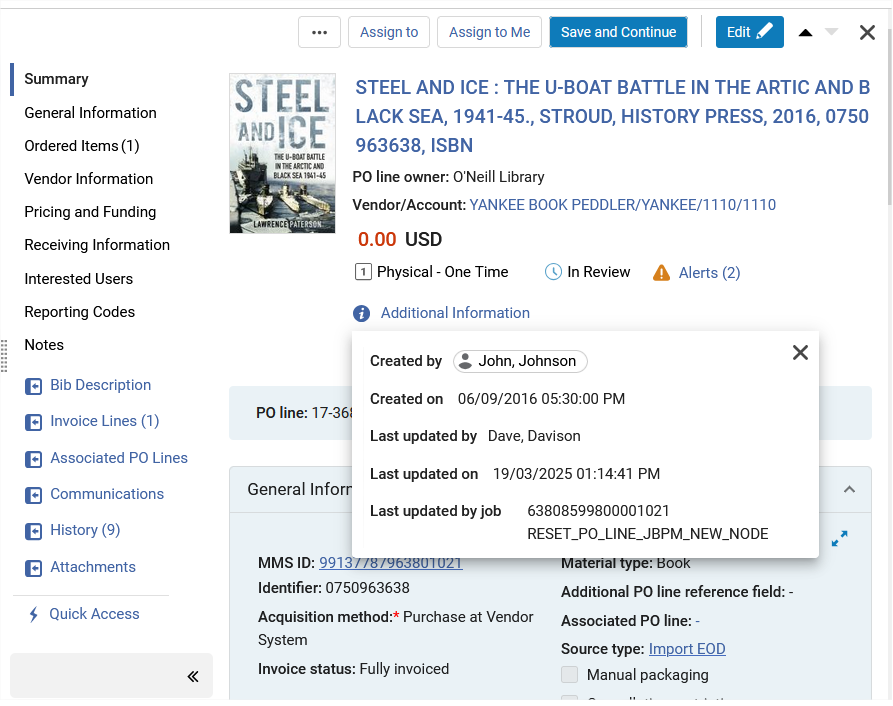
For more details, see Manually Creating a PO Line.
Save Facets Option in Resource Sharing Task Lists
August 2025 Fulfillment and Resource SharingURM-243011
A new option in the resource sharing borrowing and lending task list enables saving facet sets for reuse. This increases efficiency by enabling users to save and reuse frequently used facets.
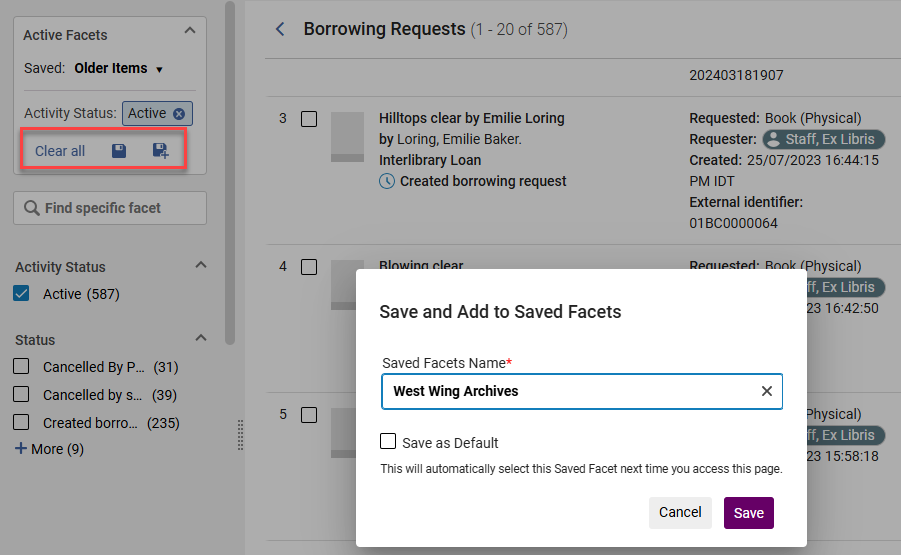
For more information, see New Layout.
Resizable and Full-Page Sliding Panels
August 2025 User Experience, Accessibility & Infrastructure
Resizable and full-page sliding panels has been delayed to a future release - currently planned for November, pending quality assurance.
Gender Field in User Management was Removed
August 2025 Fulfillment and Resource SharingURM-237930
Starting from the August 2025 release, due to GDPR privacy issues, the Gender field is no longer available for users in Alma. The contents of the Gender field are deleted from Analytics as well. This might affect existing reports, particularly those using it for filtering or grouping. This impacts all existing, future and historic users.
Cancelling Recalls on Resource Sharing Items
August 2025 Fulfillment and Resource Sharing
Idea ExchangeURM-63018
Lenders who have recalled an item that was shipped to fulfill a resource sharing request can cancel the recall if it is no longer needed. The recall cancellation is automatically forwarded to the borrower. This adds efficiency to the resource sharing workflow by preventing unnecessary recalls.
It is recommended that this action be activated for Alma ISO partners or email partners. Non-Alma ISO partners cannot automatically complete the recall cancellation on the borrower side.
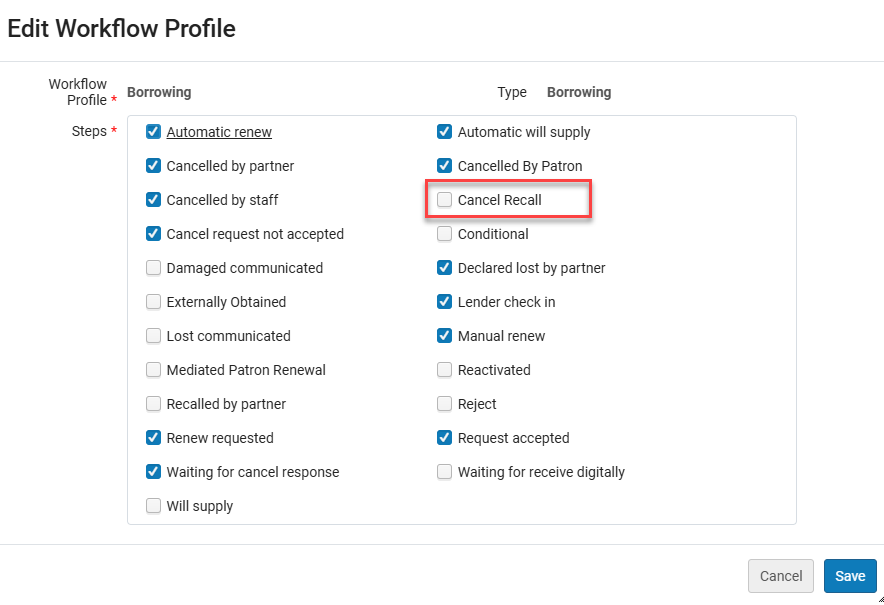
To enable this functionality, the Cancel Recall option was added to the Workflow Profile for borrowing and lending (unchecked by default).
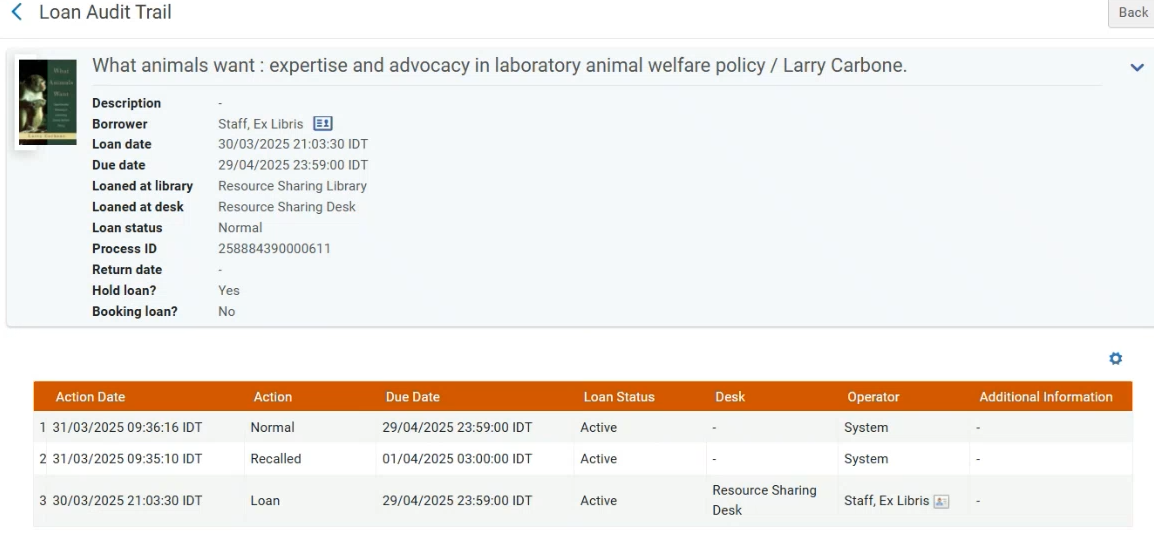
If the recall is cancelled (by a cancellation of the request or by the request being fulfilled by another copy), the due date (which was updated by the recall process) is restored to its original value on the lending and borrowing sides. This will happen regardless of any existing institution policy configured in the Fulfillment Terms of Use (TOU). The loan history is also updated.
For ISO partners, communication between the borrower and lender uses the ISO protocol.
For email partners, the lender sends the Lending Recall Email Letter. Upon receiving the email, the borrower may use the Cancel Recall action to activate the recall cancellation on the borrower request.
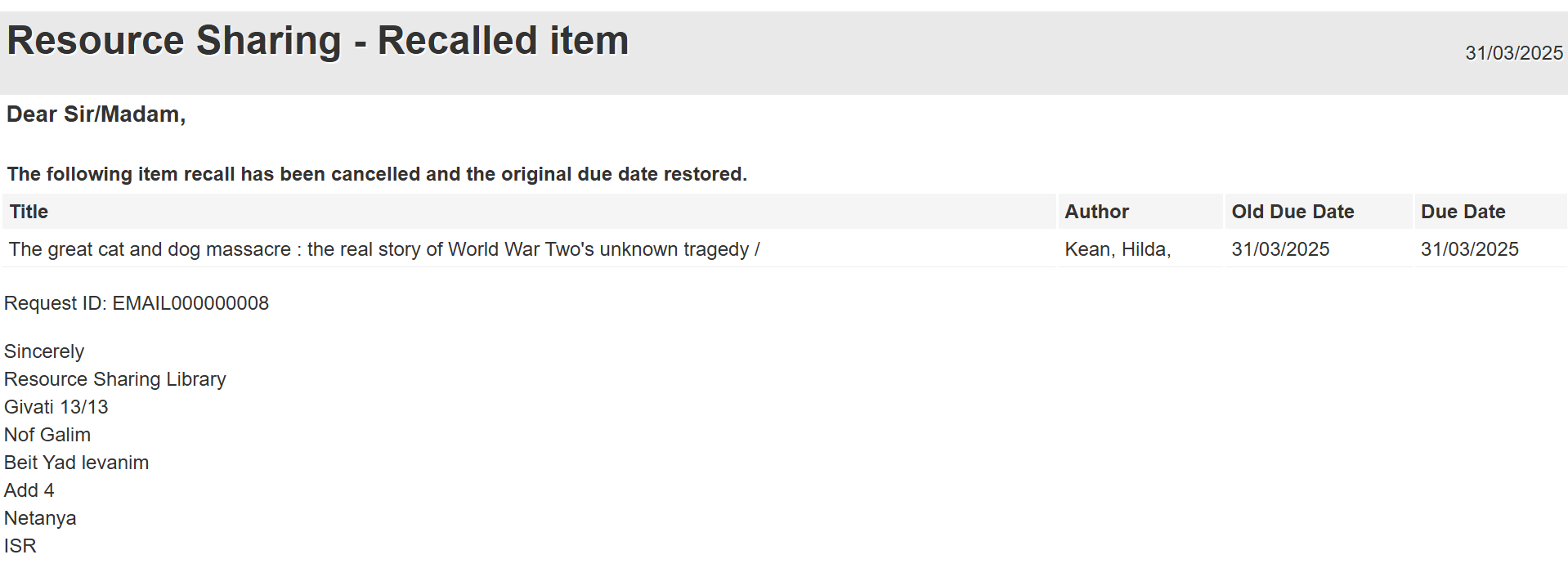
If the institution customized the Lending Recall Email Letter, you will need to update it (see Configuring Alma Letters).
For more information, see Managing Borrowing Requests,Basic Resource Sharing Configuration and Peer to Peer Resource Sharing.
Setting Status of Renewed Lending Requests to Renewal Accepted
August 2025 Fulfillment and Resource Sharing
Idea ExchangeURM-161350
It is now possible to set the lending_requests_renewed_status (Fulfillment > Other Settings) parameter so that a renewed lending request is set to a status of Renewal Accepted. As opposed to the current behavior, where the request reverts to a Received by partner status, this makes it more evident for the lending library staff that the request has been renewed.
For more information, see Managing Lending Requests.
Creating a Borrower Request Using the NCIP ItemRequested Message
August 2025 Fulfillment and Resource SharingURM-241977
The NCIP itemRequested message can now be used for creating a borrower request. For more information, see the Developers Network.
Show Lending Library on Receive Item Screen
August 2025 Fulfillment and Resource SharingURM-248018
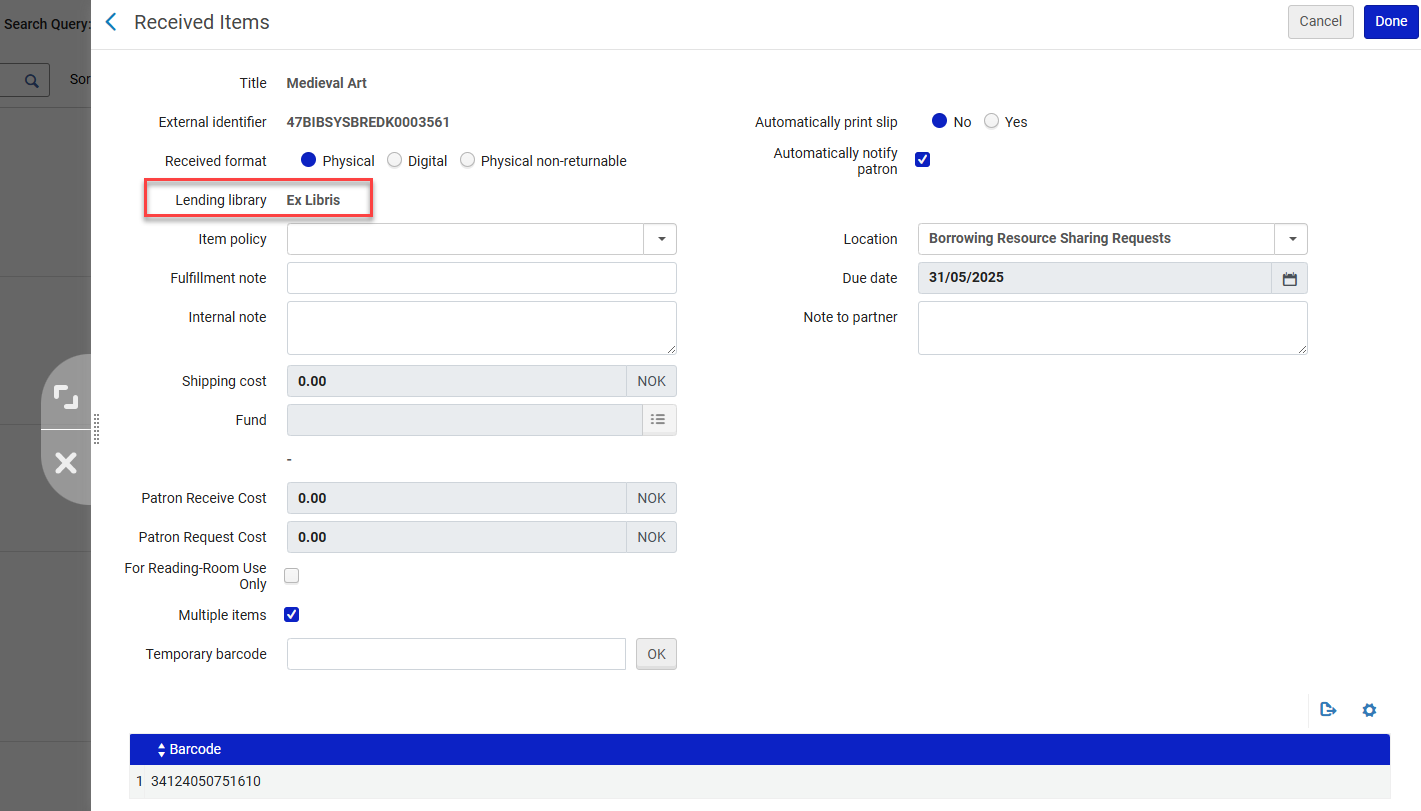
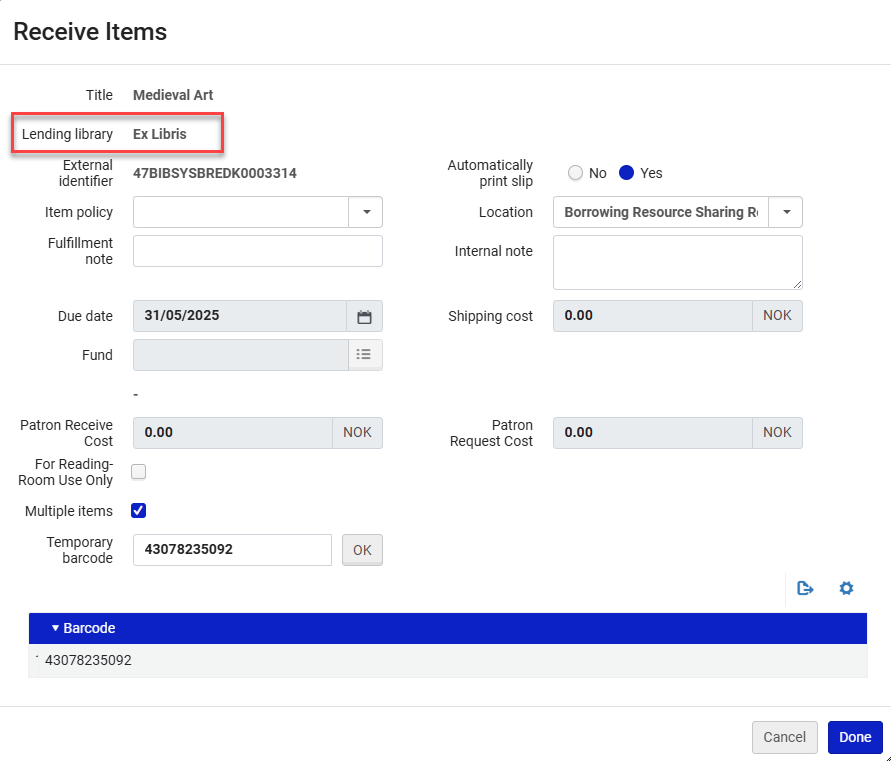
When receiving requested items, the name of the supplying lender is now shown in the receive screen. This helps reduce errors by providing more context for the receiving staff.
The Lending library name appears when using the Receive action from the borrowing task list.
The Lending library also appears in the Receive Items page (Fulfillment > Resource Sharing > Receiving Items).
For more information, see Peer to Peer Resource Sharing.
Internal Reject Reasons for Lending Requests
August 2025 Fulfillment and Resource SharingURM-248019
It is now possible to configure and use internal reject reasons for lending requests. This enables libraries to record their own workflow-related reasons and not be confined by the external list of reject reasons, which are limited by protocols.
The Internal reject reason is optional and only viewable by the lender.
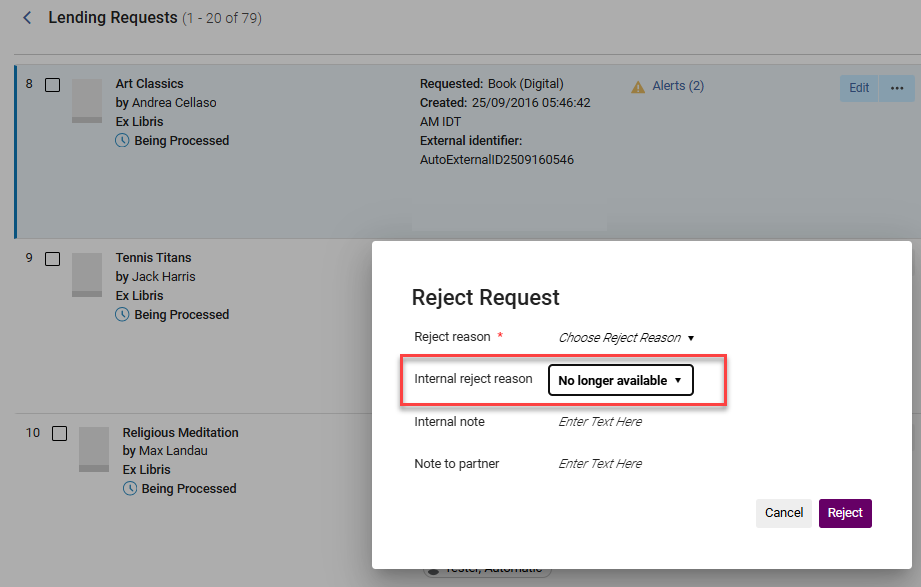
The list of internal reject reasons can be configured from Configuration > Resource Sharing > Configuration > Internal Reject Reasons.
For more information, see Advanced Resource Sharing Configurations.
Fulfillment Note in Shipped Item
August 2025 Fulfillment and Resource Sharing
Idea ExchangeURM-62658
When the lender ships an item with a fulfillment note, the note is propagated to the borrower's side and assigned as a fulfillment note to the borrower's temporary item. This enables resource sharing lenders to communicate important fulfillment related information about shipped items so that borrowers can take that into account when loaning to the patrons.
If the communication is email based, then the fulfillment note is included in the Lender Ship Email Letter. For ISO (or ISO18626) the fulfillment note is included in the ISO message.
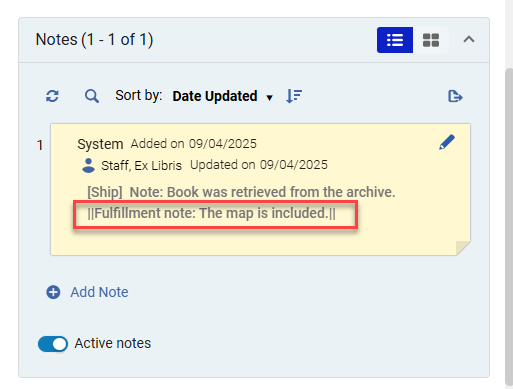
The note is also added to the Fulfillment note field on the borrower side.

The note also appears in a pop-up message when the staff user on the borrower side scans in the item.
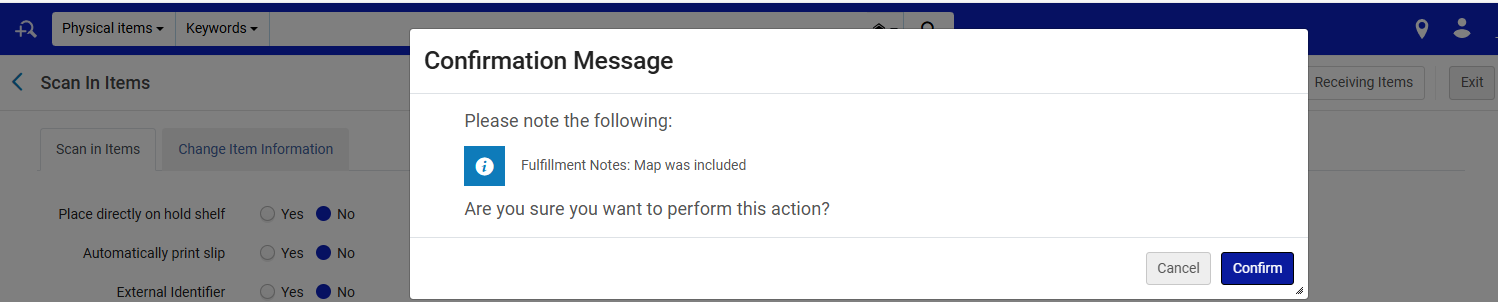
For more information, see Peer to Peer Resource Sharing.
Distribute Resource Sharing Form from Network Zone
August 2025 Fulfillment and Resource Sharing
URM-244893
It is now possible for networks to configure the resource sharing request form in the Network Zone and have the form distributed to the different Institution Zones. This gives the consortial office better control over the configuration of the resource sharing form.
Creating a Resource Sharing Request from a Purchase Request
August 2025 Fulfillment and Resource SharingIdea ExchangeURM-97829
It is now possible to convert a purchase request into a resource sharing request. This can be done by rejecting the purchase request before creating the resource sharing request, or by keeping the purchase request and creating the resource sharing request.
The new option enables the library to service users' purchase requests by obtaining the resource via a resource sharing service, even if the decision is made not to approve the purchase or if the purchase takes a long time.
The new option is available for Purchase Request Operators or Managers who are allowed to create resource sharing requests (have a Fulfillment Services Operator/Manager role). It requires a dedicated privilege to be turned on for the Purchase Request Operator/Manager role.
To activate this privilege, contact Ex Libris Support.
The link appears regardless of the purchase request status (In Review, Approved or Rejected).
From the Acquisitions > Purchase Requests > Manage Purchase Requests menu, access the Purchase Requests list. The Purchase requests have a Create Resource Sharing Request option.
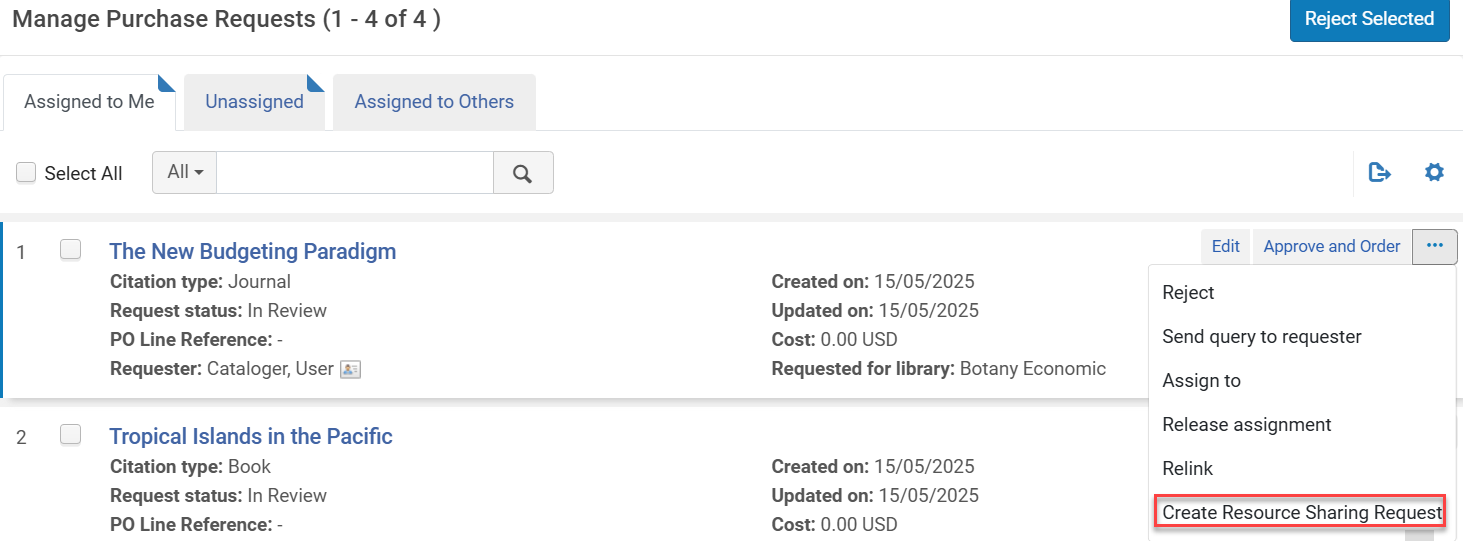
If the purchase request is active, after selecting the option to create a resource sharing request, the user is prompted to reject the purchase request, or keep it active. The purchase request status will be updated accordingly. If the user selects to reject the purchase request, the Rejection reason in the purchase request is updated to indicate that it was "Changed to resource sharing request".
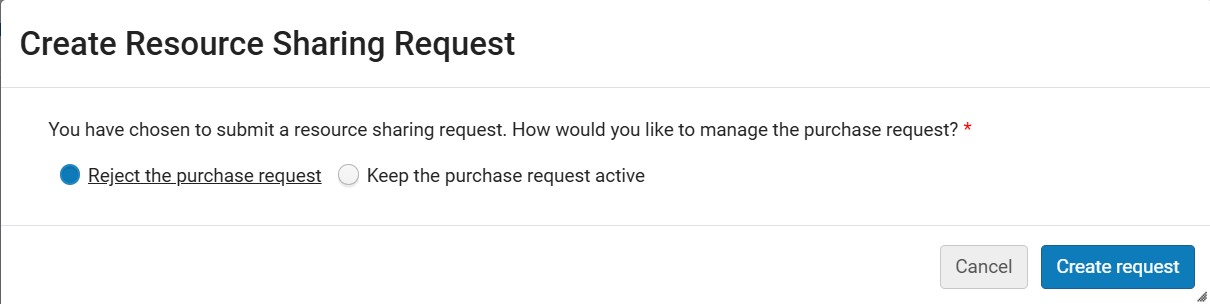
After selecting Create Request, the Resource Sharing Borrowing Request page appears with the information filled in. If the purchase request is not active, after selecting the option to create a resource sharing request, the Resource Sharing Borrowing Request page appears.
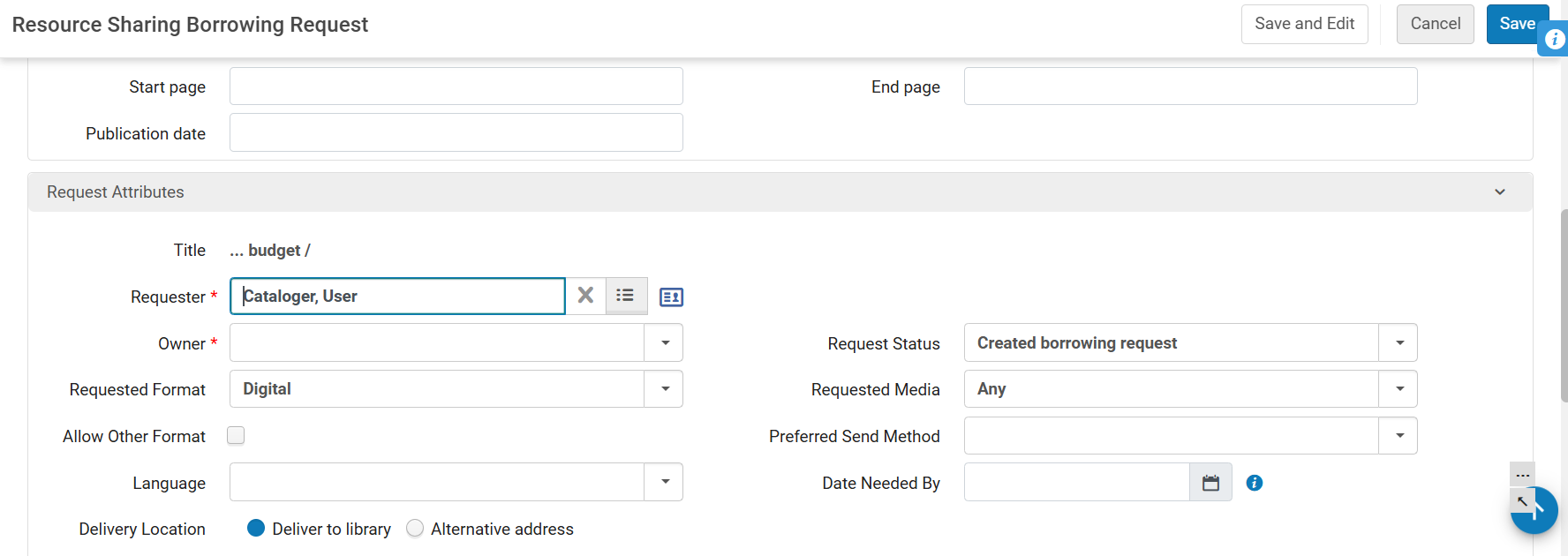
A note is added to the Request Note in the resource sharing request that the "Request has been converted from purchase request".
For more information, see:
Allow Automatic Renewals for Resource Sharing Loans
August 2025 Fulfillment and Resource SharingURM-231281To create a more efficient workflow for librarians, it is now possible to allow automatic renewals for resource sharing loans in the same way as for other library loans. This feature is controlled by the new rs_auto_renew_borrowed_loans parameter, defined in the Fulfillment > General > Other Settings configuration menu (see Configuring Fulfillment Jobs).
ReShare is a Supported ISO 18626 Peer to Peer Partner
August 2025 Fulfillment and Resource SharingURM-243294ReShare is now a supported ISO 18626 peer to peer partner. When setting up peer to peer resource sharing communication with ReShare, make sure to set the partner's Profile Type to 'ISO 18626' and the System Type to ReShare. When configuring the resource sharing partner, the System Type should be set to ReShare and the Profile Type should set to ISO 18626.
Resource Sharing Directory APIs
August 2025 Fulfillment and Resource SharingURM-243409The Resource Sharing Directory is a central place in the Community Zone with up-to-date information about resource sharing libraries in Alma. The new APIs enable getting the list of the directory partners and their details. These new APIs can also be used to download a partner from the directory in order to use it as a peer resource sharing partner. For more information, see Resource Sharing Partners and the Developer Network.
Library Controlled Additional ID for Hold Requests
August 2025 Fulfillment and Resource Sharing
CERV Enhancement (ID#8777)URM-219499
Libraries now have more control over the additional ID assigned to hold requests, by being able to set its prefix and maximum. This creates more flexibility for libraries, enabling them to set this ID to better reflect library hold request management processes.
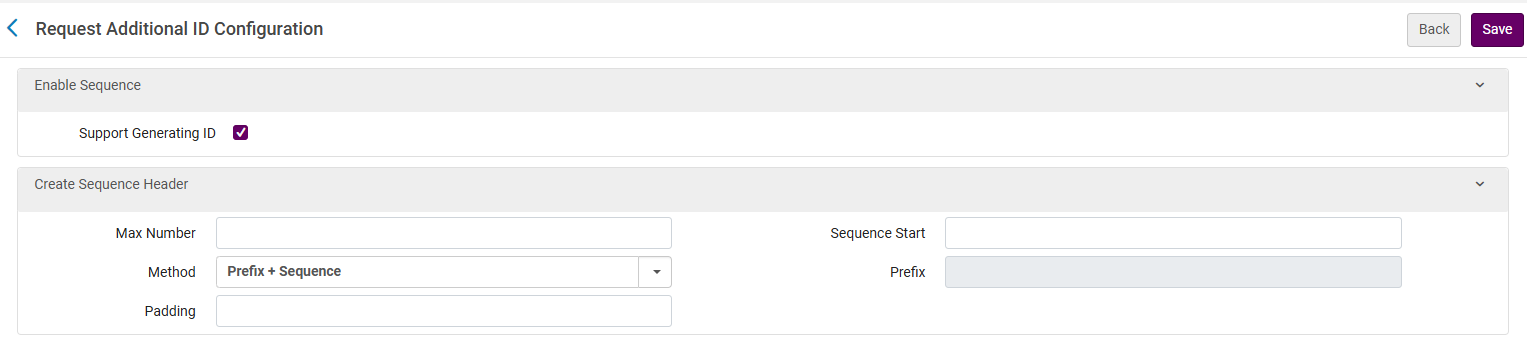
Currently, an additional ID is generated based on the internally managed sequence (Request ID). Once the user enables the new sequence (Fulfillment configuration menu > Physical Fulfillment > Request Additional ID Configuration), the fields will be generated using the new functionality. The new sequence will not be applied to existing requests that were created before the new functionality was enabled. The new ID, if it exists, will be displayed where the old ID exists today. The old ID and the new ID will therefore co-exist in the same list during the transition period.
If this feature is disabled, the default generation will be turned back on, based on the Request ID.
For more information, see Configuring Circulation Desks,Configuring Fulfillment Jobs, and Configuring the Request Additional ID.
This feature is disabled by default. Once enabled, it will affect all institution requests from the date of the configuration change onwards. If this feature is disabled, the ID generation will return to the default.
Patron Last Activity Date Updated at Login
August 2025 Fulfillment and Resource SharingURM-207829
The patron's last activity date, which is currently updated when the patron borrows or requests an item, can now also be updated by the system when the patron logs into Primo. This provides a more accurate record of the last activity date of the patron's interaction with the library, which did not necessarily lead to a request being placed. This enables the institution to detect inactive users and take relevant action.
For more information, see Configuring Last Patron Activity Date.
Grace Period for Open Days
August 2025 Fulfillment and Resource Sharing
Idea ExchangeURM-30981
More granularity was added for setting up grace period policies so that the library can decide whether closed days should be part of the grace period or not. This enables more accurate grace period calculation during library close times.
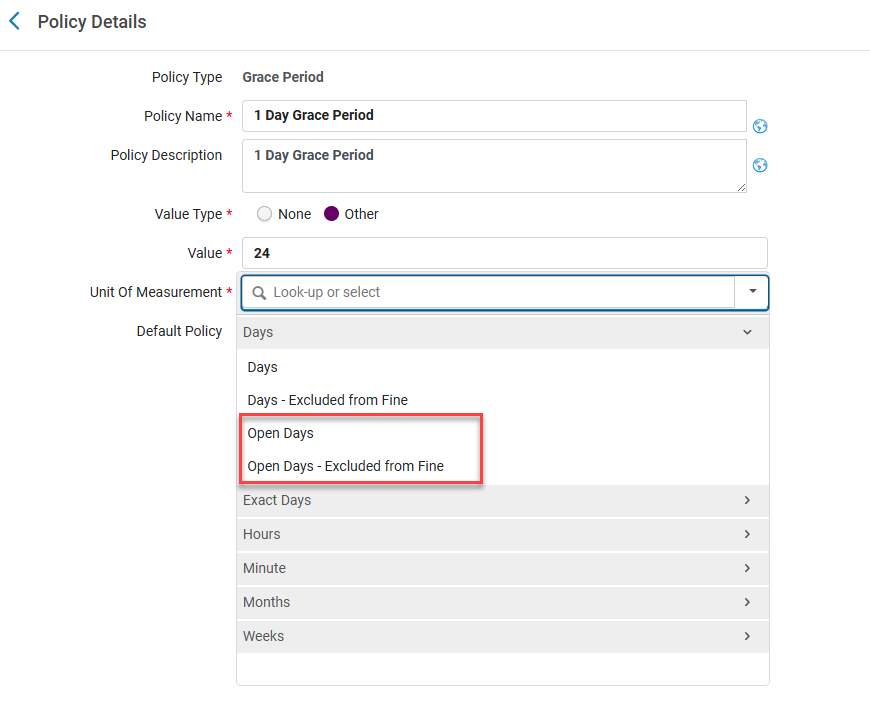
For more information, see Configuring Physical Fulfillment.
Additional Options for Bulk Fine Waiving
August 2025 Fulfillment and Resource Sharing
Idea Exchange
CERV Enhancement (ID#8734)URM-226348
New options enable more granularity in setting the population for which bulk fine waiving is done. Bulk waiving by date range, for a given set of users or for a known list of fines, gives the libraries better control for waiving fines per their exact policies and workflows.
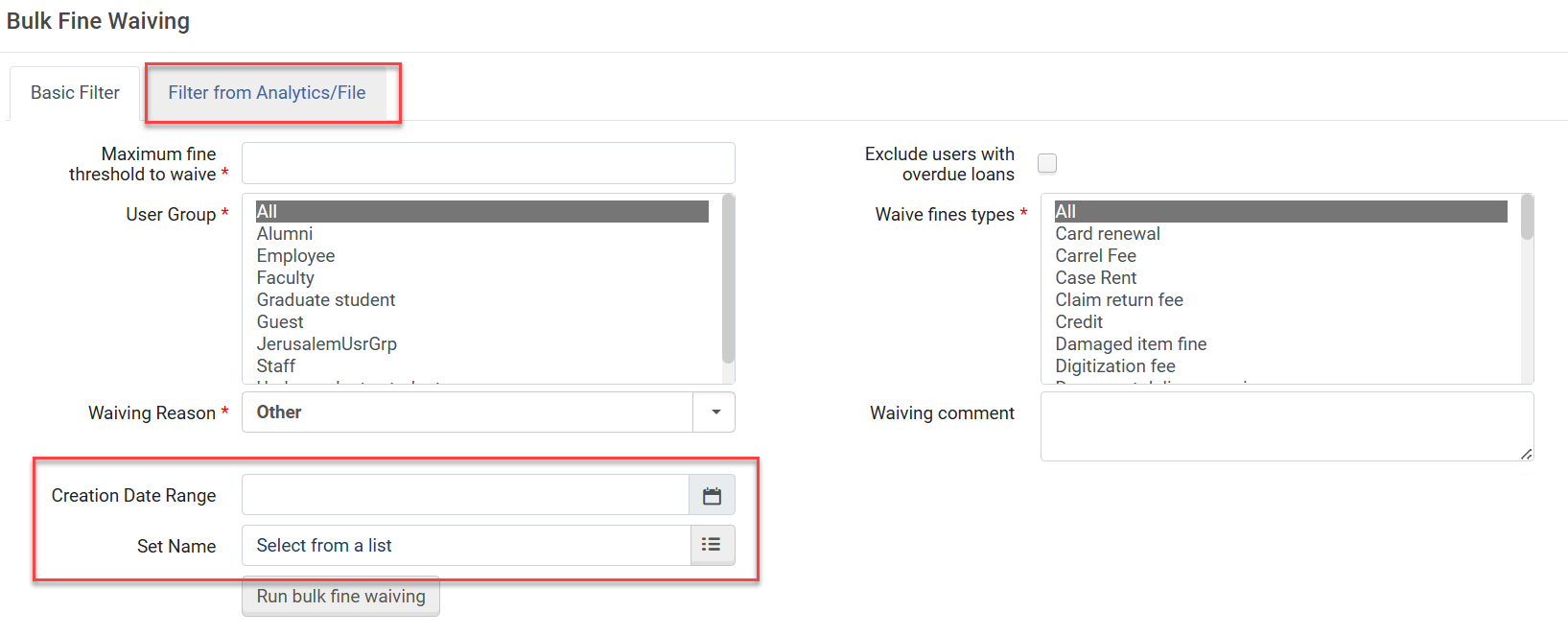
For more information, see Waiving Fines in Bulk Using a Job.
Linked Open Data: 'Works' Search Index - New Search Indexes, Facets and Relocation of the 'Works' Index
August 2025 Linked Open DataURM-227839URM-227835URM-227807
The Works persistent search now includes new search indexes for:
- Work Subclass to search by the subclass label. Additionally, a facet was added for Work Subclass.
- Expression Of in both the simple search and advanced search to search by the property "expression of" that indicates the hub of the work (by the label or URI).
- Has Instance(s) in the advanced search offering a boolean search with Yes/No values to search for works with/without instances linked to it. Additionally, a facet was added for Has Instance(s).
This functionality is only available if BIBFRAME support is enabled. Reindexing is required to support existing works within your environment.
In addition, in the persistent search,Works is now listed as the last search rather than first search the list.
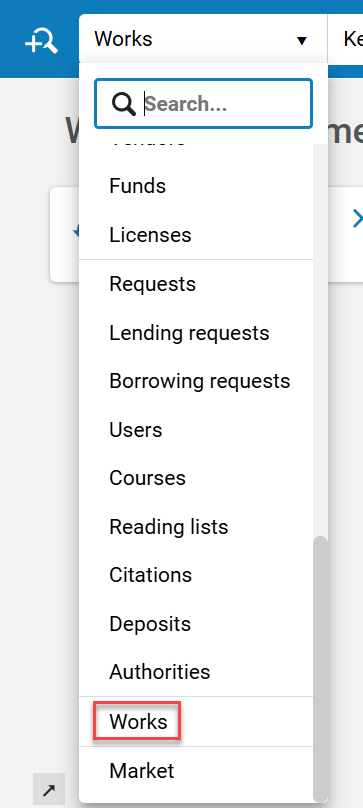
For more information, see BIBFRAME support.
Extended Date Time Format (EDTF) Validation for Date/Time MARC Fields
August 2025 Metadata ManagementURM-247251
Alma now supports validation of date/time MARC fields using the Extended Date Time Format (EDTF) standard to ensure that date/time data is compliant, enhancing data consistency and accuracy.
For more information, see:
New Search Indexes for Holdings and Authorities
August 2025 Metadata ManagementURM-196133
Alma now includes additional Holding and Authority search indexes to enhance search precision and provide greater flexibility when querying records.
- Holdings:
- Structured Ownership and Custodial History (361)
- Action Note Agent (583 $k)
- Action Note Status (583 $l)
- Electronic Name (856 $f)
- Authorities:
- URL (856 $u)
- URL link text (856 $y)
- URL public note (856 $z)
For more information, see:
- Search Indexes
- Holdings -MARC 21 Holdings Tags and Mapped Search Indexes
- Authorities -MARC 21 Authority Search Index Mapping
New View Items Option in the Metadata Editor
August 2025 Metadata ManagementURM-189606
A new View Items option has been added to the "View Related Data" menu in the Metadata Editor. This enables catalogers to quickly access the list of items linked to a title or holdings record while editing.
This enhancement simplifies the cataloging workflow for physical titles and holdings, improving efficiency and usability.
For more information, see Metadata Editor Menu and Toolbar Options > View Related Data Menu.
Virtual Keyboard for Inserting Special Characters and Diacritics
August 2025 Metadata ManagementURM-239956
CERV Enhancement (ID #8998)
When cataloging, library staff can now easily insert special characters and diacritics by using the MD Editor virtual keyboard to select a character set. This feature enables users to input special characters directly in the MD Editor without the need for external tools.
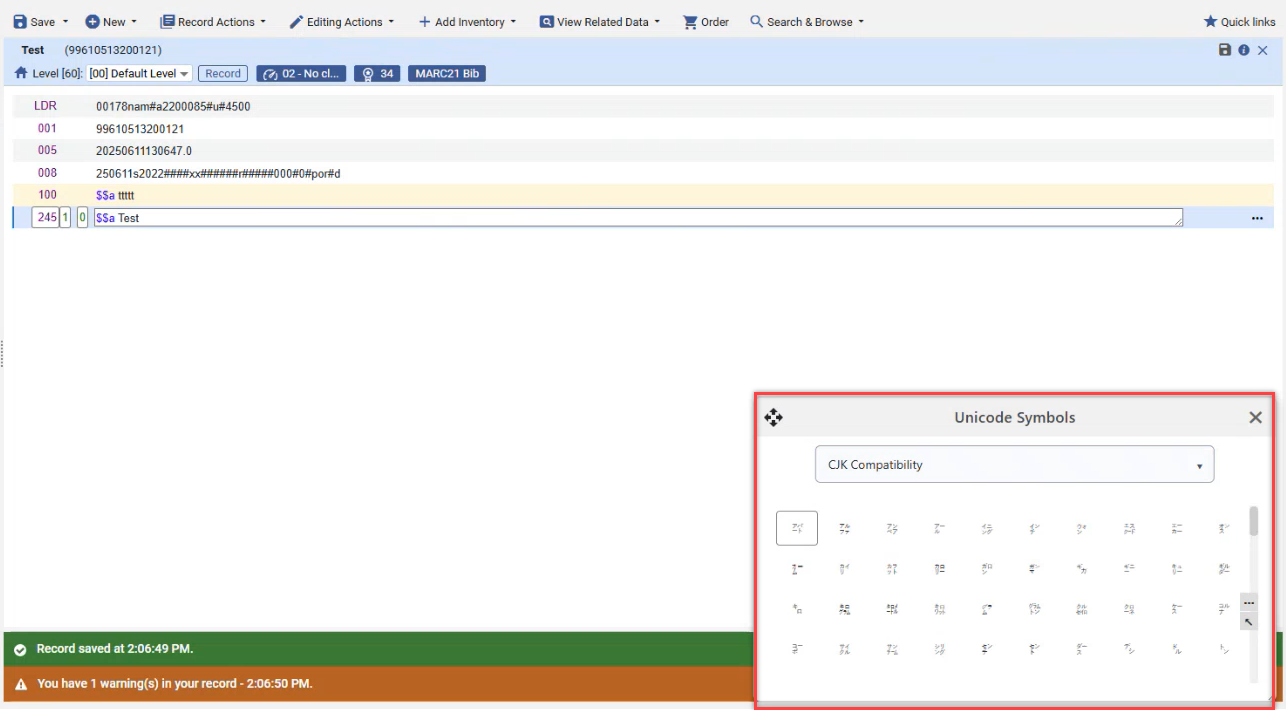
For more information, see Metadata Editor Actions.
New Partial Linking for Name/Title Headings
August 2025 Metadata ManagementURM-235304URM-246891URM-241964
A new algorithm improves MARC21 name/title field matching by enabling partial linking. It compares the full bibliographic heading against authority records, progressively removing subfields until a match is found or only core subfields remain. When a partial match occurs, the Preferred Term Correction (PTC) job updates only the matched subfields, leaving others unchanged. Selecting an authority record using F3 overrides the corresponding subfields while preserving those not included in the preferred term.
This enhancement enables more flexible linking of bibliographic name headings to authority records, improving match accuracy and efficiency while ensuring that only relevant subfields are updated in the bibliographic record.
This functionality should not be used in conjunction with the LOD Permanent Links capability, which is controlled by the configuration parameter lod_uri_enrichment_for_partial_match(as described in the Linked Data Enrichment Configuration documentation).
To enable the new partial linking behavior, customers must activate the aut_name_partial_linking(Configuration > Resources > General > Other Settings) parameter. This ensures that any new or modified bibliographic records are included in the partial linking process.
For more information, see:
- Partial Linking for Name/Title Headings
- Running a Job on a Selected Set in the Run a Job Page
- Configuring Other Settings (Resource Management)
Support for Flipping MARC 21 Headings with Cross-References in Different Fields and Alternate Graphic Representations
August 2025 Metadata ManagementURM-236288
This feature improves cataloging workflows, increases automation, and ensures closer alignment with authority records, helping libraries keep their bibliographic data consistent and current. Alma now supports preferred term correction in cases where a bibliographic heading is linked to an authority through a cross-reference. This applies when the preferred and non-preferred terms appear in different fields (e.g., authority fields 130 and 410), and where the bibliographic record includes an Alternate Graphic Representation.
For libraries that enabled this functionality after its initial release in November 2024, Alma now also handles linked headings with alternate graphic representations, while preserving the authority link.
This enhancement only applies to headings linked as of the August release. To update existing linked headings, either manually relink the links using the F3 function, or run the Unlink Bib Records from Authority Records job on the relevant set of records.
For more information, see:
- Libraries using the Extending Authority Fields to be Used for Authorized Bibliographic Field
- MARC 21 Preferred Term Corrections May Swap Headings with Cross-References Across Fields
Enhanced Handling of Bibliographic Records in the Withdraw Physical Items Job and when Withdrawing Items in the New UX
August 2025 Metadata ManagementURM-246037
Until now, when withdrawing items using the Withdraw Physical Items job (Admin > Manage Jobs and Sets > Run a Job) or in the new search UX, the operator could either keep both the holdings record and the bib record, or have the bib record suppressed/deleted if it had no other inventory.
New options were added, enabling the operator to:
- Suppress holdings from publishing while keeping the bibliographic record
- Delete holdings while keeping the bibliographic record
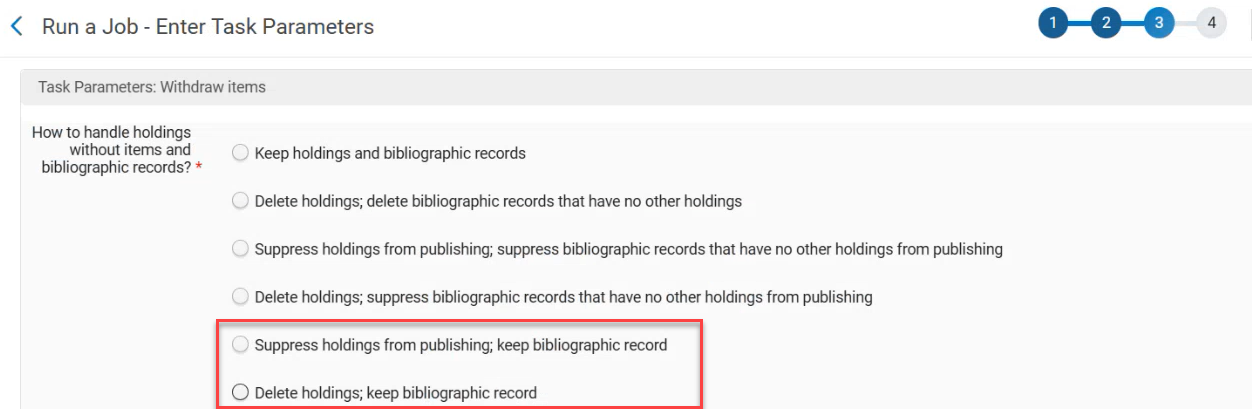
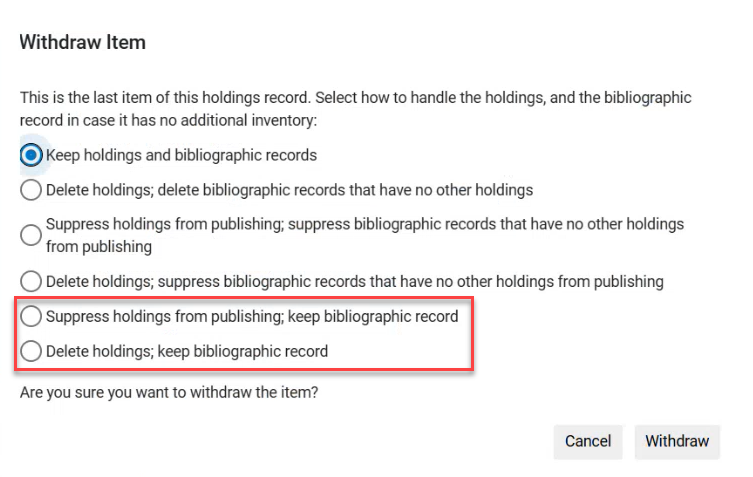
This is especially useful when the operator wants to keep the bib record regardless of the handling of the holdings record (for example, when the bib record has no direct inventory, but has related inventory).
For more information, see:
Use Overlap Analysis Tool with Multiple Matching Identifiers in One Comparison
August 2025 Metadata Management
Idea ExchangeURM-248750
The Overlap and Collection Analysis tool (Resources > Advanced Tools > Overlap and Collection Analysis) can now be used efficiently to assess mixed content collections and analyze overlapping content using up to three different match methods in one comparison. This is supported for both Collection analysis and Look Up Titles. The Identifiers are used in the defined order. The first match method is used first. The next match method is only used for the titles that were not matched using the first match method.
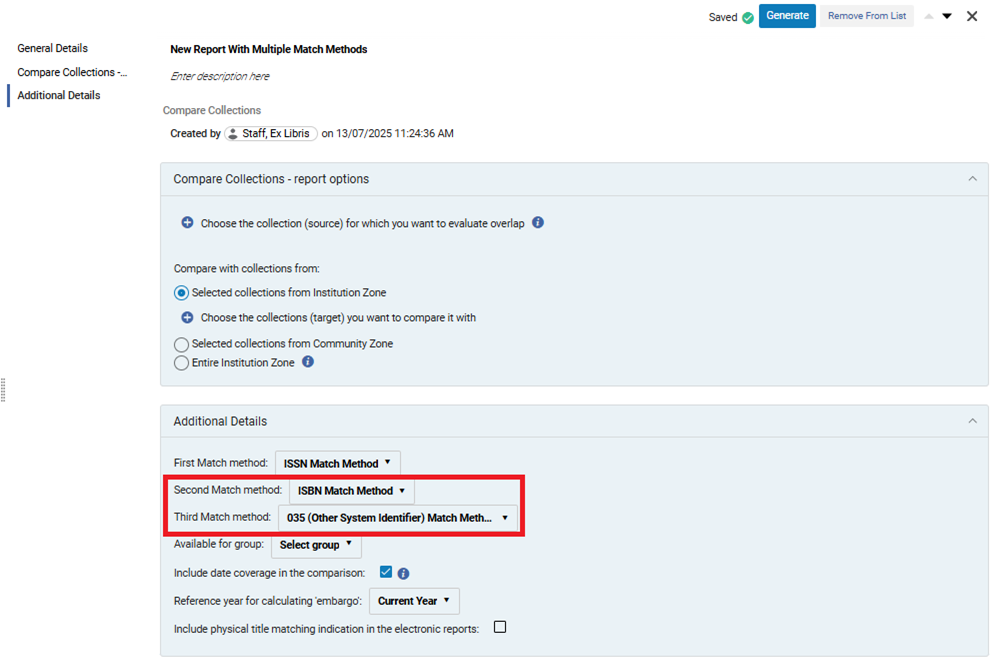
The results report includes the method that was used to obtain each match. The additional match methods, if defined, also apply to the physical indication search.
When uploading a file to the Look Up Titles analysis with multiple identifiers, ensure the identifier column headers are formatted according to the new guidelines to have them included in the analysis. (See Excel File Containing Identifiers for Comparison.)
For more information, see Performing Compare Electronic Collections Analysis.
Binding Items Marked as Committed to Retain
August 2025 Physical Resource ManagementURM-247341SF: 07922154
When the parameter enable_binding_of_items_committed_to_retain(Configuration Menu > Resources > General > Other Settings) is set to true(default false), you can now bind items that are marked as Committed to Retain . If one or more of the original items has this status, the resulting bound item is also marked as Committed to Retain.
When binding items, some data loss from the original items occurs. While the Committed to Retain status is preserved, the Retention Reason and Retention Note fields are not transferred to the resulting item.
For more information, see Binding (Merging) Items.
Edit or Delete Physical Item Description in Bulk
August 2025 Physical Resource Management
Idea ExchangeURM-246340
The Rebuild Physical item description job (Admin > Manage Jobs and Sets > Monitor Jobs) has been enhanced to support additional actions. In addition to rebuilding the item description from a template, you can now edit or delete the item description field in bulk.
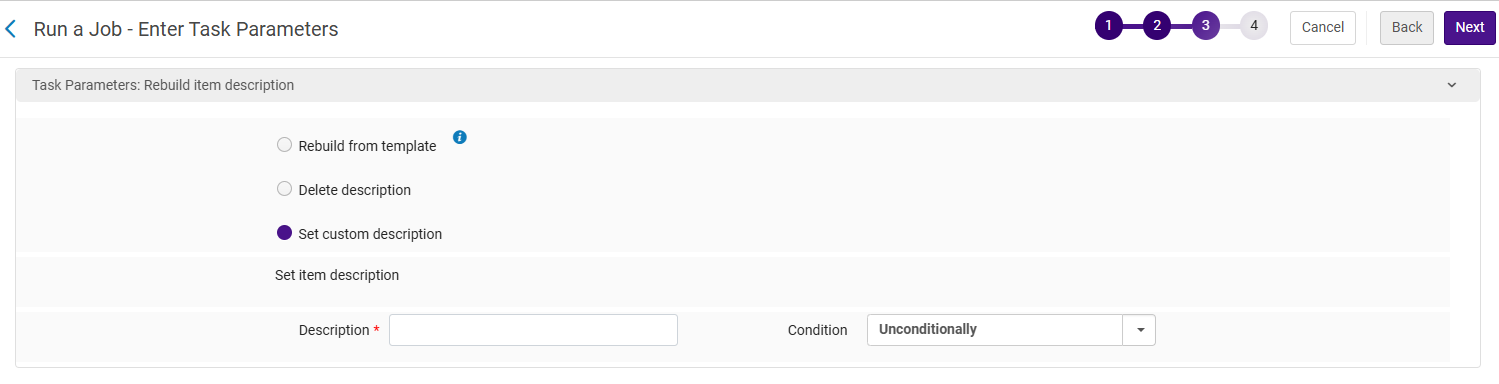
Changing an item's description may cause automatic rejection of existing requests for that item, depending on your fulfillment configuration.
Update Manual Jobs on Defined Sets
Automatic Suppression of Titles Without Inventory in Primo VE
August 2025 Electronic Resource ManagementURM-223782
Idea Exchange
CERV Enhancement (ID #8182)
When the new parameter logical_suppress_no_avail_inventory(Configuration > Discovery > Other > Customer Settings) is set to true(default false), titles without available inventory are considered suppressed and do not appear in the Primo VE search. This applies regardless of the suppress status icon or the workflow which deleted/deactivated a resource. The suppression is logical; the Alma suppression indication does not change. Bibliographic records with relations are not suppressed by this parameter (see Configuring Related Records for Physical Inventory). This is to avoid broken links between related records.
Available Inventory
The existing Primo VE logic of scope definition (avail_e/avail_p/avail_d) is used to determine Available inventory as follows:
- Physical inventory availability: if there are items or holding records
- Electronic inventory availability: if there are active portfolios, or it is a descriptive record of an electronic collection
- Digital inventory availability: if there are active non-Auxiliary representations
Network Management
In a network, set the parameter to true in all members and in the network institution.
The Network Zone title is only suppressed if:
- None of the institutions' bibs have available inventory, as well as the network level itself
- None of the institutions' bibs have relations, as well as the network level itself
Logical suppression is applied during Primo VE indexing. The new logic only takes effect for newly created or updated bibliographic records once the parameter is set to true. To ensure the logic is also applied to existing records, enable the parameter before the January Semi-Annual indexing, or contact support to request indexing.
For more information, see Discovery Customer Settings.
For information regarding the differences between this new parameter and the existing suppressBibWithDeletedHol and suppressBibWithSuppressedHol parameters, see Suppressing Alma Records from Primo VE.
Search for Electronic Collections by Provider Collection Name/ID
August 2025 Electronic Resource ManagementURM-239330URM-236340
To help simplify the identification of your purchased and subscribed collections in the Community Zone, Alma now has the ability to display a collection's unique name and identifier as provided and maintained by the content provider.
This enhancement introduces two new collection-level parameters:
- Provider Collection ID
- Provider Collection Name
These fields improve collection identification, particularly when the collection appears in the Community Zone under a different name than the one used by the provider.
Once these values are defined for a Community Zone electronic collections, they become searchable in the Community Zone,Institution Zone, and Network Zone tabs.
- The Provider Collection Name and Provider Collection ID fields have been partially populated for some collections starting early 2025. These fields will only be included in new collections going forward, so not all existing collections will have this information.
- There are cases where the provider only shared their collection name but not the collection ID.
- The Provider Collection Name/ID can only be updated by the Alma Content team.
- These fields are only visible if the data exists and was shared by the provider with Ex Libris.
- The data presented in these fields is presented exactly as passed to Ex Libris by the provider (the Provider Collection ID is not presented in cases where it was not passed to Ex Libris by the provider).
Additionally, it is now possible to include the Provider Collection Name/ID fields in Analytics reports. These fields appear in the e-inventory subject area in the folders Portfolio Details for Consortia Members and Electronic Collection.
For more information, see:
Provenance Information is Now Included in the Electronic Inventory
August 2025 Electronic Resource ManagementURM-246891
Catalogers working with the electronic inventory can now manually select Provenance information on new/existing portfolio entities or by using the API. The values in Provenance drop down list are derived from the codes configured in the Provenance table (Configuration Menu > Resources > General > Provenance Code).

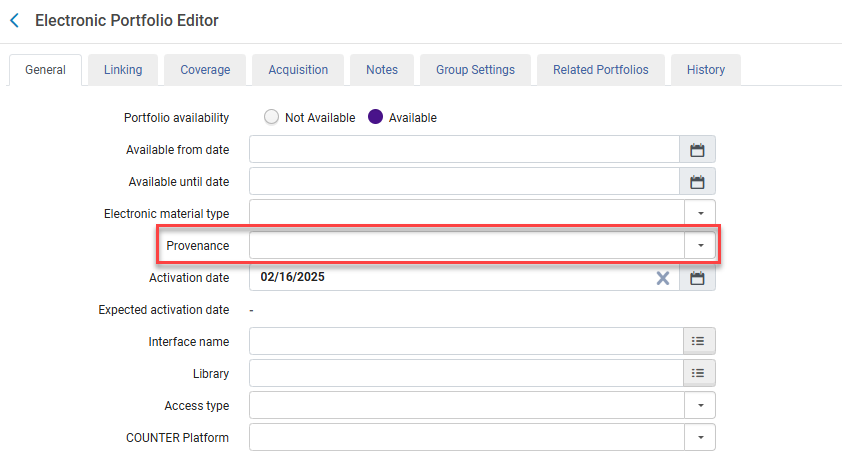
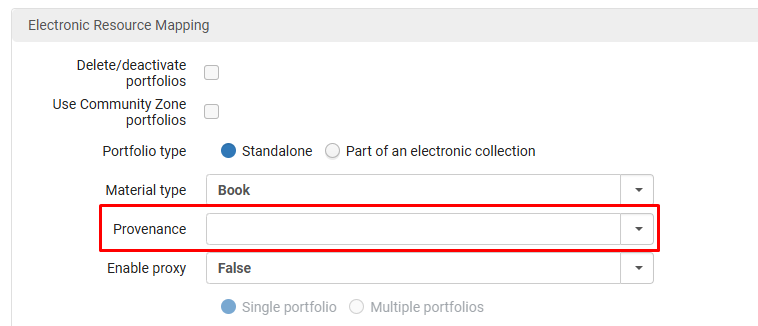
For Community Zone data, the Provenance field is empty. Customers activating portfolio/s from the Community Zone need to select a value from the drop down list.
When copying a Network Zone import profile to the Institution Zone, the provenance value is not copied, as the Provenance setup in the Network Zone may differ from that in the Institution Zone. The Institution Zone administrator must manually select the appropriate provenance value for the import profile in the Institution Zone.
For more information, see Adding the Provenance Information to an Electronic Portfolio.
For more information on updating the Provenance field using the API, see the Developer Network
Bulk Deletion of Purchase Orders
August 2025 Acquisitions
Idea ExchangeURM-209225
It is now possible to delete multiple Purchase Orders (PO) at once. The Delete PO page was updated and displays a full list of all PO's in Alma. Users can now select PO's and use the Delete Selected action. This reduces the time needed to manage large amounts of data.
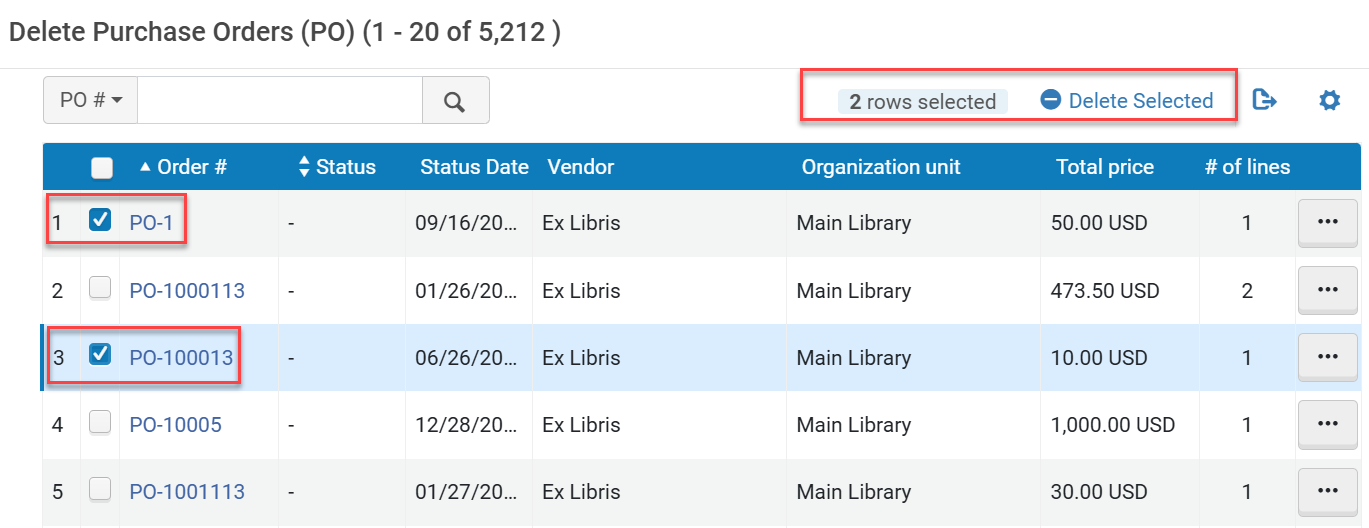
The deletion logic is the same as it was until now, when deleting only one PO each time. You can delete a PO when it does not contain PO lines that have been received, activated, or linked to an invoice. When deleting a PO, all of its associated PO lines are also deleted. The full list of PO's that were successfully deleted or not can be found in the job report.
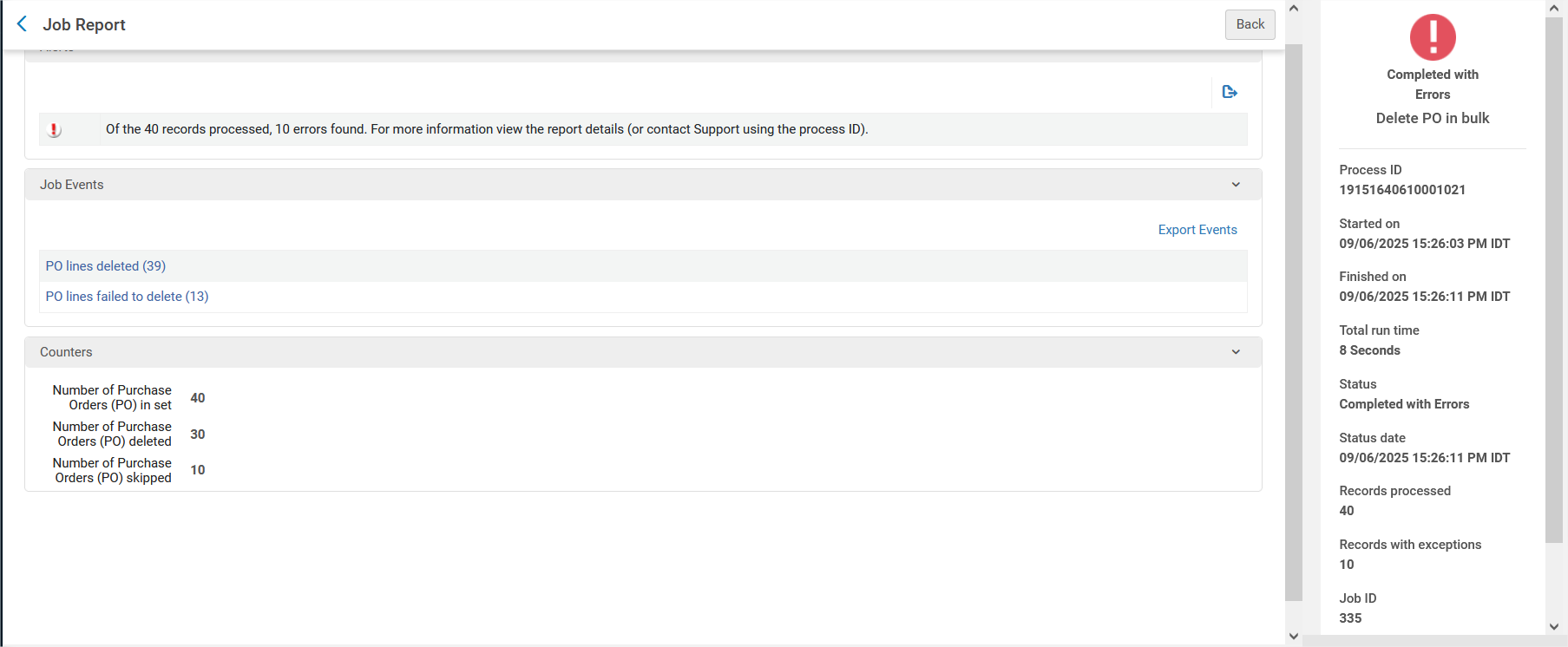
After the delete is submitted, the PO disappears. However, the related PO lines are still displayed in Alma until the deletion job finishes.
For more information, see Deleting POs.
Improvements to Change PO Line Type Cross Continuity and Cross Inventory for the Update PO Lines Information - Advanced Job
August 2025 Acquisitions
CERV Enhancement (ID#8861)URM-243381
As part of the February 2025 release, the option to change PO line type cross continuity and cross inventory, using the Update PO Lines Information - Advanced job, was introduced. Following the community's feedback, we have now introduced additional enhancements as follows:
- The Update PO Lines Information - Advanced job now changes the PO line type cross inventory and/or cross continuity, even when the PO line is linked with an invoice in status "In Review" or "Closed". When the linked invoice is in status "Waiting for Approval" or "Ready to be Paid" or "Waiting for Payment", the type does not change, and the PO line is skipped.
- In some cases, when the PO line is part of a PO, the PO line is not moved out of the PO and Alma does not set it back to “In Review”:
- When changing the PO line cross-inventory type from ‘Generic' format to ‘Physical'/‘Electronic'/‘Digital' and vice versa
- When changing the PO line cross-inventory type from ‘Electronic' (Portfolios) inventory format to ‘Electronic' (Collections) and vice versa
- A cancellation letter is sent when the original PO line's acquisition method includes sending an order letter to the vendor, and when the PO line status is "Sent". A checkbox was added that defines whether or not to send a cancellation letter. The letter will now only be sent if this checkbox is selected. This checkbox is relevant to any change done as part of the job: Acquisition method, PO line owner and PO line type.
When updating the ‘Standing Order' continuity type to ‘Subscription', we now move the PO line out of the PO, as this is not consistent with the packaging rules.
For more details, see Manual Jobs.
Option for a Member of a Network to View Only the Setup of a Configuration Done at Network Zone Level
August 2025 Collaborative Networks
URM-225903
It is now possible to view the network configuration from the member Institution Zone, enabling the Institution Zone Administrator to see what the central office recommends for that specific configuration. This provides more flexibility for network Members to remain independent but still benefit from the central office experience if necessary.
This new feature is relevant to Consortia with a Network Zone setup. It only appears when the consortia_enable_member_network_view parameter (Central Configuration Dashboard > General > General Configuration > Other Settings) is set to true at the Network Zone level.
For more information, see Consortia Central Configuration Dashboard.
Option for Institution Zone Administrator to Copy Network Zone Configurations
August 2025 Collaborative Networks
URM-214264
It is now possible for the member administrator to copy the configuration done at the network level by the network's central office.
This enhancement improves collaboration and flexibility between member administrators and NZ administrators.
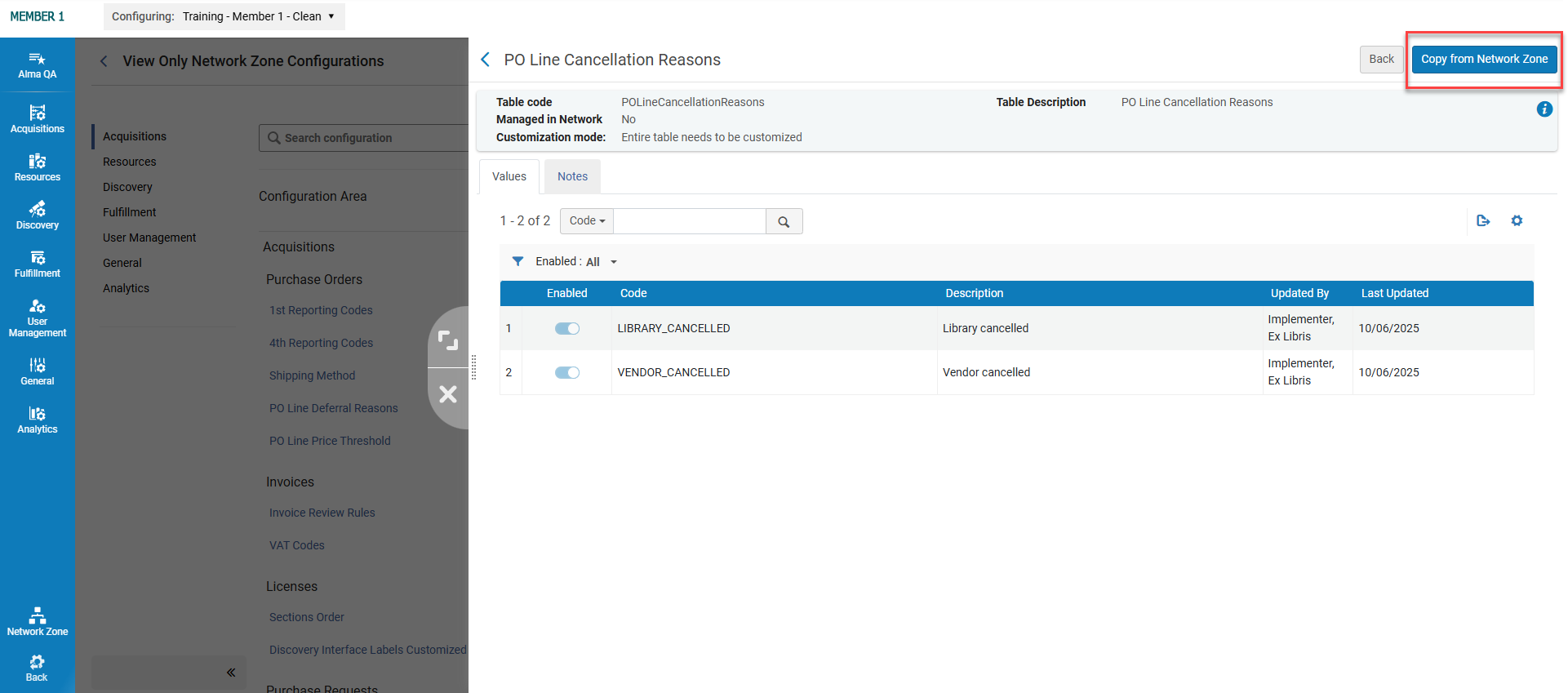
- This feature is relevant to Consortia with a Network Zone setup, where data was customized at the network level. If no customization was done at the network level, then the Copy feature will not be available. It requires the consortia_enable_member_network_view parameter (Central Configuration Dashboard > General > General Configuration > Other Settings) to be set to true at the Network Zone level.
- This new feature will be available only for configuration that remained OTB or was locally customized.
- If the configuration is already managed by the Network in Imposed Mode (see Distributing Configurations to Members), then the new feature will not appear. The customer can also request the release of the specific configuration (see Consortia Central Configuration Dashboard).
- This feature is not available for the following rules, since they already have the network configuration displayed in the local configuration:
- Display_Logic_Rules
- Rota_Assignment_Rule
- Send_Borrowing_Request_Rule
- Description_Template_Setup_Rule
- Representation_Label_Template_Setup_Rule
For more information, see Consortia Central Configuration Dashboard.
Combination of e-Resources Activated at Network Zone and Institution Zone for Display Logic Rules
August 2025Collaborative NetworksURM-242862
Idea Exchange
We have improved the user experience when configuring Display Logic Rules for Full Text services with Electronic Collections. Until now, selecting an Electronic Collection involved using a basic drop-down list, which made it difficult to search and identify the correct resource. From now on, the drop-down list is replaced by a Pick-Up List, offering a much more powerful and user-friendly selection process.
This new interface makes it easier to create rules for the Link Resolver electronic services for electronic collections managed in the Network Zone or the institution. The new search page displays additional information to help you make the right choice quickly and accurately, and enables multi-selection.
Up until now, in a Network setup, when adding a new rule in the Display Logic Rules configuration, users could only choose e-resources from their institution at Member level, and a Network Zone administrator could only add a rule with Network Zone e-resources.
Now, the Display Logic Rules configuration enables Network members to add a rule using a combination of local and network e-resources. In addition, the Network Zone administrator can access the Member Display Logic Rules configuration via the Central Configuration Dashboard to create a rule using a combination of local and network e-resources for that member.
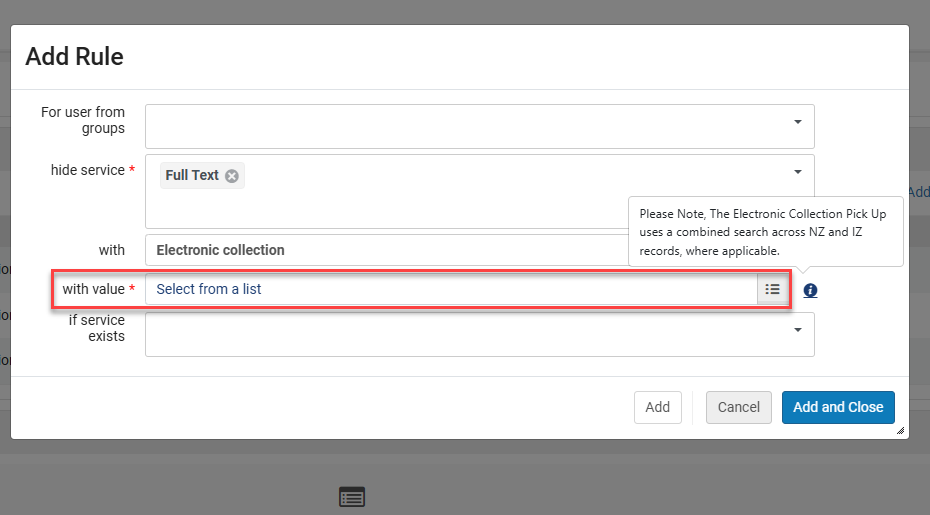
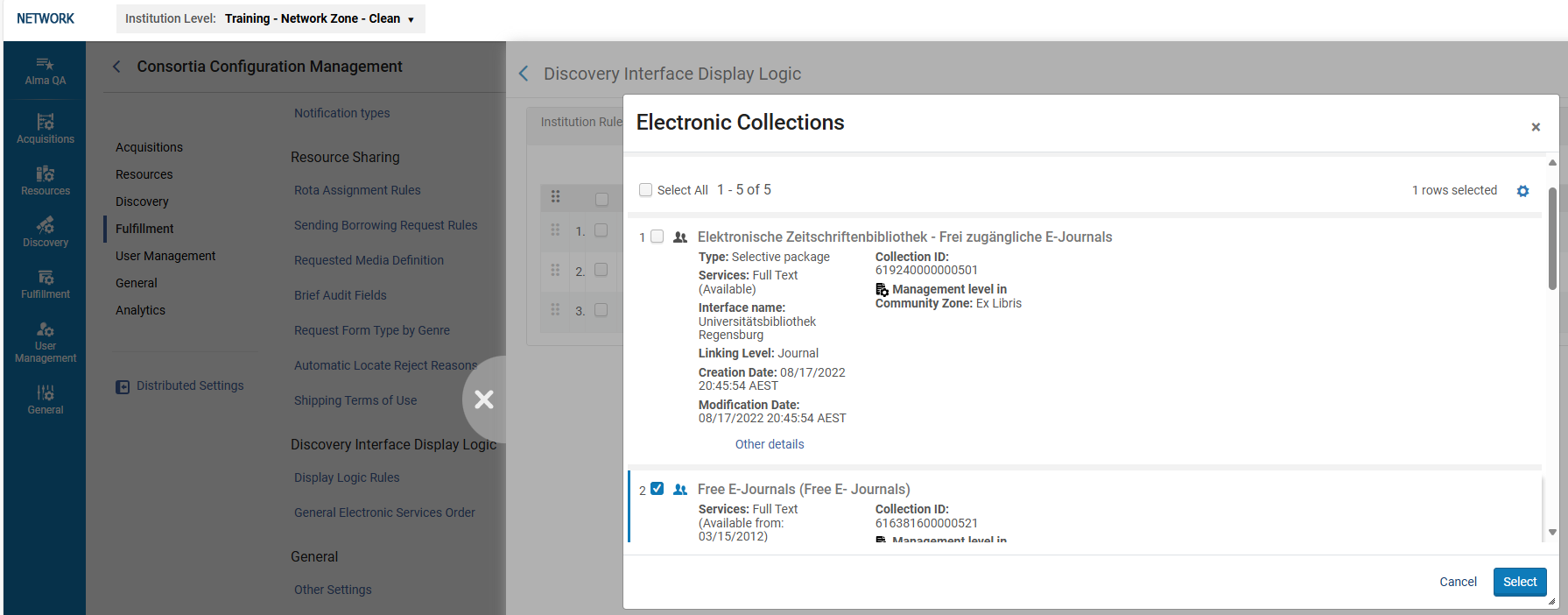
This new feature improves the efficiency of the Display Logic Rules Configuration for Consortia by enabling a combination of e-resources activated at the Network Zone and Institution Zone.
For more information, see the following pages:
- ViewIt
- How to Define Link Resolver Library Preferences
- Configuring Discovery Interface Display Logic for Alma-Summon
Online Services Order Configuration in the Consortia Central Configuration Dashboard
August 2025 Collaborative Networks
URM-78147
The Network Zone operator can now manage the Online Services Order configuration from the Central Configuration Dashboard, at both the Network Zone and institution levels.
This enables more centralized management for the Online Services Order at the Network Zone level.
This new feature is only relevant to Consortia with a Network Zone setup.
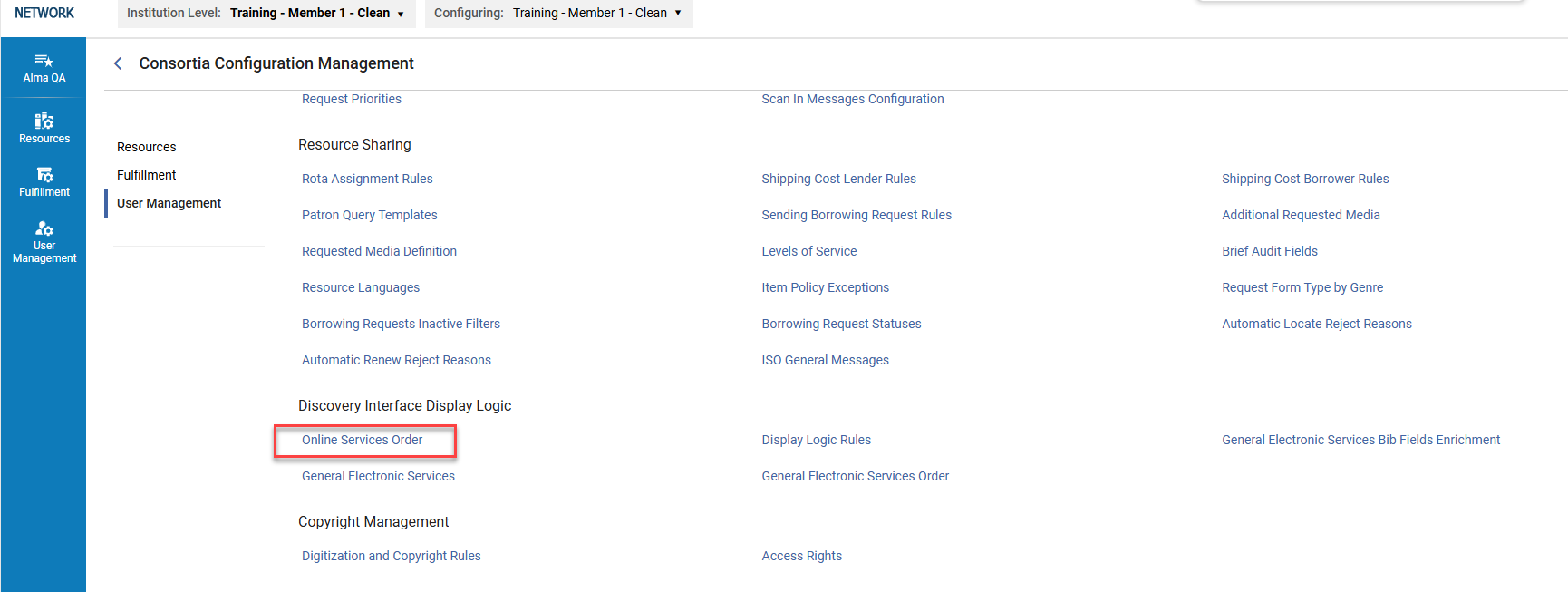
For more information, see Sections and Configuration Options.
Improved Digital Adoption Pop-ups
August 2025 User Experience, Accessibility &InfrastructureURM-245894
Previously, when users enabled functional cookies, Alma guides and new feature pop-ups showed repeatedly when clearing the browser cookies. Now, notifications will not show again after the user dismisses them, even if cookies were cleared. This change does not impact our digital adoption, anonymization, and privacy practices. Enabling functional cookies enables you to see workflow walkthroughs and new feature notifications, and in the future will include additional services such as release news and feedback options.
For details on how we collect data and how to activate functional cookies and your Show what's new preference, see Configuring Digital Adoption.
Hide/Allow as Many Cloud Apps as Needed
August 2025User Experience, Accessibility & InfrastructureURM-242467
The Enabling Cloud Apps configuration (Configuration Menu > General > General Configuration > Cloud Apps Configuration) now enables the selection of as many Cloud Apps as needed and is no longer limited to a maximum of 13. This gives users more customization options to control the cloud apps they want to hide/allow.

Get-Users API - Search for Users Modified After Specified Date
August 2025 User Experience, Accessibility & InfrastructureURM-252373
The Get-Users API now includes an option to retrieve users modified after a defined date (by last-update-date). For details, see the Developer Network.
Update-item and Create-item APIs - Allocate Sequence Number for Inventory Number
August 2025 User Experience, Accessibility & InfrastructureURM-249500
A new parameter called generate_inventory_num_name was added to the update-item & create-item APIs. This enables allocating a seq num for inventory_number. For details, see the Developer Network.
Removal of Gender Fields in Analytics
August 2025 Analytics and InsightsURM-249618
Due to GDPR privacy issues, the Gender field will no longer be available for users in Alma causing the contents of this field to be deleted from Analytics. This might affect existing reports, particularly those using it for filtering or grouping.
Updated Analytics User Badges With Additional User Info
August 2025 Analytics and InsightsURM-248658
The user badges in the Analytics Object List > Share section were enhanced to align with the new Alma UI. In addition to the display, the badge includes the option to see user details in a sliding panel.
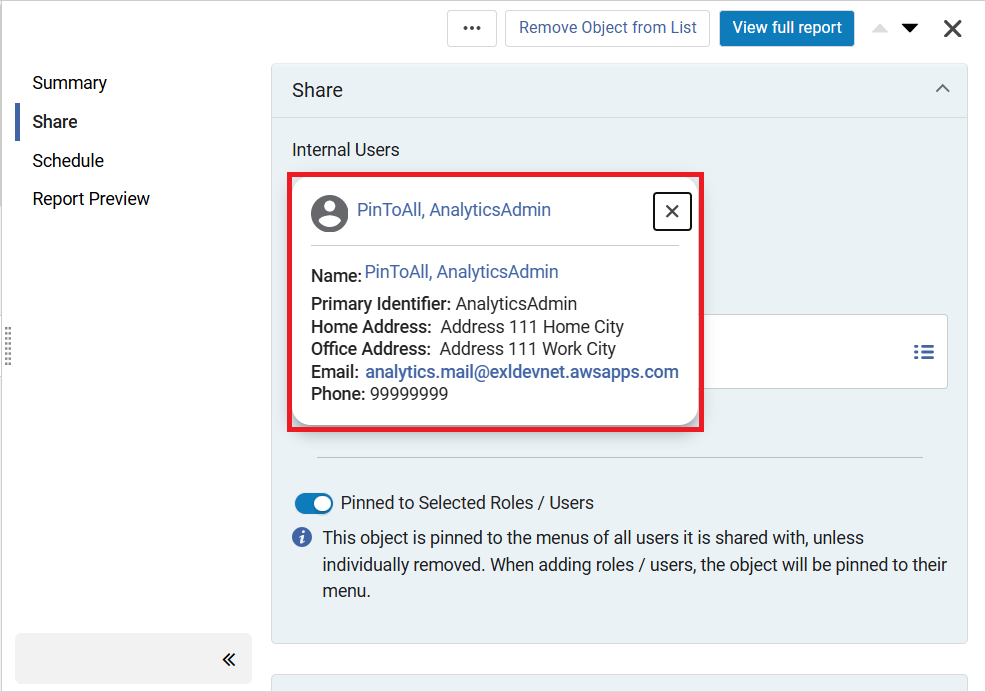
MARC is Included in the Analytics Field Name
August 2025 Analytics and InsightsURM-252083
When mapping local parameters to Analytics, it is now possible to include the MARC tag in the Analytics field name.This is done by setting the customer parameter analytics_display_local_params to true. This is helpful because it makes the mapped field immediately recognizable by displaying the MARC tag, which shows what data is being referenced.
In the coming November Release, this customer parameter will be set to true for all libraries.
The column name in the database will not change. It might affect reports that are exported to a third party which expects the header of the local parameter column to contain specific text. In these cases, libraries may want to update the third party system with the new format of the headers.
For more information, see Analytics Configuration - Other Settings.
New Metric Types in Usage Data Details - Release 5
August 2025 Analytics and InsightsURM-248720
New measures were added to the Usage Data Details - Release 5 folder in the Usage Data (COUNTER) Subject Area.
- DR_D1 - Unique Item Investigations
- DR_D1 - Unique Item Requests
- IR_M1 - Unique Item Requests
For more information, see Usage Data Details - Release 5.
New Electronic Resource Data Visualization for Electronic Collections Activations
August 2025 Analytics and InsightsURM-245234
This dashboard displays the electronic collection and portfolio activations over the past year. It also shows a breakdown of electronic resources that are Community linked versus the ones that are locally managed. It highlights the opportunity to increase the usage of Community resources, saving time and lowering costs by reducing the need for local record maintenance.
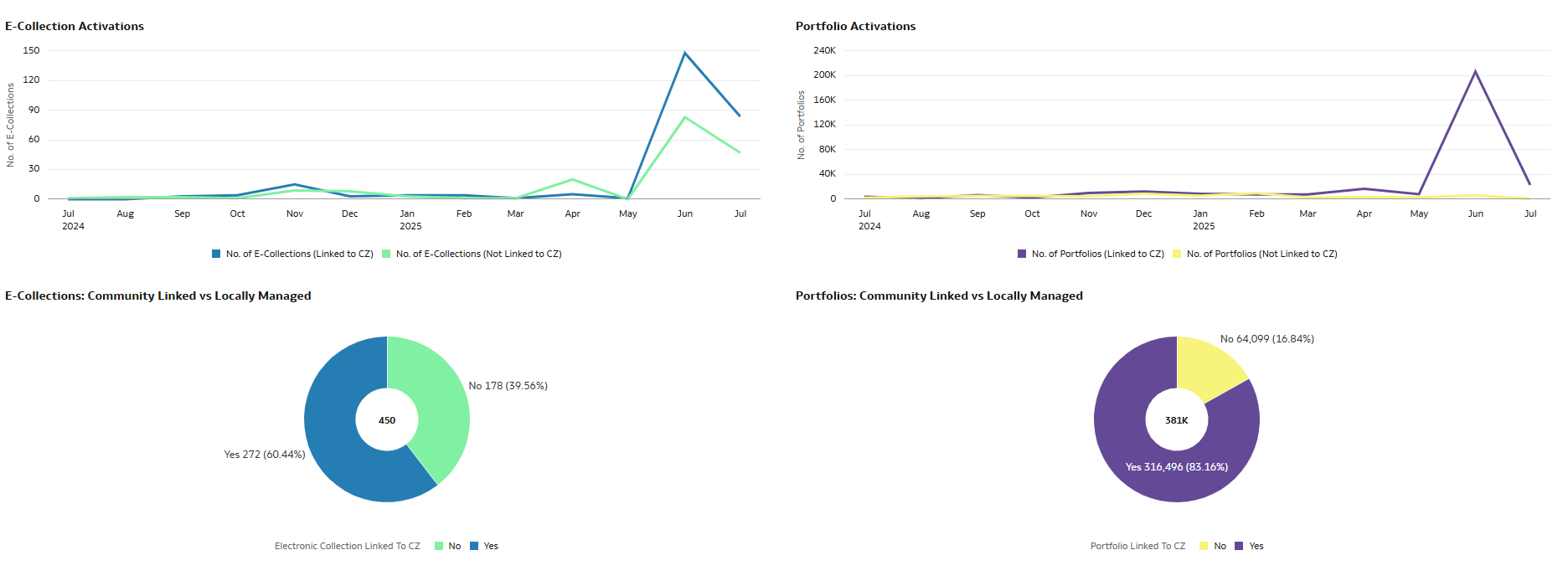
Out-of-the-box Analytics Data Visualizations Added to Alma Starter
August 2025 Analytics and InsightsURM-252169
Two new Data Visualization Analytics reports were added as out-of-the-box reports to Alma Starter institutions:
- Electronic Collection Overview
- Electronic Resources Activation
These two reports now appear in the list of out-of-the-box analytics reports and in the list of possible home page options.
Additional Enhancements
- August 2025 Metadata ManagementURM-238904 To ensure data integrity and consistent authority control, when the parameter linking_identical_headings(Configuration Menu > Resources > General > Other Settings) is set to true(default false), duplicate authority links remain linked in the bibliographic record.
For more information, see Configuring Other Settings (Resource Management).
- August 2025 Electronic Resource ManagementURM-247337 To improve performance and prevent system errors, the Portfolio Loader's online validation option is now restricted to files up to 2 MB. The offline validation option is still available for files up to 10 MB.
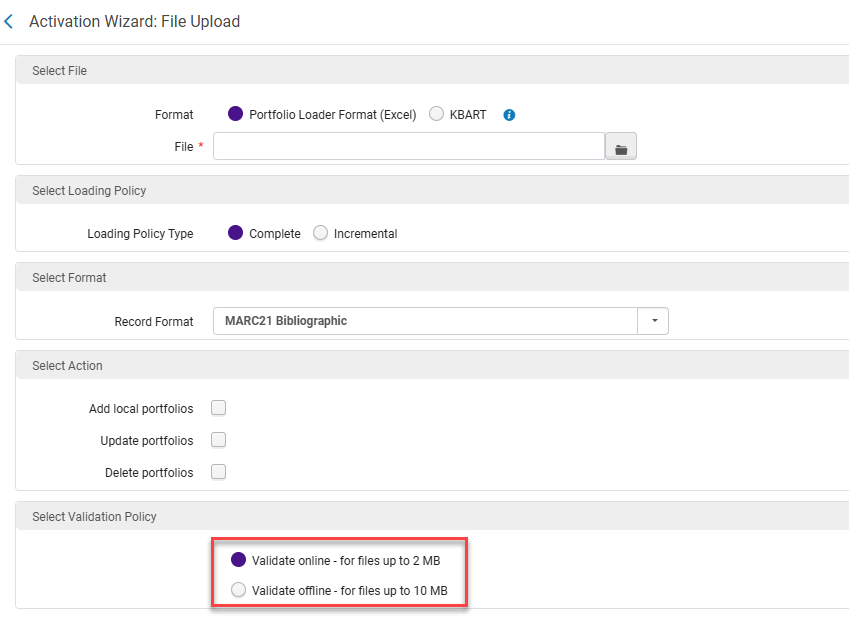 File Upload Validation Policy
 - August 2025 Fulfillment and Resource SharingURM-247763 The Leganto List Creation Method field was added to the Reading List folder and the Leganto Citation Creation Method field was added to the Reading List Citation folder.
Resolved Issues
| SF number | Area | Description |
|---|---|---|
| 08046483 URM-249747 | Analytics and Insights | There were a few duplicate LC Classification codes. This was fixed. |
| 07907251 URM-248790 | Acquisitions | For Import PO Approvals, the date of approval on the PO Line was not equal to the approval date defined in the XML file. This was fixed. |
| 07911364 URM-246866 | Acquisitions | In some cases (depending on the role scope), an incorrect invoice owner was displayed. This was fixed. |
| 07982129 07091493 URM-232549 | Acquisitions | There was an issue in a specific case, where the process sent a claim and didn't update the communication fully as expected. As a result, the next execution sent the claim again. This was fixed. |
| 08043806 URM-249864 | Acquisitions | The Invoice Excel upload failed with an error when date fields (Invoice date and Payment voucher date) were referenced. The error was fixed, and the process no longer fails. Note, however, that the date fields are not taken from the Excel file, and therefore you should use real date values and not referenced ones. |
| 07956884 URM-249482 | Acquisitions | Creating invoice lines with the API used the PO Line currency instead of the Invoice's currency. This was fixed. |
| 07955620 08017282 URM-248833 | Acquisitions | There was an issue when creating an invoice, selecting the "Save and create invoice lines" button again, and approving the invoice without the right privileges. This was fixed, and in this situation, a message now appears that the "Invoice already exists. Lines cannot be created at this stage". |
| 07247348 07219920 URM-229476 | Acquisitions | In the JST timezone, there was an ERP issue with invoices created before 9 am. This was fixed. |
| 06985469 URM-248830 | Acquisitions | The Legal Deposit Claim Letter was sent, even though the expected items from the prediction pattern had the Expected Receiving Date in the future. This was fixed. |
| 07984138 07996146 08061927 08060325 URM-248175 | Acquisitions | Some continuous POLs that should have been "In Claim" were not. This was fixed. |
| 06856541 URM-242656 | Acquisitions | There was an issue when the "claim_continuous_item_level" customer parameter was set to true and the subscription PO Line went into claim. In this case, the next claim process sent an additional claim message for the same item. This was fixed. |
| 07967960 URM-248190 | Acquisitions | Inactive funds appeared in the Recently used list. This was fixed. |
| 07984171 URM-246548 | Acquisitions | The scheduled "PO Line - Send EDI" process generated an error. This was fixed. |
| 08034457 URM-249692 | Acquisitions | The ERP Import Job generated a "Completed with Errors" message. This was fixed. |
| 08028727 URM-249712 | Acquisitions | An error was displayed when viewing the Usage Data tab. This was fixed. |
| 07976987 URM-252290 | APIs | The Resource Sharing system crashed if the code was too long. This was fixed. |
| 06869639 06955032 URM-234915 | User Experience, Accessibility and Infrastructure | In some cases, the Last patron activity date was not updated in user records as expected. This was fixed. |
| 07205456 URM-237183 | User Experience, Accessibility and Infrastructure | When patrons edited their personal delivery address on the Hold Request form in Primo VE and Last Patron Activity was activated, the page got stuck for a long time. This was fixed. |
| 08016560 URM-248495 | User Experience, Accessibility and Infrastructure | Manage patron services: When a patron exceeded their overdue limit, the message displayed with the number of overdue items, had a decimal point in it, for example, "Limit of 2.0 exceeded" instead of "Limit of 2 exceeded". This was fixed. |
| 07861807 URM-245569 | Electronic Resource Management | Updated 6 November 2025: Previously, data from the bib in the dc was not enriched for most fields. This was fixed and new mapping was added to the link resolver's context object for Dublin Core records: dc.rights, dcterms.rights, and dcterms.accessRights were mapped to rft.dcRights; dc:identifier was mapped to rft.dcIdentifier; dc:relation was mapped to rft.dcRelation; dc:type was mapped to rft.dcType. |
| 07910932 URM-243599 | Electronic Resource Management | Previously, the Overlap analysis did not include an indication that the report was generated. This was fixed, and a loading spinner is now displayed when selecting "Generate". |
| 07995153 URM-249068 | Digital Resource Management | Previously, orphan sub collections were displayed in Primo VE as Top Level Collections. This was fixed. |
| 06443351 URM-238858 | Digital Resource Management | Previously, when the parameter 'temp_restrict_digital_image_download' was enabled, some representations only displayed half of the image before zooming. This was fixed. |
| 07053138 URM-219391 | Digital Resource Management | Previously, the interface language changed to Hebrew after selecting Deliver for a representation. This was fixed. |
| 08083879 08086310 URM-253212 | Digital Resource Management | Previously, mapping multiple values using the digital import with the MARC subfield $8 linking number did not work. This was fixed. |
| 08033781 URM-249793 | Metadata Management | Previously, the Publishing to Primo job took a very long time. This was fixed. |
| 06517852 URM-188805 | Metadata Management | Previously, when the "Add Member Local Fields" option was selected in a Network general publishing profile, any published Network record field with $9 included the "member code subfield" if a member record was linked to that Network Zone record. This was fixed. |
| 07964183 URM-249484 | Electronic Resource Management | Previously, the 'Re-index MMS IDs updated by Logical collections' job completed with errors when the same MMS was linked to two collections. This was fixed. |
| 07930367 URM-249672 | Metadata Management | Previously, date handling in User Solr queries appended redundant OR clauses when the original query contained an OR condition. When itemizing such a logical set, the redundant OR caused the query to mistakenly retrieve many users outside the intended criteria. This was fixed. |
| 08058356 URM-252029 | Metadata Management | Previously, the 'Remove' option disappeared from the actions menu after performing the 'View Record' action in the New Titles search within the Itemized Set context. This was fixed. |
| 07998239 URM-250203 | Fulfillment and Resource Sharing | The default waiving reason appeared on the paid fine in the transaction details. This was fixed. |
| 08092543 08094415 08096182 07981910 07987842 08101638 08092599 08094273 07981897 08091222 URM-248263 | Fulfillment and Resource Sharing | Names with Umlauts (Ü) were not searchable in Manage Patron Services. This was fixed. |
| 07984588 URM-247487 | Fulfillment and Resource Sharing | The "Institution" filter did not appear when navigating to the Loans page via the Network tab. This was fixed. |
| 08030898 URM-252024 | Fulfillment and Resource Sharing | The drop-down menu in "Receiving department items" only showed one library. This was fixed, and the "Library" filter text in the Process Items page was changed to "Original Library" to reflect the correct filtering. |
| 07690061 URM-237567 | Fulfillment and Resource Sharing | Recalls for digitization requests were not cancelled when scanning in other copies of the title. This was fixed. |
| 08009892 URM-249566 | Fulfillment and Resource Sharing | Requests for electronic resources with an "Exclude Resource Sharing" license were not rejected. This was fixed. |
| 06749576 URM-248863 | Fulfillment and Resource Sharing | When scanning in an item for a Lending request, the query was case-sensitive and resulted in the print slip not being printed. This was fixed. |
| 08037082 07885565 URM-242598 | Fulfillment and Resource Sharing | In the Lender Ship Email Letter, the string 'URL: ' was added to the value of note_to_partner in the letter XML, even if no note was added. This was fixed. |
| 07752528 07815313 URM-242548 | Fulfillment and Resource Sharing | In some cases, the format for RS request was marked as both physical and digital in the Primo Classic form. This was fixed. |
| 07824571 URM-242568 | Fulfillment and Resource Sharing | The link resolver retrieved Community Zone related records without considering the genre configuration of the related titles. This was fixed, and Community Zone related titles are now retrieved based on each title’s genre and the corresponding configuration defined in the institution. |
| 07207614 URM-226320 | Fulfillment and Resource Sharing | In some cases, the "Create physical work orders" job failed to communicate part of the remote storage request. This was fixed. |
| 06563310 URM-188796 | Metadata Management | When building authority headings for GND name authorities containing $t values, the heading content was created by sorting the subfields alphabetically by code, instead of taking them in the order they appear. This was fixed. For institutions that have local GND authorities, contact support for re-indexing. |
| 07273301 URM-242797 | Metadata Management | In some cases, when the Preferred Term Correction job was executed in the Network, the member bibliographic records were updated and some of the local extensions in the member records were lost. This was fixed. |
| 07251237 URM-229005 | Metadata Management | After selecting Merge & Combine, when the second record was deleted, it was sometimes not removed from the records list until the list was refreshed. This is fixed. |
| 08023395 08039001 URM-248962 | Linked Open Data | Previously, the Linked Open Data for Local Authorities table could not be saved if the prefix field was empty. This was fixed. |
| 07976936 URM-246395 | Linked Open Data | Previously, Administrator roles with read-only settings could not view the Linked Data Enrichment Configuration table. This was fixed. |
| 08060634 URM-252934 | Metadata Management | In some cases, jobs with the Normalization Rule for MODS failed. This was fixed. |
| 07932533 URM-244192 | Metadata Management | Previously, ID-based linking overrode IDs in subfield $1 for field 689. This was fixed. |
| 07891992 07905536 URM-243997 | Collaborative Networks | When Alma searched for related records during the alignment job, not all of the results were processed, so Alma re-imported records from SBN that already existed in Alma. New authority records were created when the existing authorities in Alma had originating system IDs that did not match the system number of the SBN records. The search has been fixed so that all results are processed, so records that exist in Alma will no longer be re-imported from SBN. |
| 08057102 08063120 URM-252421 | User Experience, Accessibility and Infrastructure | In some cases, users could not add the citation of a specific title to the reading list. This was fixed. |
| 07954287 07866402 URM-243582 | User Experience, Accessibility and Infrastructure | Changing the zone in the content of a set was not available in the new search UI. This was fixed. |
| 07952661 URM-249337 | User Experience, Accessibility and Infrastructure | A fulfillment network in two different Alma instances was not functioning as expected, due to an internal error. This was fixed. |
| 07990092 URM-248816 | User Experience, Accessibility and Infrastructure | When navigating to Manage Patron Services > Quick User Management > Full Information, an error was displayed when pressing Save/Cancel/back from the full user details page. This was fixed, and selecting Save/Cancel/Back now leads back to the Manage Patron Services page. |
| 07892857 URM-243714 | User Experience, Accessibility and Infrastructure | A user with General System Administrator roles in Read-only mode was able to edit configurations. This was fixed. |
| 08012004 URM-250237 | User Experience, Accessibility and Infrastructure | The Deposit Manager user role could not access the Patron Deposit Customization configuration. This was fixed. |
| 07996741 URM-250159 | User Experience, Accessibility and Infrastructure | Lookup fields for forms could not handle the diacritic (´) character. This was fixed. |
Page tags: article:topicproduct:almacontent:Documentationlang:english
