
Alma May 2025 Release Notes
Main Features
Upcoming UX Enhancements in the May 2025 Release
Alma introduces major UX improvements in the May 2025 Alma Release, bringing enhanced workflows, improved readability, and a smoother transition to the new UI experiences.
Manage Patron Services and Return Items New UX
The new, next-generation Alma UX design is available for the Manage Patron Services and Return Items pages. In this release, the new UX is automatically set as the default for all users, with no option to opt-out.
For a general overview of the new Manage Patron Services and Return Items pages, see Managing Patron Services at a Circulation Desk - New Layout.
Title Searches New UX – Enhancements & August Sunset
The classic title search UX will be sunset as part of the August 2025 - we encourage you to work with the new search and become accustomed to it.
The May release introduces several improvements to the new Title Searches UX, addressing feedback and fixing known issues:
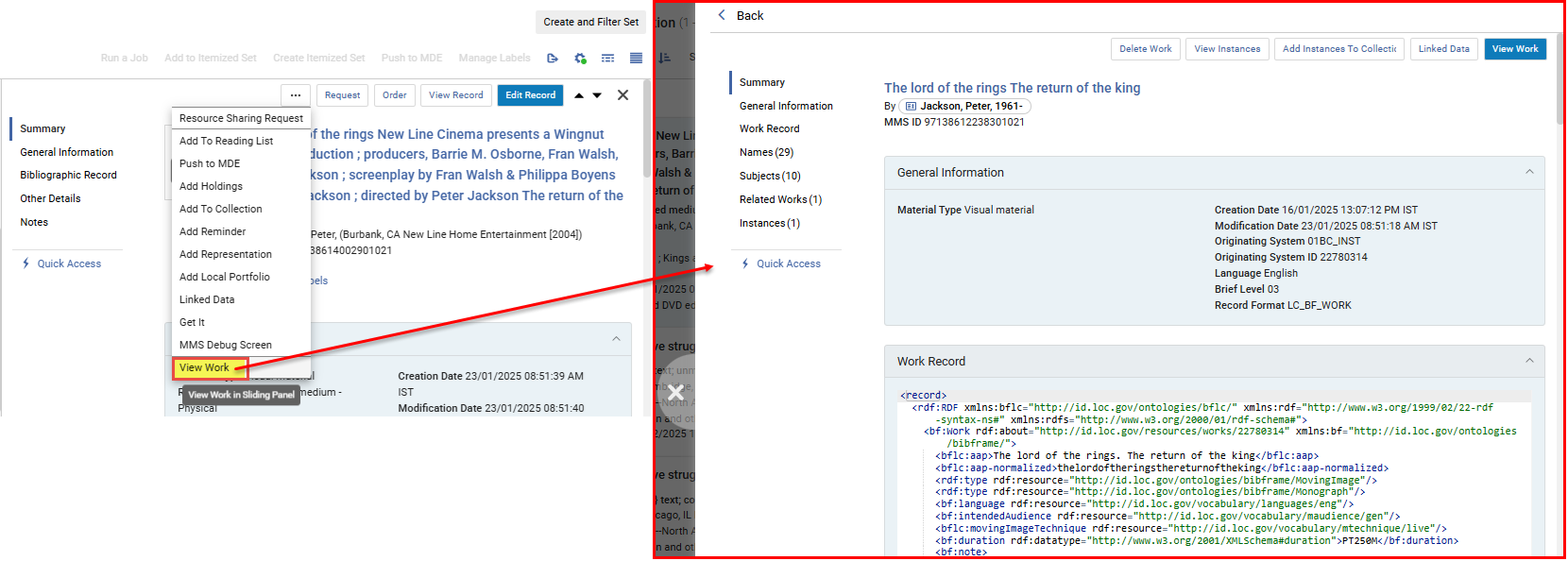
View Work Action for BIBFRAME Instances in All Titles Search
A new action in the All Titles search for BIBFRAME instance records enables users to navigate to the details page of the linked work within a sliding panel, improving navigation and display of the BIBFRAME work.
For more information, see Performing Record Actions on the Repository Search Results Page.
Enhanced Saved Facets in Title and Holdings Searches
You can now save multiple facet combinations and quickly apply them to your searches, similar to the functionality on the Manage Sets page. Saved facets appear in the Saved drop-down list, where you can also set a default that is automatically applied to searches.
Users who previously saved facets in title searches before this update will find them in the drop-down list, labeled Pre-saved.
For more information, see Saving Multiple Combinations of Facets.
Adding Cataloger Notes in the Titles and Holdings Searches
In title and holdings searches, catalogers can now view, add, edit, and delete notes directly without opening the Metadata Editor. Notes are only accessible for viewing or editing when available to the user in the Metadata Editor: if the cataloger has permission in the Metadata Editor and the record is not locked. Additionally, notes can only be managed within the search scope where the record is maintained (institution, network, or community). This enhancement enables catalogers to quickly add notes to bibliographic or holdings records.
For more information, see Searching in Alma > Notes Section.
Navigation Links Added to the Title Searches Export
The new title search UX includes single-click links to additional related entities, such as Related Records, Courses, Licenses, and Reminders, along with a link to the new Notes section for catalogers. These fields are now included in search exports to Excel, just like existing navigation links for Orders and Requests. This enhancement enables users to quickly identify records with related entities in their exported files at a glance.
For more information, see Export to Excel.
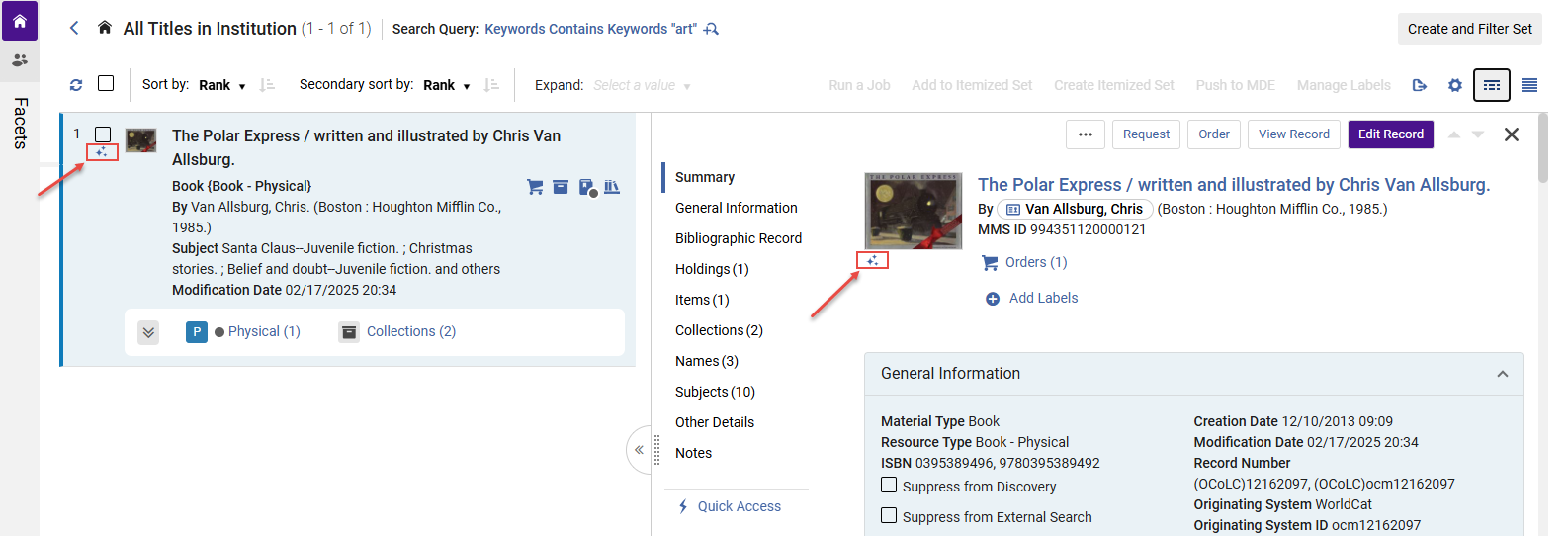
AI Indication for Community Zone Enriched Records
In the new title searches UX, the AI indication ( ) is now displayed for Community Zone records enriched by the Community Zone AI generator.
For more information, see:
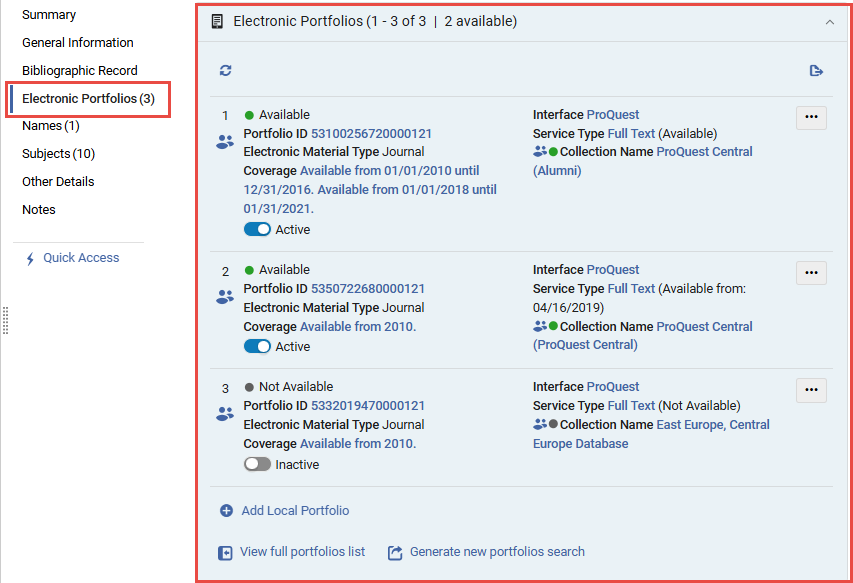
Enhanced Electronic Portfolio Availability Information in Title Searches
The expanded electronic tab and the electronic portfolio section now include a calculated availability indication, taking into account both the portfolio and service status and reflecting the availability of the portfolio to patrons. This availability, as well as the availability set in the portfolio, are also added to the Excel created when exporting the electronic portfolio section.
For more information, see Searching in Alma > Electronic Portfolios.

New Title Search Experience Features Now Available When Adding Titles to Collections
The features of the New Title Search Experience are now available when adding titles to collections (Resources > Manage Collections > Edit a Collection > Titles List > Add Title):
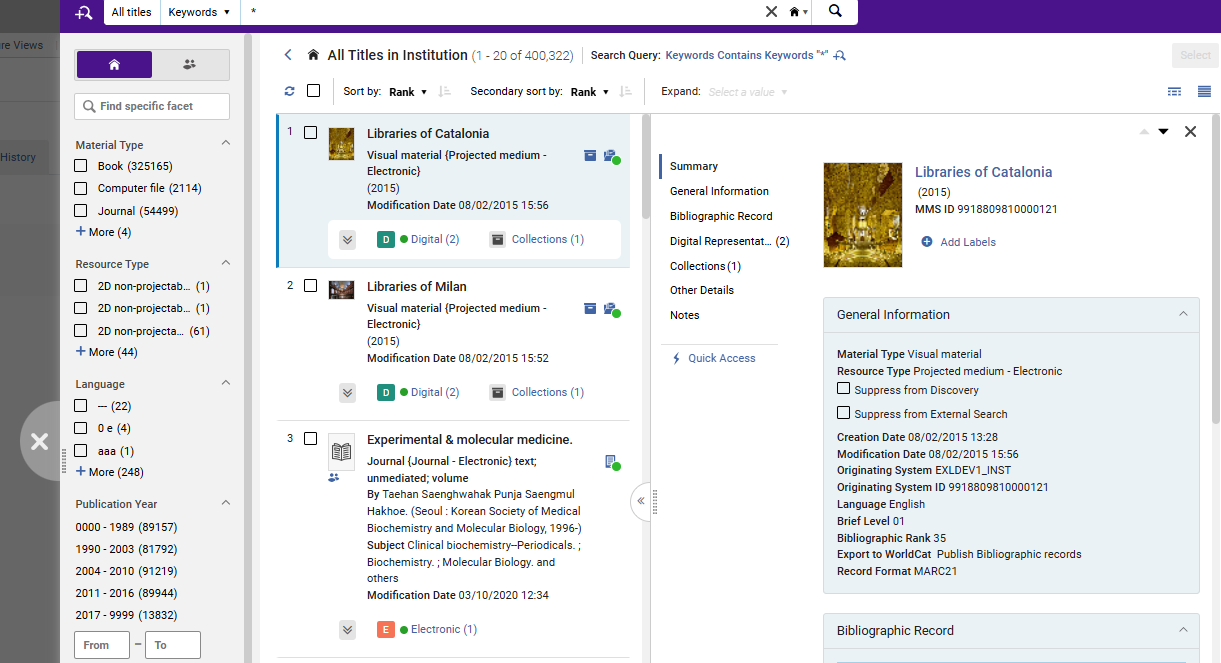
Among other characteristics of the next-generation interface, it displays as a sliding panel, with a multi-select facets pane and title details pane.
For an overview of the next-generation interface, see Introduction to the New Title Search Experience.
Enhanced Search Query Design with Improved UI and Accessibility
 Idea ExchangeURM-242034
We have introduced a new search query design with an updated UI to ensure a more consistent and efficient search process, improving the visibility and usability of search options across different workflows. The new design includes a refreshed search query display and a magnifying glass icon for quick access to update the query via the Advanced Search.
The redesigned search query and new icon make it easier for users to understand the search query and locate and utilize Advanced Search functionalities. The enhanced UI elements and structured design improve navigation, benefiting all users, including those using assistive technologies.

For more information, see Searching in Alma.
Enhanced Text Appearance for Improved Readability
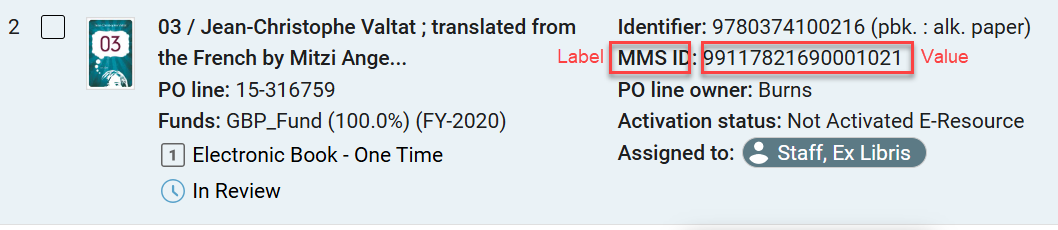
The text appearance in the record view and sections of the new UI across Alma was updated. Labels now have bold font, and values appear as regular text rather than bold. This change enhances various pages, including Purchase Order Lines, Resource Sharing, Manage Patron Services and Title Searches, to create a clearer and more intuitive interface.
This update improves readability by making it easier to distinguish between labels and their corresponding values. It was driven by user feedback, discussed, and approved by the UX focus group. It enhances the overall user experience, ensuring a more user-friendly, readable, and visually appealing system.
Closed Library Management TOU for Resource Sharing Request
May 2025Fulfillment and Resource Sharing
Idea ExchangeURM-118982
It is now possible to configure system behavior for managing a lending request's due date if the calculated date falls on a closed date. This enables the library to ensure that the lending requests' due date is not calculated to fall on dates when the library is closed.
For more information, see Managing Lending Requests.
Supporting Linked Open Data and VIAF for Local Authorities
May 2025 Linked OpenDataURM-231695
Institutions that use local authorities (in Institution Zone or Network Zone) or copy Community Zone authorities to work with them locally can define global ID's to be extracted from the authority records and mapped to VIAF (V irtual I nternational A uthority F ile). Institutions with local name authorities that are part of VIAF are able to view info cards, contributor pages and use the URI enrichment configuration.
For more information, see Configuring Linked Open Data for Local Authorities.
Alma AI Metadata Assistant Developments
Request AI Metadata Assistant for Specific Metadata in Alma Mobile 2 App
AI Metadata Assistant: Request Specific Metadata
Administrator Control: Manage Requested Metadata from AI Assistant
Searching for Titles with AI Generated Metadata
May 2025 ArtificialIntelligenceURM-238862
Two new search indexes have been added to title searches:
-
Processed with Alma AI tools – Searches for records created or enriched using Alma's AI Metadata Assistant.
-
Enriched with AI metadata by CZ – Searches for Community Zone records that have been enriched with AI-generated metadata.
These indexes help libraries quickly identify records cataloged with AI-generated metadata.
The new indexes require re-indexing and will be fully operational for new, updated, and re-indexed records only. Full functionality will be available after the semi-annual indexing process is completed. In sandbox environments, they will become fully operational after the next refresh or re-indexing.
For more information, see Search Index to MARC 21 Bibliographic Tag Mapping.


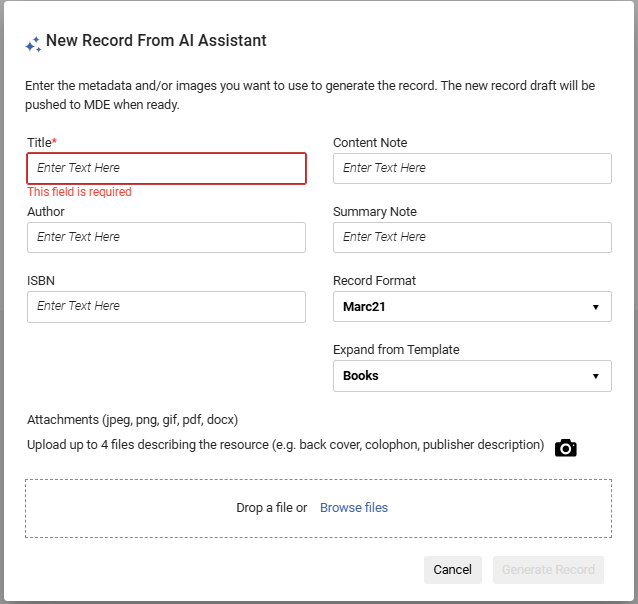
Upload Resource Descriptions in PDF and Word Document Formats in AI Metadata Assistant
May 2025 ArtificialIntelligenceURM-237682
Catalogers can now upload a PDF or Word document(up to 4 pages) containing a resource description, in addition to JPEG and PNG images. For larger files, only the first 4 pages will be used to generate metadata.
This feature is particularly useful for libraries that receive descriptive files and metadata from vendors, allowing them to generate or enrich records more efficiently.
For more information, see Working with the AI Metadata Assistant > Creating a New Record.
Delete Portfolios Directly from the Metadata Editor
May 2025 Metadata Management
IdeaExchangeURM-237697
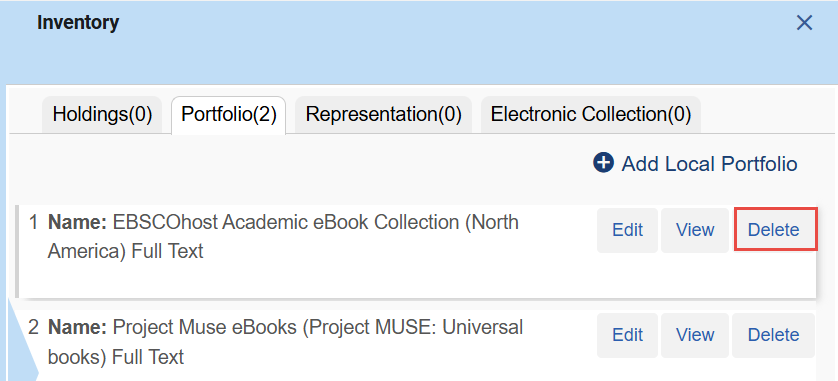
It is now possible to delete portfolios directly from the Metadata Editor inventory section.
For more information, see Navigating the Metadata Editor page > View Inventory.
For more information on network-specific configurations for record deletion, see Restrict Deletion of Network Zone Bibliographic Records with Related Records and/or Local Extensions.
Enhanced Title Navigation in the Physical Holdings Search
May 2025 MetadataManagementURM-240628
In the physical holdings search, viewing title information now opens the full title details instead of just the bibliographic record. This enables users to access the bibliographic record, its inventory, and related entities, as well as perform actions on the title and inventory based on their privileges. The Record View page remains accessible from the title details via the "View Record" action. This enhancement is especially useful for users who need to navigate seamlessly between holdings and titles while performing actions on both.
For more information, see Performing Record Actions on the Repository Search Results Page.
Physical Holdings Search Labels Management for Physical Inventory Operators
May 2025 MetadataManagementURM-239539
Since the repository search is available to all system users, managing repository search labels is restricted by a privilege, which is granted by default to administrators and managers. Previously, a single privilege controlled label management for both the physical holdings search and the new title searches. Now, separate privileges exist for bibliographic and physical holdings search labels, and physical inventory operators are able to manage physical holdings search labels by default, without affecting title search labels.
This update is particularly beneficial for physical inventory operators, who primarily use the physical holdings search and need to efficiently manage physical inventory. Libraries that wish to modify which roles can add and manage labels for title searches or the physical holdings search can contact Ex Libris support for assistance.
For more information, see Repository Search Labels.
XSL Normalization Process for Metadata Records
May 2025 Metadata ManagementURM-235395
XSL normalization of metadata records is now supported, enabling both manual and batch processing. Institutions can use XSL to manipulate metadata across all MARC-supported formats, enabling advanced data normalization through complex logic.
Key updates:
-
The new enable_xsl_normalization_rules parameter is set to false by default for all customers, except for DC/MODS customers who have already defined XSL normalization rules, for whom it is set to true.
-
A new privilege,Normalization Rules Enabled, has been added to all cataloger roles, allowing them to create normalization rules (DROOLS or XSL). Institutions can disable this privilege for selected roles if needed, by contacting Ex Libris support.
Customers who enable XSL normalization rules acknowledge that XSL is a programming language used to manipulate data and accept the associated risks.
For more information, see:
- Privileges for Roles in Alma
- Configuring Other Settings (Resource Management)
- Blog post:Alma XSL Normalization Rule Examples
Persistent Sorting Routine for Physical Items List
May 2025 Physical Resource Management
IdeaExchangeURM-158995
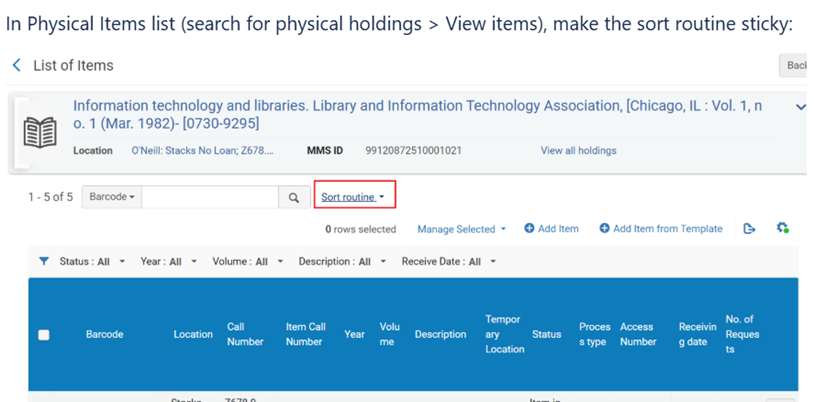
When users select a sort method different from the default, their choice will now be saved. The selected sorting will persist the next time they view a physical items list, providing a more consistent experience.
For more information, see Configuring Physical Item Sort Routines.
Flexibility in the Definition of Community Zone Updates Behaviour for New and Deleted Portfolios
May 2025 Electronic Resource Management
IdeaExchangeURM-233539
Alma now enables a more precise configuration of how updates from the Community Zone affect collections. For collections activated from the Community Zone, two distinct settings are now available to manage new and deleted portfolios:
- Activate new portfolios associated with the service automatically: Before the current release, this setting controlled both the automatic activation of new portfolios and the automatic removal of portfolios deleted from the Community Zone. Now, this setting controls only whether new portfolios added to the Community Zone are automatically activated.
- Automatically delete portfolios removed from the service: This new setting determines how to handle portfolios deleted from the Community Zone. If set to "Yes," the portfolio will be deleted from the Institution Zone, as well as the Community Zone; if set to "No," the portfolio will be unlinked and deactivated.
For existing activated services, the newly added auto-delete setting will automatically inherit the value of the auto-active setting, ensuring that current behavior remains unchanged. (i.e. an existing service that had 'Activate new portfolios associated with the service automatically' set to 'Yes' will now have 'Automatically delete portfolios removed from the service' set to 'Yes' as well, and vice versa. Each of the settings can be modified at any time using the Service Editor, the Change E-Collection Information job, the API, or the E-Collection Quick Update application.
As always, all Community Zone updates are recorded in the Community Zone Updates Task List.
For more information, see:
- Working with the Community Zone Updates Task List
- Activating an Electronic Collection Using the Activation Wizard
Adding Titles from Network Zone to Institution Zone Collections
May 2025 Digital Resource Management
IdeaExchangeURM-241494 URM-227315
You can now add titles from the Network Zone to Collections in your Institution Zone. There are two ways that you can do this:
- When adding a title from the Network Zone from the Collection Resource Editor (Resources > Manage Collections > Edit a Collection > Title List > Add Title). Select the titles you want to add and select Select.
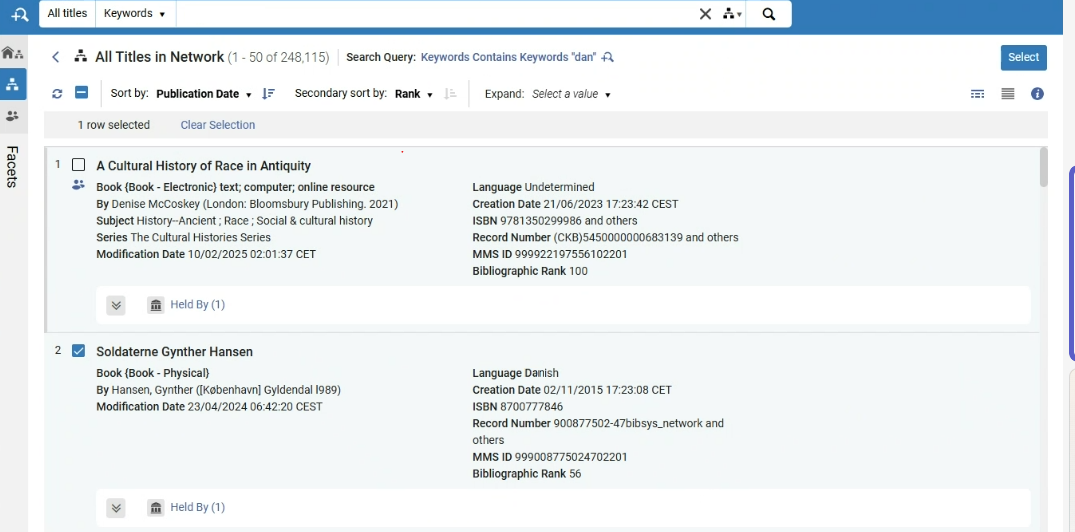 Collection Search in Network Zone
 - From the search results list when searching for titles in the Network Zone. A new Add to Collection option is now available:
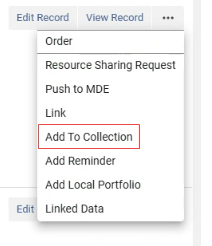 Add to Collection
Select this option and then select a collection to which you want to add the title.
With either method, the Network Zone title is linked to the Institution Zone in order to be added to the collection.
Improved Performance of ERP Export Invoices Job
May 2025Acquisitions URM-248203
An infrastructure change was made to improve the performance of this job. Instead of running the invoices one by one, multiple invoices are now processed in parallel, allowing the job to finish in a shorter time.
The name of the job was changed from “ERP export using profile {profile name}” to “ERP export using profile {profile name}PA”, where PA stands for Process Automation. The Job ID was changed from 70 to 327. The job report contains the number of processed invoices. The general information of "processed records" refers to the processed groups, which is a technical division about the job's parallel handling.
Note that you do not need to do anything; the existing scheduling is handled automatically using the new job from the May 2025 release onwards.
Improvements to Ordering from Network Zone
May 2025Acquisitions
URM-XXXXXX
Improvements were implemented to the process for ordering titles from the Network Zone (NZ):
-
When ordering in Primo from the Network Zone (NZ), the purchase requests created in the Institution Zone (IZ) are now linked to the bibliographic record in the Network. Alma first checks for a local MMS ID linked to the bibliographic record in the Network. If such a record exists, Alma uses it for the purchase request. If it doesn't exist, Alma creates one and uses it.
-
When importing with profiles of type New Order that are definedas Use Network Zone, it is now possible to match against the NZ records and create a linked record in the IZ, for which the order will be linked. To implement this, the Use NZ Record option should be used for "Upon match" in the Match Actions section:
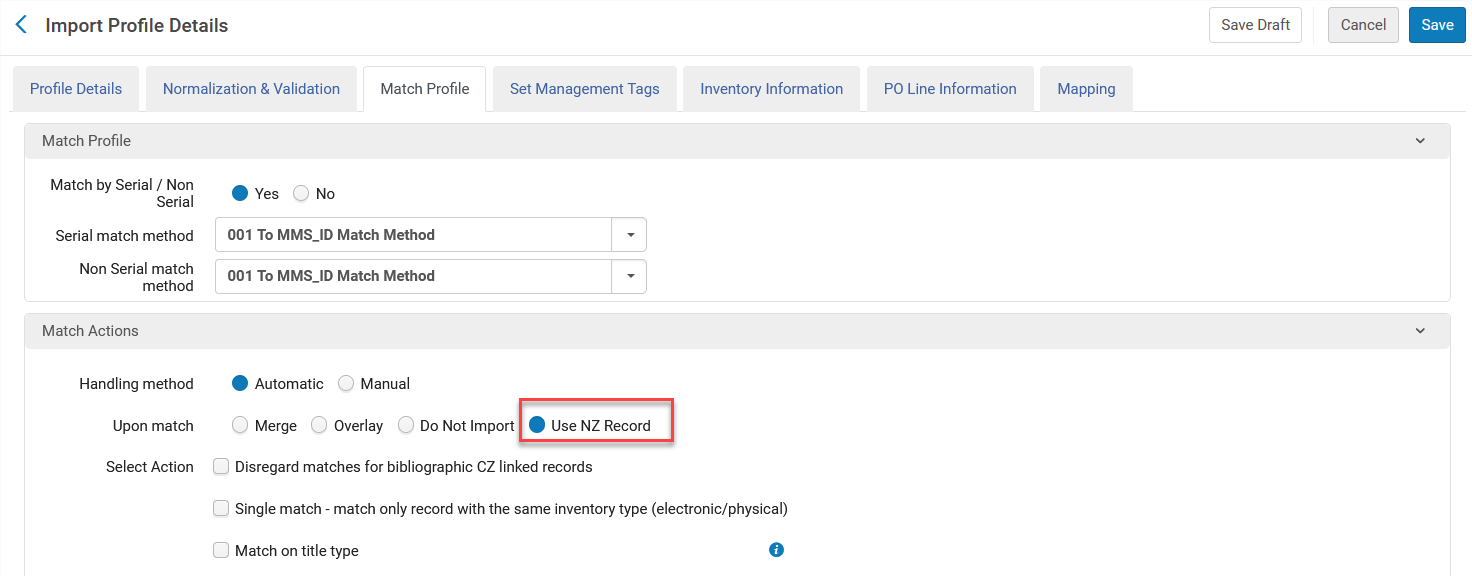
Existing profiles with the following definitions need to be edited so that the correct Upon match option will be saved:
-
Use Network Zone = Yes
-
In the Match Profile tab,Use Existing Record is selected as a value for the Upon Match field.
For more information, see Managing Import Profiles and Working with Purchase Requests.
General Electronic Services in the Consortia Central Configuration Dashboard
May 2025Collaborative Networks
It is now possible for the Network Zone operator from the Central Configuration Dashboard to manage General Electronic Services configurations at the institution level.
This feature improves cooperation by enabling centralized management of General Electronic Services configurations (General Electronic Services, General Electronic Services Order, General Electronic Services Bib Fields Enrichment) at the Network Zone level.
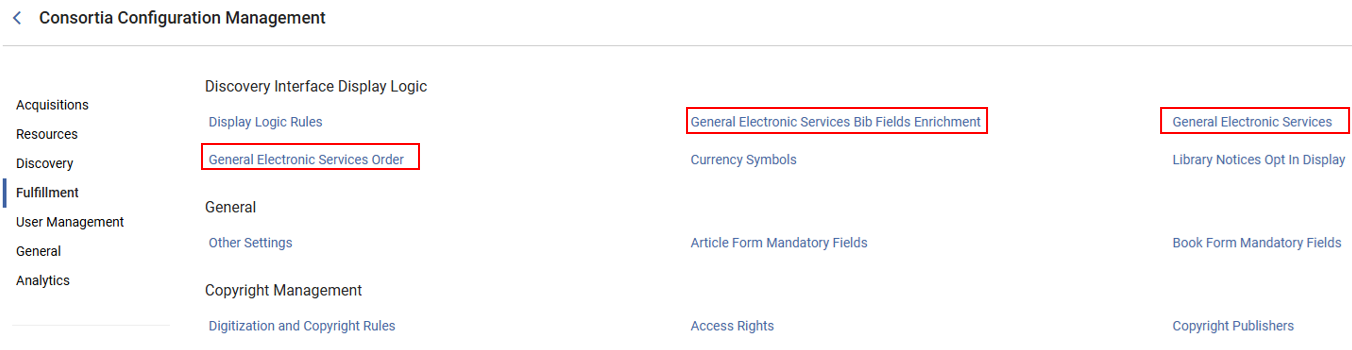
This new feature is only relevant to Consortia with a Network Zone setup.
For more information, see Discovery Interface Display Logic in Dashboard Sections and Configurations.
Network Zone Distribution Notifications to Institution Zone Administrators
May 2025Collaborative Networks
URM-230882
Configuration updates distributed from the Consortia Central Configuration Dashboard at the Network level now trigger an email to the relevant administrator at the Member level.
This feature improves communication and enhances collaboration across the network.
This is only relevant to Consortia institutions with a Network Zone setup.
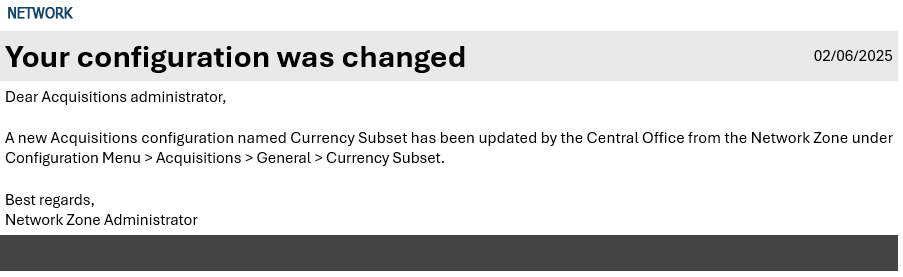
For more information, see Consortia Central Configuration Dashboard.
Redirect Old Menu Links to New Central Configuration Dashboard
May 2025 Collaborative Networks
URM-239635
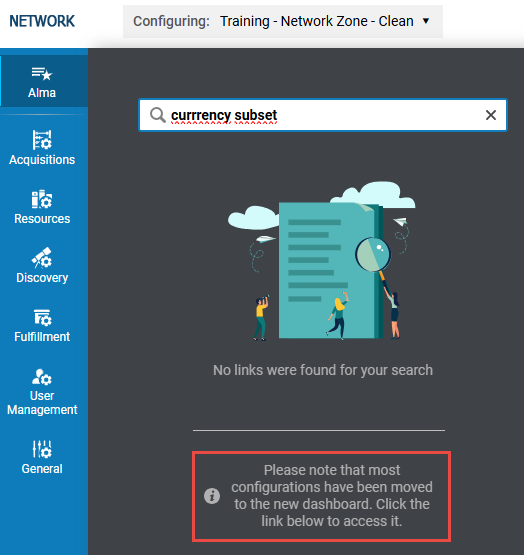
Network Zone operators can now access the New Central Configuration Dashboard directly from the Alma Configuration search when no results are found. A link appears, enabling quick access to the Dashboard to find the configuration.
This enhancement improves access to configurations at the Network Zone level.
This feature is only applicable to consortia with a Network Zone setup.
For more information, see Accessing the Consortia Central Configuration Dashboard.
Request Release of a Configuration Managed by the Network
May 2025 Collaborative Networks
URM-235375
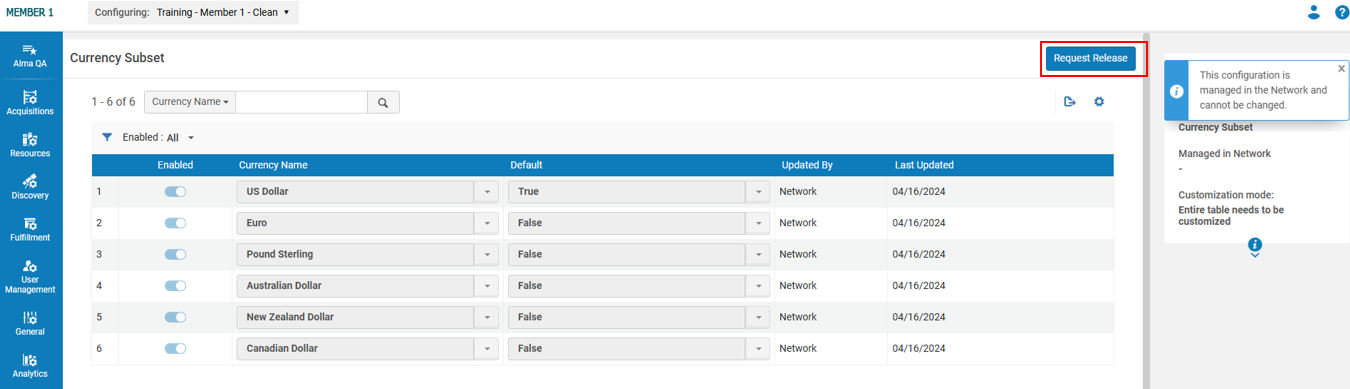
Institution Zone administrators (at the Member level) can now request to release configurations managed by their Collaborative Network's Central Office, allowing them to customize these configurations locally. This enhancement increases flexibility by allowing Institution Zone administrators to regain control over customizing configurations initially managed by the Central Office.
This feature applies only to consortia with a Network Zone setup.
For more information, see Request Release of a Configuration Managed by the Network.
Removal of Gender Information
May 2025User Experience, Accessibility & InfrastructureURM-237930
As part of our GDPR compliance efforts and in order to improve the protection of private information on the Alma database, all gender information will be removed from the user records in Alma in the upcoming August release. Since gender is not essential for product functionality, retaining it poses unnecessary compliance risks according to GDPR requirements that personal data be collected and processed only when there is a clear legal basis and business need.
The deletion will not be reversible. From that point on, it will no longer be possible to input or retrieve gender information to the user record using any of the standard interfaces that concurrently update this record.
Digital Adoption Policy Update
May 2025User Experience, Accessibility &InfrastructureURM-245723
As announced in the November 2023 release, Ex Libris began deploying Pendo, a new digital adoption tool, across Alma and other Library Open Platform back-office suite components.
Pendo is a digital adoption tool that allows customers to benefit from functionalities such as online guides and "what's new” notifications. It is also used by SAAS (Software as a Service) software companies to identify usage trends and behavioural analytics to help improve the user experience.
After further review and due to the extensive measures we are taking to anonymize the usage data and ensure full compliance with our privacy polices, in which no personal data is collected (see Privacy center | Clarivate), we will gradually (during May) activate Digital Adoption for institutions subject to GDPR, that were inactive up until now.
There will be no other changes for all other institutions. We will continue to comply with their country and institutional policies.
For more information, visit Configuring Digital Adoption.
Relative Date Searches Support for Users
May 2025User Experience, Accessibility &Infrastructure
IdeaExchangeURM-17795
Date-related search indexes in the Users advanced search, such as Purge Date, Last Activity Date, Expiration Date, etc., now include the following options to search within a moving range of days:
-
Is Within the Last (days)
-
Is Older Than (days)
-
Is Within the Next (days)
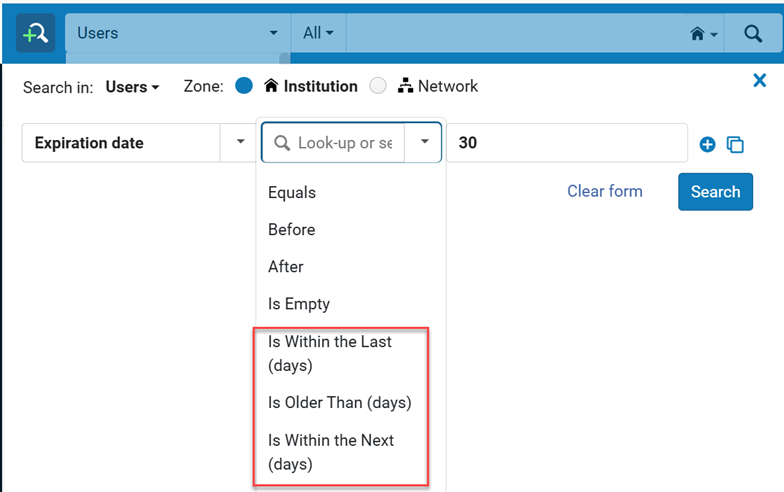
This enables customers to create dynamic "moving-window" sets (for example a logical set of users that expired in the last 30 days).

For more information, see Searching in Alma.
Security Improvements for Multi-Factor Authentication (MFA)
May 2025User Experience, Accessibility &InfrastructureURM-242984
It was already possible to configure Alma to recommend (or enforce) an additional identification method (MFA). In addition to the regular username and password screen, users receive an email with a link that they need to select in order to log in.
The MFA security has now been enhanced as follows:
-
The email link's expiry is now 10 minutes (previously it was 60 minutes).
-
The link is usable only in the same browser where the login flow started from.
Configurable Session Timeout
May 2025User Experience, Accessibility &Infrastructure
Idea ExchangeURM-219169
All Ex Libris platform products now include a configurable session timeout feature in response to community feedback from the Idea Exchange. Institutions can now set a default session timeout duration ranging from 15 to 150 minutes (default remains 60 minutes) from the new "Session Timeout" configuration page (Configuration > General > General Configuration > Session Timeout). This page is accessible to General System Administrators.
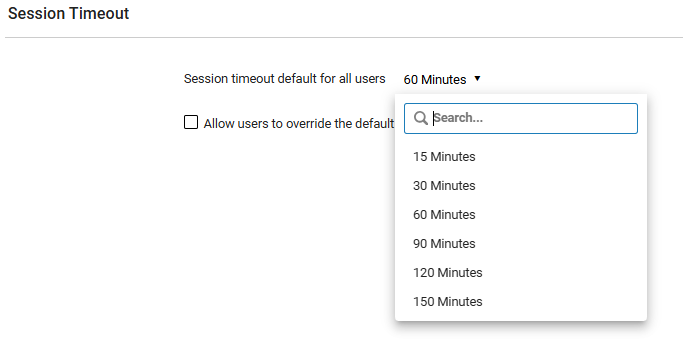
In addition, institutions can choose whether to allow individual users to override this default setting by selecting the Allow users to override the default session timeout checkbox. The user-level options also range from 15 to 150 minutes.
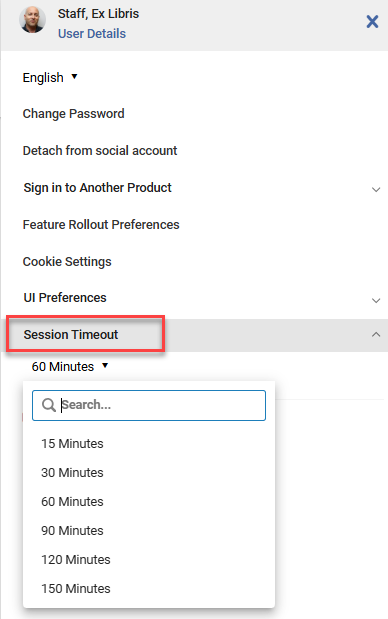
This functionality enhances flexibility while maintaining compatibility with security standards and infrastructure capabilities.
For more information, see Session Timeout Configuration.
Login Hint for OpenID Connect
May 2025User Experience, Accessibility &InfrastructureURM-239335
Institutions using OpenID Connect can now configure a login hint for single sign-on. This streamlines the user login experience by reducing the number of steps required for authentication. This option is disabled by default, and can be configured at Configuration > General > Integration Profiles > Add profile > Integration Type = OpenID Connect.
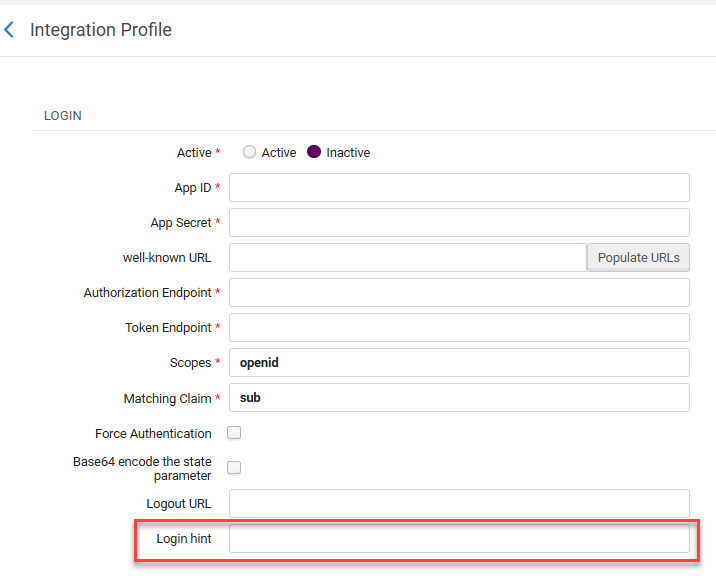
For more information, see OpenID Connect.
Apply Login Restrictions to All Users
May 2025User Experience, Accessibility & InfrastructureURM-232706
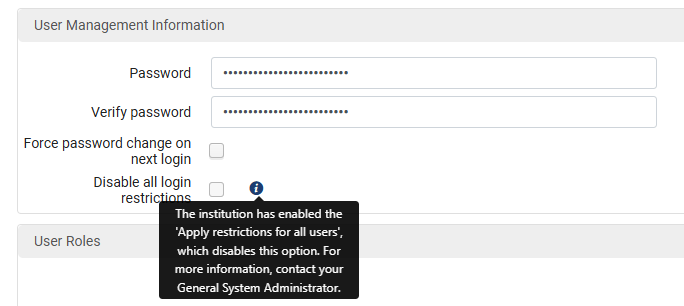
Alma users' login can be restricted by IP Range. To override these restrictions for a particular user, it is possible to select Disable all login restrictions when editing the user. Until now, users with the General System Administrator role were not restricted by the IP Range restriction. Now, clicking on the new Apply restrictions for all users checkbox in the Login Restriction Configuration page (Alma Configuration > General > Security > Login Restriction Configuration) limits users with the General System Administrator role. This provides enhanced security through more precise user access management.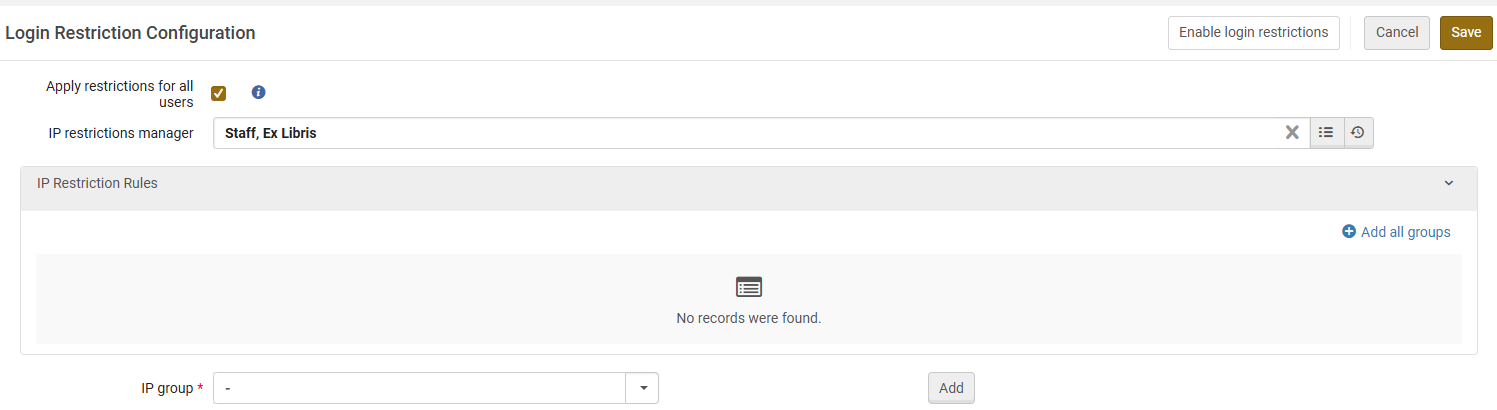
In addition, selecting the Apply restrictions for all users checkbox cancels the user-level override.
The previous configuration is not removed and will return once the checkbox is unchecked.
For more information, see Security.
Upgrade Alma Cloud App SDK for Node and Angular
May 2025User Experience, Accessibility & InfrastructureURM-192933
Cloud App developers can now upgrade the Alma Cloud App SDK to support the latest versions of Node and Angular. This enhances the security of the Cloud App.
This upgrade is not mandatory. You may continue maintaining Cloud Apps developed before 2025 without upgrading.
For more information, including instructions for upgrading your Cloud Apps, see Upgrade of the SDK to v2.0.
Support Basic Authentication in NCIP P2P
May 2025User Experience, Accessibility &InfrastructureURM-52388
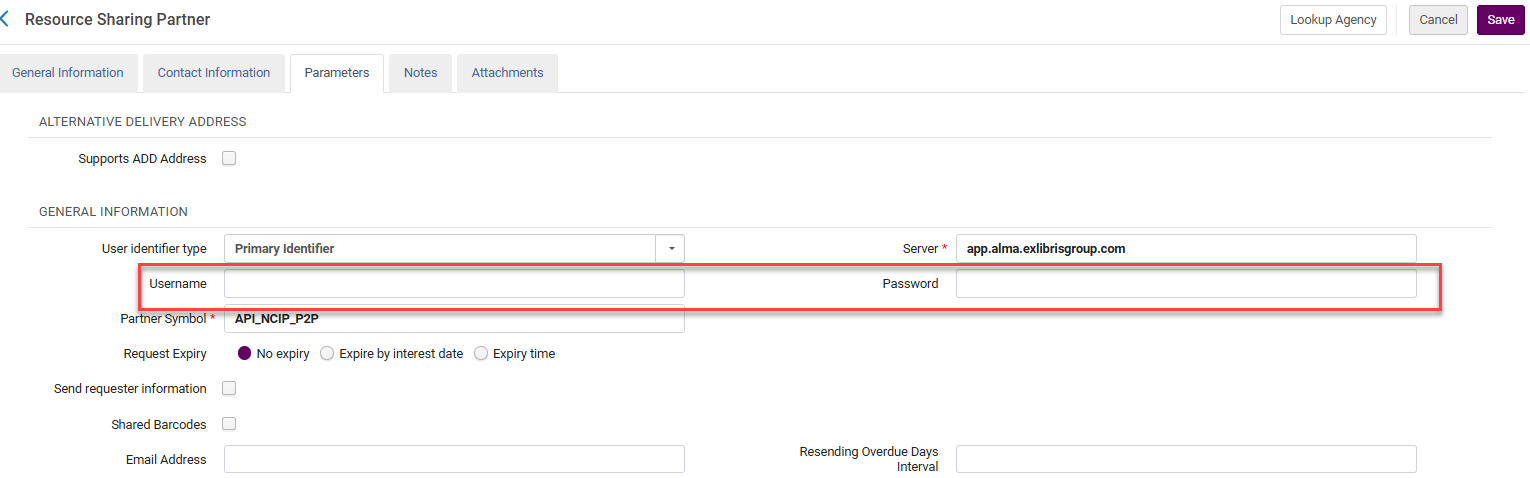
Alma now supports basic authentication when NCIP P2P messages are received. This improves security by enabling the user to protect the NCIP communication with an authentication header.
For more information, see Resource Sharing Partners.
New Bibliographic Records Distribution by LC and Dewey Classifications Canvas
May 2025 Analytics and InsightsURM-235230
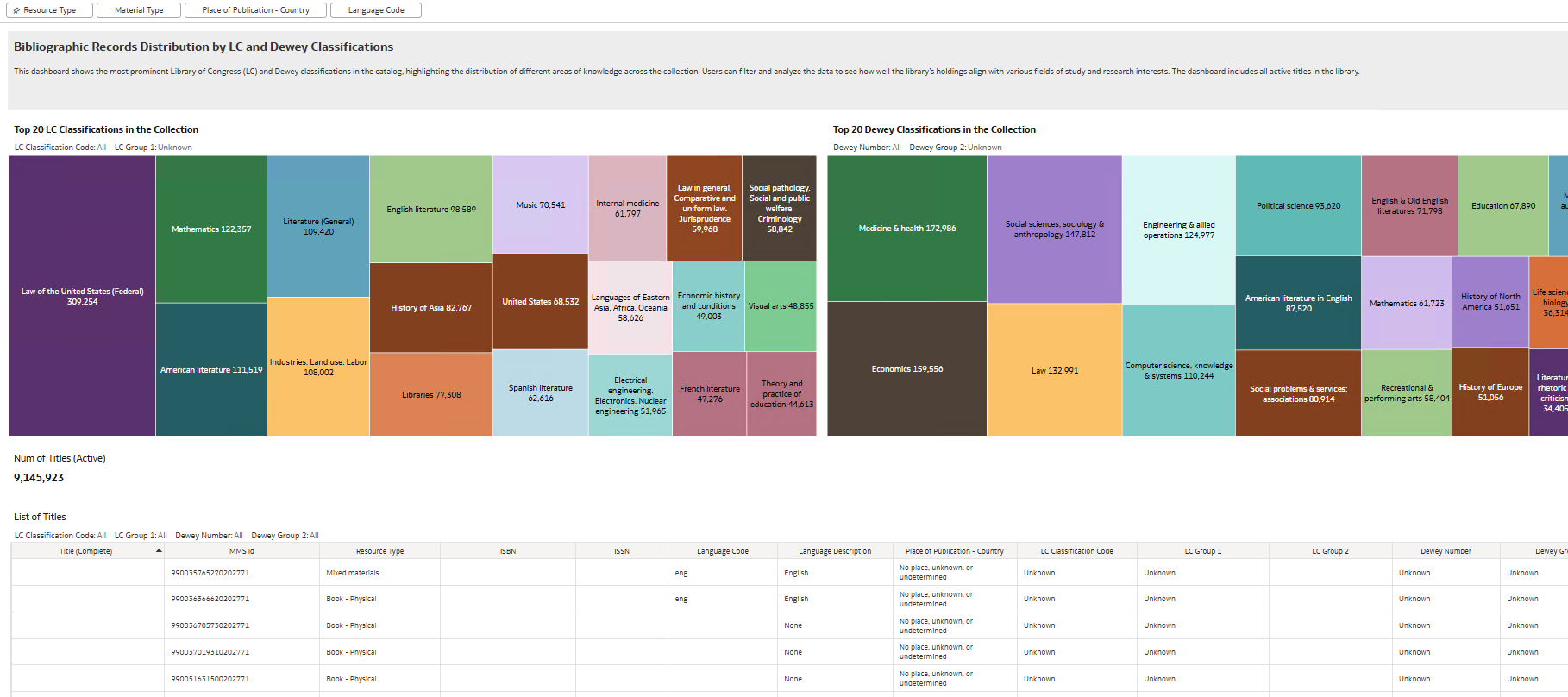
The New Bibliographic Records Distribution by LC and Dewey Classifications canvas is now available. It was combined with the existing Bibliographic Records Distribution by Language and Publication Year canvas under the new Bibliographic Records Distribution workbook. The new canvas shows the most prominent Library of Congress (LC) and Dewey classifications in the catalog, highlighting the distribution of different areas of knowledge across the collection. You can filter and analyze the data to evaluate how well your holdings support various fields of study and research interests to aid in strategic planning for a well-balanced and impactful collection.
Additional Holdings Local Parameters Now Available
May 2025 Analytics and InsightsURM-237338
You can now define up to 30 Holdings Local Parameter fields (Physical Items > Holdings Details), an increase from the previous limit of 10.
For more information, see Holdings Details.
Additional Enhancements
- May 2025 Fulfillment and Resource SharingURM-221991 When an intended lender unintentionally cancels a request by scanning a shipped item twice, the request is no longer considered completed on the borrower side. Instead, the request is now sent to the next lender on the rota as if the current lender has rejected the request. The History indicates that the previous lender rejected the request. This indication in the History includes a note that: "The lender shipped the request but then scanned it back to the library. Therefore, the lender was removed from the rota of this request."
- May 2025 Metadata ManagementURM-235048 GND Profile Updates:
- 043 is now repeatable
- Several values were added to the CV list of 670 $a
- One value of the CV list of 885 $b was altered
- May 2025 User Experience, Accessibility & InfrastructureURM-241119 On the Monitor Jobs page, for MD Import, there is no longer a limit for downloading records from the report. Previously, the export had a limit of 5,000 records.
- May 2025 Analytics and InsightsURM-233255 The Has Perpetual Electronic Access field (Titles > Title Details) was enhanced to include the access type of the portfolios on the title and not only the access type of the collections of the title. Knowing that permanent electronic versions are available enables libraries to optimize space and costs by removing print materials.
- If the access type on the portfolio is different than the one on the collection, the one on the portfolio is indicated. For example, if the access type on the portfolio is Current and the value on the collection is Perpetual, the Has Perpetual Electronic Access field indicates no.
- If the access type on the portfolio is Current and Perpetual, the Has Perpetual Electronic Access field indicates no.
- This enhancement takes effect from your institution's next ETL.
For more information, see Title Details.
- May 2025 Analytics and InsightsURM-243471 The Alma Users - Logins Per Day (Past 365 Days) out-of-the-box report is now available. It displays a table of the successful logins to Alma from your institution per day for the past year. This detailed staff login report demonstrates the Alma usage.
- May 2025 Analytics and InsightsURM-227752 Improved the logic for extracting the Analytics Source field from the rfr_id parameter in the Open URL. Note that this applies to data from this point onwards and not retroactively.
Resolved Issues
| SF number | Area | Description |
|---|---|---|
| 07907294 URM-243871 | Acquisitions | Public Templates did not appear when using Amazon Order It. This was fixed. |
| 06860959 URM-237306 | Acquisitions | Icons for ordered electronic resources in PO Lines did not show the source of the resource when the PO Line was an additional one to this resource. This was fixed. |
| 07168566 URM-234985 | Acquisitions | Purged Users were displayed in Analytics. This was fixed by removing the entry of an inactive/non existing user from the PO Line interested users list. This may require a refresh of the PO Line in Alma after loading. |
| 07497136 URM-243236 | Acquisitions | There were issues with searching the ISBN, ISSN, and UPC product identifiers. This was fixed and the “Requester ID” search field is now an “Identifier” in the Receiving Department Items and Requests search filters. |
| 07193282 07728482 URM-233082 | Acquisitions | An incorrect alert was received that the item or ordered resource already exists. This was fixed. |
| 07106590 URM-226147 | Acquisitions | The 035 field was removed from new bibliographic records for Purchase Requests. This was fixed. |
| 07904101 URM-243364 | Acquisitions | An error message stating that "An error occurred while fetching items" was displayed when a POL created via API had active Interested users. This was fixed. |
| 07792295 07812205 07754608 URM-241164 | Acquisitions | The "Change currency" option to "Re-send order to vendor" had no effect. This was fixed and now the letter is only sent to vendors if the "Resent to vendor" checkbox was selected. |
| 07754218 URM-237093 | Acquisitions | Orders were sometimes created with a different vendor than the one for the purchase request. This was fixed. |
| 07876872 URM-241042 | Acquisitions | When creating an invoice from a PO, the create date incorrectly appeared in the search options. This was fixed. |
| 07157387 URM-237214 | Acquisitions | A fund could not be added to an invoice line, even though there were sufficient funds. |
| 07254760 URM-237185 | Acquisitions | Invoice lines of one-time orders had the From date and To date fields populated. This was fixed. |
| 07203911 URM-230597 | Acquisitions | Lithuanian characters in the vendor code were displayed incorrectly for PO line searches. This was fixed. |
| 07904098 URM-243175 | Acquisitions | The receive row action did not take into account the "keep in department" user preference, and the date picker did not provide a date in the past. This was fixed. |
| 07769447 URM-241128 | Acquisitions | The claim e-mail address was not used for manual claim communication with the vendor. This was fixed. |
| 07873909 URM-242665 | Acquisitions | An error message was displayed when accessing the Communications tab for a vendor, because the related PO Line was deleted. This was fixed. |
| 07832609 07786800 07099751 07872799 06874959 07845674 07695780 07786450 URM-206587 | Acquisitions | Various issues occurred when importing invoices. These were fixed. |
| 07913941 URM-243525 | Acquisitions | In some cases, users could not add multiple SUSHI connections for the same vendor with different platforms in Counter release 5.1. This was fixed. |
| 07877534 URM-243560 | Analytics and Insights | Statistical Categories were still displayed in Borrowing Requests > Requester even after being removed from user record. This was fixed. |
| 07889127 07858597 URM-242474 | Analytics and Insights | Network Zone folders were not displayed when creating analytics objects for Primo VE. This was fixed. |
| 07904582 07272318 07872873 URM-240590 | Analytics and Insights | The Num of Loans (Not In House) field (Physical Items > Loan Measures Post-Migration) did not display any values even though loans were not marked as In-House. |
| 07822565 URM-240147 | Analytics and Insights | Deleting a folder, file, or other object from the Community folder did not work properly. This was fixed. |
| 07892147 07842641 07805688 07898373 07883995 07752648 07852301 07873008 07903923 URM-237985 | Analytics and Insights | There was a discrepancy in the fulfillment data between Alma and Analytics. This was fixed. |
| 07857395 URM-241680 | API | Running jobs from Cloud Apps was limited to admin users. This was fixed. |
| 07178261 URM-236988 | API | For the Retrieve PO lines API, the results were not sorted correctly in some cases. This was fixed. |
| 07915379 URM-242957 | Digital Resource Management | The Digital Import job from CSV created the MARC 500 field even if the field did not exist in the CSV. This was fixed. |
| 07864485 URM-242789 | Digital Resource Management | The handle identifier subfield prefix cannot be changed or removed. This was fixed. |
| 07841077 07845286 URM-241401 | Electronic Resource Management | An error message appears after changing the Additional descriptive information in the Electronic Collection activation and clicking the "Next" button when the new Titles search is enabled. This was fixed. |
| 07208866 URM-237760 | Electronic Resource Management | Local extensions were deleted from the contributing institution after the contribution process to the Community Zone ran. This was fixed. |
| 07260657 URM-232278 | Electronic Resource Management | E-Resource Activation Task List was not able to be filtered by PO Line Owner when the resource was added to the PO Line after the Activation task was created. This was fixed. |
| 07896989 URM-244032 | Fulfillment and Resource Sharing | In Manage patron services, the focus of the cursor did not go back to the barcode scanner after opening the user details. This was fixed in Full User Details, Quick User Management, and Manage Notes. |
| 07913347 URM-243433 | Fulfillment and Resource Sharing | Payment methods when paying a fine were not displayed in alphabetical order. This was fixed. |
| 07812893 URM-242828 | Fulfillment and Resource Sharing | When paying a fine in the new UI, the amount was displayed with a period instead of a comma. This was fixed. |
| 07807778 07917723 07897994 07875401 URM-242825 | Fulfillment and Resource Sharing | System notes did not include a hold shelf item if the request existed at another circulation desk within the same library. This was fixed. |
| 07775894 07891515 URM-242204 | Fulfillment and Resource Sharing | When scanning in a lending resource sharing item through the new Return Items UI, an unnecessary "The item is not on loan" alert appeared. This was fixed. |
| 07793661 URM-238259 | Fulfillment and Resource Sharing | When scanning a barcode on the loans or returns page, an error sometimes appeared stating that the "item barcode field is empty". This was fixed. |
| 07974612 07779259 URM-236383 | Fulfillment and Resource Sharing | In the new circulation desk UI, in a specific case, the "Place in queue X" text was truncated on small screens, hiding the number. This was fixed. |
| 07941836 07901991 07777408 07827114 URM-235615 | Fulfillment and Resource Sharing | An error appeared when waiving some fines from the row actions menu. This was fixed. |
| 07205575 URM-234797 | Fulfillment and Resource Sharing | In Primo -> GetIt, the Related holdings' relation type was incorrectly displayed for network members as a label code. This was fixed. |
| 06780628 URM-196532 | Fulfillment and Resource Sharing | In the Courses list, the Course Terms were not translated in non-English UIs. This was fixed. |
| 07907403 URM-242699 | Fulfillment and Resource Sharing | An unexpected error occurred while registering a user in the Manage Patron Services page. This was fixed. |
| 07795984 URM-241059 | Fulfillment and Resource Sharing | In some cases, the Retrieve Library Opening Hours API failed to return a response when the date range included a change to DST. This was fixed. |
| 07876920 URM-243731 | Fulfillment and Resource Sharing | When loaning multiple items via RFID in the new Manage Patron Services UI, “Loan Items” was displayed but did not mention to which barcode the message refers. This was fixed. Now, the relevant barcode appears in the pop-up title. |
| 07872864 07907592 07911604 07926038 07950319 URM-242634 | Fulfillment and Resource Sharing | In some cases, the Loan Receipt Letter was sent to the wrong patron after loaning items in the New Circulation Desk UI. This was fixed. |
| 07885993 07972776 07861448 07811899 07861490 07903205 07929866 URM-241701 | Fulfillment and Resource Sharing | A pop-up message for items in a temporary location did not appear when scanning in/returning items that were in a temporary location. This was fixed. |
| 07833615 URM-238519 | Fulfillment and Resource Sharing | The alert for an adjusted loan due date gave the incorrect reason. This was fixed. |
| 07792205 URM-238090 | Fulfillment and Resource Sharing | An unnecessary loan block pop-up appeared when creating a new item from the Manage Patron Services loan page. This was fixed. |
| 07242912 URM-232364 | Fulfillment and Resource Sharing | The option to renew all loans via Primo VE was blocked when a user was in the Expiration Alert Period. This was fixed. |
| 07778847 URM-238055 | Fulfillment and Resource Sharing | A booking request was not assigned to the library and circulation desk that belonged to the selected Pickup Location. This was fixed. |
| 07273626 URM-237655 | Fulfillment and Resource Sharing | When a patron added a new personal delivery address in Primo's item request form for the first time, the new address was not added to the resource request slip XML. This was fixed. |
| 07063824 URM-232871 | Fulfillment and Resource Sharing | When items were received in the acquisitions department with the "Keep in Department" checkbox selected, only one of the items was correctly processed to the hold shelf when scanned in the fulfillment department. This was fixed. |
| 07889721 URM-230540 | Fulfillment and Resource Sharing | The Requests list In Manage Patron Services displayed requests without a workflow step with a value of "Not Started". This was fixed, and these requests now display the workflow step as "Undefined". |
| 07758164 URM-238620 | Fulfillment and Resource Sharing | In the Ful Requests Report Letter XML, the start_time and end_time fields only contained the date, not the time. This was fixed, and now there are two elements for the time: booking_start_time and booking_end_time. |
| 07132284 URM-240224 | Fulfillment and Resource Sharing | Sending files between PSB and Production via resource sharing requests was not working. This was fixed. |
| 07698904 URM-239531 | Fulfillment and Resource Sharing | An incorrect request date appeared on the On Hold Shelf letter and Ful Cancel Request letters when related to borrowing requests. This was fixed and these letters now have a new XML field that can be used (notification_data/outgoing). |
| 06869407 URM-236359 | Fulfillment and Resource Sharing | Sometimes, the exported file from the borrowing/lending task list was not identical to the view. That was fixed |
| 07486101 URM-234407 | Fulfillment and Resource Sharing | The resource "Edition" field was not displayed in the Lending Requests in Alma. This was fixed. |
| 07221630 URM-232972 | Fulfillment and Resource Sharing | Institutions that kept the rejected borrowing requests active could not receive the reactivate general message from the lender. This was fixed. |
| 06947029 URM-214218 | Fulfillment and Resource Sharing | In some cases, the Due Date was set back for a lending request without a warning. This was fixed and a warning now pops up when the librarian tries to set back a due date. |
| 07812488 06583220 URM-189875 | Fulfillment and Resource Sharing | In some cases, the partners' search took a long time. This was fixed. |
| 07722241 07907277 URM-244039 | Fulfillment and Resource Sharing | In Alma mobile, the call number and other data were not displayed properly because the list was loaded incorrectly. This was fixed |
| 07793366 URM-242903 | Fulfillment and Resource Sharing | In Alma mobile, the print slip was printed twice. This was fixed. |
| 06990341 URM-238744 | Fulfillment and Resource Sharing | In Alma mobile, canceling a request did not send an email notification, both on Android and iOS. This was fixed. |
| 07256543 URM-235229 | Fulfillment and Resource Sharing | In Alma mobile, the pick from shelf filters were not sticky. This was fixed. |
| 07770997 07722674 07733454 URM-233826 | Fulfillment and Resource Sharing | In Alma mobile, the login authentication for SAML on Android was inconsistent. This was fixed. |
| 07088679 URM-235513 | Fulfillment and Resource Sharing | In some cases, an unnecessary file was placed in the institution’s SMS subdirectory as part of the “Loans - Due Date Correction after Calendar Change” job. This was fixed. |
| 07207614 URM-226320 | Fulfillment and Resource Sharing | In some cases, the "Create physical work orders" job failed to communicate part of the remote storage request. This was fixed. |
| 07812037 URM-238992 | Fulfillment and Resource Sharing | There was an error when a deposit was deleted in the "Approve Deposits" page. This was fixed. |
| 07817225 URM-241969 | Fulfillment and Resource Sharing | Previously, the external search did not appear in the task list. This was fixed. |
| 07804916 URM-241951 | Fulfillment and Resource Sharing | Previously, Rapido was unable to send requests to ISO SHAREit . SHAREit now has a designated profile type and configuration. |
| 07772490 URM-241206 | Fulfillment and Resource Sharing | Previously, the cancellation message was not sent when the request status was "Locate failed." This was fixed. |
| 06811967 URM-200938 | Fulfillment and Resource Sharing | Previously, adding an NZ record to a reading list generated a Locate Failed error. This was fixed. |
| 07819071 URM-241219 | Metadata Management | The report of the Change Holdings Information job showed an incorrect number of processed records. This was fixed. |
| 07875134 URM-243625 | Metadata Management | The suppress indication in the "held by" drawer in the Network scope was displayed incorrectly. This was fixed. |
| 07168518 07823211 URM-224481 | Metadata Management | Updated: April 29, 2025 - Call numbers with diacritics were sorted at the end of the Browse Shelf Listing. This was fixed. A new "call_number_diacritics_sort" customer parameter was added to enable correct sorting of call numbers with diacritics in Browse Shelf Listing. The default value is "false". Note that the best practice for searching call numbers with diacritics in the Browse Shelf Listing is to search until the letter with diacritics. For example, search for "2000/Wü" and not "2000/Wür".Note: To activate the call_number_diacritics_sort customer parameter, contact Ex Libris support. |
| 07895989 07894168 07931338 URM-243725 | Metadata Management | Selecting the institution in the Held By drawer/section caused an error when the record title included the special character #. This was fixed. |
| 07906028 07870907 URM-243259 | Metadata Management | When using the advanced search in the new UI to search for dates, for example, MMS Creation Date or Modification Date, it was not possible to type in the dates manually. This was fixed. |
| 07906269 URM-243255 | Metadata Management | In the new titles search, the ‘Display in Discovery’ action did not appear for records from the Network in a combined search. This was fixed. |
| 07897905 URM-243230 | Metadata Management | In the new titles search, when opening the list of holdings page in the sliding panel and then performing the "Associate POL" action, the sliding panel closed. This was fixed. |
| 07938052 URM-242929 | Metadata Management | In the new titles search, the Items list sliding panel closed when placing a request or work order. This was fixed. |
| 07906259 07915101 07905171 07952315 URM-242877 | Metadata Management | In the new search UI, serial items availability in temporary holding locations appeared incorrectly. This was fixed. |
| 07857738 URM-242776 | Metadata Management | In the new UI, when performing an Electronic Titles search, standalone portfolios with an interface name were also displayed as a collection name. This was fixed. |
| 07863572 URM-242744 | Metadata Management | In the new UI for titles, the “Remove” option for sets was missing from the "Actions Customization" menu. This was fixed. |
| 07913613 07866793 07844514 URM-242022 | Metadata Management | For the new titles search in table view, the items' availability was displayed in the physical availability column instead of "Null". This was fixed. |
| 07895147 URM-241901 | Metadata Management | There were wrong counters in the drawers and portfolio sections for some Community Zone records. This was fixed. |
| 07854114 07878982 URM-241359 | Metadata Management | In the new titles search, there were issues when switching between Institution, Network, and Community Zones. This was fixed and the scope toggle is now disabled in record full view. |
| URM-241208 | Metadata Management | The General Electronic Service in Get It was built with information from a related record instead of the main bibliographic record. General electronic services are built using data from the context object. When there are related bibliographic records, the context object was sometimes created with the related record's information. As a result, the general electronic service had the related records information - for example, ISBN. This was fixed, and now General Electronic Services in Get It use the main record's data and not the related record's data. Note that as this is a sensitive area, the fix will be gradually deployed to the various Alma instances, to assure safe deployment. |
| 07831603 URM-242122 | Metadata Management | When viewing the import profiles list and selecting on one of the profile IDs, the profile was displayed in editing mode regardless of the user privileges. This was fixed and now, by selecting the profile ID, the profile is displayed in view mode for all users. |
| 07832256 URM-241129 | Metadata Management | In CNMARC, when LDR position 09 was #, the resource type was incorrectly set to "Book {Undefined}" instead of "Book {Rare - Physical}". This was fixed. |
| 07826182 URM-241476 | Physical Resource Management | In some cases, the physical item creation date was incorrect due to time zone shifts. This was fixed. |
| 07266078 URM-239214 | Physical Resource Management | In some cases (usually for customers in the Asia/Shanghai time zone), the physical item field "Due Back Date" (return date from temporary location) was indexed with an incorrect date, displayed with an incorrect date in the item history tab, and saved incorrectly to Analytics (field RETURN_FROM_TMP_LOC of the INVENTORY_ITEM table). This was fixed. To enable the fix, set the customer parameter "temp_adjust_item_dates_to_local_time_zone" to "true". If needed, run a full inventory indexing and physical item flattening. |
| 07752316 URM-237157 | Physical Resource Management | In some cases (usually for customers in the Asia/Shanghai time zone), the physical item "Inventory Date" field was indexed with an incorrect date and as a result, the item could not be retrieved by searching the correct date. This was fixed. To enable the fix, set the customer parameter "temp_adjust_item_dates_to_local_time_zone" to "true". |
| 07634242 URM-236162 | Physical Resource Management | When moving an item (which is the last item in a holdings record) to a new location, an inaccurate warning message is displayed. The message was amended as follows: This item, which is the last remaining item in this location, will be moved to another holdings record. If there is an existing holdings record with the destination location, the item will be moved to it, and the current holdings record will be deleted. Otherwise, the item will remain in the current holdings record, but its library/location will be changed to the destination. |
| 07228334 URM-233109 | Physical Resource Management | Holdings records data in Analytics: The "Public Note" (852 subfield z) and "Non Public Note" (852 subfield x) fields display only the value of the first occurrence of the subfield. This was fixed. Now all repeatable subfields are included in the field, separated by semicolons. |
| 07783198 URM-200508 | Physical Resource Management | Item deletion events were incorrectly registered in Analytics as item creation events. This was fixed. |
| 07900035 URM-242888 | User Experience, Accessibility & Infrastructure | In the new UI for managing patron services, user notes were sorted by modification date instead of creation date. This was fixed. |
| 07817299 07820676 URM-243252 | User Experience, Accessibility & Infrastructure | In the new UI for managing patron services, the payment option was available despite the “Circulation Desk Operator - Limited” role being defined for the circulation desk. This was fixed. |
| 07869497 URM-241529 | User Experience, Accessibility & Infrastructure | In the new circulation desk UI, after clicking the "Pay" button, the focus did not return to the barcode scanner. This was fixed. |
| 07790110 07780751 07984248 07944849 07758408 07894205 07911263 07820676 07936840 URM-236049 | User Experience, Accessibility & Infrastructure | In the new circulation desk UI, a payment option was available although no payment method was defined for the circulation desk. This was fixed. |
| 07034991 07715707 URM-222073 | User Experience, Accessibility & Infrastructure | In some cases, the Patron Welcome letter was sent upon updating a user even though no new patron role was created. This was fixed. |
| 07813694 URM-240154 | User Experience, Accessibility & Infrastructure | Search Indexes in Alma displayed an error in some cases. This was fixed |
| 07756260 URM-235298 | User Experience, Accessibility & Infrastructure | There was an issue with moving columns in various areas of the Alma UI. This was fixed. |
| 07888059 URM-215406 | User Experience, Accessibility & Infrastructure | The status of the DARA recommendations could not be toggled in the second page and onwards. This was fixed. |
| 07864358 URM-241339 | User Experience, Accessibility & Infrastructure | The receiving page had two buttons (Cancel and Receive), which were not translated. This was fixed. |
| 07874789 URM-241336 | User Experience, Accessibility & Infrastructure | Warnings in the Purchase Order list were not translated in some cases. This was fixed. |
| 07744871 URM-234206 | User Experience, Accessibility & Infrastructure | Exporting bib records jobs was slow in some cases. This was fixed. |
| 07886888 07742840 07931806 URM-243744 | User Experience, Accessibility & Infrastructure | In some cases, the SIS synchronize job logged an incorrect history change in user roles. This was fixed. |
| 07892849 URM-242771 | User Experience, Accessibility & Infrastructure | The "Chat with Support" and "Cloud App Operator" roles were displayed as numbers and could not be added by administrators. This was fixed. |
| 07735711 07902932 URM-241706 | User Experience, Accessibility & Infrastructure | In some cases, the patron could view the user contact card. This was fixed. |
Page tags: article:topicproduct:almacontent:Documentationlang:english
