
Alma November 2025 Release Notes
Features
Webhooks for Resource Sharing Lending Requests
November 2025Fulfillment and Resource SharingURM-245610
It is now possible to activate a webhook for lending resource sharing requests. This enables creating real-time integration with a third party system based on update actions for lending resource sharing requests.
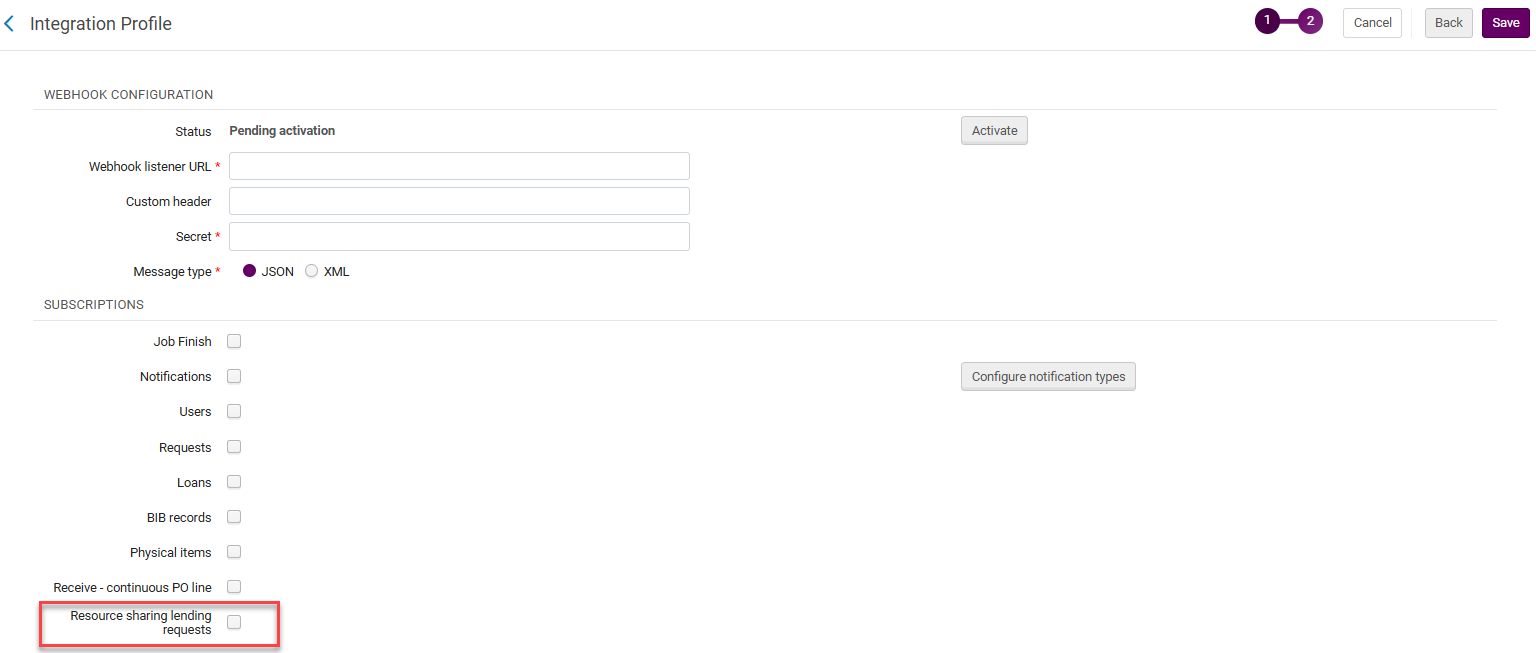
For more information, see Webhooks.
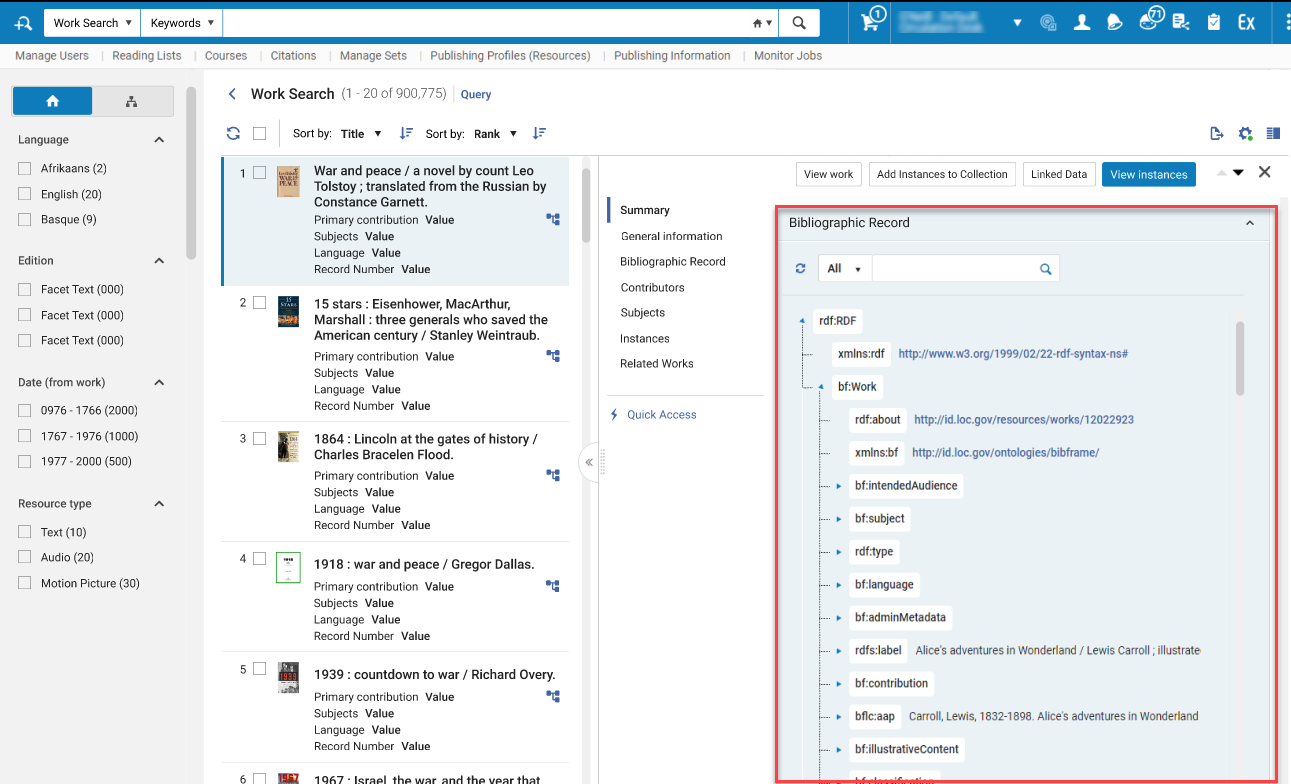
BIBFRAME Works and Instances Now Displayed in a Tree View
November 2025 Metadata & Linked Open DataURM-225476
To provide a more accessible BIBFRAME record view, the BIBFRAME work and instance record view within the persistent searches (All Titles and Works) are now displayed in a tree view. This provides the user a view that is more focused on the content of the record and a less technical RDF/XML view. Users can still view the XML view within a separate configurable section that can be added to the details display of each result.
Enhanced Device Camera Handling in AI Metadata Assistant
November 2025 Metadata & Linked Open DataURM-249292
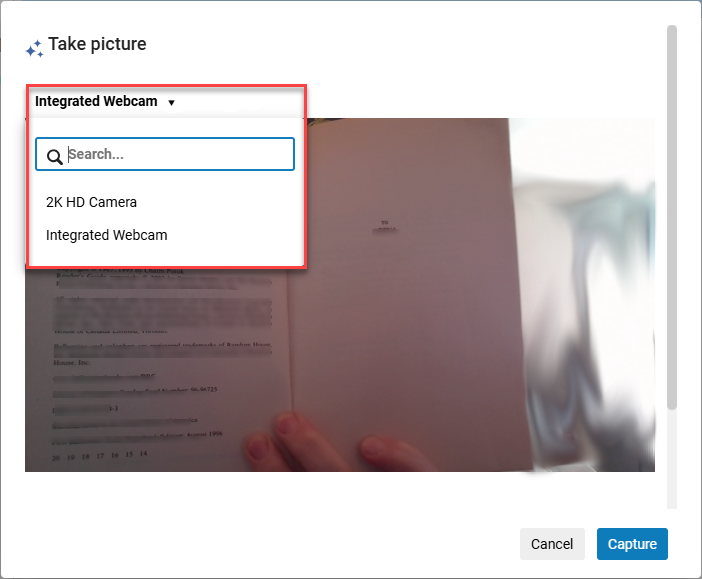
When working with multiple cameras, it is now possible to select which camera to use when using your device camera to capture an image of a resource to catalog using the AI Metadata Assistant. Image handling and quality are also enhanced for improved metadata processing. This is especially helpful for librarians working with multiple webcams or using a lower-quality webcam.
Enhanced Navigation to Titles and Holdings Information
November 2025 Metadata & Linked Open DataURM-241034
The full title and holdings details, enabling users to view record inventory and related entities in addition to viewing the metadata record, as well as performing actions according to their privileges, are now accessible from the following locations in Alma:
- The title link in the Recent Entities list:
- Bibliographic Records
- Holdings Records
- The location link and View Holdings action in the new search UX:
- Physical Items section
- Physical Holdings section
- Physical Holdings expanded tab
This is especially useful for users who need to easily navigate to holdings and titles and perform actions on them.
For more information, see Searching in Alma,Working with Holdings Records.
Relative Date Searches Support in Repository Search
November 2025 Metadata & Linked Open Data
 Idea ExchangeURM-241009
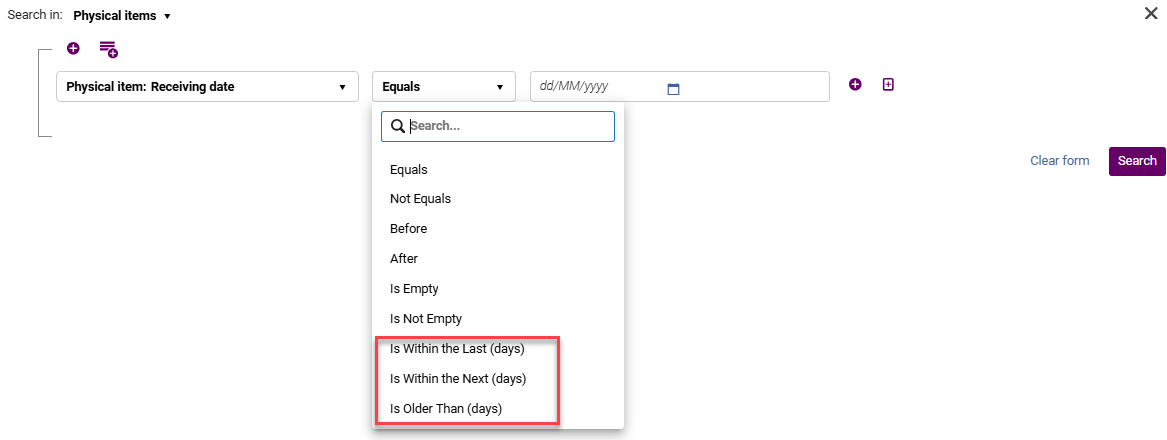
It is now possible to search for titles and inventory using a relative date range, such as titles created in the last month. This is especially useful for users who need to create a logical set based on a time range (such as "within last X days") of records, items, etc., for automated processes such as scheduling a job or creating a logical discovery set, without having to manually update the date range.
Enable Upload of Controlled Vocabulary List from a File
November 2025 Metadata & Linked Open DataURM-249998
Users can now efficiently create controlled vocabulary lists by uploading them directly from a file, significantly reducing manual effort and time.
The Controlled Vocabulary Registry (Configuration Menu > Resources > Cataloging) now includes an Import action to enable users to populate a CV from a two-column .csv file (typically containing code and description).
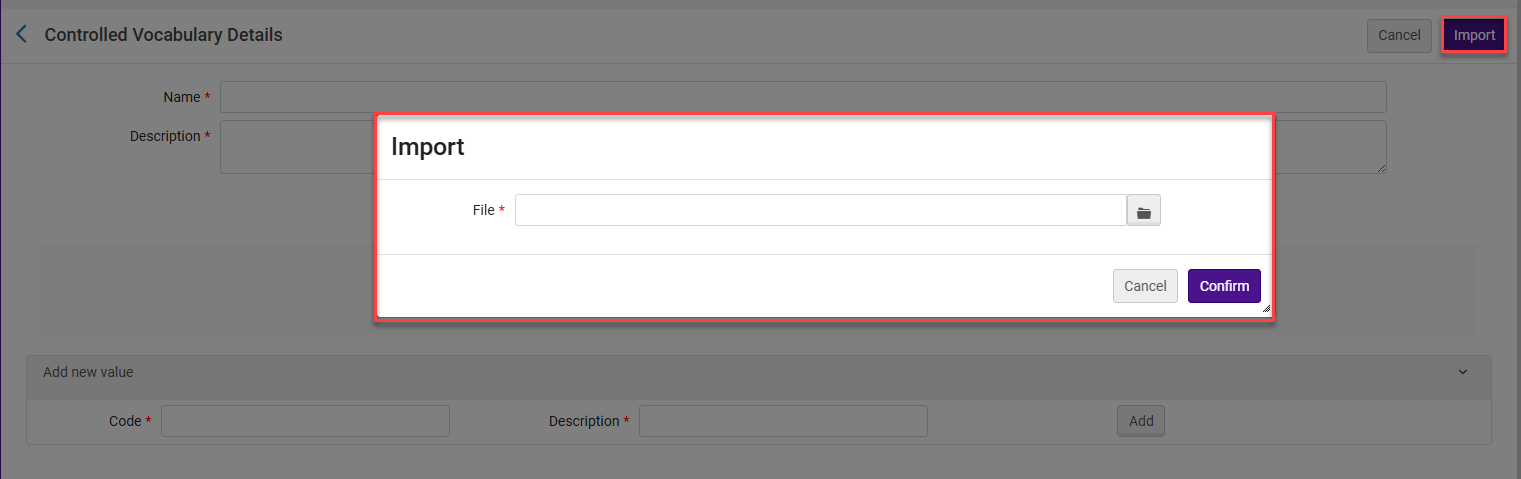
The import overwrites the existing controlled vocabulary values. To preserve current entries, users can first export the list, modify it as needed, and then re-import the updated file.
For more information, see Uploading Controlled Vocabulary List.
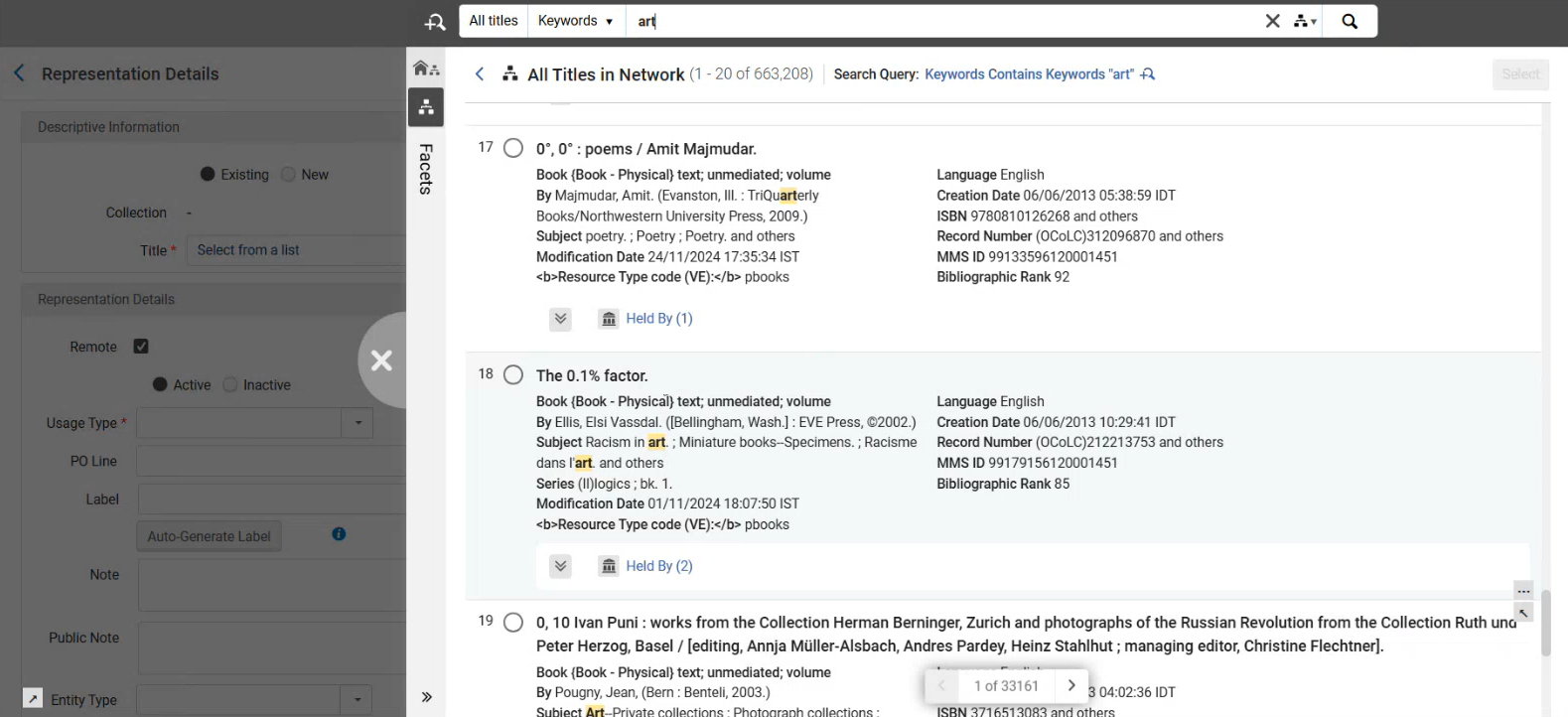
Adding a Digital Representation to an Existing Title Enhanced for the New Title Search
November 2025 Metadata & Linked Open DataURM-234811
When searching for a record to add a digital representation to, Alma now utilizes the new title search UX.
Croatian Language Support – Search, Sort, Browse, and Indexing
November 2025 Metadata & Linked Open DataURM-245606
Alma now supports Croatian language characters and sorting rules system-wide, ensuring accurate search and browsing, with digraphs treated as single letters, diacritics preserved, and sorting results according to Croatian library standards (HRN ISO 999:2001).
For more information, see Croatian Characters.
AI-Powered Insights in Alma
November 2025 Artificial IntelligenceURM-246205
Alma now includes an AI Insights feature that periodically surfaces meaningful analytics-based insights within the platform. These insights are generated by a Large Language Model (LLM) analyzing predefined reports curated by the Alma product team. Each insight is tailored to specific user roles and delivered as a notification, allowing users to view the insight and download the underlying report data.
Currently, the AI Insights are implemented in English only (even if your interface is in another language). AI Insights aggregates information at the institution level. Therefore, insights will include information about the entire institution, not just your specific library.
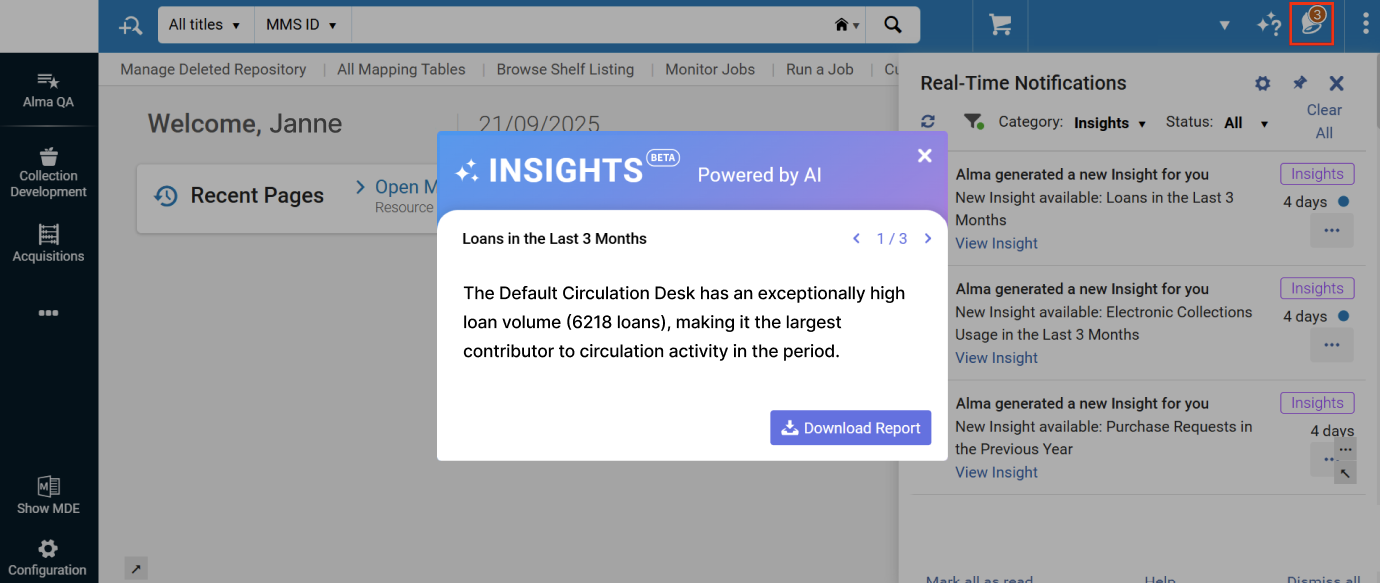
The initial insight types include the following:
- Loans in the Last 3 Months – for users with the Circulation Desk Manager role
- Electronic Collections Link Resolver Usage in the Last 3 Months – for users with the Electronic Inventory Operator role
Institutions must opt in to activate the feature. The opt-in requires General System Administrator privileges and is done from Configuration > General > AI Features > AI Usage Profile. After opting in, you will see the first insights within the first few days. After that, the timing depends on the specific insight type. The Insights rely on an internal API provided by OpenAI. No personal data is included in the reports passed to the AI model, and no institutional data is shared with OpenAI at any point.
- Opt in/out is at the institution level.
- Since AI Insights are based on Analytics data, this feature is only in Production and not in sandbox environments.
For more information, see Alma AI Insights.
Introducing Collection Development Workflows
November 2025Resource ManagementNGS
We are introducing brand-new collection development workflows to Rialto, located in Collection Development > Workflows. These workflows are available to all Alma users, regardless of whether they have access to the Rialto marketplace.
Collection development workflows become visible in the Collection Development menu once an Alma administrator updates the institution's Data Sharing Profile settings. For instructions, see Enabling Collection Development Workflows.
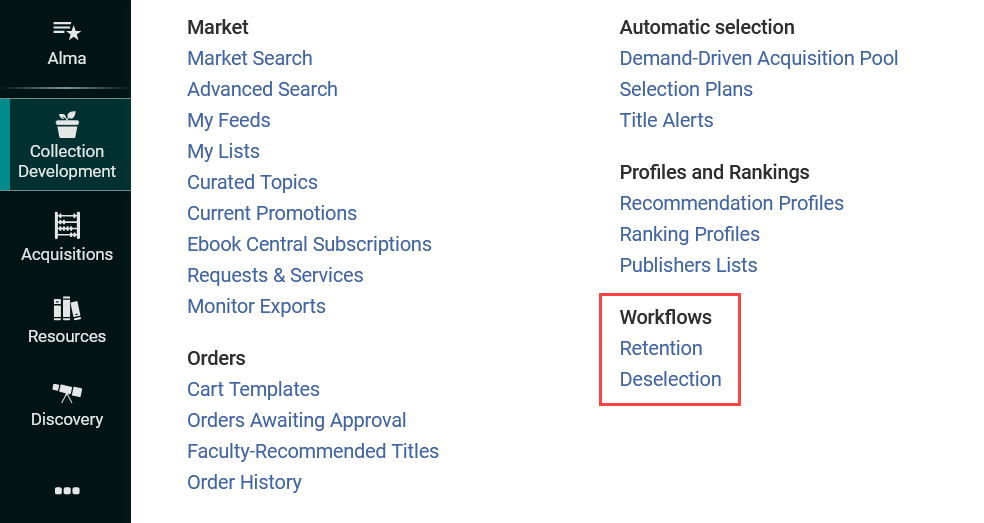
Two workflows are currently available:Retention and Deselection.
Retention enables libraries to identify important items in their collections and maintain a minimum number of copies of key titles. Use this workflow when you want to:
- Safeguard unique and high-value titles
- Establish minimum holdings for high-demand items
- Participate in collaborative retention projects with partner institutions
Deselection helps libraries identify items suitable for permanent or temporary removal from their collections. Use this workflow when you want to:
- Remove low-value or underused items
- Reduce unnecessary duplication
- Simplify inventory management
These workflows help make data-driven decisions to maintain balanced and relevant collections. For more information about how these workflows operate and how they can enhance your collection management strategy, see Collection Development Workflows.
Additional Information About Community Collections Pending Deletion
November 2025 Resource ManagementURM-231236
Collections that are marked with Management level in Community Zone as Pending Deletion now display the following additional information:
- Pending Deletion Reason
- Alternative Collections (with a link to alternative collection/s as suggested by the Ex Libris content team based on provider recommendations). Note that alternative collections only appear if we have this information from the provider.
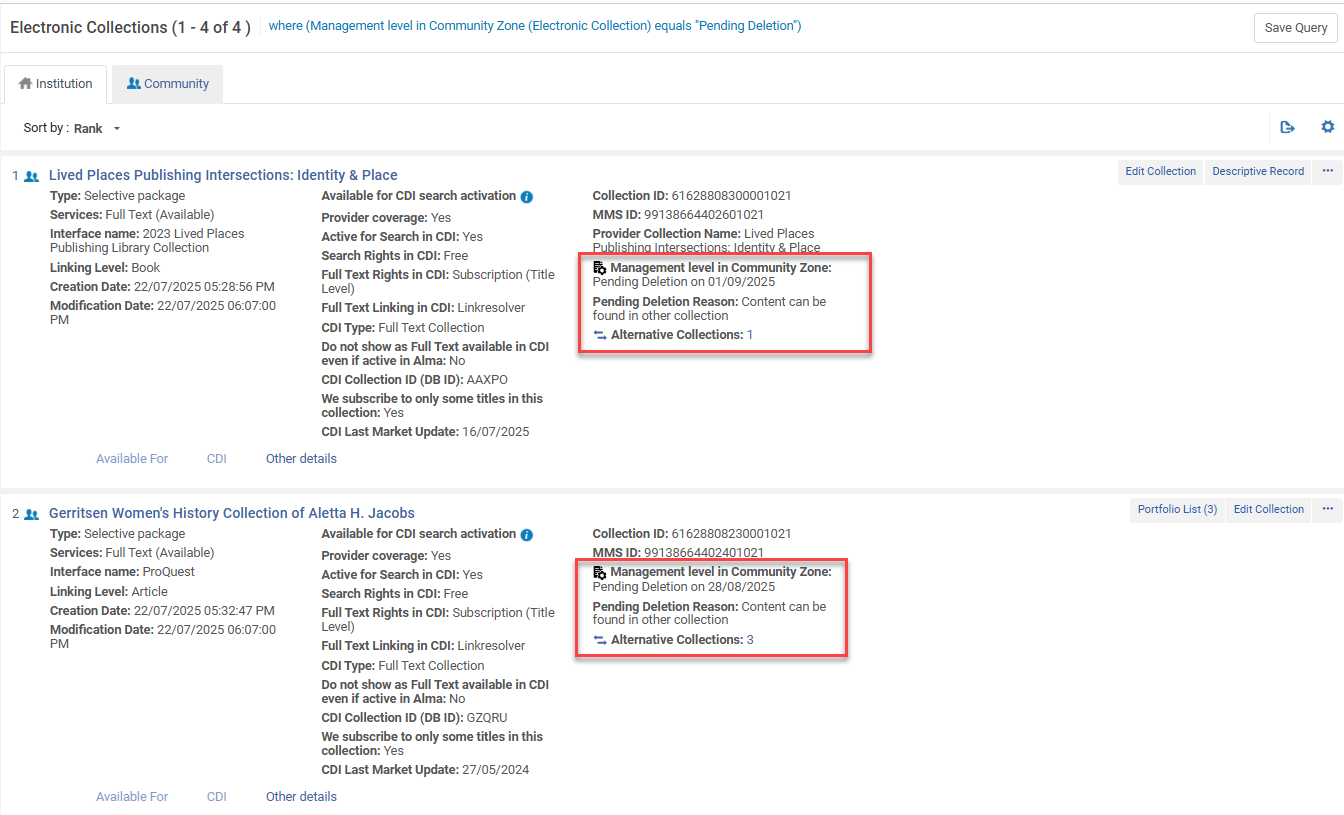
For more information, see Managing Electronic Resources.
Handle Multiple Matching BIB Records in Portfolio Loader
November 2025 Resource Management
Idea ExchangeURM-233390URM-252454
The Portfolio Loader has been enhanced to give users more control over how to handle cases where a row in the uploaded file matches multiple bibliographic records. A new setting enables you to choose between the following options:
- Skip line – The system skips the row, and no portfolio is activated or created. Note that this option retains the original system's behaviour from before the enhancement.
- Select preferred MMS – The system automatically selects the most suitable bibliographic record based on inventory presence and bibliographic rank. Records already linked to institution zones are preferred over unlinked Community Zone records.
This enhancement does not handle cases of multiple matching portfolios - they need to be resolved manually as before.
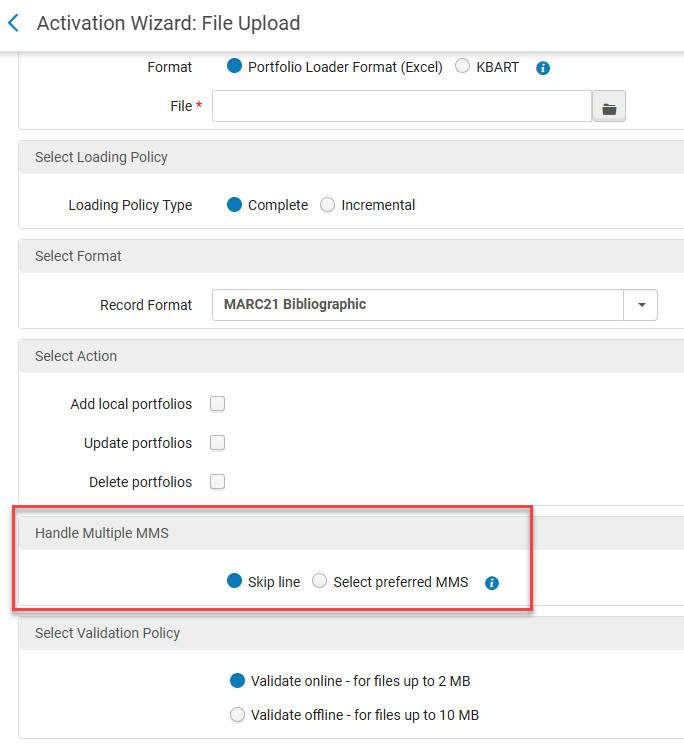
For more information, see Managing Electronic Resources.
Better Reporting on Malformed JSON Files for SUSHI Harvesting Jobs
November 2025 AcquisitionsURM-227277
When an invalid field (for example, empty fields) exists in the JSON, the "SUSHI Harvesting job" does not stop, i.e., this file is skipped and the job continues to the next file. Additionally, users can now see information about malformed JSON files in the "SUSHI Harvesting job" report. This enables users to resolve problems sooner by contacting the vendor and asking them to fix the issue/s mentioned in the report.
When possible, the errors indicate the specific invalid field. The errors indicate the following:
- The JSON file is malformed (JSON structure does not match the expected COUNTER code of practice's structure).
- Mandatory fields are missing.
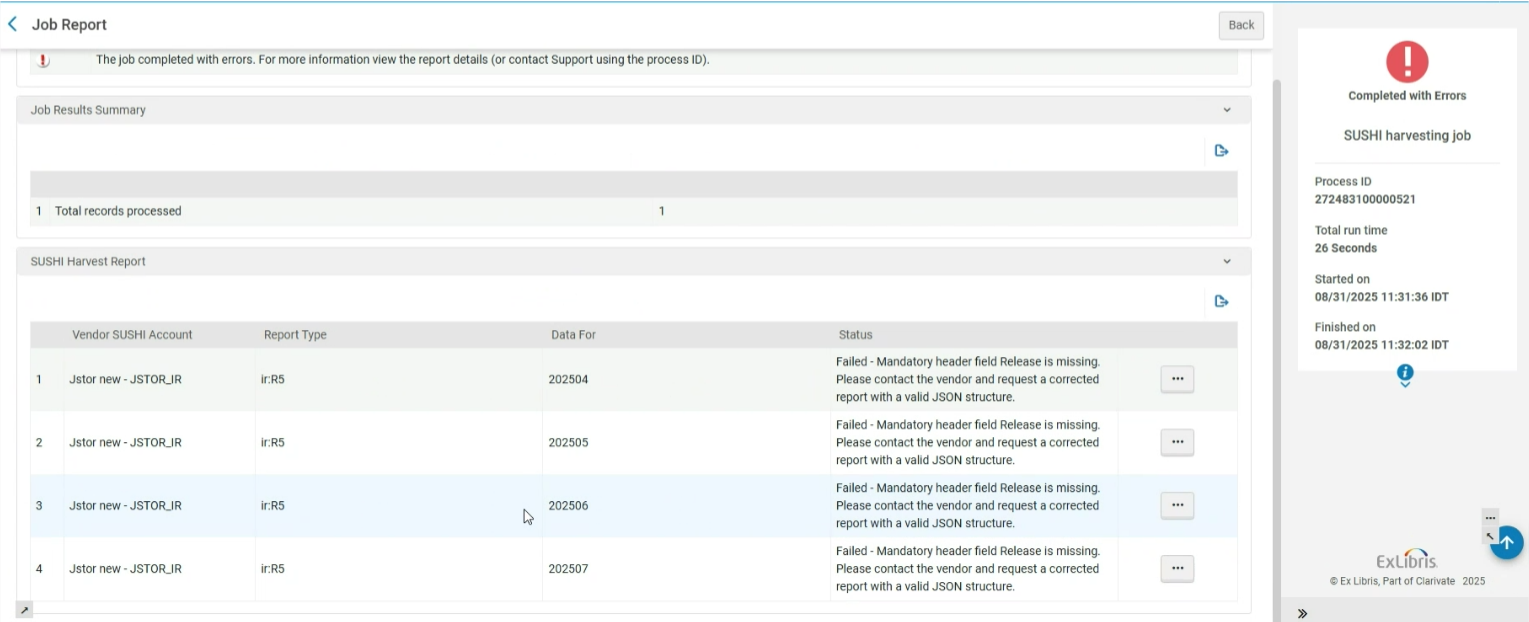
Additionally, when an invalid field (for example, empty fields) exists in the JSON, the "SUSHI Harvesting job" does not fail. Instead, this file is skipped, and the job continues.
For more information, see Managing COUNTER-Compliant Usage Data.
Create Invoice from Italian Standard e-Invoice XML File
November 2025 AcquisitionsURM-254484
Users can now create an invoice in Alma from an XML file. The supported XML formats as of this release are:
- E-Invoice - FatturaPA Italian standard (see FATTURAPA)
- Alma XML
To create an invoice from XML go to Acquisitions > Create Invoice and select the From File option.
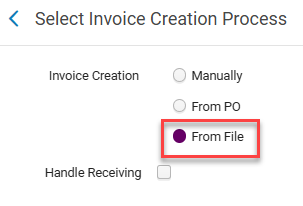

For more information, see Creating Invoices.
New MARC Subfields in the Acquisitions Letters
November 2025 Acquisitions
Idea ExchangeURM-247092
The acquisitions letters now include the subfields $v of MARC fields 490/830. This, together with the series statement and series uniform title in order letters, helps ensure accurate identification, prevent duplication, and support consistent cataloging within a collection.
The map for statement fields was enhanced as follows:
- <series_statement> is taken from $$a and $$v of field 490
- <series_uniform_title> is taken from $$a and $$v of field 830
In the case of multiple occurrences of these fields or subfields, all occurrences display as separated by ";" between subfields, and "." between fields.
This enhancement impacts the following letters:
- Order List Letter
- PO Line Claim Letter
- Legal Deposit Order Letter
- Legal Deposit Claim Letter
- Conversation Letter
For series fields that were already added to the Order List Letter, the change is made automatically.
For other letters, the customer needs to add the series fields to the XSL so they are part of the letter. Once added, they show the new display.
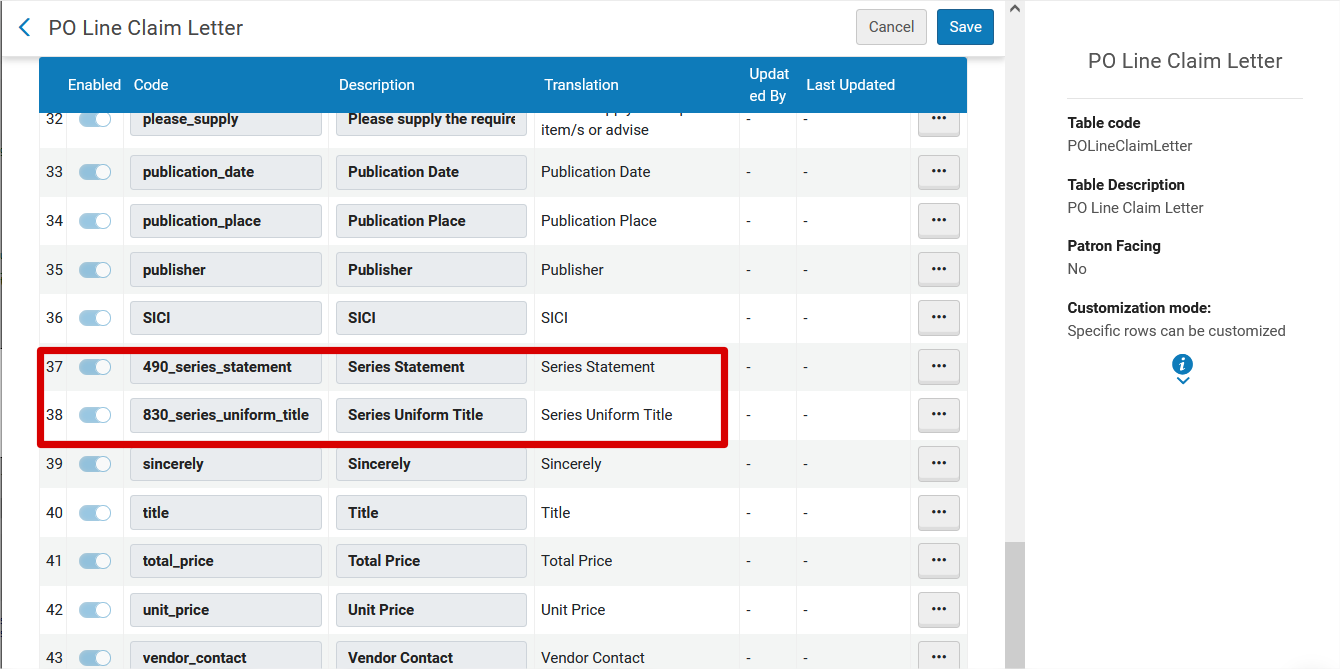
The series fields series statement and series uniform title are taken only from MARC21 records.
For more information, see Configuring Alma Letters.
Open Predicted Items and Withdraw Actions in Received Items List
November 2025 Acquisitions
Idea ExchangeURM-94380
Two item actions were added to the Received Items list:
- Open Predicted Items
- Withdraw
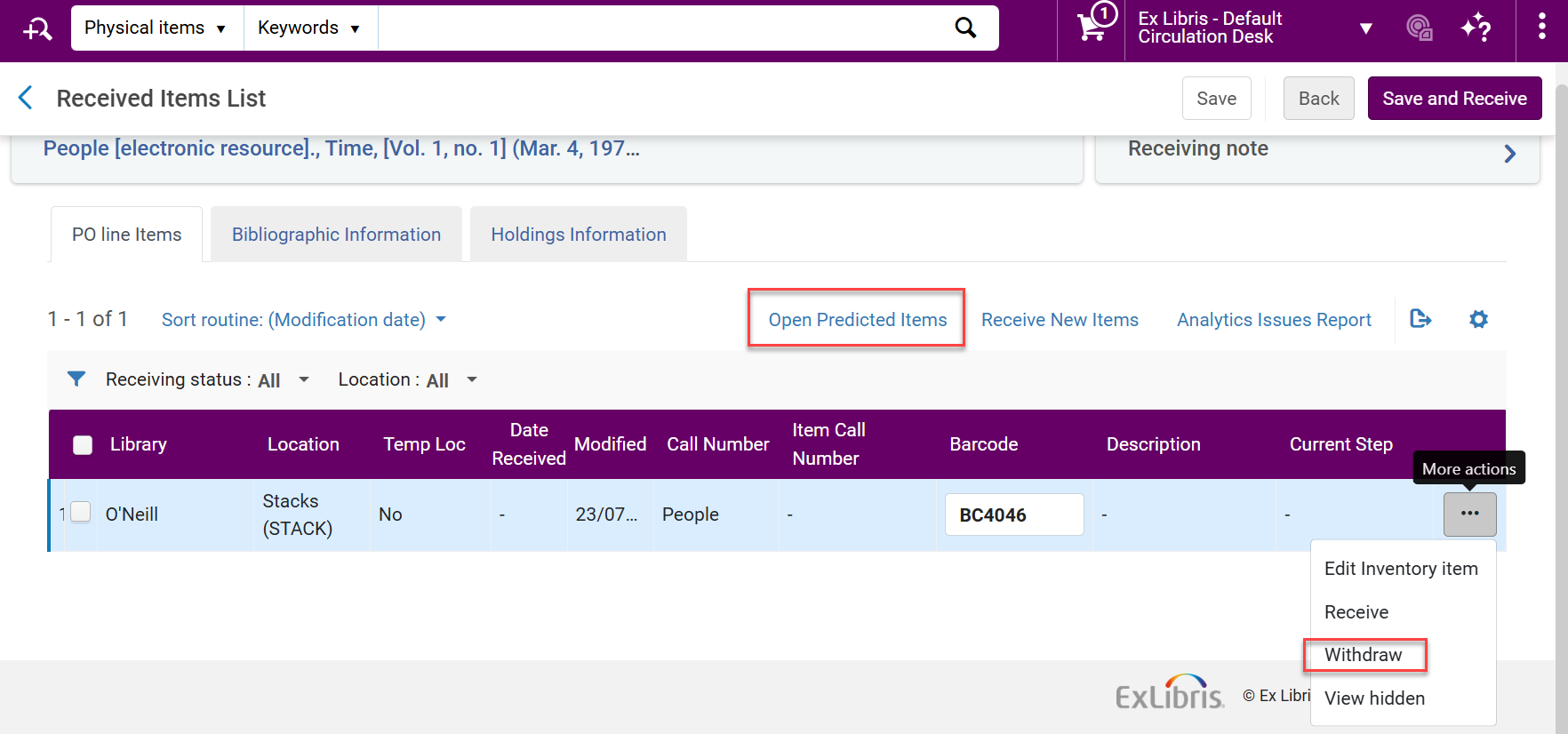
- When selecting the Open Predicted Items action for a continuous order with several holdings, a pop-up window opens, enabling the user to select for which holding the items are created.
- The Withdraw action functions the same as if done from a PO line. To enable the deletion process, the item is detached from the PO line. If the item cannot be deleted, it is still detached from the PO line as indicated by a feedback message. The Withdraw action is available for unreceived items only.
- Withdrawing items will not change the Quantity for pricing field in the PO line, even when Update "Net price" according to item quantity is checked.
For more information, see Managing Items when Receiving Continuous Material and Additional Actions when Receiving Physical Material.
Display of Fields Added to Received Items List
November 2025 Acquisitions
IdeaExchangeURM-139018
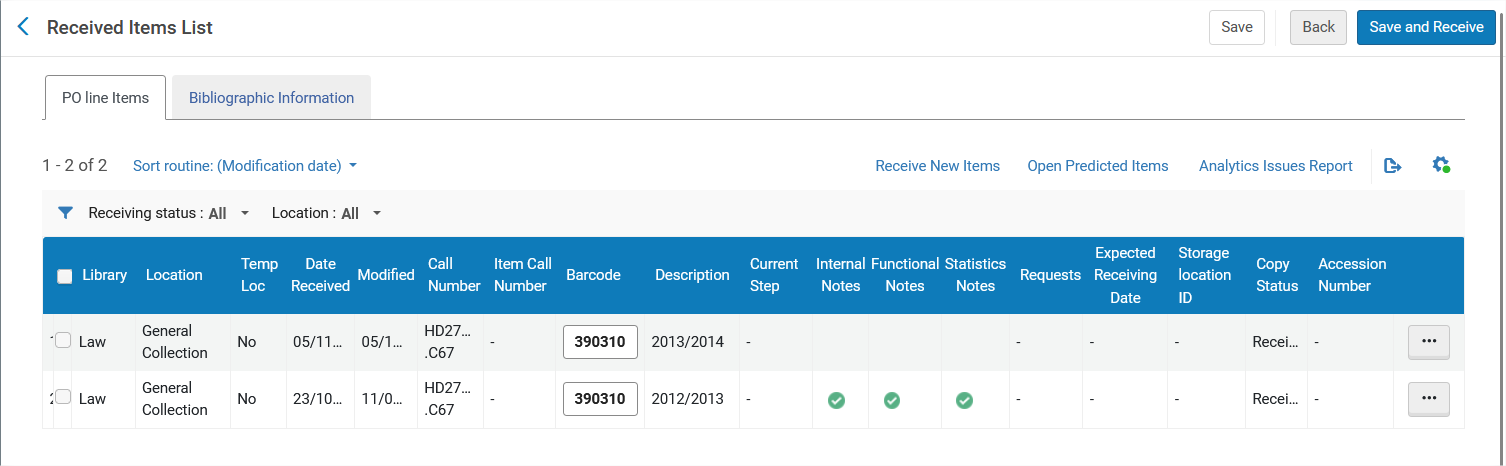
The item fields are now available for display in the Received Items List items table.
The following list shows the added fields for one-time receiving, and indicates which ones are out-of-the-box (OTB):
- Modified
- Description (OTB)
- Internal Notes (OTB)
- Functional Notes (OTB)
- Statistics Notes (OTB)
- Expected Receiving Date
- Storage location ID
The following list shows the added fields for continuous receiving, and indicates which ones are out-of-the-box (OTB):
- Copy Status
- Requests
- Internal Notes (OTB)
- Functional Notes (OTB)
- Statistics Notes (OTB)
- Expected Receiving Date
- Storage location ID
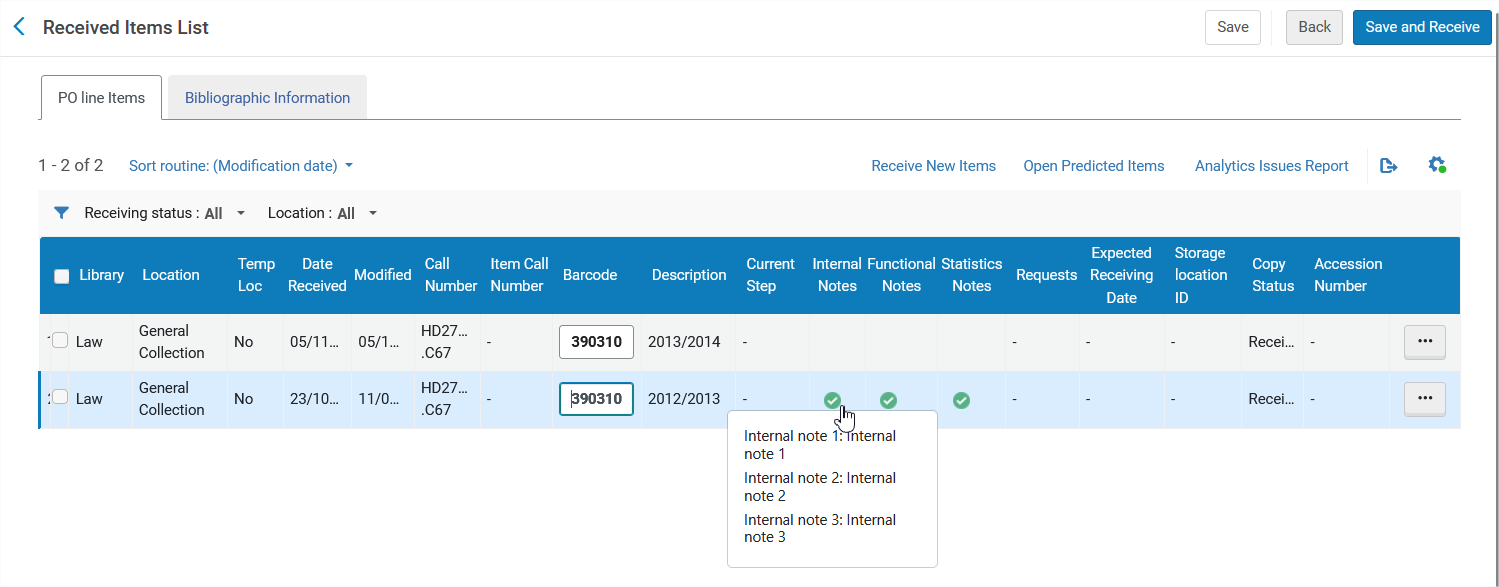
The fields for notes (Internal Notes, Functional Notes, Statistics Notes) show a green checkmark if there are any notes in their category.
Selecting the checkmark opens a pop-up with the note details.
For more information, see Receiving Physical Material.
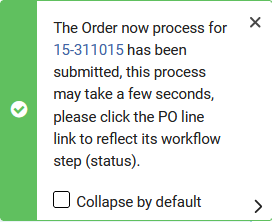
Collapse by Default for PO Line Success Message
November 2025 AcquisitionsURM-252499
The Collapse by default option now appears for the PO line success messages that appear for row actions such as Order Now and list actions such as Assign Selected.
Shared Blocks Across the Fulfillment Network
November 2025 Collaborative Networks
Idea ExchangeURM-93261
Previously, patron blocks could only be shared from the patrons' home institution to the institutions where the patron had linked accounts. With this new feature, it is possible to share blocks from any institution with any other institution where the patron has an active account, regardless of whether the institution is the home institution or the target institution. This enables patron blocking across the entire network more easily and efficiently.
Currently, this feature operates between two institutions in a Fulfillment Network where the users' accounts are not managed in the network zone. Future releases will enable the same functionality, also where the users' accounts are managed in the network zone. For more information, see Configuring User Blocks and Managing Users.
Hide Configuration Links for Display Logic Rules and Online Services Order in the Alma Configuration Menu at Network Zone Level
November 2025 Collaborative Networks
URM-226911
Since the Display Logic Rules and Online Services Order configurations were recently added to the Consortia Central Configuration Dashboard, they have been removed from the 'old' Alma and Primo VE configuration menus of the Network Zone. Network Zone administrators, while operating at the Network zone institution, now access those configurations through the Central Configuration Dashboard directly.
The removed configurations from the Alma and Primo VE configuration menus at Network Zone Level are:
- Display Logic Rules
- Online Services Order
For more information on related configurations, see Consortia Central Configuration Dashboard.
Upcoming Enablement of Pendo for Enhanced In-App Guidance
November 2025User Experience, Accessibility & InfrastructureURM-316568
As part of our ongoing efforts to enhance your user experience and deliver contextual, in-product assistance through dynamic documentation and feature guides, we will be enabling our digital adoption platform, Pendo, starting with the November release.
This is a follow-up to our earlier announcement from May, where we clarified that Pendo is no longer considered a sub-processor in our data processing framework. Pendo is used strictly to deliver non-personalized guidance and feature updates within the product and does not collect or process any personal data.
What's Changing?
- Pendo will be enabled by default across all customer environments starting with the November release. (There will be no change for institutions that manually disabled Digital Adoption in the past.)
- This enablement supports features such as in-app guides, walkthroughs, and feature announcements aimed at improving usability and onboarding.
What About Privacy?
We remain fully committed to GDPR compliance and your data protection expectations:
- No personal information is shared with Pendo.
- Institutions may choose to opt out of digital adoption features entirely at the organizational level if preferred.
- Individual users can always manage their cookie preferences, including rejecting functional cookies, regardless of the institutional settings.
For more information, visit Configuring Digital Adoption
View Sliding Panel in Full Page Mode
November 2025 User Experience, Accessibility & InfrastructureURM-235923
Users can now select the "View in full page" icon on some pages to view sliding panels in full-page mode. Sliding panels can now also be resized.
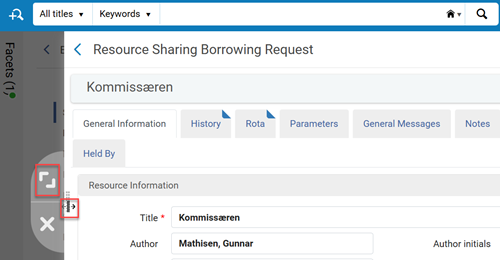
When moving to the full-page view, a warning appears to save any changes. For more information, see New Layout.
On some pages for PO Lines, the "View in full page" icon is not yet active and will be implemented in a future release.
The "View in full page" functionality is not available for "pickup" sliding panels, such as Add Collection from the All Titles search results.
Improved Layout for Record Actions and Selecting Title Area to Open in Right Panel
November 2025 User Experience, Accessibility & InfrastructureURM-239894
This feature will be deployed to the resource sharing borrowing requests list and the resource sharing lending requests list in a future release.
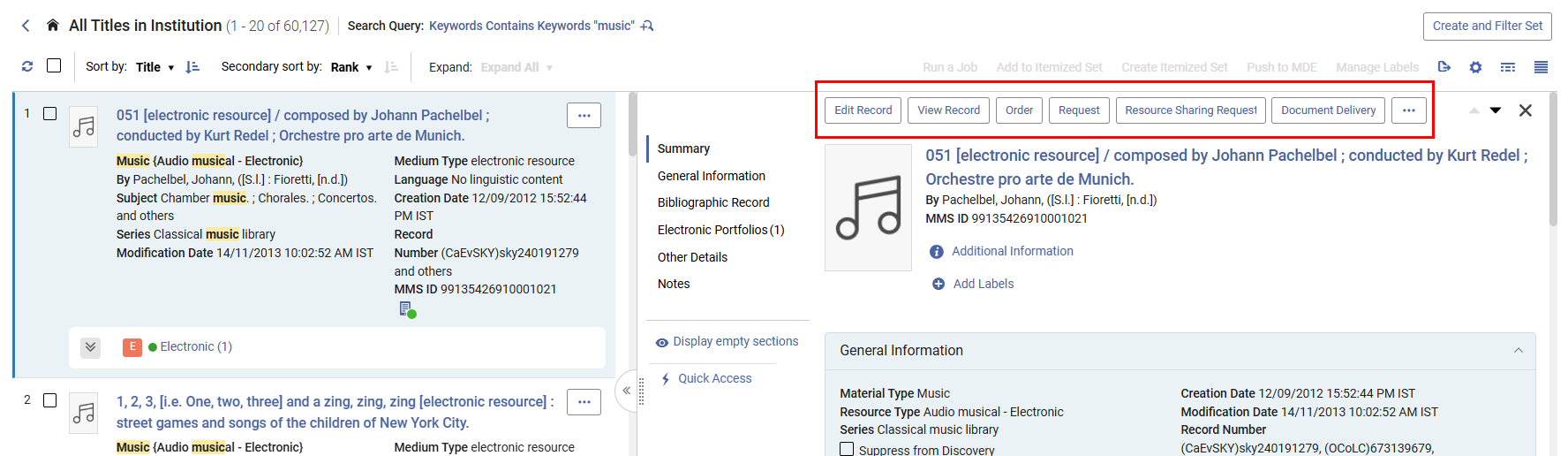
The interaction and layout of list row actions were enhanced.
The updates include the following:
- The user can now select the title area, instead of the entire row, to open the record's right panel view.
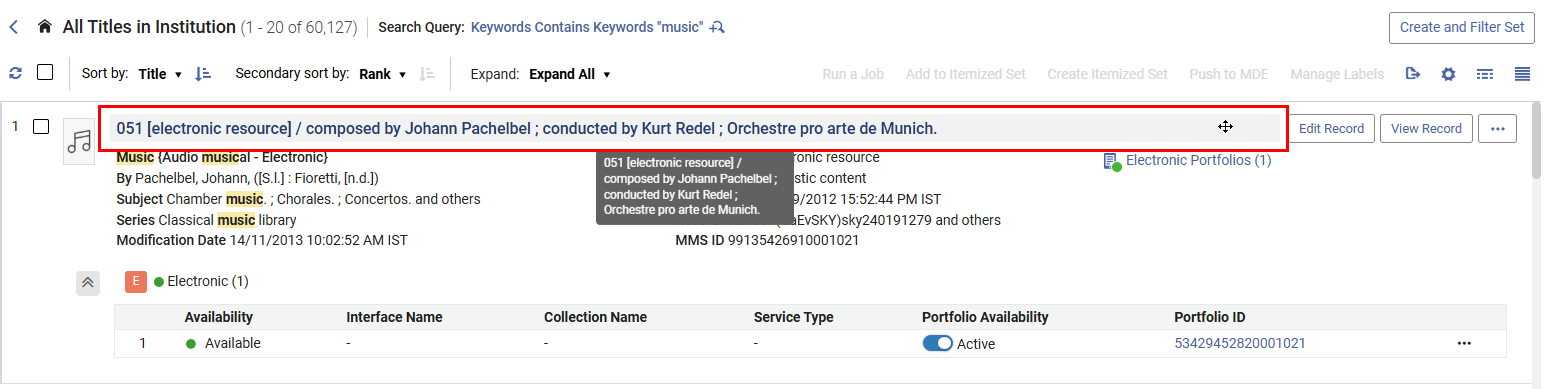
This makes it easier for users to select and copy text from the row information under the title.
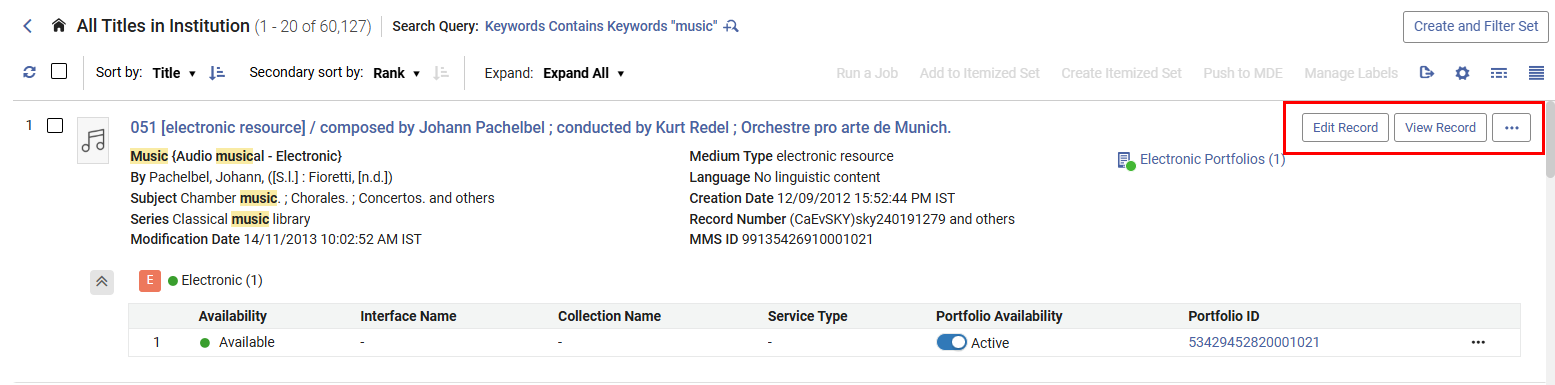
- In the list view, when the right panel is closed, more pages in Alma now display the two main actions. Additionally, the color of the buttons has been updated.
- The action buttons in the right panel are now aligned to the left for left-aligned languages, and to the right for right-aligned languages.
- Improved keyboard navigation
- Visual and accessibility improvements
For more information, see New Layout.
Improved Keyboard Support to Resize Panels for Enhanced Accessibility
November 2025 User Experience, Accessibility & InfrastructureURM-247455
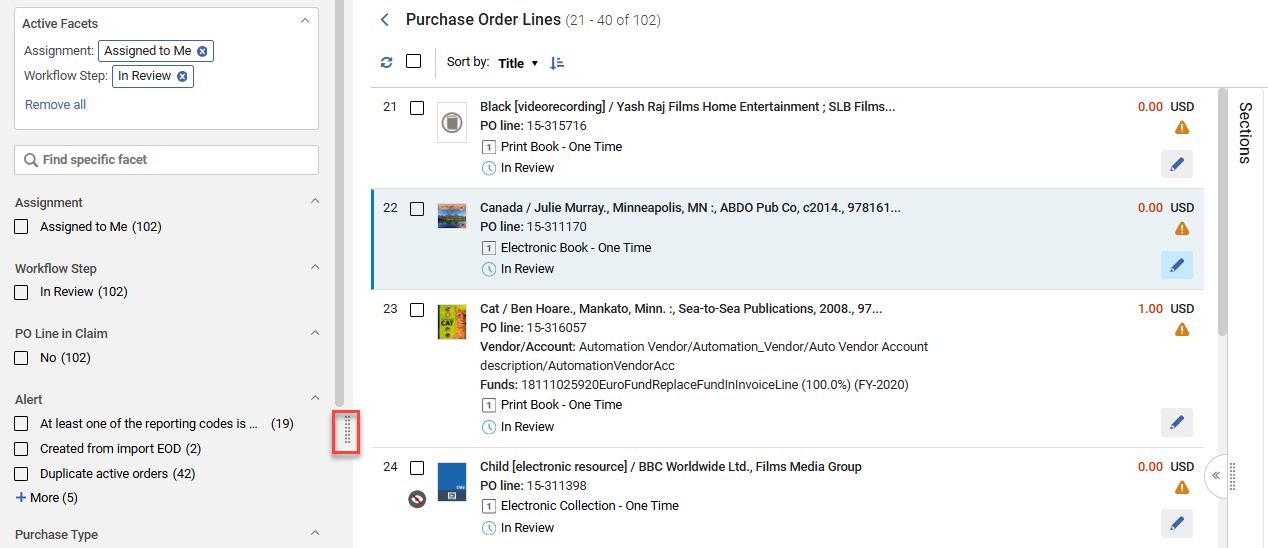
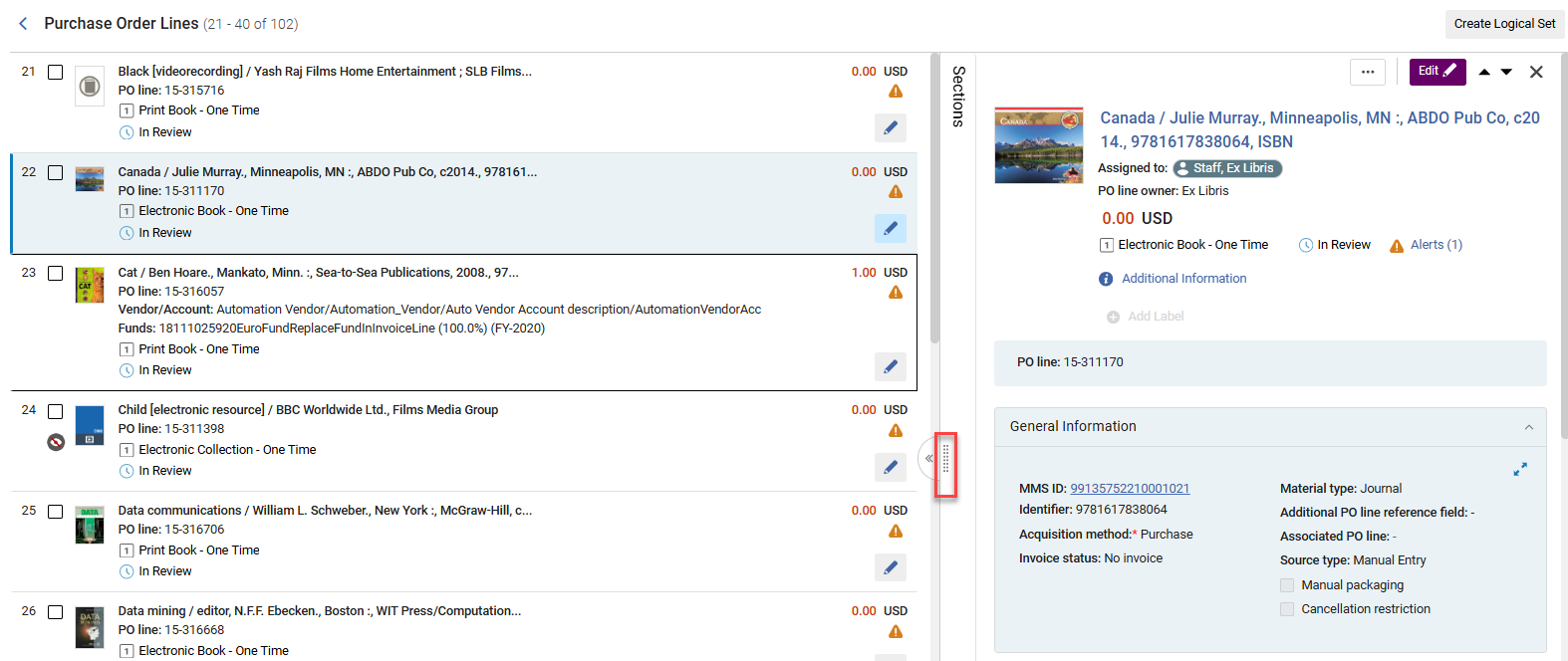
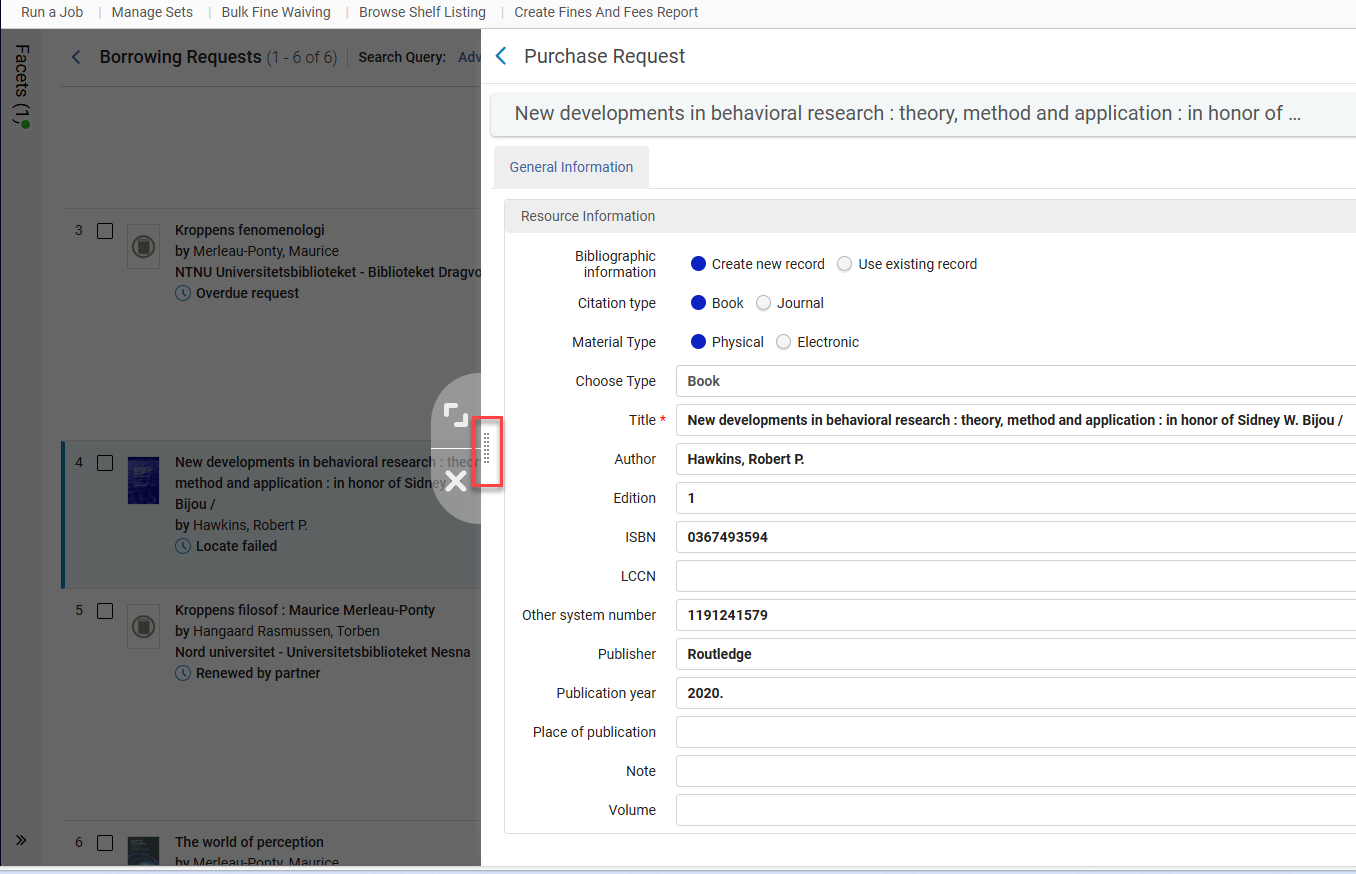
We have enhanced the facet panel, sliding panels, and the split view panels by implementing proper focus management for keyboard navigation, and enabling full keyboard-based width resizing. Users can now use the keyboard to navigate to and focus on the width resize icon and adjust the panel's width using the ↠(left) and → (right) arrow keys.
For more information, see New Layout.
German "Fuzzy Search" Added to Alma Menu Search Bar
November 2025 User Experience, Accessibility & InfrastructureURM-248274
The functionality of the Alma search menu was extended to include "smart" search capabilities in German (DE). Historically, this feature has supported English and Hebrew. However, beginning in November 2025, it will also support the German interface. Consequently, the search functionality now offers suggestions for synonyms, interchangeable terms, and even assists with simple spelling errors. This improvement enhances user navigation, simplifying the process of locating items within the Alma German search menu.
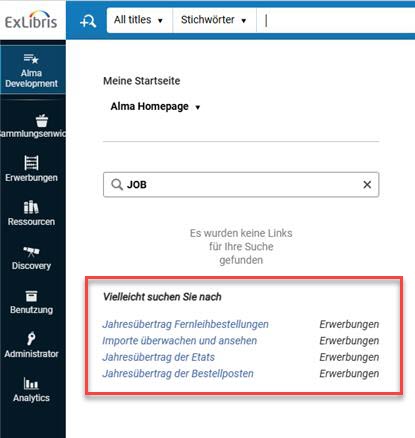
For more information, see Alma User Interface.
Watch the Improved Menu Search to see this functionality in English.
Simplified Menu Experience
November 2025 User Experience, Accessibility & InfrastructureURM-238139
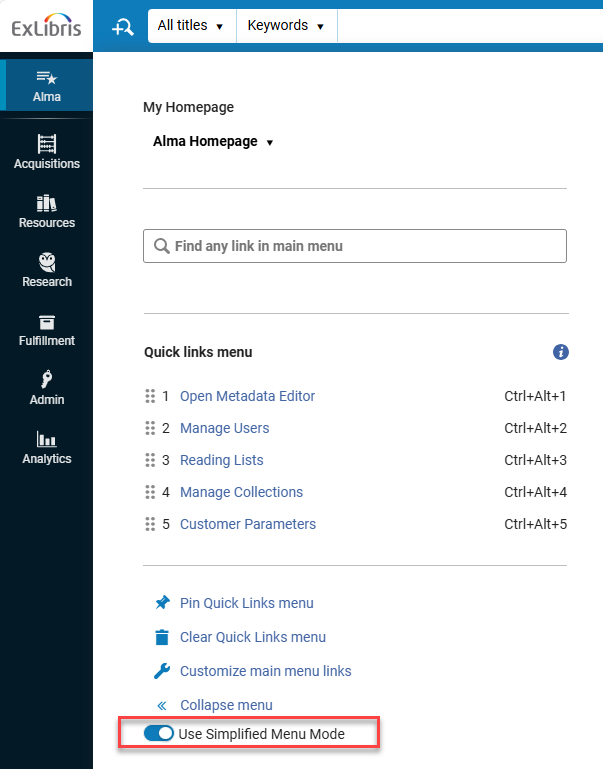
The new "simplify menu" option gives users greater control over their menu display. Selecting the Use Simplified Menu Mode toggle button in the navigation panel presents a streamlined menu containing only the most widely and commonly used menu entries, selected based on statistical analysis. Menu entries marked by a user for favorites also appear in the simplified view.
This update enables users to simplify and personalize their navigation experience, significantly reducing visual clutter and enabling more efficient and faster access to the tools, information, links, and features that matter most to them.
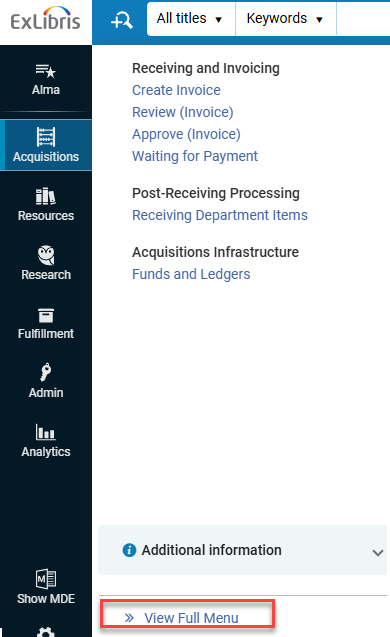
Once the simplified menu mode is enabled, you can select View Full Menu to temporarily return to the full menu view.
For more information, see New Layout.
Purge Users Based on Set
November 2025 User Experience, Accessibility & Infrastructure
Idea ExchangeURM-19890
It is now possible to purge users based on a set. This new option enhances the library's ability to purge users based on varying user record attributes, such as last activity date or expiry date. The job is run from the Run a Job page at Admin > Manage Jobs and Sets > Run a Job > Purge Users.

You can also apply a schedule to the job.
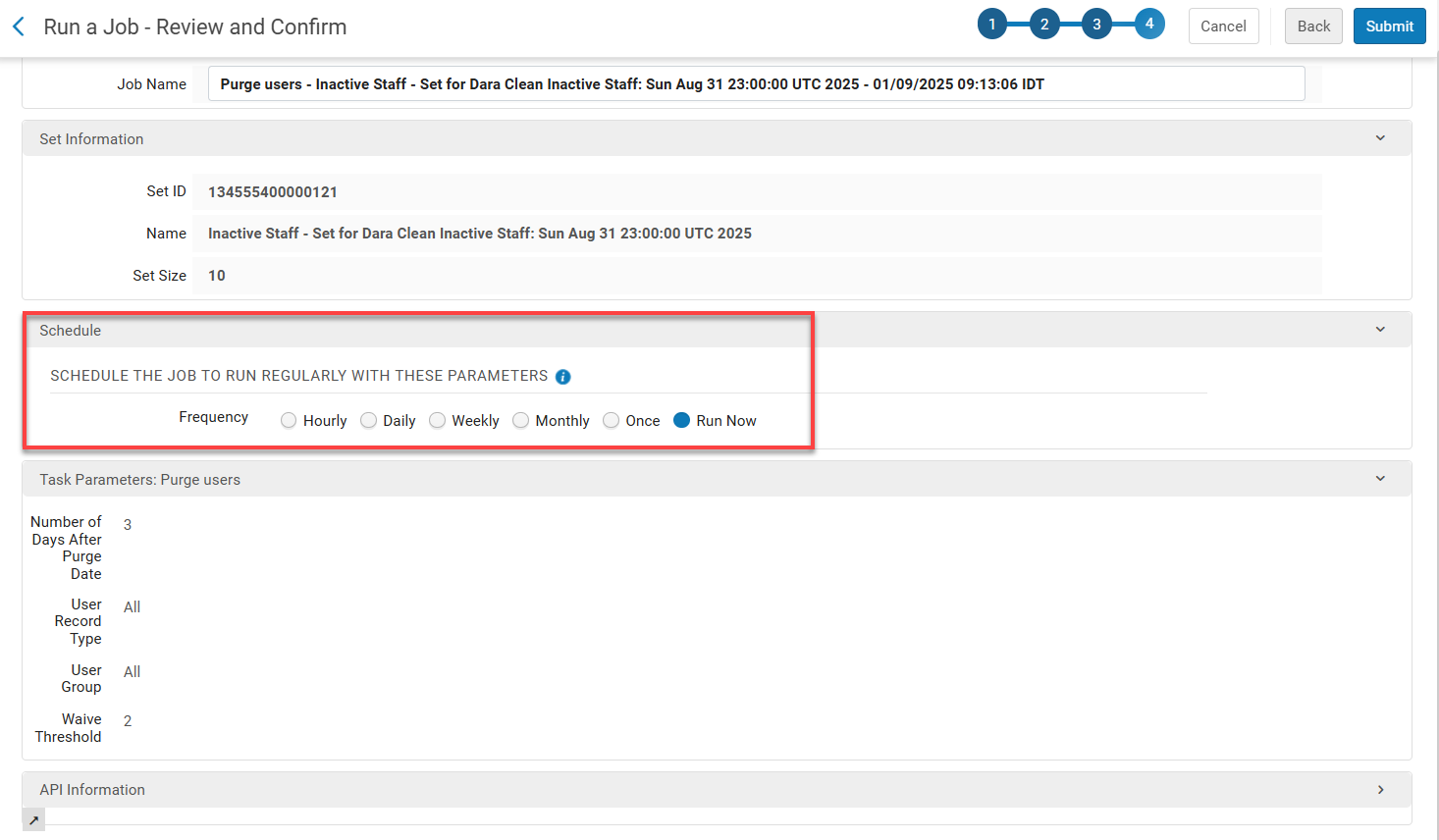
For this job, unlike the one in the Purge User Records page (Admin > User Management > Purge User Records), if the Number of days field does not have a value, then users with no purge date are also purged. If the value of the Number of days field is 0, then only users with a passed purge date will be purged.
For more information, see Manual Jobs and Purging Users.
Select All Search Results for Running Bulk Jobs
November 2025 User Experience, Accessibility & InfrastructureURM-252486
For New Generation (NG) search results pages that support logical sets and the Run a Job bulk action, a new option has been introduced that enables users to select all results across all result pages. Once the user selects one or more results from the results list, a new option appears to select all the results in the list.
After selecting this option, users can apply the Run a Job action to the entire result set in one step, without manually selecting all results page by page.
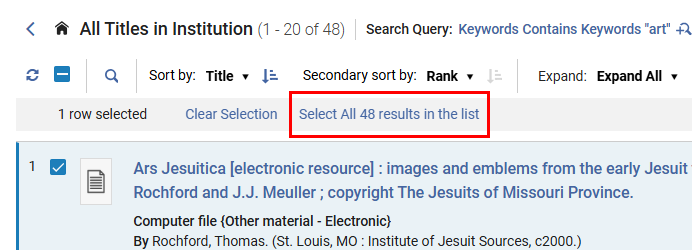
This enables more efficient processing of large sets of results by streamlining bulk job execution.
The Works search results page (see Managing Search Queries and Sets) is excluded. Support for the Works search results page will be included in a future release.
Enable Use of Modern Client for FTP Connections
November 2025 User Experience, Accessibility & InfrastructureURM-235923
The new Use Modern Client checkbox (Configuration Menu > General > External Systems > S/FTP Definitions > Add S/FTP Connection) was added to the FTP configuration page. The checkbox is enabled by default. When enabled, all FTP requests from within Alma will use the latest FTP protocol standards.
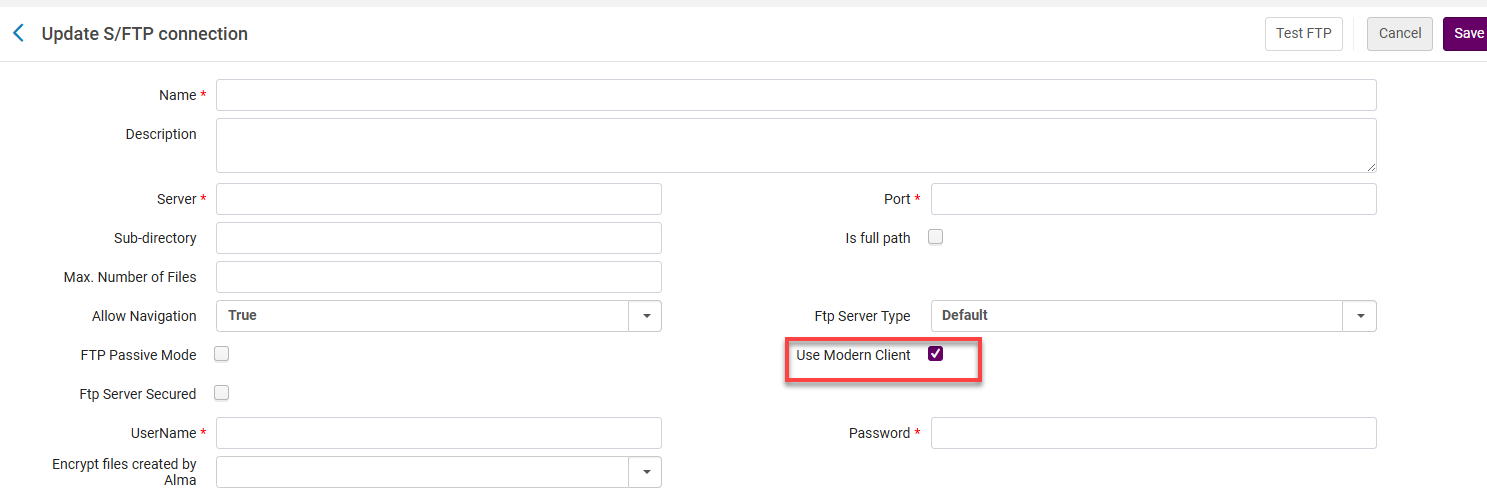
For users with existing FTP connections defined, the checkbox will be enabled/disabled according to their existing configuration.
For more information, see External Systems.
New Management Tags for Titles Reports
November 2025 Analytics
Idea ExchangeURM-246845
A new option to generate reports in the Titles Subject Area based on the management tags Export to WorldCat and Export to Libraries Australia. This enables a broader scope of reporting on Titles.
For more info, see Bibliographic Details.
Consortial Analytics Available
November 2025 Analytics and InsightsURM-253309
Alma now includes four new out-of-the-box (OTB) collection development reports that support comparison of book holdings across institutions within the same consortium.
For more information, see Consortial Analytics.
MARC Tags Included in Analytics Field Names for Local Parameters
November 2025 Analytics and InsightsURM-248164
When mapping local parameters in Analytics, the MARC tag is now included in the field name. This is possible because the customer parameter analytics_display_local_params is now set to true for all libraries.
This enhancement makes the mapped field immediately recognizable. Instead of seeing a generic label, you can see the MARC tag, which shows what data is being referenced.
Number of Unique Titles Field Available in Various Subject Area Folders
November 2025 Analytics and InsightsURM-254684
A new pre-calculated field Number of Unique Titles has been added to various Subject Area folders. It makes report creation easier and improves their performance.
The field name could be different depending on the folder.
The folders where the new field has been added are:
- Borrowing Requests > Borrowing Request Details(Num of Unique Titles)
- Course Reserves > Reading List Citations(Number of Unique Titles)
- E-Inventory > Portfolio(No. of Unique Titles)
- Fulfillment > Loan(Number of Unique Titles)
- Funds Expenditure > Fund Transactions(Number of Unique Titles)
- Lending Requests (Resource Sharing) > Lending Requests Details(Num of Unique Titles)
- Physical Items Historical Events > Item Event Measures(Num of Unique Titles)
- Purchase Requests > Purchase Requests Measures(Number of Unique Titles)
- Requests > Requests Measures(# of Unique Titles)
Export Current View Option Available in List of Analytics Objects
November 2025 Analytics and InsightsURM-218294
It is now possible to export only the visible fields when viewing Analytics objects. This provides users with a clean and focused dataset, reducing the need for a manual data cleanup.
For more information, see Export to Excel.
Additional Enhancements
- November 2025 Metadata & Linked Open DataURM-188786 To enable users to retrieve records based on a wider range of standard number source metadata, the National Bibliography search index now supports additional metadata subfields for the formats UNIMARC and CNMARC.
This enhancement will take full effect once the semi-annual indexing process is completed in your environment.
For more information, see UNIMARC Bibliographic All Titles Search.
- November 2025 Metadata & Linked Open DataURM-188231 Subfields 7 and 9 have been removed from the display of UNIMARC 6XX fields. These subfields are no longer visible when viewing UNIMARC 6XX fields, resulting in a cleaner and more streamlined display.
This enhancement will take full effect once the semi-annual indexing process is completed in your environment.
- November 2025 Metadata & Linked Open DataURM-252988 GND Profile Updates:
- One value of the CV list of 043 $c was altered
- $0 was added to the 384 field
- One value was added to the CV list of 400/410/411/430 $4
- One value was added to the CV list of 670 $a
- November 2025 Metadata & Linked Open DataURM-235309 Updates to MARC21 Profile MARC21 update No. 30 (December 2024) and MARC21 update No. 40 (June 2025), including Bibliographic, Authorities, Calcifications, and Community changes and updates to the MARC21 Holdings.
For more information, see MARC21 Search Indexes.
- November 2025 Metadata & Linked Open DataURM-166277 It is now possible to view bibliographic records linked to Name/Uniform Title authority records by using the Linked Monographs Records or Linked Serial Records actions in the NACSIS Cloud App Authority Results. Catalogers can directly access linked bibliographic records, improving copy cataloging and visibility of authority-to-bibliographic relationships. Searches run in the background using the CAT-P field (AID/UTID). This applies to Name and Uniform Title records with links to Monograph (BOOK DB) and Serial (SERIAL DB) records. It is not available for reference files.
Linked bibliographic searches are based on CAT-P fields (AID/UTID), which are not visible in the UI or record display.
For more information, see Linking Between Authority and Bibliographic Records in NACSIS-CAT.
- November 2025 Metadata & Linked Open DataURM-242103SF: 08027300 For imported BIBFRAME records, Alma adds an owl:sameAs containing the Alma URI rather than a bf:sameAs.
For more information, see API Services.
- November 2025 Resource ManagementURM-252459 The Temp location in use field is now included in the Export Physical Items Information job. Its values are "0" (indicating N) or "1" (indicating Y).
- November 2025 Resource Management
Idea ExchangeURM-306207SF: 07686084 07724542 07842030 07996509 08018780 08091218 08094632 08096512 08096459 0809787308102146 08106961 08113838 08119048 It is now possible to search for ISSN/ISBN that include hyphens, using the All Titles keywords search in Alma. For more information, see Searching in Alma.
- November 2025 Resource Management
Idea ExchangeURM-249879 Call numbers with umlauts are now correctly sorted in the Browse Shelf Listing search. This enhancement applies to institutions whose Solr search language is set to German. As this requires full indexing for call number, the effect of this enhancement will be seen after the November semi-annual indexing.
- November 2025 Fulfillment and Resource SharingURM-246521 A new checkbox,Locate journals, has been added to the Process and Enrich Citations(Fulfilment > Advanced Tools – Reading Lists > Process and Enrich Citations) and the Reading List Citation Process and Enrich jobs (Admin > Manage Jobs and Sets > Run a Job).
When you select this checkbox, Leganto attempts to locate journal items within the library repository. By default, the checkbox is not selected. This option should be used only when the set includes journals and no article citations.
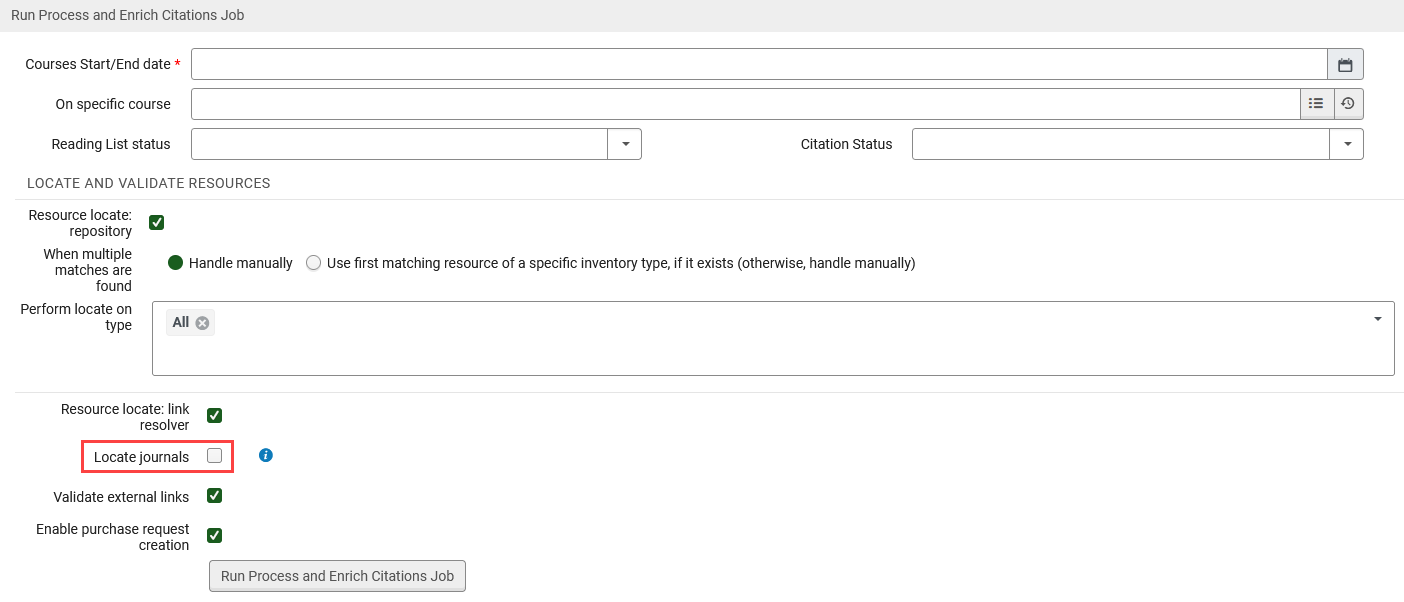 Locate Journals - Process and Enrich Citations job
 Locate Journals - Reading List Citation Process and Enrich job
Upcoming Issues to Note
Data Dictionary E-Inventory
As part of an ongoing project and in alignment with the Analytics Community of Practice, Ex Libris is currently enriching the documentation of analytics field tables with additional information. This initiative aims to assist and support users in comprehending how our Alma data is presented within the realm of Analytics fields. For this month, the following tables within the E- E-Inventory subject area were updated:
Updates to OCLC Control Number Indexes
(Updated 23 October 2025)
In the May 2026 release, we will be changing the following indexes.
- Other System Number (035a)
- Other System (035a) Exact
- OCLC Control Number (035a)
- Other System Number (035z)
- OCLC Control Number (035z)
- Other System Number (035a+z)
- OCLC Control Number (035a+z)
The indexing of these fields will no longer split the values. For example, searching for SCR will now return values such as 202408SCR.
Resolved Issues
| SF number | Area | Description |
|---|---|---|
| 08000442 URM-250171 | APIs | Previously, the GET Users API returned roles outside the restricted library scope defined in the API restriction profile. This was fixed. |
| 08103666 URM-313721 | Acquisitions | Previously, inactive interested users could still appear in the interface and receive email notifications when an item was received or activated, or when a PO line was canceled. This was fixed. |
| 08101212 URM-254884 | Acquisitions | Previously, the ERP export using the profile Invoice Payment job mistakenly displayed the message More than 1000 records were found - The job can handle 1000 records at a time. Consider rerun, which is no longer valid. This error message was removed. |
| 07886043 URM-249684 | Acquisitions | Previously, there was an issue when checking the level URL and the link to an unsuppressed Bibliographic record when using the Order Now action. This was fixed. |
| 08128163 URM-314344 | Acquisitions | In some cases, an issue occurred while loading the Order It! page because some user preference data referenced by Order It! was no longer available in the institution. This was fixed. |
| 08038654 URM-252404 | Acquisitions | In some cases, the Default 2nd – 5th reporting code fields were blank when they should have displayed content, and labels were missing. This was fixed. |
| 07989399 07894508 URM-254572 | Acquisitions | Previously, when the parameter po_line_description_update_upon_bib_change(Configuration Menu > Acquisitions > General > Other Settings) was enabled, an error was displayed when ordering a PO Line from the Metadata Editor after editing a Network bibliographic record. This was fixed. |
| 08101632 URM-306228 | Acquisitions | Previously, the No. of Units Arrived in the POLineClaimLetter was incorrect when multiple items were ordered and some were already received. This was fixed. |
| 08097659 URM-254918 | Acquisitions | Previously, the Rollover Ledger job deleted funds even after transactions were created by a POL rollover because it checked the balance of the fund instead of checking the existence of Encumbrance and Expenditure transactions. This was fixed. |
| 07986497 08168193 URM-248515 | Acquisitions | In some cases, when adding Vendor Interface Details to the Interface Name dropdown list, the dropdown list was not populated. This was fixed. |
| 08013347 08115016 URM-248353 | Acquisitions | Previously, when using the ERP export for Split by Owner files, not all invoices were uploaded. This was fixed. |
| 08084949 URM-253313 | Acquisitions | During the rollover to Fiscal Year 2026 (FY-2026), some ledgers were rolled over without some or all of their funds, which then caused an error. This was fixed. Alma now checks if a fund already exists before copying it, so all relevant funds will be included in future rollovers. |
| 06621632 08129306 URM-248325 | Analytics and Insights | Previously, the Asset Modified by field was mapped incorrectly. This was fixed. |
| 08149098 URM-314322 | Analytics and Insights | Previously, in the Funds Expenditure subject area, transactions with deleted invoice lines were removed from the report when adding a field from the Invoice Line folder. This was fixed. |
| 08088216 08075310 URM-314044 | Analytics and Insights | Previously, the cost of an order appeared as a duplicate for the Network Zone environment in the cost usage Analytics report. This was fixed. |
| 08109498 URM-306105 | Analytics and Insights | Previously, the OpenURL Context Details Request Type field could not be used with fields from the OpenURL Service Details folder. This was fixed. |
| 08125561 URM-314996 | Fulfillment and Resource Sharing | Patron Services: When a patron exceeded their overdue recalls limit, the message displayed with the number of overdue recalls had a decimal point in it, for example,Limit of 2.0 exceeded instead of Limit of 2 exceeded. This was fixed. |
| 08096272 URM-306020 | Fulfillment and Resource Sharing | In certain parts of the digitization workflow, some labels were displayed in English even when using a non-English interface. This included. These interface elements now correctly display in the selected language. |
| 08099493 URM-254892 | Fulfillment and Resource Sharing | Previously, booking requests submitted via Primo were not handled at the item level, even when the item_level_requesting parameter (Configuration > Fulfillment > Other Settings) was set to true. This parameter is intended to ensure that all requests from Primo occur strictly at the item level. This issue has now been resolved. Booking requests through Primo will be correctly treated as item-level requests when the setting is enabled. |
| 08067345 URM-254635 | Fulfillment and Resource Sharing | Previously, an error was generated when switching between circulation desks and acquisitions units while on the Return Items page. This was fixed. |
| 08047866 URM-254182 | Fulfillment and Resource Sharing | Previously, the Requests—Restore Temporarily Shelved Items job report (Fulfillment > Advanced Tools > View Restore Request Jobs) displayed inconsistent numbers for created, existing, and failed requests. This was fixed. |
| 08020350 08025905 08078349 08036492 08017536 URM-249835 | Fulfillment and Resource Sharing | Previously, in the Patron Services page, after a patron session timeout, the system would revert to the classic UI when the staff re-entered a patron's name. The was fixed. |
| 07960652 08058122 URM-249202 | Fulfillment and Resource Sharing | Previously, the system attempted to connect to the photo server with a default timeout of 10 seconds. In cases where the photo server was misconfigured or a user had no associated photo, this sometimes caused delays on the User Details and Patron Services pages. This has been fixed by reducing the default photo server connection timeout from 10 seconds to 2 seconds (2000 ms), minimizing the impact of connection issues on page performance. |
| 08001954 URM-248571 | Fulfillment and Resource Sharing | Previously, the payment popup in the Patron Services Fines and Fees view displayed a total amount including transferred fees. This was fixed. Now, only the payable amount is displayed. |
| 07925529 URM-243636 | Fulfillment and Resource Sharing | Previously, when switching between different FN members in Primo VE My Account, historical loans were displayed even when the parameter view_historical_loans_in_primo(Configuration Menu > General > General Configuration > Other Settings) was set to false. This was fixed. |
| 07905307 07977013 07933104 07893147 08016993 08082273 08003077 07907687 URM-243307 | Fulfillment and Resource Sharing | Previously, when changing the due date on multiple loans, the new due date was not displayed in the This Session filter. This was fixed. |
| 08119267 URM-254949 | Fulfillment and Resource Sharing | Bulk Fine Waiving: The Creation Date Range calendar was previously limited, preventing users from selecting dates older than one year. This restriction was removed. |
| 08030898 URM-252024 | Fulfillment and Resource Sharing | Previously, the drop-down menu in Receiving department items only showed the libraries from the Served Libraries list, and for a circulation desk, only the owing library was displayed as the served library. This was fixed. |
| 08104903 07964499 URM-314466 | Fulfillment and Resource Sharing | Previously, some system messages in letters, especially those not explicitly configured in the patron-facing code table, were displayed in English, even when the letter was sent in another language. This led to partially untranslated content for end users. This was fixed. |
| 07964499 URM-253873 | Fulfillment and Resource Sharing | Non-English Courtesy Notices: Previously, the renew_status contained the English term for the loan process status, e.g.recalled. This was fixed, and now it contains the translated value according to the user's preferred language. |
| 07863695 URM-242184 | Fulfillment and Resource Sharing | The Next Step field was missing from the exported file on Return Items & Manage Patron Services Return list. This was fixed. |
| 08098582 08166426 URM-306021 | Fulfillment and Resource Sharing | In some cases, an SLNP message failed to retrieve the expected record even though the record existed in Alma. This was fixed. |
| 08150375 08091128 08132796 URM-254452 | Fulfillment and Resource Sharing | Previously, the Update/Notify Users job report's events page showed the User ID: record has been deleted error instead of the counter events. This was fixed. |
| 08200702 08054801 08105692 08103697 08205242 URM-250180 | Metadata & Linked Open Data | In some cases, the Export to Excel for search results failed. This was fixed. |
| 08109523 URM-313440 | Metadata & Linked Open Data | Previously, for electronic collection descriptive records, the availability indication on the electronic inventory icon and the electronic collection smart-link always showed as available, even when a collection was not active. Now, the availability indicator is green only when there is an active electronic collection. |
| 07972646 URM-246861 | Metadata & Linked Open Data | Previously, when a holding was edited by opening it from the item editor, after the metadata editor was closed, the search was returned instead of the item editor from where the user started to edit the holding. This was fixed. |
| 07982079 URM-247974 | Metadata & Linked Open Data | When authority records from external systems for vocabularies that use direct IDs were imported into the Community Zone, duplicate data was created in the harvest logs, which resulted in duplicate entries in the Authority Control Task List when institutions synchronized with the Community Zone. This was fixed. |
| 08113367 URM-314217 | Metadata & Linked Open Data | Previously, other formats were missing from the Export Bibliographic Records job (e.g., RDA/RDF). This was fixed. |
| 07867766 07826965 06785838 07824983 URM-213108 | Metadata & Linked Open Data | Under some configurations, it was possible that during an import job, a temporary record in the institution was not deleted when the institution record was linked to a network record. This was fixed. |
| 08107845 08133749 07097936 08132334 08175413 07841002 07084747 URM-239690 | Resource Management | Previously, if the day and month information did not exist in CDI records with PubMed enrichment, the PMID parameter was removed. This was fixed. |
| 07999436 URM-252489 | Resource Management | Previously, changing an item's location with the Change physical item information (permanent location) merged the holdings despite having different $t s (Copy Id). This was fixed. |
| 07969568 URM-249705 | Resource Management | Previously, when updating the Dynamic URL field under the Change Service Linking Information section in the Change Electronic Collection Information job, the necessary processing was not applied. As a result, the Test Access action in the portfolio editor did not work properly. This was fixed. |
| 08160354 URM-314588 | Resource Management | Previously, the IIIF Manifest included an empty summary without quotations. This was fixed. |
| 08083738 URM-313631 | Resource Management | Previously, users could not select or copy from OCR documents in the Alma digital viewer. This was fixed. |
| 07721281 URM-253624 | Resource Management | Previously, Draft Deposits appeared in the repository even when the deposit was not submitted. This was fixed. Draft deposits are not searchable in Alma. |
| 07951330 08162562 08176829 URM-249857 | Resource Management | Previously, the CC (captions) button was not available in the digital viewer for a video opened in Safari. This was fixed. |
| 08116975 URM-313664 | Resource Management | Previously, when the list of records retrieved by an OAI request was empty and the set spec contained special characters that were encoded in the OAI request, the request element set value was not decoded. This was fixed. |
| 07898716 07932025 07894731 URM-245116 | User Experience, Accessibility and Infrastructure | Previously, even though the Users SYNCHRONIZE scheduled job was set to run every day, every 8 hours, the schedule time changed on Sundays. This was fixed. |
| 07883396 URM-313542 | User Experience, Accessibility and Infrastructure | Previously, when selecting a user from the Manage Patron Services, the User Details sliding panel blocked the Cloud Apps icon. This was fixed. |
| 07964903 URM-249798 | User Experience, Accessibility and Infrastructure | Previously, the values in the “Change Type” and “Destination” columns (Scan In Items > Change Item Information tab > Scanned Items list) were not translated and were displayed in English (i.e., "Permanent" and "Reshelve"). This was fixed, and the values are properly translated. |
| 08094421 08098139 URM-254119 | User Experience, Accessibility and Infrastructure | In some cases, the starts with option did not work when searching the Local Control Field 009. This was fixed by adding the contains exact phrasestarting with option. |
Page tags: article:topicproduct:almacontent:Documentationlang:english
