
Alma July 2025 Release Notes
Upcoming Issues to Note
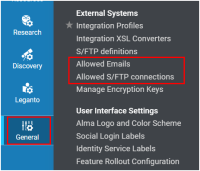
Allowed Emails and Allowed S/FTP Configuration Lists are Now Kept During Premium Sandbox Refresh
Updated: 19 August 2025 During Premium Sandbox (PSB) refresh, we now make sure the allowed email and allowed S/FTP configuration lists are kept so that users don't need to waste time manually restoring after the refresh.
Simplifying Custom Domain Certificate Renewals
We would like to update you about a change to how SSL certificates are handled, eliminating the need to renew certificates annually.
Starting July 2025, we will be moving to a new certificate management tool, in which certificates will be automatically generated and renewed. This move will be done gradually throughout the year, and by December 31st all customers (excluding those in China) will have been moved to the new tool. No action is required on your side. For additional information please refer to this article.
If you have any questions please contact the support team.
Removal of Gender Information
As published in the June release notes, gender information will be removed from all user-related information in Alma, including Analytics, in the upcoming August release. The deletion will not be reversible.
Updated Documentation for Analytics Tables
As part of an ongoing project and in alignment with the Analytics Community of Practice, Ex Libris is currently enriching the documentation of analytics field tables with additional information. This initiative aims to assist and support users in comprehending how our Alma data is presented within the realm of Analytics fields. For this month, the following date tables were updated:
| Subject Area | Table |
|---|---|
| Analytics Objects (see Analytics Objects online help) |
|
| Borrowing Requests (Resource Sharing) - see Borrowing Requests online help |
|
| Course Reserves (see Course Reserves online help) |
|
| Digital Inventory (see Digital Inventory online help) |
|
| Digital Usage (see Digital Usage online help) |
|
| Digital Waitlist (see Digital Waitlist online help) |
|
| E- Inventory (see E-Inventory online help) |
|
| Fines and Fees (see Fines and Fees online help) |
|
| Fulfillment (see Fulfillment online help) |
|
| Lending Requests (Resource Sharing) - see Lending Requests online help |
|
| Requests (see Requests online help) |
|
| Titles (see Titles online help) |
|
| Usage Data (COUNTER) - see Usage Data online help |
|
Main Features
New Electronic Collection Overview Data Visualization Now Available
July 2025 Analytics and InsightsURM-211293
The new Electronic Collection Overview Data Visualization is now available under Shared Folders > Alma > E-lnventory > Data Visualization > Electronic Collection Overview:
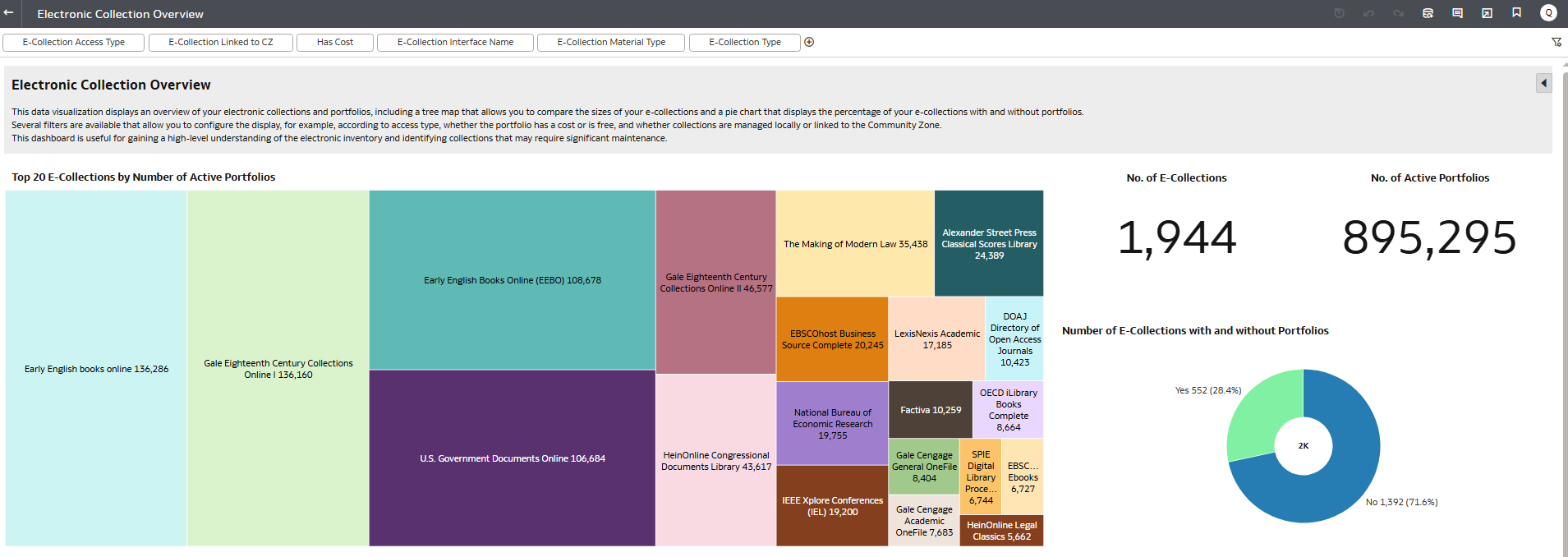
This data visualization displays an overview of your electronic collections and portfolios, including a tree map that allows you to compare the sizes of your e-collections and a pie chart that displays the percentage of your e-collections with and without portfolios. Several filters are available that allow you to configure the display, for example, according to access type, whether the portfolio has a cost or is free, and whether collections are managed locally or linked to the Community Zone.
This dashboard is useful for gaining a high-level understanding of the electronic inventory and identifying collections that require significant maintenance.
New RapidILL Borrowing and Lending Dashboard Now Available
July 2025 Analytics and InsightsURM-246670
The new RapidILL Borrowing and Lending Dashboard is now available. It contains 13 reports in 11 tabs that display information on your institution's borrowing and lending. The last tab contains an explanation of the reports in the dashboard:
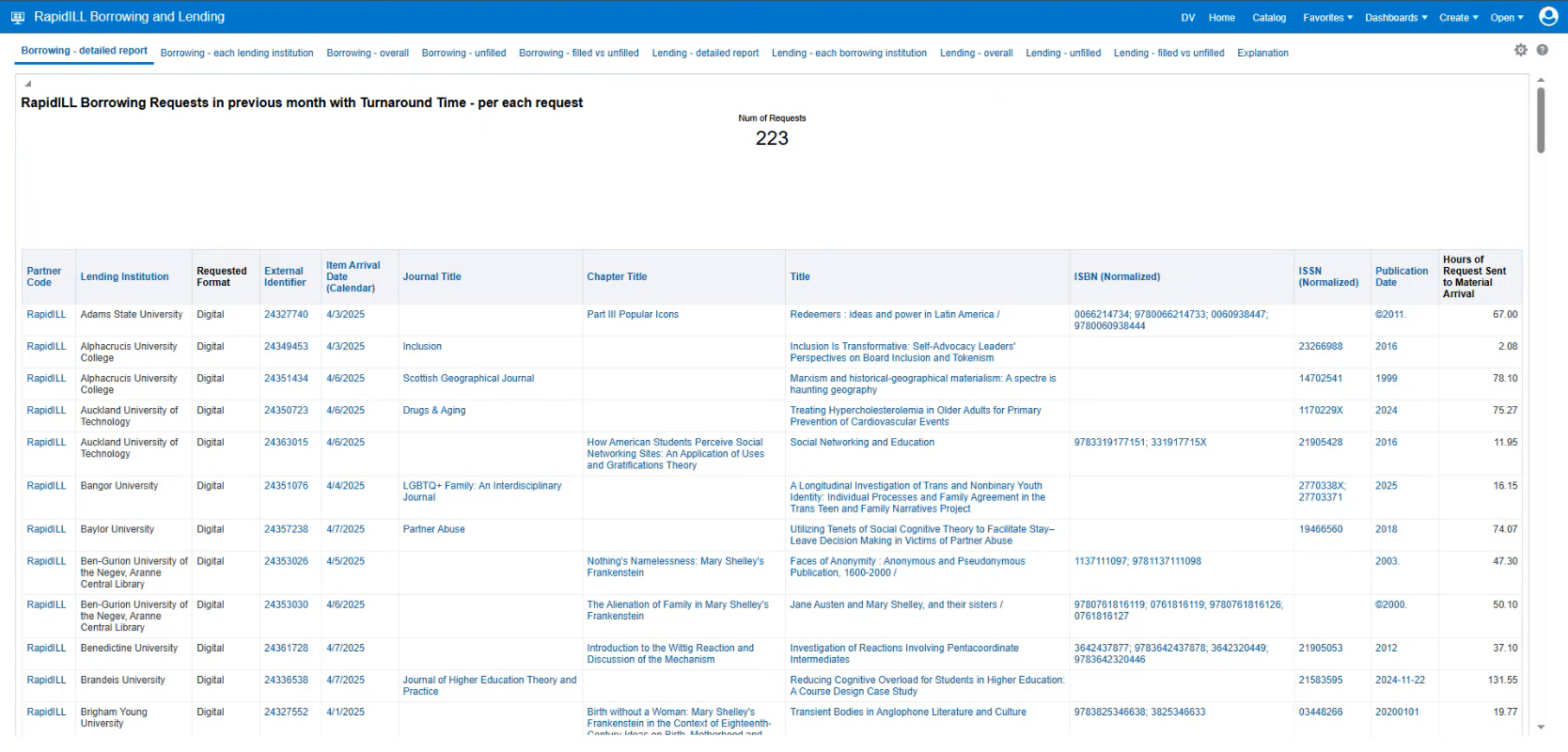
This dashboard replaces the current need to collect RapidILL statistics from within the external RapidILL interface and instead integrates all of the analytics functionality in one location.
In addition, the following out-of-the-box analytics reports are now available. For more information, see RapidILL.
- RapidILL Borrowing Requests in previous month with Turnaround Time - overall
- RapidILL Borrowing Requests in previous month with Turnaround Time - per each lending institution
- RapidILL Borrowing Requests in previous month with Turnaround Time - per each request
- RapidILL Borrowing Requests Unfilled in previous month
- RapidILL Borrowing Requests filled in previous month - only the number
- RapidILL Borrowing Requests Unfilled in previous month - only the number
- RapidILL Lending Requests in previous month with Turnaround Time - overall
- RapidILL Lending Requests in previous month with Turnaround Time - per each borrowing institution
- RapidILL Lending Requests in previous month with Turnaround Time - per each request
- RapidILL Lending Requests Unfilled in previous month
- RapidILL Lending Requests filled in previous month - only the number
- RapidILL Lending Requests Unfilled in previous month - only the number
- RapidILL Reports Explanation
Additional Enhancements
- July 2025 Analytics and InsightsURM-233402 The Normalized Source field (Link Resolver Usage > OpenURL Context Details) displays a normalized and human-readable name representing the Source. Some Source values did not have a readable equivalent. For this enhancement, the values of this field were enhanced to include additional normalized Source values.
Resolved Issues
| SF number | Area | Description |
|---|---|---|
| 07940917 URM-247293 | Acquisitions | When trying to relink a PO line that had inventory from more than one bibliographic record (which is not allowed), an incomprehensible error message was displayed. This was fixed, and now the correct error message is displayed. |
| 07106590 URM-226147 | Acquisitions | The 035 field was removed from new bibliographic records for Purchase Requests. This was fixed. |
| 07970444 URM-247436 | Acquisitions | Some approved purchase requests did not have a linked PO Line. This was fixed. |
| 07864077 URM-245555 | Acquisitions | Alma was slow when processing PO lines that were waiting for manual renewal. This was fixed. |
| 07978575, 07886116 URM-244030 | Acquisitions | There was an issue with duplicated labels in some rare cases. This was fixed. |
| 07710688 URM-235363 | Acquisitions | For records with many relations, receiving an item was taking too long or failing. This was fixed. |
| 07979700 URM-247095 | Acquisitions | The SUSHI Harvesting job was completed with errors due to missing metric types. This was fixed, and two new metric types were added. |
| 07977903 URM-246850 | Acquisitions | In some cases, the harvested files for the R5.1 release could not be viewed. This was fixed and now, after copying the R5 account to R5.1 , the View History action of R51 will not display the history for R5. |
| 07756361 URM-246762 | Analytics and Insights | The Interested Users field of the PO Line dimension displayed inactive users. This was fixed, and now only active users appear. |
| 07967825 URM-246477 | Analytics and Insights | When scheduled reports failed to be sent, incorrect error messages were displayed. This was fixed. |
| 07894052 URM-242708 | API | The Get/Set API for sets of holdings did not work. This was fixed. |
| 07178261 URM-236988 | API | For the Retrieve PO lines API, the results were not sorted correctly in some cases. This was fixed. |
| 07954170 URM-248529 | Digital Resource Management | In some cases, values in multi-select combo boxes presented a corrupted value when a deposit was submitted before all mandatory fields were filled. This was fixed. |
| 08049266, 08023258 URM-248518 | Digital Resource Management | An error occurred on the Approve Deposits page. This was fixed. |
| 07863484 URM-248514 | Digital Resource Management | The Download Digital Titles Inventory job sent the Download Representation Letter instead of the Download Digital Titles Inventory Job Letter. This was fixed, and now the job sends the correct letter. |
| 07941464 URM-248130 | Digital Resource Management | When EPUBs were opened in the Digital Viewer, the text box was displayed slightly out of the viewer box. This was fixed. |
| 07976597 URM-247091 | Digital Resource Management | The full list of representations opened very slowly for a title with many representations. This was fixed. |
| 07994261 URM-246877 | Digital Resource Management | The ETD template would not open in the Metadata Editor, and the error message, "No record found. You may have insufficient privileges," appeared. This was fixed. |
| 08022816 URM-248749 | Electronic Resource Management | Previously, portfolios with special characters in the title could not be ordered from the new titles search. This was fixed. |
| 07964384, 08006712 URM-246237 | Electronic Resource Management | In some cases, the Delete Electronic Collection job failed. This was fixed. |
| 07977839 URM-248521 | Fulfillment and Resource Sharing | The enabled column did not appear in the exported Excel from the Digitization workflow rules page. This was fixed. |
| 07999009, 07943191 URM-246329 | Fulfillment and Resource Sharing | When loaning an item attached to an expired booking request, the request was still available at the Expired Hold Shelf list. This was fixed. |
| 07905956, 07892831 URM-242772 | Fulfillment and Resource Sharing | Fulfillment Administrator and General System Administrator roles in read-only mode could edit multiple Fulfillment configurations. This was fixed. |
| 07942793 URM-246623 | Fulfillment and Resource Sharing | In some cases, the Work Order Department In-Process Items list threw an error when filtered by the Request filter. This was fixed. |
| 07953112, 07967770, 07930244 URM-243743 | Fulfillment and Resource Sharing | When toggling between the Network and Institution tabs in the Requests list for Manage Patron Services, the filters were not changed accordingly. This was fixed. |
| 07827005 URM-240601 | Fulfillment and Resource Sharing | When an item on a reading list had a Move Temporarily request, the Due Back Date was automatically set to a default system date after scan-in. This was fixed, and now the Due Back Date remains empty unless a specific return date is provided. |
| 07811049, 07935519 URM-243891 | Fulfillment and Resource Sharing | For lending requests, in some cases, the pop-up screen that appeared when an item was returned displayed the permanent location and not the temporary location. This was fixed. |
| 07803946, 07903082 URM-243031 | Fulfillment and Resource Sharing | A specific configuration caused the "held by" functionality to fail. This was fixed. |
| 07939769 URM-244899 | Fulfillment and Resource Sharing | Previously, the Hide Section for the following user groups did not work as expected. This was fixed. |
| 07873686 URM-246904 | Fulfillment and Resource Sharing | Previously, when updating a course, the old search ID was not deleted. This was fixed. |
| 07931246 URM-246638 | Linked Open Data | Some records' availability information was not displayed in the Get It section due to an internal error caused by an incorrect configuration in the "General Electronic Services Bib Fields Enrichment" mapping table. Now, the mapping table's rows with incomplete information are ignored, and only enabled rows are considered. This was fixed. |
| 07907393 URM-246612 | Linked Open Data | Previously, automatic enrichment did not work when there was a NAMES field (1XX or 7XX) without a second indicator=7. This was fixed. |
| 07905532, 07960908 URM-242899 | Metadata Management | The published set contained search results with invalid IDs, causing errors in the publishing job. These IDs are now filtered out of the publishing process. |
| 07896431 URM-244019 | Metadata Management | Some thumbnails were not displayed in the All Titles search. This was fixed. |
| 07917476, 07950158 URM-248097 | Metadata Management | After relinking a portfolio to another bibliographic record, the electronic portfolios section and drawers were not refreshed. This was fixed. |
| 07884669 URM-242186 | Metadata Management | There was no keyboard shortcut when moving between search scopes in the new All Titles search. This was fixed, and Alt + Z + number was added as a search scope toggle shortcut. |
| 08016525 07866428 07864560 07792044 07769809 URM-242845 | Metadata Management | Physical Items search: Checkboxes were not visible for users without a Cataloger role. This was fixed. |
| 07989171, 07750598, 07876408 URM-234491 | User Experience, Accessibility & Infrastructure | OAI import profile jobs repeatedly got stuck in the initialization stage. This was fixed. |
| 07874789 URM-241336 | User Experience, Accessibility & Infrastructure | Warnings in the Purchase Order list were not translated in some cases. This was fixed. |
Page tags: article:topicproduct:almacontent:Documentationlang:english
