Configuring Patron Registration Forms
En las siguientes áreas, puede configurar qué campos aparecen en el Formulario de registro de usuario:
- User Registration (Admin > Manage Users)
- Patron Registration (Fulfillment > Manage Patron Services > Register New User button)
- Edit User ( Manage Patron Services )
- Edit User( Manage Users )
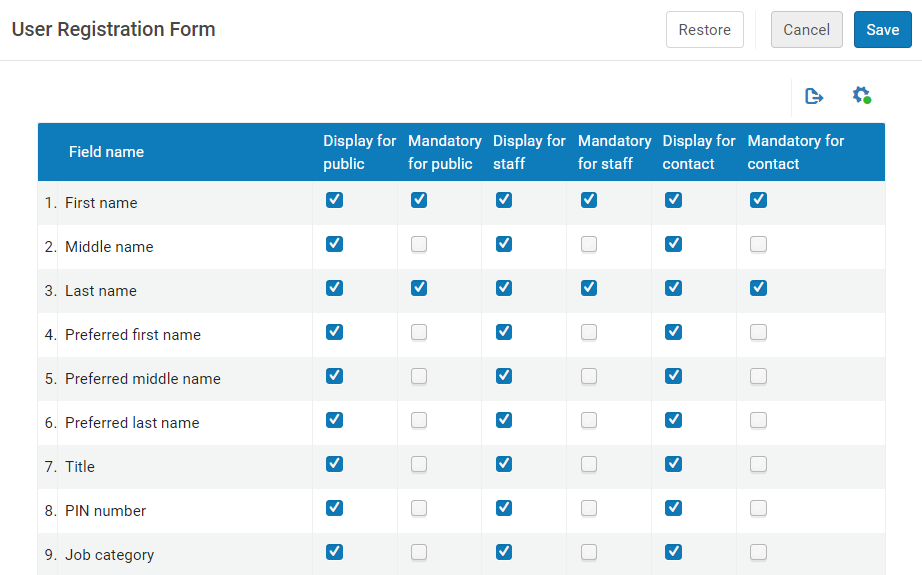
Esto permite al usuario configurar formularios que se ajusten a las necesidades de la biblioteca y manejen solo la información requerida por esta. Accessing this option enables users to select the fields in the user registration form that they want to be visible in the form, with the exception of the mandatory fields.
To configure the User Registration Form:
- Access the User Registration Form (Configuration menu > User Management > User Details > User Registration Form).
- In the table, select the fields to be displayed to the various audiences (such as public or staff).
- Click Save.
Además, es posible determinar qué tipos de direcciones/correos electrónicos/teléfonos aparecen en el formulario. This option can be activated by Ex Libris. Please contact support for assistance.