
Patron Charges Configuration
Configuring Fines/Fees Behavior
- Administrador de usuarios
- Administrador general del sistema
Se puede configurar la disponibilidad de multas y cuotas predefinidas, así como si dichas multas/cuotas a) pueden eximirse, b) pueden ser añadidas manualmente a un usuario, y/o c) incluyen IVA, y qué porcentaje. También se pueden añadir hasta diez multas/cuotas adicionales; estas se encuentran desactivadas por defecto. Contactar con el Soporte al cliente de Ex Libris para habilitar estos tipos y personalizar su descripción.
You configure fines and fees on the Fine Fee Type Definition mapping table page (Configuration Menu > User Management > Patron Charges > Fines/Fees Behavior). For more information about mapping tables, see Mapping Tables.
To configure when and for whom notifications are sent to users, see Configuring Fines/Fees Notifications.
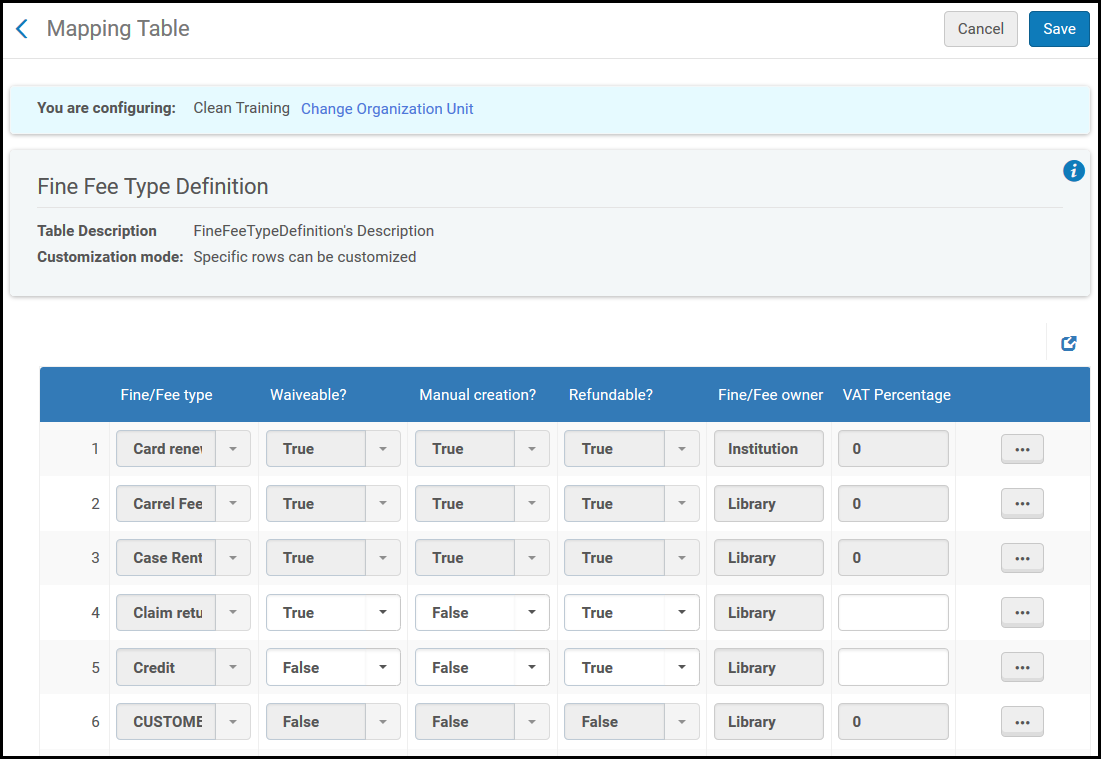
Se puede configurar o restaurar filas en esta tabla. Editar los campos como se indica a continuación:
- Fine/Fee type - The name and label of the fine. Esta solo puede ser cambiada por el personal de Ex Libris.
- Waiveable? - Si esta cuota se puede eximir. See Managing User Fines and Fees.
- Manual creation? - Si esta cuota se puede añadir manualmente a un usuario. See Managing User Fines and Fees. Alguna multas/cuotas son añadidas automáticamente como resultado de una regla, tarea o proceso; marcar este campo como Falso no tiene efecto en las multas/cuotas automáticas. Por defecto, algunas cuotas pueden añadirse manualmente y otras cuotas no.
- Refundable? - Este campo actualmente no tiene ningún efecto.
Part or all of the lost item replacement fee may be automatically refunded by Alma if the patron returns a physical item after the fee was assessed (see Lost Item Replacement Fee Refund Ratio). The Refundable? field on this page has no effect on this process.
- Fine/Fee owner- Whether the fine is owned by the library or the institution. The only effect this field has is that, if the value is Library, then you must be at a circulation desk to manually add the fine/fee to a user. See Managing User Fines and Fees.
- VAT Percentage- A VAT percentage between 0 and 100. Por defecto, el IVA es 0. El importe del IVA está incluido en el valor total calculado para la cuota o multa. Por ejemplo, si a un usuario se le cobra $10 por una llave de casillero y el valor del porcentaje de IVA de una clave casillero es 10 (10%), al usuario se le cobrará un total de $10, en los que $9,09 corresponden a la cuota y $0,91 al IVA. See Managing User Fines and Fees. El valor del IVA se envía junto con el resto de la información financiera relevante al sistema de tesorería, y aparece en la tabla Analytics USER_FINES_AND_FEES.
- Updated By- The user who last changed fields in this row.
- Last Updated- The date and time of the last change to this row.
Configuring Reasons for Waiving Fines/Fees
- Administrador de usuarios
- Administrador general del sistema
Se pueden configurar las razones para la exención de multas/cuotas. These reasons appear in a drop-down list when you are waiving a fine or fee (see Managing User Fines and Fees).
You configure the reasons for waiving fines/fees on the Fine Fee Transaction Reason code table (Configuration Menu > User Management > Patron Charges > Reasons for Waiving Fines/Fees). For more information about code tables, see Code Tables.
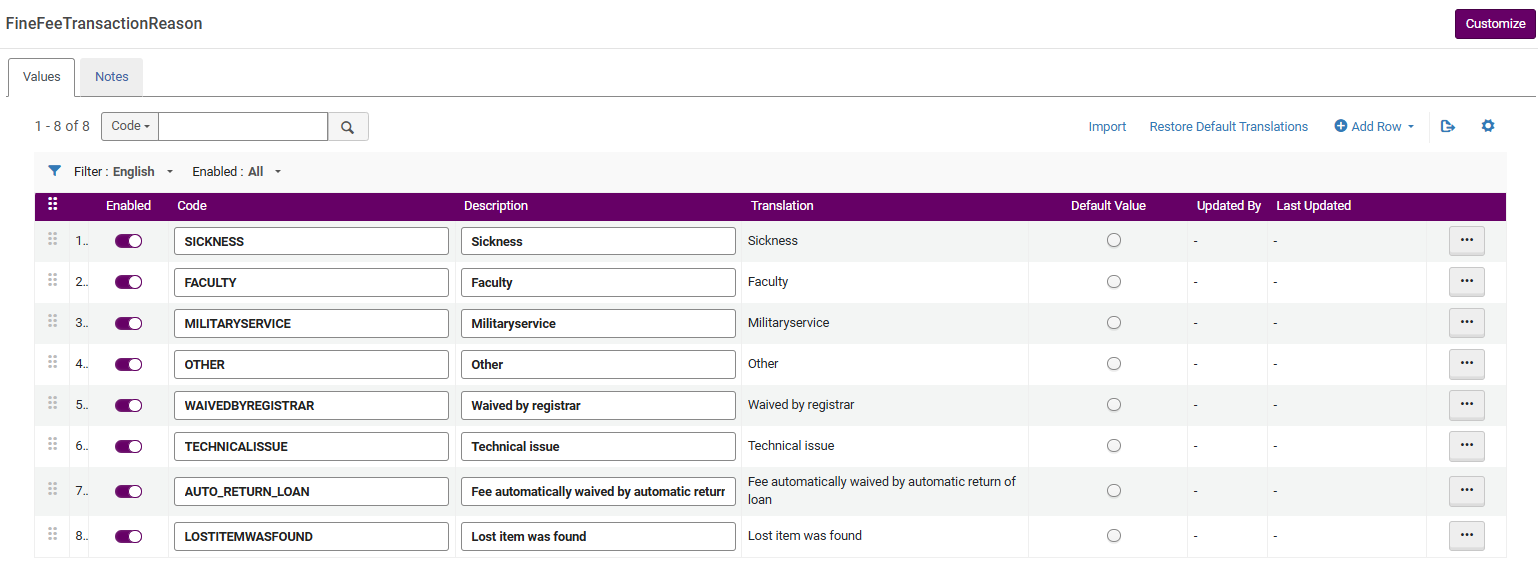
Se pueden añadir, editar y eliminar razones. También se pueden activar y desactivar razones.
No hay límite en la cantidad de razones personalizadas que puede añadir.
Configuring Fines/Fees Notifications
- Administrador de usuarios
- Administrador general del sistema
Se pueden configurar los criterios para cuando se notifique a los usuarios sobre sus multas y cuotas al ejecutar la tarea de Notificación de multas/cuotas You schedule or run this job on the Fulfillment Jobs Configuration page (see Configuring Fulfillment Jobs) and you can also view this job on the Monitor Jobs page (when scheduled, as it runs, or after it runs; see Viewing Scheduled Jobs).
You do this by creating fine/fee notification profiles. Es posible seleccionar los importes mínimos y máximos para enviar una notificación a grupos de usuarios específicos, bibliotecas, tipos de multa/cuota y establecer una cuota de notificación, si se desea. Se puede seleccionar si la notificaciones se envían por correo electrónico/SMS, se imprimen (para ser enviadas por correo postal o entregadas por el bibliotecario), o ambas opciones. Cuando se ejecuta la tarea de notificación de multas/cuotas, todos los perfiles habilitados cuyo criterio sea verdadero, generan correos electrónicos, SMS y/o impresiones.
You manage fine/fee notification profiles on the Fines/Fees Notification Profile List page (Configuration Menu > User Management > Patron Charges > Fines/Fees Notification Profiles). La columna Crear notificación de cuota indica si el perfil tiene una cuota de notificación definida.
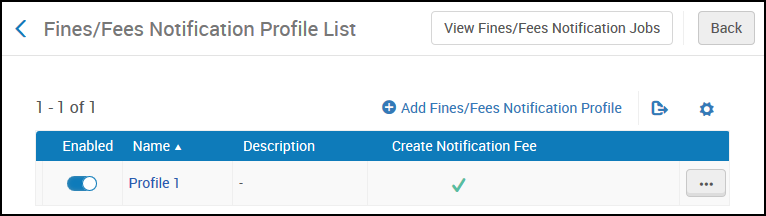
Se puede añadir, editar o borrar perfiles y también habilitarlos o desactivarlos.
Se debe configurar al menos un perfil de notificación de multas/cuotas para que la notificación se envíe a los usuarios.
To configure notifications of fines and fees:
- On the Fines/Fees Notification Profiles List page, select Add Fines/Fees Notification Profile to add a new profile or select Edit in the row actions list to edit an existing profile.

- Rellenar los campos relevantes. Los campos son:
- Name (mandatory) - Profile name
- Description - Profile description
Los siguientes criterios deben coincidir en su totalidad para que las notificaciones sean enviadas.
- Minimum amount for user (mandatory) - Send notification if the total amount of a user's fines, according to the selected criteria, is equal to or greater than this value. Solo valores positivos; deben usarse decimales. For values less than 1, use a leading 0, for example 0.45, not .45.
- Maximum amount for user - Send notification If the total amount of a user's fines, according to the selected criteria, is less than this value.
- User group - If a default user group was configured, it is selected automatically if the field is left empty. Si no se configuró un grupo de usuarios y el campo se deja en blanco, se envía una notificación para todos los tipos.
- Skip Patrons with Loans - When selected, do not send a notification to users with active loans with any status, including Claim Returned and Lost Loan. Por defecto, esta opción no está seleccionada.
- Only Active Patrons - When selected, do not send a notification to inactive users and/or external users with expired accounts. Por defecto, esta opción no está seleccionada.
- Fines/fees owner- Send notification for fines owed to specific libraries or the institution. Las notificaciones se envían por separado para cada biblioteca, y las coberturas mínimas/máximas se calculan por separado para cada biblioteca. Por ejemplo, si el umbral es $100 y el usuario posee multas de $75 en dos bibliotecas, no se envía ningún mensaje. Si ambas multas superan los $100, se envían dos mensajes, uno por cada biblioteca. Dejar el parámetro vacío es igual a enumerar todas las bibliotecas.
- Fines/fees type - Send notification for specific fine/fee types. Si se deja vacío, se envía una notificación a todos los tipos. Los límites mínimos y máximos se calculan sobre la base de todos los tipos seleccionados.
- Fines/fees Created Before (days)- Send notification if the fine is owed for more than the specified number of days.
- Fines/fees Created After (days) - Send notification if the fine is owed for less than the specified number of days. Por ejemplo, si Creada antes de se establece a 30 y Creada después de se establece a 50, el criterio incluirá solo las multas creadas desde hace más de 30 días pero con menos de 50 días de creación.Si el criterio anterior encuentra una coincidencia, la notificación se envía según se hayan configurado los campos restantes.
- Create Notification Fee - When this check box is selected, the Notification Fee Amount field is also displayed.
- Notification Fee Amount - The handling fee being issued for the notification. This field only displays when Create Notification Fee is checked and is mandatory when visible. El valor debe ser mayor que cero.
- Letter send format- Whether to send email/SMS, print a letter, or both. Envía la Carta de notificación de multas\cuotas completa. See Configuring Alma Letters.
- Printer- If you selected to print a letter, select the printer.
- Select Save.
Configuring Bursar Transaction IDs
- Administrador de usuarios
- Administrador general del sistema
Muchas instituciones exportan multas y cuotas a un sistema de tesorería exclusivo. Normalmente, las multas y tarifas exportadas se consideran cerradas en Alma, puesto que pasan a gestionarse fuera del ámbito de la biblioteca. Instead, you can export the fines and fees with a unique sequence called a bursar transaction ID. Al utilizar este ID, el sistema de tesorería notifica a Alma cuándo se deben cerrar las multas y cuotas. For more information about exporting to a bursar system, see Bursar Systems.
Alma genera IDs únicos para cada transacción en el sistema de tesorería. You can define and manage multiple sequence types for multiple bursar systems on the Bursar Transaction ID Sequence Configuration page (Configuration Menu > User Management > Patron Charges > Bursar Transaction ID).
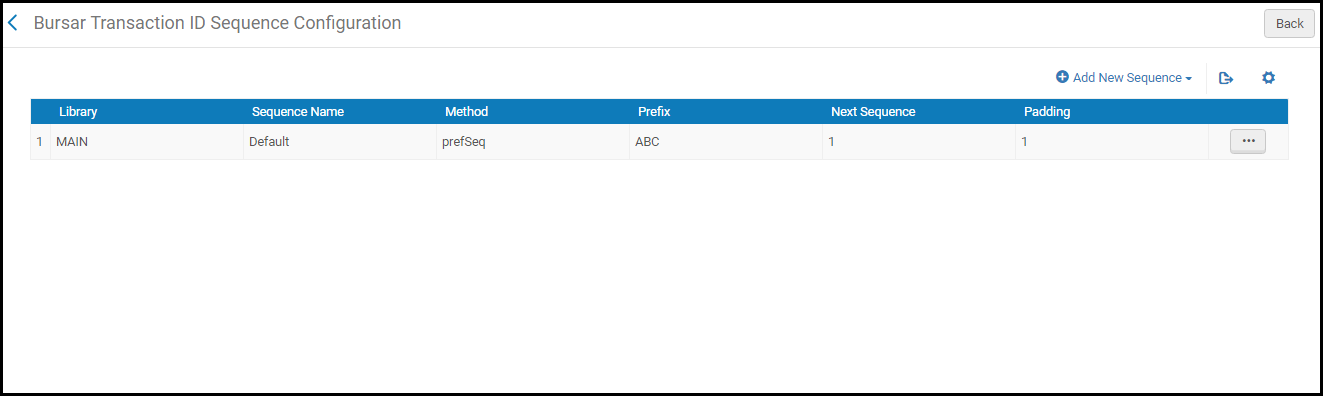
En esta página se puede:
- Añadir una secuencia (véase más adelante). Solo puede definirse una secuencia para cada institución y/o biblioteca
- Delete a sequence - Select Delete in the row actions list and select Confirm in the confirmation dialog box.
- Edit a sequence - Select Edit in the row actions list and see the steps below for adding a sequence.
- Establecer manualmente el siguiente número en una secuencia (véase más adelante).
To add a sequence:
- On the Bursar Transaction ID Sequence Configuration page, select Add New Sequence and enter the following values:
- Library- The library that uses this sequence. Si no selecciona una biblioteca, todas las bibliotecas de la institución usarán esta secuencia.
- Sequence Name- A unique name.
- Sequence Start- The initial number for the sequence. Introducir un valor numérico. Cada exportación posterior agregará 1 a este número.
- Method- Currently, the only option is Prefix + Sequence.
- Prefix- A prefix for the sequence. For example, if the prefix is ABC and the current sequence number is 32, the ID is ABC32.
- Padding- The number of digits to use for the number. For example, in the above example, if the padding is 10, the ID is ABC0000000032.
- Select Add Row to add the sequence.
To manually set the next number in a sequence:
- On the Bursar Transaction ID Sequence Configuration page, select Set Next Sequence Value in the row actions list for the sequence. The Set Next Number Value dialog box appears.
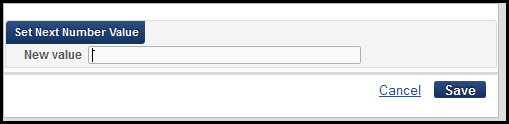
- Enter a numeric value and select Save.
