
Configurar el Borrado del usuario
Para configurar la eliminación de usuario se debe tener uno de los siguientes roles:
- Administrador de usuarios
- Administrador general del sistema
You can configure what happens to user information when you delete users using the purge users job (see Purging Users) or API.Whenever you change the policy to be more restrictive (remove more data), Alma applies the new policy to all previously purged users as well.
- This configuration does not affect what happens when you manually delete users (see Deleting Users).
- La tarea Purgar registros de usuarios no borra a los usuarios con solicitudes de recursos compartidos que estén en el estante de reservas.
- The Delete User Policy also applies to Delete user API. For more information, see Delete user API in the Developers Network.
You configure user deletion on the Delete User Policy page (Configuration Menu > User Management > General > Delete User Policy.
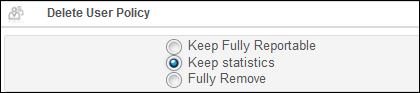
To configure user deletion:
- En la página Política de borrado de usuario, seleccionar un ajuste para la política de borrado de usuario:
- Keep fully reportable – The user's status is Deleted; all requests are canceled, and the user identifier is deactivated. El resto de los datos del usuario se conserva en el sistema.
- Keep statistics – The user's statistical data is retained: that is, all non-identifying statistical data, (such as the user group and job category) are retained, as well as data on the Statistics tab. The primary ID is moved into the last name. Todos los otros datos se borran. Note that user data may already be anonymized; see Configuring Anonymization.
- Keep statistics and remove primary ID (recommended) – The user's statistical data is retained: that is, all non-identifying statistical data, (such as the user group and job category) are retained, as well as data on the Statistics tab. The primary ID is removed and an internal unique Alma ID is moved into the last name. Todos los otros datos se borran. Tenga en cuenta que la información de usuario puede ya estar anónima. See Configuring Anonymization. If this option is chosen and the prior selection was Keep fully reportable or Keep statistics, a confirmation message is displayed to indicate that user records that were previously purged using the previously selected option will also be updated and you are asked to confirm the choice. When you confirm, a new job updates the previously purged user records.
- Fully remove – All user data is removed, including statistical data.
- Select Save and Execute. La política de borrado de usuario seleccionada se ha guardado e invocado para todos los usuarios ya borrados.
