
Real-Time Notifications
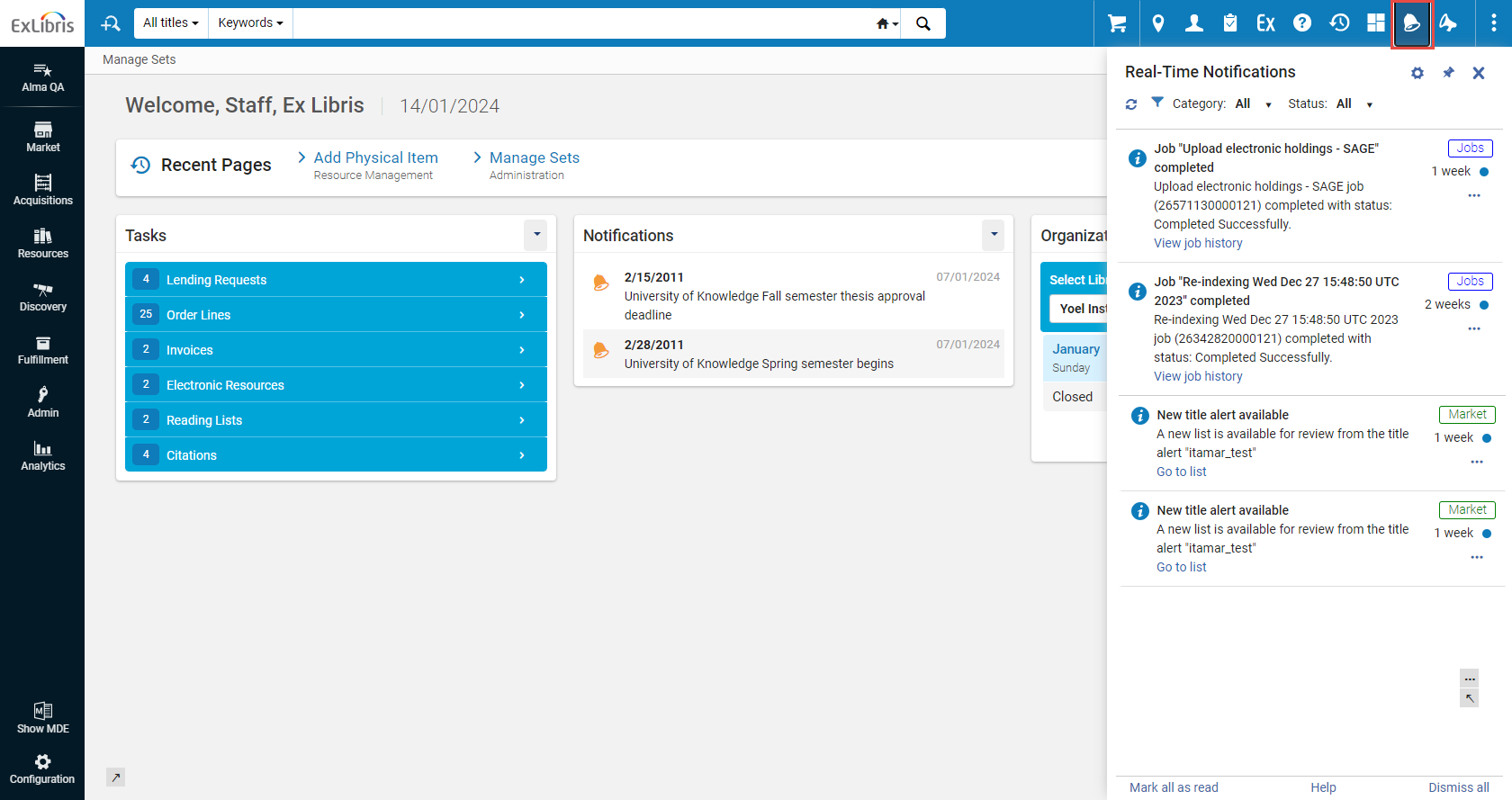
Real-Time Notifications is an opt-in, system-level interface that displays items requiring your attention such as manual jobs. Users who opt-in can receive a pop-up and/or email when exporting files, manual jobs, etc., are completed. All such notifications are accessible through the notification icon ( ) on the top menu bar.
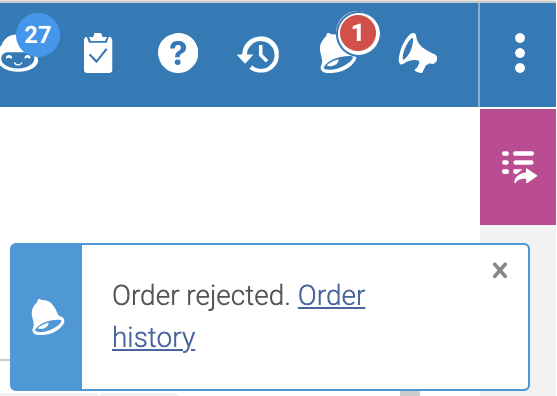
For Rialto, notifications appear when orders are cancelled, rejected, require intervention, etc. Users will also see the message (with actionable links) in the Real-Time Notifications panel. For a walk through on viewing and managing user notifications, watch User Notifications (2:00 min).
The Notifications Panel
The Real-Time Notifications list is a helpful way to view notifications requiring your attention for the last month. After one month, all notifications are deleted. El orden de las notificaciones es desde la más reciente hacia abajo, por hora y fecha.
To open the Real-Time Notifications panel:
- To open the Real-Time Notifications panel, select the
 icon on the persistent menu bar in the interface. The system checks for changes to your tasks every few minutes, and if new changes exist, a counter is displayed on the icon -
 .
- To have the panel constantly displayed, pin it to the screen by selecting the
 icon.
Alma and Esploro real-time notifications for jobs are indicated with the Jobs tag (
 ). Rialto real-time notifications are indicated with the Market tag (
 ). Analytics real-time notifications are indicated with the Analytics tag (
 ).
Configuring the Notifications
Puede controlar qué notificaciones puedes recibir y cuáles no. These selections can be made and configured at any moment. Puede optar por recibir notificaciones en su bandeja de correo electrónico o verlas como mensajes emergentes. Todas las notificaciones están presentes en el panel.
To configure notifications:
- Click the icon on the persistent menu bar.
- Click the
 icon to open the configuration section of the Real-Time Notifications panel.
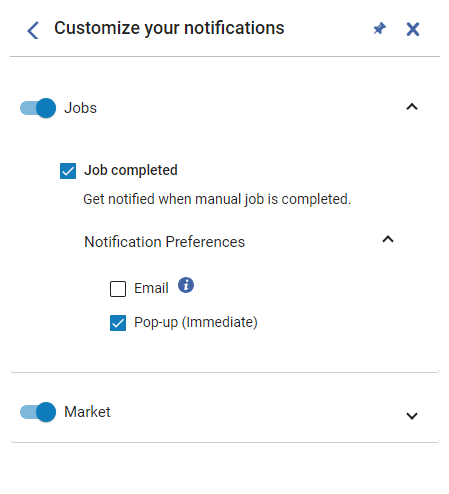
- To enable notifications of a certain category (for example Jobs or Market), toggle on the control. Within each category you can also configure sending of notifications via email. A continuación, se enumeran las categorías de notificación:
- Analytics– Configure notifications for when an administrator shares a report, dashboard, or DV workbook with you.
- Cataloging – Configure notifications for cataloging, such as for the AI Metadata Assistant (for example when the AI Metadata Assistant draft is ready to work on in the MD Editor).
- Export – Configure notifications for exported files.
- Jobs – Notify when manual jobs are completed. Por defecto, se notifica con un mensaje emergente.
- Market – Configure notifications for the Rialto system.
- To enable specific notification types within the category (for example, notifications on the creation of new PO lines), select the relevant checkbox.
- To opt in to receive notifications to your email box, click Notification Preferences, and then select the Email checkbox. Emails are sent to the address defined as your Primary email address. The administrator needs to make sure that the email address is in the email allowed list in the system. The letter that is sent is 'User Notifications (New Gen)', see Configuring Alma Letters. Tenga en cuenta que, cuando configura la carta, las ediciones se aplicarán a todas las notificaciones enviadas.
- To opt in to receive notifications as pop-up messages, click Notification Preferences, and then select the Pop-up (immediate) checkbox. Example of a popup notification:
Working with Notifications
| Para: | Acción: |
|---|---|
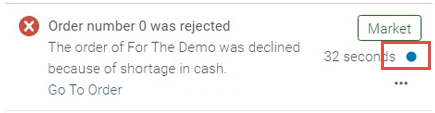
| Change the state from Unread to Read |
|
| Descartar notificaciones |
Una notificación descartada se borra inmediatamente y no se puede restaurar.
|
| Filtrar notificaciones |
Puede filtrar notificaciones por:
|
| Salto al ejemplar | Select the Go To link. Esto abre el ejemplar relevante en Alma / Rialto. |
| Bloquear notificaciones de un cierto tipo |
Si no está interesado en recibir notificaciones de un cierto tipo (por ejemplo, notificaciones sobre la creación de nuevas líneas de orden de compra), puede bloquearlas.
|
Currently Available Notifications
Las siguientes notificaciones están disponibles:
| Real-Time Notification | Available for | Description |
| Tarea "[Nombre]" completada | Todos los usuarios | Reciba una notificación cuando se complete una tarea manual de Alma (que no sea una tarea programada). |
| El administrador compartió un nuevo informe con el usuario | Todos los usuarios | Notificación de que un administrador ha compartido con usted un informe, un tablero o un libro de trabajo de visualización de datos. |
| Añadir lista al carrito completado | Todos los usuarios de Rialto | Sea notificado cuando añadir al carrito desde la lista se haya completado. |
| No se puede cerrar la solicitud de préstamo enlazada | Compradores de Rialto | Notificarme cuando solicite cerrar una solicitud de préstamo enlazada al finalizar el préstamo, pero que no sea posible debido a su estado. |
| Balance de fondo limitado por la/s regla/s de plan de selección | Administradores de Rialto | Sea notificado cuando una regla del plan de selección no tenga suficientes fondos |
| Una institución optó por no participar en Existencias de socios | Administradores de Rialto | Reciba una notificación cuando un socio haya optado por no participar en las Existencias de socios. |
| La carga del fichero ha terminado con éxito | Usuarios de Rialto | Reciba una notificación cuando la carga de un fichero a la lista termine correctamente. |
| Error al cargar fichero | Usuarios de Rialto | Reciba una notificación cuando falle la carga de un fichero a la lista. |
| Carga del fichero abortada | Usuarios de Rialto | Reciba una notificación cuando se aborte la carga de un fichero a la lista. |
| Títulos creados | Usuarios de Rialto | Reciba una notificación cuando una alerta de título genere una nueva lista para revisión. |
| La orden requiere una revisión | Compradores/Aprobadores de Rialto | Notificación sobre órdenes que requieren una revisión. |
| Orden cancelada | Compradores/Aprobadores de Rialto | Notificación de cuándose se canceló una orden. |
| Pedido cancelado Libro electrónico no disponible | Compradores/Aprobadores de Rialto | Recibir una notificación cuando un pedido sea cancelado debido a que el libro electrónico no está disponible. |
| Orden rechazada | Seleccionadores de Rialto | Get notified when an order has been rejected by approval staff. |
| Cancelación de solicitud de pedido rechazada | Compradores/Aprobadores de Rialto | Get notified when an order cancellation request is rejected. |
| Selección inteligente EBA completada | Administradores de Rialto | Reciba una notificación cuando una selección inteligente se haya completado correctamente. |
| El plan EBA termina pronto | Administradores de Rialto | Get notified when an EBA plan is approaching it's end date. |
| Plan EBA terminado esperando selección de título | Administradores de Rialto | Reciba una notificación cuando un plan EBA se cierre y esté a la espera de la selección de título. |
| Error en la tarea EBA | Administradores de Rialto | Recibir una notificación cuando falle la tarea EBA. |
| Compra EBA completada | Administradores de Rialto | Recibir una notificación cuando un proceso de compra EBA se haya completado correctamente. |
| Título ya disponible | Usuarios de Rialto | Receive a notification when a title on a list you own (or that has been shared with you) has changed availability status from Not Yet Published to Available. |
| Nuevos títulos en espera de aprobación | Compradores/Aprobadores de Rialto | Receive a notification when titles are submitted by selection staff for approval. |
| Etiquetar a un usuario en un comentario | Usuarios de Rialto | Esto le permite recibir una notificación si otro usuario le ha etiquetado en un comentario de una lista. |
