
Locating Items for Resource Sharing
Esta página describe cómo localizar ejemplares de recursos compartidos, incluido el proceso de localización de préstamos, el proceso de localización de préstamos entrantes y la autopropiedad. For more information on the various workflows for resource sharing, including broker and peer to peer based, managing resource sharing partners, borrowing/lending requests and contributing to the resource sharing directory, see Resource Sharing.
Para localizar ejemplares de uso compartido de recursos se debe tener una de las siguientes funciones:
- Operador de servicios al usuario (para biblioteca de recursos compartidos)
- Gerente de servicios al usuario (para biblioteca de recursos compartidos)
El proceso de localización compara los metadatos de una solicitud de recurso compartido con un recurso de catálogo.
The locate process creates a rota list of potential lending partners that are searched to fulfill the sharing request. The rota list is created based on rota templates (see Configuring Rota Templates).
Este proceso se realiza como parte del uso compartido de recursos punto a punto, tal como se indica a continuación:
-
Borrowing Locate – Locates a borrowing request in the partner catalogs. Alma busca en los catálogos de todos los socios de ruta para determinar si los socios poseen el registro solicitado. Solo los socios que poseen el recurso solicitado se solicitan para el recurso. Si la localización falla, el socio es eliminado de la ruta. Las solicitudes de préstamo son bloqueadas para que no se envíen a los prestadores si existe un propietario local que coincide con el material solicitado.
When configuring a value in the Holdings code field on the Resource Sharing Partner page (Fulfillment > Resource Sharing > Partners, select Edit from the row actions list for an ISO partner), the locate process completes successfully only if the resource is found at the library specified by the Holdings code value. (For details, see Resource Sharing Partners).
Alternatively, you can assign multiple libraries to a holdings code so that the locate process completes successfully when the item is found for any of the assigned libraries. Para más información, contactar con el Soporte de Ex Libris
For details on the borrowing locate process, see Borrowing Locate Process.
-
Lending Locate – Locates a lending request in the lender's catalog. Alma searches the local catalog to find a local repository match for the metadata of a request from an external requester. Los prestadores pueden saber automáticamente si poseen el recurso solicitado y también pueden ver el estado del inventario relevante de un solo vistazo.
For details on the lending locate process, see Lending Locate Process.
-
Self Ownership – Locates a borrowing request in the borrower's catalog prior to sending the request to the partner. Este tipo de búsqueda determina si una solicitud de recursos del usuario debe completarse desde un inventario local o si la solicitud debe dirigirse a un socio de recursos compartidos como parte del proceso de ubicación de préstamos.
For details on self ownership, see Self Ownership.
Esta sección describe varias etapas en el proceso de localización, sus herramientas de monitorización y como se configura todo el proceso.
Cuando el parámetro rs_uresolver_locate se establece en verdadero, los recursos electrónicos se localizan basándose en la resolución de enlaces de tipo OpenURL, que exige un ISSN. If the parameter is set to false, the regular metadata search works without mandating an ISSN.
Borrowing Locate Process
The Borrowing Locate process is configured as part of the Locate Profiles (Configuration > Fulfillment > Resource Sharing > Locate Profiles) as described in Configuring Locate Profiles. Los perfiles de localización deben ser de uno de los siguientes tipos:
-
Z39.50 – If the locate target is not an Alma institution, its catalog may be searched by Alma using the Z39.50 protocol. El socio de destino debe estar ejecutando un servidor Z39.50 de acceso abierto. Una consulta de búsqueda busca el título de la solicitud, el autor, el ISSN / ISBN y el año (fecha de publicación). Si se ha especificado más de un campo de consulta, todos deben ser verdaderos para ofrecer un resultado exitoso. Una búsqueda con éxito en una o más bases de datos de socio se considera un éxito.
Alma puede definir destinos de localización de este tipo solo si el destino de localización forma parte del destino externo de búsqueda de Alma. Si se puede buscar un socio de esta forma pero el catálogo del socio no se encuentra en la lista de objetivos externos de la búsqueda de Alma, póngase contacto con los Servicios de datos de Ex Libris para hacer de dicho catálogo un objetivo de búsqueda.
-
Alma – If the locate target is an Alma institution, its catalog may be searched using Alma APIs. Esto favorece opciones de localización más precisas.
Si su institución es un miembro de una red de servicios al usuario o una institución miembro de una Zona de red, el proceso local usa los ID de los registros internos de Alma en lugar de los metadatos de la solicitud. Therefore, in this circumstance, there is no need to configure the Locate By Fields. Para otras instituciones, cuando se utiliza un perfil de localización de Alma, si el prestador y el solicitante no comparten la misma Zona de red o Red de servicios al usuario, el proceso de localización dependerá de la configuración del perfil de localización:
- If the Locate by Fields checkbox is selected on the Locate Profile Details page, the locate process proceeds based on the selected subfields (Title,Author,ISBN/ISSN,Edition,System Control Number,LCCN, Other Standard ID, Barcode, DOI).
- If Locate only if all fields match is set to “Yes”, locate will find a match only when all selected fields (which exist in the request metadata) match. Si se establece en "No", se encontrarán coincidencias si cualquiera de los campos de identificadores seleccionados coincide (si no existe un campo de identificadores en la solicitud, la búsqueda solo será exitosa si todos los demás campos seleccionados coinciden). El proceso de localización de préstamos se lleva a cabo con éxito si existe un solo resultado de coincidencia, y falla si no hay ningún resultado de coincidencia. If there is more than one match, the rs_fail_locate_multiple_results parameter dictates the behavior (see Configuring Other Settings (Fulfillment).
-
If the Locate by Fields checkbox is not selected on the Locate Profile Details page, or if none of the subfields have been selected, the locate process proceeds based on the following criteria: LCCN, System Control Number, Title, and ISBN/ISSN.
Al realizar una solicitud basada en un resultado de búsqueda, el "Número de control del sistema" se extrae del campo 035 solo si tiene un prefijo OCLC. Se normaliza el número de control y se elimina el prefijo. De esta manera, el proceso de localización opera únicamente sobre la parte del número que sucede al prefijo.
You can specify whether the locate process will check physical resources and/or electronic and digital resources as follows:
- When Ignore Physical Resources is not selected and Ignore Electronic and Digital Resources is selected, Alma performs the locate process only for physical resources based on the bibliographic record.
- When Ignore Physical Resources is selected and Ignore Electronic and Digital Resources is not selected, Alma performs the locate process only for electronic resources similar to how the link resolver works and using and the request's volume/issue information and the lender's coverage data.
- When Ignore Physical Resources and Ignore Electronic and Digital Resources are both unselected, Alma performs the locate process for physical resources based on the bibliographic record, and for electronic resources similar to how the link resolver works, using the request's volume/issue information and the lenders' coverage data. Primero se realiza la verificación de localización electrónica.
The Ignore Physical Resources field appears only if the rs_uresolver_locate parameter is set to TRUE.
The final locate behavior is also affected by the rs_ignore_electronic_for_physical_reques t parameter (Configuration > Fulfillment > General > Other Settings) and allow other formats field (Fulfillment > Borrowing Requests > Create Request > Request Attributes), as seen below. This table describes how the locate process runs with regard to the possible combinations.
| Allow other formats is not selected | Allow other formats is selected | ||
|
rs_ignore_electronic_for_physical_request=false If the checkbox Ignore electronic resources for physical-only requests is unchecked in the library Details, when selecting the Locate resource action, the New All titles search will still find electronic resources. |
Ignore Electronic and Digital Resources is not selected in Locate Profile Details |
Permitir electrónicos sin importar el formato |
Permitir electrónicos sin importar el formato |
|
Ignore Electronic and Digital Resources is selected in Locate Profile Details |
Ignorar electrónicos sin importar el formato |
Ignorar electrónicos sin importar el formato
|
|
|
rs_ignore_electronic_for_physical_request=true |
Ignore Electronic and Digital Resources is not selected in Locate Profile Details |
Ignorar electrónicos si es físico/físico no retornable |
Permitir electrónicos sin importar el formato |
|
Ignore Electronic and Digital Resources is selected in Locate Profile Details |
Ignorar electrónicos sin importar el formato |
Ignorar electrónicos sin importar el formato |
Use the rs_uresolver_locate parameter to indicate that the locate process should consider volume/issue information for electronic resources, similar to how the link resolver would search the rota members' e-inventory. See Configuring Other Settings (Fulfillment).
- BLDSS – A locate may be performed using the British Library Document Supply Service. For more information on the BLDSS locate profile parameters, see Adding Locate Profiles.
-
Fulfillment Network – If the lender and requester share the same fulfillment network, there is no locate process, since Alma knows which partner owns the requested title. La solicitud de localización se procesa entonces como se indica a continuación:
- La solicitud se almacena en Alma con la lista de miembros de la red de servicios al usuario que posee el recurso.
-
Para los socios cuyo ID de institución forme parte de la misma red de cumplimiento que el solicitante:
– If the institution ID is linked to the requester, the requested record is considered a locate success.
– If the institution ID is not linked to the requester, the requested record is considered a locate failure.
You can configure an Alma locate profile to test for requestability and availability by selecting the Check item availability and Check item requestability checkboxes on the Locate Profile Details page (see Configuring Locate Profiles). When selecting Check item availability, the locate process succeeds only if the record is found at the partner and at least one item is available (Status In Place). When selecting Check item requestability, the locate process succeeds only if the item is requestable (the Is Requestable for Resource Sharing policy =True).
La verificación de la disponibilidad y la posibilidad de solicitar un ejemplar solo incluye los ejemplares directamente vinculados al registro bibliográfico correspondiente. Si el registro bibliográfico coincidente tiene inventario físico vinculado a uno de los registros relacionados del registro, el proceso de localización no tendrá en cuenta estos ejemplares.
Attach the relevant locate profile to a resource sharing partner (see Resource Sharing Partners).
The rs_do_not_send_request_when_locate_fails parameter (Configuration > Fulfillment > Other Settings) enables automatic removal of the lending partner from the rota in the case of a technical error such as a connection issue. Este parámetro excluirá a los socios para los que el sistema haya encontrado un error técnico o no haya recibido respuesta al intentar localizar información en el repositorio del prestamista. Ejemplos de estos problemas pueden ser fallos de conexión, credenciales incorrectas o intentos de búsqueda por campos no admitidos por el prestamista. Tenga en cuenta que los socios sin perfil de localización no se verán afectados.
Se puede activar el proceso de localización de préstamos automáticamente seleccionando los ajustes relevantes cuando se configure el perfil de localización, tal como se describe en el siguiente procedimiento.
- On the Organization Unit Details page (see Configuring Parameters of a Resource Sharing Library), select the Cancel request on locate failure checkbox for Alma to automatically cancel a request for which the locate process did not find any potential partner.
-
Select the Automatically activate locate profile checkbox for the borrowing locate process to be automatically triggered when a borrowing request is created from any interface – Alma, Primo or API.
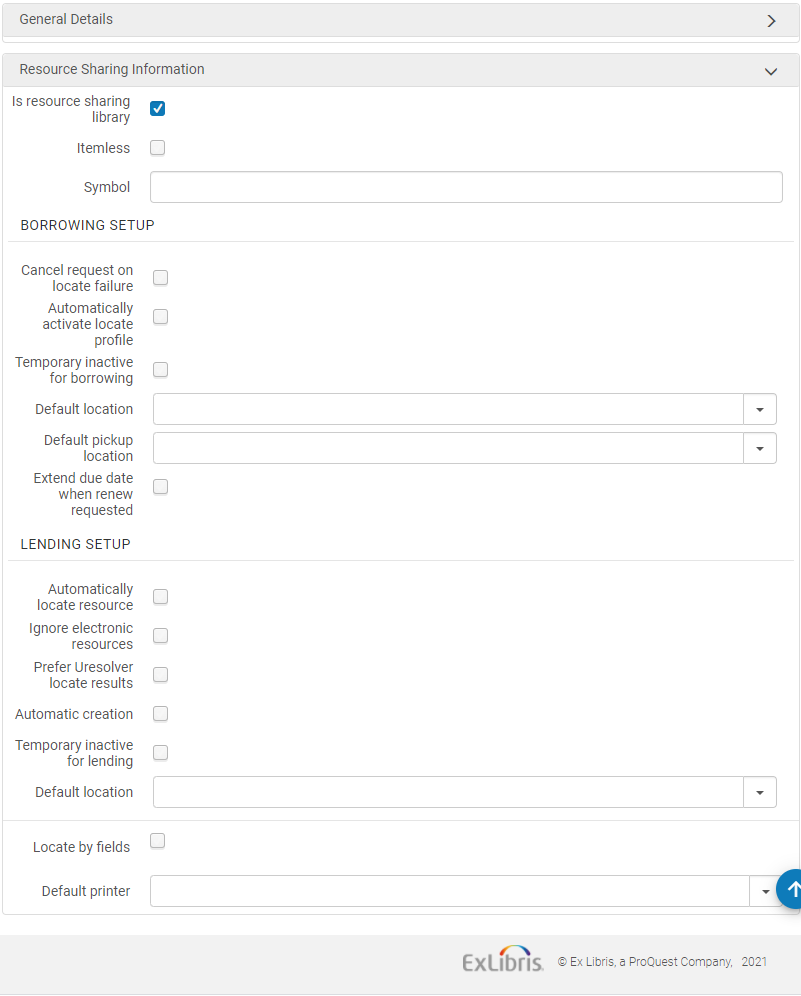
El proceso de localización automática se puede activar solo si las Reglas de asignación de ruta automática han sido previamente activadas para adjuntar automáticamente una ruta a la solicitud. Luego el proceso de localización se ejecuta en la ruta adjunta automáticamente.
-
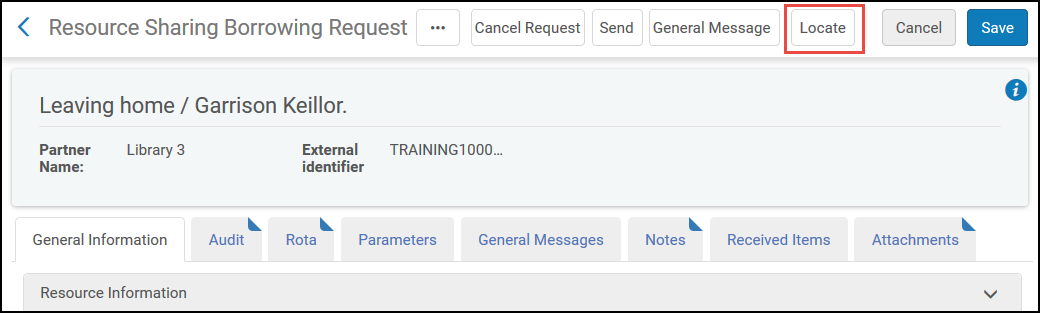
On the Resource Sharing Borrowing Request page (Fulfillment > Resource Sharing > Borrowing Requests, select Edit for a request), select the Locate button.
-
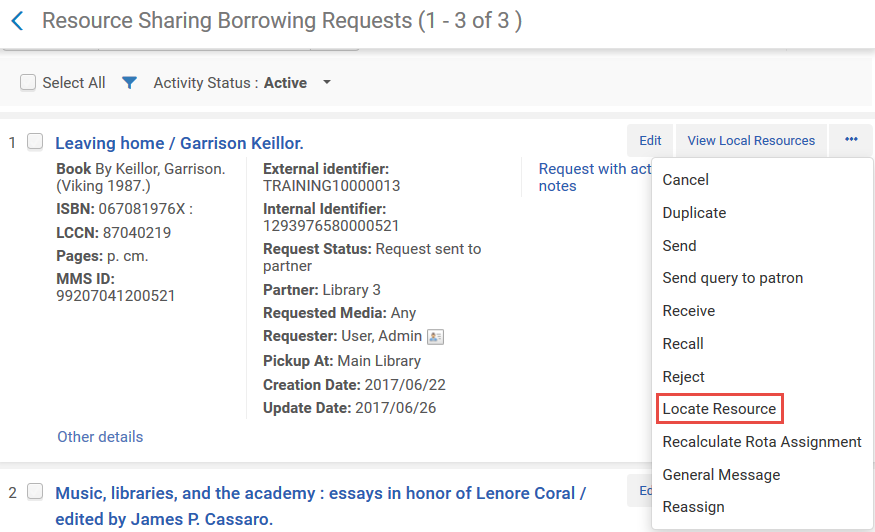
On the Resource Sharing Borrowing Requests page (Fulfillment > Resource Sharing > Borrowing Requests), select the Locate Resource action. Este enlace solo se muestra si la solicitud tiene un socio o ruta asociado.
Lending Locate Process
El proceso de localización de préstamos se puede activar automática o manualmente después de crear una solicitud de préstamo.
- To automatically activate the Lending Locate process, on the Organization Unit Details page (see To automatically activate the borrowing locate process above), select the Automatically locate resource checkbox. Cuando se crea una solicitud de préstamo, el recurso se busca automáticamente.
- To manually activate the Lending Locate process, on the Resource Sharing Lending Requests Task List page (Fulfillment > Resource Sharing > Lending Requests), select Locate from the row actions list.
The Lending Locate process succeeds if there is a single matching result and fails if there are no matching results or if there are multiple matches found. Si un título tiene más de un ejemplar, la disponibilidad y "capacidad de solicitud" no se comprueban en el proceso de localización, y la solicitud debe gestionarse manualmente. In either failure case, the search query is displayed on the Repository Search page, and the operator can either manually attach the lending request to the local repository or select the Change Query link to change the search query.
Se puede configurar una biblioteca de recursos compartidos para rechazar automáticamente una solicitud entrante si el título solicitado no tiene ejemplares disponibles. This can be done by selecting the Reject request when no available item, the Reject request when no requestable items and the Automatically Locate Resource switches in the Lending Setup of the Resource Sharing Library. Si los interruptores no están encendidos, el operador del prestatario podrá decidir manualmente si desea rechazar la solicitud en caso de que el ejemplar solicitado no esté disponible.
La verificación de la disponibilidad y la posibilidad de solicitar un ejemplar solo incluye los ejemplares directamente vinculados al registro bibliográfico correspondiente. Si el registro bibliográfico coincidente tiene inventario físico vinculado a uno de los registros relacionados del registro, el proceso de localización no tendrá en cuenta estos ejemplares.
El proceso de localización de préstamos se lleva a cabo sobre la base de los metadatos disponibles para la solicitud:
- Si la solicitud se ha recibido con un ID de registro, la solicitud de préstamo se vincula automáticamente al registro identificado. A request can be received with a record ID by ISO ILL if the requester and borrower are part of the same fulfillment network and the request has been placed using the Network Zone record or a Primo deduplicated record. Si los dos registros están deduplicados en Primo y la solicitud se realiza desde Primo, el proceso de localización considerará todo el inventario como candidatos para completar la solicitud, y accederá a cualquier inventario que se pueda solicitar para compartir recursos. Si la solicitud se realiza desde Alma, la deduplicación no será relevante y el registro que se eligió para la solicitud es el que se utilizará.
- If the request has been received without a record ID, the record is located based on the selected Locate by Fields values on the Organization Unit Details page (Configuration Menu > General > Libraries > Add a Library or Edit Library Information select the Libraries tab and edit the resource sharing library). If Locate only if all fields match is set to “Yes”, locate will find a match only when all selected fields (which exist in the request metadata) match. Si se establece en "No", la opción de localizar encontrará una coincidencia si alguno de los campos identificadores seleccionados (por ejemplo, ISBN, ISSN, LCCN o número OCLC) coincide. Si no hay campos identificadores en la solicitud, la opción de localizar solo tendrá éxito si todos los demás campos seleccionados coinciden.
- If the Locate by Fields checkbox is not selected, or if none of the subfields have been selected, the locate process proceeds based on the following criteria (in the indicated order): LCCN, System Control Number, Title, and ISBN/ISSN.
- Si el ID de registro remoto está especificado en la solicitud, el proceso de localización se realizará solamente en el ID de registro remoto.
Cuando Alma procesa solicitudes de préstamo para copias digitales de artículos de revistas y capítulos de libros, revisa registros bibliográficos existentes que coincidan con la solicitud de préstamo. En el caso de capítulos de libros, también verifica las copias físicas del libro que se pueden digitalizar para este fin. En el caso de artículos, no verifica copias físicas de la revista que se puedan digitalizar.
Self Ownership
La verificación de auto propiedad determina si un recurso solicitado es de propiedad local en la institución del solicitante. When creating a new borrowing request in Alma, a warning message (The institutional inventory has services for the requested title) displays if the requested resource is owned by the local institution.
La verificación de auto propiedad se gestiona de la siguiente forma:
- The record is located based on the selected Locate by Fields values on the Organization Unit Details page (Configuration Menu > General > Libraries > Add a Library or Edit Library Information select the Libraries tab and edit the resource sharing library). See To automatically activate the borrowing locate process above.
- If the Locate by Fields checkbox is not selected, or if none of the subfields have been selected, the locate process proceeds based on the following criteria (in the indicated order): LCCN, System Control Number, Title, and ISBN/ISSN.
Cuando se lleva a cabo en la pestaña Primo Get It, la propiedad propia se determina resolviendo el OpenURL entrante a un recurso existente y, por lo tanto, se basa en el mecanismo de coincidencia del resolvedor en lugar de las configuraciones mencionadas anteriormente.
