
Configuring Parameters of a Resource Sharing Library
This page describes how to configure the parameters of a resource sharing library including itemless resource sharing libraries. For links to all the main fulfillment documentation pages see Fulfillment.
For a list of links to the main resource sharing online help pages, see Resource Sharing.
Configuring Parameters of a Resource Sharing Library
Para configurar los parámetros de la biblioteca de recursos compartidos se debe tener uno de los siguientes roles:
- Administrador general del sistema
Las bibliotecas dentro de una institución o campus pueden estar configuradas para tener relaciones que permitan a los usuarios verificar la entrada o salida de recursos en otra ubicación, enviar ejemplares para un lado y otro, o adquirir (comprar) ejemplares en nombre de otros. If a library is configured to do this for libraries at other institutions (and not only within the institution), it is known as a resource sharing library.
A resource sharing library must have its own Fulfillment Unit (see Configuring Fulfillment Units) in order to be able to configure the Borrowing Request Rules and the Lending Request Rules with the relevant Borrowing Resource Sharing Terms of Use and the Lending Resource Sharing Terms of Use.
See Adding a Library for more information about configuring libraries.
- Navigate to the Summary tab page (Configuration Menu > Fulfillment > Library Management > Opening Hours).
- Set the Configuring filter (top left of the page) to the scope of the resource sharing library.
- Modify the Organization Unit Name and Description fields, as necessary (see Configuring the Institution and it's Libraries).
- Enter your ISIL code (see ISIL Code for more information).
-
In the Resource Sharing Information section, select Is Resource Sharing Library. Aparecen los campos de la sección Información de recursos compartidos.
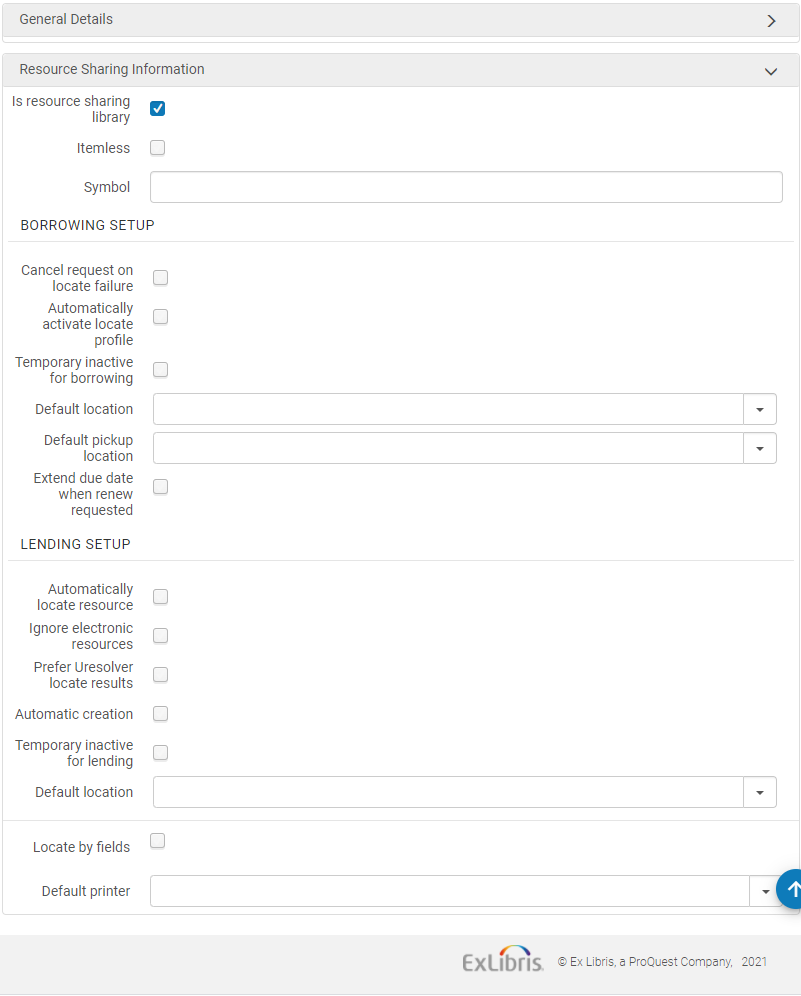
- Select Itemless to designate the library as an itemless resource sharing library (see Configuring an Itemless Resource Sharing Library).
- Enter the ISO symbol of your resource sharing library in the ISO symbol field to indicate that the library works with ISO.
- Para configurar las solicitudes de dar en préstamo:
- When Cancel request on locate failure is selected, Alma automatically cancels requests for which the borrowing locate process was not able to find a potential partner (see Borrowing Locate Process).
Select Automatically activate locate profile to indicate that when a rota assignment rule is met, a locate profile is assigned to the activated rota, based on the rota assignment rule. For details on rota assignment rules, see Configuring Rota Assignment Rules.
When selecting this option, the borrowing locate process is automatically triggered when a borrowing request is created from any interface – Alma, Primo or API (see Borrowing Locate Process).
La localización automática se puede activar solo si las Reglas de asignación de ruta automática también se activaron para adjuntar automáticamente una ruta a la solicitud. Luego el proceso de localización se ejecuta en la ruta adjunta automáticamente.
- Select Temporary inactive for borrowing to indicate that this library is blocked for borrowing requests.
- When selected, the field,Inactive dates range, is displayed. Seleccionar un rango de fecha para especificar que el bloque es solo aplicable durante un periodo de tiempo especificado. If the date range is left empty, the library remains inactive until the Temporary inactive for borrowing checkbox is deselected. El estado inactivo bloquea las solicitudes de préstamo para esta biblioteca tanto si han sido creadas a través de de la IU, API o en Primo. For Primo users, the resource sharing request link is hidden. For Alma UI users and API processes, when requesting an item, a block message is displayed. El mensaje de bloqueo se puede anular en la IU de Alma.
- In the Default location field, select the default temporary location to which designated inventory is moved for fulfillment of the borrowing request.
- In the Default pickup location field, select the library that is to be the default pickup location for resource sharing requests. Si se deja en blanco la ubicación de recogida por defecto, el campo de ubicación de recogida del formulario de recursos compartidos quedará en blanco.
- To extend the loan due date of an RS loan: When a lender is asked to renew an RS loan that is about to become overdue, the loan due date can be extended by a configurable short period (up to nine days after the request renew date). Esto evita que el préstamo se retrase y acumule multas mientras se contacta con el prestador para acordar una renovación y una nueva fecha de vencimiento. Once the renewal is confirmed with the lender, the loan and the borrowing request are renewed on the agreed upon due date (using the existing workflow).
Activate this option by selecting the "Extend due date when renew requested" checkbox and populating the new 'Extend due date by (days)' field on the resource sharing library configuration page.
Las "reglas de impresión automática" no se tienen en cuenta si el operador clica manualmente el botón "Imprimir comprobante".
- Para configurar las solicitudes de préstamo:
Select Automatically locate resource for Alma to attempt to locate the requested resource locally. (For more information on this process, see Lending Locate Process.)
Al seleccionar esta casilla de verificación, aparecen cuatro casillas de verificación adicionales:
- Select the Reject request when locate fails checkbox to reject a lending request when the locate does not find any matching items.
- Select the Reject request when no available items checkbox to reject a lending request when there are no items available in place.
- Select the Reject request when no requestable items checkbox to reject a lending request when there are no items that are requestable for resource sharing, according to the applicable policy.
- Select the Reject request when only electronic available checkbox to automatically reject items that are only available electronically. When Reject request when only electronicavailable is selected, set the Electronic Rejection Rules to control automatic rejection rules based on the resource's license terms. To customize the description and translation text of request reject reasons when received (and recorded as a request note) on the borrower side, see Configuring Request Reject Reasons.
- Use the Electronic Rejection Rules to cause requests for electronic resources that are linked to licenses with any of the following terms to be automatically rejected:
- Préstamo electrónico entre bibliotecas
- Préstamo entre bibliotecas impreso o por fax
- Indicador obligatorio del mantenimiento de registros de préstamos entre bibliotecas
Préstamo entre bibliotecas mediante transmisión electrónica segura
Si configura una regla para rechazar una solicitud de un recurso vinculado a una licencia con cualquiera de las condiciones anteriores, la solicitud será rechazada. No hay ningún significado especial para un término de licencia u otro en lo que respecta a este rechazo automático.
Watch the Electronic Rejection Rules video (5:27 min.).
- Select Ignore electronic resources for the locate process to only consider physical items.
- Ignore electronic resources for physical-only requests- If selected, then the lender locate ignores electronic matches when the lending request is for a physical resource.
Select Automatic creation for the partner field to be visible on the shipping items page. For details on automatic creation of lending requests from shipping items, see Shipping Items.
Alma se puede configurar para mostrar la preferencia por artículo en formato electrónico en el proceso de localización del lado del prestador. Si se encuentra un artículo solicitado en formato electrónico, ese recurso se considerar la única opción para el prestador. Solo se consideran otras opciones físicas posibles si no se encuentran recursos electrónicos. This behavior is activated by the "Prefer Uresolver locate results" option which can be selected from the Lending Setup section of the resource sharing library. Electronic resources are considered a match only if their coverage matches the details of the request. Esto afecta tanto el proceso de localización automático como el manual del prestador.
- Select Temporarily inactive for lending to indicate that this library is blocked for borrowing requests. Cuando se selecciona, aparecen las dos opciones siguientes:
- Inactive dates range – Select a date range to specify that the block is only applicable during the specified time period. If the date range is left empty, the library remains inactive until the Temporary inactive for lending checkbox is deselected. El estado inactivo bloquea las solicitudes entrantes de préstamo para esta biblioteca.
- (New for February 2026)Turn off lending for – Enables you to selectively deactivate specific lending services, rather than deactivating all services. You can deactivate Everything, temporarily deactivate Physical lending while keeping digital services active, or temporarily deactivate Digital from Physical lending while continuing physical shipping or electronic lending.
- In the Default location field, select the default temporary location to which designated inventory is moved for fulfillment of the lending request.
-
Select the Locate by Fields checkbox to filter the search in the resource sharing library. Este proceso restringe los resultados disponibles para el proceso de localización. La página se refresca y muestra los nuevos campos de búsqueda.
La página muestra los campos de búsqueda de la siguiente manera:
Seleccionar los campos en los que se quiere buscar recursos en la biblioteca de recursos compartidos.
- Título
- Autor
- Error al recuperar datos del patrón de publicación.
- Número de control del sistema
- Edición
- LCCN
- Otro ID estándar
- Código de barras
- DOI
- Select Yes in the Locate only if all fields match field if you want the locate to be successful only when all selected fields match. If set to No, then:
- If the request has identifiers (such as ISBN, OCLC number, or LCCN), locate is successful if any of the selected identifier fields find a match. Other fields, such as Title and Author, are not used for the match.
- If no identifier fields exist on the request, locate is only successful if all of the other selected fields match.
- Select the Default printer to define the printer that is used for this resource sharing library when a user performs an action that can be done while not at a desk (such as shipping). Cuando el usuario está en el mostrador, la impresora por defecto será la del mostrador.
- Select Save.
For information on configuring a library for SLNP, please see the Developer Network.
Configuring an Itemless Resource Sharing Library
Para crear una biblioteca de recursos compartidos sin ejemplares, se debe tener uno de los siguientes roles:
- Administrador general del sistema
- Administración del sistema
- Operador de servicios al usuario (para biblioteca de recursos compartidos)
- Gerente de servicios al usuario (para biblioteca de recursos compartidos)
Una biblioteca de recursos compartidos sin ejemplares no gestiona ejemplares. La biblioteca actúa como un agente para otras bibliotecas de recursos compartidos, ya que transfiere solicitudes de una biblioteca prestataria a una biblioteca receptora, sin una inventario real de ejemplares.
Un proceso de recursos compartidos gestionado por una biblioteca de recursos compartidos sin ejemplares tiene los siguientes atributos especiales:
- Los ejemplares recibidos como parte de un proceso de recursos compartidos no aparecen en el catálogo como ejemplares temporales.
- El envío de solicitudes de préstamo es posible sin adjuntar un verdadero ejemplar de inventario a la solicitud de envío.
Todos los demás aspectos del proceso de recursos compartidos, como el intercambio de mensajes entre la biblioteca que solicita el préstamo y la biblioteca que da el préstamo, son idénticos al proceso gestionado por bibliotecas de recursos compartidos regulares.
To designate a resource sharing library as itemless, select the Itemless checkbox on the Organization Unit Details page (see step 3 in To configure resource sharing library information:).
- Create a resource sharing borrowing request (Fulfillment > Resource Sharing > Borrowing Requests, select Add > From Search or Add > Manually). Ensure that you select Pickup at = Resource Sharing Library and that you assign partner to the request.
- Select Send. The Request Status = Request sent to partner.
- To receive the requested resource, select Receive for the request. Aparece la página Ejemplares recibidos.
- In the Internal Note field, enter a note to indicate information that describes the purpose for which the resource is requested. The request's status changes to Physically Received by Library.
When shipping an itemless lending request, ensure that the Scan Item Barcode field is blank on the Shipping Items page (see Shipping Items).
For more information about itemless broker requests, see the More Information About Itemless Broker Workflow video (14:44 mins).
Temporarily Closing a Resource Sharing Library for Lending with Inactive Date Range
(New for May 2026)
To configure contact information, you must have one of the following roles:
- Administrador de servicios al usuario
- Administrador de servicios al usuario
- Operador de servicios al usuario (es necesario abrir un ticket con el equipo de Soporte de Clarivate para activarlo)
Esta función permite al personal cerrar temporalmente la biblioteca para el préstamo de libros.
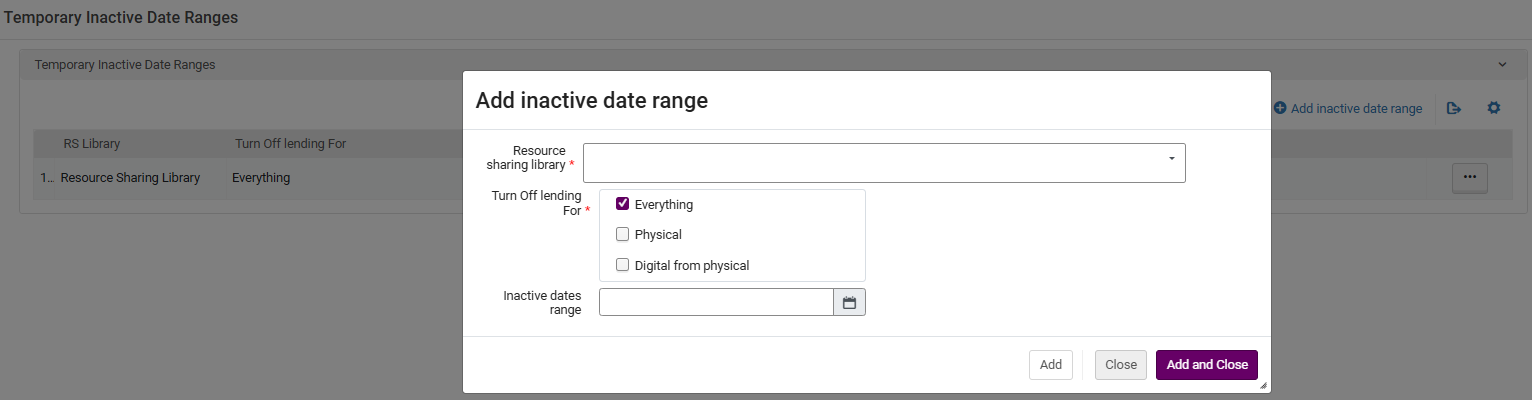
- Select the Temporary Inactive Date Ranges (Fulfillment > Resource Sharing > Temporary Inactive Date Ranges) link.
- Select Add inactive date range.
-
Acceda a la biblioteca de recursos compartidos, seleccione los elementos para los que desea desactivar el préstamo e introduzca el intervalo de fechas de inactividad.
-
Las bibliotecas que se han marcado como inactivas aparecen en la página Intervalos de fechas de inactividad temporal.

