
Configurar la integración con OAI
Overview of the Open Archives Initiative Protocol for Metadata Harvesting (OAI-PMH) integration with Alma and instructions for configuring an OAI Repository Definition integration type profile.
The Open Archives Initiative Protocol for Metadata Harvesting (OAI-PMH) is a low-barrier mechanism for developing and promoting inter-operability standards that aim to facilitate efficient dissemination of content across repositories.Data Providers are repositories that expose structured metadata through OAI-PMH.Service Providers then make OAI-PMH service requests to harvest that metadata. OAI-PMH usa seis tipos de solicitud ("verbos") que se invocan dentro de HTTP. Using this functionality, Alma can publish metadata (as a Data Provider) that can then be harvested by external tools/repositories (Data Harvesters).
Configurar un perfil de integración OAI es el primer paso hacia la publicación a través de OAI. Configurar un perfil de integración OAI permite a Alma exponer los registros como tipos AOI y los recopila según corresponda.
Una vez configurado el perfil de integración OAI, se puede configurar un perfil de publicación. Cuando eso esté terminado, su configuración OAI debería estar completa y su base de datos lista para cargar. For information on setting up a publishing OAI profile, see Publishing and Inventory Enrichment.
See Making the Alma Repository Available via OAI for more information.
- On the Integration Profile List page (Configuration Menu > General > External Systems > Integration Profiles), select Add Integration Profile. Aparece el primer paso del Asistente de integración de dos pasos.
- From the Integration Type drop-down menu, select OAI Repository Definition(do not select the code and the name). La página se actualiza con los campos relevantes para el perfil.La casilla de selección "Por defecto" no funciona para este tipo de integración.

- Enter an optional Description for the integration profile, and select Next. Entonces aparece el paso 2 del asistente del perfil de integración.Si se ha configurado anteriormente un perfil de integración OAI, se solicitará editar el perfil existente.
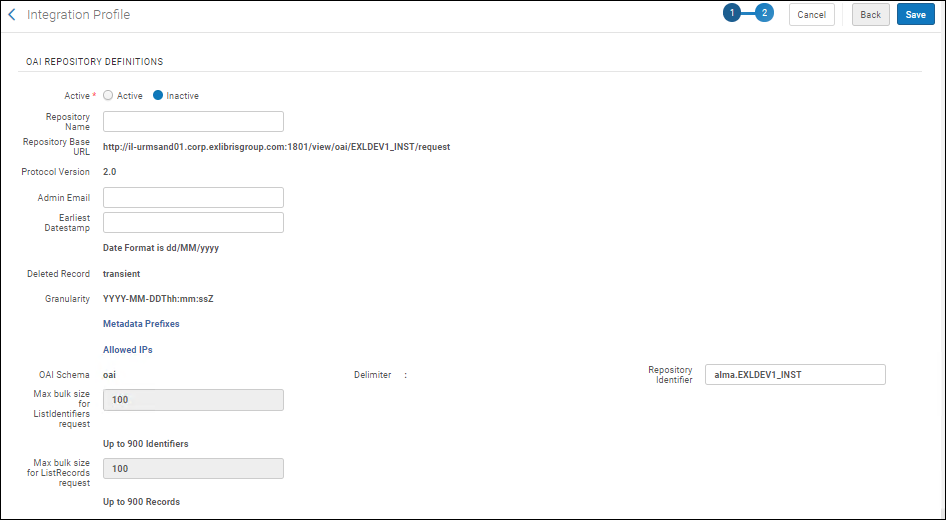
- Introducir las Definiciones del repositorio OAI según sea necesario:
- Active/Inactive(required) - Select Active.
- Repository Name- The repository when calling the OAI API.
- Repository Base URL- The fixed, auto-generated base URL for all OAI links, not editable.
- Protocol Version- The protocol version used. La versión se introduce automáticamente para este parámetro y no es editable.
- Admin Email(required) - The email address where you want communications related to the integration profile to be sent.
- Earliest Datestamp(required) - The first date stamp of the repository records (which can be used, for example, when querying the repository by date).
- Deleted Record- This is automatically identified as transient and is not editable.
- Granularity- The data/timestamp granularity is automatically identified as YYYY-MM-DDThh:mm:ssZ and is not editable. See ISO 8601 for an explanation of this format.
- Metadata Prefixes- Select to open a page enable or disable prefixes. This page is a mapping table; for more information, see Mapping Tables. En esta página solo se puede habilitar o deshabilitar prefijos.
- Allowed IPs- Select to open a page to configure IP ranges for users/locations who can access the repository. This page is a mapping table (see Mapping Tables for more information). En esta página se puede añadir, editar o borrar rangos. Para un rango de IP, usar un guion sin espacios (-) entre las cadenas (las correcciones de sintaxis se indican en los mensajes de error). Las IP permitidas son las direcciones/rangos de IP que tienen acceso a OAI de Alma. Cualquier IP que no figure en esta lista recibirá una respuesta de error cuando uno intenta acceder a OAI de Alma. If no IP is defined in this mapping table, no one can access Alma via OAI requests.
- OAI Schema- This is identified as oai and is not editable.
- Delimiter- The delimiter is identified as a colon (:) and is not editable.
- Repository Identifier- Enter a string that identifies the repository that is compliant with OAI-PMH requirements. El valor debería contener dos cadenas sin caracteres especiales, separados por un punto (por ejemplo, 01BC.INST).
- Max bulk size for ListIdentifiers request(required) - A value from 100 to 900 is specified by Ex Libris. Comuníquese con soporte para cambiar esta configuración.
- Max bulk size for ListRecords request(required) - A value from 100 to 900 is specified by Ex Libris. Comuníquese con soporte para cambiar esta configuración.
- Select Save to complete the profile.
Because Alma allows for only one OAI setting, if you want to change anything in the integration profile, you must select Edit from the Actions menu and edit the existing profile.
Page tags: article:topicproduct:almacontent:Documentationlang:englishOAIOAI-PMHOAI Repository Definition
