
Búsqueda Z39.50
Overview and instructions for configuring a Z39.50 server integration profile.
- Administrador general del sistema
An institution's catalog can be made searchable by external applications. Esto puede ser requerido para varios propósitos. For example, if the institution serves as a copy cataloging source or participates in a resource sharing network, it's catalog may need to be searched externally.
For general information about the Z39.50 protocol, see http://www.loc.gov/z3950/gateway.html#about
Si se configura un perfil de integración del servidor Z39.50, Alma atiende las búsquedas entrantes de Z39.50. Si se detecta una solicitud entrante, Alma devuelve una respuesta Z39.50, incluyendo información de registros en formato MARC u OPAC, dependiendo de la configuración del cliente.
- Solo un único perfil Z39.50 puede ser configurado para una institución.
- Si se abre el catálogo de su institución para una búsqueda Z39.50, Ex Libris puede añadirlo al grupo de recursos externos de búsqueda disponibles para copias de catalogación.
- The following attributes are supported by Alma: Term (1016, 1017); Author (1, 1003, 1004); Subject (21); Title (4); ISBN (7); ISSN (8); Date (31); Identifier (12); OCLC Number (1211).
- Identificador de atributo (12) — Número local. Alma interpreta este "número local" como una búsqueda de MMS ID U Otro número de sistema (other_system_number desde la sección de búsqueda Registro operativo), compuesta por 035 y 001 del registro relacionado. The related records being retrieved by searching in the following fields: 019az, 035az, 773w, 774w, 775w, 777w, 786w, 800w, 810w, 811w.
- Debe configurarse la dirección IP de Alma, el puerto y el nombre de la base de datos en la máquina del cliente Z39.50. The IP address/port to configure is:<Alma server>:1921(or 210, if you are working with Refworks – see Configuring a Z39.50 Refworks Client). Note that these ports are open to all, with no restriction on specific IP addresses; there is therefore never any need to add new IP addresses on the Alma side. The database name to use is the Alma institution code—for example,60univ_inst. For information about your Alma server domain, see Your Alma Domain Names.
- For filtering Alma's Z39.50 response at a campus level in a multicampus environment, you must add the campus code to the database name that is configured on the Z39.50 client machine using the following format:base (institution ID>/<campus code>. For example,base 60univ_inst/Springfield may be used at the client Z39.50 machine where 60univ_inst= the Alma institution code and Springfield= the Alma campus code. When this is implemented, Alma's Z39.50 search and present results are displayed/filtered only for resources that are owned by the campus (and its libraries). Esto habilita a instituciones en un entorno de múltiples campus a proporcionar resultados que pertenezcan únicamente a bibliotecas identificadas dentro del campus seleccionado.
- Al realizar una búsqueda externa utilizando Z39.50 y recuperando 10.000 registros o más, Alma responde con un mensaje de error cuando recupera el siguiente volumen de registros excediendo el límite de 10.000. La integración Z39.50 tiene como objetivo integrar la búsqueda de Alma con otros sistemas automatizados con propósitos de préstamos entre bibliotecas, copias de catalogación o selección. No es posible utilizar la integración Z39.50 para otros flujos de trabajo, como para realizar exportaciones masivas de registros.
Las siguientes reglas determinan la devolución de información de registro MARC:
- MARC holdings records are returned only if the Enrich with holdings checkbox is selected (see the procedure below). Selecting the Enrich with holdings parameter enriches the MARC 21 results with MARC 21 holdings fields such as the 852.
- Los registros de existencias MARC son devueltos solo para ubicaciones permanentes.
- Suppressed MARC holdings records (Suppress from discovery is selected for the record in the MD Editor) are excluded.
- MARC holdings records from suppressed locations (Suppress from discovery is selected for the location; see Configuring Physical Locations) are excluded.
- Suppressed MARC bibliographic records (Suppress from discovery is selected for the record in the MD Editor) and their associated holdings records are excluded.
Las siguientes reglas determinan la devolución de información de registro OPAC:
- Los registros de existencias OPAC son devueltos tanto para ubicaciones permanentes como temporales (en existencia por ubicación).
- Suppressed OPAC holdings records (Suppress from discovery is selected for the record in the MD Editor) are excluded.
- OPAC holdings records from suppressed locations (Suppress from discovery is selected for the location; see Configuring Physical Locations) are excluded.
- Suppressed OPAC bibliographic records (Suppress from discovery is selected for the record in the MD Editor) and their associated holdings records are excluded.
El soporte del servidor Z39.50 de Alma incluye soporte UNIMARC para registros de la Zona de red, que son enriquecidos con información de instituciones miembro. When a Z39.50 call to Alma specifies the UNIMARC format, Alma responds with the Z39.50 presentResponse output in UNIMARC format. La indicación de disponibilidad es gestionada utilizando el formato UNIMARC siguiente:
- Campo 852 MARC
- $a Ubicación – Código de la institución
- $6 Enlace – MMS ID
- $9 Campo local – P (print) / E (electrónico) / D (digital)
Cuando más de un tipo de material está disponible para una institución, como por ejemplo impreso (print) y electrónico, el campo 852 contendrá $9 múltiples entradas.
Configuración de un Perfil de Integración de Tipo Búsqueda Z39.50
For each institution, there can be only one Z39.50 Server integration profile.
- On the Integration Profile List page (Configuration Menu > General > External Systems > Integration Profiles), select Add Integration Profile. Se abre la primera página del asistente de perfil de integración.
- Introducir un código y un nombre para el perfil que se está definiendo.
- From the Integration type drop-down list, select Z39.50 Server.La casilla de selección "Por defecto" no funciona para este tipo de integración.
- Select Next.
-
Complete the export parameters using the information provided in the table below.
Parámetros de exportación Z39.50 Parámetro Descripción Nombre de usuario / Contraseña
Introducir un nombre de usuario y contraseña (opcional) para que Alma se comunique con la máquina del cliente Z39.50.
El nombre de usuario Z39.50 y la contraseña no distinguen mayúsculas y pueden incluir:
- No más de 10 caracteres
- Uppercase/lowercase letters, digits, and underscores Passwords CANNOT contain any special characters (for example, # or $)
For example, if you set the user name/password to Alma_12_34, it is possible to authenticate with all of following options:alma_12_34,ALMA_12_34, and alMA_1234.
Si se configuran un nombre de usuario y contraseña, Alma no permite búsquedas a menos que se indique el nombre de usuario y la contraseña.
Permitir acceso
Seleccionar este parámetro para permitir que la máquina del cliente Z39.50 pueda ingresar a Alma.
Enriquecimiento con Existencias
Seleccionar este parámetro para incluir información de existencias, además de información bibliográfica, en la respuesta Z39.50 que Alma devuelve.
Z39.50 recupera fondos relacionados, pero no ejemplares. Esto no es configurable.
Enriquecer con inventario electrónicoSelect this parameter to search in electronic inventory in the Institution Zone. The response will include information about the electronic inventory available in the institution.Incluir resultados de recursos electrónicos gestionados en la redEsta casilla de verificación solo está disponible para los miembros en una Zona de Red.When this option is activated, then when performing a Institution Zone holding lookup using the Z39.50 protocol, the results include:-
registros bibliográficos de la Zona de la Institución sin importar el inventario existente u otras entidades que estén presentes,
-
Institution Zone bibliographic records irrespective of the activation status: "active" for the collection or the portfolio,
-
Network Zone bibliographic records that belong to a portfolio or an electronic collection that has the "available for group" for the owning member Institution.
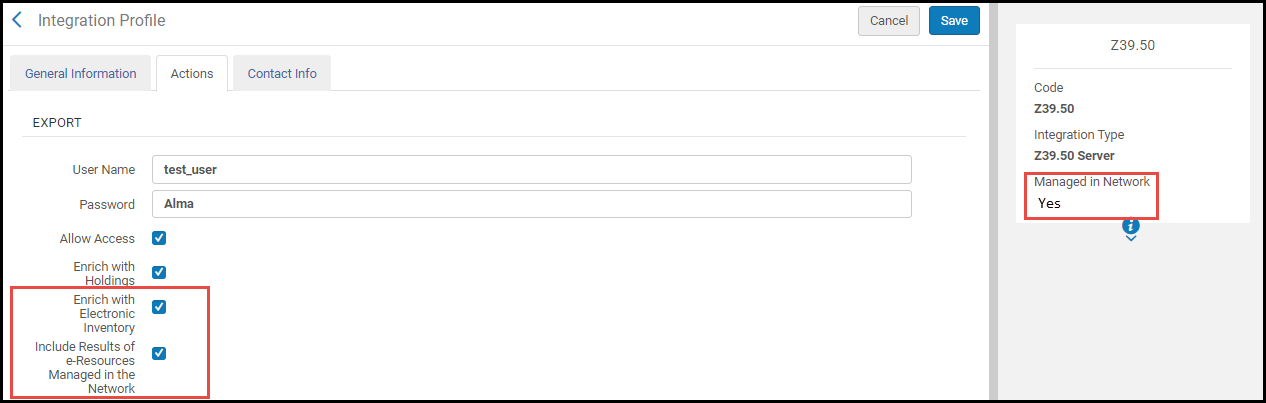 In consortia where the configuration of Z39.50 integration profile is done by the Network and is distributed to all members, the Z39.50 integration profile is marked as "Managed in Network". In this cases, this option is visible in the Network Zone institution as well. The network can determine whether this profile is distributed to members with this option activated or disabled. Any member using this profile can decide to opt out and manage the profile locally by editing the Network configuration (see Unlink from Network).
Enriquecimiento con Disponibilidad de Participantes
Si se está configurando este perfil en una Zona de red, seleccionar este parámetro para devolver la propiedad de la institución miembro en la respuesta Z39.50.
Solo las solicitudes a la Zona de red incluyen la propiedad de las instituciones miembro. La información devuelta incluye la institución, el registro bibliográfico (MMS ID) y el formato (físico, electrónico, o digital). Esta funcionalidad soporta consultas más eficientes por miembros de la red colaborativa, y suele ser requerida con fines de integraciones externas y para compartir recursos.
La información de propiedad de la institución miembro es devuelta en los subcampos 852 MARC 21 siguientes:
- $a - Código de la institución
- $6 - MMS ID
- $9 – P (print), E (electrónico), o D (digital)
Enriquecimiento con Representaciones
Seleccionar este parámetro para que la información de representación no-remota sea expuesta al sistema externo.
Enriquecimiento con Representaciones Remotas
Seleccionar este parámetro para que la información de representación remota sea expuesta al sistema externo.
Aplicar normalización
Seleccionar este parámetro para normalizar los registros bibliográficos de Alma antes de cualquier enriquecimiento adicional y para ser presentados a un sistema externo como resultado de una solicitud Z39.50. Normalization can be applied to MARC 21, KORMARC, UNIMARC, and CNMARC bibliographic records using the following normalization processes provided out of the box or by customizing these processes with normalization rules that you create: Marc21 Bib normalize on external search, KORMARC Bib normalize on external search, UNIMARC Bib normalize on external search, or CNMARC normalize on external search.
 Ejemplo de Regla de Normalización del Perfil de Configuración de Metadatos Bibliográficos CNMARC.
The normalization rules that are provided remove the following information from the bibliographic record: 590 local note (MARC 21), 590 local note (KORMARC), 900 local field (UNIMARC), and 300 general note (CNMARC). See Working with Normalization Rules for more information.
Debido a que el proceso de enriquecimiento es realizado tras haberse completado el proceso de normalización, el proceso de normalización no afecta a los campos añadidos por enriquecimiento.
The normalization rules that are provided out of the box use the following drools files (specified on the Task Parameters tab): drools/remove590.dslr, drools/remove900.dslr, and drools/remove300.dslr.
 Ejemplo de fichero drools de la regla de Normalización Cnmarc Bib normalizar en Z39.50/búsqueda SRU
For more information, see Working with Normalization Processes.
Suprimir registros basados en la etiqueta "Suprimir de la Búsqueda Externa" Select this parameter to exclude records with a Suppress from External Search tag from being exposed to the external system. Enriquecer con datos de almacenamiento remoto Seleccione este parámetro para que el elemento "callNumber" de la respuesta actual Z39.50 (cuando use el formato OPAC) se rellene con el "ID de ubicación de almacenamiento" de los ejemplares en existencias en lugar de la clasificación. Si los mismos ejemplares del registro en existencias tienen valores diferentes de "ID de ubicación de almacenamiento", uno de ellos estará incluido en la respuesta. -
Select Save.
Actions Available for the Z39.50 Profile
- Destino
- Manage in Network – This action is only available in the Network Zone. Select this action to distribute this configuration to member institutions using the Distribute network administration changes to members job. See Centrally Managing Configurations in a Network Zone and Distribute Network Administration Changes to Members for more information.
- Stop Network Management – This action is only available in the Network Zone. Select this action to disable distribution of this configuration to member institutions when using the Distribute network administration changes to members job. See Centrally Managing Configurations in a Network Zone and Distribute Network Administration Changes to Members for more information.
- Unlink from Network – This action is only available for member institutions. When the Z39.50 Server integration profile is distributed to a member institution (that is, the integration profile is linked to the Network), the member institution may select the Unlink from Network action to disconnect from the Network Zone version of the integration profile and modify it for local use.
- Historial de tareas
- ¿Seguro que desea eliminar esta plantilla de expurgación?
Configurar un Cliente Refworks Z39.50
- In the Refworks client administrative application, select Search > Online Catalog or Database. Se abre el cuadro de diálogo del Catálogo Online o Base de Datos.
- Select the Request a Z39.50 Site link. Se abre el cuadro de diálogo Solicitar.
Solicitar un Sitio Z39.50 - In the Z39.50 Site Name box, enter the name that you want to display for your institution in Refworks.
- In the Details field, enter the following:
- Server – The Alma server:<Alma domain>For APAC countries, you must use the alternate Alma domain <Alma alternate domain>. See Your Alma Domain Names.
- Port – Specify 210
- Database – This is the Alma institution code, such as 01_EXL_INST
- Usuario y contraseña, si es que han sido definido en Alma
- Server – The Alma server:<Alma domain>
- Select Send request.
Ejemplo Configuraciones de Cliente Refworks
The following is an example of one Alma customer's Refworks client settings (note that this has not been verified by Ex Libris):
- URL:university.alma.exlibrisgroup.com(see Your Alma Domain Names)
- Port:210
- Database:01_EXL_INST
- Record Syntax:USmarc
- Element Set Name:F
- Import Filter:MARC Format
- Character Set:ANSEL/ALA/USmarc
- Requires Password:No
- Any Field:1016
- Author Field:1003
- Year Field:31
- Title Field:4
- Keyword Field:21
Timeout Time When Using Z39.50 Search
When searching via z39.50, the session timeout for Alma is 2 minutes. After 2 minutes, the session terminates, and your work may be lost.
Page tags: article:topicZ39.50Z39.50 serverproduct:almacontent:Documentationlang:englishZ39.50 server integration typeZ39.50 Refworks
