
リアルタイム発注による注文明細の作成
このページでは、API を使用してリアルタイムをセットアップおよび操作する方法について説明します。For a list of links to pages with instructions for purchasing in Alma including renewals, working with vendors, etc., see Purchasing.For the overall purchasing workflow, including the steps required for creating orders (whether using EOD, creating them manually, etc.), see Purchasing Workflow.For an overview of working with acquisitions in Alma, including links to relevant sections such as Invoicing, Renewals, Configuration, etc., see Introduction to Acquisitions.
Almaは、ベンダーが注文システムをAlmaのリポジトリおよび注文機能と統合できるようにすることで、リアルタイム注文を可能にしています。これは、Almaオペレーターがベンダーのシステムでアイテムを直接購入でき、注文データがAlmaのAPIを使用してベンダーのシステムからAlmaに自動的に送信されることを意味します。その後、Almaは購入したアイテムごとに注文明細を自動的に作成します。
リアルタイム発注によって、リソースの利用可否がすばやくわかり、レコード統合の効率性が向上し、レコードを手動でオーバーレイまたは統合する際の面倒な手順が軽減され、Almaのデータ強化をさらに推し進めることができます。
以下は、リアルタイム購入ワークフローの概要です。
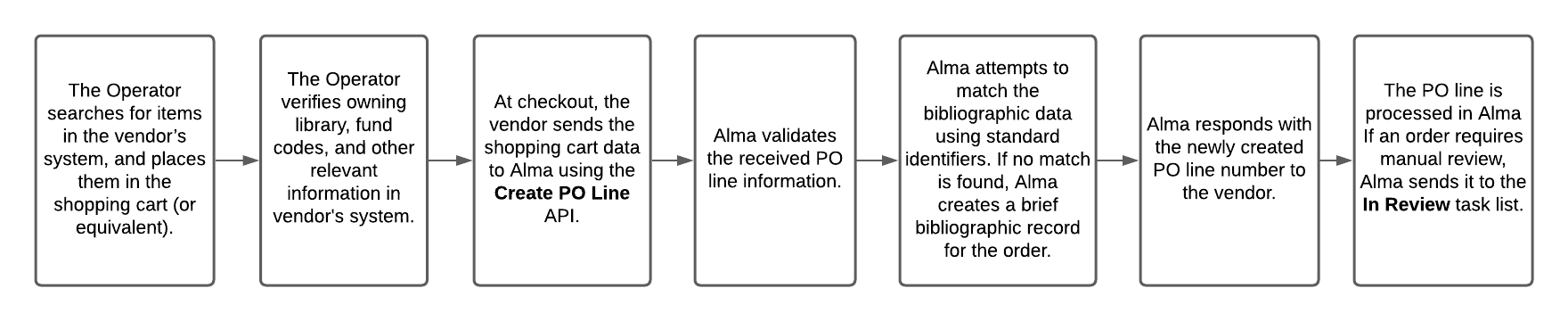
参加ベンダーによるリアルタイム発注ワークフローの設定
このセクションでは、ベンダーとのリアルタイム発注ワークフローの設定に関する一般的な情報を提供します。セットアップはAlmaとベンダーのシステムの両方で行う必要があります。
For specific instructions for working with ProQuest Coutts OASIS, see Setting up a real-time acquisitions workflow with ProQuest Coutts OASIS.See also Manually Creating a PO Line.
Almaで必要な設定
The simple setup includes the following steps:
- デフォルトのメタデータテンプレート:デフォルトのメタデータテンプレートが設定されていることを確認します。(Open the Metadata Editor>Template> choose the template you want to define as a default > right-click and select Properties> check as default).
- 新規発注API統合プロファイル:このAPIは、ベンダーシステムで行われた発注の発注明細をAlmaで作成するために使用されます。As part of the PO line details, the relevant metadata is sent to Alma.Almaはそれを既存の書誌レコードと一致させようと試行します。一致する書誌レコードが存在する場合、新しい発注明細はそのレコードに関連付けられます。If not – a new bibliographic record will be created with the supplied metadata.You need to decide on the matching rules that you want to apply (see How the bibliographic record is determined).Validations for fund-related issues can also be configured (as documented here(docx)).一致が見つかった場合、新規注文API 統合プロファイルは、既存のレコードの管理タグに変更を加えません。一致するものが見つからない場合、統合プロファイルはデフォルト/プロファイル設定に従って管理タグを含む新しい Bib を作成します。
- Ex Libris recommends to define an API Restriction profile(see here).
- GOBI用のベンダー固有Alma設定:GOBIを代表するベンダーアカウントは、0%の割引で定義されなければなりません。
ベンダーへのセットアップ情報の送信
リアルタイム発注のセットアップは、ベンダー側でも行う必要があります。For information for vendors, see Setting up a real-time ordering workflow with ExLibris Alma.
- 以下に詳述するように、セットアップに必要なAlma情報をベンダーに提供します:
| ベンダーに送信 | 説明 |
|---|---|
| APIキー |
Generate an API key and supply it to the vendor. If several vendors are part of the real-time ordering, supply each vendor a unique separate API key.In this way, if and when the institution wants to discontinue working with a specific vendor, that specific API key can be disabled via the Developers Network.Other API keys will continue functioning as usual. To generate your API key:
サンドボックス内または実稼働環境内でAPIを定義できます。
For more details regarding API key generation and working with Alma APIs, see Alma APIs. |
| ベンダーコードとベンダーアカウントコード |
Almaのベンダーレコードに関する情報は、受入 > 受入インフラストラクチャ > ベンダーからご確認ください。リアルタイム発注の一部として作成された発注明細は、ベンダーおよびベンダーアカウントに関連付けられます。
Alma内でこのベンダーが注文明細用EDIメッセージを送信しないように設定されていることをご確認ください。Other EDI messages (e.g. for invoices) can be sent, if it is part of your workflow. |
| ライブラリコード(複数)の所有 |
The library to which the PO line created as part of Real-time ordering will be assigned to. 所有図書館コードのリストをベンダーに提供してください。The implementation on the vendor side might be to provide a dropdown on the ordering form, from which to choose the relevant owning library.その他の実装は、アカウントを単一の所有図書館に関連付けることです。この場合、オペレーターは関連するアカウントでログインする必要があります。 Note that the vendor can use the Retrieve libraries API in order to get a full list of libraries, or use the Get library API to check a code of specific library. |
| 予算コード(複数) | The fund from which the payment will be done.Note that the vendor can use the Retrieve funds API. |


アクセスモデルの考慮事項
When the New Order API runs, Alma uses the vendor identifier number, or the ISBN/ISSN, to match the incoming order to an existing portfolio in an electronic collection.この機能は現在、OASISおよびGOBIで利用可能です。
- 一致するものが見つかった場合、注文明細はポートフォリオに関連付けられます。The access model description, as defined in the Access Model table, is then added to the Public Access Model field (within the Acquisition tab of the Portfolio Editor) for display in Primo.
- 所属機関で一致するものが見つからない場合、アクセスプロバイダーのコレクションコードを使用して、関連するコミュニティゾーンコレクション内でコミュニティゾーンが検索されます。このコードは、発注情報の一部としてAlmaに転送されます。Once a match is found in the Community Zone, the portfolio is activated in the institution linked to the Community Zone.The access model is stored in the Access Model field of the PO line for electronic orders, and within the portfolio's Public Access Model field for display in Primo.
Portfolios that are activated from the Community Zone as a result of orders coming into Alma from OASIS/GOBI via API enter Alma as not'Available'.For the portfolio to appear in the discovery system, the institution must make the portfolio available (once it was made available on the vendor side).
If your institution would like orders coming from OASIS/GOBI via API to create all resources that are matched to Alma Community Zone as 'Available', set the acq_activate_portfolio_from_API parameter (Configuration menu > Acquisitions > Other settings) to 'true'.If the parameter was set to true and the resource did not have a Community Zone match, a local portfolio will be created.This local portfolio will not be set as "Available" (an Electronic Activation Task List will be created) because local, non CZ-linked portfolios, have no URL information.See more information in January release notes and Configuring Other Settings (Acquisitions) page.
Note that the portfolio's Public Access Model description will only be presented in the discovery system if the Enable Display of AccessModel checkbox is selected on the Other Settings page (Configuration > Fulfillment > Discovery Interface Display Logic > Other Settings).See Configuring Other Settings.
In case a PO line of type 'License Upgrade' was added to the portfolio as an additional PO line, the Public Access Model field on the portfolio displays the access model associated with the license-upgrade order.
追加情報
追加情報については、以下を参照してください。
- Lists of vendors supported for orders originating from OASIS/GOBI:Vendor Lists.
- Detailed overview of Real-time purchasing:https://developers.exlibrisgroup.com/blog/Real-time-Acquisitions
- PO Line API (how the bib record is determined):https://developers.exlibrisgroup.com/blog/Create-PO-line-API-how-the-bibliographic-record-is-determined
- Create PO Line API:https://developers.exlibrisgroup.com/alma/apis/acq/POST/gwPcGly021rXkIgBNjmJH6pSL6v0plPz/d5b14609-b590-470e-baba-9944682f8c7e
- New Order API for Electronic Portfolios that are Part of a Collection
ベンダーリスト
参加ベンダーのリストについては、以下を参照してください。
-
If you would like a vendor to enable this feature, or if you are a vendor who would like to enable this feature, contact VendorIntegration@exlibrisgroup.com.
-
デフォルトでは、CZ電子コレクションは以下のように使用されます。If you want to use a local electronic collection from the vendors below, or from other vendors, you can open a support case and specify the local collection ID that you would like to use.
OASISベンダーリスト
OASISからの注文で現在サポートされているベンダーのリストは次のとおりです。
| プロバイダ名 | コレクション名 | コレクションID |
|---|---|---|
| Bloomsbury Collection | Bloomsbury Collections All Titles | 614950000000000416 |
| Brill Online | Brill Online Books | 613170000000000148 |
| Cairn Ebooks | CAIRN eBooks General | 613170000000000198 |
| Cambridge University | Cambridge Core All Books | 613820000000000020 |
| De Gruyter | De Gruyter eBooks Complete | 611000000000002268 |
| EBSCO | EBSCOhost Ebooks | 61111000211069000 |
| Elsevier | Elsevier ScienceDirect Books Complete | 613840000000000009 |
| Gale GVRL | Gale 電子ブック | 611000000000000731 |
| IGI Global Online | IGI Global InfoSci-Books | 611000000000002255 |
| John Benjamins | John Benjamins Books | 613820000000000062 |
| JSTOR | JSTOR Books | 613170000000000272 |
| Karger | Karger eBooks Collection | 613810000000000333 |
| マンチェスター大学出版局 | Manchester Hive | 615490000000000250 |
| Oxford Scholarly Editions Online | Oxford Scholarly Editions Online | 613840000000000106 |
| Project MUSE | Project MUSE - EBA All Single Title Collection | 615410000000000517 |
| ProQuest Ebook Central | EBook Central Perpetual and DDATitles | 614330000000000002 |
| Rittenhouse R2 | R2 Digital Library PDA Discoverable Titles | 614900000000001202 |
| SAGE | SAGEナレッジAZ(全タイトル) | 613790000000000598 |
| Taylor & Francis | Taylor & Francis eBooks Complete | 611000000000000660 |
| Wiley Online Library (eBooks) | Wiley Online Library Online Books | 611000000000000499 |
| World Scientific Publishing | World Scientific eBooks | 612490000000000003 |
GOBIベンダーリスト
Electronic collections should be activated in the Institution Zone before the API can push and link portfolios to the CZ.
The list of vendors currently supported for orders originating from GOBI is:
| プロバイダ名 | コレクション名 | コレクションID |
|---|---|---|
| Al Manhal | Al Manhal eBook Collection | 614910000000001498 |
| Bloomsbury | Bloomsbury Collections All Titles | 614950000000000416 |
| Brill Online | Brill Online Books | 613170000000000148 |
| CAIRN | CAIRN eBooks General | 613170000000000198 |
| Cambridge University Press | Cambridge Core All Books | 613820000000000020 |
| De Gruyter | de Gruyter eBooks Complete | 611000000000002268 |
| Digitalia Hispanica Digitalia | Digitalia Hispanica | 613840000000000287 |
| Duke University Press | e-Duke All Books | 615410000000000518 |
| EBSCOhost | EBSCOhost Ebooks | 61111000211069000 |
| Edward Elgar Books | Edward Elgar Books | 613170000000000299 |
| Elsevier ScienceDirect | Elsevier ScienceDirect Books Complete | 613840000000000009 |
| Gale GVRL | Gale 電子ブック | 611000000000000731 |
| IGI Global Online | IGI Global InfoSci-Books | 611000000000002255 |
| John Benjamins | John Benjamins Books | 613820000000000062 |
| JSTOR | JSTOR Books | 613170000000000272 |
| Karger | Karger eBooks Collection | 613810000000000333 |
| マンチェスター大学出版局 | Manchester Hive | 615490000000000250 |
| Project MUSE | Project MUSE - EBA All Single Title Collection | 615410000000000517 |
| Oxford Bibliographies Online Oxford University Press | Oxford Bibliographies | 613170000000000296 |
| Oxford Clinical Psychology Online Oxford University Press | Oxford Clinical Psychology | 613790000000001102 |
| Oxford Handbooks Online | Oxford Handbooks Online Complete | 611000000000002626 |
| Oxford Medicine Online | Oxford Medicine Online | 613410000000000010 |
| Oxford Scholarly Editions Online | Oxford Scholarly Editions Online | 613840000000000106 |
| Oxford Reference Online | Oxford Reference Library | 613170000000000188 |
| ProQuest Ebook Central | EBook Central Perpetual and DDATitles | 614330000000000002 |
| Rittenhouse R2 Digital Library Rittenhouse Book Distributors, Inc. | R2 Digital Library PDA Discoverable Titles | 614900000000001202 |
| SAGE Online Content | SAGEナレッジAZ(全タイトル) | 613790000000000598 |
| SpringerLink | SpringerLink Books Complete | 611000000000001381 |
| Taylor & Francis eBooks | Taylor & Francis eBooks Complete | 611000000000000660 |
| University Press Scholarship | University Press Scholarship Online Complete | 613450000000000059 |
| Wiley Online Library (eBooks) | Wiley Online Library Online Books | 611000000000000499 |
| Wolters Kluwer | Books@Ovid Purchase | 612430000000000018 |
| World Scientific | World Scientific eBooks | 612490000000000003 |
Real-Time Ordering for ATO, STL, and EBA Purchase Models
| 購入モデル | 説明 |
|---|---|
| 所有物へのアクセス(ATO) |
ATO is a unique usage-based acquisition model for eBooks, where all spending contributes towards ownership, thus allowing customers to control the budget while potentially providing access to a wider pool of titles. このモデルは、次のような図書館に関連しています。
This model is available via ProQuest's Ebook Central platform. |
| 短期ローン(STL) |
|
|
エビデンスに基づく受入(EBA) |
EBAの仕組み、4つのステップ
|
STL/ATOおよびAlma:
Alma receives the order via API and associates it with the relevant resource.If an additional order is sent to Alma via API as part of the STL/ATO, the new order is associated with the existing resource as the "main order," while the initial order becomes an "additional order." Both the main and the additional orders have the resource associated with them.メイン注文明細は、プライマリでアクティブな注文明細であり、関連するすべての属性がポートフォリオ(アクセスモデル)に渡されます。
Example: This use case describes the chain of events when STL/ATO orders are sent to Alma:
- The library has a DDA program with ProQuest.As part of the DDA program, the electronic resource,AI-Powered IoT for COVID-19, is made available via ProQuest Ebook Central.
- ProQuest は、STL リアルタイム注文をトリガーするリソースへのアクセスを識別します。
- ProQuest identifies an additional, second accessing of the resource, which triggers an additional STL real-time order.
- STLプロセスの一部として作成された両方の注文明細は、リソースに関連付けられています。
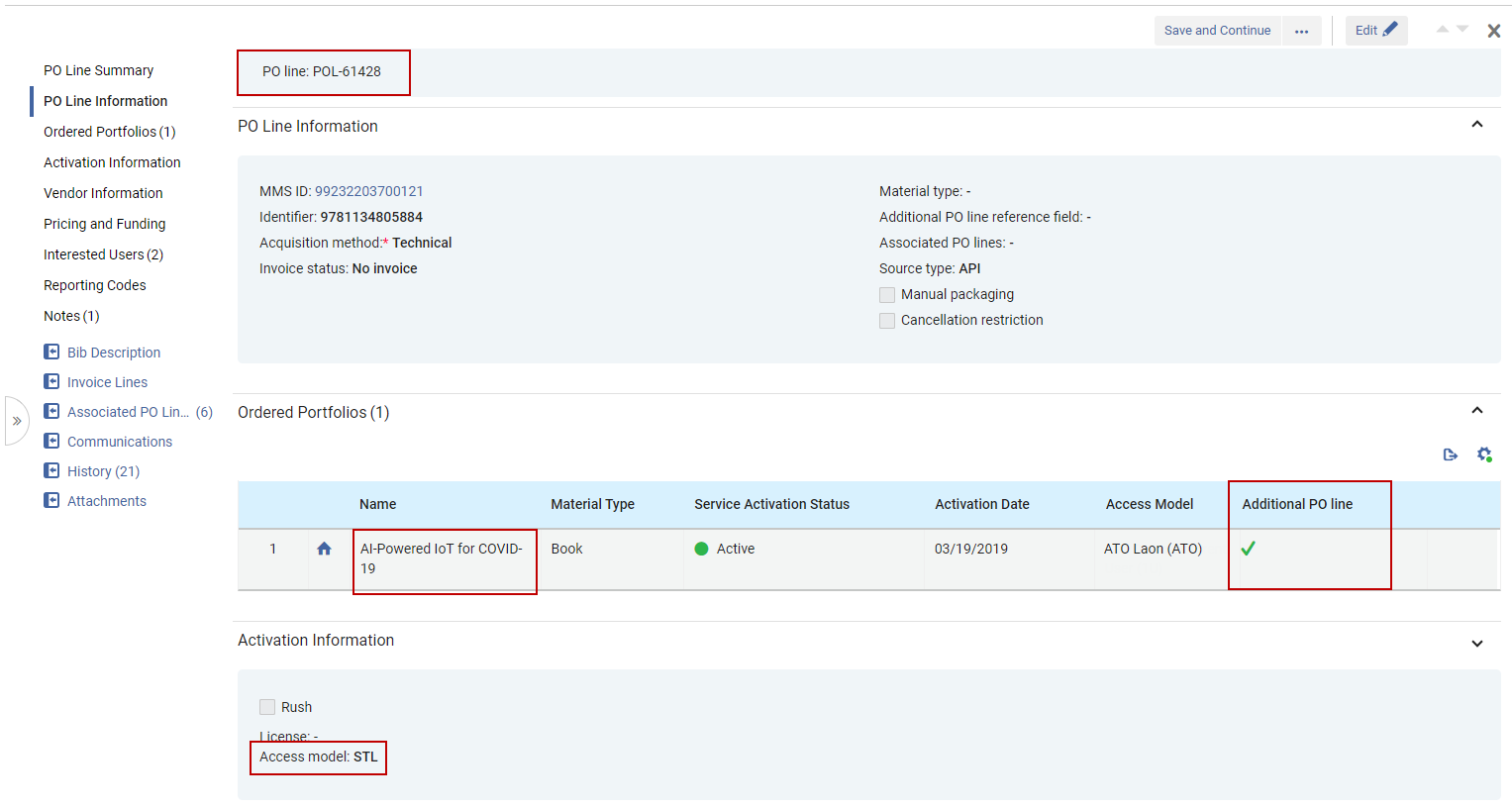 元の(1番目)の注文明細は追加の注文明細としてポートフォリオに関連付けられています
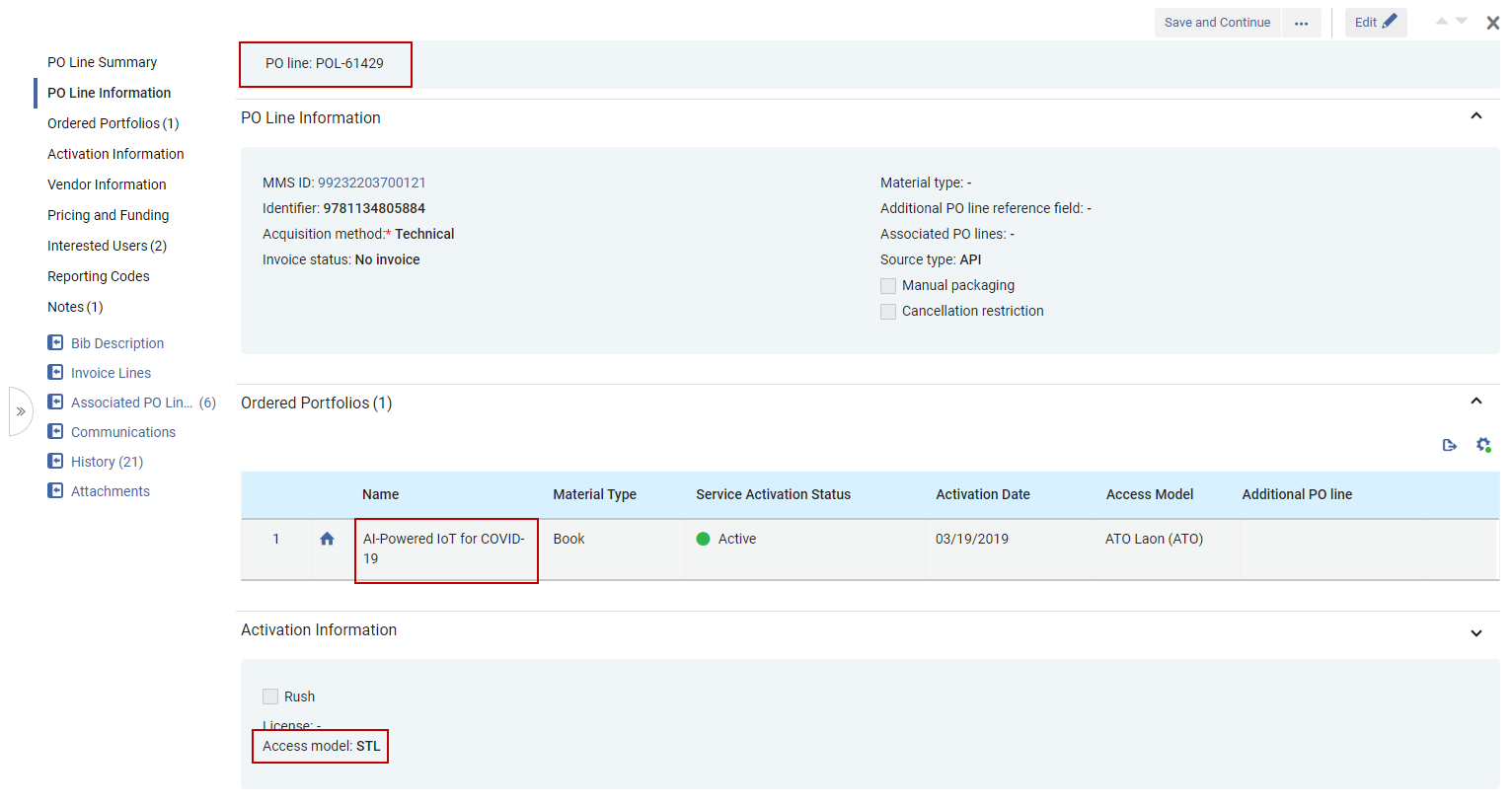 2番目の注文明細はポートフォリオにも関連付けられています
EBA と Alma
EBA (Evidence Based Acquisition) is a purchasing model in which a onetime deposit is passed to the vendor at the beginning of the subscription period, but the actual payment takes place only at the end of the period.AlmaでEBA購入を処理するための推奨手順は次のとおりです。
- 図書館がベンダーに預け入れた全額(サブスクリプション期間中の金額)に対して専用の EBA 基金を作成します。
- 期間の終わりに、図書館がEBAクレジットを使用して、選択したポートフォリオの永続的なアクセスを購入するときに、「所有」ポートフォリオを持つコレクションに関連付けられた注文(注文明細)を作成します
The PO line will not be associated with all the relevant owned portfolios - only the collection.
- オプション: この EBA のサブスクリプション期間の終了時に購入されたポートフォリオのリストを添付して、POL に追加します。
- For the next subscription period with the same vendor, either create a new fund or add an additional allocation to the existing fund (rollover is another option when applicable), and repeat the previous steps.
EBA はリアルト経由でも管理できます。For additional information, see Working with Evidence Based Acquisition (EBA).
Page tags: article:topicproduct:almacontent:Documentationlang:englishreal-time orderingreal-time acquisitions
