
その他の設定(受入)
その他を設定するには、次の役職が必要です:
- 発注・受入オペレーター
- 統括システム管理者
追加の設定は、顧客パラメーターマッピングテーブル(設定メニュー > 受入 > 全般 > その他の設定)でカスタマイズできます。For more information about mapping tables, see Mapping Tables.
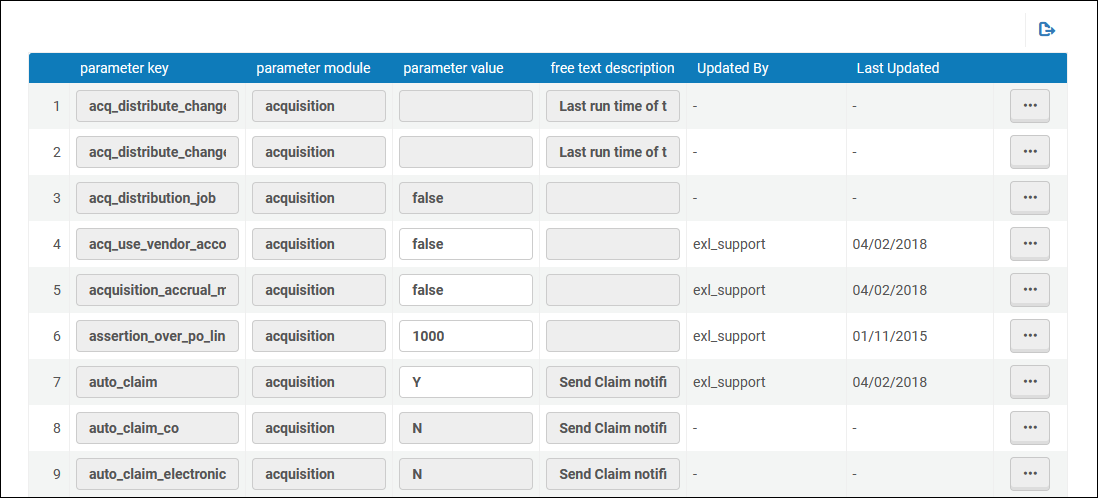
任意のパラメーターを変更または復元できます。変更を保存するには、必ず保存を選択してください。次のテーブルに、[顧客パラメータマッピングテーブル]ページで使用可能なパラメータを示します。
| パラメータ | 説明 |
|---|---|
| acq_activate_portfolio_from_API |
This parameter configures whether API orders sent from OASIS/GOBI for portfolios that are matched to Alma Community Zone will set the portfolio as 'available' (parameter=True) or 'not available' (parameter=False)" in case the parameter was set to true and the resource did not have a Community Zone match, the portfolio will not be set as "Available" and an electronic activation task list will be created (as the local – non CZ linked portfolio – has no URL information). See more information in January release notes and in the Real-Time Ordering page. |
| acq_distribute_changes_last_run | The last date that the Distribute Network Acquisition Changes to Members job ran to distribute vendor information.このジョブは、この日付以降にネットワークゾーンに追加されたすべてのベンダーをコピーします。For more information, see Sharing Vendor Information in a Network Zone.
The format is YYYYMMDD(or YYYYMMDD_hhmmss). |
| acq_distribute_changes_last_run_license | The last date that the Distribute Network Acquisition Changes to Members job ran to distribute license information.このジョブは、この日付以降にネットワークゾーンに追加されたすべての集中管理ライセンスをコピーします。For more information, see Sharing Vendor Information in a Network Zone.
The format is YYYYMMDD(or YYYYMMDD_hhmmss). |
| acq_distribution_job | Whether the Distribute Network Acquisition Changes to Members job is active (true) or not (false).For more information, see Sharing Vendor Information in a Network Zone. |
| acq_use_vendor_account_email | ベンダーアカウント(true)とベンダー(false)のどちらに定義されたEメールにベンダー関連のEメールを送信するか。デフォルトはfalseです 。
このパラメーターは、Order List Letter、PO Line Cancellation Letter、PO Line Claim Letter、PO Line Aggregated Claim Letter、PO Line Renewal Letterの各レターに対して送信される電子メールにのみ関連します。[通信]タブを使用して送信されるEメールには影響しません。 |
| acquisition_accrual_mode | 機関が、発生主義会計で作業できる(true)かできない(false)か。See Working with Accrual Accounting. |
| allow_edit_closed_invoice_line |
Whether to enable the option to edit fields of invoice lines that are in closed invoices (true) or disable it (false). このパラメーターが true に設定されている場合、クローズ済みの請求書で次のフィールドを編集できます。
For additional information, see Creating Invoices. |
| auto_claim(1回限りの物的注文の場合) |
Controls whether a Claim notification is sent to vendor in case the PO Line is set to claim task list.可能な値:
For additional details, see Processing Claims. |
| auto_claim_co(物的継続注文の場合) | |
| auto_claim_electronic(1回限りの電子注文および継続注文の場合) | |
| block_mms_creation_multi_thread | このパラメータの目的は、新しい注文APIを使用するときに重複した注文明細が作成されないようにすることです。 |
| claim_aggregated_letter |
1つのベンダーの複数のクレームを1つのクレームレターにまとめるかどうかを管理します:
For additional details, see Processing Claims. |
|
claim_continuous_item_level |
When a claim letter is sent for a given month, and the item is never received, if the following month's item also goes into claim, a claim letter can be sent with details for both months.このオプションを有効にするには、パラメータをtrueに設定します 。デフォルトはfalseです。See Processing Claims. |
| conversation_send_from_logged_in_user_address |
Configures that conversation letter emails will go out from the logged in user's email (as addressed "From") or the library's.This is configured by setting the customer parameter:conversation_send_from_logged_in_user_address to be equal to "true". The parameter is relevant only for Alma letter type:ConversationLetter. |
| copy_POL_price_to_item | 注文明細価格が変更されたときに、注文明細のリスト価格を物的な1回限りの注文についてアイテムの在庫価格フィールドにコピーするかどうか。価格をコピーするには、このパラメータをtrueに設定します。さらに、trueに設定されていて注文明細が保存されている場合、通貨が現地通貨でない場合は、アイテムの合計が再計算されます。パラメータのデフォルトはfalseで、価格をアイテムにコピーしない設定です。 |
|
currency_exchange_use_explicit_ratio |
trueに設定すると、注文書を作成するときに明示的な為替レートを定義する機能が有効になります。See Configuring Explicit Exchange Rates. |
| delete_linked_portfolio_upon_pol_cancellation (New for February 2026) | When true (false by default), when cancelling a PO line, both local inactive portfolios and inactive portfolios that are linked to the Community Zone, or that are part of an electronic collection, will be deleted. |
| eod_match_holdings_by_call_number (New for February 2026) |
「真(true)」の場合、新規発注インポートプロファイルの一部として資料を作成する際、所蔵一致において請求番号が考慮されます。When the call number is different from the one of an existing holding for the matched bibliographic record, a new holding is created.For more information, see Managing Import Profiles. 一致する所蔵が複数見つかった場合、システムはどれを使用するかを判断できないため、新しい所蔵が作成されます。これは、図書館と場所に基づいて複数の一致が見つかった場合の既存の動作です。
|
| expended_from_fund_default | The default value of whether VAT is expended from the invoice line's fund (true or false). |
| exportPrepaidInv | [請求書の詳細]ページで前払いを選択したときに、ERPにエクスポートチェックボックスが表示されているかどうか(trueまたはfalse)。 |
| handle_invoice_payment |
請求書が承認された後にどうなるかを定義します。
For details, see Invoicing Workflow and Working with Invoices Waiting for Payment. |
| デジタル貸出猶予期間のライブラリ閉鎖日数を含める | trueに設定すると、デジタル貸出猶予期間には、猶予期間中の図書館の休館日も含まれます。When set to false the closed library days are not included in the grace period. |
| invoice_allow_vat_in_line_level | VATが、請求書明細レベルで請求書について設定できる(true)かできない(false)か。 |
| invoice_export_xml_dates_format | 請求書エクスポートxmlの日付フォーマットがシステムの日付フォーマットに従うかどうかを定義します。
The possible values are:True or False.True means that the dates format in the exported invoice xml will be as defined in the system.False means that the dates format in the exported invoice xml will be yyyymmdd. デフォルト値はFalseです。 |
| invoice_not_unique | 目録データベースに同じベンダーを持っている固有でない請求書番号を保存できる(true)かできない(false)か。trueの場合、同じ請求書番号と同じベンダーのレコードを識別することができます。See Creating Invoices. |
| invoice_prefix | 使用されていません。 |
| invoice_skip_erp | Whether the invoice workflow skips the step where the invoice is sent to an external ERP system for payment (true), or the step is performed and invoices are sent to an external ERP system for payment (false).
For details on how this setting affects the invoicing workflow, see Invoicing Workflow. |
| Invoice_split_additional_charges |
Whether it is possible to itemize non-standard additional charges of different types in an invoice.The term "additional charges" refers to all non-tax charges other than the cost of the item itself.Standard additional charges are: Discount, Insurance, Overhead, Shipment, and Other. Supported non-standard additional-charge types are those that appear in the Invoice Line Types code table (Configuration menu > Acquisitions > Invoices > Invoice Line Types), and are available only if they are enabled in that table.Note that this table is only available when this parameter is set to true.For additional information, see Creating Invoices.
EDIから生成された請求書の場合、このパラメータは、個々の請求書明細に追加された追加料金がAlmaによって処理される方法も定義します:
|
| invoice_subscription_overlap | サブスクリプション日付の重複を確認チェックボックスが、[請求書明細の詳細]ページに表示されているかどうか(trueまたはfalse)。このパラメータがtrueに設定されていて、チェックボックスが選択されている場合、Almaは注文明細に関連付けられているすべての請求書明細を確認し、継続サブスクリプションの請求日付の重複があるかどうかを判断し、ある場合は、その旨のアラートを発行します。 |
| invoice_use_pro_rata | 新しい請求書を作成するときに、プロラタを使用設定がデフォルトで選択されているかどうか(trueまたはfalse)。 |
| no_e-task_on_close_po_line | 電子注文明細が閉じられたときにタスクが作成されるかどうか(タスクはユーザーにリソースを無効化するよう通知します)。trueはタスクが作成されていないことを示し、falseはタスクが作成されていることを示します。デフォルトはfalseです 。 |
| orderit_login_new_tab |
OrderIt をゲストとして使用する際に、ログインウィンドウを開く方法。想定値は以下のとおりです:
|
| po_line_calc_co_next_step_on_receive | Set to true to calculate a PO line's next step and put the item in transit, if needed, when receiving a continuous PO line for other departments.デフォルトであるfalseに設定されている場合、他の部門の継続的な注文明細を受入しても、アイテムは通過中になりません。 |
| po_line_hold_item_for_interested_users | Controls whether the "Hold Item" option is selected in the Interested Users tab of the Purchase Order Line Detail page of an automatically generated PO line (i.e., a PO line that is created from a patron Purchase Request, from an EOD process, or from an automated job).デフォルトは[False]です 。For additional information about the "Hold Item" option, see Manually Creating a PO Line. |
| po_line_notify_interested_users_upon_cancellation | Controls whether the "Notify upon cancellation" option is selected in the Interested Users tab of the Purchase Order Line Detail page of an automatically generated PO line (i.e., a PO line that is created from a patron Purchase Request, from an EOD process, or from an automated job).デフォルトはTrueです。For additional information about the "Notify upon cancellation" option, see Manually Creating a PO Line. |
| po_line_notify_interested_users_upon_receiving_activation | Controls whether the "Notify user upon receiving/activation" option is selected in the Interested Users tab of the Purchase Order Line Detail page of an automatically generated PO line (i.e., a PO line that is created from a patron Purchase Request, from an EOD process, or from an automated job).デフォルトはTrueです。For additional information about the "Notify user upon receiving/activation" option, see Manually Creating a PO Line. |
| po_line_notify_interested_users_upon_renewal | Controls whether the "Notify upon renewal" option is selected in the Interested Users tab of the Purchase Order Line Detail page of an automatically generated PO line (i.e., a PO line that is created from a patron Purchase Request, from an EOD process, or from an automated job).デフォルトは[False]です 。For additional information about the "Notify upon renewal" option, see Manually Creating a PO Line. |
| po_line_prefix | すべての注文明細に使用される接頭語。デフォルトはPOL-です。 |
| po_line_quantity_updated_with_items_number | 新しい注文明細を作成する際にデフォルトで有効になります。このパラメータを使用すると、[アイテムの数に応じて正味価格を更新]チェックボックスを表示できます。The checkbox reflects the number of ordered items within the Quantity for pricing field.
When the checkbox is enabled, the Quantity for pricing amount is updated automatically once the user adds/removes items, and as a result, the Net Price field is also updated. |
| po_line_remove_interested_users | Set to true to indicate that all interested users on closed and canceled PO lines should be deleted when the weekly PO Line – Delete interested users job runs.See Manually Creating a PO Line. |
| po_line_send_notification_to_vendor_on_renewal | Whether the PO Line Renewal Letter (see Configuring Alma Letters) should be sent to vendors when a subscription is renewed.Note that the vendor's preferred email address is used (true or false).For an overview of the renew process see Renewal Workflow. |
| po_packed_by_fund | 予算に応じて注文明細が自動的に注文書にパッケージ化されているかどうか(trueまたはfalse)。trueに設定されている場合、機能的な予算を扱う機関は、特定の予算に関連したすべての注文書をさがして、より効率的に注文書の承認を管理することができます。For more information, see Packaging PO Lines into a PO. |
| po_prefix | すべての注文書に使用する接頭語。デフォルトはPO-です。 |
|
pol_electronic_process_type_acq |
When an electronic resource is created via the regular PO Line creation process, or when manually associated to a PO Line, the Process type of the resource is set to Acquisition.When set to true (default), the process type of the electronic resource is set to Acquisition.If the user does not want the Process type of the resource to be changed, the parameter should be set to false. |
|
pol_handle_bib_record_without_inventory |
注文明細がキャンセルされ、その結果、注文対象のアイテムとその所蔵レコードが削除された場合に、アイテムのない書誌レコードがどのように処理されるかを定義します。可能な値は以下の通りです:
これらの値は、上記のようにすべて大文字でマッピング テーブルに入力する必要があります。For example,MANUAL, not Manual or manual. See Canceling PO Lines. |
|
PR_indicate_for_primo_if_ISBN_is_exist |
Primo購入リクエストフォームのアラートを有効にします。デフォルトである[true]に設定する際にリソースがすでにライブラリに所有されている場合、ISBNまたはEISBNナンバーを空白のフォームに入力すると、アラートがページに表示されます。 After entering the identifier, when applicable, a message displays and indicates whether there is a resource for the identifier or not.
これは、ネットワークとマルチキャンパスにも関連します。これはジャーナルには適用されません。 For more information see Configuring Request Forms for Primo VE and Configuring Display Labels for Primo VE. |
| purchase_request_import_profile | 購入リクエストの一致に使用されるインポートプロファイルの名前を格納します。Leaving this parameter blank means the purchase request matching process will use the default match of ISBN/ISSN numbers.For more information, see Creating a Purchase Request. |
| recalculate_fund_transaction_with_explicit_exchange_rate |
This is only relevant for institutions that use the "Explicit Exchange Rate" functionality (see Configuring Explicit Exchange Rates). When this parameter is set to "false" (by default), Alma calculates calculates the explicit exchange rate on the fund associated with the PO line ,once only, and marks the transaction on the fund as "Explicit exchange rate = Yes".When the Recalculate PO Line Encumbrances Based on Current Exchange Rates job is run (see Scheduled Jobs), Alma does not recalculate the transaction again, according to the explicit exchange rate.これは、適用された日の為替レートの価値を維持するためです。デフォルトではこのジョブは非アクティブであり、アクティブ化するにはサポートに連絡する必要があることに注意してください。 When the recalculate_fund_transaction_with_explicit_exchange_rate customer parameter is set to "true", Alma recalculates the explicit exchange rate on the fund associated with the PO line,every time that the Recalculate PO Line Encumbrances Based on Current Exchange Rates job is run.Almaは、資金上の取引が「明示的な為替レート = はい」とマークされており、明示的な為替レートが適用されていた場合であっても、この再計算を行います。 現在の為替レートに基づいて注文明細の負債を再計算するジョブはデフォルトでは無効です。Institutions can enable it by accessing Admin->Monitor Jobs -> Scheduled (see Scheduled Jobs). |
| release_remaining_encumbrance_for_edi | EDIを使用して作成された請求書で、連続注文明細について負債がリリースされているかどうか(trueまたはfalse)。 |
| replacement_cost_calc_update |
Whether to add or reduce the amount to the PO line price being copied to the item's Replacement cost field (see replacement_cost_calc_update).The amount is converted to local currency. 金額を追加するには、数値 + A を使用します (例: 5A)。数値の範囲は無制限です。To add a percentage of the price, use a numeric value+P, for example 5P.The numeric range is 0-100.To reduce either the amount or percentage, add a hyphen before the value, for example -5A.The addition to or removal from the replacement cost is in local currency. |
| replacement_cost_copied_from_POL |
Whether the PO line price is copied to the Replacement cost field in the item for physical one time orders.想定値は以下のとおりです:
注文明細の通貨が現地通貨でない場合は、合計が再計算され、機関が決めた通貨でアイテムに保存されます。 The Replacement cost field is updated upon creation of a new PO line, when changing the PO line's price and saving the PO line, and when adding/removing items and saving the PO line. See also Replacement Cost. |
| temp_calculate_fund_balance_at_end_job |
ジョブの終了時に資金残高を計算するかどうか。想定値は以下のとおりです:
|
| temp_debug_log_for_OCLC_client | OCLCクライアントコードのデバッグログに出力します。 |
| temp_po_by_index_xml | |
| trial_notification_before_start_date | 使用中でない。See the job Trials – Start and Notify Participants in Viewing Scheduled Jobs. |
| po_line_description_update_upon_bib_change |
書誌レコードに変更が発生したときに、PO(発注書)明細の説明とPO(発注書)明細の「書誌の説明」セクションを更新するかどうかを制御します。想定値は以下のとおりです: false(default) - The PO line is not updated when the related bibliographic record is updated. true - All of the PO line description fields and the "Bib Description" section are updated when the bibliographic record is updated. When set to true, any changes to relevant fields in the bibliographic record will update all bibliographic description fields in the PO line.For the list of relevant fields, see Bib Description.If changes are made only to fields that are not listed as relevant, the PO line description is not updated when the related bibliographic record changes. |
| vat_percent_default | 機関のVATのデフォルトパーセンテージ。デフォルトは初め0です 。 |
| view_holding_in_receive | 受入アイテムを表示する際に所蔵情報が表示されるかどうか(trueまたはfalse)。 |
Page tags: article:topicproduct:almacontent:Documentationlang:englishsplit additional charges
