
リポーティングコードの設定
- 受入管理者
- 一般システム管理者
You define reporting codes that can be used for analyzing acquisitions in subsequent reporting.These codes appear in Alma in drop-down lists on the PO line Summary tab (see Manually Creating a PO Line).たとえば、郵便料金のリポーティングコードがある場合は、郵便料金のリポーティングコードがあるすべての注文書明細をリストするリポートを作成できます。リポーティングコードは、機関内のすべての図書館に適用されます。
You can get further details at Best Practice Toolkit: Reporting Codes.
Watch the Configuring Reporting Codes video.
You configure reporting codes in the 1st, 2nd, 3rd, 4th and 5th reporting code tables (Configuration Menu > Acquisitions > Purchase Orders > 1st/2nd/3rd/4th/5th Reporting Codes).For more information about code tables, see Code Tables.
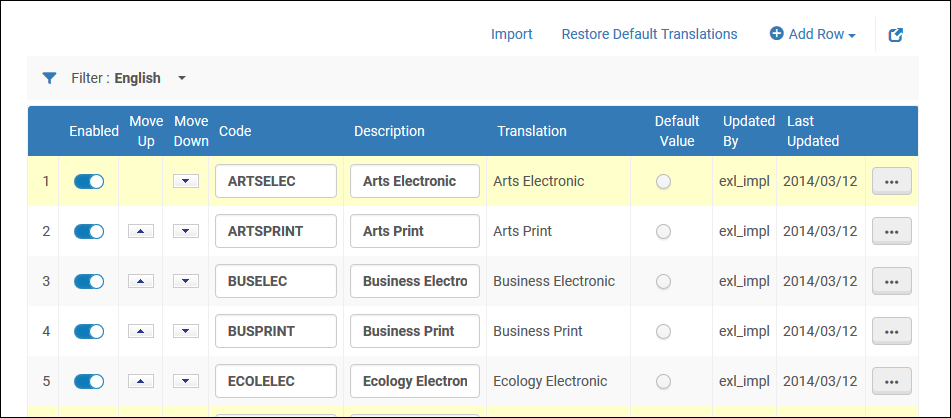
リポーティングコードを追加、インポート、編集、および削除できます(システムから永久に削除する場合)。また、コードを有効/無効にして、ドロップダウンリストに表示されるコードを管理し、ドロップダウンリストに表示されるコードの順序を変更して、デフォルトコードを選択することもできます。The default code is used for all open PO lines that do not have a code selected.
インポートすると、既存のリポーティングコードのリストが上書きされます。既存のリストを保存し、それらをインポートしてコードを追加するだけの場合は、次の手順を実行することをお勧めします。
- 既存のリストをファイルにエクスポートします。
- エクスポートされたファイルの行を追加または削除して、目的のコードリストを作成します。
- 変更したファイルをインポートします。インポートされたファイルのコードのリストは、以前にテーブルに入力された値を上書きします。
Page tags: article:topicproduct:almacontent:Documentationlang:englishReporting Codeadd reporting codeedit reporting codedelete reporting code
