Configuring Patron Registration Forms
次の領域で、ユーザー登録フォームに表示されるフィールドを設定できます。
- User Registration (Admin > Manage Users)
- Patron Registration (Fulfillment > Manage Patron Services > Register New User button)
- Edit User ( Manage Patron Services )
- Edit User( Manage Users )
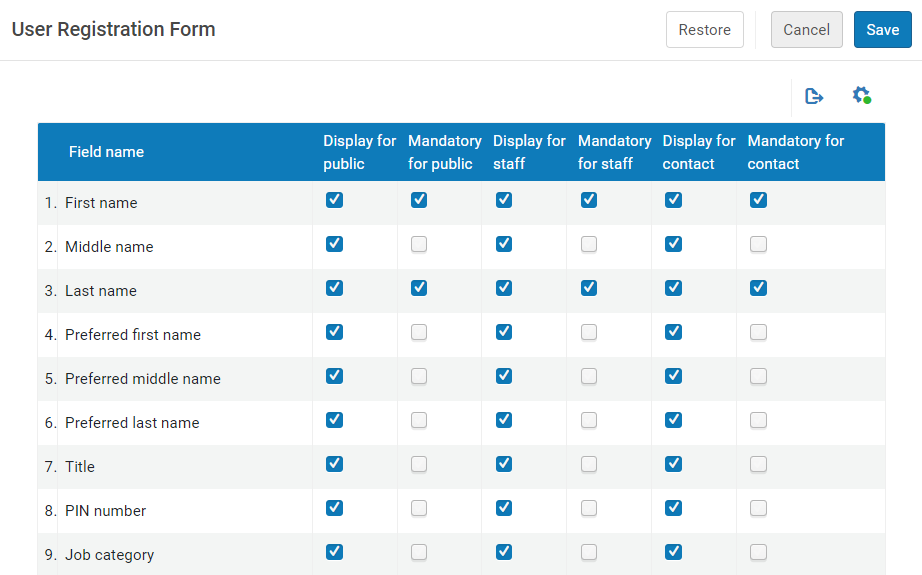
これにより、ユーザーは図書館のニーズに合わせて微調整されたフォームを構成し、図書館に必要な情報のみを処理できるようになります。Accessing this option enables users to select the fields in the user registration form that they want to be visible in the form, with the exception of the mandatory fields.
To configure the User Registration Form:
- Access the User Registration Form (Configuration menu > User Management > User Details > User Registration Form).
- In the table, select the fields to be displayed to the various audiences (such as public or staff).
- 保存をクリックします。
フォームに表示されるアドレス/電子メール/電話の種類を判別することもできます。This option can be activated by Ex Libris.Please contact support for assistance.